

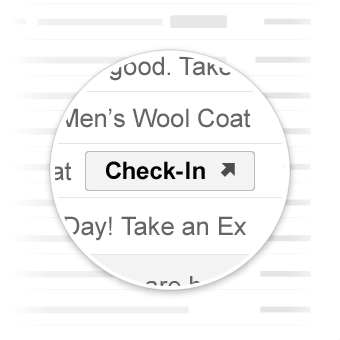
تأخذ الإجراءات "الانتقال إلى" المستخدم إلى موقعك الإلكتروني حيث يمكن إكمال الإجراء. على عكس الإجراءات التي تتم بنقرة واحدة، يمكن التفاعل مع الإجراءات "الانتقال إلى" عدة مرات.
حالات الاستخدام
في ما يلي الإجراءات "الانتقال إلى" التي يتيحها Gmail:
قد يتم إتاحة المزيد من الإجراءات في المستقبل.
الإجراء "عرض"
يمكنك إضافة زر ViewAction إلى الرسائل الإلكترونية التي تطلب من المستخدمين الانتقال إلى موقعك الإلكتروني لإكمال الإجراء.
يضيف الإعلان التالي زر ViewAction إلى رسالة إلكترونية:
JSON-LD
<script type="application/ld+json">
{
  "@context": "http://schema.org",
  "@type": "EmailMessage",
  "potentialAction": {
    "@type": "ViewAction",
    "url": "https://watch-movies.com/watch?movieId=abc123",
    "name": "Watch movie"
  },
  "description": "Watch the 'Avengers' movie online"
}
</script>
البيانات الجزئية
<div itemscope itemtype="http://schema.org/EmailMessage">
  <div itemprop="potentialAction" itemscope itemtype="http://schema.org/ViewAction">
    <link itemprop="target" href="https://watch-movies.com/watch?movieId=abc123"/>
    <meta itemprop="name" content="Watch movie"/>
  </div>
  <meta itemprop="description" content="Watch the 'Avengers' movie online"/>
</div>
بيانات الناشر
يمكنك إضافة تفاصيل عن المؤسسة التي ترسل الرسالة الإلكترونية من خلال ضبط الحقل publisher:
JSON-LD
<script type="application/ld+json">
{
  "@context": "http://schema.org",
  "@type": "EmailMessage",
  "description": "Watch the 'Avengers' movie online",
  "potentialAction": {
    "@type": "ViewAction",
    "url": "https://watch-movies.com/watch?movieId=abc123",
    "name": "Watch movie"
  },
  "publisher": {
    "@type": "Organization",
    "name": "Google Play",
    "url": "https://play.google.com",
    "url/googlePlus": "https://plus.google.com/106886664866983861036"
  }
}
</script>
البيانات الجزئية
<div itemscope itemtype="http://schema.org/EmailMessage">
  <meta itemprop="description" content="Watch the 'Avengers' movie online"/>
  <div itemprop="potentialAction" itemscope itemtype="http://schema.org/ViewAction">
    <link itemprop="target" href="https://watch-movies.com/watch?movieId=abc123"/>
    <meta itemprop="name" content="Watch movie"/>
  </div>
  <div itemprop="publisher" itemscope itemtype="http://schema.org/Organization">
    <meta itemprop="name" content="Google Play"/>
    <link itemprop="url" href="https://play.google.com"/>
    <link itemprop="url/googlePlus" href="https://plus.google.com/106886664866983861036"/>
  </div>
</div>
الإجراء "تتبُّع"
يمكنك إضافة زر TrackAction إلى الرسائل الإلكترونية التي تطلب من المستخدمين الانتقال إلى موقعك الإلكتروني لتتبُّع الطرود التي يتم تسليمها.
يتم إنشاء إجراء تلقائيًا عند تحديد السمة trackingUrl. لإنشاء رابط مباشر إلى تطبيق على الأجهزة الجوّالة، عليك أيضًا تضمين TrackAction كما هو موضّح في المثال التالي:
JSON-LD
<script type="application/ld+json">
{
  "@context": "http://schema.org",
  "@type": "ParcelDelivery",
  "deliveryAddress": {
    "@type": "PostalAddress",
    "streetAddress": "24 Willie Mays Plaza",
    "addressLocality": "San Francisco",
    "addressRegion": "CA",
    "addressCountry": "US",
    "postalCode": "94107"
  },
  "expectedArrivalUntil": "2013-03-12T12:00:00-08:00",
  "carrier": {
    "@type": "Organization",
    "name": "FedEx"
  },
  "itemShipped": {
    "@type": "Product",
    "name": "iPod Mini"
  },
  "partOfOrder": {
    "@type": "Order",
    "orderNumber": "176057",
    "merchant": {
      "@type": "Organization",
      "name": "Bob Dole"
    }
  },
  "trackingUrl": "http://fedex.com/track/1234567890"
  "potentialAction": {
    "@type": "TrackAction",
    "target": "http://fedex.com/track/1234567890"
  },
}
</script>
البيانات الجزئية
<div itemscope itemtype="http://schema.org/ParcelDelivery">
  <div itemprop="deliveryAddress" itemscope itemtype="http://schema.org/PostalAddress">
    <meta itemprop="streetAddress" content="24 Willie Mays Plaza"/>
    <meta itemprop="addressLocality" content="San Francisco"/>
    <meta itemprop="addressRegion" content="CA"/>
    <meta itemprop="addressCountry" content="US"/>
    <meta itemprop="postalCode" content="94107"/>
  </div>
  <meta itemprop="expectedArrivalUntil" content="2013-03-12T12:00:00-08:00"/>
  <div itemprop="carrier" itemscope itemtype="http://schema.org/Organization">
    <meta itemprop="name" content="FedEx"/>
  </div>
  <div itemprop="itemShipped" itemscope itemtype="http://schema.org/Product">
    <meta itemprop="name" content="iPod Mini"/>
  </div>
  <div itemprop="partOfOrder" itemscope itemtype="http://schema.org/Order">
    <meta itemprop="orderNumber" content="176057"/>
    <div itemprop="merchant" itemscope itemtype="http://schema.org/Organization">
      <meta itemprop="name" content="Bob Dole"/>
    </div>
  </div>
  <link itemprop="trackingUrl" href="http://fedex.com/track/1234567890"/>
  <div itemprop="potentialAction" itemscope itemtype="http://schema.org/TrackAction">
    <link itemprop="target" href="http://fedex.com/track/1234567890"/>
  </div>
</div>
اختبار الترميز
يمكنك التحقّق من صحة الترميز باستخدام الـ أداة اختبار ترميز الرسائل الإلكترونية. الصِق رمز الترميز وانقر على الزر التحقّق من الصحة لفحص المحتوى وتلقّي تقرير عن أي أخطاء حالية.
المواصفات
للاطّلاع على مواصفات أنواع الإجراءات المختلفة "الانتقال إلى"، يُرجى مراجعة مستندات النوعَين المحدّدَين ViewAction أو TrackAction.