

Tindakan Buka akan mengarahkan pengguna ke situs Anda tempat tindakan dapat diselesaikan. Tidak seperti Tindakan Sekali Klik, tindakan buka dapat digunakan beberapa kali.
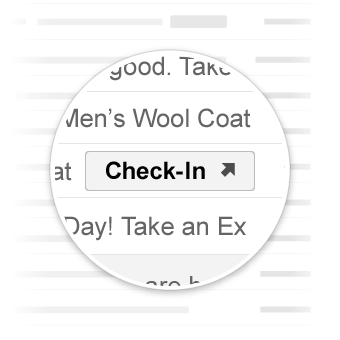
Tindakan cepat di Gmail.
Kasus Penggunaan
Tindakan Cepat yang saat ini didukung oleh Gmail adalah:
Tindakan lainnya mungkin didukung di masa mendatang.
Lihat Tindakan
Anda dapat menambahkan tombol ViewAction ke email yang mengharuskan pengguna membuka situs Anda untuk menyelesaikan tindakan.
Deklarasi berikut menambahkan tombol ViewAction ke email:
JSON-LD
<script type="application/ld+json">
{
  "@context": "http://schema.org",
  "@type": "EmailMessage",
  "potentialAction": {
    "@type": "ViewAction",
    "url": "https://watch-movies.com/watch?movieId=abc123",
    "name": "Watch movie"
  },
  "description": "Watch the 'Avengers' movie online"
}
</script>
Microdata
<div itemscope itemtype="http://schema.org/EmailMessage">
  <div itemprop="potentialAction" itemscope itemtype="http://schema.org/ViewAction">
    <link itemprop="target" href="https://watch-movies.com/watch?movieId=abc123"/>
    <meta itemprop="name" content="Watch movie"/>
  </div>
  <meta itemprop="description" content="Watch the 'Avengers' movie online"/>
</div>
Data penayang
Anda dapat menambahkan detail tentang organisasi yang mengirim pesan email dengan menyetel kolom publisher:
JSON-LD
<script type="application/ld+json">
{
  "@context": "http://schema.org",
  "@type": "EmailMessage",
  "description": "Watch the 'Avengers' movie online",
  "potentialAction": {
    "@type": "ViewAction",
    "url": "https://watch-movies.com/watch?movieId=abc123",
    "name": "Watch movie"
  },
  "publisher": {
    "@type": "Organization",
    "name": "Google Play",
    "url": "https://play.google.com",
    "url/googlePlus": "https://plus.google.com/106886664866983861036"
  }
}
</script>
Microdata
<div itemscope itemtype="http://schema.org/EmailMessage">
  <meta itemprop="description" content="Watch the 'Avengers' movie online"/>
  <div itemprop="potentialAction" itemscope itemtype="http://schema.org/ViewAction">
    <link itemprop="target" href="https://watch-movies.com/watch?movieId=abc123"/>
    <meta itemprop="name" content="Watch movie"/>
  </div>
  <div itemprop="publisher" itemscope itemtype="http://schema.org/Organization">
    <meta itemprop="name" content="Google Play"/>
    <link itemprop="url" href="https://play.google.com"/>
    <link itemprop="url/googlePlus" href="https://plus.google.com/106886664866983861036"/>
  </div>
</div>
Melacak Tindakan
Anda dapat menambahkan tombol TrackAction ke email yang mengharuskan pengguna membuka situs Anda untuk melacak paket yang sedang dikirim.
Tindakan dibuat secara otomatis saat Anda menentukan properti trackingUrl. Untuk menautkan langsung ke aplikasi seluler, sertakan juga TrackAction seperti yang ditunjukkan:
JSON-LD
<script type="application/ld+json">
{
  "@context": "http://schema.org",
  "@type": "ParcelDelivery",
  "deliveryAddress": {
    "@type": "PostalAddress",
    "streetAddress": "24 Willie Mays Plaza",
    "addressLocality": "San Francisco",
    "addressRegion": "CA",
    "addressCountry": "US",
    "postalCode": "94107"
  },
  "expectedArrivalUntil": "2013-03-12T12:00:00-08:00",
  "carrier": {
    "@type": "Organization",
    "name": "FedEx"
  },
  "itemShipped": {
    "@type": "Product",
    "name": "iPod Mini"
  },
  "partOfOrder": {
    "@type": "Order",
    "orderNumber": "176057",
    "merchant": {
      "@type": "Organization",
      "name": "Bob Dole"
    }
  },
  "trackingUrl": "http://fedex.com/track/1234567890"
  "potentialAction": {
    "@type": "TrackAction",
    "target": "http://fedex.com/track/1234567890"
  },
}
</script>
Microdata
<div itemscope itemtype="http://schema.org/ParcelDelivery">
  <div itemprop="deliveryAddress" itemscope itemtype="http://schema.org/PostalAddress">
    <meta itemprop="streetAddress" content="24 Willie Mays Plaza"/>
    <meta itemprop="addressLocality" content="San Francisco"/>
    <meta itemprop="addressRegion" content="CA"/>
    <meta itemprop="addressCountry" content="US"/>
    <meta itemprop="postalCode" content="94107"/>
  </div>
  <meta itemprop="expectedArrivalUntil" content="2013-03-12T12:00:00-08:00"/>
  <div itemprop="carrier" itemscope itemtype="http://schema.org/Organization">
    <meta itemprop="name" content="FedEx"/>
  </div>
  <div itemprop="itemShipped" itemscope itemtype="http://schema.org/Product">
    <meta itemprop="name" content="iPod Mini"/>
  </div>
  <div itemprop="partOfOrder" itemscope itemtype="http://schema.org/Order">
    <meta itemprop="orderNumber" content="176057"/>
    <div itemprop="merchant" itemscope itemtype="http://schema.org/Organization">
      <meta itemprop="name" content="Bob Dole"/>
    </div>
  </div>
  <link itemprop="trackingUrl" href="http://fedex.com/track/1234567890"/>
  <div itemprop="potentialAction" itemscope itemtype="http://schema.org/TrackAction">
    <link itemprop="target" href="http://fedex.com/track/1234567890"/>
  </div>
</div>
Menguji Markup
Anda dapat memvalidasi markup menggunakan Alat Penguji Markup Email. Tempelkan kode markup Anda dan klik tombol Validasi untuk memindai konten dan menerima laporan tentang error yang ada.
Spesifikasi
Untuk mengetahui spesifikasi berbagai jenis tindakan buka, lihat dokumentasi untuk jenis ViewAction atau TrackAction tertentu.