

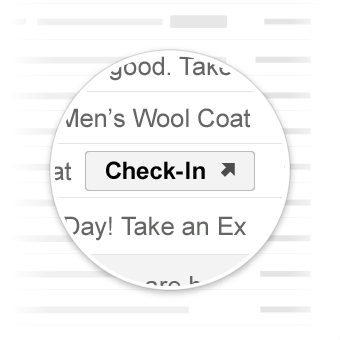
اقدامات Go-to کاربر را به وبسایت شما هدایت میکنند که در آنجا میتوان اقدام مورد نظر را انجام داد. برخلاف اقدامات تککلیکی ، اقدامات Go-to میتوانند چندین بار مورد استفاده قرار گیرند.
موارد استفاده
اقدامات پیش فرض پشتیبانی شده توسط Gmail عبارتند از:
ممکن است در آینده از اقدامات بیشتری پشتیبانی شود.
مشاهده اقدام
شما میتوانید یک دکمه ViewAction به ایمیلهایی اضافه کنید که از کاربران میخواهند برای انجام عمل به سایت شما مراجعه کنند.
دستور زیر یک دکمه ViewAction به ایمیل اضافه میکند:
JSON-LD
<script type="application/ld+json">
{
  "@context": "http://schema.org",
  "@type": "EmailMessage",
  "potentialAction": {
    "@type": "ViewAction",
    "url": "https://watch-movies.com/watch?movieId=abc123",
    "name": "Watch movie"
  },
  "description": "Watch the 'Avengers' movie online"
}
</script>
میکرودیتا
<div itemscope itemtype="http://schema.org/EmailMessage">
  <div itemprop="potentialAction" itemscope itemtype="http://schema.org/ViewAction">
    <link itemprop="target" href="https://watch-movies.com/watch?movieId=abc123"/>
    <meta itemprop="name" content="Watch movie"/>
  </div>
  <meta itemprop="description" content="Watch the 'Avengers' movie online"/>
</div>
دادههای ناشر
شما میتوانید با تنظیم فیلد publisher جزئیاتی در مورد سازمان ارسالکنندهی ایمیل اضافه کنید:
JSON-LD
<script type="application/ld+json">
{
  "@context": "http://schema.org",
  "@type": "EmailMessage",
  "description": "Watch the 'Avengers' movie online",
  "potentialAction": {
    "@type": "ViewAction",
    "url": "https://watch-movies.com/watch?movieId=abc123",
    "name": "Watch movie"
  },
  "publisher": {
    "@type": "Organization",
    "name": "Google Play",
    "url": "https://play.google.com",
    "url/googlePlus": "https://plus.google.com/106886664866983861036"
  }
}
</script>
میکرودیتا
<div itemscope itemtype="http://schema.org/EmailMessage">
  <meta itemprop="description" content="Watch the 'Avengers' movie online"/>
  <div itemprop="potentialAction" itemscope itemtype="http://schema.org/ViewAction">
    <link itemprop="target" href="https://watch-movies.com/watch?movieId=abc123"/>
    <meta itemprop="name" content="Watch movie"/>
  </div>
  <div itemprop="publisher" itemscope itemtype="http://schema.org/Organization">
    <meta itemprop="name" content="Google Play"/>
    <link itemprop="url" href="https://play.google.com"/>
    <link itemprop="url/googlePlus" href="https://plus.google.com/106886664866983861036"/>
  </div>
</div>
اکشن آهنگ
شما میتوانید یک دکمه TrackAction به ایمیلها اضافه کنید که کاربران را ملزم میکند برای پیگیری بستههای تحویل داده شده به سایت شما مراجعه کنند.
وقتی ویژگی trackingUrl مشخص میکنید، یک اکشن به طور خودکار ایجاد میشود. برای پیوند مستقیم به یک برنامه تلفن همراه، همانطور که در مثال زیر نشان داده شده است، یک TrackAction نیز اضافه کنید:
JSON-LD
<script type="application/ld+json">
{
  "@context": "http://schema.org",
  "@type": "ParcelDelivery",
  "deliveryAddress": {
    "@type": "PostalAddress",
    "streetAddress": "24 Willie Mays Plaza",
    "addressLocality": "San Francisco",
    "addressRegion": "CA",
    "addressCountry": "US",
    "postalCode": "94107"
  },
  "expectedArrivalUntil": "2013-03-12T12:00:00-08:00",
  "carrier": {
    "@type": "Organization",
    "name": "FedEx"
  },
  "itemShipped": {
    "@type": "Product",
    "name": "iPod Mini"
  },
  "partOfOrder": {
    "@type": "Order",
    "orderNumber": "176057",
    "merchant": {
      "@type": "Organization",
      "name": "Bob Dole"
    }
  },
  "trackingUrl": "http://fedex.com/track/1234567890"
  "potentialAction": {
    "@type": "TrackAction",
    "target": "http://fedex.com/track/1234567890"
  },
}
</script>
میکرودیتا
<div itemscope itemtype="http://schema.org/ParcelDelivery">
  <div itemprop="deliveryAddress" itemscope itemtype="http://schema.org/PostalAddress">
    <meta itemprop="streetAddress" content="24 Willie Mays Plaza"/>
    <meta itemprop="addressLocality" content="San Francisco"/>
    <meta itemprop="addressRegion" content="CA"/>
    <meta itemprop="addressCountry" content="US"/>
    <meta itemprop="postalCode" content="94107"/>
  </div>
  <meta itemprop="expectedArrivalUntil" content="2013-03-12T12:00:00-08:00"/>
  <div itemprop="carrier" itemscope itemtype="http://schema.org/Organization">
    <meta itemprop="name" content="FedEx"/>
  </div>
  <div itemprop="itemShipped" itemscope itemtype="http://schema.org/Product">
    <meta itemprop="name" content="iPod Mini"/>
  </div>
  <div itemprop="partOfOrder" itemscope itemtype="http://schema.org/Order">
    <meta itemprop="orderNumber" content="176057"/>
    <div itemprop="merchant" itemscope itemtype="http://schema.org/Organization">
      <meta itemprop="name" content="Bob Dole"/>
    </div>
  </div>
  <link itemprop="trackingUrl" href="http://fedex.com/track/1234567890"/>
  <div itemprop="potentialAction" itemscope itemtype="http://schema.org/TrackAction">
    <link itemprop="target" href="http://fedex.com/track/1234567890"/>
  </div>
</div>
نشانهگذاری خود را آزمایش کنید
شما میتوانید با استفاده از ابزار Email Markup Tester، نشانهگذاری خود را اعتبارسنجی کنید. کد نشانهگذاری خود را در آن قرار دهید و روی دکمه اعتبارسنجی کلیک کنید تا محتوا بررسی شود و گزارشی از هرگونه خطای موجود دریافت کنید.
مشخصات
برای مشخصات انواع مختلف اقدامات لازم، به مستندات مربوط به نوع خاص ViewAction یا TrackAction مراجعه کنید.
،اقدامات Go-to کاربر را به وبسایت شما هدایت میکنند که در آنجا میتوان اقدام مورد نظر را انجام داد. برخلاف اقدامات تککلیکی ، اقدامات Go-to میتوانند چندین بار مورد استفاده قرار گیرند.
موارد استفاده
اقدامات پیش فرض پشتیبانی شده توسط Gmail عبارتند از:
ممکن است در آینده از اقدامات بیشتری پشتیبانی شود.
مشاهده اقدام
شما میتوانید یک دکمه ViewAction به ایمیلهایی اضافه کنید که از کاربران میخواهند برای انجام عمل به سایت شما مراجعه کنند.
دستور زیر یک دکمه ViewAction به ایمیل اضافه میکند:
JSON-LD
<script type="application/ld+json">
{
  "@context": "http://schema.org",
  "@type": "EmailMessage",
  "potentialAction": {
    "@type": "ViewAction",
    "url": "https://watch-movies.com/watch?movieId=abc123",
    "name": "Watch movie"
  },
  "description": "Watch the 'Avengers' movie online"
}
</script>
میکرودیتا
<div itemscope itemtype="http://schema.org/EmailMessage">
  <div itemprop="potentialAction" itemscope itemtype="http://schema.org/ViewAction">
    <link itemprop="target" href="https://watch-movies.com/watch?movieId=abc123"/>
    <meta itemprop="name" content="Watch movie"/>
  </div>
  <meta itemprop="description" content="Watch the 'Avengers' movie online"/>
</div>
دادههای ناشر
شما میتوانید با تنظیم فیلد publisher جزئیاتی در مورد سازمان ارسالکنندهی ایمیل اضافه کنید:
JSON-LD
<script type="application/ld+json">
{
  "@context": "http://schema.org",
  "@type": "EmailMessage",
  "description": "Watch the 'Avengers' movie online",
  "potentialAction": {
    "@type": "ViewAction",
    "url": "https://watch-movies.com/watch?movieId=abc123",
    "name": "Watch movie"
  },
  "publisher": {
    "@type": "Organization",
    "name": "Google Play",
    "url": "https://play.google.com",
    "url/googlePlus": "https://plus.google.com/106886664866983861036"
  }
}
</script>
میکرودیتا
<div itemscope itemtype="http://schema.org/EmailMessage">
  <meta itemprop="description" content="Watch the 'Avengers' movie online"/>
  <div itemprop="potentialAction" itemscope itemtype="http://schema.org/ViewAction">
    <link itemprop="target" href="https://watch-movies.com/watch?movieId=abc123"/>
    <meta itemprop="name" content="Watch movie"/>
  </div>
  <div itemprop="publisher" itemscope itemtype="http://schema.org/Organization">
    <meta itemprop="name" content="Google Play"/>
    <link itemprop="url" href="https://play.google.com"/>
    <link itemprop="url/googlePlus" href="https://plus.google.com/106886664866983861036"/>
  </div>
</div>
اکشن آهنگ
شما میتوانید یک دکمه TrackAction به ایمیلها اضافه کنید که کاربران را ملزم میکند برای پیگیری بستههای تحویل داده شده به سایت شما مراجعه کنند.
وقتی ویژگی trackingUrl مشخص میکنید، یک اکشن به طور خودکار ایجاد میشود. برای پیوند مستقیم به یک برنامه تلفن همراه، همانطور که در مثال زیر نشان داده شده است، یک TrackAction نیز اضافه کنید:
JSON-LD
<script type="application/ld+json">
{
  "@context": "http://schema.org",
  "@type": "ParcelDelivery",
  "deliveryAddress": {
    "@type": "PostalAddress",
    "streetAddress": "24 Willie Mays Plaza",
    "addressLocality": "San Francisco",
    "addressRegion": "CA",
    "addressCountry": "US",
    "postalCode": "94107"
  },
  "expectedArrivalUntil": "2013-03-12T12:00:00-08:00",
  "carrier": {
    "@type": "Organization",
    "name": "FedEx"
  },
  "itemShipped": {
    "@type": "Product",
    "name": "iPod Mini"
  },
  "partOfOrder": {
    "@type": "Order",
    "orderNumber": "176057",
    "merchant": {
      "@type": "Organization",
      "name": "Bob Dole"
    }
  },
  "trackingUrl": "http://fedex.com/track/1234567890"
  "potentialAction": {
    "@type": "TrackAction",
    "target": "http://fedex.com/track/1234567890"
  },
}
</script>
میکرودیتا
<div itemscope itemtype="http://schema.org/ParcelDelivery">
  <div itemprop="deliveryAddress" itemscope itemtype="http://schema.org/PostalAddress">
    <meta itemprop="streetAddress" content="24 Willie Mays Plaza"/>
    <meta itemprop="addressLocality" content="San Francisco"/>
    <meta itemprop="addressRegion" content="CA"/>
    <meta itemprop="addressCountry" content="US"/>
    <meta itemprop="postalCode" content="94107"/>
  </div>
  <meta itemprop="expectedArrivalUntil" content="2013-03-12T12:00:00-08:00"/>
  <div itemprop="carrier" itemscope itemtype="http://schema.org/Organization">
    <meta itemprop="name" content="FedEx"/>
  </div>
  <div itemprop="itemShipped" itemscope itemtype="http://schema.org/Product">
    <meta itemprop="name" content="iPod Mini"/>
  </div>
  <div itemprop="partOfOrder" itemscope itemtype="http://schema.org/Order">
    <meta itemprop="orderNumber" content="176057"/>
    <div itemprop="merchant" itemscope itemtype="http://schema.org/Organization">
      <meta itemprop="name" content="Bob Dole"/>
    </div>
  </div>
  <link itemprop="trackingUrl" href="http://fedex.com/track/1234567890"/>
  <div itemprop="potentialAction" itemscope itemtype="http://schema.org/TrackAction">
    <link itemprop="target" href="http://fedex.com/track/1234567890"/>
  </div>
</div>
نشانهگذاری خود را آزمایش کنید
شما میتوانید با استفاده از ابزار Email Markup Tester، نشانهگذاری خود را اعتبارسنجی کنید. کد نشانهگذاری خود را در آن قرار دهید و روی دکمه اعتبارسنجی کلیک کنید تا محتوا بررسی شود و گزارشی از هرگونه خطای موجود دریافت کنید.
مشخصات
برای مشخصات انواع مختلف اقدامات لازم، به مستندات مربوط به نوع خاص ViewAction یا TrackAction مراجعه کنید.