

כדי לתעד המרות, צריך להפעיל מעקב המרות בחשבון Google Ads שמוגדר למעקב המרות. במדריך הזה מוסבר איך לוודא שמעקב ההמרות מופעל, איך להפעיל אותו אם הוא לא מופעל כבר ואיך לאחזר מידע על פעולות המרה קיימות.
ברוב פעולות ההמרה נדרשות פעולות נוספות מצידכם כדי לעקוב אחריהן. מידע נוסף על הסוגים השונים של פעולות ההמרה והדרישות שלהם זמין במאמרים קטגוריות של פעולות המרה ויצירת פעולות המרה.
הכנה למתן הסכמה
כשמייבאים המרות או נתוני משתמשים, צריך לאשר שיש לכם הרשאה לשתף נתוני המרות עם Google. אפשר לעשות את זה באחת משתי דרכים:
- קביעת הגדרות ברירת מחדל להסכמה ברמת החשבון. בממשק המשתמש של Google Ads, לוחצים על כלים > המרכז לניהול נתונים > הגדרות הסכמה > הגדרות הסכמה שנקבעו כברירת מחדל.
- מגדירים את שדה ההסכמה בכל מטען ייעודי (payload) של המרות או נתוני משתמשים שיובאו (לדוגמה,
ClickConversion.consent,CallConversion.consentאוUserData.consent).
הגדרת מעקב המרות באתר
אם אתם עוקבים אחרי המרות באתר או מטמיעים המרות משופרות לצורך שיוך ללידים, קודם צריך להגדיר את התיוג באתר. פועלים לפי השלבים במאמר הגדרת Google Tag להמרות משופרות לצורך שיוך ללידים, או משתמשים ב-Google Tag Manager לפי השלבים במאמר הגדרת Google Tag Manager להמרות משופרות לצורך שיוך ללידים.
הפעלת מעקב המרות בחשבון למעקב המרות ב-Google Ads
כדי לוודא שההגדרה של מעקב ההמרות בחשבון תקינה וליצור או לאחזר פעולות המרה, פועלים לפי השלבים הבאים.
שלבים להפעלת מעקב המרות
אחזור מידע על ההגדרה של מעקב ההמרות
כדי לבדוק את ההגדרה של מעקב ההמרות בחשבון ולוודא שמעקב ההמרות מופעל, שולחים שאילתה למשאב Customer בשביל ConversionTrackingSetting.
מריצים את השאילתה הבאה עם GoogleAdsService.SearchStream:
SELECT
  customer.conversion_tracking_setting.google_ads_conversion_customer,
  customer.conversion_tracking_setting.conversion_tracking_status,
  customer.conversion_tracking_setting.conversion_tracking_id,
  customer.conversion_tracking_setting.cross_account_conversion_tracking_id
FROM customer
השדה google_ads_conversion_customer מציין את חשבון Google Ads שבו נוצרות ומנוהלות ההמרות של הלקוח הזה. אם אתם משתמשים במעקב המרות ברמת חשבון הניהול, זהו המזהה של חשבון הניהול. צריך לציין את מספר הלקוח של ההמרות ב-Google Ads בתור customer_id בבקשות של Google Ads API כדי ליצור ולנהל המרות. שימו לב שהשדה הזה מאוכלס גם אם מעקב ההמרות לא מופעל.
השדה conversion_tracking_status מציין אם מעקב ההמרות מופעל ואם בחשבון מוגדר מעקב המרות ברמת חשבון הניהול.
יצירת פעולת המרה בחשבון הלקוח של ההמרות ב-Google Ads
אם הערך של conversion_tracking_status הוא NOT_CONVERSION_TRACKED, מעקב ההמרות לא מופעל בחשבון. מפעילים את מעקב ההמרות על ידי יצירה של לפחות ConversionAction אחת בחשבון ההמרות ב-Google Ads, כמו בדוגמה הבאה. לחלופין, אתם יכולים ליצור פעולת המרה בממשק המשתמש לפי ההוראות במאמר הגדרת מעקב המרות במרכז העזרה של Google Ads, בהתאם לסוג ההמרה שאתם רוצים להפעיל.
שימו לב שהתכונה 'המרות משופרות' מופעלת באופן אוטומטי כששולחים נתונים דרך Google Ads API, אבל אפשר להשבית אותה דרך ממשק המשתמש של Google Ads.
קוד לדוגמה
Java
private void runExample(GoogleAdsClient googleAdsClient, long customerId) { // Creates a ConversionAction. ConversionAction conversionAction = ConversionAction.newBuilder() // Note that conversion action names must be unique. If a conversion action already // exists with the specified conversion_action_name the create operation will fail with // a ConversionActionError.DUPLICATE_NAME error. .setName("Earth to Mars Cruises Conversion #" + getPrintableDateTime()) .setCategory(ConversionActionCategory.DEFAULT) .setType(ConversionActionType.WEBPAGE) .setStatus(ConversionActionStatus.ENABLED) .setViewThroughLookbackWindowDays(15L) .setValueSettings( ValueSettings.newBuilder() .setDefaultValue(23.41) .setAlwaysUseDefaultValue(true) .build()) .build(); // Creates the operation. ConversionActionOperation operation = ConversionActionOperation.newBuilder().setCreate(conversionAction).build(); try (ConversionActionServiceClient conversionActionServiceClient = googleAdsClient.getLatestVersion().createConversionActionServiceClient()) { MutateConversionActionsResponse response = conversionActionServiceClient.mutateConversionActions( Long.toString(customerId), Collections.singletonList(operation)); System.out.printf("Added %d conversion actions:%n", response.getResultsCount()); for (MutateConversionActionResult result : response.getResultsList()) { System.out.printf( "New conversion action added with resource name: '%s'%n", result.getResourceName()); } } }
C#
public void Run(GoogleAdsClient client, long customerId) { // Get the ConversionActionService. ConversionActionServiceClient conversionActionService = client.GetService(Services.V25.ConversionActionService); // Note that conversion action names must be unique. // If a conversion action already exists with the specified name the create operation // will fail with a ConversionAction.DUPLICATE_NAME error. string ConversionActionName = "Earth to Mars Cruises Conversion #" + ExampleUtilities.GetRandomString(); // Add a conversion action. ConversionAction conversionAction = new ConversionAction() { Name = ConversionActionName, Category = ConversionActionCategory.Default, Type = ConversionActionType.Webpage, Status = ConversionActionStatus.Enabled, ViewThroughLookbackWindowDays = 15, ValueSettings = new ConversionAction.Types.ValueSettings() { DefaultValue = 23.41, AlwaysUseDefaultValue = true } }; // Create the operation. ConversionActionOperation operation = new ConversionActionOperation() { Create = conversionAction }; try { // Create the conversion action. MutateConversionActionsResponse response = conversionActionService.MutateConversionActions(customerId.ToString(), new ConversionActionOperation[] { operation }); // Display the results. foreach (MutateConversionActionResult newConversionAction in response.Results) { Console.WriteLine($"New conversion action with resource name = " + $"'{newConversionAction.ResourceName}' was added."); } } catch (GoogleAdsException e) { Console.WriteLine("Failure:"); Console.WriteLine($"Message: {e.Message}"); Console.WriteLine($"Failure: {e.Failure}"); Console.WriteLine($"Request ID: {e.RequestId}"); throw; } }
PHP
public static function runExample(GoogleAdsClient $googleAdsClient, int $customerId) { // Creates a conversion action. $conversionAction = new ConversionAction( [ // Note that conversion action names must be unique. // If a conversion action already exists with the specified conversion_action_name // the create operation will fail with a ConversionActionError.DUPLICATE_NAME error. 'name' => 'Earth to Mars Cruises Conversion #' . Helper::getPrintableDatetime(), 'category' => ConversionActionCategory::PBDEFAULT, 'type' => ConversionActionType::WEBPAGE, 'status' => ConversionActionStatus::ENABLED, 'view_through_lookback_window_days' => 15, 'value_settings' => new ValueSettings( [ 'default_value' => 23.41, 'always_use_default_value' => true ] ) ] ); // Creates a conversion action operation. $conversionActionOperation = new ConversionActionOperation(); $conversionActionOperation->setCreate($conversionAction); // Issues a mutate request to add the conversion action. $conversionActionServiceClient = $googleAdsClient->getConversionActionServiceClient(); $response = $conversionActionServiceClient->mutateConversionActions( MutateConversionActionsRequest::build($customerId, [$conversionActionOperation]) ); printf("Added %d conversion actions:%s", $response->getResults()->count(), PHP_EOL); foreach ($response->getResults() as $addedConversionAction) { /** * @var ConversionAction $addedConversionAction */ printf( "New conversion action added with resource name: '%s'%s", $addedConversionAction->getResourceName(), PHP_EOL ); } }
Python
def main(client: GoogleAdsClient, customer_id: str) -> None: conversion_action_service: ConversionActionServiceClient = ( client.get_service("ConversionActionService") ) # Create the operation. conversion_action_operation: ConversionActionOperation = client.get_type( "ConversionActionOperation" ) # Create conversion action. conversion_action: ConversionAction = conversion_action_operation.create # Note that conversion action names must be unique. If a conversion action # already exists with the specified conversion_action_name, the create # operation will fail with a ConversionActionError.DUPLICATE_NAME error. conversion_action.name = f"Earth to Mars Cruises Conversion {uuid.uuid4()}" conversion_action.type_ = ( client.enums.ConversionActionTypeEnum.UPLOAD_CLICKS ) conversion_action.category = ( client.enums.ConversionActionCategoryEnum.DEFAULT ) conversion_action.status = client.enums.ConversionActionStatusEnum.ENABLED conversion_action.view_through_lookback_window_days = 15 # Create a value settings object. value_settings: ConversionAction.ValueSettings = ( conversion_action.value_settings ) value_settings.default_value = 15.0 value_settings.always_use_default_value = True # Add the conversion action. conversion_action_response: MutateConversionActionsResponse = ( conversion_action_service.mutate_conversion_actions( customer_id=customer_id, operations=[conversion_action_operation], ) ) print( "Created conversion action " f'"{conversion_action_response.results[0].resource_name}".' )
Ruby
def add_conversion_action(customer_id) # GoogleAdsClient will read a config file from # ENV['HOME']/google_ads_config.rb when called without parameters client = Google::Ads::GoogleAds::GoogleAdsClient.new # Add a conversion action. conversion_action = client.resource.conversion_action do |ca| ca.name = "Earth to Mars Cruises Conversion #{(Time.new.to_f * 100).to_i}" ca.type = :UPLOAD_CLICKS ca.category = :DEFAULT ca.status = :ENABLED ca.view_through_lookback_window_days = 15 # Create a value settings object. ca.value_settings = client.resource.value_settings do |vs| vs.default_value = 15 vs.always_use_default_value = true end end # Create the operation. conversion_action_operation = client.operation.create_resource.conversion_action(conversion_action) # Add the ad group ad. response = client.service.conversion_action.mutate_conversion_actions( customer_id: customer_id, operations: [conversion_action_operation], ) puts "New conversion action with resource name = #{response.results.first.resource_name}." end
Perl
sub add_conversion_action { my ($api_client, $customer_id) = @_; # Note that conversion action names must be unique. # If a conversion action already exists with the specified conversion_action_name, # the create operation fails with error ConversionActionError.DUPLICATE_NAME. my $conversion_action_name = "Earth to Mars Cruises Conversion #" . uniqid(); # Create a conversion action. my $conversion_action = Google::Ads::GoogleAds::V25::Resources::ConversionAction->new({ name => $conversion_action_name, category => DEFAULT, type => WEBPAGE, status => ENABLED, viewThroughLookbackWindowDays => 15, valueSettings => Google::Ads::GoogleAds::V25::Resources::ValueSettings->new({ defaultValue => 23.41, alwaysUseDefaultValue => "true" })}); # Create a conversion action operation. my $conversion_action_operation = Google::Ads::GoogleAds::V25::Services::ConversionActionService::ConversionActionOperation ->new({create => $conversion_action}); # Add the conversion action. my $conversion_actions_response = $api_client->ConversionActionService()->mutate({ customerId => $customer_id, operations => [$conversion_action_operation]}); printf "New conversion action added with resource name: '%s'.\n", $conversion_actions_response->{results}[0]{resourceName}; return 1; }
curl
מוודאים שהערך של type מוגדר לערך הנכון של ConversionActionType. מידע נוסף על יצירת פעולות המרה ב-Google Ads API
אחזור של פעולת המרה קיימת
כדי לאחזר פרטים של פעולת המרה קיימת, שולחים את השאילתה הבאה. מוודאים שמספר הלקוח בבקשה מוגדר ללקוח ההמרות ב-Google Ads שזיהיתם קודם, וסוג פעולת ההמרה מוגדר לערך הנכון של ConversionActionType.
SELECT
  conversion_action.id,
  conversion_action.resource_name,
  conversion_action.name,
  conversion_action.type,
  conversion_action.category,
  conversion_action.status
FROM conversion_action

WHERE conversion_action.type = 'INSERT_CONVERSION_ACTION_TYPE'
מעקב המרות ברמת חשבון ניהול
מעקב המרות ברמת חשבון ניהול מאפשר לחשבונות Google Ads לייבא המרות בשם חשבונות אחרים, שבהם הוצגו המודעות שהניבו המרות. כך תוכלו לאחד את החשבונות ששולחים בקשות ייבוא, ולפשט את תהליך השילוב.
הפעלת מעקב המרות ברמת חשבון ניהול ב-Google Ads API
אתם יכולים להשתמש ב-Google Ads API כדי להפעיל מעקב המרות ברמת חשבון הניהול כשאתם יוצרים או מעדכנים חשבונות לקוח.
במשאב Customer, מגדירים את השדה conversion_tracking_setting.google_ads_conversion_customer לשם המשאב של חשבון הניהול שאמור לנהל את פעולות ההמרה בשם חשבון הלקוח.
בקשות לשינוי חשבון הלקוח שמוגדר כבעלים של ההמרות בחשבון לקוח אחר צריכות להישלח מחשבון הניהול שהופך להיות חשבון הלקוח החדש שמוגדר כבעלים של ההמרות.
כדי לעשות את זה, מגדירים את login-customer-id למזהה של חשבון הניהול.
כשמפעילים מעקב המרות ברמת חשבון ניהול, או כשמחליפים את חשבון הניהול שדרכו מתבצע מעקב ההמרות בחשבון לקוח קיים, חלות אותן אזהרות כמו במקרה שבו מבצעים את השינוי הזה בממשק המשתמש. באופן ספציפי:
- חשבון הלקוח יאמץ את כללי ברירת המחדל לקביעת ערך המרה ואת יעדי ברירת המחדל שקשורים למחזור החיים של הלקוח, שמוגדרים במנהל מעקב ההמרות החדש שלו.
- בקמפיינים שמטרגטים פעולת המרה ספציפית, המערכת תעבור לשימוש ביעדי ההמרה שמוגדרים כברירת מחדל בחשבון הניהול. אם תמשיכו לטרגט פעולת המרה ספציפית, יכול להיות שתיתקלו בהתנהגות לא עקבית, כי יכול להיות שחשבון הניהול לא יכלול את אותם יעדים כמו חשבון הלקוח. חשוב לוודא שהקמפיינים עוברים אופטימיזציה להשגת היעדים הנכונים.
- אם חשבון מסוים משתייך ליותר מחשבון ניהול אחד, אפשר להגדיר בו פעולות המרה רק מחשבון ניהול אחד. אם לא מצוין חשבון מעקב המרות, החשבון ישמש כחשבון מעקב ההמרות כברירת מחדל.
ייבוא המרות בין חשבונות
כשמעקב המרות ברמת חשבון ניהול מופעל, חשבונות לקוח וחשבונות ניהול יכולים לייבא המרות בשם החשבון להצגת מודעות. כך אפשר לפשט את הלוגיקה של הייבוא, כדי שלא תצטרכו לקבוע את חשבון הצגת המודעות לכל המרה בזמן הייבוא. אתם יכולים פשוט לבחור חשבון אחד מתוך עץ החשבונות שלכם כדי לייבא את כל ההמרות.
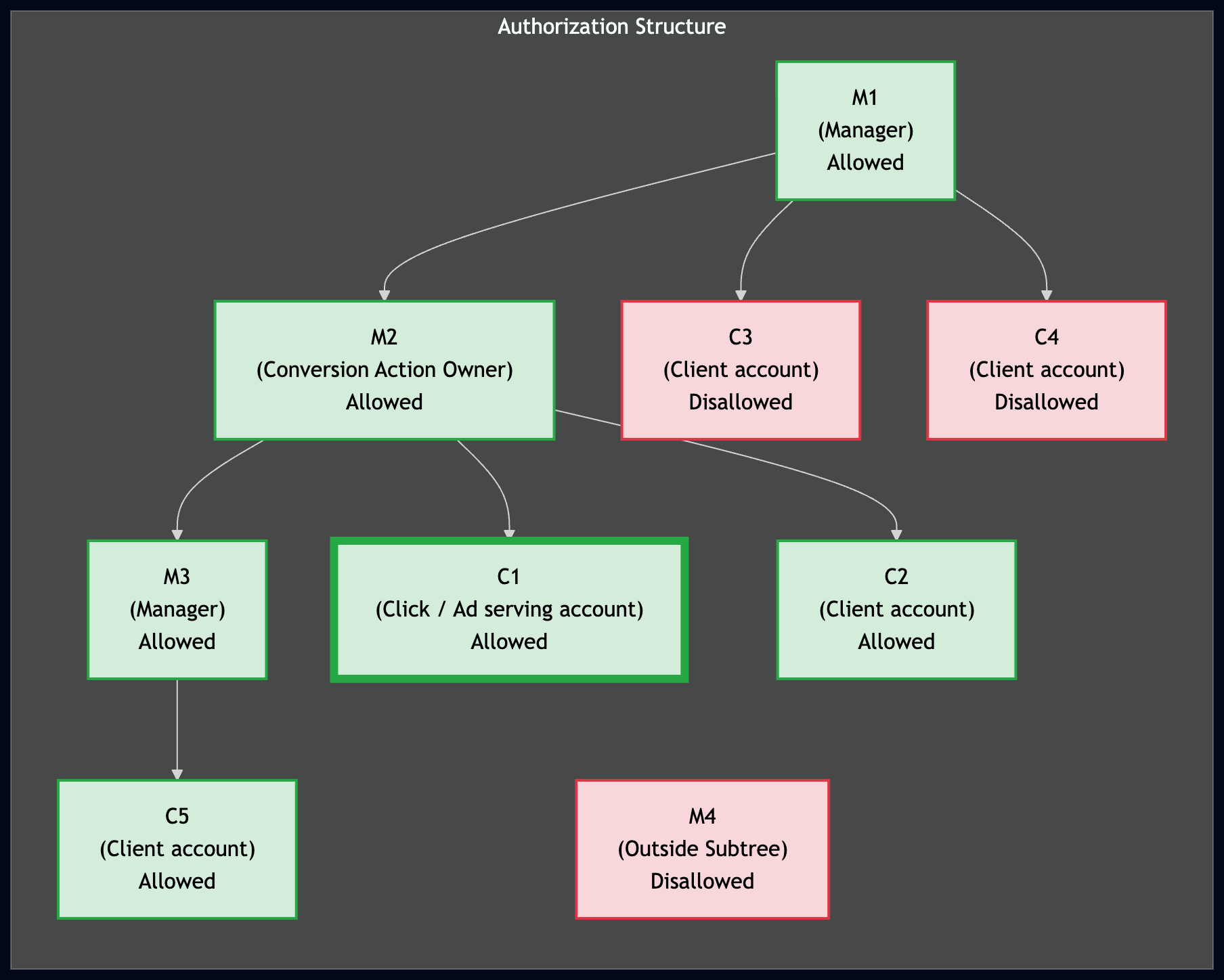
כדי להעלות המרה בהצלחה, לחשבון המעלה צריכה להיות גישה לפעולת ההמרה. בהיררכיית מעקב חוצה-חשבונות, לחשבון שמעלה את ההמרות יש גישה לפעולה אם הוא חשבון הורה (חשבון ניהול) או חשבון צאצא של הבעלים של פעולת ההמרה בעץ החשבונות.
הדיאגרמה הבאה ממחישה את מבנה ההרשאות לייבוא המרות. כאן C1 הוא חשבון הלקוח שהציג את המודעה שהניבה את ההמרה, ו-M2 הוא הבעלים של פעולת ההמרה וחשבון ההורה של מעקב ההמרות של C1. החשבונות שמודגשים בירוק יכולים לייבא המרות בשם C1, והחשבונות שמודגשים באדום לא יכולים.
יצירה של פעולות המרה
כדי למדוד המרות, צריך להגדיר ConversionAction לtype של פעולת ההמרה שרוצים לעקוב אחריה.
לדוגמה, רכישה אונליין ושיחת טלפון דורשות פעולות המרה שונות.
הדרך הכי טובה להגדיר פעולות המרה חדשות ב-API היא להשתמש בדוגמת הקוד להוספת פעולת המרה. הדוגמה מטפלת בכל משימות האימות ברקע, ומדריכה אתכם ביצירת ConversionAction.
ברוב פעולות ההמרה, צריך לבצע שלבים נוספים כדי לעקוב אחריהן. לדוגמה, כדי לעקוב אחרי המרות באתר, אתם צריכים להוסיף לדף ההמרות באתר קטע קוד שנקרא תג. כדי לקרוא על הדרישות המפורטות של סוגים אחרים של פעולות המרה, עיינו במאמר במרכז העזרה של Google Ads בנושא סוגי המרות.
אם אתם משתמשים במעקב המרות ברמת חשבון ניהול, הפונקציה
ConversionActionService מחזירה את פעולות ההמרה הבאות:
- כל פעולות ההמרה שמוגדרות בחשבון הניהול שמשמש את החשבון למעקב המרות ברמת חשבון הניהול
- כל פעולות ההמרה שבהן הלקוח צבר נתונים סטטיסטיים, כולל פעולות שהוגדרו על ידי המערכת ופעולות שנמצאות בבעלות החשבון הניהולי, גם אם החשבון הניהולי מבטל את הקישור בהמשך
- כל הפעולות שהלקוח הגדיר בחשבון שלו
- המרות ב-Analytics שנוצרו בנכסים מקושרים ב-Google Analytics.
הנתון הזה כולל פעולות של המרות ב-Analytics שלא יובאו אל Google Ads, והסטטוס שלהן הוא
HIDDEN.
קוד לדוגמה
דוגמת הקוד הבאה ממחישה את התהליך של יצירת פעולת המרה חדשה. באופן ספציפי, היא יוצרת פעולת המרה שבה השדה type מוגדר כ-UPLOAD_CLICKS.
היא גם מגדירה את category לערך DEFAULT.
הגדרות ברירת המחדל הבאות חלות:
השדה
primary_for_goalמוגדר אוטומטית על ידי Google Ads API, אבל אתם יכולים להגדיר אותו באופן מפורש כדי לשלוט בהשפעה של פעולת המרה על הדיווח והבידינג בחשבון שלכם כשמשלבים אותה עם יעדי ההמרה.Google Ads API מגדיר את
counting_typeבאופן אוטומטי לערךMANY_PER_CLICK. מידע נוסף זמין במאמר מידע על אפשרויות לספירת המרות.Google Ads API מגדיר את מודל השיוך כמבוסס-נתונים על ידי הגדרת השדה
attribution_model_settingsלערךGOOGLE_SEARCH_ATTRIBUTION_DATA_DRIVENשלAttributionModel. מידע נוסף על מודלים של שיוך (Attribution)
Java
private void runExample(GoogleAdsClient googleAdsClient, long customerId) { // Creates a ConversionAction. ConversionAction conversionAction = ConversionAction.newBuilder() // Note that conversion action names must be unique. If a conversion action already // exists with the specified conversion_action_name the create operation will fail with // a ConversionActionError.DUPLICATE_NAME error. .setName("Earth to Mars Cruises Conversion #" + getPrintableDateTime()) .setCategory(ConversionActionCategory.DEFAULT) .setType(ConversionActionType.WEBPAGE) .setStatus(ConversionActionStatus.ENABLED) .setViewThroughLookbackWindowDays(15L) .setValueSettings( ValueSettings.newBuilder() .setDefaultValue(23.41) .setAlwaysUseDefaultValue(true) .build()) .build(); // Creates the operation. ConversionActionOperation operation = ConversionActionOperation.newBuilder().setCreate(conversionAction).build(); try (ConversionActionServiceClient conversionActionServiceClient = googleAdsClient.getLatestVersion().createConversionActionServiceClient()) { MutateConversionActionsResponse response = conversionActionServiceClient.mutateConversionActions( Long.toString(customerId), Collections.singletonList(operation)); System.out.printf("Added %d conversion actions:%n", response.getResultsCount()); for (MutateConversionActionResult result : response.getResultsList()) { System.out.printf( "New conversion action added with resource name: '%s'%n", result.getResourceName()); } } }
C#
public void Run(GoogleAdsClient client, long customerId) { // Get the ConversionActionService. ConversionActionServiceClient conversionActionService = client.GetService(Services.V25.ConversionActionService); // Note that conversion action names must be unique. // If a conversion action already exists with the specified name the create operation // will fail with a ConversionAction.DUPLICATE_NAME error. string ConversionActionName = "Earth to Mars Cruises Conversion #" + ExampleUtilities.GetRandomString(); // Add a conversion action. ConversionAction conversionAction = new ConversionAction() { Name = ConversionActionName, Category = ConversionActionCategory.Default, Type = ConversionActionType.Webpage, Status = ConversionActionStatus.Enabled, ViewThroughLookbackWindowDays = 15, ValueSettings = new ConversionAction.Types.ValueSettings() { DefaultValue = 23.41, AlwaysUseDefaultValue = true } }; // Create the operation. ConversionActionOperation operation = new ConversionActionOperation() { Create = conversionAction }; try { // Create the conversion action. MutateConversionActionsResponse response = conversionActionService.MutateConversionActions(customerId.ToString(), new ConversionActionOperation[] { operation }); // Display the results. foreach (MutateConversionActionResult newConversionAction in response.Results) { Console.WriteLine($"New conversion action with resource name = " + $"'{newConversionAction.ResourceName}' was added."); } } catch (GoogleAdsException e) { Console.WriteLine("Failure:"); Console.WriteLine($"Message: {e.Message}"); Console.WriteLine($"Failure: {e.Failure}"); Console.WriteLine($"Request ID: {e.RequestId}"); throw; } }
PHP
public static function runExample(GoogleAdsClient $googleAdsClient, int $customerId) { // Creates a conversion action. $conversionAction = new ConversionAction( [ // Note that conversion action names must be unique. // If a conversion action already exists with the specified conversion_action_name // the create operation will fail with a ConversionActionError.DUPLICATE_NAME error. 'name' => 'Earth to Mars Cruises Conversion #' . Helper::getPrintableDatetime(), 'category' => ConversionActionCategory::PBDEFAULT, 'type' => ConversionActionType::WEBPAGE, 'status' => ConversionActionStatus::ENABLED, 'view_through_lookback_window_days' => 15, 'value_settings' => new ValueSettings( [ 'default_value' => 23.41, 'always_use_default_value' => true ] ) ] ); // Creates a conversion action operation. $conversionActionOperation = new ConversionActionOperation(); $conversionActionOperation->setCreate($conversionAction); // Issues a mutate request to add the conversion action. $conversionActionServiceClient = $googleAdsClient->getConversionActionServiceClient(); $response = $conversionActionServiceClient->mutateConversionActions( MutateConversionActionsRequest::build($customerId, [$conversionActionOperation]) ); printf("Added %d conversion actions:%s", $response->getResults()->count(), PHP_EOL); foreach ($response->getResults() as $addedConversionAction) { /** * @var ConversionAction $addedConversionAction */ printf( "New conversion action added with resource name: '%s'%s", $addedConversionAction->getResourceName(), PHP_EOL ); } }
Python
def main(client: GoogleAdsClient, customer_id: str) -> None: conversion_action_service: ConversionActionServiceClient = ( client.get_service("ConversionActionService") ) # Create the operation. conversion_action_operation: ConversionActionOperation = client.get_type( "ConversionActionOperation" ) # Create conversion action. conversion_action: ConversionAction = conversion_action_operation.create # Note that conversion action names must be unique. If a conversion action # already exists with the specified conversion_action_name, the create # operation will fail with a ConversionActionError.DUPLICATE_NAME error. conversion_action.name = f"Earth to Mars Cruises Conversion {uuid.uuid4()}" conversion_action.type_ = ( client.enums.ConversionActionTypeEnum.UPLOAD_CLICKS ) conversion_action.category = ( client.enums.ConversionActionCategoryEnum.DEFAULT ) conversion_action.status = client.enums.ConversionActionStatusEnum.ENABLED conversion_action.view_through_lookback_window_days = 15 # Create a value settings object. value_settings: ConversionAction.ValueSettings = ( conversion_action.value_settings ) value_settings.default_value = 15.0 value_settings.always_use_default_value = True # Add the conversion action. conversion_action_response: MutateConversionActionsResponse = ( conversion_action_service.mutate_conversion_actions( customer_id=customer_id, operations=[conversion_action_operation], ) ) print( "Created conversion action " f'"{conversion_action_response.results[0].resource_name}".' )
Ruby
def add_conversion_action(customer_id) # GoogleAdsClient will read a config file from # ENV['HOME']/google_ads_config.rb when called without parameters client = Google::Ads::GoogleAds::GoogleAdsClient.new # Add a conversion action. conversion_action = client.resource.conversion_action do |ca| ca.name = "Earth to Mars Cruises Conversion #{(Time.new.to_f * 100).to_i}" ca.type = :UPLOAD_CLICKS ca.category = :DEFAULT ca.status = :ENABLED ca.view_through_lookback_window_days = 15 # Create a value settings object. ca.value_settings = client.resource.value_settings do |vs| vs.default_value = 15 vs.always_use_default_value = true end end # Create the operation. conversion_action_operation = client.operation.create_resource.conversion_action(conversion_action) # Add the ad group ad. response = client.service.conversion_action.mutate_conversion_actions( customer_id: customer_id, operations: [conversion_action_operation], ) puts "New conversion action with resource name = #{response.results.first.resource_name}." end
Perl
sub add_conversion_action { my ($api_client, $customer_id) = @_; # Note that conversion action names must be unique. # If a conversion action already exists with the specified conversion_action_name, # the create operation fails with error ConversionActionError.DUPLICATE_NAME. my $conversion_action_name = "Earth to Mars Cruises Conversion #" . uniqid(); # Create a conversion action. my $conversion_action = Google::Ads::GoogleAds::V25::Resources::ConversionAction->new({ name => $conversion_action_name, category => DEFAULT, type => WEBPAGE, status => ENABLED, viewThroughLookbackWindowDays => 15, valueSettings => Google::Ads::GoogleAds::V25::Resources::ValueSettings->new({ defaultValue => 23.41, alwaysUseDefaultValue => "true" })}); # Create a conversion action operation. my $conversion_action_operation = Google::Ads::GoogleAds::V25::Services::ConversionActionService::ConversionActionOperation ->new({create => $conversion_action}); # Add the conversion action. my $conversion_actions_response = $api_client->ConversionActionService()->mutate({ customerId => $customer_id, operations => [$conversion_action_operation]}); printf "New conversion action added with resource name: '%s'.\n", $conversion_actions_response->{results}[0]{resourceName}; return 1; }
curl
אפשר לראות את הדוגמה הזו בתיקייה Remarketing (רימרקטינג) בספריית הלקוח ובאוסף הדוגמאות של הקוד: דוגמה לקוד של Add Conversion Action.
פורמטים מאושרים
מערכת Google Ads ו-Google Ads API תומכים במגוון רחב של פעולות המרה, ולכן חלק מכללי האימות משתנים בהתאם ל-type של הפעולה.
השגיאה הכי נפוצה כשיוצרים פעולת המרה היא DUPLICATE_NAME. חשוב להשתמש בשם ייחודי לכל פעולת המרה.
כמה טיפים להגדרת השדות של ConversionAction:
- כל שדות ה-enum
- ניסיון להגדיר שדה enum כלשהו לערך
UNKNOWNיוביל לשגיאהRequestError.INVALID_ENUM_VALUE. app_id- המאפיין
app_idלא ניתן לשינוי ואפשר להגדיר אותו רק כשיוצרים המרה חדשה באפליקציה. attribution_model_settings- הגדרת האפשרות הזו לאפשרות שהוצאה משימוש תוביל לשגיאה
CANNOT_SET_RULE_BASED_ATTRIBUTION_MODELS. Google Ads תומך רק ב-GOOGLE_ADS_LAST_CLICKוב-GOOGLE_SEARCH_ATTRIBUTION_DATA_DRIVEN. click_through_lookback_window_daysאם מגדירים במאפיין הזה ערך מחוץ לטווח המותר, מוצגת שגיאה
RangeError.TOO_LOWאוRangeError.TOO_HIGH.המאפיין הזה חייב להיות בין יום אחד ל-60 ימים לפעולת המרה מסוג
AD_CALLאוWEBSITE_CALL. ברוב פעולות ההמרה האחרות, הטווח המותר הוא יום אחד עד 90 יום.include_in_conversions_metricהגדרת הערך הזה בפעולת
createאוupdateנכשלת עם שגיאהFieldError.IMMUTABLE_FIELD. במקום זאת, מגדירים אתprimary_for_goalכמו שמתואר במדריך ליעדי המרה.phone_call_duration_secondsניסיון להגדיר את המאפיין הזה בפעולת המרה שלא מיועדת לשיחות יוביל לשגיאה
FieldError.VALUE_MUST_BE_UNSET.typeהמאפיין
typeלא ניתן לשינוי, ואפשר להגדיר אותו רק כשיוצרים המרה חדשה.עדכון של פעולת המרה עם
typeששווה ל-UNKNOWNמוביל לשגיאהMutateError.MUTATE_NOT_ALLOWED.value_settingsהשדה
value_settingsשל פעולת המרה מסוגWEBSITE_CALLאוAD_CALLצריך להיות מוגדר לערךtrueב-always_use_default_value. אם תציינו את הערךfalseכשאתם יוצרים או מעדכנים את הערך הזה, תתקבל השגיאהINVALID_VALUE.view_through_lookback_window_daysאם מגדירים במאפיין הזה ערך מחוץ לטווח המותר, מוצגת שגיאה
RangeError.TOO_LOWאוRangeError.TOO_HIGH. ברוב פעולות ההמרה, הטווח המותר הוא בין יום אחד ל-30 ימים.אי אפשר להגדיר את המאפיין הזה בפעולות המרה מסוג
AD_CALLאוWEBSITE_CALL. אם תציינו ערך, תופיע השגיאהVALUE_MUST_BE_UNSET.