

您必须在 Google Ads 转化账户中启用转化跟踪,才能记录转化。本指南详细介绍了如何确认转化跟踪是否已启用、如何启用转化跟踪(如果尚未启用),以及如何检索有关现有转化操作的信息。
大多数转化操作还需要您采取额外的步骤才能进行跟踪。如需详细了解各种转化操作类型及其要求,请参阅转化操作类别和创建转化操作。
准备提供意见征求数据
导入转化数据或用户数据时,您必须确认自己有权与 Google 分享转化数据。您可以使用以下两种方式之一来执行此操作:
- 配置账号级默认用户意见征求设置。在 Google Ads 界面中,依次点击工具 > 数据管理器 > 意见征求设置 > 默认意见征求设置。
- 在每个导入的转化或用户数据载荷中设置同意情况字段(例如
ClickConversion.consent、CallConversion.consent或UserData.consent)。
设置网站以跟踪转化
如果您要跟踪网站转化或为潜在客户实现增强型转化,请先配置网站代码。按照为增强型潜在客户转化配置 Google 代码中的步骤操作,或者按照为增强型潜在客户转化配置 Google 跟踪代码管理器中的步骤使用 Google 跟踪代码管理器。
在 Google Ads 转化账户中启用转化跟踪
请按照以下步骤验证账号的转化跟踪设置,并创建或检索转化操作。
启用转化跟踪的步骤
检索有关转化跟踪设置的信息
您可以查询 ConversionTrackingSetting 的 Customer 资源,检查账号的转化跟踪设置并确认转化跟踪已启用。
使用 GoogleAdsService.SearchStream 发出以下查询:
SELECT
  customer.conversion_tracking_setting.google_ads_conversion_customer,
  customer.conversion_tracking_setting.conversion_tracking_status,
  customer.conversion_tracking_setting.conversion_tracking_id,
  customer.conversion_tracking_setting.cross_account_conversion_tracking_id
FROM customer
google_ads_conversion_customer 字段表示为相应客户创建和管理转化的 Google Ads 账号。对于使用跨账号转化跟踪的客户,这是经理账号的 ID。在 Google Ads API 请求中,应将 Google Ads 转化客户 ID 作为 customer_id 提供,以创建和管理转化。请注意,即使未启用转化跟踪,系统也会填充此字段。
conversion_tracking_status 字段用于指明是否已启用转化跟踪,以及相应账号是否在使用跨账号转化跟踪。
在 Google Ads 转化客户下创建转化操作
如果 conversion_tracking_status 值为 NOT_CONVERSION_TRACKED,则表示相应账号未启用转化跟踪。通过在 Google Ads 转化账户中创建至少一个 ConversionAction 来启用转化跟踪,如以下示例所示。或者,您也可以按照 Google Ads 帮助中心内有关转化跟踪设置的文章中的说明,在界面中创建转化操作,以启用所需的转化类型。
请注意,通过 Google Ads API 发送数据时,系统会自动启用增强型转化,但您可以通过 Google Ads 界面停用该功能。
代码示例
Java
private void runExample(GoogleAdsClient googleAdsClient, long customerId) { // Creates a ConversionAction. ConversionAction conversionAction = ConversionAction.newBuilder() // Note that conversion action names must be unique. If a conversion action already // exists with the specified conversion_action_name the create operation will fail with // a ConversionActionError.DUPLICATE_NAME error. .setName("Earth to Mars Cruises Conversion #" + getPrintableDateTime()) .setCategory(ConversionActionCategory.DEFAULT) .setType(ConversionActionType.WEBPAGE) .setStatus(ConversionActionStatus.ENABLED) .setViewThroughLookbackWindowDays(15L) .setValueSettings( ValueSettings.newBuilder() .setDefaultValue(23.41) .setAlwaysUseDefaultValue(true) .build()) .build(); // Creates the operation. ConversionActionOperation operation = ConversionActionOperation.newBuilder().setCreate(conversionAction).build(); try (ConversionActionServiceClient conversionActionServiceClient = googleAdsClient.getLatestVersion().createConversionActionServiceClient()) { MutateConversionActionsResponse response = conversionActionServiceClient.mutateConversionActions( Long.toString(customerId), Collections.singletonList(operation)); System.out.printf("Added %d conversion actions:%n", response.getResultsCount()); for (MutateConversionActionResult result : response.getResultsList()) { System.out.printf( "New conversion action added with resource name: '%s'%n", result.getResourceName()); } } }
C#
public void Run(GoogleAdsClient client, long customerId) { // Get the ConversionActionService. ConversionActionServiceClient conversionActionService = client.GetService(Services.V25.ConversionActionService); // Note that conversion action names must be unique. // If a conversion action already exists with the specified name the create operation // will fail with a ConversionAction.DUPLICATE_NAME error. string ConversionActionName = "Earth to Mars Cruises Conversion #" + ExampleUtilities.GetRandomString(); // Add a conversion action. ConversionAction conversionAction = new ConversionAction() { Name = ConversionActionName, Category = ConversionActionCategory.Default, Type = ConversionActionType.Webpage, Status = ConversionActionStatus.Enabled, ViewThroughLookbackWindowDays = 15, ValueSettings = new ConversionAction.Types.ValueSettings() { DefaultValue = 23.41, AlwaysUseDefaultValue = true } }; // Create the operation. ConversionActionOperation operation = new ConversionActionOperation() { Create = conversionAction }; try { // Create the conversion action. MutateConversionActionsResponse response = conversionActionService.MutateConversionActions(customerId.ToString(), new ConversionActionOperation[] { operation }); // Display the results. foreach (MutateConversionActionResult newConversionAction in response.Results) { Console.WriteLine($"New conversion action with resource name = " + $"'{newConversionAction.ResourceName}' was added."); } } catch (GoogleAdsException e) { Console.WriteLine("Failure:"); Console.WriteLine($"Message: {e.Message}"); Console.WriteLine($"Failure: {e.Failure}"); Console.WriteLine($"Request ID: {e.RequestId}"); throw; } }
PHP
public static function runExample(GoogleAdsClient $googleAdsClient, int $customerId) { // Creates a conversion action. $conversionAction = new ConversionAction( [ // Note that conversion action names must be unique. // If a conversion action already exists with the specified conversion_action_name // the create operation will fail with a ConversionActionError.DUPLICATE_NAME error. 'name' => 'Earth to Mars Cruises Conversion #' . Helper::getPrintableDatetime(), 'category' => ConversionActionCategory::PBDEFAULT, 'type' => ConversionActionType::WEBPAGE, 'status' => ConversionActionStatus::ENABLED, 'view_through_lookback_window_days' => 15, 'value_settings' => new ValueSettings( [ 'default_value' => 23.41, 'always_use_default_value' => true ] ) ] ); // Creates a conversion action operation. $conversionActionOperation = new ConversionActionOperation(); $conversionActionOperation->setCreate($conversionAction); // Issues a mutate request to add the conversion action. $conversionActionServiceClient = $googleAdsClient->getConversionActionServiceClient(); $response = $conversionActionServiceClient->mutateConversionActions( MutateConversionActionsRequest::build($customerId, [$conversionActionOperation]) ); printf("Added %d conversion actions:%s", $response->getResults()->count(), PHP_EOL); foreach ($response->getResults() as $addedConversionAction) { /** * @var ConversionAction $addedConversionAction */ printf( "New conversion action added with resource name: '%s'%s", $addedConversionAction->getResourceName(), PHP_EOL ); } }
Python
def main(client: GoogleAdsClient, customer_id: str) -> None: conversion_action_service: ConversionActionServiceClient = ( client.get_service("ConversionActionService") ) # Create the operation. conversion_action_operation: ConversionActionOperation = client.get_type( "ConversionActionOperation" ) # Create conversion action. conversion_action: ConversionAction = conversion_action_operation.create # Note that conversion action names must be unique. If a conversion action # already exists with the specified conversion_action_name, the create # operation will fail with a ConversionActionError.DUPLICATE_NAME error. conversion_action.name = f"Earth to Mars Cruises Conversion {uuid.uuid4()}" conversion_action.type_ = ( client.enums.ConversionActionTypeEnum.UPLOAD_CLICKS ) conversion_action.category = ( client.enums.ConversionActionCategoryEnum.DEFAULT ) conversion_action.status = client.enums.ConversionActionStatusEnum.ENABLED conversion_action.view_through_lookback_window_days = 15 # Create a value settings object. value_settings: ConversionAction.ValueSettings = ( conversion_action.value_settings ) value_settings.default_value = 15.0 value_settings.always_use_default_value = True # Add the conversion action. conversion_action_response: MutateConversionActionsResponse = ( conversion_action_service.mutate_conversion_actions( customer_id=customer_id, operations=[conversion_action_operation], ) ) print( "Created conversion action " f'"{conversion_action_response.results[0].resource_name}".' )
Ruby
def add_conversion_action(customer_id) # GoogleAdsClient will read a config file from # ENV['HOME']/google_ads_config.rb when called without parameters client = Google::Ads::GoogleAds::GoogleAdsClient.new # Add a conversion action. conversion_action = client.resource.conversion_action do |ca| ca.name = "Earth to Mars Cruises Conversion #{(Time.new.to_f * 100).to_i}" ca.type = :UPLOAD_CLICKS ca.category = :DEFAULT ca.status = :ENABLED ca.view_through_lookback_window_days = 15 # Create a value settings object. ca.value_settings = client.resource.value_settings do |vs| vs.default_value = 15 vs.always_use_default_value = true end end # Create the operation. conversion_action_operation = client.operation.create_resource.conversion_action(conversion_action) # Add the ad group ad. response = client.service.conversion_action.mutate_conversion_actions( customer_id: customer_id, operations: [conversion_action_operation], ) puts "New conversion action with resource name = #{response.results.first.resource_name}." end
Perl
sub add_conversion_action { my ($api_client, $customer_id) = @_; # Note that conversion action names must be unique. # If a conversion action already exists with the specified conversion_action_name, # the create operation fails with error ConversionActionError.DUPLICATE_NAME. my $conversion_action_name = "Earth to Mars Cruises Conversion #" . uniqid(); # Create a conversion action. my $conversion_action = Google::Ads::GoogleAds::V25::Resources::ConversionAction->new({ name => $conversion_action_name, category => DEFAULT, type => WEBPAGE, status => ENABLED, viewThroughLookbackWindowDays => 15, valueSettings => Google::Ads::GoogleAds::V25::Resources::ValueSettings->new({ defaultValue => 23.41, alwaysUseDefaultValue => "true" })}); # Create a conversion action operation. my $conversion_action_operation = Google::Ads::GoogleAds::V25::Services::ConversionActionService::ConversionActionOperation ->new({create => $conversion_action}); # Add the conversion action. my $conversion_actions_response = $api_client->ConversionActionService()->mutate({ customerId => $customer_id, operations => [$conversion_action_operation]}); printf "New conversion action added with resource name: '%s'.\n", $conversion_actions_response->{results}[0]{resourceName}; return 1; }
curl
确保 type 设置为正确的 ConversionActionType 值。如需详细了解如何在 Google Ads API 中创建转化操作,请参阅创建转化操作。
检索现有转化操作
您可以发出以下查询,以检索现有转化操作的详细信息。确保请求中的客户 ID 设置为您之前确定的 Google Ads 转化客户,并且转化操作类型设置为正确的 ConversionActionType 值。
SELECT
  conversion_action.id,
  conversion_action.resource_name,
  conversion_action.name,
  conversion_action.type,
  conversion_action.category,
  conversion_action.status
FROM conversion_action

WHERE conversion_action.type = 'INSERT_CONVERSION_ACTION_TYPE'
跨账号转化跟踪
借助跨账号转化跟踪,Google Ads 账号可以代表其他账号导入转化数据,而这些其他账号可能投放了促成转化的广告。这有助于您整合发出导入请求的账号,从而简化集成。
在 Google Ads API 中启用跨账号转化跟踪
您可以在创建或更新客户账号时,使用 Google Ads API 选择启用跨账号转化跟踪。
在 Customer 资源中,将 conversion_tracking_setting.google_ads_conversion_customer 字段设置为应代表客户账号管理转化操作的经理账号的资源名称。
修改客户账号的转化客户的请求必须由将成为该客户账号的新转化客户的经理账号发送。
为此,请将 login-customer-id 设置为经理账号 ID。
如果您选择采用跨账号转化跟踪,或者为现有客户账号切换转化跟踪经理账号,则适用与在界面中进行此更改时相同的注意事项。具体而言:
- 客户账号将采用其新的转化跟踪管理器的默认转化价值规则和默认客户生命周期目标。
- 以特定转化操作为目标的广告系列将改用转化经理账号的默认转化目标。如果您继续以特定转化操作为目标,可能会导致行为不一致,因为经理账号的目标可能与客户账号的目标不同。确保您的广告系列已针对正确的目标进行优化。
- 如果某个账号属于多个经理账号,则该账号只能使用一个经理账号的转化操作。如果未指定转化跟踪账号,相应账号默认会使用自身作为转化跟踪账号。
跨账号导入转化数据
启用跨账号跟踪后,客户账号和经理账号可以代表广告投放账号导入转化。这样一来,您就可以简化导入逻辑,无需在导入时确定每次转化的投放账号,只需从账号树中选择一个账号来导入所有转化即可。
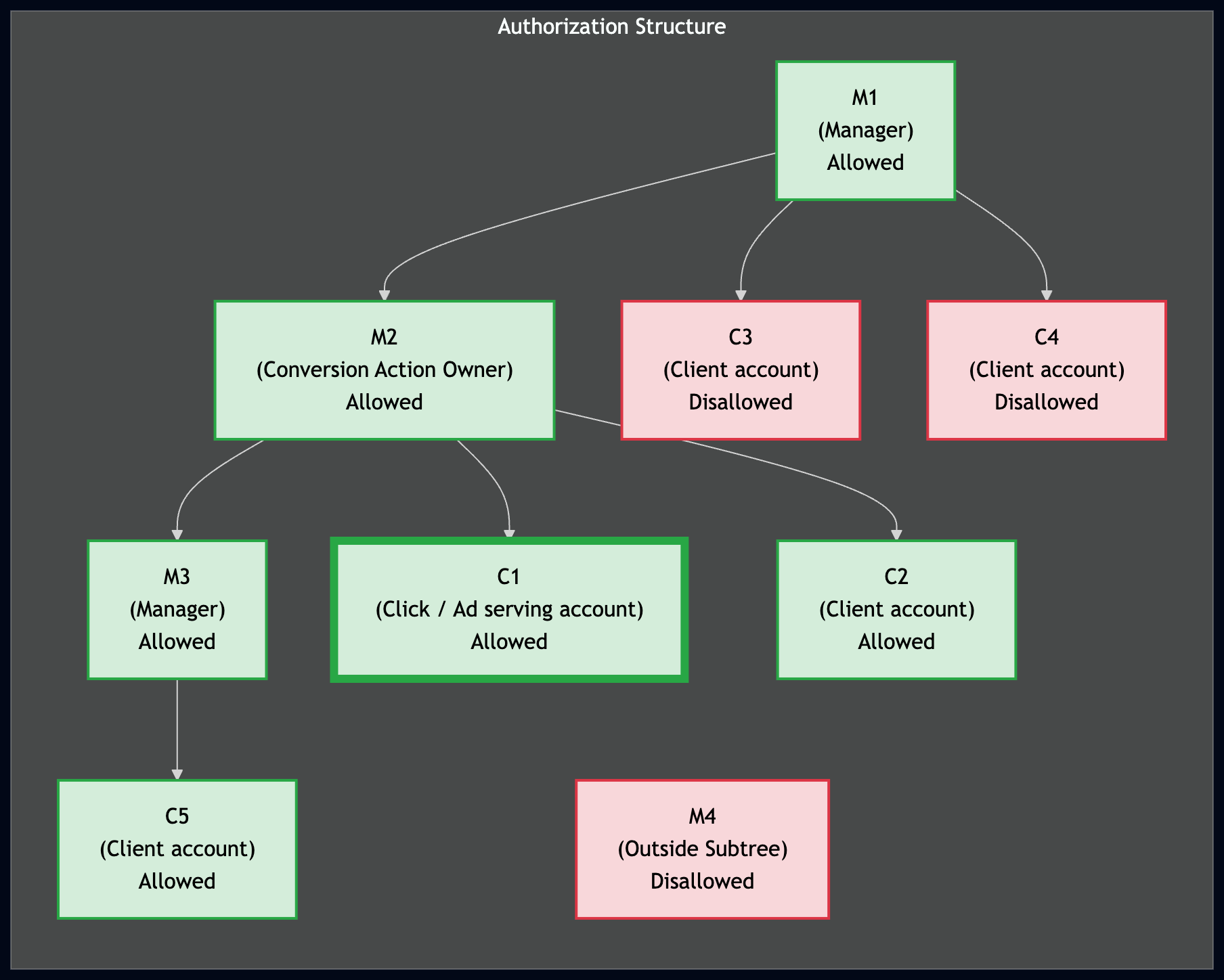
若要成功上传转化数据,上传账号必须有权访问相应转化操作。在跨账号跟踪层次结构中,如果上传账号是账号树中转化操作所有者的父级账号(经理账号)或后代账号,则该账号有权访问相应操作。
下图展示了导入转化数据的授权结构。其中,C1 是投放了促成转化的广告的客户账号,M2 是转化操作所有者,也是 C1 的转化跟踪父账号。以绿色突出显示的账号可以代表 C1 导入转化,而以红色突出显示的账号则不能。
创建转化操作
如需衡量转化,请为要跟踪的转化操作的type设置 ConversionAction。
例如,网上购买和来电咨询需要不同的转化操作。
在 API 中设置新转化操作的最佳方式是使用添加转化操作代码示例。该示例会为您处理所有后台身份验证任务,并引导您创建 ConversionAction。
大多数转化操作还需要您采取额外的步骤才能进行跟踪。例如,如需跟踪网站上的转化,您必须向网站上的转化页添加一段称为代码的代码段。如需详细了解其他转化操作类型的要求,请参阅我们的 Google Ads 帮助中心内关于转化类型的文章。
如果您使用的是跨账号转化跟踪,则 ConversionActionService 会返回以下转化操作:
- 相应账号用于跨账号转化跟踪的经理账号定义的所有转化操作
- 客户已积累统计信息的所有转化操作,包括系统定义的操作和由经理账号拥有的操作(即使该经理账号随后取消关联)
- 客户在自己的账号中定义的所有操作
- 在关联的 Google Analytics 媒体资源中创建的 Google Analytics 转化。
这包括未导入 Google Ads 的 Google Analytics 转化的操作,这些操作的状态为
HIDDEN。
代码示例
以下代码示例将引导您完成创建新转化操作的过程。具体而言,它会创建一个将 type 设置为 UPLOAD_CLICKS 的转化操作。它还会将 category 设置为 DEFAULT。
系统会应用以下默认设置:
Google Ads API 会自动设置
primary_for_goal字段,但您可以明确设置此字段,以控制转化操作在与转化目标结合使用时对账号中的报告和出价产生的影响。Google Ads API 会自动将
counting_type设置为MANY_PER_CLICK。如需了解详情,请参阅转化统计选项简介。Google Ads API 通过将
attribution_model_settings字段设置为AttributionModel的GOOGLE_SEARCH_ATTRIBUTION_DATA_DRIVEN值,将归因模型设置为以数据为依据。如需详细了解归因模型,请参阅归因模型简介。
Java
private void runExample(GoogleAdsClient googleAdsClient, long customerId) { // Creates a ConversionAction. ConversionAction conversionAction = ConversionAction.newBuilder() // Note that conversion action names must be unique. If a conversion action already // exists with the specified conversion_action_name the create operation will fail with // a ConversionActionError.DUPLICATE_NAME error. .setName("Earth to Mars Cruises Conversion #" + getPrintableDateTime()) .setCategory(ConversionActionCategory.DEFAULT) .setType(ConversionActionType.WEBPAGE) .setStatus(ConversionActionStatus.ENABLED) .setViewThroughLookbackWindowDays(15L) .setValueSettings( ValueSettings.newBuilder() .setDefaultValue(23.41) .setAlwaysUseDefaultValue(true) .build()) .build(); // Creates the operation. ConversionActionOperation operation = ConversionActionOperation.newBuilder().setCreate(conversionAction).build(); try (ConversionActionServiceClient conversionActionServiceClient = googleAdsClient.getLatestVersion().createConversionActionServiceClient()) { MutateConversionActionsResponse response = conversionActionServiceClient.mutateConversionActions( Long.toString(customerId), Collections.singletonList(operation)); System.out.printf("Added %d conversion actions:%n", response.getResultsCount()); for (MutateConversionActionResult result : response.getResultsList()) { System.out.printf( "New conversion action added with resource name: '%s'%n", result.getResourceName()); } } }
C#
public void Run(GoogleAdsClient client, long customerId) { // Get the ConversionActionService. ConversionActionServiceClient conversionActionService = client.GetService(Services.V25.ConversionActionService); // Note that conversion action names must be unique. // If a conversion action already exists with the specified name the create operation // will fail with a ConversionAction.DUPLICATE_NAME error. string ConversionActionName = "Earth to Mars Cruises Conversion #" + ExampleUtilities.GetRandomString(); // Add a conversion action. ConversionAction conversionAction = new ConversionAction() { Name = ConversionActionName, Category = ConversionActionCategory.Default, Type = ConversionActionType.Webpage, Status = ConversionActionStatus.Enabled, ViewThroughLookbackWindowDays = 15, ValueSettings = new ConversionAction.Types.ValueSettings() { DefaultValue = 23.41, AlwaysUseDefaultValue = true } }; // Create the operation. ConversionActionOperation operation = new ConversionActionOperation() { Create = conversionAction }; try { // Create the conversion action. MutateConversionActionsResponse response = conversionActionService.MutateConversionActions(customerId.ToString(), new ConversionActionOperation[] { operation }); // Display the results. foreach (MutateConversionActionResult newConversionAction in response.Results) { Console.WriteLine($"New conversion action with resource name = " + $"'{newConversionAction.ResourceName}' was added."); } } catch (GoogleAdsException e) { Console.WriteLine("Failure:"); Console.WriteLine($"Message: {e.Message}"); Console.WriteLine($"Failure: {e.Failure}"); Console.WriteLine($"Request ID: {e.RequestId}"); throw; } }
PHP
public static function runExample(GoogleAdsClient $googleAdsClient, int $customerId) { // Creates a conversion action. $conversionAction = new ConversionAction( [ // Note that conversion action names must be unique. // If a conversion action already exists with the specified conversion_action_name // the create operation will fail with a ConversionActionError.DUPLICATE_NAME error. 'name' => 'Earth to Mars Cruises Conversion #' . Helper::getPrintableDatetime(), 'category' => ConversionActionCategory::PBDEFAULT, 'type' => ConversionActionType::WEBPAGE, 'status' => ConversionActionStatus::ENABLED, 'view_through_lookback_window_days' => 15, 'value_settings' => new ValueSettings( [ 'default_value' => 23.41, 'always_use_default_value' => true ] ) ] ); // Creates a conversion action operation. $conversionActionOperation = new ConversionActionOperation(); $conversionActionOperation->setCreate($conversionAction); // Issues a mutate request to add the conversion action. $conversionActionServiceClient = $googleAdsClient->getConversionActionServiceClient(); $response = $conversionActionServiceClient->mutateConversionActions( MutateConversionActionsRequest::build($customerId, [$conversionActionOperation]) ); printf("Added %d conversion actions:%s", $response->getResults()->count(), PHP_EOL); foreach ($response->getResults() as $addedConversionAction) { /** * @var ConversionAction $addedConversionAction */ printf( "New conversion action added with resource name: '%s'%s", $addedConversionAction->getResourceName(), PHP_EOL ); } }
Python
def main(client: GoogleAdsClient, customer_id: str) -> None: conversion_action_service: ConversionActionServiceClient = ( client.get_service("ConversionActionService") ) # Create the operation. conversion_action_operation: ConversionActionOperation = client.get_type( "ConversionActionOperation" ) # Create conversion action. conversion_action: ConversionAction = conversion_action_operation.create # Note that conversion action names must be unique. If a conversion action # already exists with the specified conversion_action_name, the create # operation will fail with a ConversionActionError.DUPLICATE_NAME error. conversion_action.name = f"Earth to Mars Cruises Conversion {uuid.uuid4()}" conversion_action.type_ = ( client.enums.ConversionActionTypeEnum.UPLOAD_CLICKS ) conversion_action.category = ( client.enums.ConversionActionCategoryEnum.DEFAULT ) conversion_action.status = client.enums.ConversionActionStatusEnum.ENABLED conversion_action.view_through_lookback_window_days = 15 # Create a value settings object. value_settings: ConversionAction.ValueSettings = ( conversion_action.value_settings ) value_settings.default_value = 15.0 value_settings.always_use_default_value = True # Add the conversion action. conversion_action_response: MutateConversionActionsResponse = ( conversion_action_service.mutate_conversion_actions( customer_id=customer_id, operations=[conversion_action_operation], ) ) print( "Created conversion action " f'"{conversion_action_response.results[0].resource_name}".' )
Ruby
def add_conversion_action(customer_id) # GoogleAdsClient will read a config file from # ENV['HOME']/google_ads_config.rb when called without parameters client = Google::Ads::GoogleAds::GoogleAdsClient.new # Add a conversion action. conversion_action = client.resource.conversion_action do |ca| ca.name = "Earth to Mars Cruises Conversion #{(Time.new.to_f * 100).to_i}" ca.type = :UPLOAD_CLICKS ca.category = :DEFAULT ca.status = :ENABLED ca.view_through_lookback_window_days = 15 # Create a value settings object. ca.value_settings = client.resource.value_settings do |vs| vs.default_value = 15 vs.always_use_default_value = true end end # Create the operation. conversion_action_operation = client.operation.create_resource.conversion_action(conversion_action) # Add the ad group ad. response = client.service.conversion_action.mutate_conversion_actions( customer_id: customer_id, operations: [conversion_action_operation], ) puts "New conversion action with resource name = #{response.results.first.resource_name}." end
Perl
sub add_conversion_action { my ($api_client, $customer_id) = @_; # Note that conversion action names must be unique. # If a conversion action already exists with the specified conversion_action_name, # the create operation fails with error ConversionActionError.DUPLICATE_NAME. my $conversion_action_name = "Earth to Mars Cruises Conversion #" . uniqid(); # Create a conversion action. my $conversion_action = Google::Ads::GoogleAds::V25::Resources::ConversionAction->new({ name => $conversion_action_name, category => DEFAULT, type => WEBPAGE, status => ENABLED, viewThroughLookbackWindowDays => 15, valueSettings => Google::Ads::GoogleAds::V25::Resources::ValueSettings->new({ defaultValue => 23.41, alwaysUseDefaultValue => "true" })}); # Create a conversion action operation. my $conversion_action_operation = Google::Ads::GoogleAds::V25::Services::ConversionActionService::ConversionActionOperation ->new({create => $conversion_action}); # Add the conversion action. my $conversion_actions_response = $api_client->ConversionActionService()->mutate({ customerId => $customer_id, operations => [$conversion_action_operation]}); printf "New conversion action added with resource name: '%s'.\n", $conversion_actions_response->{results}[0]{resourceName}; return 1; }
curl
您可以在客户端库的“再营销”文件夹中以及代码示例集合中查看此示例:添加转化操作代码示例。
验证
Google Ads 和 Google Ads API 支持各种转化操作,因此一些验证规则会因操作的 type 而异。
创建转化操作时最常见的错误是DUPLICATE_NAME。请确保您为每个转化操作使用唯一的名称。
以下是有关设置 ConversionAction 字段的一些提示:
- 所有枚举字段
- 尝试将任何枚举字段设置为
UNKNOWN都会导致RequestError.INVALID_ENUM_VALUE错误。 app_idapp_id属性是不可变的,只能在创建新的应用转化时进行设置。attribution_model_settings- 如果将此属性设置为已弃用的选项,则会导致
CANNOT_SET_RULE_BASED_ATTRIBUTION_MODELS错误。 Google Ads 仅支持GOOGLE_ADS_LAST_CLICK和GOOGLE_SEARCH_ATTRIBUTION_DATA_DRIVEN。 click_through_lookback_window_days如果将此属性设置为允许范围以外的值,则会导致
RangeError.TOO_LOW或RangeError.TOO_HIGH错误。对于
AD_CALL或WEBSITE_CALL转化操作,此属性的值必须介于 1 天到 60 天之间。对于大多数其他转化操作,允许的范围为 1 到 90 天。include_in_conversions_metric在
create或update操作中设置此值会失败,并显示FieldError.IMMUTABLE_FIELD错误。请改为按照转化目标指南中的说明设置primary_for_goal。phone_call_duration_seconds尝试在非来电转化操作中设置此属性会导致
FieldError.VALUE_MUST_BE_UNSET错误。typetype属性是不可变的,只能在创建新转化时设置。如果更新转化操作时将
type设置为等于UNKNOWN,则会导致MutateError.MUTATE_NOT_ALLOWED错误。value_settingsWEBSITE_CALL或AD_CALL转化操作的value_settings必须将always_use_default_value设置为true。在创建或更新此值时指定false的值会导致INVALID_VALUE错误。view_through_lookback_window_days如果将此属性设置为允许范围以外的值,则会导致
RangeError.TOO_LOW或RangeError.TOO_HIGH错误。对于大多数转化操作,允许的范围为 1 到 30 天。此属性无法针对
AD_CALL或WEBSITE_CALL转化操作进行设置。指定值会导致VALUE_MUST_BE_UNSET错误。