

میتوانید از Google Ads API برای مدیریت تبدیلهای کلیک آنلاین در Google Ads استفاده کنید. تبدیلهای کلیک آنلاین به شما کمک میکند آگهیهایی را که منجر به فروش در دنیای آنلاین شدهاند، مثلاً ازطریق وبسایت، پیگیری کنید.
تبدیلهای آنلاین بااستفاده از برچسب Google ردیابی میشوند، اما میتوانید آنها را بااستفاده از Google Ads API اصلاح یا بهبود دهید.
اگر قبلاً برچسب Google را راهاندازی کردهاید و میخواهید تبدیلهای آنلاینتان را اصلاح کنید، صفحه اصلاحات تبدیل را ببینید. اگر برچسب Google را راهاندازی کردهاید و میخواهید تبدیلهای آنلاینتان را با دادههای ارائهشده توسط کاربر (که با نام تبدیلهای بهبودیافته برای وب نیز شناخته میشود) بهبود دهید، به خواندن ادامه دهید.
تبدیلهای بهبودیافته برای وب
بخش زیر نحوه بهبود تبدیلهای کلیک آنلاین را توضیح میدهد که با نام تبدیلهای بهبودیافته برای وب نیز شناخته میشود.
تبدیلهای بهبودیافته برای وب نیاز به راهاندازی برچسبی دارد که بهطور خودکار شناسه کلیک، مانند GCLID، و شناسه سفارش را هنگام تبدیل کاربر به Google Ads ارسال کند. میتوانید تبدیلهای بهبودیافته را ازطریق Google Tag Manager، برچسب Google، یا Google Ads API راهاندازی کنید. استفاده از Google Ads API به شما این مزیت را میدهد که دادههای تبدیل طرف اول را ظرف ۲۴ ساعت پساز رویداد تبدیل ارسال کنید، نه همزمان با آن. این کار امکان مکانیابی دادههای طرف اول را از منابع مختلفی مثل پایگاه داده مشتری یا سیستم CRM فراهم میکند.
نحوه عملکرد تبدیلهای بهبودیافته برای وب
تبدیلهای بهبودیافته برای وب در «میانای برنامهسازی کاربردی Google Ads» مرحله ۳ را در نمودار زیر تکمیل میکند. بهجای ارسال اطلاعات درهمسازیشده کاربر هنگام تبدیل کاربر، برچسب فقط GCLID و شناسه سفارش را ارسال میکند و شما اطلاعات درهمسازیشده کاربر را بعداً با وارد کردن شناسه سفارش همراه با دادههای درهمسازیشده ارسال میکنید. برای کسب اطلاعات بیشتر درباره تبدیلهای بهبودیافته برای وب، درباره تبدیلهای بهبودیافته را ببینید.
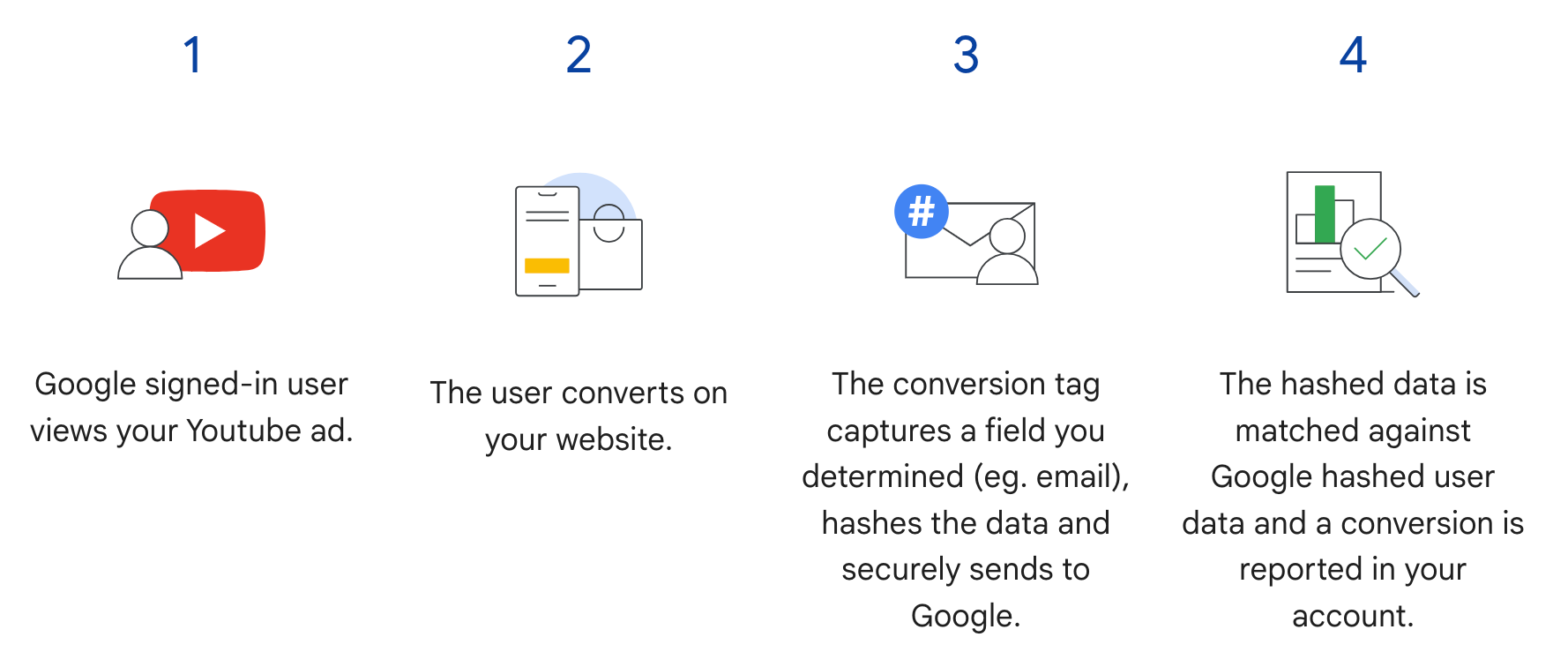
پیشنیازها
قبلاز اینکه بتوانید از تبدیلهای بهبودیافته برای وب استفاده کنید، باید شرایط دادههای مشتری را بپذیرید. با اجرای پُرسمان زیر در مشتری تبدیل Google Ads میتوانید تأیید کنید که شرایط دادههای مشتری پذیرفته شده است یا نه:
SELECT
  customer.id,
  customer.conversion_tracking_setting.accepted_customer_data_terms
FROM customer
اگر accepted_customer_data_terms، false است، دستورالعملهای
راهاندازی تبدیلهای بهبودیافته برای وب را دنبال کنید تا این
پیشنیاز را تکمیل کنید.
پیکربندی برچسبگذاری
با دنبال کردن دستورالعملهای راهاندازی تبدیلهای بهبودیافته برای وب بااستفاده از Google Ads API میتوانید برچسبگذاری را برای وبسایتتان پیکربندی کنید. توصیه میشود که برای کمک به مطابقت دادن تبدیل، شناسههای تراکنش (شناسههای سفارش) را نیز به برچسب ردگیری تبدیل خود اضافه کنید.
پیادهسازی میانای برنامهسازی کاربردی
جریان کلی برای وارد کردن تبدیلهای بهبودیافته برای وب در Google Ads API در اینجا آمده است.
دادههای ارائهشده توسط کاربر را نرمالسازی و درهمسازی کنید، مانند نشانی ایمیل، شماره تلفن، و نشانی پستی.
اشیاء
ConversionAdjustmentرا با دادههای ارائهشده توسط کاربر که نرمالسازی و درهمسازی شدهاند پر کنید.وارد کردن
ConversionAdjustmentهدف بهConversionAdjustmentUploadService.
نرمالسازی و درهمسازی دادههای ارائهشده توسط کاربر
بهدلیل ملاحظات حریم خصوصی، دادههای زیر باید قبلاز وارد شدن بااستفاده از SHA-256 درهمسازی شوند:
- نشانی ایمیل
- شماره تلفن
- نام
- نام خانوادگی
- نشانی خیابان
دادههای زیر را درهمسازی نکنید:
- کشور
- ایالت
- شهر
- کد پستی
برای استانداردسازی نتایج درهمسازی، قبلاز درهمسازی یکی از این مقادیر، کارهای زیر را انجام دهید:
- فاصلههای سفید اضافی در ابتدا و انتهای متن را بردارید.
- نوشتار را به حروف کوچک تبدیل کن.
- شماره تلفنها را طبق استاندارد E.164 قالببندی کنید.
قالببندی نشانی ایمیل برای تبدیلهای بهبودیافته
برای اطمینان از بالاترین نرخ مطابقت برای تبدیلهای بهسازیشده، باید نشانیهای ایمیل را بهدرستی قالببندی و درهمسازی کنید. برای این کار، مراحل زیر را دنبال کنید:
اعمال کردن عادیسازی استاندارد (همه نشانیهای ایمیل):
- هرگونه فاصله سفید ASCII در ابتدا و انتهای متن را حذف کنید.
- همه نویسههای نشانی ایمیل را به حروف کوچک تبدیل کنید.
اعمال نرمالسازی مختص دامنه (فقط
gmail.comوgooglemail.com):- پساز تبدیل نشانی ایمیل به حروف کوچک، بررسی کنید که آیا دامنه (بعداز نماد
@)gmail.comیاgooglemail.comاست. - حذف نقطهها (
.): از بخش نام کاربری (قبلاز نماد@)، همه نویسههای نقطه را حذف کنید. - برداشتن پسوندهای بهعلاوه (
+): از بخش نام کاربری، اولین علامت بهعلاوه (+) و همه نویسههای بعدی تا نماد@را بردارید.- مثال:
Jane.Doe+Shopping@googlemail.comابتدا بهjane.doe+shopping@googlemail.com(حروف کوچک) تبدیل میشود، و سپسjanedoe@googlemail.com(قوانین Gmail و Googlemail).
- مثال:
- دامنههای دیگر: برای هر دامنهای غیراز
gmail.comیاgooglemail.com، نقطهها یا پسوندهای بهعلاوه را از نام کاربری برندارید. فقط نرمالسازی استاندارد را اعمال کنید (فاصله سفید را کوتاه کنید و به حروف کوچک تبدیل کنید).- مثال:
user.name+NYC@Example.comبهuser.name+nyc@example.comنرمالسازی میشود.
- مثال:
- پساز تبدیل نشانی ایمیل به حروف کوچک، بررسی کنید که آیا دامنه (بعداز نماد
درهمسازی نشانی ایمیل نرمالسازیشده:
- رشته ایمیل نرمالشده را بهصورت بایتهای UTF-8 کدبندی کنید.
- بایتهای UTF-8 را بااستفاده از الگوریتم SHA-256 درهمسازی کنید.
- خلاصه حاصل را بهعنوان رشته شانزدهشانزدهی با حروف کوچک (۶۴ نویسه) قالببندی کنید.
import hashlib
import re


def normalize_and_hash_email(email: str) -> str:
    """Normalizes and SHA-256 hashes an email address for enhanced conversions."""
    normalized = email.strip().lower()
    parts = normalized.split("@")
    if len(parts) != 2:
        raise ValueError("Invalid email address format.")
    username, domain = parts
    if domain in ("gmail.com", "googlemail.com"):
        username = username.replace(".", "")
        username = re.sub(r"\+.*$", "", username)
    normalized = f"{username}@{domain}"
    return hashlib.sha256(normalized.encode("utf-8")).hexdigest()
نمونه کد
این مثال نشان میدهد که چگونه دادههای ارائهشده توسط کاربر را نرمالسازی و درهمسازی کنید.
جاوا
private String normalizeAndHash(MessageDigest digest, String s, boolean trimIntermediateSpaces) throws UnsupportedEncodingException { // Normalizes by first converting all characters to lowercase, then trimming spaces. String normalized = s.toLowerCase(); if (trimIntermediateSpaces) { // Removes leading, trailing, and intermediate spaces. normalized = normalized.replaceAll("\\s+", ""); } else { // Removes only leading and trailing spaces. normalized = normalized.trim(); } // Hashes the normalized string using the hashing algorithm. byte[] hash = digest.digest(normalized.getBytes("UTF-8")); StringBuilder result = new StringBuilder(); for (byte b : hash) { result.append(String.format("%02x", b)); } return result.toString(); } /** * Returns the result of normalizing and hashing an email address. For this use case, Google Ads * requires removal of any '.' characters or trailing '+' and characters that follow it from the * username portion of the email address if the domain is {@code gmail.com} or {@code * googlemail.com}. * * @param digest the digest to use to hash the normalized string. * @param emailAddress the email address to normalize and hash. */ private String normalizeAndHashEmailAddress(MessageDigest digest, String emailAddress) throws UnsupportedEncodingException { // Removes all whitespace (leading, trailing, and intermediate) from the email address. String normalizedEmail = emailAddress.toLowerCase().replaceAll("\\s+", ""); String[] emailParts = normalizedEmail.split("@", 2); if (emailParts.length == 2 && emailParts[1].matches("^(gmail|googlemail)\\.com$")) { // Removes any '.' characters from the portion of the email address before the domain if the // domain is gmail.com or googlemail.com. emailParts[0] = emailParts[0].replaceAll("\\.", ""); // Removes any '+' and all characters that follow it from the portion of the email address // before the domain if the domain is gmail.com or googlemail.com. emailParts[0] = emailParts[0].replaceAll("\\+.*", ""); normalizedEmail = String.format("%s@%s", emailParts[0], emailParts[1]); } return normalizeAndHash(digest, normalizedEmail, true); } /** * Returns the result of normalizing and hashing a phone number. For this use case, Google Ads * requires phone numbers to be in E.164 format. * * @param digest the digest to use to hash the normalized string. * @param phoneNumber the phone number to normalize and hash. */ private String normalizeAndHashPhoneNumber(MessageDigest digest, String phoneNumber) throws UnsupportedEncodingException { // Removes non-digit characters and prepends a leading '+' sign. String digitsOnly = phoneNumber.replaceAll("[^0-9]", ""); String formattedPhone = "+" + digitsOnly; if (!formattedPhone.matches("^\\+[1-9]\\d{6,14}$")) { throw new IllegalArgumentException("Phone number must be in E.164 format: " + phoneNumber); } return normalizeAndHash(digest, formattedPhone, true); }
C#
/// <summary> /// Normalizes the email address and hashes it. For this use case, Google Ads requires /// removal of any '.' characters preceding <code>gmail.com</code> or /// <code>googlemail.com</code>. /// </summary> /// <param name="emailAddress">The email address.</param> /// <returns>The hash code.</returns> private string NormalizeAndHashEmailAddress(string emailAddress) { string normalizedEmail = emailAddress.ToLower(); string[] emailParts = normalizedEmail.Split('@'); if (emailParts.Length > 1 && (emailParts[1] == "gmail.com" || emailParts[1] == "googlemail.com")) { // Removes any '.' characters from the portion of the email address before // the domain if the domain is gmail.com or googlemail.com. emailParts[0] = emailParts[0].Replace(".", ""); normalizedEmail = $"{emailParts[0]}@{emailParts[1]}"; } return NormalizeAndHash(normalizedEmail); } /// <summary> /// Normalizes and hashes a string value. /// </summary> /// <param name="value">The value to normalize and hash.</param> /// <returns>The normalized and hashed value.</returns> private static string NormalizeAndHash(string value) { return ToSha256String(digest, ToNormalizedValue(value)); } /// <summary> /// Hash a string value using SHA-256 hashing algorithm. /// </summary> /// <param name="digest">Provides the algorithm for SHA-256.</param> /// <param name="value">The string value (e.g. an email address) to hash.</param> /// <returns>The hashed value.</returns> private static string ToSha256String(SHA256 digest, string value) { byte[] digestBytes = digest.ComputeHash(Encoding.UTF8.GetBytes(value)); // Convert the byte array into an unhyphenated hexadecimal string. return BitConverter.ToString(digestBytes).Replace("-", string.Empty); } /// <summary> /// Removes leading and trailing whitespace and converts all characters to /// lower case. /// </summary> /// <param name="value">The value to normalize.</param> /// <returns>The normalized value.</returns> private static string ToNormalizedValue(string value) { return value.Trim().ToLower(); }
PHP
private static function normalizeAndHash( string $hashAlgorithm, string $value, bool $trimIntermediateSpaces ): string { // Normalizes by first converting all characters to lowercase, then trimming spaces. $normalized = strtolower($value); if ($trimIntermediateSpaces === true) { // Removes leading, trailing, and intermediate spaces. $normalized = str_replace(' ', '', $normalized); } else { // Removes only leading and trailing spaces. $normalized = trim($normalized); } return hash($hashAlgorithm, strtolower(trim($normalized))); } /** * Returns the result of normalizing and hashing an email address. For this use case, Google * Ads requires removal of any '.' characters preceding "gmail.com" or "googlemail.com". * * @param string $hashAlgorithm the hash algorithm to use * @param string $emailAddress the email address to normalize and hash * @return string the normalized and hashed email address */ private static function normalizeAndHashEmailAddress( string $hashAlgorithm, string $emailAddress ): string { $normalizedEmail = strtolower($emailAddress); $emailParts = explode("@", $normalizedEmail); if ( count($emailParts) > 1 && preg_match('/^(gmail|googlemail)\.com\s*/', $emailParts[1]) ) { // Removes any '.' characters from the portion of the email address before the domain // if the domain is gmail.com or googlemail.com. $emailParts[0] = str_replace(".", "", $emailParts[0]); $normalizedEmail = sprintf('%s@%s', $emailParts[0], $emailParts[1]); } return self::normalizeAndHash($hashAlgorithm, $normalizedEmail, true); }
Python
def normalize_and_hash_email_address(email_address): """Returns the result of normalizing and hashing an email address. For this use case, Google Ads requires removal of any '.' characters preceding "gmail.com" or "googlemail.com" Args: email_address: An email address to normalize. Returns: A normalized (lowercase, removed whitespace) and SHA-265 hashed string. """ normalized_email = email_address.strip().lower() email_parts = normalized_email.split("@") # Check that there are at least two segments if len(email_parts) > 1: # Removes any '.' and '+' characters from the portion of the email address # before the domain chars_to_remove = ".+" translation_table = str.maketrans("", "", chars_to_remove) email_parts[0] = email_parts[0].translate(translation_table) normalized_email = "@".join(email_parts) return normalize_and_hash(normalized_email) def normalize_and_hash(s): """Normalizes and hashes a string with SHA-256. Private customer data must be hashed during upload, as described at: https://support.google.com/google-ads/answer/9888656 Args: s: The string to perform this operation on. Returns: A normalized (lowercase, removed whitespace) and SHA-256 hashed string. """ return hashlib.sha256(s.strip().lower().encode()).hexdigest()
Ruby
# Returns the result of normalizing and then hashing the string using the # provided digest. Private customer data must be hashed during upload, as # described at https://support.google.com/google-ads/answer/9888656. def normalize_and_hash(str) # Remove leading and trailing whitespace and ensure all letters are lowercase # before hasing. Digest::SHA256.hexdigest(str.strip.downcase) end # Returns the result of normalizing and hashing an email address. For this use # case, Google Ads requires removal of any '.' characters preceding 'gmail.com' # or 'googlemail.com'. def normalize_and_hash_email(email) email_parts = email.downcase.split("@") # Removes any '.' characters from the portion of the email address before the # domain if the domain is gmail.com or googlemail.com. if email_parts.last =~ /^(gmail|googlemail)\.com\s*/ email_parts[0] = email_parts[0].gsub('.', '') end normalize_and_hash(email_parts.join('@')) end
پرل
sub normalize_and_hash { my $value = shift; my $trim_intermediate_spaces = shift; if ($trim_intermediate_spaces) { $value =~ s/\s+//g; } else { $value =~ s/^\s+|\s+$//g; } return sha256_hex(lc $value); } # Returns the result of normalizing and hashing an email address. For this use # case, Google Ads requires removal of any '.' characters preceding 'gmail.com' # or 'googlemail.com'. sub normalize_and_hash_email_address { my $email_address = shift; my $normalized_email = lc $email_address; my @email_parts = split('@', $normalized_email); if (scalar @email_parts > 1 && $email_parts[1] =~ /^(gmail|googlemail)\.com\s*/) { # Remove any '.' characters from the portion of the email address before the # domain if the domain is 'gmail.com' or 'googlemail.com'. $email_parts[0] =~ s/\.//g; $normalized_email = sprintf '%s@%s', $email_parts[0], $email_parts[1]; } return normalize_and_hash($normalized_email, 1); }
curl
پر کردن اشیای «تعدیل تبدیل»
بخش زیر نشان میدهد چگونه یک اصلاح بهبود
بسازید که حاوی شناسه سفارش، بهعلاوه شناسههای نشانی ایمیل، شماره تلفن، و
نشانی فیزیکی باشد، و استانداردسازی و درهمسازی درصورت نیاز اعمال شود. بهعنوان
روال مطلوب، درصورت دردسترس بودن، gclid را در اصلاح بگنجانید.
این مرحله تقریباً مشابه راهنمای وارد کردن اصلاحات تبدیل است، با چند نکته احتیاطی:
user_identifiersرا با دادههای کاربر نرمالسازیشده و درهمسازیشده تکمیل کنید. اگر چند شناسه کاربر دردسترس دارید، برای هرکدام یکUserIdentifierجداگانه ایجاد کنید (حداکثر پنج شناسه).
جاوا
// Creates a builder for constructing the enhancement adjustment. ConversionAdjustment.Builder enhancementBuilder = ConversionAdjustment.newBuilder().setAdjustmentType(ConversionAdjustmentType.ENHANCEMENT); // Extracts user email, phone, and address info from the raw data, normalizes and hashes it, // then wraps it in UserIdentifier objects. // Creates a separate UserIdentifier object for each. The data in this example is hardcoded, but // in your application you might read the raw data from an input file. // IMPORTANT: Since the identifier attribute of UserIdentifier // (https://developers.google.com/google-ads/api/reference/rpc/latest/UserIdentifier) is a // oneof // (https://protobuf.dev/programming-guides/proto3/#oneof-features), you must set only ONE of // hashedEmail, hashedPhoneNumber, mobileId, thirdPartyUserId, or addressInfo. Setting more // than one of these attributes on the same UserIdentifier will clear all the other members // of the oneof. For example, the following code is INCORRECT and will result in a // UserIdentifier with ONLY a hashedPhoneNumber. // // UserIdentifier incorrectlyPopulatedUserIdentifier = // UserIdentifier.newBuilder() // .setHashedEmail("...") // .setHashedPhoneNumber("...") // .build(); ImmutableMap.Builder<String, String> rawRecordBuilder = ImmutableMap.<String, String>builder() // Email address that includes a period (.) and plus (+) suffix before the Gmail domain. .put("email", "alex.2+myalias@gmail.com") // Address that includes all four required elements: first name, last name, country // code, and postal code. .put("firstName", "Alex") .put("lastName", "Quinn") .put("countryCode", "US") .put("postalCode", "94045") // Phone number to be converted to E.164 format, with a leading '+' as required. .put("phone", "+1 800-555-0102") // This example lets you put conversion details as arguments, but in reality you might // store this data alongside other user data, so we include it in this sample user // record. .put("orderId", orderId) .put("conversionActionId", Long.toString(conversionActionId)) .put("currencyCode", "USD"); // Adds entries for the optional fields. if (conversionDateTime != null) { rawRecordBuilder.put("conversionDateTime", conversionDateTime); } if (userAgent != null) { rawRecordBuilder.put("userAgent", userAgent); } // Builds the map representing the record. Map<String, String> rawRecord = rawRecordBuilder.build(); // Creates a SHA256 message digest for hashing user identifiers in a privacy-safe way, as // described at https://support.google.com/google-ads/answer/9888656. MessageDigest sha256Digest = MessageDigest.getInstance("SHA-256"); // Creates a list for the user identifiers. List<UserIdentifier> userIdentifiers = new ArrayList<>(); // Creates a user identifier using the hashed email address, using the normalize and hash method // specifically for email addresses. UserIdentifier emailIdentifier = UserIdentifier.newBuilder() // Optional: specify the user identifier source. .setUserIdentifierSource(UserIdentifierSource.FIRST_PARTY) // Uses the normalize and hash method specifically for email addresses. .setHashedEmail(normalizeAndHashEmailAddress(sha256Digest, rawRecord.get("email"))) .build(); userIdentifiers.add(emailIdentifier); // Checks if the record has a phone number, and if so, adds a UserIdentifier for it. if (rawRecord.containsKey("phone")) { UserIdentifier hashedPhoneNumberIdentifier = UserIdentifier.newBuilder() .setHashedPhoneNumber( normalizeAndHashPhoneNumber(sha256Digest, rawRecord.get("phone"))) .build(); // Adds the hashed phone number identifier to the UserData object's list. userIdentifiers.add(hashedPhoneNumberIdentifier); } // Checks if the record has all the required mailing address elements, and if so, adds a // UserIdentifier for the mailing address. if (rawRecord.containsKey("firstName")) { // Checks if the record contains all the other required elements of a mailing address. Set<String> missingAddressKeys = new HashSet<>(); for (String addressKey : new String[] {"lastName", "countryCode", "postalCode"}) { if (!rawRecord.containsKey(addressKey)) { missingAddressKeys.add(addressKey); } } if (!missingAddressKeys.isEmpty()) { System.out.printf( "Skipping addition of mailing address information because the following required keys" + " are missing: %s%n", missingAddressKeys); } else { // Creates an OfflineUserAddressInfo object that contains all the required elements of a // mailing address. OfflineUserAddressInfo addressInfo = OfflineUserAddressInfo.newBuilder() .setHashedFirstName( normalizeAndHash(sha256Digest, rawRecord.get("firstName"), false)) .setHashedLastName(normalizeAndHash(sha256Digest, rawRecord.get("lastName"), false)) .setCountryCode(rawRecord.get("countryCode")) .setPostalCode(rawRecord.get("postalCode")) .build(); UserIdentifier addressIdentifier = UserIdentifier.newBuilder().setAddressInfo(addressInfo).build(); // Adds the address identifier to the UserData object's list. userIdentifiers.add(addressIdentifier); } } // Adds the user identifiers to the enhancement adjustment. enhancementBuilder.addAllUserIdentifiers(userIdentifiers);
C#
// Normalize and hash the raw data, then wrap it in UserIdentifier objects. // Create a separate UserIdentifier object for each. The data in this example is // hardcoded, but in your application you might read the raw data from an input file. // // IMPORTANT: Since the identifier attribute of UserIdentifier // (https://developers.google.com/google-ads/api/reference/rpc/latest/UserIdentifier) // is a oneof // (https://protobuf.dev/programming-guides/proto3/#oneof-features), you must set // only ONE of hashed_email, hashed_phone_number, mobile_id, third_party_user_id, // or address-info. Setting more than one of these attributes on the same UserIdentifier // will clear all the other members of the oneof. For example, the following code is // INCORRECT and will result in a UserIdentifier with ONLY a hashed_phone_number: // UserIdentifier incorrectlyPopulatedUserIdentifier = new UserIdentifier() // { // HashedEmail = "..." // HashedPhoneNumber = "..." // } UserIdentifier addressIdentifier = new UserIdentifier() { AddressInfo = new OfflineUserAddressInfo() { HashedFirstName = NormalizeAndHash("Dana"), HashedLastName = NormalizeAndHash("Quinn"), HashedStreetAddress = NormalizeAndHash("1600 Amphitheatre Pkwy"), City = "Mountain View", State = "CA", PostalCode = "94043", CountryCode = "US" }, // Optional: Specifies the user identifier source. UserIdentifierSource = UserIdentifierSource.FirstParty }; // Creates a user identifier using the hashed email address. UserIdentifier emailIdentifier = new UserIdentifier() { UserIdentifierSource = UserIdentifierSource.FirstParty, // Uses the normalize and hash method specifically for email addresses. HashedEmail = NormalizeAndHashEmailAddress("dana@example.com") }; // Adds the user identifiers to the enhancement adjustment. enhancement.UserIdentifiers.AddRange(new[] { addressIdentifier, emailIdentifier });
PHP
// Creates the conversion enhancement. $enhancement = new ConversionAdjustment(['adjustment_type' => ConversionAdjustmentType::ENHANCEMENT]); // Extracts user email, phone, and address info from the raw data, normalizes and hashes it, // then wraps it in UserIdentifier objects. // Creates a separate UserIdentifier object for each. The data in this example is hardcoded, // but in your application you might read the raw data from an input file. // IMPORTANT: Since the identifier attribute of UserIdentifier // (https://developers.google.com/google-ads/api/reference/rpc/latest/UserIdentifier) is a // oneof // (https://protobuf.dev/programming-guides/proto3/#oneof-features), you must set only ONE // of hashedEmail, hashedPhoneNumber, mobileId, thirdPartyUserId, or addressInfo. Setting // more than one of these attributes on the same UserIdentifier will clear all the other // members of the oneof. For example, the following code is INCORRECT and will result in a // UserIdentifier with ONLY a hashedPhoneNumber. // // $incorrectlyPopulatedUserIdentifier = new UserIdentifier([ // 'hashed_email' => '...', // 'hashed_phone_number' => '...' // ]); $rawRecord = [ // Email address that includes a period (.) before the Gmail domain. 'email' => 'alex.2@example.com', // Address that includes all four required elements: first name, last name, country // code, and postal code. 'firstName' => 'Alex', 'lastName' => 'Quinn', 'countryCode' => 'US', 'postalCode' => '94045', // Phone number to be converted to E.164 format, with a leading '+' as required. 'phone' => '+1 800 5550102', // This example lets you input conversion details as arguments, but in reality you might // store this data alongside other user data, so we include it in this sample user // record. 'orderId' => $orderId, 'conversionActionId' => $conversionActionId, 'conversionDateTime' => $conversionDateTime, 'currencyCode' => 'USD' ]; // Creates a list for the user identifiers. $userIdentifiers = []; // Uses the SHA-256 hash algorithm for hashing user identifiers in a privacy-safe way, as // described at https://support.google.com/google-ads/answer/9888656. $hashAlgorithm = "sha256"; // Creates a user identifier using the hashed email address, using the normalize and hash // method specifically for email addresses. $emailIdentifier = new UserIdentifier( [ // Uses the normalize and hash method specifically for email addresses. 'hashed_email' => self::normalizeAndHashEmailAddress( $hashAlgorithm, $rawRecord['email'] ), // Optional: Specifies the user identifier source. 'user_identifier_source' => UserIdentifierSource::FIRST_PARTY ] ); $userIdentifiers[] = $emailIdentifier; // Checks if the record has a phone number, and if so, adds a UserIdentifier for it. if (array_key_exists('phone', $rawRecord)) { $hashedPhoneNumberIdentifier = new UserIdentifier( [ 'hashed_phone_number' => self::normalizeAndHash( $hashAlgorithm, $rawRecord['phone'], true ) ] ); // Adds the hashed email identifier to the user identifiers list. $userIdentifiers[] = $hashedPhoneNumberIdentifier; } // Checks if the record has all the required mailing address elements, and if so, adds a // UserIdentifier for the mailing address. if (array_key_exists('firstName', $rawRecord)) { // Checks if the record contains all the other required elements of a mailing // address. $missingAddressKeys = []; foreach (['lastName', 'countryCode', 'postalCode'] as $addressKey) { if (!array_key_exists($addressKey, $rawRecord)) { $missingAddressKeys[] = $addressKey; } } if (!empty($missingAddressKeys)) { printf( "Skipping addition of mailing address information because the " . "following required keys are missing: %s%s", json_encode($missingAddressKeys), PHP_EOL ); } else { // Creates an OfflineUserAddressInfo object that contains all the required // elements of a mailing address. $addressIdentifier = new UserIdentifier( [ 'address_info' => new OfflineUserAddressInfo( [ 'hashed_first_name' => self::normalizeAndHash( $hashAlgorithm, $rawRecord['firstName'], false ), 'hashed_last_name' => self::normalizeAndHash( $hashAlgorithm, $rawRecord['lastName'], false ), 'country_code' => $rawRecord['countryCode'], 'postal_code' => $rawRecord['postalCode'] ] ) ] ); // Adds the address identifier to the user identifiers list. $userIdentifiers[] = $addressIdentifier; } } // Adds the user identifiers to the conversion. $enhancement->setUserIdentifiers($userIdentifiers);
Python
# Extracts user email, phone, and address info from the raw data, normalizes # and hashes it, then wraps it in UserIdentifier objects. Creates a separate # UserIdentifier object for each. The data in this example is hardcoded, but # in your application you might read the raw data from an input file. # IMPORTANT: Since the identifier attribute of UserIdentifier # (https://developers.google.com/google-ads/api/reference/rpc/latest/UserIdentifier) # is a oneof # (https://protobuf.dev/programming-guides/proto3/#oneof-features), you must # set only ONE of hashed_email, hashed_phone_number, mobile_id, # third_party_user_id, or address_info. Setting more than one of these # attributes on the same UserIdentifier will clear all the other members of # the oneof. For example, the following code is INCORRECT and will result in # a UserIdentifier with ONLY a hashed_phone_number: # # incorrectly_populated_user_identifier = client.get_type("UserIdentifier") # incorrectly_populated_user_identifier.hashed_email = "..."" # incorrectly_populated_user_identifier.hashed_phone_number = "..."" raw_record = { # Email address that includes a period (.) before the Gmail domain. "email": "alex.2@example.com", # Address that includes all four required elements: first name, last # name, country code, and postal code. "first_name": "Alex", "last_name": "Quinn", "country_code": "US", "postal_code": "94045", # Phone number to be converted to E.164 format, with a leading '+' as # required. "phone": "+1 800 5550102", # This example lets you input conversion details as arguments, but in # reality you might store this data alongside other user data, so we # include it in this sample user record. "order_id": order_id, "conversion_action_id": conversion_action_id, "conversion_date_time": conversion_date_time, "currency_code": "USD", "user_agent": user_agent, } # Constructs the enhancement adjustment. conversion_adjustment = client.get_type("ConversionAdjustment") conversion_adjustment.adjustment_type = ( client.enums.ConversionAdjustmentTypeEnum.ENHANCEMENT ) # Creates a user identifier using the hashed email address, using the # normalize and hash method specifically for email addresses. email_identifier = client.get_type("UserIdentifier") # Optional: Specifies the user identifier source. email_identifier.user_identifier_source = ( client.enums.UserIdentifierSourceEnum.FIRST_PARTY ) # Uses the normalize and hash method specifically for email addresses. email_identifier.hashed_email = normalize_and_hash_email_address( raw_record["email"] ) # Adds the email identifier to the conversion adjustment. conversion_adjustment.user_identifiers.append(email_identifier) # Checks if the record has a phone number, and if so, adds a UserIdentifier # for it. if raw_record.get("phone") is not None: phone_identifier = client.get_type("UserIdentifier") phone_identifier.hashed_phone_number = normalize_and_hash( raw_record["phone"] ) # Adds the phone identifier to the conversion adjustment. conversion_adjustment.user_identifiers.append(phone_identifier) # Checks if the record has all the required mailing address elements, and if # so, adds a UserIdentifier for the mailing address. if raw_record.get("first_name") is not None: # Checks if the record contains all the other required elements of a # mailing address. required_keys = ["last_name", "country_code", "postal_code"] # Builds a new list of the required keys that are missing from # raw_record. missing_keys = [ key for key in required_keys if key not in raw_record.keys() ] if len(missing_keys) > 0: print( "Skipping addition of mailing address information because the" f"following required keys are missing: {missing_keys}" ) else: # Creates a user identifier using sample values for the user address, # hashing where required. address_identifier = client.get_type("UserIdentifier") address_info = address_identifier.address_info address_info.hashed_first_name = normalize_and_hash( raw_record["first_name"] ) address_info.hashed_last_name = normalize_and_hash( raw_record["last_name"] ) address_info.country_code = raw_record["country_code"] address_info.postal_code = raw_record["postal_code"] # Adds the address identifier to the conversion adjustment. conversion_adjustment.user_identifiers.append(address_identifier)
Ruby
# Extracts user email, phone, and address info from the raw data, normalizes # and hashes it, then wraps it in UserIdentifier objects. Creates a separate # UserIdentifier object for each. The data in this example is hardcoded, but # in your application you might read the raw data from an input file. # IMPORTANT: Since the identifier attribute of UserIdentifier # (https://developers.google.com/google-ads/api/reference/rpc/latest/UserIdentifier) # is a oneof # (https://protobuf.dev/programming-guides/proto3/#oneof-features), you must # set only ONE of hashed_email, hashed_phone_number, mobile_id, # third_party_user_id, or address_info. Setting more than one of these # attributes on the same UserIdentifier will clear all the other members of # the oneof. For example, the following code is INCORRECT and will result in # a UserIdentifier with ONLY a hashed_phone_number: # # incorrectly_populated_user_identifier.hashed_email = "..."" # incorrectly_populated_user_identifier.hashed_phone_number = "..."" raw_record = { # Email address that includes a period (.) before the Gmail domain. "email" => "alex.2@example.com", # Address that includes all four required elements: first name, last # name, country code, and postal code. "first_name" => "Alex", "last_name" => "Quinn", "country_code" => "US", "postal_code" => "94045", # Phone number to be converted to E.164 format, with a leading '+' as # required. "phone" => "+1 800 5550102", # This example lets you input conversion details as arguments, but in # reality you might store this data alongside other user data, so we # include it in this sample user record. "order_id" => order_id, "conversion_action_id" => conversion_action_id, "conversion_date_time" => conversion_date_time, "currency_code" => "USD", "user_agent" => user_agent, } enhancement = client.resource.conversion_adjustment do |ca| ca.conversion_action = client.path.conversion_action(customer_id, conversion_action_id) ca.adjustment_type = :ENHANCEMENT ca.order_id = order_id # Sets the conversion date and time if provided. Providing this value is # optional but recommended. unless conversion_date_time.nil? ca.gclid_date_time_pair = client.resource.gclid_date_time_pair do |pair| pair.conversion_date_time = conversion_date_time end end # Creates a user identifier using the hashed email address, using the # normalize and hash method specifically for email addresses. ca.user_identifiers << client.resource.user_identifier do |ui| # Uses the normalize and hash method specifically for email addresses. ui.hashed_email = normalize_and_hash_email(raw_record["email"]) # Optional: Specifies the user identifier source. ui.user_identifier_source = :FIRST_PARTY end # Checks if the record has a phone number, and if so, adds a UserIdentifier # for it. unless raw_record["phone"].nil? ca.user_identifiers << client.resource.user_identifier do |ui| ui.hashed_phone_number = normalize_and_hash_email(raw_record["phone"]) end end # Checks if the record has all the required mailing address elements, and if # so, adds a UserIdentifier for the mailing address. unless raw_record["first_name"].nil? # Checks if the record contains all the other required elements of a # mailing address. required_keys = ["last_name", "country_code", "postal_code"] # Builds a new list of the required keys that are missing from # raw_record. missing_keys = required_keys - raw_record.keys if missing_keys puts( "Skipping addition of mailing address information because the" \ "following required keys are missing: #{missing_keys}" ) else ca.user_identifiers << client.resource.user_identifier do |ui| ui.address_info = client.resource.offline_user_address_info do |info| # Certain fields must be hashed using SHA256 in order to handle # identifiers in a privacy-safe way, as described at # https://support.google.com/google-ads/answer/9888656. info.hashed_first_name = normalize_and_hash( raw_record["first_name"]) info.hashed_last_name = normalize_and_hash( raw_record["last_name"]) info.postal_code = normalize_and_hash(raw_record["country_code"]) info.country_code = normalize_and_hash(raw_record["postal_code"]) end end end end
پرل
# Construct the enhancement adjustment. my $enhancement = Google::Ads::GoogleAds::V26::Services::ConversionAdjustmentUploadService::ConversionAdjustment ->new({ adjustmentType => ENHANCEMENT }); # Extract user email, phone, and address info from the raw data, # normalize and hash it, then wrap it in UserIdentifier objects. # Create a separate UserIdentifier object for each. # The data in this example is hardcoded, but in your application # you might read the raw data from an input file. # # IMPORTANT: Since the identifier attribute of UserIdentifier # (https://developers.google.com/google-ads/api/reference/rpc/latest/UserIdentifier) # is a oneof # (https://protobuf.dev/programming-guides/proto3/#oneof-features), you must set # only ONE of hashed_email, hashed_phone_number, mobile_id, third_party_user_id, # or address-info. Setting more than one of these attributes on the same UserIdentifier # will clear all the other members of the oneof. For example, the following code is # INCORRECT and will result in a UserIdentifier with ONLY a hashed_phone_number: # # my $incorrect_user_identifier = Google::Ads::GoogleAds::V26::Common::UserIdentifier->new({ # hashedEmail => '...', # hashedPhoneNumber => '...', # }); my $raw_record = { # Email address that includes a period (.) before the Gmail domain. email => 'alex.2@example.com', # Address that includes all four required elements: first name, last # name, country code, and postal code. firstName => 'Alex', lastName => 'Quinn', countryCode => 'US', postalCode => '94045', # Phone number to be converted to E.164 format, with a leading '+' as # required. phone => '+1 800 5550102', # This example lets you input conversion details as arguments, # but in reality you might store this data alongside other user data, # so we include it in this sample user record. orderId => $order_id, conversionActionId => $conversion_action_id, conversionDateTime => $conversion_date_time, currencyCode => "USD", userAgent => $user_agent, }; my $user_identifiers = []; # Create a user identifier using the hashed email address, using the normalize # and hash method specifically for email addresses. my $hashed_email = normalize_and_hash_email_address($raw_record->{email}); push( @$user_identifiers, Google::Ads::GoogleAds::V26::Common::UserIdentifier->new({ hashedEmail => $hashed_email, # Optional: Specify the user identifier source. userIdentifierSource => FIRST_PARTY })); # Check if the record has a phone number, and if so, add a UserIdentifier for it. if (defined $raw_record->{phone}) { # Add the hashed phone number identifier to the list of UserIdentifiers. push( @$user_identifiers, Google::Ads::GoogleAds::V26::Common::UserIdentifier->new({ hashedPhoneNumber => normalize_and_hash($raw_record->{phone}, 1)})); } # Confirm the record has all the required mailing address elements, and if so, add # a UserIdentifier for the mailing address. if (defined $raw_record->{firstName}) { my $required_keys = ["lastName", "countryCode", "postalCode"]; my $missing_keys = []; foreach my $key (@$required_keys) { if (!defined $raw_record->{$key}) { push(@$missing_keys, $key); } } if (@$missing_keys) { print "Skipping addition of mailing address information because the following" . "keys are missing: " . join(",", @$missing_keys); } else { push( @$user_identifiers, Google::Ads::GoogleAds::V26::Common::UserIdentifier->new({ addressInfo => Google::Ads::GoogleAds::V26::Common::OfflineUserAddressInfo->new({ # First and last name must be normalized and hashed. hashedFirstName => normalize_and_hash($raw_record->{firstName}), hashedLastName => normalize_and_hash($raw_record->{lastName}), # Country code and zip code are sent in plain text. countryCode => $raw_record->{countryCode}, postalCode => $raw_record->{postalCode}, })})); } } # Add the user identifiers to the enhancement adjustment. $enhancement->{userIdentifiers} = $user_identifiers;
curl
order_id،adjustment_type(ENHANCEMENT)، وconversion_action(WEBPAGE)، بههمراهgclid_date_time_pairاختیاری (قالببندیشده بهصورتyyyy-mm-dd HH:mm:ss+|-HH:mm، برای مثال:2022-01-01 19:32:45-05:00(صرفنظر از ساعت تابستانی) ) وuser_agentرا تنظیم کنید:
جاوا
// Sets the conversion action. enhancementBuilder.setConversionAction( ResourceNames.conversionAction( customerId, Long.parseLong(rawRecord.get("conversionActionId")))); // Sets the order ID. Enhancements MUST use order ID instead of GCLID date/time pair. enhancementBuilder.setOrderId(rawRecord.get("orderId")); // Sets the conversion date and time if provided. Providing this value is optional but // recommended. if (rawRecord.containsKey("conversionDateTime")) { enhancementBuilder.setGclidDateTimePair( GclidDateTimePair.newBuilder() .setConversionDateTime(rawRecord.get("conversionDateTime"))); } // Sets the user agent if provided. This should match the user agent of the request that sent // the original conversion so the conversion and its enhancement are either both attributed as // same-device or both attributed as cross-device. if (rawRecord.containsKey("userAgent")) { enhancementBuilder.setUserAgent(rawRecord.get("userAgent")); }
C#
// Set the conversion action. enhancement.ConversionAction = ResourceNames.ConversionAction(customerId, conversionActionId); // Set the order ID. Enhancements MUST use order ID instead of GCLID date/time pair. enhancement.OrderId = orderId; // Sets the conversion date and time if provided. Providing this value is optional but // recommended. if (string.IsNullOrEmpty(conversionDateTime)) { enhancement.GclidDateTimePair = new GclidDateTimePair() { ConversionDateTime = conversionDateTime }; } // Sets optional fields where a value was provided. if (!string.IsNullOrEmpty(userAgent)) { // Sets the user agent. This should match the user agent of the request that // sent the original conversion so the conversion and its enhancement are either // both attributed as same-device or both attributed as cross-device. enhancement.UserAgent = userAgent; }
PHP
// Sets the conversion action. $enhancement->setConversionAction( ResourceNames::forConversionAction($customerId, $rawRecord['conversionActionId']) ); // Sets the order ID. Enhancements MUST use order ID instead of GCLID date/time pair. if (!empty($rawRecord['orderId'])) { $enhancement->setOrderId($rawRecord['orderId']); } // Sets the conversion date and time if provided. Providing this value is optional but // recommended. if (!empty($rawRecord['conversionDateTime'])) { // Sets the conversion date and time if provided. Providing this value is optional but // recommended. $enhancement->setGclidDateTimePair( new GclidDateTimePair( [ 'conversion_date_time' => $rawRecord['conversionDateTime'] ] ) ); } // Sets the user agent if provided. This should match the user agent of the request that // sent the original conversion so the conversion and its enhancement are either both // attributed as same-device or both attributed as cross-device. if (!empty($rawRecord['userAgent'])) { $enhancement->setUserAgent($rawRecord['userAgent']); }
Python
conversion_action_service = client.get_service("ConversionActionService") # Sets the conversion action. conversion_adjustment.conversion_action = ( conversion_action_service.conversion_action_path( customer_id, raw_record["conversion_action_id"] ) ) # Sets the order ID. Enhancements MUST use order ID instead of GCLID # date/time pair. conversion_adjustment.order_id = order_id # Sets the conversion date and time if provided. Providing this value is # optional but recommended. if raw_record.get("conversion_date_time"): conversion_adjustment.gclid_date_time_pair.conversion_date_time = ( raw_record["conversion_date_time"] ) # Sets optional fields where a value was provided if raw_record.get("user_agent"): # Sets the user agent. This should match the user agent of the request # that sent the original conversion so the conversion and its # enhancement are either both attributed as same-device or both # attributed as cross-device. conversion_adjustment.user_agent = user_agent
Ruby
ca.conversion_action = client.path.conversion_action(customer_id, conversion_action_id) ca.adjustment_type = :ENHANCEMENT ca.order_id = order_id # Sets the conversion date and time if provided. Providing this value is # optional but recommended. unless conversion_date_time.nil? ca.gclid_date_time_pair = client.resource.gclid_date_time_pair do |pair| pair.conversion_date_time = conversion_date_time end end # Creates a user identifier using the hashed email address, using the # normalize and hash method specifically for email addresses. ca.user_identifiers << client.resource.user_identifier do |ui| # Uses the normalize and hash method specifically for email addresses. ui.hashed_email = normalize_and_hash_email(raw_record["email"]) # Optional: Specifies the user identifier source. ui.user_identifier_source = :FIRST_PARTY end # Checks if the record has a phone number, and if so, adds a UserIdentifier # for it. unless raw_record["phone"].nil? ca.user_identifiers << client.resource.user_identifier do |ui| ui.hashed_phone_number = normalize_and_hash_email(raw_record["phone"]) end end # Checks if the record has all the required mailing address elements, and if # so, adds a UserIdentifier for the mailing address. unless raw_record["first_name"].nil? # Checks if the record contains all the other required elements of a # mailing address. required_keys = ["last_name", "country_code", "postal_code"] # Builds a new list of the required keys that are missing from # raw_record. missing_keys = required_keys - raw_record.keys if missing_keys puts( "Skipping addition of mailing address information because the" \ "following required keys are missing: #{missing_keys}" ) else ca.user_identifiers << client.resource.user_identifier do |ui| ui.address_info = client.resource.offline_user_address_info do |info| # Certain fields must be hashed using SHA256 in order to handle # identifiers in a privacy-safe way, as described at # https://support.google.com/google-ads/answer/9888656. info.hashed_first_name = normalize_and_hash( raw_record["first_name"]) info.hashed_last_name = normalize_and_hash( raw_record["last_name"]) info.postal_code = normalize_and_hash(raw_record["country_code"]) info.country_code = normalize_and_hash(raw_record["postal_code"]) end end end end # Sets optional fields where a value was provided. unless user_agent.nil? # Sets the user agent. This should match the user agent of the request # that sent the original conversion so the conversion and its enhancement # are either both attributed as same-device or both attributed as # cross-device. ca.user_agent = user_agent end
پرل
# Set the conversion action. $enhancement->{conversionAction} = Google::Ads::GoogleAds::V26::Utils::ResourceNames::conversion_action( $customer_id, $raw_record->{conversionActionId}); # Set the order ID. Enhancements MUST use order ID instead of GCLID date/time pair. $enhancement->{orderId} = $raw_record->{orderId}; # Set the conversion date and time if provided. Providing this value is optional # but recommended. if (defined $raw_record->{conversionDateTime}) { $enhancement->{gclidDateTimePair} = Google::Ads::GoogleAds::V26::Services::ConversionAdjustmentUploadService::GclidDateTimePair ->new({ conversionDateTime => $raw_record->{conversionDateTime}}); } # Set the user agent if provided. This should match the user agent of the # request that sent the original conversion so the conversion and its enhancement # are either both attributed as same-device or both attributed as cross-device. if (defined $raw_record->{userAgent}) { $enhancement->{userAgent} = $raw_record->{userAgent}; }
curl
خلاصه طرحواره Request و ConversionAdjustment
جدولهای زیر فیلدهای سطح بالا را در
UploadConversionAdjustmentsRequest
و فیلدهای هر مورد را در ConversionAdjustment
(conversion_adjustments[]) هنگام بارگذاری تبدیلهای بهبودیافته برای وب بااستفاده از
ConversionAdjustmentUploadService.UploadConversionAdjustments خلاصه میکند:
| فیلد درخواست | الزام | قالب و محدودیتها |
|---|---|---|
customer_id |
الزامی | روی شناسه مشتری تبدیل Google Ads (google_ads_conversion_customer در customer.conversion_tracking_setting) بدون خط تیره تنظیم شده است. |
conversion_adjustments[] |
الزامی | حداکثر ۲٬۰۰۰ ورودی ConversionAdjustment در هر درخواست (TOO_MANY_ADJUSTMENTS_IN_REQUEST). |
partial_failure |
الزامی | باید روی true تنظیم شود تا اصلاحات معتبر پردازش شوند و خطاهای سطح ردیف در partial_failure_error برگردانده شوند. |
validate_only |
اختیاری | وقتی true، درخواست را بدون اجرای اصلاحات اعتبارسنجی میکند. |
job_id |
اختیاری | مثبت int32 (1 تا 2^31 - 1؛ 0 نگهبان تنظیمنشده است و درصورت مشخص شدن، INVALID_JOB_ID را برمیگرداند) برای گروهبندی چندین درخواست تحت یک کار منطقی در job_summaries. |
هر ConversionAdjustment در
conversion_adjustments[] (حداکثر ۲۰۰۰ اصلاح در هر درخواست) از فیلدهای زیر پشتیبانی میکند:
ConversionAdjustment فیلد |
الزام | قالب و محدودیتها |
|---|---|---|
adjustment_type |
الزامی | باید روی ENHANCEMENT (ConversionAdjustmentType) تنظیم شود. |
conversion_action |
الزامی | نام منبع (customers/{conversion_customer_id}/conversionActions/{action_id}) کنش تبدیل ENABLED با type = WEBPAGE که حداقل ۶ ساعت قبلاز بارگذاری (TOO_RECENT_CONVERSION_ACTION) ایجاد شده است. |
order_id |
الزامی | شناسه تراکنش تبدیل برای بهبود؛ باید با شناسه سفارشی که توسط برچسب تبدیل وبسایت ارسال شده است مطابقت داشته باشد. |
user_identifiers[] |
الزامی | یک تا پنج شیء UserIdentifier در هر بهبود. user_identifier_source اختیاری (مثل FIRST_PARTY) و یک شناسه برای هر ورودی تنظیم کنید:• hashed_email: رشته شانزدهشانزدهی SHA-256.• hashed_phone_number: E.164 رشته هگز SHA-256.• address_info: OfflineUserAddressInfo با درهمسازی SHA-256 hashed_first_name، hashed_last_name، hashed_street_address، و درهمسازینشده city، state، country_code، postal_code. |
gclid_date_time_pair |
اختیاری (توصیهشده) | GclidDateTimePair حاوی gclid و conversion_date_time (
yyyy-mm-dd HH:mm:ss+|-HH:mm، برای مثال: 2022-01-01 19:32:45-05:00 (بدون درنظر گرفتن ساعت تابستانی)
، برای مثال، 2026-06-01 14:30:00-04:00) تبدیل اصلی. تبدیلهای قدیمیتر از ۵۴ روز را نمیتوان اصلاح کرد (CONVERSION_EXPIRED). |
adjustment_date_time |
اختیاری | مُهر زمان (
yyyy-mm-dd HH:mm:ss+|-HH:mm، برای مثال: 2022-01-01 19:32:45-05:00 (بدون درنظر گرفتن ساعت تابستانی)
) زمان وقوع اصلاح؛ اگر تنظیم شده باشد، باید بعداز conversion_date_time باشد. |
user_agent |
اختیاری | رشته سرصفحه HTTP User-Agent از درخواست تبدیل اصلی تا تبدیل و بهبوددهی دارای اسناد دستگاه یکسان باشند (same-device یا cross-device). |
restatement_value |
در ENHANCEMENT تنظیم نشود |
وقتی adjustment_type ENHANCEMENT باشد، نادیده گرفته میشود. برای تغییر مقدار تبدیل، عملیات جداگانهای با adjustment_type = RESTATEMENT ارسال کنید. |
وارد کردن بهبودهای تبدیل
جاوا
// Creates the conversion adjustment upload service client. try (ConversionAdjustmentUploadServiceClient conversionUploadServiceClient = googleAdsClient.getLatestVersion().createConversionAdjustmentUploadServiceClient()) { // Uploads the enhancement adjustment. Partial failure should always be set to true. // NOTE: This request contains a single adjustment as a demonstration. However, if you have // multiple adjustments to upload, it's best to upload multiple adjustments per request // instead of sending a separate request per adjustment. See the following for per-request // limits: // https://developers.google.com/google-ads/api/docs/best-practices/quotas#conversion_adjustment_upload_service UploadConversionAdjustmentsResponse response = conversionUploadServiceClient.uploadConversionAdjustments( UploadConversionAdjustmentsRequest.newBuilder() .setCustomerId(Long.toString(customerId)) .addConversionAdjustments(enhancementBuilder) // Enables partial failure (must be true). .setPartialFailure(true) .build());
C#
// Uploads the enhancement adjustment. Partial failure should always be set to true. // // NOTE: This request contains a single adjustment as a demonstration. // However, if you have multiple adjustments to upload, it's best to upload // multiple adjustmenst per request instead of sending a separate request per // adjustment. See the following for per-request limits: // https://developers.google.com/google-ads/api/docs/best-practices/quotas#conversion_adjust UploadConversionAdjustmentsResponse response = conversionAdjustmentUploadService.UploadConversionAdjustments( new UploadConversionAdjustmentsRequest() { CustomerId = customerId.ToString(), ConversionAdjustments = { enhancement }, // Enables partial failure (must be true). PartialFailure = true, });
PHP
// Issues a request to upload the conversion enhancement. $conversionAdjustmentUploadServiceClient = $googleAdsClient->getConversionAdjustmentUploadServiceClient(); // NOTE: This request contains a single adjustment as a demonstration. However, if you have // multiple adjustments to upload, it's best to upload multiple adjustments per request // instead of sending a separate request per adjustment. See the following for per-request // limits: // https://developers.google.com/google-ads/api/docs/best-practices/quotas#conversion_adjustment_upload_service $response = $conversionAdjustmentUploadServiceClient->uploadConversionAdjustments( // Enables partial failure (must be true). UploadConversionAdjustmentsRequest::build($customerId, [$enhancement], true) );
Python
# Creates the conversion adjustment upload service client. conversion_adjustment_upload_service = client.get_service( "ConversionAdjustmentUploadService" ) # Uploads the enhancement adjustment. Partial failure should always be set # to true. # NOTE: This request only uploads a single conversion, but if you have # multiple conversions to upload, it's still best to upload them in a single # request. See the following for per-request limits for reference: # https://developers.google.com/google-ads/api/docs/best-practices/quotas#conversion_upload_service response = conversion_adjustment_upload_service.upload_conversion_adjustments( customer_id=customer_id, conversion_adjustments=[conversion_adjustment], # Enables partial failure (must be true). partial_failure=True, )
Ruby
response = client.service.conversion_adjustment_upload.upload_conversion_adjustments( customer_id: customer_id, # NOTE: This request only uploads a single conversion, but if you have # multiple conversions to upload, it's still best to upload them in a single # request. See the following for per-request limits for reference: # https://developers.google.com/google-ads/api/docs/best-practices/quotas#conversion_upload_service conversion_adjustments: [enhancement], # Partial failure must be set to true. partial_failure: true, )
پرل
# Upload the enhancement adjustment. Partial failure should always be set to true. # # NOTE: This request contains a single adjustment as a demonstration. # However, if you have multiple adjustments to upload, it's best to # upload multiple adjustments per request instead of sending a separate # request per adjustment. See the following for per-request limits: # https://developers.google.com/google-ads/api/docs/best-practices/quotas#conversion_adjustment_upload_service my $response = $api_client->ConversionAdjustmentUploadService() ->upload_conversion_adjustments({ customerId => $customer_id, conversionAdjustments => [$enhancement], # Enable partial failure (must be true). partialFailure => "true" });
curl
ساختار درخواست و پاسخ REST
هنگام فراخوانی
ConversionAdjustmentUploadService.UploadConversionAdjustments
ازطریق REST، درخواست POST را با تنظیم partialFailure روی true ارسال کنید:
POST https://googleads.googleapis.com/v26/customers/{customer_id}:uploadConversionAdjustments
{
  "partialFailure": true,
  "jobId": 2001,
  "conversionAdjustments": [
    {
      "conversionAction": "customers/{customer_id}/conversionActions/{conversion_action_id}",
      "adjustmentType": "ENHANCEMENT",
      "orderId": "ORDER-2026-1001",
      "gclidDateTimePair": {
        "gclid": "EAIaIQobChMI...",
        "conversionDateTime": "2026-06-01 14:30:00-04:00"
      },
      "userAgent": "Mozilla/5.0 (Macintosh; Intel Mac OS X 10_15_7)",
      "userIdentifiers": [
        {
          "userIdentifierSource": "FIRST_PARTY",
          "hashedEmail": "f660ab912ec121d1b1e928a0bb4bc61b15f5ad44d5efdc4e1c92a25e99b8e44a"
        },
        {
          "userIdentifierSource": "FIRST_PARTY",
          "hashedPhoneNumber": "42975f8f9e46c2e13c1a2294957e5cb8d8e6f4f7341a036c6e595bc9f5e24621"
        },
        {
          "userIdentifierSource": "FIRST_PARTY",
          "addressInfo": {
            "hashedFirstName": "a665a45920422f9d417e4867efdc4fb8a04a1f3fff1fa07e998e86f7f7a27ae3",
            "hashedLastName": "b3a8e0e1f9ab1bfe3a36f231f676f78bb30a519d2b21e6c530c0eee8ebb4a5d0",
            "hashedStreetAddress": "35a9e381b1a27567549b5f8a6f783c167ebf809f1c4d6a9e367240484d8ce281",
            "city": "New York",
            "state": "NY",
            "postalCode": "10011",
            "countryCode": "US"
          }
        }
      ]
    },
    {
      "conversionAction": "customers/{customer_id}/conversionActions/{conversion_action_id}",
      "adjustmentType": "ENHANCEMENT",
      "userIdentifiers": [
        {
          "userIdentifierSource": "FIRST_PARTY",
          "hashedEmail": "f660ab912ec121d1b1e928a0bb4bc61b15f5ad44d5efdc4e1c92a25e99b8e44a"
        }
      ]
    }
  ]
}
در این دسته دو اصلاحی که اصلاح دوم orderId را حذف میکند،
ردیفهای موفق
ConversionAdjustmentResult ورودیهای پرشده را در results[] برمیگردانند،
درحالیکه ردیفهای ناموفق
اشیاء {} خالی را در results[] بههمراه جزئیات خطای سطح ردیف در partialFailureError در
UploadConversionAdjustmentsResponse برمیگردانند:
{
  "results": [
    {
      "gclidDateTimePair": {
        "gclid": "EAIaIQobChMI...",
        "conversionDateTime": "2026-06-01 14:30:00-04:00"
      },
      "orderId": "ORDER-2026-1001",
      "conversionAction": "customers/{customer_id}/conversionActions/{conversion_action_id}",
      "adjustmentType": "ENHANCEMENT"
    },
    {}
  ],
  "jobId": "2001",
  "partialFailureError": {
    "code": 3,
    "message": "The required field was not present., at conversion_adjustments[1].order_id",
    "details": [
      {
        "@type": "type.googleapis.com/google.ads.googleads.v26.errors.GoogleAdsFailure",
        "errors": [
          {
            "errorCode": {
              "fieldError": "REQUIRED"
            },
            "message": "The required field was not present.",
            "location": {
              "fieldPathElements": [
                {
                  "fieldName": "conversion_adjustments",
                  "index": 1
                },
                {
                  "fieldName": "order_id"
                }
              ]
            }
          }
        ]
      }
    ]
  }
}
مرور موارد واردشده
برای اینکه مطمئن شوید تبدیلهای بهبودیافته برای وب بهطور مؤثر کار میکند و برای تشخیص مشکلات در تنظیماتتان، از گزارش تشخیص خرابی API تبدیلهای بهبودیافته استفاده کنید.
از عیبیابی دادههای آفلاین برای بررسی سلامت کلی واردات اخیرتان استفاده کنید.
تشخیص خرابی بارگذاری پُرسمان با GAQL
همچنین میتوانید با پرسمان کردن
offline_conversion_upload_client_summary دربرابر
شناسه مشتری تبدیل، سلامت بارگذاری سطح حساب، تعداد کارهای اخیر، و هشدارهای خطا را بهصورت برنامهنویسیشده بررسی کنید:
SELECT
  customer.id,
  offline_conversion_upload_client_summary.client,
  offline_conversion_upload_client_summary.status,
  offline_conversion_upload_client_summary.total_event_count,
  offline_conversion_upload_client_summary.successful_event_count,
  offline_conversion_upload_client_summary.success_rate,
  offline_conversion_upload_client_summary.pending_event_count,
  offline_conversion_upload_client_summary.pending_rate,
  offline_conversion_upload_client_summary.last_upload_date_time,
  offline_conversion_upload_client_summary.alerts,
  offline_conversion_upload_client_summary.daily_summaries,
  offline_conversion_upload_client_summary.job_summaries
FROM offline_conversion_upload_client_summary
هنگام گزارشدهی درباره سنجههای تبدیل برای پویشهایتان، به
نگاشت سنجههای میانای کاربر مراجعه کنید تا سنجههای میانای کاربر Google Ads را با
فیلدهای گزارشدهی Google Ads API مرتبط کنید. همچنین میتوانید منبع conversion_action را پُرسمان کنید تا تعداد کل تبدیلها و مقدار کل تبدیل را برای یک کنش تبدیل مشخص مشاهده کنید.
روالهای مطلوب
هنگام پیادهسازی تبدیلهای بهبودیافته برای وب، روالهای مطلوب زیر را درنظر داشته باشید.
بررسی شناسه مشتری
وقتی تبدیلها را وارد میکنید، شناسه مشتری باید روی حسابی تنظیم شود که
حاوی کنش تبدیل است و پایش تبدیل را انجام میدهد. برای بررسی این تنظیم، منبع Customer Google Ads ارائه را برای ConversionTrackingSetting پُرسمان کنید. پُرسمان زیر را با GoogleAdsService.SearchStream صادر کنید تا مقدار customer.conversion_tracking_setting.google_ads_conversion_customer را پیدا کنید.
SELECT
  customer.conversion_tracking_setting.google_ads_conversion_customer,
  customer.conversion_tracking_setting.conversion_tracking_status,
  customer.conversion_tracking_setting.conversion_tracking_id,
  customer.conversion_tracking_setting.cross_account_conversion_tracking_id
FROM customer
customer_id را روی مقدار google_ads_conversion_customer در درخواستهایتان
برای وارد کردن تبدیلها تنظیم کنید.
اگر چند شناسه دارید، آنها را اضافه کنید
اگر GCLID را برای تبدیل دارید، توصیه میکنیم آن را علاوهبر
user_identifiers ارسال کنید تا عملکرد بهبود یابد. علاوهبراین، اگر بیشاز یک UserIdentifier برای تبدیل دارید، گنجاندن همه آنها میتواند احتمال مطابقت را افزایش دهد. همه شناسهها را در همان
ConversionAdjustment وارد کنید.
هنگام راهاندازی یکپارچهسازی، خطاهای خرابی جزئی را بررسی کنید
وقتی برای اولینبار تبدیلهای بهبودیافته را برای ادغام وب راهاندازی میکنید،
هرگونه خطای جزئی را در فیلد
partial_failure_error
پاسخ بررسی و برطرف کنید. اگر در تنظیماتتان مشکلی وجود دارد، میتوانید این فیلد را بررسی کنید تا مشکل را پیدا و برطرف کنید. برای جزئیات بیشتر و مثالهای مربوط به
مدیریت خطای خرابی جزئی، به
راهنمای خرابی جزئی اختصاصی مراجعه کنید.
پساز برطرف کردن مشکلاتی که در خطاهای خرابی جزئی ظاهر شدهاند و تکمیل ادغام، به استفاده از عیبیابی دادههای آفلاین بروید تا بهطور منظم سلامت تبدیلهایتان را بررسی کنید.
چندین اصلاح را در یک درخواست دستهبندی کنید
اگر چندین اصلاحیه برای وارد کردن دارید، عملیات را (تا ۲۰۰۰ اصلاحیه تبدیل در هر درخواست) در یک
UploadConversionAdjustmentsRequest
دستهبندی کنید،
بهجای اینکه برای هر اصلاحیه یک درخواست وارد کردن ارسال کنید.
برای اطلاع از محدودیتهای تعداد اصلاحات در هر درخواست، راهنمای سهمیه را بررسی کنید. اگر میخواهید عیبیابی دادههای آفلاین مجموعهای از درخواستها را تحت یک کار منطقی گروهبندی کند، job_id همه درخواستها را روی یک مقدار تنظیم کنید.
عیبیابی
از گزارش تشخیص خرابی ایپیآیِ تبدیل بهبودیافته استفاده کنید تا صحت عملکرد تبدیلهای بهبودیافته برای وب را تأیید کنید و مشکلات را در راهاندازیتان تشخیص دهید.
اشکالزدایی خطاهای رایج
رهنمودهای زیر به شما کمک میکند خطاهای رایج را در «تبدیلهای بهبودیافته برای وب» تشخیص دهید و برطرف کنید.
| خطا | |
|---|---|
CONVERSION_NOT_FOUND
|
تبدیلی برای کنش تبدیل ارائهشده و جفت شناسه تبدیل یا
order_id پیدا نشد. تأیید کنید که تبدیل یک تبدیل Google Ads برای
مشتری تبدیل Google Ads مشخصشده در customer_id درخواست است.علاوهبراین، مطمئن شوید که تبدیل برای کلیکی نبوده است که در آن gbraid
یا wbraid بهجای
gclid پر شده است.
Google Ads از تبدیلهای بهبودیافته برای وب برای این تبدیلها پشتیبانی نمیکند.
|
CUSTOMER_NOT_ACCEPTED_CUSTOMER_DATA_TERMS
|
شرایط خدمات دادههای مشتری برای
customer_id درخواست پذیرفته نشده است. دستورالعملهای مربوط به این کار را در
راهنمای پیشنیازها پیدا کنید.
|
CONVERSION_ALREADY_ENHANCED
|
این تبدیل قبلاً با order_id و conversion_action
تعدیل دریافت کرده است. حتماً برای هر تبدیل،
order_id یکتایی ارائه دهید.
|
CONVERSION_ACTION_NOT_ELIGIBLE_FOR_ENHANCEMENT
|
conversion_action ارائهشده واجدشرایط تبدیلهای بهبودیافته برای وب نیست. در میانای کاربری Google Ads، حتماً چارگوش روشن کردن تبدیلهای بهبودیافته را در کنش تبدیلی که در درخواستتان به آن ارجاع داده شده است علامت بزنید. دستورالعملهای مربوط به این کار را در
مرکز راهنمایی پیدا کنید.
|