

يمكنك استخدام Google Ads API لإدارة الإحالات الناجحة الناتجة عن النقرات على الإنترنت في "إعلانات Google". تساعدك الإحالات الناجحة الناتجة عن النقرات على الإنترنت في تتبُّع الإعلانات التي أدّت إلى مبيعات على الإنترنت، مثل تلك التي تتم من خلال موقع إلكتروني.
يتم تتبُّع الإحالات الناجحة على الإنترنت باستخدام علامة تتبُّع من Google، ولكن يمكنك تعديلها أو تحسينها باستخدام Google Ads API.
إذا كنت قد أعددت علامة تتبُّع من Google وتريد تعديل إحالاتك الناجحة على الإنترنت، اطّلِع على صفحة تعديلات الإحالات الناجحة. إذا كنت قد أعددت "علامة تتبُّع من Google" وتريد تحسين إحالاتك الناجحة على الإنترنت باستخدام البيانات المقدَّمة من المستخدم، والمعروفة أيضًا باسم الإحالات الناجحة المحسّنة للويب، تابِع القراءة.
الإحالات الناجحة المحسّنة للويب
يوضّح القسم التالي كيفية تحسين الإحالات الناجحة الناتجة عن النقرات على الإنترنت، والمعروفة أيضًا باسم الإحالات الناجحة المحسّنة للويب.
تتطلّب ميزة "الإحالات الناجحة المحسّنة للويب" إعداد علامة تتبُّع ترسل تلقائيًا معرّف نقرة، مثل معرّف النقرة من Google، ومعرّف طلب إلى "إعلانات Google" عندما يجري مستخدم إحالة ناجحة. يمكنك إعداد ميزة "الإحالات الناجحة المحسّنة" من خلال Google Tag Manager أو علامة تتبُّع من Google أو Google Ads API. يمنحك استخدام Google Ads API ميزة إرسال بيانات الإحالات الناجحة الخاصة بالطرف الأول في غضون 24 ساعة من حدث الإحالة الناجحة، بدلاً من إرسالها في الوقت نفسه. يتيح ذلك تحديد موقع بيانات الطرف الأول من مجموعة متنوعة من المصادر، مثل قاعدة بيانات العملاء أو نظام إدارة علاقات العملاء.
طريقة عمل ميزة "الإحالات الناجحة المحسّنة للويب"
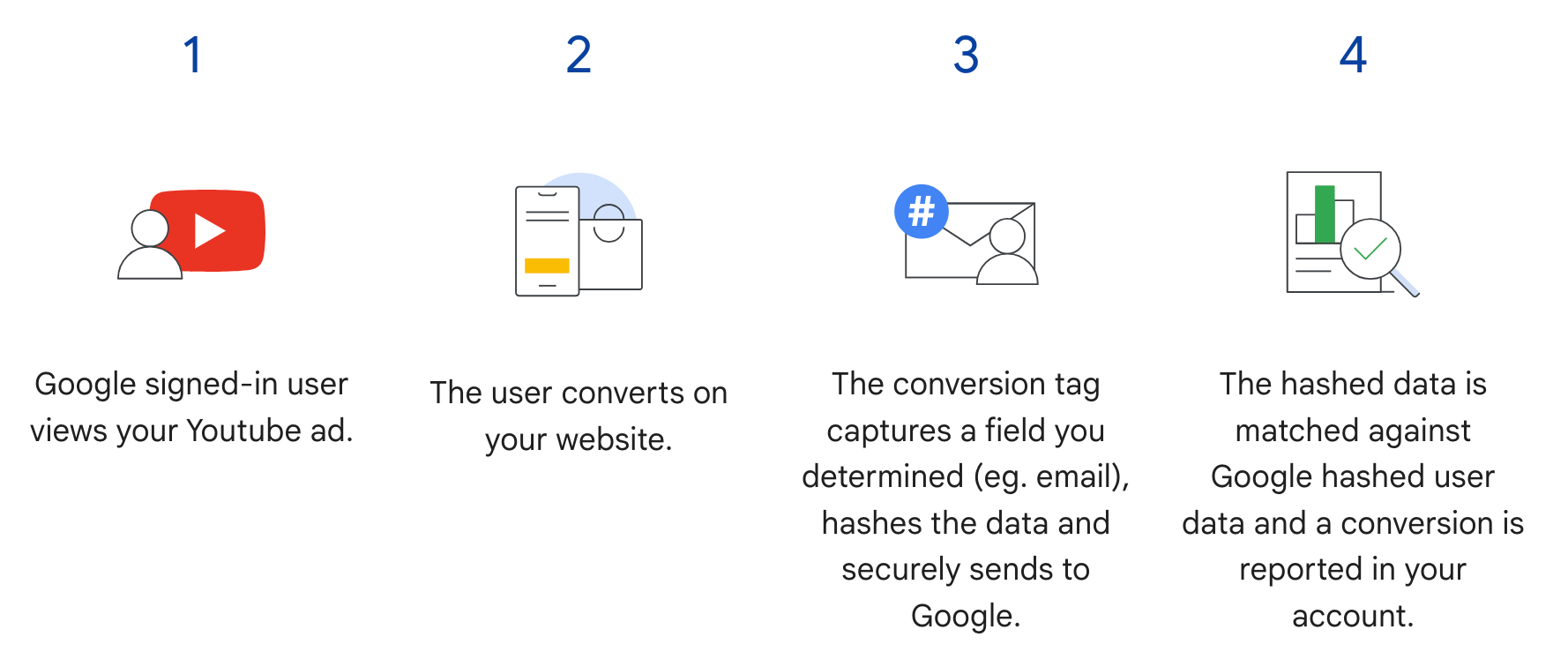
تكمّل ميزة "الإحالات الناجحة المحسّنة للويب" في Google Ads API الخطوة 3 في المسار التالي.
بدلاً من إرسال معلومات المستخدم المجزّأة عند إجراء المستخدم إحالة ناجحة، ترسِل العلامة معرّف النقرة من Google ومعرّف الطلب فقط، ويمكنك إرسال معلومات المستخدم المجزّأة لاحقًا من خلال استيراد معرّف الطلب مع البيانات المجزّأة. لمزيد من المعلومات عن ميزة "الإحالات الناجحة المحسّنة للويب"، يُرجى الاطّلاع على مقالة لمحة عن الإحالات الناجحة المحسّنة.
المتطلبات الأساسية
يجب قبول أحكام بيانات العملاء قبل أن تتمكّن من استخدام ميزة "الإحالات الناجحة المحسّنة للويب". يمكنك التحقّق مما إذا تم قبول أحكام بيانات العملاء من خلال إصدار طلب البحث التالي إلى عميل الإحالة الناجحة في "إعلانات Google":
SELECT
  customer.id,
  customer.conversion_tracking_setting.accepted_customer_data_terms
FROM customer
إذا كانت القيمة accepted_customer_data_terms هي false، اتّبِع التعليمات الواردة في مقالة إعداد ميزة "الإحالات الناجحة المحسّنة للويب" لإكمال هذا الشرط الأساسي.
ضبط إعدادات وضع العلامات
يمكنك ضبط إعدادات وضع العلامات لموقعك الإلكتروني باتّباع التعليمات الواردة في مقالة إعداد ميزة "الإحالات الناجحة المحسّنة للويب" باستخدام Google Ads API. ننصحك أيضًا بإضافة معرّفات المعاملات (معرّفات الطلبات) إلى علامة تتبُّع الإحالات الناجحة للمساعدة في مطابقة الإحالات الناجحة.
تنفيذ واجهة برمجة التطبيقات
في ما يلي المسار العام لاستيراد ميزة "الإحالات الناجحة المحسّنة للويب" في Google Ads API.
تسوية البيانات المقدَّمة من المستخدِم وتجزئتها، مثل عنوان البريد الإلكتروني ورقم الهاتف والعنوان البريدي
املأوا عناصر
ConversionAdjustmentبالبيانات المقدَّمة من المستخدِم بعد تسويتها وتجزئتها.استورِد كائنات
ConversionAdjustmentإلىConversionAdjustmentUploadService.
تسوية البيانات المقدَّمة من المستخدم وتجزئتها
لمراعاة اعتبارات الخصوصية، يجب تجزئة البيانات التالية باستخدام SHA-256 قبل استيرادها:
- عنوان البريد الإلكتروني
- رقم الهاتف
- الاسم الأول
- اسم العائلة
- عنوان الشارع
يجب عدم تجزئة البيانات التالية:
- البلد
- الولاية
- المدينة
- الرمز البريدي
لتوحيد نتائج التجزئة، عليك إجراء ما يلي قبل تجزئة إحدى هذه القيم:
- إزالة المسافات البيضاء البادئة واللاحقة
- تحويل النص إلى أحرف لاتينية صغيرة
- تنسيق أرقام الهواتف وفقًا لمعيار E.164
تنسيق عنوان البريد الإلكتروني لميزة "الإحالات الناجحة المحسّنة"
لضمان أعلى نسب مطابقة لميزة "الإحالات الناجحة المحسّنة"، عليك تنسيق عناوين البريد الإلكتروني وتجزئتها بشكل صحيح باتّباع الخطوات التالية:
تطبيق التسوية العادية (جميع عناوين البريد الإلكتروني):
- إزالة أي مسافة بيضاء بادئة ولاحقة في ASCII
- حوِّل جميع الأحرف في عنوان البريد الإلكتروني إلى أحرف صغيرة.
تطبيق التسوية الخاصة بالنطاق (
gmail.comوgooglemail.comفقط):- بعد تحويل عنوان البريد الإلكتروني إلى أحرف صغيرة، تحقَّق مما إذا كان النطاق (بعد الرمز
@) هوgmail.comأوgooglemail.com. - إزالة النقاط (
.): من جزء اسم المستخدم (قبل الرمز@)، أزِل جميع أحرف النقطة. - إزالة اللاحقات التي تتضمّن علامة الجمع (
+): من جزء اسم المستخدم، أزِل علامة الجمع الأولى (+) وجميع الأحرف اللاحقة حتى الرمز@.- مثال: يصبح
Jane.Doe+Shopping@googlemail.comأولاًjane.doe+shopping@googlemail.com(أحرف صغيرة)، ثمjanedoe@googlemail.com(قواعد Gmail وGooglemail).
- مثال: يصبح
- النطاقات الأخرى: بالنسبة إلى أي نطاق غير
gmail.comأوgooglemail.com، لا تزِل النقاط أو اللاحقات التي تتضمّن علامة الجمع من اسم المستخدم. طبِّق التسوية العادية فقط (إزالة المسافات البيضاء وتحويل الأحرف إلى أحرف صغيرة).- يتم تحويل المثال:
user.name+NYC@Example.comإلىuser.name+nyc@example.com.
- يتم تحويل المثال:
- بعد تحويل عنوان البريد الإلكتروني إلى أحرف صغيرة، تحقَّق مما إذا كان النطاق (بعد الرمز
تجزئة عنوان البريد الإلكتروني العادي:
- ترميز سلسلة البريد الإلكتروني العادية كبايتات UTF-8
- جزِّئ وحدات البايت UTF-8 باستخدام خوارزمية SHA-256.
- يجب تنسيق الملخّص الناتج كسلسلة سداسية عشرية بأحرف صغيرة (64 حرفًا).
import hashlib
import re


def normalize_and_hash_email(email: str) -> str:
    """Normalizes and SHA-256 hashes an email address for enhanced conversions."""
    normalized = email.strip().lower()
    parts = normalized.split("@")
    if len(parts) != 2:
        raise ValueError("Invalid email address format.")
    username, domain = parts
    if domain in ("gmail.com", "googlemail.com"):
        username = username.replace(".", "")
        username = re.sub(r"\+.*$", "", username)
    normalized = f"{username}@{domain}"
    return hashlib.sha256(normalized.encode("utf-8")).hexdigest()
مثال على الرمز
يوضّح هذا المثال كيفية تسوية البيانات المقدَّمة من المستخدِم وتجزئتها.
جافا
private String normalizeAndHash(MessageDigest digest, String s, boolean trimIntermediateSpaces) throws UnsupportedEncodingException { // Normalizes by first converting all characters to lowercase, then trimming spaces. String normalized = s.toLowerCase(); if (trimIntermediateSpaces) { // Removes leading, trailing, and intermediate spaces. normalized = normalized.replaceAll("\\s+", ""); } else { // Removes only leading and trailing spaces. normalized = normalized.trim(); } // Hashes the normalized string using the hashing algorithm. byte[] hash = digest.digest(normalized.getBytes("UTF-8")); StringBuilder result = new StringBuilder(); for (byte b : hash) { result.append(String.format("%02x", b)); } return result.toString(); } /** * Returns the result of normalizing and hashing an email address. For this use case, Google Ads * requires removal of any '.' characters or trailing '+' and characters that follow it from the * username portion of the email address if the domain is {@code gmail.com} or {@code * googlemail.com}. * * @param digest the digest to use to hash the normalized string. * @param emailAddress the email address to normalize and hash. */ private String normalizeAndHashEmailAddress(MessageDigest digest, String emailAddress) throws UnsupportedEncodingException { // Removes all whitespace (leading, trailing, and intermediate) from the email address. String normalizedEmail = emailAddress.toLowerCase().replaceAll("\\s+", ""); String[] emailParts = normalizedEmail.split("@", 2); if (emailParts.length == 2 && emailParts[1].matches("^(gmail|googlemail)\\.com$")) { // Removes any '.' characters from the portion of the email address before the domain if the // domain is gmail.com or googlemail.com. emailParts[0] = emailParts[0].replaceAll("\\.", ""); // Removes any '+' and all characters that follow it from the portion of the email address // before the domain if the domain is gmail.com or googlemail.com. emailParts[0] = emailParts[0].replaceAll("\\+.*", ""); normalizedEmail = String.format("%s@%s", emailParts[0], emailParts[1]); } return normalizeAndHash(digest, normalizedEmail, true); } /** * Returns the result of normalizing and hashing a phone number. For this use case, Google Ads * requires phone numbers to be in E.164 format. * * @param digest the digest to use to hash the normalized string. * @param phoneNumber the phone number to normalize and hash. */ private String normalizeAndHashPhoneNumber(MessageDigest digest, String phoneNumber) throws UnsupportedEncodingException { // Removes non-digit characters and prepends a leading '+' sign. String digitsOnly = phoneNumber.replaceAll("[^0-9]", ""); String formattedPhone = "+" + digitsOnly; if (!formattedPhone.matches("^\\+[1-9]\\d{6,14}$")) { throw new IllegalArgumentException("Phone number must be in E.164 format: " + phoneNumber); } return normalizeAndHash(digest, formattedPhone, true); }
#C
/// <summary> /// Normalizes the email address and hashes it. For this use case, Google Ads requires /// removal of any '.' characters preceding <code>gmail.com</code> or /// <code>googlemail.com</code>. /// </summary> /// <param name="emailAddress">The email address.</param> /// <returns>The hash code.</returns> private string NormalizeAndHashEmailAddress(string emailAddress) { string normalizedEmail = emailAddress.ToLower(); string[] emailParts = normalizedEmail.Split('@'); if (emailParts.Length > 1 && (emailParts[1] == "gmail.com" || emailParts[1] == "googlemail.com")) { // Removes any '.' characters from the portion of the email address before // the domain if the domain is gmail.com or googlemail.com. emailParts[0] = emailParts[0].Replace(".", ""); normalizedEmail = $"{emailParts[0]}@{emailParts[1]}"; } return NormalizeAndHash(normalizedEmail); } /// <summary> /// Normalizes and hashes a string value. /// </summary> /// <param name="value">The value to normalize and hash.</param> /// <returns>The normalized and hashed value.</returns> private static string NormalizeAndHash(string value) { return ToSha256String(digest, ToNormalizedValue(value)); } /// <summary> /// Hash a string value using SHA-256 hashing algorithm. /// </summary> /// <param name="digest">Provides the algorithm for SHA-256.</param> /// <param name="value">The string value (e.g. an email address) to hash.</param> /// <returns>The hashed value.</returns> private static string ToSha256String(SHA256 digest, string value) { byte[] digestBytes = digest.ComputeHash(Encoding.UTF8.GetBytes(value)); // Convert the byte array into an unhyphenated hexadecimal string. return BitConverter.ToString(digestBytes).Replace("-", string.Empty); } /// <summary> /// Removes leading and trailing whitespace and converts all characters to /// lower case. /// </summary> /// <param name="value">The value to normalize.</param> /// <returns>The normalized value.</returns> private static string ToNormalizedValue(string value) { return value.Trim().ToLower(); }
PHP
private static function normalizeAndHash( string $hashAlgorithm, string $value, bool $trimIntermediateSpaces ): string { // Normalizes by first converting all characters to lowercase, then trimming spaces. $normalized = strtolower($value); if ($trimIntermediateSpaces === true) { // Removes leading, trailing, and intermediate spaces. $normalized = str_replace(' ', '', $normalized); } else { // Removes only leading and trailing spaces. $normalized = trim($normalized); } return hash($hashAlgorithm, strtolower(trim($normalized))); } /** * Returns the result of normalizing and hashing an email address. For this use case, Google * Ads requires removal of any '.' characters preceding "gmail.com" or "googlemail.com". * * @param string $hashAlgorithm the hash algorithm to use * @param string $emailAddress the email address to normalize and hash * @return string the normalized and hashed email address */ private static function normalizeAndHashEmailAddress( string $hashAlgorithm, string $emailAddress ): string { $normalizedEmail = strtolower($emailAddress); $emailParts = explode("@", $normalizedEmail); if ( count($emailParts) > 1 && preg_match('/^(gmail|googlemail)\.com\s*/', $emailParts[1]) ) { // Removes any '.' characters from the portion of the email address before the domain // if the domain is gmail.com or googlemail.com. $emailParts[0] = str_replace(".", "", $emailParts[0]); $normalizedEmail = sprintf('%s@%s', $emailParts[0], $emailParts[1]); } return self::normalizeAndHash($hashAlgorithm, $normalizedEmail, true); }
Python
def normalize_and_hash_email_address(email_address): """Returns the result of normalizing and hashing an email address. For this use case, Google Ads requires removal of any '.' characters preceding "gmail.com" or "googlemail.com" Args: email_address: An email address to normalize. Returns: A normalized (lowercase, removed whitespace) and SHA-265 hashed string. """ normalized_email = email_address.strip().lower() email_parts = normalized_email.split("@") # Check that there are at least two segments if len(email_parts) > 1: # Removes any '.' and '+' characters from the portion of the email address # before the domain chars_to_remove = ".+" translation_table = str.maketrans("", "", chars_to_remove) email_parts[0] = email_parts[0].translate(translation_table) normalized_email = "@".join(email_parts) return normalize_and_hash(normalized_email) def normalize_and_hash(s): """Normalizes and hashes a string with SHA-256. Private customer data must be hashed during upload, as described at: https://support.google.com/google-ads/answer/9888656 Args: s: The string to perform this operation on. Returns: A normalized (lowercase, removed whitespace) and SHA-256 hashed string. """ return hashlib.sha256(s.strip().lower().encode()).hexdigest()
Ruby
# Returns the result of normalizing and then hashing the string using the # provided digest. Private customer data must be hashed during upload, as # described at https://support.google.com/google-ads/answer/9888656. def normalize_and_hash(str) # Remove leading and trailing whitespace and ensure all letters are lowercase # before hasing. Digest::SHA256.hexdigest(str.strip.downcase) end # Returns the result of normalizing and hashing an email address. For this use # case, Google Ads requires removal of any '.' characters preceding 'gmail.com' # or 'googlemail.com'. def normalize_and_hash_email(email) email_parts = email.downcase.split("@") # Removes any '.' characters from the portion of the email address before the # domain if the domain is gmail.com or googlemail.com. if email_parts.last =~ /^(gmail|googlemail)\.com\s*/ email_parts[0] = email_parts[0].gsub('.', '') end normalize_and_hash(email_parts.join('@')) end
Perl
sub normalize_and_hash { my $value = shift; my $trim_intermediate_spaces = shift; if ($trim_intermediate_spaces) { $value =~ s/\s+//g; } else { $value =~ s/^\s+|\s+$//g; } return sha256_hex(lc $value); } # Returns the result of normalizing and hashing an email address. For this use # case, Google Ads requires removal of any '.' characters preceding 'gmail.com' # or 'googlemail.com'. sub normalize_and_hash_email_address { my $email_address = shift; my $normalized_email = lc $email_address; my @email_parts = split('@', $normalized_email); if (scalar @email_parts > 1 && $email_parts[1] =~ /^(gmail|googlemail)\.com\s*/) { # Remove any '.' characters from the portion of the email address before the # domain if the domain is 'gmail.com' or 'googlemail.com'. $email_parts[0] =~ s/\.//g; $normalized_email = sprintf '%s@%s', $email_parts[0], $email_parts[1]; } return normalize_and_hash($normalized_email, 1); }
curl
ملء عناصر ConversionAdjustment
يوضّح القسم التالي كيفية إنشاء تعديل تحسين يتضمّن رقم تعريف طلب، بالإضافة إلى معرّفات عنوان البريد الإلكتروني ورقم الهاتف والعنوان الفعلي، مع تطبيق التوحيد والتجزئة حسب الحاجة. وفقًا لأفضل الممارسات، يجب تضمين gclid في التسوية إذا كانت متاحة.
تتشابه هذه الخطوة إلى حدّ كبير مع دليل استيراد تعديلات الإحالات الناجحة، مع بعض التحذيرات:
- املأوا
user_identifiersببيانات المستخدمين المجزّأة والموحّدة. إذا كانت لديك معرّفات مستخدمين متعدّدة، أنشئUserIdentifierمنفصلاً لكل معرّف، بحد أقصى خمسة معرّفات.
جافا
// Creates a builder for constructing the enhancement adjustment. ConversionAdjustment.Builder enhancementBuilder = ConversionAdjustment.newBuilder().setAdjustmentType(ConversionAdjustmentType.ENHANCEMENT); // Extracts user email, phone, and address info from the raw data, normalizes and hashes it, // then wraps it in UserIdentifier objects. // Creates a separate UserIdentifier object for each. The data in this example is hardcoded, but // in your application you might read the raw data from an input file. // IMPORTANT: Since the identifier attribute of UserIdentifier // (https://developers.google.com/google-ads/api/reference/rpc/latest/UserIdentifier) is a // oneof // (https://protobuf.dev/programming-guides/proto3/#oneof-features), you must set only ONE of // hashedEmail, hashedPhoneNumber, mobileId, thirdPartyUserId, or addressInfo. Setting more // than one of these attributes on the same UserIdentifier will clear all the other members // of the oneof. For example, the following code is INCORRECT and will result in a // UserIdentifier with ONLY a hashedPhoneNumber. // // UserIdentifier incorrectlyPopulatedUserIdentifier = // UserIdentifier.newBuilder() // .setHashedEmail("...") // .setHashedPhoneNumber("...") // .build(); ImmutableMap.Builder<String, String> rawRecordBuilder = ImmutableMap.<String, String>builder() // Email address that includes a period (.) and plus (+) suffix before the Gmail domain. .put("email", "alex.2+myalias@gmail.com") // Address that includes all four required elements: first name, last name, country // code, and postal code. .put("firstName", "Alex") .put("lastName", "Quinn") .put("countryCode", "US") .put("postalCode", "94045") // Phone number to be converted to E.164 format, with a leading '+' as required. .put("phone", "+1 800-555-0102") // This example lets you put conversion details as arguments, but in reality you might // store this data alongside other user data, so we include it in this sample user // record. .put("orderId", orderId) .put("conversionActionId", Long.toString(conversionActionId)) .put("currencyCode", "USD"); // Adds entries for the optional fields. if (conversionDateTime != null) { rawRecordBuilder.put("conversionDateTime", conversionDateTime); } if (userAgent != null) { rawRecordBuilder.put("userAgent", userAgent); } // Builds the map representing the record. Map<String, String> rawRecord = rawRecordBuilder.build(); // Creates a SHA256 message digest for hashing user identifiers in a privacy-safe way, as // described at https://support.google.com/google-ads/answer/9888656. MessageDigest sha256Digest = MessageDigest.getInstance("SHA-256"); // Creates a list for the user identifiers. List<UserIdentifier> userIdentifiers = new ArrayList<>(); // Creates a user identifier using the hashed email address, using the normalize and hash method // specifically for email addresses. UserIdentifier emailIdentifier = UserIdentifier.newBuilder() // Optional: specify the user identifier source. .setUserIdentifierSource(UserIdentifierSource.FIRST_PARTY) // Uses the normalize and hash method specifically for email addresses. .setHashedEmail(normalizeAndHashEmailAddress(sha256Digest, rawRecord.get("email"))) .build(); userIdentifiers.add(emailIdentifier); // Checks if the record has a phone number, and if so, adds a UserIdentifier for it. if (rawRecord.containsKey("phone")) { UserIdentifier hashedPhoneNumberIdentifier = UserIdentifier.newBuilder() .setHashedPhoneNumber( normalizeAndHashPhoneNumber(sha256Digest, rawRecord.get("phone"))) .build(); // Adds the hashed phone number identifier to the UserData object's list. userIdentifiers.add(hashedPhoneNumberIdentifier); } // Checks if the record has all the required mailing address elements, and if so, adds a // UserIdentifier for the mailing address. if (rawRecord.containsKey("firstName")) { // Checks if the record contains all the other required elements of a mailing address. Set<String> missingAddressKeys = new HashSet<>(); for (String addressKey : new String[] {"lastName", "countryCode", "postalCode"}) { if (!rawRecord.containsKey(addressKey)) { missingAddressKeys.add(addressKey); } } if (!missingAddressKeys.isEmpty()) { System.out.printf( "Skipping addition of mailing address information because the following required keys" + " are missing: %s%n", missingAddressKeys); } else { // Creates an OfflineUserAddressInfo object that contains all the required elements of a // mailing address. OfflineUserAddressInfo addressInfo = OfflineUserAddressInfo.newBuilder() .setHashedFirstName( normalizeAndHash(sha256Digest, rawRecord.get("firstName"), false)) .setHashedLastName(normalizeAndHash(sha256Digest, rawRecord.get("lastName"), false)) .setCountryCode(rawRecord.get("countryCode")) .setPostalCode(rawRecord.get("postalCode")) .build(); UserIdentifier addressIdentifier = UserIdentifier.newBuilder().setAddressInfo(addressInfo).build(); // Adds the address identifier to the UserData object's list. userIdentifiers.add(addressIdentifier); } } // Adds the user identifiers to the enhancement adjustment. enhancementBuilder.addAllUserIdentifiers(userIdentifiers);
#C
// Normalize and hash the raw data, then wrap it in UserIdentifier objects. // Create a separate UserIdentifier object for each. The data in this example is // hardcoded, but in your application you might read the raw data from an input file. // // IMPORTANT: Since the identifier attribute of UserIdentifier // (https://developers.google.com/google-ads/api/reference/rpc/latest/UserIdentifier) // is a oneof // (https://protobuf.dev/programming-guides/proto3/#oneof-features), you must set // only ONE of hashed_email, hashed_phone_number, mobile_id, third_party_user_id, // or address-info. Setting more than one of these attributes on the same UserIdentifier // will clear all the other members of the oneof. For example, the following code is // INCORRECT and will result in a UserIdentifier with ONLY a hashed_phone_number: // UserIdentifier incorrectlyPopulatedUserIdentifier = new UserIdentifier() // { // HashedEmail = "..." // HashedPhoneNumber = "..." // } UserIdentifier addressIdentifier = new UserIdentifier() { AddressInfo = new OfflineUserAddressInfo() { HashedFirstName = NormalizeAndHash("Dana"), HashedLastName = NormalizeAndHash("Quinn"), HashedStreetAddress = NormalizeAndHash("1600 Amphitheatre Pkwy"), City = "Mountain View", State = "CA", PostalCode = "94043", CountryCode = "US" }, // Optional: Specifies the user identifier source. UserIdentifierSource = UserIdentifierSource.FirstParty }; // Creates a user identifier using the hashed email address. UserIdentifier emailIdentifier = new UserIdentifier() { UserIdentifierSource = UserIdentifierSource.FirstParty, // Uses the normalize and hash method specifically for email addresses. HashedEmail = NormalizeAndHashEmailAddress("dana@example.com") }; // Adds the user identifiers to the enhancement adjustment. enhancement.UserIdentifiers.AddRange(new[] { addressIdentifier, emailIdentifier });
PHP
// Creates the conversion enhancement. $enhancement = new ConversionAdjustment(['adjustment_type' => ConversionAdjustmentType::ENHANCEMENT]); // Extracts user email, phone, and address info from the raw data, normalizes and hashes it, // then wraps it in UserIdentifier objects. // Creates a separate UserIdentifier object for each. The data in this example is hardcoded, // but in your application you might read the raw data from an input file. // IMPORTANT: Since the identifier attribute of UserIdentifier // (https://developers.google.com/google-ads/api/reference/rpc/latest/UserIdentifier) is a // oneof // (https://protobuf.dev/programming-guides/proto3/#oneof-features), you must set only ONE // of hashedEmail, hashedPhoneNumber, mobileId, thirdPartyUserId, or addressInfo. Setting // more than one of these attributes on the same UserIdentifier will clear all the other // members of the oneof. For example, the following code is INCORRECT and will result in a // UserIdentifier with ONLY a hashedPhoneNumber. // // $incorrectlyPopulatedUserIdentifier = new UserIdentifier([ // 'hashed_email' => '...', // 'hashed_phone_number' => '...' // ]); $rawRecord = [ // Email address that includes a period (.) before the Gmail domain. 'email' => 'alex.2@example.com', // Address that includes all four required elements: first name, last name, country // code, and postal code. 'firstName' => 'Alex', 'lastName' => 'Quinn', 'countryCode' => 'US', 'postalCode' => '94045', // Phone number to be converted to E.164 format, with a leading '+' as required. 'phone' => '+1 800 5550102', // This example lets you input conversion details as arguments, but in reality you might // store this data alongside other user data, so we include it in this sample user // record. 'orderId' => $orderId, 'conversionActionId' => $conversionActionId, 'conversionDateTime' => $conversionDateTime, 'currencyCode' => 'USD' ]; // Creates a list for the user identifiers. $userIdentifiers = []; // Uses the SHA-256 hash algorithm for hashing user identifiers in a privacy-safe way, as // described at https://support.google.com/google-ads/answer/9888656. $hashAlgorithm = "sha256"; // Creates a user identifier using the hashed email address, using the normalize and hash // method specifically for email addresses. $emailIdentifier = new UserIdentifier( [ // Uses the normalize and hash method specifically for email addresses. 'hashed_email' => self::normalizeAndHashEmailAddress( $hashAlgorithm, $rawRecord['email'] ), // Optional: Specifies the user identifier source. 'user_identifier_source' => UserIdentifierSource::FIRST_PARTY ] ); $userIdentifiers[] = $emailIdentifier; // Checks if the record has a phone number, and if so, adds a UserIdentifier for it. if (array_key_exists('phone', $rawRecord)) { $hashedPhoneNumberIdentifier = new UserIdentifier( [ 'hashed_phone_number' => self::normalizeAndHash( $hashAlgorithm, $rawRecord['phone'], true ) ] ); // Adds the hashed email identifier to the user identifiers list. $userIdentifiers[] = $hashedPhoneNumberIdentifier; } // Checks if the record has all the required mailing address elements, and if so, adds a // UserIdentifier for the mailing address. if (array_key_exists('firstName', $rawRecord)) { // Checks if the record contains all the other required elements of a mailing // address. $missingAddressKeys = []; foreach (['lastName', 'countryCode', 'postalCode'] as $addressKey) { if (!array_key_exists($addressKey, $rawRecord)) { $missingAddressKeys[] = $addressKey; } } if (!empty($missingAddressKeys)) { printf( "Skipping addition of mailing address information because the " . "following required keys are missing: %s%s", json_encode($missingAddressKeys), PHP_EOL ); } else { // Creates an OfflineUserAddressInfo object that contains all the required // elements of a mailing address. $addressIdentifier = new UserIdentifier( [ 'address_info' => new OfflineUserAddressInfo( [ 'hashed_first_name' => self::normalizeAndHash( $hashAlgorithm, $rawRecord['firstName'], false ), 'hashed_last_name' => self::normalizeAndHash( $hashAlgorithm, $rawRecord['lastName'], false ), 'country_code' => $rawRecord['countryCode'], 'postal_code' => $rawRecord['postalCode'] ] ) ] ); // Adds the address identifier to the user identifiers list. $userIdentifiers[] = $addressIdentifier; } } // Adds the user identifiers to the conversion. $enhancement->setUserIdentifiers($userIdentifiers);
Python
# Extracts user email, phone, and address info from the raw data, normalizes # and hashes it, then wraps it in UserIdentifier objects. Creates a separate # UserIdentifier object for each. The data in this example is hardcoded, but # in your application you might read the raw data from an input file. # IMPORTANT: Since the identifier attribute of UserIdentifier # (https://developers.google.com/google-ads/api/reference/rpc/latest/UserIdentifier) # is a oneof # (https://protobuf.dev/programming-guides/proto3/#oneof-features), you must # set only ONE of hashed_email, hashed_phone_number, mobile_id, # third_party_user_id, or address_info. Setting more than one of these # attributes on the same UserIdentifier will clear all the other members of # the oneof. For example, the following code is INCORRECT and will result in # a UserIdentifier with ONLY a hashed_phone_number: # # incorrectly_populated_user_identifier = client.get_type("UserIdentifier") # incorrectly_populated_user_identifier.hashed_email = "..."" # incorrectly_populated_user_identifier.hashed_phone_number = "..."" raw_record = { # Email address that includes a period (.) before the Gmail domain. "email": "alex.2@example.com", # Address that includes all four required elements: first name, last # name, country code, and postal code. "first_name": "Alex", "last_name": "Quinn", "country_code": "US", "postal_code": "94045", # Phone number to be converted to E.164 format, with a leading '+' as # required. "phone": "+1 800 5550102", # This example lets you input conversion details as arguments, but in # reality you might store this data alongside other user data, so we # include it in this sample user record. "order_id": order_id, "conversion_action_id": conversion_action_id, "conversion_date_time": conversion_date_time, "currency_code": "USD", "user_agent": user_agent, } # Constructs the enhancement adjustment. conversion_adjustment = client.get_type("ConversionAdjustment") conversion_adjustment.adjustment_type = ( client.enums.ConversionAdjustmentTypeEnum.ENHANCEMENT ) # Creates a user identifier using the hashed email address, using the # normalize and hash method specifically for email addresses. email_identifier = client.get_type("UserIdentifier") # Optional: Specifies the user identifier source. email_identifier.user_identifier_source = ( client.enums.UserIdentifierSourceEnum.FIRST_PARTY ) # Uses the normalize and hash method specifically for email addresses. email_identifier.hashed_email = normalize_and_hash_email_address( raw_record["email"] ) # Adds the email identifier to the conversion adjustment. conversion_adjustment.user_identifiers.append(email_identifier) # Checks if the record has a phone number, and if so, adds a UserIdentifier # for it. if raw_record.get("phone") is not None: phone_identifier = client.get_type("UserIdentifier") phone_identifier.hashed_phone_number = normalize_and_hash( raw_record["phone"] ) # Adds the phone identifier to the conversion adjustment. conversion_adjustment.user_identifiers.append(phone_identifier) # Checks if the record has all the required mailing address elements, and if # so, adds a UserIdentifier for the mailing address. if raw_record.get("first_name") is not None: # Checks if the record contains all the other required elements of a # mailing address. required_keys = ["last_name", "country_code", "postal_code"] # Builds a new list of the required keys that are missing from # raw_record. missing_keys = [ key for key in required_keys if key not in raw_record.keys() ] if len(missing_keys) > 0: print( "Skipping addition of mailing address information because the" f"following required keys are missing: {missing_keys}" ) else: # Creates a user identifier using sample values for the user address, # hashing where required. address_identifier = client.get_type("UserIdentifier") address_info = address_identifier.address_info address_info.hashed_first_name = normalize_and_hash( raw_record["first_name"] ) address_info.hashed_last_name = normalize_and_hash( raw_record["last_name"] ) address_info.country_code = raw_record["country_code"] address_info.postal_code = raw_record["postal_code"] # Adds the address identifier to the conversion adjustment. conversion_adjustment.user_identifiers.append(address_identifier)
Ruby
# Extracts user email, phone, and address info from the raw data, normalizes # and hashes it, then wraps it in UserIdentifier objects. Creates a separate # UserIdentifier object for each. The data in this example is hardcoded, but # in your application you might read the raw data from an input file. # IMPORTANT: Since the identifier attribute of UserIdentifier # (https://developers.google.com/google-ads/api/reference/rpc/latest/UserIdentifier) # is a oneof # (https://protobuf.dev/programming-guides/proto3/#oneof-features), you must # set only ONE of hashed_email, hashed_phone_number, mobile_id, # third_party_user_id, or address_info. Setting more than one of these # attributes on the same UserIdentifier will clear all the other members of # the oneof. For example, the following code is INCORRECT and will result in # a UserIdentifier with ONLY a hashed_phone_number: # # incorrectly_populated_user_identifier.hashed_email = "..."" # incorrectly_populated_user_identifier.hashed_phone_number = "..."" raw_record = { # Email address that includes a period (.) before the Gmail domain. "email" => "alex.2@example.com", # Address that includes all four required elements: first name, last # name, country code, and postal code. "first_name" => "Alex", "last_name" => "Quinn", "country_code" => "US", "postal_code" => "94045", # Phone number to be converted to E.164 format, with a leading '+' as # required. "phone" => "+1 800 5550102", # This example lets you input conversion details as arguments, but in # reality you might store this data alongside other user data, so we # include it in this sample user record. "order_id" => order_id, "conversion_action_id" => conversion_action_id, "conversion_date_time" => conversion_date_time, "currency_code" => "USD", "user_agent" => user_agent, } enhancement = client.resource.conversion_adjustment do |ca| ca.conversion_action = client.path.conversion_action(customer_id, conversion_action_id) ca.adjustment_type = :ENHANCEMENT ca.order_id = order_id # Sets the conversion date and time if provided. Providing this value is # optional but recommended. unless conversion_date_time.nil? ca.gclid_date_time_pair = client.resource.gclid_date_time_pair do |pair| pair.conversion_date_time = conversion_date_time end end # Creates a user identifier using the hashed email address, using the # normalize and hash method specifically for email addresses. ca.user_identifiers << client.resource.user_identifier do |ui| # Uses the normalize and hash method specifically for email addresses. ui.hashed_email = normalize_and_hash_email(raw_record["email"]) # Optional: Specifies the user identifier source. ui.user_identifier_source = :FIRST_PARTY end # Checks if the record has a phone number, and if so, adds a UserIdentifier # for it. unless raw_record["phone"].nil? ca.user_identifiers << client.resource.user_identifier do |ui| ui.hashed_phone_number = normalize_and_hash_email(raw_record["phone"]) end end # Checks if the record has all the required mailing address elements, and if # so, adds a UserIdentifier for the mailing address. unless raw_record["first_name"].nil? # Checks if the record contains all the other required elements of a # mailing address. required_keys = ["last_name", "country_code", "postal_code"] # Builds a new list of the required keys that are missing from # raw_record. missing_keys = required_keys - raw_record.keys if missing_keys puts( "Skipping addition of mailing address information because the" \ "following required keys are missing: #{missing_keys}" ) else ca.user_identifiers << client.resource.user_identifier do |ui| ui.address_info = client.resource.offline_user_address_info do |info| # Certain fields must be hashed using SHA256 in order to handle # identifiers in a privacy-safe way, as described at # https://support.google.com/google-ads/answer/9888656. info.hashed_first_name = normalize_and_hash( raw_record["first_name"]) info.hashed_last_name = normalize_and_hash( raw_record["last_name"]) info.postal_code = normalize_and_hash(raw_record["country_code"]) info.country_code = normalize_and_hash(raw_record["postal_code"]) end end end end
Perl
# Construct the enhancement adjustment. my $enhancement = Google::Ads::GoogleAds::V25::Services::ConversionAdjustmentUploadService::ConversionAdjustment ->new({ adjustmentType => ENHANCEMENT }); # Extract user email, phone, and address info from the raw data, # normalize and hash it, then wrap it in UserIdentifier objects. # Create a separate UserIdentifier object for each. # The data in this example is hardcoded, but in your application # you might read the raw data from an input file. # # IMPORTANT: Since the identifier attribute of UserIdentifier # (https://developers.google.com/google-ads/api/reference/rpc/latest/UserIdentifier) # is a oneof # (https://protobuf.dev/programming-guides/proto3/#oneof-features), you must set # only ONE of hashed_email, hashed_phone_number, mobile_id, third_party_user_id, # or address-info. Setting more than one of these attributes on the same UserIdentifier # will clear all the other members of the oneof. For example, the following code is # INCORRECT and will result in a UserIdentifier with ONLY a hashed_phone_number: # # my $incorrect_user_identifier = Google::Ads::GoogleAds::V25::Common::UserIdentifier->new({ # hashedEmail => '...', # hashedPhoneNumber => '...', # }); my $raw_record = { # Email address that includes a period (.) before the Gmail domain. email => 'alex.2@example.com', # Address that includes all four required elements: first name, last # name, country code, and postal code. firstName => 'Alex', lastName => 'Quinn', countryCode => 'US', postalCode => '94045', # Phone number to be converted to E.164 format, with a leading '+' as # required. phone => '+1 800 5550102', # This example lets you input conversion details as arguments, # but in reality you might store this data alongside other user data, # so we include it in this sample user record. orderId => $order_id, conversionActionId => $conversion_action_id, conversionDateTime => $conversion_date_time, currencyCode => "USD", userAgent => $user_agent, }; my $user_identifiers = []; # Create a user identifier using the hashed email address, using the normalize # and hash method specifically for email addresses. my $hashed_email = normalize_and_hash_email_address($raw_record->{email}); push( @$user_identifiers, Google::Ads::GoogleAds::V25::Common::UserIdentifier->new({ hashedEmail => $hashed_email, # Optional: Specify the user identifier source. userIdentifierSource => FIRST_PARTY })); # Check if the record has a phone number, and if so, add a UserIdentifier for it. if (defined $raw_record->{phone}) { # Add the hashed phone number identifier to the list of UserIdentifiers. push( @$user_identifiers, Google::Ads::GoogleAds::V25::Common::UserIdentifier->new({ hashedPhoneNumber => normalize_and_hash($raw_record->{phone}, 1)})); } # Confirm the record has all the required mailing address elements, and if so, add # a UserIdentifier for the mailing address. if (defined $raw_record->{firstName}) { my $required_keys = ["lastName", "countryCode", "postalCode"]; my $missing_keys = []; foreach my $key (@$required_keys) { if (!defined $raw_record->{$key}) { push(@$missing_keys, $key); } } if (@$missing_keys) { print "Skipping addition of mailing address information because the following" . "keys are missing: " . join(",", @$missing_keys); } else { push( @$user_identifiers, Google::Ads::GoogleAds::V25::Common::UserIdentifier->new({ addressInfo => Google::Ads::GoogleAds::V25::Common::OfflineUserAddressInfo->new({ # First and last name must be normalized and hashed. hashedFirstName => normalize_and_hash($raw_record->{firstName}), hashedLastName => normalize_and_hash($raw_record->{lastName}), # Country code and zip code are sent in plain text. countryCode => $raw_record->{countryCode}, postalCode => $raw_record->{postalCode}, })})); } } # Add the user identifiers to the enhancement adjustment. $enhancement->{userIdentifiers} = $user_identifiers;
curl
احرص على ضبط
order_idعلى معرّف الطلب الخاص بالإحالة الناجحة المطلوب تعديلها، والذي يجب أن يتطابق مع معرّف الطلب الذي أرسلته العلامة.ضبط السمة
adjustment_typeعلىENHANCEMENTاضبط
conversion_actionعلى اسم المورد الخاص بـConversionActionالذي يتضمّنtypeبقيمةWEBPAGE.(اختياري) إذا أمكن، املأ الحقل
gclid_date_time_pairللحصول على قياس أكثر دقة. اضبطconversion_date_timeعلى التاريخ والوقت اللذين حدثت فيهما الإحالة الناجحة التي تتضمّنorder_idالمحدّد. أدرِج إزاحة المنطقة الزمنية واستخدِم التنسيقyyyy-mm-dd HH:mm:ss+|-HH:mm، مثلاً:2022-01-01 19:32:45-05:00(مع تجاهل نظام التوقيت الصيفي).(اختياري) اضبط
user_agentعلى وكيل المستخدم للطلب الذي أرسل الإحالة الناجحة الأصلية، وذلك لكي يتم تحديد مصدر الإحالة الناجحة والتحسين على أنّهما من الجهاز نفسه أو يعملان من خلال جهاز آخر.
جافا
// Sets the conversion action. enhancementBuilder.setConversionAction( ResourceNames.conversionAction( customerId, Long.parseLong(rawRecord.get("conversionActionId")))); // Sets the order ID. Enhancements MUST use order ID instead of GCLID date/time pair. enhancementBuilder.setOrderId(rawRecord.get("orderId")); // Sets the conversion date and time if provided. Providing this value is optional but // recommended. if (rawRecord.containsKey("conversionDateTime")) { enhancementBuilder.setGclidDateTimePair( GclidDateTimePair.newBuilder() .setConversionDateTime(rawRecord.get("conversionDateTime"))); } // Sets the user agent if provided. This should match the user agent of the request that sent // the original conversion so the conversion and its enhancement are either both attributed as // same-device or both attributed as cross-device. if (rawRecord.containsKey("userAgent")) { enhancementBuilder.setUserAgent(rawRecord.get("userAgent")); }
#C
// Set the conversion action. enhancement.ConversionAction = ResourceNames.ConversionAction(customerId, conversionActionId); // Set the order ID. Enhancements MUST use order ID instead of GCLID date/time pair. enhancement.OrderId = orderId; // Sets the conversion date and time if provided. Providing this value is optional but // recommended. if (string.IsNullOrEmpty(conversionDateTime)) { enhancement.GclidDateTimePair = new GclidDateTimePair() { ConversionDateTime = conversionDateTime }; } // Sets optional fields where a value was provided. if (!string.IsNullOrEmpty(userAgent)) { // Sets the user agent. This should match the user agent of the request that // sent the original conversion so the conversion and its enhancement are either // both attributed as same-device or both attributed as cross-device. enhancement.UserAgent = userAgent; }
PHP
// Sets the conversion action. $enhancement->setConversionAction( ResourceNames::forConversionAction($customerId, $rawRecord['conversionActionId']) ); // Sets the order ID. Enhancements MUST use order ID instead of GCLID date/time pair. if (!empty($rawRecord['orderId'])) { $enhancement->setOrderId($rawRecord['orderId']); } // Sets the conversion date and time if provided. Providing this value is optional but // recommended. if (!empty($rawRecord['conversionDateTime'])) { // Sets the conversion date and time if provided. Providing this value is optional but // recommended. $enhancement->setGclidDateTimePair( new GclidDateTimePair( [ 'conversion_date_time' => $rawRecord['conversionDateTime'] ] ) ); } // Sets the user agent if provided. This should match the user agent of the request that // sent the original conversion so the conversion and its enhancement are either both // attributed as same-device or both attributed as cross-device. if (!empty($rawRecord['userAgent'])) { $enhancement->setUserAgent($rawRecord['userAgent']); }
Python
conversion_action_service = client.get_service("ConversionActionService") # Sets the conversion action. conversion_adjustment.conversion_action = ( conversion_action_service.conversion_action_path( customer_id, raw_record["conversion_action_id"] ) ) # Sets the order ID. Enhancements MUST use order ID instead of GCLID # date/time pair. conversion_adjustment.order_id = order_id # Sets the conversion date and time if provided. Providing this value is # optional but recommended. if raw_record.get("conversion_date_time"): conversion_adjustment.gclid_date_time_pair.conversion_date_time = ( raw_record["conversion_date_time"] ) # Sets optional fields where a value was provided if raw_record.get("user_agent"): # Sets the user agent. This should match the user agent of the request # that sent the original conversion so the conversion and its # enhancement are either both attributed as same-device or both # attributed as cross-device. conversion_adjustment.user_agent = user_agent
Ruby
ca.conversion_action = client.path.conversion_action(customer_id, conversion_action_id) ca.adjustment_type = :ENHANCEMENT ca.order_id = order_id # Sets the conversion date and time if provided. Providing this value is # optional but recommended. unless conversion_date_time.nil? ca.gclid_date_time_pair = client.resource.gclid_date_time_pair do |pair| pair.conversion_date_time = conversion_date_time end end # Creates a user identifier using the hashed email address, using the # normalize and hash method specifically for email addresses. ca.user_identifiers << client.resource.user_identifier do |ui| # Uses the normalize and hash method specifically for email addresses. ui.hashed_email = normalize_and_hash_email(raw_record["email"]) # Optional: Specifies the user identifier source. ui.user_identifier_source = :FIRST_PARTY end # Checks if the record has a phone number, and if so, adds a UserIdentifier # for it. unless raw_record["phone"].nil? ca.user_identifiers << client.resource.user_identifier do |ui| ui.hashed_phone_number = normalize_and_hash_email(raw_record["phone"]) end end # Checks if the record has all the required mailing address elements, and if # so, adds a UserIdentifier for the mailing address. unless raw_record["first_name"].nil? # Checks if the record contains all the other required elements of a # mailing address. required_keys = ["last_name", "country_code", "postal_code"] # Builds a new list of the required keys that are missing from # raw_record. missing_keys = required_keys - raw_record.keys if missing_keys puts( "Skipping addition of mailing address information because the" \ "following required keys are missing: #{missing_keys}" ) else ca.user_identifiers << client.resource.user_identifier do |ui| ui.address_info = client.resource.offline_user_address_info do |info| # Certain fields must be hashed using SHA256 in order to handle # identifiers in a privacy-safe way, as described at # https://support.google.com/google-ads/answer/9888656. info.hashed_first_name = normalize_and_hash( raw_record["first_name"]) info.hashed_last_name = normalize_and_hash( raw_record["last_name"]) info.postal_code = normalize_and_hash(raw_record["country_code"]) info.country_code = normalize_and_hash(raw_record["postal_code"]) end end end end # Sets optional fields where a value was provided. unless user_agent.nil? # Sets the user agent. This should match the user agent of the request # that sent the original conversion so the conversion and its enhancement # are either both attributed as same-device or both attributed as # cross-device. ca.user_agent = user_agent end
Perl
# Set the conversion action. $enhancement->{conversionAction} = Google::Ads::GoogleAds::V25::Utils::ResourceNames::conversion_action( $customer_id, $raw_record->{conversionActionId}); # Set the order ID. Enhancements MUST use order ID instead of GCLID date/time pair. $enhancement->{orderId} = $raw_record->{orderId}; # Set the conversion date and time if provided. Providing this value is optional # but recommended. if (defined $raw_record->{conversionDateTime}) { $enhancement->{gclidDateTimePair} = Google::Ads::GoogleAds::V25::Services::ConversionAdjustmentUploadService::GclidDateTimePair ->new({ conversionDateTime => $raw_record->{conversionDateTime}}); } # Set the user agent if provided. This should match the user agent of the # request that sent the original conversion so the conversion and its enhancement # are either both attributed as same-device or both attributed as cross-device. if (defined $raw_record->{userAgent}) { $enhancement->{userAgent} = $raw_record->{userAgent}; }
curl
تحسينات على استيراد الإحالات الناجحة
جافا
// Creates the conversion adjustment upload service client. try (ConversionAdjustmentUploadServiceClient conversionUploadServiceClient = googleAdsClient.getLatestVersion().createConversionAdjustmentUploadServiceClient()) { // Uploads the enhancement adjustment. Partial failure should always be set to true. // NOTE: This request contains a single adjustment as a demonstration. However, if you have // multiple adjustments to upload, it's best to upload multiple adjustments per request // instead of sending a separate request per adjustment. See the following for per-request // limits: // https://developers.google.com/google-ads/api/docs/best-practices/quotas#conversion_adjustment_upload_service UploadConversionAdjustmentsResponse response = conversionUploadServiceClient.uploadConversionAdjustments( UploadConversionAdjustmentsRequest.newBuilder() .setCustomerId(Long.toString(customerId)) .addConversionAdjustments(enhancementBuilder) // Enables partial failure (must be true). .setPartialFailure(true) .build());
#C
// Uploads the enhancement adjustment. Partial failure should always be set to true. // // NOTE: This request contains a single adjustment as a demonstration. // However, if you have multiple adjustments to upload, it's best to upload // multiple adjustmenst per request instead of sending a separate request per // adjustment. See the following for per-request limits: // https://developers.google.com/google-ads/api/docs/best-practices/quotas#conversion_adjust UploadConversionAdjustmentsResponse response = conversionAdjustmentUploadService.UploadConversionAdjustments( new UploadConversionAdjustmentsRequest() { CustomerId = customerId.ToString(), ConversionAdjustments = { enhancement }, // Enables partial failure (must be true). PartialFailure = true, });
PHP
// Issues a request to upload the conversion enhancement. $conversionAdjustmentUploadServiceClient = $googleAdsClient->getConversionAdjustmentUploadServiceClient(); // NOTE: This request contains a single adjustment as a demonstration. However, if you have // multiple adjustments to upload, it's best to upload multiple adjustments per request // instead of sending a separate request per adjustment. See the following for per-request // limits: // https://developers.google.com/google-ads/api/docs/best-practices/quotas#conversion_adjustment_upload_service $response = $conversionAdjustmentUploadServiceClient->uploadConversionAdjustments( // Enables partial failure (must be true). UploadConversionAdjustmentsRequest::build($customerId, [$enhancement], true) );
Python
# Creates the conversion adjustment upload service client. conversion_adjustment_upload_service = client.get_service( "ConversionAdjustmentUploadService" ) # Uploads the enhancement adjustment. Partial failure should always be set # to true. # NOTE: This request only uploads a single conversion, but if you have # multiple conversions to upload, it's still best to upload them in a single # request. See the following for per-request limits for reference: # https://developers.google.com/google-ads/api/docs/best-practices/quotas#conversion_upload_service response = conversion_adjustment_upload_service.upload_conversion_adjustments( customer_id=customer_id, conversion_adjustments=[conversion_adjustment], # Enables partial failure (must be true). partial_failure=True, )
Ruby
response = client.service.conversion_adjustment_upload.upload_conversion_adjustments( customer_id: customer_id, # NOTE: This request only uploads a single conversion, but if you have # multiple conversions to upload, it's still best to upload them in a single # request. See the following for per-request limits for reference: # https://developers.google.com/google-ads/api/docs/best-practices/quotas#conversion_upload_service conversion_adjustments: [enhancement], # Partial failure must be set to true. partial_failure: true, )
Perl
# Upload the enhancement adjustment. Partial failure should always be set to true. # # NOTE: This request contains a single adjustment as a demonstration. # However, if you have multiple adjustments to upload, it's best to # upload multiple adjustments per request instead of sending a separate # request per adjustment. See the following for per-request limits: # https://developers.google.com/google-ads/api/docs/best-practices/quotas#conversion_adjustment_upload_service my $response = $api_client->ConversionAdjustmentUploadService() ->upload_conversion_adjustments({ customerId => $customer_id, conversionAdjustments => [$enhancement], # Enable partial failure (must be true). partialFailure => "true" });
curl
مراجعة عمليات الاستيراد
استخدِم تقرير بيانات التشخيص الخاص بواجهة برمجة التطبيقات "الإحالات الناجحة المحسّنة" للتأكّد من أنّ ميزة "الإحالات الناجحة المحسّنة للويب" تعمل بفعالية ولتحديد المشاكل في عملية الإعداد وحلّها.
استخدِم أدوات تشخيص البيانات غير الإلكترونية لمراجعة الحالة العامة لعمليات الاستيراد الأخيرة.
عند إعداد تقارير عن مقاييس الإحالات الناجحة لحملاتك، يُرجى الرجوع إلى ربط مقاييس واجهة المستخدِم لربط مقاييس واجهة المستخدِم في "إعلانات Google" بحقول إعداد التقارير في Google Ads API. يمكنك أيضًا طلب البحث عن المورد conversion_action للاطّلاع على إجمالي عدد الإحالات الناجحة وإجمالي قيمة الإحالة الناجحة لإجراء إحالة ناجحة معيّن.
أفضل الممارسات
يُرجى مراعاة أفضل الممارسات التالية عند تنفيذ ميزة "الإحالات الناجحة المحسّنة للويب".
التحقّق من معرّف العميل
عند استيراد الإحالات الناجحة، يجب ضبط معرّف العميل على الحساب الذي يتضمّن إجراء الإحالة الناجحة والذي يتولّى تتبُّع الإحالات الناجحة. للاطّلاع على هذا الإعداد، أرسِل طلب بحث إلى مصدر Customer في "إعلانات Google" بشأن ConversionTrackingSetting. أدخِل طلب البحث التالي مع GoogleAdsService.SearchStream للعثور على قيمة customer.conversion_tracking_setting.google_ads_conversion_customer.
SELECT
  customer.conversion_tracking_setting.google_ads_conversion_customer,
  customer.conversion_tracking_setting.conversion_tracking_status,
  customer.conversion_tracking_setting.conversion_tracking_id,
  customer.conversion_tracking_setting.cross_account_conversion_tracking_id
FROM customer
اضبط customer_id على القيمة google_ads_conversion_customer في طلباتك
لاستيراد الإحالات الناجحة.
تضمين معرّفات متعدّدة إذا كانت متوفّرة
إذا كان لديك معرّف النقرة من Google لإحالة ناجحة، ننصحك بإرساله بالإضافة إلى user_identifiers لتحسين الأداء. بالإضافة إلى ذلك، إذا كان لديك أكثر من UserIdentifier للإحالة الناجحة، يمكن أن يؤدي تضمين كل هذه المعرّفات إلى تحسين احتمالية حدوث مطابقة. أدرِج جميع المعرّفات في
ConversionAdjustment نفسه.
مراجعة أخطاء الإخفاق الجزئي عند إعداد عملية الدمج
عند إعداد عملية دمج ميزة "الإحالات الناجحة المحسّنة للويب" للمرة الأولى، راجِع أي أخطاء جزئية في حقل partial_failure_error في الردّ وعالِجها. إذا كانت هناك مشاكل في عملية الإعداد، يمكنك فحص هذا الحقل للتحقيق فيها ومعالجتها. لمزيد من التفاصيل والأمثلة ذات الصلة بمعالجة أخطاء الإخفاق الجزئي، يُرجى الانتقال إلى دليل الإخفاق الجزئي المخصّص.
بعد حلّ أي مشاكل ظهرت في أخطاء الإخفاق الجزئي واكتمال عملية الدمج، يمكنك التبديل إلى استخدام بيانات تشخيص البيانات غير الإلكترونية لمراجعة حالة إحالاتك الناجحة بانتظام.
تجميع تعديلات متعددة في طلب واحد
إذا كان لديك تعديلات متعدّدة تريد استيرادها، يمكنك تجميع العمليات (ما يصل إلى 2,000 تعديل إحالة ناجحة لكل طلب) في UploadConversionAdjustmentsRequest واحد، بدلاً من إرسال طلب استيراد لكل تعديل.
راجِع دليل الحصص لمعرفة حدود عدد التعديلات لكل طلب. إذا كنت تريد أن تجمع أداة تشخيص البيانات غير المتصلة بالإنترنت مجموعة من الطلبات ضمن مهمة منطقية واحدة، اضبط job_id لجميع الطلبات على القيمة نفسها.
تحديد المشاكل وحلّها
استخدِم تقرير بيانات تشخيص واجهة برمجة التطبيقات "الإحالات الناجحة المحسّنة" للتأكّد من أنّ ميزة "الإحالات الناجحة المحسّنة للويب" تعمل بفعالية ولتحديد المشاكل في عملية الإعداد وحلّها.
تصحيح الأخطاء الشائعة
تساعدك الإرشادات التالية في تحديد المشاكل الشائعة وحلّها في ما يتعلّق بميزة "الإحالات الناجحة المحسّنة للويب".
| خطأ | |
|---|---|
CONVERSION_NOT_FOUND
|
تعذّر العثور على إحالة ناجحة لإجراء الإحالة الناجحة ومعرّف الإحالة الناجحة المحدَّدَين أو order_id. تأكَّد من أنّ الإحالة الناجحة هي إحالة ناجحة في "إعلانات Google"
لعميل الإحالة الناجحة في "إعلانات Google" المحدّد في customer_id الطلب.بالإضافة إلى ذلك، تأكَّد من أنّ الإحالة الناجحة لم تكن لنقرة تم فيها ملء الحقل gbraid
أو wbraid بدلاً من
gclid.
لا تتيح "إعلانات Google" ميزة "الإحالات الناجحة المحسّنة للويب" لهذه الإحالات الناجحة.
|
CUSTOMER_NOT_ACCEPTED_CUSTOMER_DATA_TERMS
|
لم يتم قبول أحكام بيانات العملاء وشروطها في customer_id من الطلب. يمكنك الاطّلاع على التعليمات الخاصة بذلك في دليل المتطلبات الأساسية.
|
CONVERSION_ALREADY_ENHANCED
|
سبق أن تم تعديل هذه الإحالة الناجحة باستخدام order_id وconversion_action المحدّدين. احرص على تقديم
order_id فريد لكل إحالة ناجحة.
|
CONVERSION_ACTION_NOT_ELIGIBLE_FOR_ENHANCEMENT
|
إنّ conversion_action المقدَّم غير مؤهَّل لاستخدام ميزة "الإحالات الناجحة المحسّنة للويب". في واجهة مستخدم "إعلانات Google"، تأكَّد من وضع علامة في المربّع تفعيل ميزة الإحالات الناجحة المحسّنة في إجراء الإحالة الناجحة المشار إليه في طلبك. يمكنك الاطّلاع على التعليمات الخاصة بذلك في مركز المساعدة.
|