

Les groupes de fiches sont utilisés dans
les campagnes Performance Max pour les marchands afin de spécifier les produits à inclure ou à exclure
dans chaque groupe de composants. Ils sont donc appliqués au AssetGroup
niveau à l'aide d'
AssetGroupListingGroupFilter
objets. Cela est semblable à d'autres types de campagnes pour les marchands dans lesquelles les groupes de produits sont appliqués au niveau AdGroup.
Tous les groupes de composants des campagnes Performance Max pour les marchands nécessitent une arborescence de partition de produits valide composée d'objets AssetGroupListingGroupFilter. Pour répondre à cette exigence, vous pouvez utiliser une arborescence à un seul nœud qui inclut tous les produits du compte Merchant Center.
Dans l'interface utilisateur, on parle de groupes de produits. Vous pouvez effectuer un regroupement à l'aide de plusieurs dimensions, ce qui vous permet d'inclure ou d'exclure des produits.
Prenons l'arborescence suivante, dans laquelle les produits ont été divisés au premier niveau par état en "Neuf", "Occasion" et autres états. Au deuxième niveau, les produits dans d'autres états ont été divisés par marque en produits "CoolBrand", "CheapBrand" et autres marques.
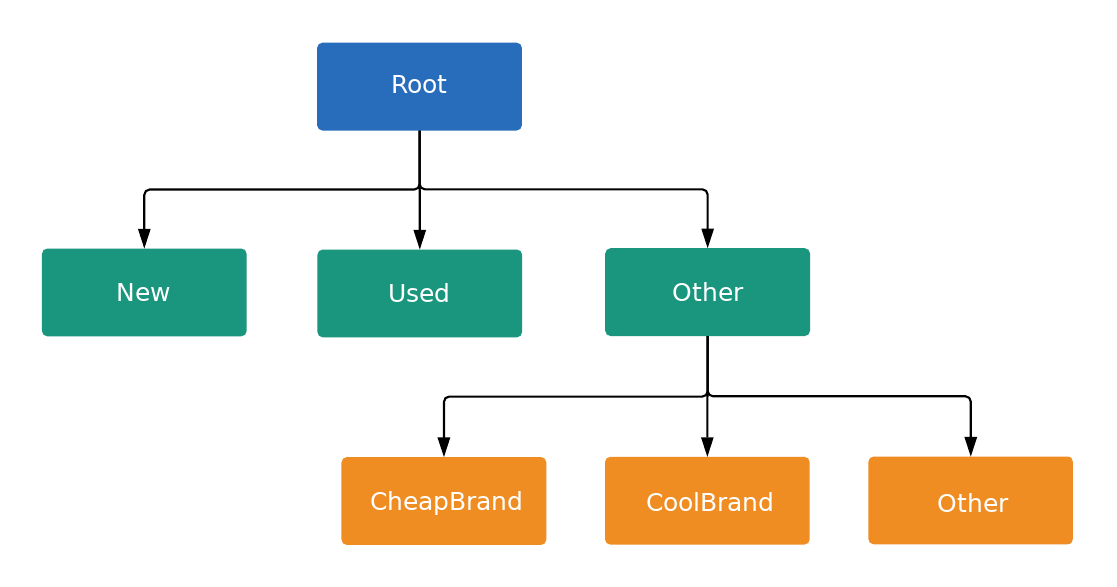
Chaque nœud de l'arborescence est une subdivision ou une unité, comme défini par
ListingGroupType. Une subdivision introduit un nouveau niveau dans l'arborescence, tandis que les unités sont des feuilles de l'arborescence. Chaque subdivision doit toujours être entièrement partitionnée. Elle doit donc contenir un nœud représentant Autre. Dans l'exemple, la racine et les nœuds État du produit : (Autre) sont des subdivisions. Cette structure arborescente avec des subdivisions et des unités vous permet de définir des enchères au niveau de l'unité et de vous assurer que chaque produit appartient à un seul nœud d'unité dans l'arborescence.
Vous ne pouvez définir des enchères que sur AdGroupCriterion lorsque le ListingGroupInfo.type associé est UNIT.
Lorsqu'un AdGroupCriterion a la valeur par défaut false pour negative et que ListingGroupInfo.type est défini sur UNIT, vous devez fournir une valeur d'enchère si la stratégie d'enchères du groupe d'annonces nécessite des enchères au niveau du critère, comme le CPC manuel. Par exemple, vous devez définir le champ cpc_bid_micros sur un AdGroupCriterion. Si vous ne fournissez pas d'enchère requise pour un nœud UNIT positif, vous recevrez une erreur.
Les enchères ne peuvent pas être définies sur un AdGroupCriterion si le ListingGroupInfo.type est SUBDIVISION. Si negative est défini sur true pour AdGroupCriterion, les enchères ne s'appliquent pas, car il s'agit d'une exclusion.
Les nœuds sont des objets de la ListingGroupInfo
classe, qui contient le
ListingGroupType champ indiquant si
les nœuds sont des unités ou des subdivisions. Définir ListingGroupInfo sur listing_group
de AdGroupCriterion le lie au
AdGroup.
Pour qu'une arborescence soit valide, vous devez disposer d'au moins un nœud d'unité. Cette unité peut être le nœud racine, qui devient alors la division "Tous les produits". Les annonces ne seront diffusées que lorsque vous aurez créé une arborescence de groupes de fiches valide.
Groupes de fiches Performance Max
Les groupes de fiches des campagnes Performance Max fonctionnent mieux lorsqu'ils ciblent des groupes de produits. Il est donc préférable de les utiliser plutôt que de cibler des produits individuels par ID de l'article. Vous pouvez utiliser différentes dimensions telles que des libellés personnalisés ou une marque dans votre flux de produits pour regrouper les produits.
Exemple de code
Java
/** * Runs the example. * * @param googleAdsClient the Google Ads API client. * @param customerId the client customer ID. * @param assetGroupId the asset group id for the Performance Max campaign. * @param replaceExistingTree option to remove existing product tree from the passed in asset * group. * @throws GoogleAdsException if an API request failed with one or more service errors. */ private void runExample( GoogleAdsClient googleAdsClient, long customerId, long assetGroupId, boolean replaceExistingTree) throws Exception { String assetGroupResourceName = ResourceNames.assetGroup(customerId, assetGroupId); List<MutateOperation> operations = new ArrayList<>(); if (replaceExistingTree) { List<AssetGroupListingGroupFilter> existingListingGroupFilters = getAllExistingListingGroupFilterAssetsInAssetGroup( googleAdsClient, customerId, assetGroupResourceName); if (!existingListingGroupFilters.isEmpty()) { // A special factory object that ensures the creation of remove operations in the // correct order (child listing group filters must be removed before their parents). AssetGroupListingGroupFilterRemoveOperationFactory removeOperationFactory = new AssetGroupListingGroupFilterRemoveOperationFactory(existingListingGroupFilters); operations.addAll(removeOperationFactory.removeAll()); } } // Uses a factory to create all the MutateOperations that manipulate a specific // AssetGroup for a specific customer. The operations returned by the factory's methods // are used to construct a new tree of filters. These filters can have parent-child // relationships, and also include a special root that includes all children. // // When creating these filters, temporary IDs are used to create the hierarchy between // each of the nodes in the tree, beginning with the root listing group filter. // // The factory created below is specific to a customerId and assetGroupId. AssetGroupListingGroupFilterCreateOperationFactory createOperationFactory = new AssetGroupListingGroupFilterCreateOperationFactory( customerId, assetGroupId, TEMPORARY_ID_LISTING_GROUP_ROOT); // Creates the operation to add the root node of the tree. operations.add(createOperationFactory.createRoot()); // Creates an operation to add a leaf node for new products. ListingGroupFilterDimension newProductDimension = ListingGroupFilterDimension.newBuilder() .setProductCondition( ProductCondition.newBuilder() .setCondition(ListingGroupFilterProductCondition.NEW) .build()) .build(); operations.add( createOperationFactory.createUnit( TEMPORARY_ID_LISTING_GROUP_ROOT, createOperationFactory.nextId(), newProductDimension)); // Creates an operation to add a leaf node for used products. ListingGroupFilterDimension usedProductDimension = ListingGroupFilterDimension.newBuilder() .setProductCondition( ProductCondition.newBuilder() .setCondition(ListingGroupFilterProductCondition.USED) .build()) .build(); operations.add( createOperationFactory.createUnit( TEMPORARY_ID_LISTING_GROUP_ROOT, createOperationFactory.nextId(), usedProductDimension)); // This represents the ID of the "other" category in the ProductCondition subdivision. This ID // is saved because the node with this ID will be further partitioned, and this ID will serve as // the parent ID for subsequent child nodes of the "other" category. long otherSubdivisionId = createOperationFactory.nextId(); // Creates an operation to add a subdivision node for other products in the ProductCondition // subdivision. ListingGroupFilterDimension otherProductDimension = ListingGroupFilterDimension.newBuilder() .setProductCondition(ProductCondition.newBuilder().build()) .build(); operations.add( // Calls createSubdivision because this listing group will have children. createOperationFactory.createSubdivision( TEMPORARY_ID_LISTING_GROUP_ROOT, otherSubdivisionId, otherProductDimension)); // Creates an operation to add a leaf node for products with the brand "CoolBrand". ListingGroupFilterDimension coolBrandProductDimension = ListingGroupFilterDimension.newBuilder() .setProductBrand(ProductBrand.newBuilder().setValue("CoolBrand").build()) .build(); operations.add( createOperationFactory.createUnit( otherSubdivisionId, createOperationFactory.nextId(), coolBrandProductDimension)); // Creates an operation to add a leaf node for products with the brand "CheapBrand". ListingGroupFilterDimension cheapBrandProductDimension = ListingGroupFilterDimension.newBuilder() .setProductBrand(ProductBrand.newBuilder().setValue("CheapBrand").build()) .build(); operations.add( createOperationFactory.createUnit( otherSubdivisionId, createOperationFactory.nextId(), cheapBrandProductDimension)); // Creates an operation to add a leaf node for other products in the ProductBrand subdivision. ListingGroupFilterDimension otherBrandProductDimension = ListingGroupFilterDimension.newBuilder() .setProductBrand(ProductBrand.newBuilder().build()) .build(); operations.add( createOperationFactory.createUnit( otherSubdivisionId, createOperationFactory.nextId(), otherBrandProductDimension)); try (GoogleAdsServiceClient googleAdsServiceClient = googleAdsClient.getLatestVersion().createGoogleAdsServiceClient()) { MutateGoogleAdsRequest request = MutateGoogleAdsRequest.newBuilder() .setCustomerId(Long.toString(customerId)) .addAllMutateOperations(operations) .build(); MutateGoogleAdsResponse response = googleAdsServiceClient.mutate(request); printResponseDetails(request, response); } }
C#
/// <summary> /// Runs the code example. /// </summary> /// <param name="client">The Google Ads client.</param> /// <param name="customerId">The Google Ads customer ID.</param> /// <param name="assetGroupId">The asset group id for the Performance Max campaign.</param> /// <param name="replaceExistingTree">Option to remove existing product tree /// from the passed in asset group.</param> public void Run( GoogleAdsClient client, long customerId, long assetGroupId, bool replaceExistingTree) { GoogleAdsServiceClient googleAdsServiceClient = client.GetService(Services.V25.GoogleAdsService); string assetGroupResourceName = ResourceNames.AssetGroup(customerId, assetGroupId); // We use a factory to create all the MutateOperations that manipulate a specific // AssetGroup for a specific customer. The operations returned by the factory's methods // are used to optionally remove all AssetGroupListingGroupFilters from the tree, and // then to construct a new tree of filters. These filters can have a parent-child // relationship, and also include a special root that includes all children. // // When creating these filters, we use temporary IDs to create the hierarchy between // the root listing group filter, and the subdivisions and leave nodes beneath that. // // The factory specific to a customerId and assetGroupId is created below. AssetGroupListingGroupFilterCreateOperationFactory createOperationFactory = new AssetGroupListingGroupFilterCreateOperationFactory( customerId, assetGroupId, TEMPORARY_ID_LISTING_GROUP_ROOT ); MutateGoogleAdsRequest request = new MutateGoogleAdsRequest { CustomerId = customerId.ToString() }; if (replaceExistingTree) { List<AssetGroupListingGroupFilter> existingListingGroupFilters = GetAllExistingListingGroupFilterAssetsInAssetGroup( client, customerId, assetGroupResourceName ); if (existingListingGroupFilters.Count > 0) { // A special factory object that ensures the creation of remove operations in the // correct order (child listing group filters must be removed before their parents). AssetGroupListingGroupFilterRemoveOperationFactory removeOperationFactory = new AssetGroupListingGroupFilterRemoveOperationFactory( existingListingGroupFilters ); request.MutateOperations.AddRange(removeOperationFactory.RemoveAll()); } } request.MutateOperations.Add(createOperationFactory.CreateRoot()); request.MutateOperations.Add( createOperationFactory.CreateUnit( TEMPORARY_ID_LISTING_GROUP_ROOT, createOperationFactory.NextId(), new ListingGroupFilterDimension() { ProductCondition = new ListingGroupFilterDimension.Types.ProductCondition() { Condition = ListingGroupFilterProductCondition.New } } ) ); request.MutateOperations.Add( createOperationFactory.CreateUnit( TEMPORARY_ID_LISTING_GROUP_ROOT, createOperationFactory.NextId(), new ListingGroupFilterDimension() { ProductCondition = new ListingGroupFilterDimension.Types.ProductCondition() { Condition = ListingGroupFilterProductCondition.Used } } ) ); // We save this ID because create child nodes underneath it. long subdivisionIdConditionOther = createOperationFactory.NextId(); request.MutateOperations.Add( // We're calling CreateSubdivision because this listing group will have children. createOperationFactory.CreateSubdivision( TEMPORARY_ID_LISTING_GROUP_ROOT, subdivisionIdConditionOther, new ListingGroupFilterDimension() { // All sibling nodes must have the same dimension type. We use an empty // ProductCondition to indicate that this is an "Other" partition. ProductCondition = new ListingGroupFilterDimension.Types.ProductCondition() } ) ); request.MutateOperations.Add( createOperationFactory.CreateUnit( subdivisionIdConditionOther, createOperationFactory.NextId(), new ListingGroupFilterDimension() { ProductBrand = new ProductBrand() { Value = "CoolBrand" } } ) ); request.MutateOperations.Add( createOperationFactory.CreateUnit( subdivisionIdConditionOther, createOperationFactory.NextId(), new ListingGroupFilterDimension() { ProductBrand = new ProductBrand() { Value = "CheapBrand" } } ) ); request.MutateOperations.Add( createOperationFactory.CreateUnit( subdivisionIdConditionOther, createOperationFactory.NextId(), new ListingGroupFilterDimension() { ProductBrand = new ProductBrand() } ) ); MutateGoogleAdsResponse response = googleAdsServiceClient.Mutate(request); PrintResponseDetails(request, response); }
PHP
/** * Runs the example. * * @param GoogleAdsClient $googleAdsClient the Google Ads API client * @param int $customerId the customer ID * @param int $assetGroupId the asset group ID * @param bool $replaceExistingTree true if it should replace the existing listing group * tree on the asset group */ public static function runExample( GoogleAdsClient $googleAdsClient, int $customerId, int $assetGroupId, bool $replaceExistingTree ) { // We create all the mutate operations that manipulate a specific asset group for a specific // customer. The operations are used to optionally remove all asset group listing group // filters from the tree, and then to construct a new tree of filters. These filters can // have a parent-child relationship, and also include a special root that includes all // children. // // When creating these filters, we use temporary IDs to create the hierarchy between // the root listing group filter, and the subdivisions and leave nodes beneath that. $mutateOperations = []; if ($replaceExistingTree === true) { $existingListingGroupFilters = self::getAllExistingListingGroupFilterAssetsInAssetGroup( $googleAdsClient, $customerId, ResourceNames::forAssetGroup($customerId, $assetGroupId) ); if (count($existingListingGroupFilters) > 0) { $mutateOperations = array_merge( $mutateOperations, // Ensures the creation of remove operations in the correct order (child listing // group filters must be removed before their parents). self::createMutateOperationsForRemovingListingGroupFiltersTree( $existingListingGroupFilters ) ); } } $mutateOperations[] = self::createMutateOperationForRoot( $customerId, $assetGroupId, self::LISTING_GROUP_ROOT_TEMPORARY_ID ); // The temporary ID to be used for creating subdivisions and units. static $tempId = self::LISTING_GROUP_ROOT_TEMPORARY_ID - 1; $mutateOperations[] = self::createMutateOperationForUnit( $customerId, $assetGroupId, $tempId--, self::LISTING_GROUP_ROOT_TEMPORARY_ID, new ListingGroupFilterDimension([ 'product_condition' => new ProductCondition([ 'condition' => ListingGroupFilterProductCondition::PBNEW ]) ]) ); $mutateOperations[] = self::createMutateOperationForUnit( $customerId, $assetGroupId, $tempId--, self::LISTING_GROUP_ROOT_TEMPORARY_ID, new ListingGroupFilterDimension([ 'product_condition' => new ProductCondition([ 'condition' => ListingGroupFilterProductCondition::USED ]) ]) ); // We save this ID to create child nodes underneath it. $conditionOtherSubdivisionId = $tempId--; // We're calling createMutateOperationForSubdivision() because this listing group will // have children. $mutateOperations[] = self::createMutateOperationForSubdivision( $customerId, $assetGroupId, $conditionOtherSubdivisionId, self::LISTING_GROUP_ROOT_TEMPORARY_ID, new ListingGroupFilterDimension([ // All sibling nodes must have the same dimension type. We use an empty // ProductCondition to indicate that this is an "Other" partition. 'product_condition' => new ProductCondition() ]) ); $mutateOperations[] = self::createMutateOperationForUnit( $customerId, $assetGroupId, $tempId--, $conditionOtherSubdivisionId, new ListingGroupFilterDimension( ['product_brand' => new ProductBrand(['value' => 'CoolBrand'])] ) ); $mutateOperations[] = self::createMutateOperationForUnit( $customerId, $assetGroupId, $tempId--, $conditionOtherSubdivisionId, new ListingGroupFilterDimension([ 'product_brand' => new ProductBrand(['value' => 'CheapBrand']) ]) ); $mutateOperations[] = self::createMutateOperationForUnit( $customerId, $assetGroupId, $tempId--, $conditionOtherSubdivisionId, // All other product brands. new ListingGroupFilterDimension(['product_brand' => new ProductBrand()]) ); // Issues a mutate request to create everything and prints its information. $googleAdsServiceClient = $googleAdsClient->getGoogleAdsServiceClient(); $response = $googleAdsServiceClient->mutate( MutateGoogleAdsRequest::build($customerId, $mutateOperations) ); self::printResponseDetails($mutateOperations, $response); }
Python
def main( client: GoogleAdsClient, customer_id: str, asset_group_id: int, # Will be str for path construction replace_existing_tree: bool, ) -> None: """The main method that creates all necessary entities for the example. Args: client: an initialized GoogleAdsClient instance. customer_id: a client customer ID. asset_group_id: the asset group id for the Performance Max campaign. replace_existing_tree: option to remove existing product tree from the passed in asset group. """ googleads_service: GoogleAdsServiceClient = client.get_service( "GoogleAdsService" ) # asset_group_id is used as a string in path construction. asset_group_resource_name: str = googleads_service.asset_group_path( customer_id, str(asset_group_id) ) operations: List[MutateOperation] = [] if replace_existing_tree: # Retrieve a list of existing AssetGroupListingGroupFilters existing_listing_group_filters: List[AssetGroupListingGroupFilter] = ( get_all_existing_listing_group_filter_assets_in_asset_group( client, customer_id, asset_group_resource_name ) ) # If present, create MutateOperations to remove each # AssetGroupListingGroupFilter and add them to the list of operations. if existing_listing_group_filters: remove_operation_factory = ( AssetGroupListingGroupFilterRemoveOperationFactory( client, existing_listing_group_filters ) ) operations.extend(remove_operation_factory.remove_all()) create_operation_factory = ( AssetGroupListingGroupFilterCreateOperationFactory( client, customer_id, asset_group_id, # Pass as int, will be converted to str in __init__ _TEMPORARY_ID_LISTING_GROUP_ROOT, ) ) operations.append(create_operation_factory.create_root()) new_dimension: ListingGroupFilterDimension = client.get_type( "ListingGroupFilterDimension" ) new_dimension.product_condition.condition = ( client.enums.ListingGroupFilterProductConditionEnum.NEW ) operations.append( create_operation_factory.create_unit( _TEMPORARY_ID_LISTING_GROUP_ROOT, create_operation_factory.next_id(), new_dimension, ) ) used_dimension: ListingGroupFilterDimension = client.get_type( "ListingGroupFilterDimension" ) used_dimension.product_condition.condition = ( client.enums.ListingGroupFilterProductConditionEnum.USED ) operations.append( create_operation_factory.create_unit( _TEMPORARY_ID_LISTING_GROUP_ROOT, create_operation_factory.next_id(), used_dimension, ) ) # We save this ID because create child nodes underneath it. subdivision_id_condition_other: int = create_operation_factory.next_id() # All sibling nodes must have the same dimension type. We use an empty # product_condition to indicate that this is an "Other" partition. other_dimension: ListingGroupFilterDimension = client.get_type( "ListingGroupFilterDimension" ) # This triggers the presence of the product_condition field without # specifying any field values. This is important in order to tell the API # that this is an "other" node. other_dimension.product_condition._pb.SetInParent() # We're calling create_subdivision because this listing group will have # children. operations.append( create_operation_factory.create_subdivision( _TEMPORARY_ID_LISTING_GROUP_ROOT, subdivision_id_condition_other, other_dimension, ) ) cool_dimension: ListingGroupFilterDimension = client.get_type( "ListingGroupFilterDimension" ) cool_dimension.product_brand.value = "CoolBrand" operations.append( create_operation_factory.create_unit( subdivision_id_condition_other, create_operation_factory.next_id(), cool_dimension, ) ) cheap_dimension: ListingGroupFilterDimension = client.get_type( "ListingGroupFilterDimension" ) cheap_dimension.product_brand.value = "CheapBrand" operations.append( create_operation_factory.create_unit( subdivision_id_condition_other, create_operation_factory.next_id(), cheap_dimension, ) ) empty_dimension: ListingGroupFilterDimension = client.get_type( "ListingGroupFilterDimension" ) # This triggers the presence of the product_brand field without specifying # any field values. This is important in order to tell the API # that this is an "other" node. empty_dimension.product_brand._pb.SetInParent() operations.append( create_operation_factory.create_unit( subdivision_id_condition_other, create_operation_factory.next_id(), empty_dimension, ) ) response: MutateGoogleAdsResponse = googleads_service.mutate( customer_id=customer_id, mutate_operations=operations ) print_response_details(operations, response)
Ruby
def add_performance_max_product_listing_group_tree( customer_id, asset_group_id, replace_existing_tree) # GoogleAdsClient will read a config file from # ENV['HOME']/google_ads_config.rb when called without parameters client = Google::Ads::GoogleAds::GoogleAdsClient.new asset_group_resource_name = client.path.asset_group( customer_id, asset_group_id, ) # We use a factory to create all the MutateOperations that manipulate a # specific AssetGroup for a specific customer. The operations returned by the # factory's methods are used to optionally remove all # AssetGroupListingGroupFilters from the tree, and then to construct a new # tree of filters. These filters can have a parent-child relationship, and # also include a special root that includes all children. # # When creating these filters, we use temporary IDs to create the hierarchy # between the root listing group filter, and the subdivisions and leave nodes # beneath that. # # The factory specific to a customerId and assetGroupId is created below. create_operation_factory = AssetGroupListingGroupFilterCreateOperationFactory.new( customer_id, asset_group_id, TEMPORARY_ID_LISTING_GROUP_ROOT, ) operations = [] if replace_existing_tree existing_listing_group_filters = get_existing_listing_group_filters_in_asset_group( client, customer_id, asset_group_resource_name, ) if existing_listing_group_filters.length > 0 # A special factory object that ensures the creation of remove operations # in the correct order (child listing group filters must be removed # before their parents). remove_operation_factory = AssetGroupListingGroupFilterRemoveOperationFactory.new( existing_listing_group_filters ) operations += remove_operation_factory.remove_all(client) end end operations << create_operation_factory.create_root(client) operations << create_operation_factory.create_unit( client, TEMPORARY_ID_LISTING_GROUP_ROOT, create_operation_factory.next_id, client.resource.listing_group_filter_dimension do |dimension| dimension.product_condition = client.resource.product_condition do |condition| condition.condition = :NEW end end, ) operations << create_operation_factory.create_unit( client, TEMPORARY_ID_LISTING_GROUP_ROOT, create_operation_factory.next_id, client.resource.listing_group_filter_dimension do |dimension| dimension.product_condition = client.resource.product_condition do |condition| condition.condition = :USED end end, ) # We save this ID because we create child nodes underneath it. subdivision_id_condition_other = create_operation_factory.next_id operations << create_operation_factory.create_subdivision( client, TEMPORARY_ID_LISTING_GROUP_ROOT, subdivision_id_condition_other, client.resource.listing_group_filter_dimension do |dimension| dimension.product_condition = client.resource.product_condition do |condition| # All sibling nodes must have the same dimension type. We use an empty # ProductCondition to indicate that this is an "Other" partition. end end, ) operations << create_operation_factory.create_unit( client, subdivision_id_condition_other, create_operation_factory.next_id, client.resource.listing_group_filter_dimension do |dimension| dimension.product_brand = client.resource.product_brand do |brand| brand.value = 'CoolBrand' end end, ) operations << create_operation_factory.create_unit( client, subdivision_id_condition_other, create_operation_factory.next_id, client.resource.listing_group_filter_dimension do |dimension| dimension.product_brand = client.resource.product_brand do |brand| brand.value = 'CheapBrand' end end, ) operations << create_operation_factory.create_unit( client, subdivision_id_condition_other, create_operation_factory.next_id, client.resource.listing_group_filter_dimension do |dimension| dimension.product_brand = client.resource.product_brand do |brand| end end, ) response = client.service.google_ads.mutate( customer_id: customer_id, mutate_operations: operations, ) print_response_details(operations, response) end
Perl
sub add_performance_max_product_listing_group_tree { my ($api_client, $customer_id, $asset_group_id, $replace_existing_tree) = @_; # We create all the mutate operations that manipulate a specific asset group for # a specific customer. The operations are used to optionally remove all asset # group listing group filters from the tree, and then to construct a new tree # of filters. These filters can have a parent-child relationship, and also include # a special root that includes all children. # # When creating these filters, we use temporary IDs to create the hierarchy between # the root listing group filter, and the subdivisions and leave nodes beneath that. my $mutate_operations = []; if (defined $replace_existing_tree) { my $existing_listing_group_filters = get_all_existing_listing_group_filter_assets_in_asset_group( $api_client, $customer_id, Google::Ads::GoogleAds::V25::Utils::ResourceNames::asset_group( $customer_id, $asset_group_id )); if (scalar @$existing_listing_group_filters > 0) { push @$mutate_operations, # Ensure the creation of remove operations in the correct order (child # listing group filters must be removed before their parents). @{ create_mutate_operations_for_removing_listing_group_filters_tree( $existing_listing_group_filters)}; } } push @$mutate_operations, create_mutate_operation_for_root($customer_id, $asset_group_id, LISTING_GROUP_ROOT_TEMPORARY_ID); # The temporary ID to be used for creating subdivisions and units. my $temp_id = LISTING_GROUP_ROOT_TEMPORARY_ID - 1; push @$mutate_operations, create_mutate_operation_for_unit( $customer_id, $asset_group_id, $temp_id--, LISTING_GROUP_ROOT_TEMPORARY_ID, Google::Ads::GoogleAds::V25::Resources::ListingGroupFilterDimension->new({ productCondition => Google::Ads::GoogleAds::V25::Resources::ProductCondition->new({ condition => NEW })})); push @$mutate_operations, create_mutate_operation_for_unit( $customer_id, $asset_group_id, $temp_id--, LISTING_GROUP_ROOT_TEMPORARY_ID, Google::Ads::GoogleAds::V25::Resources::ListingGroupFilterDimension->new({ productCondition => Google::Ads::GoogleAds::V25::Resources::ProductCondition->new({ condition => USED })})); # We save this ID to create child nodes underneath it. my $condition_other_subdivision_id = $temp_id--; # We're calling create_mutate_operation_for_subdivision() because this listing # group will have children. push @$mutate_operations, create_mutate_operation_for_subdivision( $customer_id, $asset_group_id, $condition_other_subdivision_id, LISTING_GROUP_ROOT_TEMPORARY_ID, Google::Ads::GoogleAds::V25::Resources::ListingGroupFilterDimension->new({ # All sibling nodes must have the same dimension type. We use an empty # ProductCondition to indicate that this is an "Other" partition. productCondition => Google::Ads::GoogleAds::V25::Resources::ProductCondition->new({})})); push @$mutate_operations, create_mutate_operation_for_unit( $customer_id, $asset_group_id, $temp_id--, $condition_other_subdivision_id, Google::Ads::GoogleAds::V25::Resources::ListingGroupFilterDimension->new({ productBrand => Google::Ads::GoogleAds::V25::Resources::ProductBrand->new({ value => "CoolBrand" })})); push @$mutate_operations, create_mutate_operation_for_unit( $customer_id, $asset_group_id, $temp_id--, $condition_other_subdivision_id, Google::Ads::GoogleAds::V25::Resources::ListingGroupFilterDimension->new({ productBrand => Google::Ads::GoogleAds::V25::Resources::ProductBrand->new({ value => "CheapBrand" })})); push @$mutate_operations, create_mutate_operation_for_unit( $customer_id, $asset_group_id, $temp_id--, $condition_other_subdivision_id, # All other product brands. Google::Ads::GoogleAds::V25::Resources::ListingGroupFilterDimension->new({ productBrand => Google::Ads::GoogleAds::V25::Resources::ProductBrand->new({})})); # Issue a mutate request to create everything and print its information. my $response = $api_client->GoogleAdsService()->mutate({ customerId => $customer_id, mutateOperations => $mutate_operations }); print_response_details($mutate_operations, $response); return 1; }
curl
Dimensions disponibles pour ListingDimensionInfo
Plusieurs dimensions de fiches peuvent faire partie d'un groupe de fiches Performance Max. Les types ListingDimensionInfo suivants peuvent être utilisés avec les campagnes Performance Max pour les marchands :
ProductBrandInfoProductCategoryInfoProductChannelInfoProductConditionInfoProductCustomAttributeInfoProductItemIdInfoProductTypeInfo
Chaque ressource inclut une liste des localisations compatibles dans le
ProductCategoryConstant.ProductCategoryLocalization
champ.
Pour comprendre les données renvoyées par la ressource, essayez l'
exemple Get Product Category Constants.
Vous pouvez créer d'autres nœuds d'unité en transmettant un objet vide de
ListingDimensionInfo types à ListingGroupInfo.
ID temporaires
Les critères de groupe de composants ne sont pas attribués à des ID tant que la requête de mutation qui les crée n'est pas traitée par le serveur. Toutefois, un ListingGroupInfo n'est pas valide tant qu'il n'est pas complet. Par conséquent, chaque fois que vous créez une subdivision, vous devez également créer au moins l'un de ses enfants et un nœud Autre dans la même requête.
Pour définir le parent_criterion_id de
ListingGroupInfo pour les nœuds enfants créés
dans la même requête que le parent, vous pouvez utiliser des ID de critère temporaires. Ces ID ne s'appliquent que dans le contexte d'une seule requête de mutation. Vous pouvez utiliser n'importe quel entier négatif comme ID temporaire.