

Grup listingan digunakan dalam
kampanye Performa Maksimal retail untuk menentukan produk yang akan disertakan atau dikecualikan
di setiap grup aset. Oleh karena itu, grup listingan diterapkan di AssetGroup
tingkat menggunakan
AssetGroupListingGroupFilter
objek. Hal ini mirip dengan jenis kampanye retail lainnya yang menerapkan grup produk di tingkat AdGroup.
Semua grup aset dalam kampanye Performa Maksimal retail memerlukan pohon partisi produk yang valid dan terdiri dari objek AssetGroupListingGroupFilter. Anda dapat menggunakan pohon node tunggal yang menyertakan semua produk di akun Merchant Center untuk memenuhi persyaratan ini.
Hal ini disebut sebagai grup produk di UI. Anda dapat mengelompokkan menggunakan beberapa dimensi, sehingga Anda dapat menyertakan atau mengecualikan produk.
Pertimbangkan pohon berikut, yang pada tingkat pertama, produk telah dibagi berdasarkan kondisi menjadi Baru, Bekas, dan kondisi produk lainnya. Pada tingkat kedua, produk dalam kondisi produk lainnya telah dibagi berdasarkan merek sebagai produk "CoolBrand", "CheapBrand", dan merek lainnya.
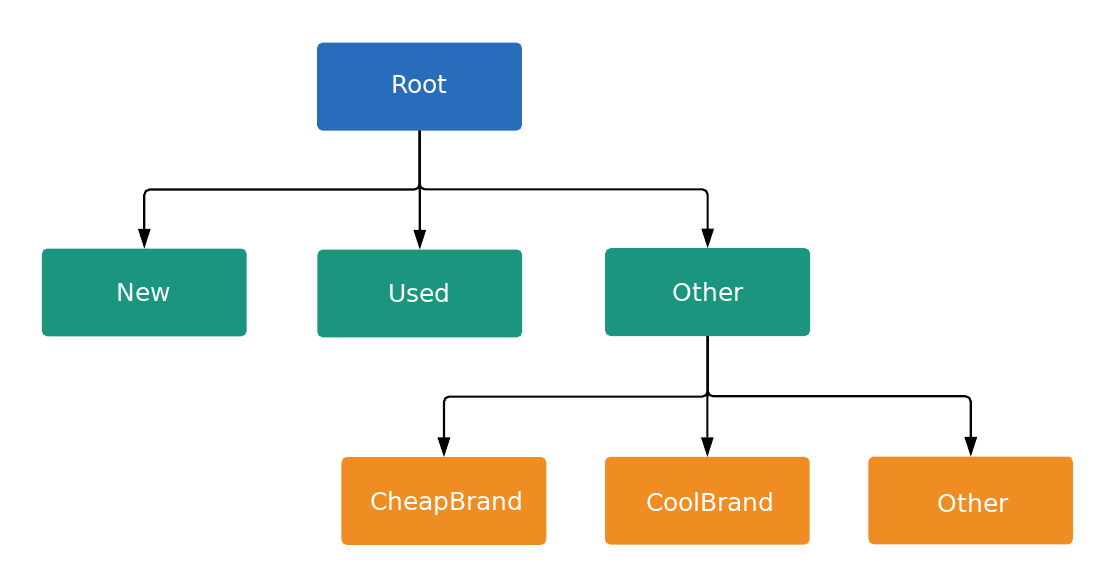
Setiap node di pohon adalah subdivisi atau unit, seperti yang ditentukan oleh
ListingGroupType. Subdivisi memperkenalkan tingkat baru di pohon, sedangkan unit adalah daun pohon. Setiap subdivisi harus selalu dipartisi sepenuhnya, sehingga harus berisi node yang mewakili Lainnya. Dalam contoh ini, node root dan Kondisi Produk: (Lainnya) adalah subdivisi. Struktur pohon dengan subdivisi dan unit ini memungkinkan Anda menetapkan bid di tingkat unit dan juga memastikan bahwa setiap produk termasuk dalam satu dan hanya satu node unit di pohon.
Anda hanya dapat menetapkan bid pada AdGroupCriterion jika ListingGroupInfo.type terkait adalah UNIT.
Jika AdGroupCriterion memiliki negative yang ditetapkan ke false default, dan memiliki ListingGroupInfo.type yang ditetapkan ke UNIT, Anda harus memberikan nilai bid jika strategi bidding grup iklan memerlukan bid di tingkat kriteria, seperti CPC Manual. Misalnya, Anda harus menetapkan kolom cpc_bid_micros pada AdGroupCriterion. Jika Anda gagal memberikan bid yang diperlukan untuk node UNIT positif, Anda akan mendapatkan error.
Bid tidak dapat ditetapkan pada AdGroupCriterion jika ListingGroupInfo.type adalah SUBDIVISION. Jika AdGroupCriterion memiliki negative yang ditetapkan ke true, bid tidak berlaku karena merupakan pengecualian.
Node adalah objek dari ListingGroupInfo
class, yang berisi
ListingGroupType field yang menunjukkan apakah
node adalah unit atau subdivisi. Menetapkan ListingGroupInfo ke listing_group
dari AdGroupCriterion akan menautkannya ke
AdGroup.
Anda memerlukan minimal satu node unit agar pohon menjadi valid. Unit tersebut dapat berupa node root, yang kemudian menjadi divisi "Semua Produk". Iklan tidak akan ditayangkan hingga Anda membuat pohon kelompok listingan yang valid.
Grup listingan Performa Maksimal
Grup listingan di kampanye Performa Maksimal berfungsi paling baik saat menargetkan grup produk, sehingga hal ini harus diutamakan daripada menargetkan produk individual berdasarkan ID item. Anda dapat menggunakan dimensi yang berbeda seperti label kustom atau merek di feed produk untuk mengelompokkan produk.
Contoh kode
Java
/** * Runs the example. * * @param googleAdsClient the Google Ads API client. * @param customerId the client customer ID. * @param assetGroupId the asset group id for the Performance Max campaign. * @param replaceExistingTree option to remove existing product tree from the passed in asset * group. * @throws GoogleAdsException if an API request failed with one or more service errors. */ private void runExample( GoogleAdsClient googleAdsClient, long customerId, long assetGroupId, boolean replaceExistingTree) throws Exception { String assetGroupResourceName = ResourceNames.assetGroup(customerId, assetGroupId); List<MutateOperation> operations = new ArrayList<>(); if (replaceExistingTree) { List<AssetGroupListingGroupFilter> existingListingGroupFilters = getAllExistingListingGroupFilterAssetsInAssetGroup( googleAdsClient, customerId, assetGroupResourceName); if (!existingListingGroupFilters.isEmpty()) { // A special factory object that ensures the creation of remove operations in the // correct order (child listing group filters must be removed before their parents). AssetGroupListingGroupFilterRemoveOperationFactory removeOperationFactory = new AssetGroupListingGroupFilterRemoveOperationFactory(existingListingGroupFilters); operations.addAll(removeOperationFactory.removeAll()); } } // Uses a factory to create all the MutateOperations that manipulate a specific // AssetGroup for a specific customer. The operations returned by the factory's methods // are used to construct a new tree of filters. These filters can have parent-child // relationships, and also include a special root that includes all children. // // When creating these filters, temporary IDs are used to create the hierarchy between // each of the nodes in the tree, beginning with the root listing group filter. // // The factory created below is specific to a customerId and assetGroupId. AssetGroupListingGroupFilterCreateOperationFactory createOperationFactory = new AssetGroupListingGroupFilterCreateOperationFactory( customerId, assetGroupId, TEMPORARY_ID_LISTING_GROUP_ROOT); // Creates the operation to add the root node of the tree. operations.add(createOperationFactory.createRoot()); // Creates an operation to add a leaf node for new products. ListingGroupFilterDimension newProductDimension = ListingGroupFilterDimension.newBuilder() .setProductCondition( ProductCondition.newBuilder() .setCondition(ListingGroupFilterProductCondition.NEW) .build()) .build(); operations.add( createOperationFactory.createUnit( TEMPORARY_ID_LISTING_GROUP_ROOT, createOperationFactory.nextId(), newProductDimension)); // Creates an operation to add a leaf node for used products. ListingGroupFilterDimension usedProductDimension = ListingGroupFilterDimension.newBuilder() .setProductCondition( ProductCondition.newBuilder() .setCondition(ListingGroupFilterProductCondition.USED) .build()) .build(); operations.add( createOperationFactory.createUnit( TEMPORARY_ID_LISTING_GROUP_ROOT, createOperationFactory.nextId(), usedProductDimension)); // This represents the ID of the "other" category in the ProductCondition subdivision. This ID // is saved because the node with this ID will be further partitioned, and this ID will serve as // the parent ID for subsequent child nodes of the "other" category. long otherSubdivisionId = createOperationFactory.nextId(); // Creates an operation to add a subdivision node for other products in the ProductCondition // subdivision. ListingGroupFilterDimension otherProductDimension = ListingGroupFilterDimension.newBuilder() .setProductCondition(ProductCondition.newBuilder().build()) .build(); operations.add( // Calls createSubdivision because this listing group will have children. createOperationFactory.createSubdivision( TEMPORARY_ID_LISTING_GROUP_ROOT, otherSubdivisionId, otherProductDimension)); // Creates an operation to add a leaf node for products with the brand "CoolBrand". ListingGroupFilterDimension coolBrandProductDimension = ListingGroupFilterDimension.newBuilder() .setProductBrand(ProductBrand.newBuilder().setValue("CoolBrand").build()) .build(); operations.add( createOperationFactory.createUnit( otherSubdivisionId, createOperationFactory.nextId(), coolBrandProductDimension)); // Creates an operation to add a leaf node for products with the brand "CheapBrand". ListingGroupFilterDimension cheapBrandProductDimension = ListingGroupFilterDimension.newBuilder() .setProductBrand(ProductBrand.newBuilder().setValue("CheapBrand").build()) .build(); operations.add( createOperationFactory.createUnit( otherSubdivisionId, createOperationFactory.nextId(), cheapBrandProductDimension)); // Creates an operation to add a leaf node for other products in the ProductBrand subdivision. ListingGroupFilterDimension otherBrandProductDimension = ListingGroupFilterDimension.newBuilder() .setProductBrand(ProductBrand.newBuilder().build()) .build(); operations.add( createOperationFactory.createUnit( otherSubdivisionId, createOperationFactory.nextId(), otherBrandProductDimension)); try (GoogleAdsServiceClient googleAdsServiceClient = googleAdsClient.getLatestVersion().createGoogleAdsServiceClient()) { MutateGoogleAdsRequest request = MutateGoogleAdsRequest.newBuilder() .setCustomerId(Long.toString(customerId)) .addAllMutateOperations(operations) .build(); MutateGoogleAdsResponse response = googleAdsServiceClient.mutate(request); printResponseDetails(request, response); } }
C#
/// <summary> /// Runs the code example. /// </summary> /// <param name="client">The Google Ads client.</param> /// <param name="customerId">The Google Ads customer ID.</param> /// <param name="assetGroupId">The asset group id for the Performance Max campaign.</param> /// <param name="replaceExistingTree">Option to remove existing product tree /// from the passed in asset group.</param> public void Run( GoogleAdsClient client, long customerId, long assetGroupId, bool replaceExistingTree) { GoogleAdsServiceClient googleAdsServiceClient = client.GetService(Services.V25.GoogleAdsService); string assetGroupResourceName = ResourceNames.AssetGroup(customerId, assetGroupId); // We use a factory to create all the MutateOperations that manipulate a specific // AssetGroup for a specific customer. The operations returned by the factory's methods // are used to optionally remove all AssetGroupListingGroupFilters from the tree, and // then to construct a new tree of filters. These filters can have a parent-child // relationship, and also include a special root that includes all children. // // When creating these filters, we use temporary IDs to create the hierarchy between // the root listing group filter, and the subdivisions and leave nodes beneath that. // // The factory specific to a customerId and assetGroupId is created below. AssetGroupListingGroupFilterCreateOperationFactory createOperationFactory = new AssetGroupListingGroupFilterCreateOperationFactory( customerId, assetGroupId, TEMPORARY_ID_LISTING_GROUP_ROOT ); MutateGoogleAdsRequest request = new MutateGoogleAdsRequest { CustomerId = customerId.ToString() }; if (replaceExistingTree) { List<AssetGroupListingGroupFilter> existingListingGroupFilters = GetAllExistingListingGroupFilterAssetsInAssetGroup( client, customerId, assetGroupResourceName ); if (existingListingGroupFilters.Count > 0) { // A special factory object that ensures the creation of remove operations in the // correct order (child listing group filters must be removed before their parents). AssetGroupListingGroupFilterRemoveOperationFactory removeOperationFactory = new AssetGroupListingGroupFilterRemoveOperationFactory( existingListingGroupFilters ); request.MutateOperations.AddRange(removeOperationFactory.RemoveAll()); } } request.MutateOperations.Add(createOperationFactory.CreateRoot()); request.MutateOperations.Add( createOperationFactory.CreateUnit( TEMPORARY_ID_LISTING_GROUP_ROOT, createOperationFactory.NextId(), new ListingGroupFilterDimension() { ProductCondition = new ListingGroupFilterDimension.Types.ProductCondition() { Condition = ListingGroupFilterProductCondition.New } } ) ); request.MutateOperations.Add( createOperationFactory.CreateUnit( TEMPORARY_ID_LISTING_GROUP_ROOT, createOperationFactory.NextId(), new ListingGroupFilterDimension() { ProductCondition = new ListingGroupFilterDimension.Types.ProductCondition() { Condition = ListingGroupFilterProductCondition.Used } } ) ); // We save this ID because create child nodes underneath it. long subdivisionIdConditionOther = createOperationFactory.NextId(); request.MutateOperations.Add( // We're calling CreateSubdivision because this listing group will have children. createOperationFactory.CreateSubdivision( TEMPORARY_ID_LISTING_GROUP_ROOT, subdivisionIdConditionOther, new ListingGroupFilterDimension() { // All sibling nodes must have the same dimension type. We use an empty // ProductCondition to indicate that this is an "Other" partition. ProductCondition = new ListingGroupFilterDimension.Types.ProductCondition() } ) ); request.MutateOperations.Add( createOperationFactory.CreateUnit( subdivisionIdConditionOther, createOperationFactory.NextId(), new ListingGroupFilterDimension() { ProductBrand = new ProductBrand() { Value = "CoolBrand" } } ) ); request.MutateOperations.Add( createOperationFactory.CreateUnit( subdivisionIdConditionOther, createOperationFactory.NextId(), new ListingGroupFilterDimension() { ProductBrand = new ProductBrand() { Value = "CheapBrand" } } ) ); request.MutateOperations.Add( createOperationFactory.CreateUnit( subdivisionIdConditionOther, createOperationFactory.NextId(), new ListingGroupFilterDimension() { ProductBrand = new ProductBrand() } ) ); MutateGoogleAdsResponse response = googleAdsServiceClient.Mutate(request); PrintResponseDetails(request, response); }
PHP
/** * Runs the example. * * @param GoogleAdsClient $googleAdsClient the Google Ads API client * @param int $customerId the customer ID * @param int $assetGroupId the asset group ID * @param bool $replaceExistingTree true if it should replace the existing listing group * tree on the asset group */ public static function runExample( GoogleAdsClient $googleAdsClient, int $customerId, int $assetGroupId, bool $replaceExistingTree ) { // We create all the mutate operations that manipulate a specific asset group for a specific // customer. The operations are used to optionally remove all asset group listing group // filters from the tree, and then to construct a new tree of filters. These filters can // have a parent-child relationship, and also include a special root that includes all // children. // // When creating these filters, we use temporary IDs to create the hierarchy between // the root listing group filter, and the subdivisions and leave nodes beneath that. $mutateOperations = []; if ($replaceExistingTree === true) { $existingListingGroupFilters = self::getAllExistingListingGroupFilterAssetsInAssetGroup( $googleAdsClient, $customerId, ResourceNames::forAssetGroup($customerId, $assetGroupId) ); if (count($existingListingGroupFilters) > 0) { $mutateOperations = array_merge( $mutateOperations, // Ensures the creation of remove operations in the correct order (child listing // group filters must be removed before their parents). self::createMutateOperationsForRemovingListingGroupFiltersTree( $existingListingGroupFilters ) ); } } $mutateOperations[] = self::createMutateOperationForRoot( $customerId, $assetGroupId, self::LISTING_GROUP_ROOT_TEMPORARY_ID ); // The temporary ID to be used for creating subdivisions and units. static $tempId = self::LISTING_GROUP_ROOT_TEMPORARY_ID - 1; $mutateOperations[] = self::createMutateOperationForUnit( $customerId, $assetGroupId, $tempId--, self::LISTING_GROUP_ROOT_TEMPORARY_ID, new ListingGroupFilterDimension( [ 'product_condition' => new ProductCondition( [ 'condition' => ListingGroupFilterProductCondition::PBNEW ] ) ] ) ); $mutateOperations[] = self::createMutateOperationForUnit( $customerId, $assetGroupId, $tempId--, self::LISTING_GROUP_ROOT_TEMPORARY_ID, new ListingGroupFilterDimension( [ 'product_condition' => new ProductCondition( [ 'condition' => ListingGroupFilterProductCondition::USED ] ) ] ) ); // We save this ID to create child nodes underneath it. $conditionOtherSubdivisionId = $tempId--; // We're calling createMutateOperationForSubdivision() because this listing group will // have children. $mutateOperations[] = self::createMutateOperationForSubdivision( $customerId, $assetGroupId, $conditionOtherSubdivisionId, self::LISTING_GROUP_ROOT_TEMPORARY_ID, new ListingGroupFilterDimension( [ // All sibling nodes must have the same dimension type. We use an empty // ProductCondition to indicate that this is an "Other" partition. 'product_condition' => new ProductCondition() ] ) ); $mutateOperations[] = self::createMutateOperationForUnit( $customerId, $assetGroupId, $tempId--, $conditionOtherSubdivisionId, new ListingGroupFilterDimension( ['product_brand' => new ProductBrand(['value' => 'CoolBrand'])] ) ); $mutateOperations[] = self::createMutateOperationForUnit( $customerId, $assetGroupId, $tempId--, $conditionOtherSubdivisionId, new ListingGroupFilterDimension( [ 'product_brand' => new ProductBrand(['value' => 'CheapBrand']) ] ) ); $mutateOperations[] = self::createMutateOperationForUnit( $customerId, $assetGroupId, $tempId--, $conditionOtherSubdivisionId, // All other product brands. new ListingGroupFilterDimension(['product_brand' => new ProductBrand()]) ); // Issues a mutate request to create everything and prints its information. $googleAdsServiceClient = $googleAdsClient->getGoogleAdsServiceClient(); $response = $googleAdsServiceClient->mutate( MutateGoogleAdsRequest::build($customerId, $mutateOperations) ); self::printResponseDetails($mutateOperations, $response); }
Python
def main( client: GoogleAdsClient, customer_id: str, asset_group_id: int, # Will be str for path construction replace_existing_tree: bool, ) -> None: """The main method that creates all necessary entities for the example. Args: client: an initialized GoogleAdsClient instance. customer_id: a client customer ID. asset_group_id: the asset group id for the Performance Max campaign. replace_existing_tree: option to remove existing product tree from the passed in asset group. """ googleads_service: GoogleAdsServiceClient = client.get_service( "GoogleAdsService" ) # asset_group_id is used as a string in path construction. asset_group_resource_name: str = googleads_service.asset_group_path( customer_id, str(asset_group_id) ) operations: List[MutateOperation] = [] if replace_existing_tree: # Retrieve a list of existing AssetGroupListingGroupFilters existing_listing_group_filters: List[AssetGroupListingGroupFilter] = ( get_all_existing_listing_group_filter_assets_in_asset_group( client, customer_id, asset_group_resource_name ) ) # If present, create MutateOperations to remove each # AssetGroupListingGroupFilter and add them to the list of operations. if existing_listing_group_filters: remove_operation_factory = ( AssetGroupListingGroupFilterRemoveOperationFactory( client, existing_listing_group_filters ) ) operations.extend(remove_operation_factory.remove_all()) create_operation_factory = ( AssetGroupListingGroupFilterCreateOperationFactory( client, customer_id, asset_group_id, # Pass as int, will be converted to str in __init__ _TEMPORARY_ID_LISTING_GROUP_ROOT, ) ) operations.append(create_operation_factory.create_root()) new_dimension: ListingGroupFilterDimension = client.get_type( "ListingGroupFilterDimension" ) new_dimension.product_condition.condition = ( client.enums.ListingGroupFilterProductConditionEnum.NEW ) operations.append( create_operation_factory.create_unit( _TEMPORARY_ID_LISTING_GROUP_ROOT, create_operation_factory.next_id(), new_dimension, ) ) used_dimension: ListingGroupFilterDimension = client.get_type( "ListingGroupFilterDimension" ) used_dimension.product_condition.condition = ( client.enums.ListingGroupFilterProductConditionEnum.USED ) operations.append( create_operation_factory.create_unit( _TEMPORARY_ID_LISTING_GROUP_ROOT, create_operation_factory.next_id(), used_dimension, ) ) # We save this ID because create child nodes underneath it. subdivision_id_condition_other: int = create_operation_factory.next_id() # All sibling nodes must have the same dimension type. We use an empty # product_condition to indicate that this is an "Other" partition. other_dimension: ListingGroupFilterDimension = client.get_type( "ListingGroupFilterDimension" ) # This triggers the presence of the product_condition field without # specifying any field values. This is important in order to tell the API # that this is an "other" node. other_dimension.product_condition._pb.SetInParent() # We're calling create_subdivision because this listing group will have # children. operations.append( create_operation_factory.create_subdivision( _TEMPORARY_ID_LISTING_GROUP_ROOT, subdivision_id_condition_other, other_dimension, ) ) cool_dimension: ListingGroupFilterDimension = client.get_type( "ListingGroupFilterDimension" ) cool_dimension.product_brand.value = "CoolBrand" operations.append( create_operation_factory.create_unit( subdivision_id_condition_other, create_operation_factory.next_id(), cool_dimension, ) ) cheap_dimension: ListingGroupFilterDimension = client.get_type( "ListingGroupFilterDimension" ) cheap_dimension.product_brand.value = "CheapBrand" operations.append( create_operation_factory.create_unit( subdivision_id_condition_other, create_operation_factory.next_id(), cheap_dimension, ) ) empty_dimension: ListingGroupFilterDimension = client.get_type( "ListingGroupFilterDimension" ) # This triggers the presence of the product_brand field without specifying # any field values. This is important in order to tell the API # that this is an "other" node. empty_dimension.product_brand._pb.SetInParent() operations.append( create_operation_factory.create_unit( subdivision_id_condition_other, create_operation_factory.next_id(), empty_dimension, ) ) response: MutateGoogleAdsResponse = googleads_service.mutate( customer_id=customer_id, mutate_operations=operations ) print_response_details(operations, response)
Ruby
def add_performance_max_product_listing_group_tree( customer_id, asset_group_id, replace_existing_tree) # GoogleAdsClient will read a config file from # ENV['HOME']/google_ads_config.rb when called without parameters client = Google::Ads::GoogleAds::GoogleAdsClient.new asset_group_resource_name = client.path.asset_group( customer_id, asset_group_id, ) # We use a factory to create all the MutateOperations that manipulate a # specific AssetGroup for a specific customer. The operations returned by the # factory's methods are used to optionally remove all # AssetGroupListingGroupFilters from the tree, and then to construct a new # tree of filters. These filters can have a parent-child relationship, and # also include a special root that includes all children. # # When creating these filters, we use temporary IDs to create the hierarchy # between the root listing group filter, and the subdivisions and leave nodes # beneath that. # # The factory specific to a customerId and assetGroupId is created below. create_operation_factory = AssetGroupListingGroupFilterCreateOperationFactory.new( customer_id, asset_group_id, TEMPORARY_ID_LISTING_GROUP_ROOT, ) operations = [] if replace_existing_tree existing_listing_group_filters = get_existing_listing_group_filters_in_asset_group( client, customer_id, asset_group_resource_name, ) if existing_listing_group_filters.length > 0 # A special factory object that ensures the creation of remove operations # in the correct order (child listing group filters must be removed # before their parents). remove_operation_factory = AssetGroupListingGroupFilterRemoveOperationFactory.new( existing_listing_group_filters ) operations += remove_operation_factory.remove_all(client) end end operations << create_operation_factory.create_root(client) operations << create_operation_factory.create_unit( client, TEMPORARY_ID_LISTING_GROUP_ROOT, create_operation_factory.next_id, client.resource.listing_group_filter_dimension do |dimension| dimension.product_condition = client.resource.product_condition do |condition| condition.condition = :NEW end end, ) operations << create_operation_factory.create_unit( client, TEMPORARY_ID_LISTING_GROUP_ROOT, create_operation_factory.next_id, client.resource.listing_group_filter_dimension do |dimension| dimension.product_condition = client.resource.product_condition do |condition| condition.condition = :USED end end, ) # We save this ID because we create child nodes underneath it. subdivision_id_condition_other = create_operation_factory.next_id operations << create_operation_factory.create_subdivision( client, TEMPORARY_ID_LISTING_GROUP_ROOT, subdivision_id_condition_other, client.resource.listing_group_filter_dimension do |dimension| dimension.product_condition = client.resource.product_condition do |condition| # All sibling nodes must have the same dimension type. We use an empty # ProductCondition to indicate that this is an "Other" partition. end end, ) operations << create_operation_factory.create_unit( client, subdivision_id_condition_other, create_operation_factory.next_id, client.resource.listing_group_filter_dimension do |dimension| dimension.product_brand = client.resource.product_brand do |brand| brand.value = 'CoolBrand' end end, ) operations << create_operation_factory.create_unit( client, subdivision_id_condition_other, create_operation_factory.next_id, client.resource.listing_group_filter_dimension do |dimension| dimension.product_brand = client.resource.product_brand do |brand| brand.value = 'CheapBrand' end end, ) operations << create_operation_factory.create_unit( client, subdivision_id_condition_other, create_operation_factory.next_id, client.resource.listing_group_filter_dimension do |dimension| dimension.product_brand = client.resource.product_brand do |brand| end end, ) response = client.service.google_ads.mutate( customer_id: customer_id, mutate_operations: operations, ) print_response_details(operations, response) end
Perl
sub add_performance_max_product_listing_group_tree { my ($api_client, $customer_id, $asset_group_id, $replace_existing_tree) = @_; # We create all the mutate operations that manipulate a specific asset group for # a specific customer. The operations are used to optionally remove all asset # group listing group filters from the tree, and then to construct a new tree # of filters. These filters can have a parent-child relationship, and also include # a special root that includes all children. # # When creating these filters, we use temporary IDs to create the hierarchy between # the root listing group filter, and the subdivisions and leave nodes beneath that. my $mutate_operations = []; if (defined $replace_existing_tree) { my $existing_listing_group_filters = get_all_existing_listing_group_filter_assets_in_asset_group( $api_client, $customer_id, Google::Ads::GoogleAds::V25::Utils::ResourceNames::asset_group( $customer_id, $asset_group_id )); if (scalar @$existing_listing_group_filters > 0) { push @$mutate_operations, # Ensure the creation of remove operations in the correct order (child # listing group filters must be removed before their parents). @{ create_mutate_operations_for_removing_listing_group_filters_tree( $existing_listing_group_filters)}; } } push @$mutate_operations, create_mutate_operation_for_root($customer_id, $asset_group_id, LISTING_GROUP_ROOT_TEMPORARY_ID); # The temporary ID to be used for creating subdivisions and units. my $temp_id = LISTING_GROUP_ROOT_TEMPORARY_ID - 1; push @$mutate_operations, create_mutate_operation_for_unit( $customer_id, $asset_group_id, $temp_id--, LISTING_GROUP_ROOT_TEMPORARY_ID, Google::Ads::GoogleAds::V25::Resources::ListingGroupFilterDimension->new({ productCondition => Google::Ads::GoogleAds::V25::Resources::ProductCondition->new({ condition => NEW })})); push @$mutate_operations, create_mutate_operation_for_unit( $customer_id, $asset_group_id, $temp_id--, LISTING_GROUP_ROOT_TEMPORARY_ID, Google::Ads::GoogleAds::V25::Resources::ListingGroupFilterDimension->new({ productCondition => Google::Ads::GoogleAds::V25::Resources::ProductCondition->new({ condition => USED })})); # We save this ID to create child nodes underneath it. my $condition_other_subdivision_id = $temp_id--; # We're calling create_mutate_operation_for_subdivision() because this listing # group will have children. push @$mutate_operations, create_mutate_operation_for_subdivision( $customer_id, $asset_group_id, $condition_other_subdivision_id, LISTING_GROUP_ROOT_TEMPORARY_ID, Google::Ads::GoogleAds::V25::Resources::ListingGroupFilterDimension->new({ # All sibling nodes must have the same dimension type. We use an empty # ProductCondition to indicate that this is an "Other" partition. productCondition => Google::Ads::GoogleAds::V25::Resources::ProductCondition->new({})})); push @$mutate_operations, create_mutate_operation_for_unit( $customer_id, $asset_group_id, $temp_id--, $condition_other_subdivision_id, Google::Ads::GoogleAds::V25::Resources::ListingGroupFilterDimension->new({ productBrand => Google::Ads::GoogleAds::V25::Resources::ProductBrand->new({ value => "CoolBrand" })})); push @$mutate_operations, create_mutate_operation_for_unit( $customer_id, $asset_group_id, $temp_id--, $condition_other_subdivision_id, Google::Ads::GoogleAds::V25::Resources::ListingGroupFilterDimension->new({ productBrand => Google::Ads::GoogleAds::V25::Resources::ProductBrand->new({ value => "CheapBrand" })})); push @$mutate_operations, create_mutate_operation_for_unit( $customer_id, $asset_group_id, $temp_id--, $condition_other_subdivision_id, # All other product brands. Google::Ads::GoogleAds::V25::Resources::ListingGroupFilterDimension->new({ productBrand => Google::Ads::GoogleAds::V25::Resources::ProductBrand->new({})})); # Issue a mutate request to create everything and print its information. my $response = $api_client->GoogleAdsService()->mutate({ customerId => $customer_id, mutateOperations => $mutate_operations }); print_response_details($mutate_operations, $response); return 1; }
curl
Dimensi yang tersedia untuk ListingDimensionInfo
Ada beberapa dimensi listingan yang dapat menjadi bagian dari grup listingan Performa Maksimal. Jenis ListingDimensionInfo berikut dapat digunakan dengan kampanye Performa Maksimal retail:
ProductBrandInfoProductCategoryInfoProductChannelInfoProductConditionInfoProductCustomAttributeInfoProductItemIdInfoProductTypeInfo
Setiap resource menyertakan daftar pelokalan yang didukung di
ProductCategoryConstant.ProductCategoryLocalization
kolom.
Untuk memahami data yang ditampilkan oleh resource, coba contoh
Mendapatkan Konstanta Kategori Produk.
Node unit Lainnya dapat dibuat dengan meneruskan objek kosong dari jenis ListingDimensionInfo ke ListingGroupInfo.
ID Sementara
Kriteria grup aset tidak diberi ID hingga permintaan ubah yang membuatnya diproses oleh server. Namun, ListingGroupInfo tidak valid hingga selesai, jadi setiap kali Anda membuat subdivisi, Anda juga harus membuat setidaknya satu turunannya dan node Lainnya dalam permintaan yang sama.
Untuk menetapkan parent_criterion_id dari
ListingGroupInfo untuk node turunan yang dibuat
dalam permintaan induk yang sama, Anda dapat menggunakan ID kriteria sementara. ID ini hanya berlaku dalam konteks satu permintaan ubah. Bilangan bulat negatif apa pun dapat digunakan sebagai ID sementara.