

Аналогично процессу аутентификации служебных учетных записей , процесс аутентификации одного пользователя использует функции авторизации и управления пользователями, предоставляемые пользовательским интерфейсом Google Ads, для предоставления приложению доступа ко всем необходимым учетным записям. Этот процесс аутентификации состоит из двух этапов:
- Вы предоставляете одному пользователю доступ ко всем аккаунтам Google Ads , которые должны управляться приложением.
- Пользователь разрешает вашему приложению управлять его аккаунтами Google Ads от его имени, предоставляя таким образом приложению доступ ко всем аккаунтам Google Ads.
Поскольку задействован только один пользователь, вы можете использовать такие инструменты, как gcloud CLI или пример кода GenerateUserCredential, вместо того, чтобы создавать собственный процесс аутентификации пользователей OAuth 2.0.
Ещё один пример использования этого рабочего процесса — когда доступ к вашим учётным записям осуществляется через небольшое количество пользовательских входов (например, 3-4 пользователя), поэтому затраты на разработку полноценного процесса аутентификации пользователей OAuth не оправданы по сравнению с затратами на получение авторизации для 3-4 пользователей с помощью инструмента командной строки, такого как gcloud CLI.
Недостатки
По сравнению с рабочим процессом с использованием служебных учетных записей, у этого подхода есть несколько недостатков:
- Для аутентификации пользователя необходимо создать идентификатор клиента и секретный ключ OAuth 2.0 в консоли Google Cloud, что требует больше шагов настройки, чем создание учетной записи службы и ключа.
- Вашему приложению, возможно, потребуется пройти дополнительную проверку в Google Cloud App .
- Если авторизованный пользователь покинет команду или компанию, ваше приложение может перестать работать, если вы удалите пользователя из своих учетных записей или заблокируете его учетную запись. Служебные учетные записи не привязаны к отдельным пользователям, поэтому этот риск исключен.
- Пользователю, авторизующему аккаунт Google Ads, следует принять дополнительные меры предосторожности, такие как включение двухфакторной аутентификации , чтобы защитить свой аккаунт Google от взлома из-за недостаточной безопасности, вредоносного ПО или фишинга. Сервисные аккаунты менее уязвимы для этой проблемы, поскольку некоторые из этих способов атаки к ним напрямую не применяются.
Сгенерировать учетные данные
Следуйте инструкциям , чтобы настроить экран согласия OAuth для вашего приложения и добавьте
https://www.googleapis.com/auth/adwordsв качестве области действия OAuth 2.0. Подробности см. в разделе «Настройка экрана согласия OAuth» .Создайте идентификатор клиента и секретный ключ клиента, следуя инструкциям . После создания клиента OAuth 2.0 загрузите JSON-файл клиента, сначала нажав на значок «Загрузить клиент OAuth», а затем на кнопку «ЗАГРУЗИТЬ JSON» на следующем экране. Сохраните файл как
credentials.json.Найдите учетную запись пользователя, которая имеет доступ ко всем аккаунтам Google Ads, которыми вы хотите управлять с помощью своего приложения. Если есть аккаунты, у которых отсутствует доступ, следуйте инструкциям , чтобы предоставить необходимый доступ.
Загрузите и установите gcloud CLI. После установки убедитесь в корректной работе инструмента, выполнив команду `
gcloud versionиз командной строки. Результат может выглядеть следующим образом.:~$ gcloud version Google Cloud SDK 492.0.0 alpha 2024.09.06 beta 2024.09.06 bq 2.1.8 bundled-python3-unix 3.11.9 core 2024.09.06 enterprise-certificate-proxy 0.3.2 gcloud-crc32c 1.0.0 gsutil 5.30
Сгенерируйте токен обновления OAuth 2.0, запустив инструмент командной строки gcloud:
gcloud auth application-default

  login --scopes=https://www.googleapis.com/auth/adwords,https://www.googleapis.com/auth/cloud-platform

  --client-id-file=<path_to_credentials.json>
Файл
credentials.jsonбыл получен на предыдущем шаге.Команда
gcloudоткрывает окно входа в учетную запись Google в новом окне браузера и проводит вас через этапы аутентификации OAuth 2.0. Убедитесь, что вы вошли в систему под пользователем, которого выбрали на предыдущих шагах. Если ваше приложение не проверено , вы можете увидеть предупреждающий экран. В таких случаях можно безопасно нажать ссылку «Показать расширенные настройки» и выбрать опцию «Перейти к PROJECT_NAME (не проверено)» .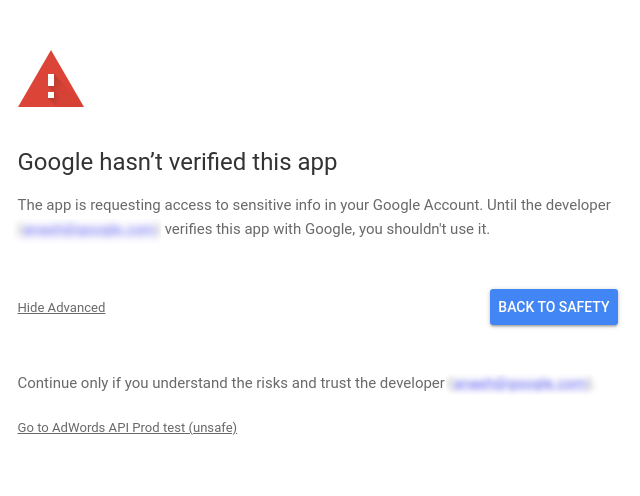
После проверки прав доступа нажмите кнопку «Продолжить» , чтобы предоставить необходимые разрешения. Браузер перейдет по адресу
https://cloud.google.com/sdk/auth_success, что будет означать успешную аутентификацию. На странице отобразится следующее сообщение:Authorization code granted. Close this tab.Команда
gcloudвыводит следующее сообщение:Credentials saved to file: [/****/.config/gcloud/application_default_credentials.json]Теперь откройте файл
application_default_credentials.json. Его содержимое должно быть примерно следующим:{ "account": "", "client_id": "******.apps.googleusercontent.com", "client_secret": "******", "refresh_token": "******", "type": "authorized_user", "universe_domain": "googleapis.com" }
Конфигурация клиентской библиотеки
Выберите вкладку, соответствующую вашему языку программирования, чтобы получить инструкции по настройке клиентской библиотеки.
Java
Настройте следующие ключи в файле ads.properties .
api.googleads.clientId=INSERT_CLIENT_ID_HERE
api.googleads.clientSecret=INSERT_CLIENT_SECRET_HERE
api.googleads.refreshToken=INSERT_REFRESH_TOKEN_HERE
api.googleads.loginCustomerId=INSERT_LOGIN_CUSTOMER_ID_HERE
Дополнительные параметры см. в руководстве по настройке .
.СЕТЬ
Вы можете инициализировать экземпляр GoogleAdsClient во время выполнения, используя учетные данные, полученные от пользователя, к чьим аккаунтам вы обращаетесь с API-запросами.
GoogleAdsConfig config = new GoogleAdsConfig()
{
    OAuth2Mode = OAuth2Flow.APPLICATION,
    OAuth2ClientId = "INSERT_OAUTH2_CLIENT_ID",
    OAuth2ClientSecret = "INSERT_OAUTH2_CLIENT_SECRET",
    OAuth2RefreshToken = "INSERT_OAUTH2_REFRESH_TOKEN",
    ...
};
GoogleAdsClient client = new GoogleAdsClient(config);
Дополнительные параметры см. в руководстве по настройке .
Python
Настройте следующие ключи в файле google-ads.yaml .
client_id: INSERT_OAUTH2_CLIENT_ID_HERE
client_secret: INSERT_OAUTH2_CLIENT_SECRET_HERE
refresh_token: INSERT_REFRESH_TOKEN_HERE
login_customer_id: INSERT_LOGIN_CUSTOMER_ID_HERE
Дополнительные параметры см. в руководстве по настройке .
PHP
Настройте следующие ключи в файле google_ads_php.ini .
[GOOGLE_ADS]
loginCustomerId = "INSERT_LOGIN_CUSTOMER_ID_HERE"

[OAUTH2]
clientId = "INSERT_OAUTH2_CLIENT_ID_HERE"
clientSecret = "INSERT_OAUTH2_CLIENT_SECRET_HERE"
refreshToken = "INSERT_OAUTH2_REFRESH_TOKEN_HERE"
Дополнительные параметры см. в руководстве по настройке .
Руби
Настройте следующие ключи в файле google_ads_config.rb .
Google::Ads::GoogleAds::Config.new do |c|
    c.client_id = 'INSERT_CLIENT_ID_HERE'
    c.client_secret = 'INSERT_CLIENT_SECRET_HERE'
    c.refresh_token = 'INSERT_REFRESH_TOKEN_HERE'
    c.login_customer_id = 'INSERT_LOGIN_CUSTOMER_ID_HERE'
end
Дополнительные параметры см. в руководстве по настройке .
Perl
Настройте следующие ключи в файле googleads.properties .
clientId=INSERT_OAUTH2_CLIENT_ID_HERE
clientSecret=INSERT_OAUTH2_CLIENT_SECRET_HERE
refreshToken=INSERT_OAUTH2_REFRESH_TOKEN_HERE
loginCustomerId=INSERT_LOGIN_CUSTOMER_ID_HERE
Дополнительные параметры см. в руководстве по настройке .
локон
Для начала воспользуйтесь HTTP-клиентом, чтобы получить токен доступа OAuth 2.0. В этом руководстве используется команда curl .
curl \
--data "grant_type=refresh_token" \
--data "client_id=CLIENT_ID" \
--data "client_secret=CLIENT_SECRET" \
--data "refresh_token=REFRESH_TOKEN" \
https://www.googleapis.com/oauth2/v3/token
Теперь вы можете использовать токен доступа в своих API-запросах. В следующем примере показано, как создать отчет по кампании, используя метод GoogleAdsService.SearchStream для получения информации о кампаниях в вашем аккаунте. Данное руководство не охватывает подробности создания отчетов .
curl -i -X POST https://googleads.googleapis.com/v25/customers/CUSTOMER_ID/googleAds:searchStream \
-H "Content-Type: application/json" \
-H "Authorization: Bearer ACCESS_TOKEN" \
-H "login-customer-id: LOGIN_CUSTOMER_ID" \
--data-binary "@query.json"
Содержимое файла query.json следующее:
{
    "query": "SELECT campaign.id, campaign.name, campaign.network_settings.target_content_network FROM campaign ORDER BY campaign.id"
}