

บัญชี Google Ads มี 2 ประเภท ได้แก่ บัญชีดูแลจัดการ Google Ads และบัญชีผู้ลงโฆษณา Google Ads ดูคำอธิบายโดยละเอียดเกี่ยวกับความสัมพันธ์ของข้อกำหนดเหล่านี้ และข้อกำหนดอื่นๆ (เช่น บัญชีลูกค้าและลูกค้า) ได้ที่ประเภทบัญชี
บัญชีดูแลจัดการสามารถจัดการบัญชีดูแลจัดการ Google Ads อื่นๆ หรือบัญชีผู้ลงโฆษณา Google Ads ได้ คุณสามารถลิงก์บัญชีผู้ลงโฆษณากับบัญชีดูแลจัดการ แล้วจัดการบัญชีผู้ลงโฆษณาผ่านบัญชีดูแลจัดการได้ โครงสร้างที่ลิงก์โดยรวมคือกราฟแบบมีทิศทางและไม่มีวงจรที่มีบัญชีผู้ลงโฆษณาที่ระดับล่างสุด
คุณให้สิทธิ์เข้าถึงบัญชี Google Ads แก่ผู้ใช้แต่ละรายหรือบัญชีบริการได้ คุณให้สิทธิ์ผู้ใช้เข้าถึงบัญชีผู้ลงโฆษณาได้ 2 วิธีดังนี้
- ให้สิทธิ์ผู้ใช้เข้าถึงบัญชีผู้ลงโฆษณาโดยตรงด้วยการเชิญ ผู้ใช้ไปยังบัญชีนั้น
- ให้สิทธิ์เข้าถึงบัญชีผู้ลงโฆษณาแก่ผู้ใช้โดยอ้อมด้วยการเชิญผู้ใช้ไปยังบัญชีดูแลจัดการที่ลิงก์กับบัญชีนั้น ผู้ใช้ ได้รับสิทธิ์เข้าถึงบัญชีผู้ลงโฆษณาเนื่องจากบัญชีดูแลจัดการมีสิทธิ์เข้าถึง บัญชีทั้งหมดที่ลิงก์ภายใต้บัญชีดูแลจัดการ
นอกจากนี้ คุณยังมอบหมายบทบาทของผู้ใช้ได้เมื่อเชิญผู้ใช้ให้ จัดการบัญชี
ลองพิจารณาลำดับชั้นบัญชีต่อไปนี้ สมมติว่าผู้ใช้ทั้งหมดมีสิทธิ์การเข้าถึงระดับมาตรฐาน
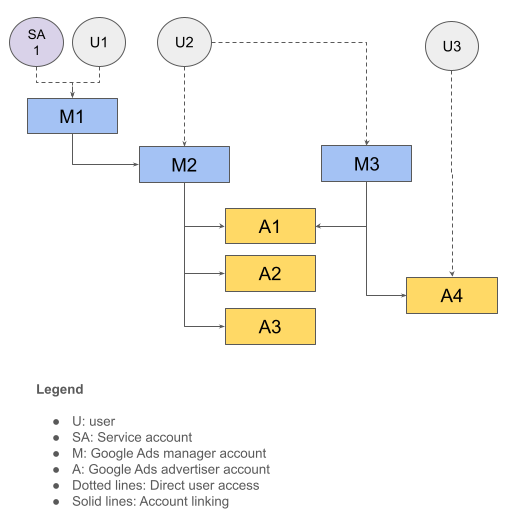
ตารางต่อไปนี้สรุปโครงสร้างบัญชีนี้
| ผู้ใช้ | มีสิทธิ์เข้าถึง | มีสิทธิ์เข้าถึงโดยอ้อม |
|---|---|---|
| U1, SA1 | M1 | M2, A1, A2, A3 |
| U2 | M2, M3 | A1, A2, A3, A4 |
| U3 | A4 |
รหัสลูกค้าสำหรับการเข้าสู่ระบบ
ผู้ใช้อาจมีสิทธิ์เข้าถึงลําดับชั้นของบัญชีหลายรายการ เมื่อทำการเรียก API
ในกรณีดังกล่าว คุณต้องระบุบัญชีรูทที่จะใช้เพื่อ
กำหนดระดับการให้สิทธิ์และการเข้าถึงบัญชีอย่างถูกต้อง โดยให้ใส่ส่วนหัว
login-customer-id ในคำขอ API
ตารางต่อไปนี้ใช้ลําดับชั้นบัญชีจากตัวอย่างก่อนหน้าเพื่อแสดงรหัสลูกค้าสําหรับการเข้าสู่ระบบที่คุณใช้ได้ และ รายการบัญชีที่เกี่ยวข้องซึ่งคุณเรียกใช้ได้
| ผู้ใช้ | เข้าสู่ระบบด้วยรหัสลูกค้าเพื่อใช้งาน | บัญชีที่จะทำการเรียก API |
|---|---|---|
| U1, SA1 | M1 | M1, M2, A1, A2, A3 |
| U2 | M2 | M2, A1, A2, A3 |
| U2 | M3 | M3, A1, A4 |
| U3 | A4 | A4 |
คุณข้ามการระบุส่วนหัว login-customer-id ได้หากผู้ใช้มีสิทธิ์เข้าถึงบัญชี Google Ads ที่คุณเรียกใช้โดยตรง
เช่น คุณไม่จำเป็นต้องระบุส่วนหัว login-customer-id เมื่อใช้ข้อมูลเข้าสู่ระบบ U3 เพื่อทำการเรียกไปยัง A4 เนื่องจากเซิร์ฟเวอร์ของ Google Ads สามารถกำหนดระดับการเข้าถึงจากรหัสลูกค้า (A4) ได้อย่างถูกต้อง
หากคุณใช้ไลบรารีของไคลเอ็นต์ Google Ads API ให้ใช้การตั้งค่าต่อไปนี้เพื่อระบุส่วนหัว login-customer-id
Java
เพิ่มการตั้งค่าต่อไปนี้ลงในไฟล์ ads.properties
api.googleads.loginCustomerId=INSERT_LOGIN_CUSTOMER_ID_HERE
.NET
เพิ่มการตั้งค่าต่อไปนี้เมื่อเริ่มต้นออบเจ็กต์ GoogleAdsConfig
และใช้เพื่อสร้างออบเจ็กต์ GoogleAdsClient
GoogleAdsConfig config = new GoogleAdsConfig()
{
    // ...
    LoginCustomerId = "INSERT_LOGIN_CUSTOMER_ID_HERE"
};
GoogleAdsClient client = new GoogleAdsClient(config);
Python
เพิ่มการตั้งค่าต่อไปนี้ลงในไฟล์ google-ads.yaml
login_customer_id: INSERT_LOGIN_CUSTOMER_ID_HERE
PHP
เพิ่มการตั้งค่าต่อไปนี้ลงในไฟล์ google_ads_php.ini
[GOOGLE_ADS]
loginCustomerId = "INSERT_LOGIN_CUSTOMER_ID_HERE"
Ruby
เพิ่มการตั้งค่าต่อไปนี้ลงในไฟล์ google_ads_config.rb
Google::Ads::GoogleAds::Config.new do |c|
  c.login_customer_id = 'INSERT_LOGIN_CUSTOMER_ID_HERE'
end
สร้างอินสแตนซ์ GoogleAdsClient โดยส่งเส้นทางไปยังตำแหน่งที่คุณเก็บ
ไฟล์นี้
client = Google::Ads::GoogleAds::GoogleAdsClient.new(
  'path/to/google_ads_config.rb'
)
Perl
เพิ่มการตั้งค่าต่อไปนี้ลงในไฟล์ googleads.properties
loginCustomerId=INSERT_LOGIN_CUSTOMER_ID_HERE
curl
ระบุอาร์กิวเมนต์บรรทัดคำสั่งต่อไปนี้เมื่อเรียกใช้คำสั่ง curl
-H "login-customer-id: INSERT_LOGIN_CUSTOMER_ID_HERE"คุณสามารถใช้เมธอด
CustomerService.ListAccessibleCustomers
เพื่อดึงข้อมูลรายการบัญชีที่ผู้ใช้มีสิทธิ์เข้าถึงโดยตรง
บัญชีเหล่านี้ใช้เป็นค่าที่ถูกต้องสำหรับส่วนหัว login-customer-id ได้
Java
private void runExample(GoogleAdsClient client) { // Optional: Change credentials to use a different refresh token, to retrieve customers // available for a specific user. // // UserCredentials credentials = // UserCredentials.newBuilder() // .setClientId("INSERT_OAUTH_CLIENT_ID") // .setClientSecret("INSERT_OAUTH_CLIENT_SECRET") // .setRefreshToken("INSERT_REFRESH_TOKEN") // .build(); // // client = client.toBuilder().setCredentials(credentials).build(); try (CustomerServiceClient customerService = client.getLatestVersion().createCustomerServiceClient()) { ListAccessibleCustomersResponse response = customerService.listAccessibleCustomers( ListAccessibleCustomersRequest.newBuilder().build()); System.out.printf("Total results: %d%n", response.getResourceNamesCount()); for (String customerResourceName : response.getResourceNamesList()) { System.out.printf("Customer resource name: %s%n", customerResourceName); } } }
C#
public void Run(GoogleAdsClient client) { // Get the CustomerService. CustomerServiceClient customerService = client.GetService(Services.V25.CustomerService); try { // Retrieve the list of customer resources. string[] customerResourceNames = customerService.ListAccessibleCustomers(); // Display the result. foreach (string customerResourceName in customerResourceNames) { Console.WriteLine( $"Found customer with resource name = '{customerResourceName}'."); } } catch (GoogleAdsException e) { Console.WriteLine("Failure:"); Console.WriteLine($"Message: {e.Message}"); Console.WriteLine($"Failure: {e.Failure}"); Console.WriteLine($"Request ID: {e.RequestId}"); throw; } }
PHP
public static function runExample(GoogleAdsClient $googleAdsClient) { $customerServiceClient = $googleAdsClient->getCustomerServiceClient(); // Issues a request for listing all accessible customers. $accessibleCustomers = $customerServiceClient->listAccessibleCustomers(new ListAccessibleCustomersRequest()); print 'Total results: ' . count($accessibleCustomers->getResourceNames()) . PHP_EOL; // Iterates over all accessible customers' resource names and prints them. foreach ($accessibleCustomers->getResourceNames() as $resourceName) { /** @var string $resourceName */ printf("Customer resource name: '%s'%s", $resourceName, PHP_EOL); } }
Python
def main(client: GoogleAdsClient) -> None: customer_service: CustomerServiceClient = client.get_service( "CustomerService" ) accessible_customers: ListAccessibleCustomersResponse = ( customer_service.list_accessible_customers() ) result_total: int = len(accessible_customers.resource_names) print(f"Total results: {result_total}") resource_names: List[str] = accessible_customers.resource_names for resource_name in resource_names: # resource_name is implicitly str print(f'Customer resource name: "{resource_name}"')
Ruby
def list_accessible_customers() # GoogleAdsClient will read a config file from # ENV['HOME']/google_ads_config.rb when called without parameters client = Google::Ads::GoogleAds::GoogleAdsClient.new accessible_customers = client.service.customer.list_accessible_customers().resource_names accessible_customers.each do |resource_name| puts "Customer resource name: #{resource_name}" end end
Perl
sub list_accessible_customers { my ($api_client) = @_; my $list_accessible_customers_response = $api_client->CustomerService()->list_accessible_customers(); printf "Total results: %d.\n", scalar @{$list_accessible_customers_response->{resourceNames}}; foreach my $resource_name (@{$list_accessible_customers_response->{resourceNames}}) { printf "Customer resource name: '%s'.\n", $resource_name; } return 1; }
curl
# Returns the resource names of customers directly accessible by the user # authenticating the call. # # Variables: # API_VERSION, # OAUTH2_ACCESS_TOKEN: # See https://developers.google.com/google-ads/api/rest/auth#request_headers # for details. # curl -f --request GET \ "https://googleads.googleapis.com/v${API_VERSION}/customers:listAccessibleCustomers" \ --header "Content-Type: application/json" \ --header "Authorization: Bearer ${OAUTH2_ACCESS_TOKEN}" \
จะเกิดอะไรขึ้นหากListAccessibleCustomersไม่สามารถดึงรหัสลูกค้าของฉันได้
หากเมธอด CustomerService.ListAccessibleCustomers
ไม่ดึงข้อมูลรหัสลูกค้าที่คุณคาดว่าจะปรากฏในผลลัพธ์
สาเหตุที่เป็นไปได้มีดังนี้
คุณมีสิทธิ์เข้าถึงรหัสลูกค้า แต่สิทธิ์เข้าถึงดังกล่าวออกให้ผ่าน บัญชีดูแลจัดการระดับบน เช่น หากคุณเรียกใช้เมธอด
ListAccessibleCustomersด้วยข้อมูลเข้าสู่ระบบของผู้ใช้U1ในตัวอย่างก่อนหน้า เมธอดจะแสดงเฉพาะM1ในผลลัพธ์ แม้ว่าU1จะมีสิทธิ์เข้าถึงบัญชีอื่นๆ ก็ตาม หากต้องการยืนยันความเป็นไปได้นี้ ให้ดึงข้อมูลลำดับชั้นของบัญชีโดยเรียกใช้คำค้นหาsearchหรือsearchStreamกับแหล่งข้อมูลcustomer_clientสำหรับแต่ละบัญชีที่เมธอดListAccessibleCustomersแสดงผล โดยทำได้โดย ตั้งค่าบัญชีแต่ละบัญชีเป็นlogin-customer-idตามที่อธิบายไว้ในส่วนก่อนหน้า หากมีสิทธิ์เข้าถึงบัญชีเป้าหมาย คุณจะดึงข้อมูลบัญชีดังกล่าวเป็นส่วนหนึ่งของลําดับชั้นบัญชีได้คุณใช้ข้อมูลเข้าสู่ระบบ OAuth ไม่ถูกต้อง สถานการณ์ที่พบบ่อยที่สุดคือ คุณใช้ข้อมูลเข้าสู่ระบบของผู้ใช้รายอื่น เช่น อาจเกิดจากความผิดพลาดในการผสมข้อมูลเข้าสู่ระบบของแซนด์บ็อกซ์หรือนักพัฒนาแอปกับ ข้อมูลเข้าสู่ระบบที่ใช้งานจริง หรืออ่านข้อมูลเข้าสู่ระบบของผู้ใช้รายอื่น จากฐานข้อมูลหรือแคชในเครื่องอย่างไม่ถูกต้อง วิธีหนึ่งที่อาจใช้แก้ปัญหานี้ได้คือใช้ Google People API เพื่อดึงชื่อและอีเมลของผู้ใช้ที่เข้าสู่ระบบ แล้วตรวจสอบว่าตรงกับอีเมลที่คุณคาดไว้หรือไม่
คุณไม่มีสิทธิ์เข้าถึงบัญชี โปรดทำตามคู่มือการเข้าถึงบัญชีเพื่อรับสิทธิ์เข้าถึงบัญชีลูกค้าที่ถูกต้อง
บทบาทของผู้ใช้
Google Ads API ไม่มีรูปแบบการเข้าถึงแยกต่างหากของตัวเอง หรือใช้ขอบเขต OAuth 2.0 แยกต่างหากเพื่อจำกัดฟังก์ชันการทำงาน
เช่น Google Ads API ใช้ขอบเขตเดียวกัน
สำหรับการดำเนินการแบบอ่านอย่างเดียวเทียบกับการดำเนินการแบบอ่านและเขียน แต่ Google Ads API จะใช้บทบาทของผู้ใช้เดียวกันกับที่ Google Ads รองรับ เมื่อมีการมอบบทบาทผู้ใช้ให้กับบัญชีที่ระดับบัญชีดูแลจัดการ บัญชีในลำดับชั้นจะรับช่วงบทบาทนั้น หากผู้ใช้มีบทบาทที่ขัดแย้งกันในบัญชีหนึ่งๆ
ระบบจะแก้ไขระดับที่ถูกต้องโดยใช้login-customer-idบัญชีที่ระบุใน
คำขอ API
ตารางต่อไปนี้ใช้ลําดับชั้นบัญชีจากตัวอย่าง ก่อนหน้าและแสดงผลของการให้บทบาทผู้ใช้ต่างๆ แก่ผู้ใช้
| ผู้ใช้ | ให้บทบาทของผู้ใช้แล้ว | login-customer-id | ระดับการเข้าถึงที่มีผล |
|---|---|---|---|
| SA1 | สิทธิ์การเข้าถึงระดับมาตรฐานในบัญชี M1 | M1 | สิทธิ์การเข้าถึงระดับมาตรฐานใน M1, M2, A1, A2, A3 |
| U2 |
สิทธิ์การเข้าถึงระดับมาตรฐานใน M2 สิทธิ์การเข้าถึงระดับอ่านอย่างเดียวใน M3 |
M2 | สิทธิ์การเข้าถึงระดับมาตรฐานใน M2, A1, A2, A3 |
| U2 |
สิทธิ์การเข้าถึงระดับมาตรฐานใน M2 สิทธิ์การเข้าถึงระดับอ่านอย่างเดียวใน M3 |
M3 | สิทธิ์การเข้าถึงระดับอ่านอย่างเดียวใน M3, A1, A4 |