

Google Ads 账号有两种类型:Google Ads 经理账号和 Google Ads 广告客户账号。如需详细了解这些术语以及其他术语(例如“客户账号”和“客户”)之间的关系,请参阅账号类型。
经理账号可以管理其他 Google Ads 经理账号或 Google Ads 广告客户账号。您可以将广告客户账号与经理账号相关联,然后通过经理账号管理广告客户账号。整体关联结构是一个有向无环图,其中广告客户账号位于叶级。
您可以向单个用户或服务账号授予对 Google Ads 账号的访问权限。您可以通过以下两种方式向用户授予对广告客户账号的访问权限:
- 邀请用户加入相应广告客户账号,从而授予用户对该账号的直接访问权限。
- 邀请用户加入与相应广告客户账号相关联的经理账号,从而授予该用户对相应广告客户账号的间接访问权限。由于经理账号有权访问其下关联的所有账号,因此用户可以访问广告客户账号。
您还可以在邀请用户管理账号时分配用户角色。
请考虑以下账号层次结构。假设所有用户都具有标准访问权限。
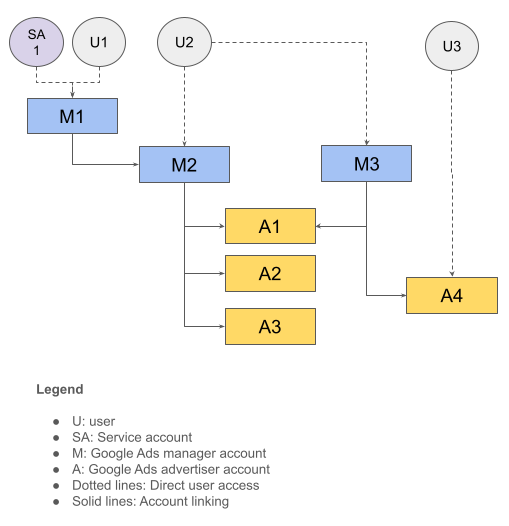
下表总结了此账号结构。
| 用户 | 能够直接访问 | 拥有对以下内容的间接访问权限 |
|---|---|---|
| U1、SA1 | M1 | M2、A1、A2、A3 |
| U2 | M2、M3 | A1、A2、A3、A4 |
| U3 | A4 |
登录客户 ID
用户可能有权访问多个账号层次结构。在这种情况下进行 API 调用时,您需要指定要使用的根账号,以便正确确定授权和账号访问权限级别。为此,请在 API 请求中指定 login-customer-id 标头。
下表沿用了上一个示例中的账号层次结构,展示了您可以使用的登录客户 ID,以及您可以调用的相应账号列表。
| 用户 | 登录客户 ID 以使用 | 用于进行 API 调用的账号 |
|---|---|---|
| U1、SA1 | M1 | M1、M2、A1、A2、A3 |
| U2 | M2 | M2、A1、A2、A3 |
| U2 | M3 | M3、A1、A4 |
| U3 | A4 | A4 |
如果用户可以直接访问您要调用的 Google Ads 账号,则可以跳过提供 login-customer-id 标头。例如,当您使用 U3 凭据调用 A4 时,无需指定 login-customer-id 标头,因为 Google Ads 服务器可以根据客户 ID (A4) 正确确定访问权限级别。
如果您使用的是我们的某个客户端库,请使用以下设置来指定 login-customer-id 标头。
Java
将以下设置添加到 ads.properties 文件中。
api.googleads.loginCustomerId=INSERT_LOGIN_CUSTOMER_ID_HERE
C#
在初始化 GoogleAdsConfig 对象并使用该对象创建 GoogleAdsClient 对象时,添加以下设置。
GoogleAdsConfig config = new GoogleAdsConfig()
{
    ...
    LoginCustomerId = ******
};
GoogleAdsClient client = new GoogleAdsClient(config);
PHP
将以下设置添加到 google_ads_php.ini 文件中。
[GOOGLE_ADS]
loginCustomerId = "INSERT_LOGIN_CUSTOMER_ID_HERE"
Python
将以下设置添加到 google-ads.yaml 文件中。
login_customer_id: INSERT_LOGIN_CUSTOMER_ID_HERE
Ruby
将以下设置添加到 google_ads_config.rb 文件中。
Google::Ads::GoogleAds::Config.new do |c|
  c.login_customer_id = 'INSERT_LOGIN_CUSTOMER_ID_HERE'
end
通过传递此文件的保存路径来创建 GoogleAdsClient 实例。
client = Google::Ads::GoogleAds::GoogleAdsClient.new('path/to/google_ads_config.rb')
Perl
将以下设置添加到 googleads.properties 文件中。
loginCustomerId=INSERT_LOGIN_CUSTOMER_ID_HERE
curl
运行 curl 命令时,请指定以下命令行实参。
-H "login-customer-id: LOGIN_CUSTOMER_ID"
您可以使用 CustomerService.ListAccessibleCustomers 方法检索用户有直接访问权限的账号列表。这些账号可用作 login-customer-id 标头的有效值。
Java
private void runExample(GoogleAdsClient client) { // Optional: Change credentials to use a different refresh token, to retrieve customers // available for a specific user. // // UserCredentials credentials = // UserCredentials.newBuilder() // .setClientId("INSERT_OAUTH_CLIENT_ID") // .setClientSecret("INSERT_OAUTH_CLIENT_SECRET") // .setRefreshToken("INSERT_REFRESH_TOKEN") // .build(); // // client = client.toBuilder().setCredentials(credentials).build(); try (CustomerServiceClient customerService = client.getLatestVersion().createCustomerServiceClient()) { ListAccessibleCustomersResponse response = customerService.listAccessibleCustomers( ListAccessibleCustomersRequest.newBuilder().build()); System.out.printf("Total results: %d%n", response.getResourceNamesCount()); for (String customerResourceName : response.getResourceNamesList()) { System.out.printf("Customer resource name: %s%n", customerResourceName); } } }
C#
public void Run(GoogleAdsClient client) { // Get the CustomerService. CustomerServiceClient customerService = client.GetService(Services.V25.CustomerService); try { // Retrieve the list of customer resources. string[] customerResourceNames = customerService.ListAccessibleCustomers(); // Display the result. foreach (string customerResourceName in customerResourceNames) { Console.WriteLine( $"Found customer with resource name = '{customerResourceName}'."); } } catch (GoogleAdsException e) { Console.WriteLine("Failure:"); Console.WriteLine($"Message: {e.Message}"); Console.WriteLine($"Failure: {e.Failure}"); Console.WriteLine($"Request ID: {e.RequestId}"); throw; } }
PHP
public static function runExample(GoogleAdsClient $googleAdsClient) { $customerServiceClient = $googleAdsClient->getCustomerServiceClient(); // Issues a request for listing all accessible customers. $accessibleCustomers = $customerServiceClient->listAccessibleCustomers(new ListAccessibleCustomersRequest()); print 'Total results: ' . count($accessibleCustomers->getResourceNames()) . PHP_EOL; // Iterates over all accessible customers' resource names and prints them. foreach ($accessibleCustomers->getResourceNames() as $resourceName) { /** @var string $resourceName */ printf("Customer resource name: '%s'%s", $resourceName, PHP_EOL); } }
Python
def main(client: GoogleAdsClient) -> None: customer_service: CustomerServiceClient = client.get_service( "CustomerService" ) accessible_customers: ListAccessibleCustomersResponse = ( customer_service.list_accessible_customers() ) result_total: int = len(accessible_customers.resource_names) print(f"Total results: {result_total}") resource_names: List[str] = accessible_customers.resource_names for resource_name in resource_names: # resource_name is implicitly str print(f'Customer resource name: "{resource_name}"')
Ruby
def list_accessible_customers() # GoogleAdsClient will read a config file from # ENV['HOME']/google_ads_config.rb when called without parameters client = Google::Ads::GoogleAds::GoogleAdsClient.new accessible_customers = client.service.customer.list_accessible_customers().resource_names accessible_customers.each do |resource_name| puts "Customer resource name: #{resource_name}" end end
Perl
sub list_accessible_customers { my ($api_client) = @_; my $list_accessible_customers_response = $api_client->CustomerService()->list_accessible_customers(); printf "Total results: %d.\n", scalar @{$list_accessible_customers_response->{resourceNames}}; foreach my $resource_name (@{$list_accessible_customers_response->{resourceNames}}) { printf "Customer resource name: '%s'.\n", $resource_name; } return 1; }
curl
# Returns the resource names of customers directly accessible by the user # authenticating the call. # # Variables: # API_VERSION, # DEVELOPER_TOKEN, # OAUTH2_ACCESS_TOKEN: # See https://developers.google.com/google-ads/api/rest/auth#request_headers # for details. # curl -f --request GET \ "https://googleads.googleapis.com/v${API_VERSION}/customers:listAccessibleCustomers" \ --header "Content-Type: application/json" \ --header "developer-token: ${DEVELOPER_TOKEN}" \ --header "Authorization: Bearer ${OAUTH2_ACCESS_TOKEN}" \
如果 ListAccessibleCustomers 方法未检索到我的客户 ID,该怎么办?
如果 CustomerService.ListAccessibleCustomers 方法未检索到您预期会出现在结果中的客户 ID,可能是出于以下几个原因。
您有权访问相应客户 ID,但该访问权限是通过父级经理账号授予的。例如,如果您在上一个示例中调用
ListAccessibleCustomers方法并使用用户U1凭据,则即使U1有权访问更多账号,您也只会收到结果中的M1。如需确认此可能性,请针对ListAccessibleCustomers方法返回的每个账号检索账号层次结构。为此,请按照上一部分中的说明,将每个账号都设置为登录客户 ID。如果您有权访问目标账号,则应该能够将其作为账号层次结构的一部分进行提取。您使用的 OAuth 凭据有误。最常见的情况是,您使用的是其他用户的凭据。例如,这可能是因为意外将沙盒或开发者凭据与生产凭据混淆,或者从数据库或本地缓存中错误地读取了其他用户的凭据。排查此问题的一种可能方法是使用 Google People API 检索已登录用户的姓名和电子邮件地址,并验证其是否与您预期的电子邮件地址一致。
您无权访问此账号。请按照说明获取对相应客户账号的访问权限。
用户角色
Google Ads API 没有单独的访问权限模型,也不会使用单独的 OAuth 2.0 范围来限制功能。例如,Google Ads API 对只读操作和读写操作使用相同的范围。Google Ads API 遵循 Google Ads 支持的相同用户角色。如果向经理账号授予了用户角色,则层次结构中的账号会继承该角色。如果用户对给定账号拥有冲突的角色,系统会根据 API 请求中指定的 login-customer-id 账号来确定正确的级别。
下表沿用了上一个示例中的账号层次结构,并展示了向用户授予各种用户角色所带来的影响。
| 用户 | 已授予用户角色 | login-customer-id | 有效访问权限级别 |
|---|---|---|---|
| SA1 | 账号 M1 的标准权限 | M1 | M1、M2、A1、A2、A3 的标准权限 |
| U2 |
M2 上的标准权限 M3 上的只读访问权限 |
M2 | M2、A1、A2、A3 的标准权限 |
| U2 |
M2 上的标准权限 M3 上的只读访问权限 |
M3 | 在 M3、A1、A4 上拥有只读权限 |