

In Hotelanzeigengruppen können Sie Ihre Hotels in viele Hotelgruppen nach mehreren Dimensionen unterteilen, um die Gebote für jede Gruppe entsprechend anzupassen. Sehen Sie sich den folgenden Baum an. Auf der ersten Ebene wurden die Hotels grob in 5‑Sterne-Hotels, 4‑Sterne-Hotels und andere Hotelkategorien unterteilt. Auf der zweiten Ebene wurden die Hotels in anderen Hotelklassen in „Hotels in den USA“, „Hotels im Vereinigten Königreich“ und Hotels in anderen Regionen unterteilt.
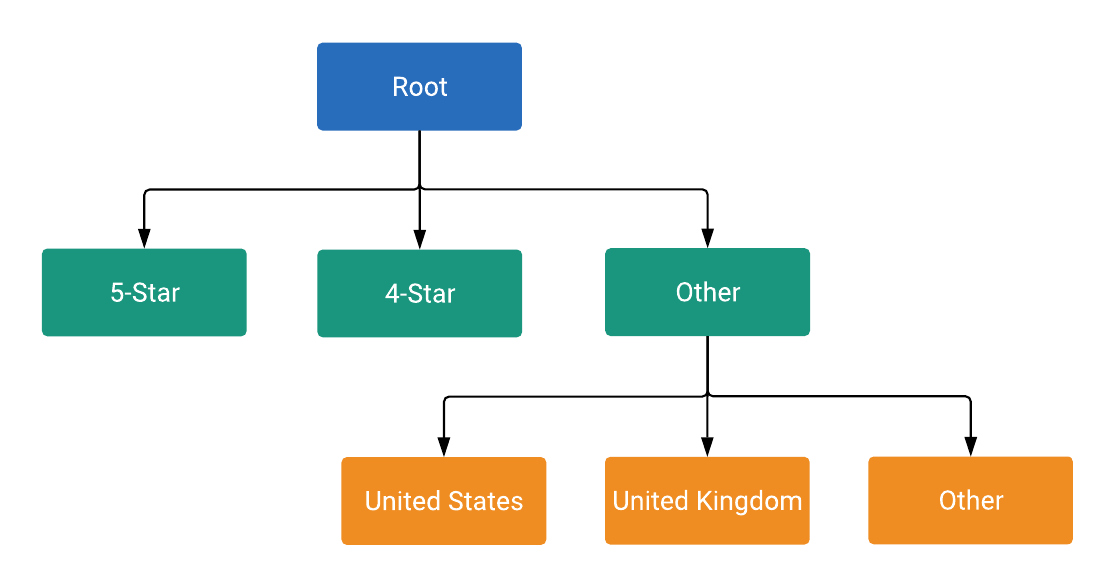
Jeder Knoten im Baum ist entweder eine Unterteilung oder eine Einheit, wie in ListingGroupType definiert. Durch eine Unterteilung wird eine neue Ebene im Baum eingeführt, während Einheiten die Blätter des Baums sind. Jede Unterteilung muss immer vollständig partitioniert sein und daher einen Knoten für Andere enthalten. Im Beispiel sind der Stammknoten und der Knoten Hotel Class: (Other) Unterteilungen. Mit dieser Baumstruktur mit Unterteilungen und Einheiten können Sie Gebote auf Einheitsebene festlegen. Außerdem wird so dafür gesorgt, dass jedes Hotelangebot in genau einen Einheitsknoten im Baum fällt.
Knoten sind Objekte der Klasse ListingGroupInfo, die das Feld ListingGroupType enthält, das angibt, ob die Knoten Einheiten oder Unterteilungen sind. Wenn Sie ListingGroupInfo auf listing_group von AdGroupCriterion festlegen, wird es mit dem AdGroup verknüpft.
Prozentuale CPC-Gebote festlegen
Gebote (z. B. percent_cpc_bid_micros oder cpc_bid_micros, je nach Gebotsstrategie) können für AdGroupCriterion nur für Einheitenknoten festgelegt werden. Der Versuch, Gebote für Unterteilungsknoten festzulegen, schlägt mit einem Fehler fehl.
Dimensionen für Hotelgruppen
Ein ListingGroupInfo hat auch ein case_value, das ein ListingDimensionInfo mit einem von mehreren Dimensionstypen ist. Ein ListingGroupInfo steht für die Werte, die mit Ihren Hotels verknüpft sind, z. B. Hotel-ID, Hotelstandort oder Hotelkategorie. Eine vollständige Beschreibung der verfügbaren ListingDimensionInfo-Typen finden Sie in der ListingDimensionInfo-Referenzdokumentation.
Jedes unmittelbare untergeordnete Element einer Unterteilung muss ein case_value desselben ListingDimensionInfo-Untertyps haben. Nur der Root-Knoten hat keine case_value.
Jede Unterteilung muss ein leeres case_value des richtigen Typs enthalten, das alle Sonstiges-Werte darstellt.
Weitere Informationen finden Sie im folgenden Code-Snippet, in dem die erste Ebene der Struktur der Listengruppe hinzugefügt wird:
Java
private static String addLevel1Nodes( long customerId, long adGroupId, String rootResourceName, List<AdGroupCriterionOperation> operations, long percentCpcBidMicroAmount) { // Creates hotel class info and dimension info for 5-star hotels. ListingDimensionInfo fiveStarredDimensionInfo = ListingDimensionInfo.newBuilder() .setHotelClass(HotelClassInfo.newBuilder().setValue(5).build()) .build(); // Creates listing group info for 5-star hotels as a UNIT node. ListingGroupInfo fiveStarredUnit = ListingGroupInfo.newBuilder() .setType(ListingGroupType.UNIT) .setParentAdGroupCriterion(rootResourceName) .setCaseValue(fiveStarredDimensionInfo) .build(); // Creates an ad group criterion for 5-star hotels. AdGroupCriterion fiveStarredAdGroupCriterion = createAdGroupCriterion(customerId, adGroupId, fiveStarredUnit, percentCpcBidMicroAmount); // Decrements the temp ID for the next ad group criterion. AdGroupCriterionOperation operation = generateCreateOperation(fiveStarredAdGroupCriterion); operations.add(operation); // You can also create more UNIT nodes for other hotel classes by copying the above code in // this method and modifying the value passed to HotelClassInfo() to the value you want. // For instance, passing 4 instead of 5 in the above code will create a UNIT node of 4-star // hotels instead. // Creates hotel class info and dimension info for other hotel classes by not specifying // any attributes on those object. ListingDimensionInfo otherHotelsDimensionInfo = ListingDimensionInfo.newBuilder() .setHotelClass(HotelClassInfo.newBuilder().build()) .build(); // Creates listing group info for other hotel classes as a SUBDIVISION node, which will be // used as a parent node for children nodes of the next level. ListingGroupInfo otherHotelsSubdivision = createListingGroupInfo( ListingGroupType.SUBDIVISION, rootResourceName, otherHotelsDimensionInfo); // Creates an ad group criterion for other hotel classes. AdGroupCriterion otherHotelsAdGroupCriterion = createAdGroupCriterion( customerId, adGroupId, otherHotelsSubdivision, percentCpcBidMicroAmount); operation = generateCreateOperation(otherHotelsAdGroupCriterion); operations.add(operation); return otherHotelsAdGroupCriterion.getResourceName(); }
C#
private string AddLevel1Nodes(long customerId, long adGroupId, string rootResourceName, List<AdGroupCriterionOperation> operations, long percentCpcBidMicroAmount) { // Create listing dimension info for 5-star class hotels. ListingDimensionInfo fiveStarredListingDimensionInfo = new ListingDimensionInfo { HotelClass = new HotelClassInfo { Value = 5 } }; // Create a listing group info for 5-star hotels as a UNIT node. ListingGroupInfo fiveStarredUnit = CreateListingGroupInfo(ListingGroupType.Unit, rootResourceName, fiveStarredListingDimensionInfo); // Create an ad group criterion for 5-star hotels. AdGroupCriterion fiveStarredAdGroupCriterion = CreateAdGroupCriterion(customerId, adGroupId, fiveStarredUnit, percentCpcBidMicroAmount); // Create an operation and add it to the list of operations. operations.Add(new AdGroupCriterionOperation { Create = fiveStarredAdGroupCriterion }); // Decrement the temp ID for the next ad group criterion. nextTempId--; // You can also create more UNIT nodes for other hotel classes by copying the above code // in this method and modifying the value passed to HotelClassInfo(). // For instance, passing 4 instead of 5 in the above code will instead create a UNIT // node of 4-star hotels. // Create hotel class info and dimension info for other hotel classes by *not* // specifying any attributes on those object. ListingDimensionInfo otherHotelsListingDimensionInfo = new ListingDimensionInfo { HotelClass = new HotelClassInfo() }; // Create listing group info for other hotel classes as a SUBDIVISION node, which will // be used as a parent node for children nodes of the next level. ListingGroupInfo otherHotelsSubdivisionListingGroupInfo = CreateListingGroupInfo (ListingGroupType.Subdivision, rootResourceName, otherHotelsListingDimensionInfo); // Create an ad group criterion for other hotel classes. AdGroupCriterion otherHotelsAdGroupCriterion = CreateAdGroupCriterion(customerId, adGroupId, otherHotelsSubdivisionListingGroupInfo, percentCpcBidMicroAmount); // Create an operation and add it to the list of operations. operations.Add(new AdGroupCriterionOperation { Create = otherHotelsAdGroupCriterion }); // Decrement the temp ID for the next ad group criterion. nextTempId--; return otherHotelsAdGroupCriterion.ResourceName; }
PHP
private static function addLevel1Nodes( int $customerId, int $adGroupId, string $rootResourceName, array &$operations, int $percentCpcBidMicroAmount ) { // Creates hotel class info and dimension info for 5-star hotels. $fiveStarredDimensionInfo = new ListingDimensionInfo( [ 'hotel_class' => new HotelClassInfo(['value' => 5]) ] ); // Creates listing group info for 5-star hotels as a UNIT node. $fiveStarredUnit = self::createListingGroupInfo( ListingGroupType::UNIT, $rootResourceName, $fiveStarredDimensionInfo ); // Creates an ad group criterion for 5-star hotels. $fiveStarredAdGroupCriterion = self::createAdGroupCriterion( $customerId, $adGroupId, $fiveStarredUnit, $percentCpcBidMicroAmount ); // Decrements the temp ID for the next ad group criterion. self::$nextTempId--; $operation = self::generateCreateOperation($fiveStarredAdGroupCriterion); $operations[] = $operation; // You can also create more UNIT nodes for other hotel classes by copying the above code in // this method and modifying the value passed to HotelClassInfo() to the value you want. // For instance, passing 4 instead of 5 in the above code will create a UNIT node of 4-star // hotels instead. // Creates hotel class info and dimension info for other hotel classes by *not* specifying // any attributes on those object. $othersHotelsDimensionInfo = new ListingDimensionInfo( [ 'hotel_class' => new HotelClassInfo() ] ); // Creates listing group info for other hotel classes as a SUBDIVISION node, which will be // used as a parent node for children nodes of the next level. $otherHotelsSubDivision = self::createListingGroupInfo( ListingGroupType::SUBDIVISION, $rootResourceName, $othersHotelsDimensionInfo ); // Creates an ad group criterion for other hotel classes. $otherHotelsAdGroupCriterion = self::createAdGroupCriterion( $customerId, $adGroupId, $otherHotelsSubDivision, $percentCpcBidMicroAmount ); $operation = self::generateCreateOperation($otherHotelsAdGroupCriterion); $operations[] = $operation; self::$nextTempId--; return $otherHotelsAdGroupCriterion->getResourceName(); }
Python
def add_level1_nodes( client: GoogleAdsClient, customer_id: str, ad_group_id: str, root_resource_name: str, operations: List[AdGroupCriterionOperation], percent_cpc_bid_micro_amount: int, ) -> str: """Creates child nodes on level 1, partitioned by the hotel class info. Args: client: The Google Ads API client. customer_id: The Google Ads customer ID. ad_group_id: The ad group ID to which the hotel listing group will be added. root_resource_name: The string resource name of the listing group's root node. operations: A list of AdGroupCriterionOperations. percent_cpc_bid_micro_amount: The CPC bid micro amount to be set on created ad group criteria. Returns: The string resource name of the "other hotel classes" node, which serves as the parent node for the next level of the listing tree. """ global next_temp_id # Create listing dimension info for 5-star class hotels. five_starred_listing_dimension_info: ListingDimensionInfo = client.get_type( "ListingDimensionInfo" ) five_starred_listing_dimension_info.hotel_class.value = 5 # Create a listing group info for 5-star hotels as a UNIT node. five_starred_unit: ListingGroupInfo = create_listing_group_info( client, client.enums.ListingGroupTypeEnum.UNIT, root_resource_name, five_starred_listing_dimension_info, ) # Create an ad group criterion for 5-star hotels. five_starred_ad_group_criterion: AdGroupCriterion = ( create_ad_group_criterion( client, customer_id, ad_group_id, five_starred_unit, percent_cpc_bid_micro_amount, ) ) # Create an operation and add it to the list of operations. five_starred_ad_group_criterion_operation: AdGroupCriterionOperation = ( client.get_type("AdGroupCriterionOperation") ) client.copy_from( five_starred_ad_group_criterion_operation.create, five_starred_ad_group_criterion, ) operations.append(five_starred_ad_group_criterion_operation) # Decrement the temp ID for the next ad group criterion. next_temp_id -= 1 # You can also create more UNIT nodes for other hotel classes by copying the # above code in this method and modifying the hotel class value. # For instance, passing 4 instead of 5 in the above code will instead create # a UNIT node of 4-star hotels. # Create hotel class info and dimension info without any specifying # attributes. This node will then represent hotel classes other than those # already covered by UNIT nodes at this level. other_hotels_listing_dimension_info: ListingDimensionInfo = client.get_type( "ListingDimensionInfo" ) # Set "hotel_class" as the oneof field on the ListingDimensionInfo object # without specifying the optional hotel_class field. client.copy_from( other_hotels_listing_dimension_info.hotel_class, client.get_type("HotelClassInfo"), ) # Create listing group info for other hotel classes as a SUBDIVISION node, # which will be used as a parent node for children nodes of the next level. other_hotels_subdivision_listing_group_info: ListingGroupInfo = ( create_listing_group_info( client, client.enums.ListingGroupTypeEnum.SUBDIVISION, root_resource_name, other_hotels_listing_dimension_info, ) ) # Create an ad group criterion for other hotel classes. other_hotels_ad_group_criterion: AdGroupCriterion = ( create_ad_group_criterion( client, customer_id, ad_group_id, other_hotels_subdivision_listing_group_info, percent_cpc_bid_micro_amount, ) ) # Create an operation and add it to the list of operations. other_hotels_ad_group_criterion_operation: AdGroupCriterionOperation = ( client.get_type("AdGroupCriterionOperation") ) client.copy_from( other_hotels_ad_group_criterion_operation.create, other_hotels_ad_group_criterion, ) operations.append(other_hotels_ad_group_criterion_operation) # Decrement the temp ID for the next ad group criterion. next_temp_id -= 1 return other_hotels_ad_group_criterion.resource_name
Ruby
def add_level1_nodes( client, customer_id, ad_group_id, root_resource_name, operations, percent_cpc_bid_micro_amount) # Creates hotel class info and dimension info for 5-star hotels. five_starred_dimension_info = client.resource.listing_dimension_info do |d| d.hotel_class = client.resource.hotel_class_info do |c| c.value = 5 end end # Creates listing group info for 5-star hotels as a UNIT node. five_starred_unit = create_listing_group_info( client, :UNIT, root_resource_name, five_starred_dimension_info, ) # Creates an ad group criterion for 5-star hotels. five_starred_ad_group_criterion = create_ad_group_criterion( client, customer_id, ad_group_id, five_starred_unit, percent_cpc_bid_micro_amount, ) operations << generate_create_operation( client, five_starred_ad_group_criterion, ) # You can also create more UNIT nodes for other hotel classes by copying the # above code in this method and modifying the value passed to HotelClassInfo() # to the value you want. # For instance, passing 4 instead of 5 in the above code will create a UNIT # node of 4-star hotels instead. # Creates hotel class info and dimension info for other hotel classes # by *not* specifying any attributes on those object. other_hotels_dimention_info = client.resource.listing_dimension_info do |d| d.hotel_class = client.resource.hotel_class_info end # Creates listing group info for other hotel classes as a SUBDIVISION node, # which will be used as a parent node for children nodes of the next level. other_hotels_subdivision = create_listing_group_info( client, :SUBDIVISION, root_resource_name, other_hotels_dimention_info, ) # Creates an ad group criterion for other hotel classes. other_hotels_ad_group_criterion = create_ad_group_criterion( client, customer_id, ad_group_id, other_hotels_subdivision, percent_cpc_bid_micro_amount, ) operations << generate_create_operation( client, other_hotels_ad_group_criterion, ) other_hotels_ad_group_criterion.resource_name end
Perl
sub add_level_1_nodes { my ($customer_id, $ad_group_id, $root_resource_name, $operations, $percent_cpc_bid_micro_amount) = @_; # Create hotel class info and dimension info for 5-star hotels. my $five_starred_dimension_info = Google::Ads::GoogleAds::V25::Common::ListingDimensionInfo->new({ hotelClass => Google::Ads::GoogleAds::V25::Common::HotelClassInfo->new({ value => 5 })}); # Create listing group info for 5-star hotels as a UNIT node. my $five_starred_unit = create_listing_group_info(UNIT, $root_resource_name, $five_starred_dimension_info); # Create an ad group criterion for 5-star hotels. my $five_starred_ad_group_criterion = create_ad_group_criterion($customer_id, $ad_group_id, $five_starred_unit, $percent_cpc_bid_micro_amount); my $operation = generate_create_operation($five_starred_ad_group_criterion); push @$operations, $operation; # You can also create more UNIT nodes for other hotel classes by copying the # above code in this method and modifying the value passed to HotelClassInfo # to the value you want. For instance, passing 4 instead of 5 in the above code # will create a UNIT node of 4-star hotels instead. # Create hotel class info and dimension info for other hotel classes by *not* # specifying any attributes on those object. my $others_hotels_dimension_info = Google::Ads::GoogleAds::V25::Common::ListingDimensionInfo->new({ hotelClass => Google::Ads::GoogleAds::V25::Common::HotelClassInfo->new()} ); # Create listing group info for other hotel classes as a SUBDIVISION node, which # will be used as a parent node for children nodes of the next level. my $other_hotels_subdivision = create_listing_group_info(SUBDIVISION, $root_resource_name, $others_hotels_dimension_info); # Create an ad group criterion for other hotel classes. my $other_hotels_ad_group_criterion = create_ad_group_criterion($customer_id, $ad_group_id, $other_hotels_subdivision, $percent_cpc_bid_micro_amount); $operation = generate_create_operation($other_hotels_ad_group_criterion); push @$operations, $operation; return $other_hotels_ad_group_criterion->{resourceName}; }
curl
Verfügbare Dimensionen für ListingDimensionInfo
Die folgenden ListingDimensionInfo-Typen sind für Hotelanzeigen verfügbar:
Temporäre IDs
Anzeigengruppenkriterien werden erst dann IDs zugewiesen, wenn die Mutationsanfrage, mit der sie erstellt werden, vom Server verarbeitet wird. Ein ListingGroupInfo ist jedoch erst gültig, wenn es vollständig ist. Wenn Sie also eine Unterteilung erstellen, müssen Sie im selben Vorgang auch mindestens ein untergeordnetes Element erstellen.
Wenn Sie die parent_ad_group_criterion von ListingGroupInfo für die untergeordneten Knoten festlegen möchten, können Sie temporäre Kriterien-IDs verwenden. Diese Kennungen sind lokal (nicht global) eindeutig und gelten nur im Kontext einer einzelnen Mutationsanfrage. Eine beliebige eindeutige negative Ganzzahl (z. B. -1, -2, -3) kann als temporäre ID in einer einzelnen Anfrage verwendet werden.
Wenn die Anfrage verarbeitet wird, wird jedem AdGroupCriterion wie gewohnt eine positive globale ID zugewiesen.