

本快速入门指南可帮助您首次调用 Google Ads API。
主要概念
- Google Cloud 项目:Google Cloud 项目是创建、启用和使用所有 Google 服务的基础,包括管理 API 和 OAuth 2.0 API 凭据。您可以在 Google Cloud 控制台中创建项目。
- API 访问权限级别:Google Cloud 项目的 API 访问权限级别决定了您每天可以进行的 API 调用次数以及可以向哪些环境进行 API 调用。您可以在项目的 Google Ads API“概览”页上查看项目的 API 访问权限级别。
- Google Ads 经理账号:Google Ads 经理账号用于管理其他 Google Ads 账号,这些账号可以是 Google Ads 客户账号的集合,也可以是其他 Google Ads 经理账号。
- Google Ads 客户账号:用于投放广告的 Google Ads 账号,您希望通过 API 调用定位该账号。
- 客户客户 ID:用于标识 Google Ads 客户账号的 10 位数。如果您是从 Google Ads 界面复制的此 ID,请务必移除连字符。
- OAuth 2.0:OAuth 2.0 是一种行业标准授权协议,所有 Google API 都使用该协议。您需要服务账号和密钥才能生成 OAuth 2.0 凭据以进行 API 调用。
- 服务账号:一种特殊的 Google 账号,属于您的应用,而非个人用户。它用于向 Google Ads API 验证您的应用。您需要拥有一个 Google Cloud 项目才能获取服务账号。
- 服务账号密钥:包含服务账号私钥的 JSON 应用凭据文件。它用于生成 OAuth 2.0 凭据,以便在进行 Google Ads API 调用时对服务账号进行身份验证。您需要拥有服务账号才能获取服务账号密钥。
前提条件
如需发起 Google Ads API 调用,您应完成以下步骤。
配置您的云项目以获取 Google Ads API 访问权限
Google Cloud 项目用于管理 Google API 和 OAuth 2.0 API 凭据。您可以访问 Google Cloud 控制台,查看现有的 Google Cloud 项目或创建新项目。
首先,在您的项目中启用 Google Ads API:
接下来,访问 Google Ads API 概览页面。该页面会显示您当前的 API 访问权限级别。如果您的当前 API 访问权限级别为测试,请展开升级访问权限级别部分。按照说明申请探索者访问权限。
您完成申请后,Google 会自动审核您的申请,并在大多数情况下将您的账号升级为探索者账号。如果您未获得探索者访问权限,请不要担心;本指南将在配置 Google Ads 客户账号时提供相应的说明。
创建服务账号
您需要服务账号和服务账号密钥才能进行 API 调用。如果您已在使用其他 Google API,并且已创建 OAuth 2.0 服务账号和密钥,则可以跳过此步骤并重复使用现有凭据。
如何创建服务账号和密钥
- 在 Google Cloud 控制台中,依次前往菜单 > IAM 和管理 > 服务账号。
- 选择您的服务账号。
- 依次点击密钥 > 添加密钥 > 创建新密钥。
- 选择 JSON,然后点击创建。
系统会生成新的公钥/私钥对,并以新文件的形式下载到您的计算机上。将下载的 JSON 文件以
credentials.json的名称保存到工作目录中。此文件是相应密钥的唯一副本。请勿将credentials.json提交到版本控制系统(例如,将其添加到.gitignore文件中)。 - 点击关闭。
配置 Google Ads 客户账号
首先,确定您要针对哪个 Google Ads 账号发起 API 调用。您可以通过 API 调用访问的账号类型取决于 Google Cloud 项目的 API 访问权限级别。查看您的 Google Ads API 概览页面,了解您的 API 访问权限级别。
探索者、基本和标准访问权限级别
您可以向 Google Ads 生产账号发出调用。不过,您可以按照测试访问权限标签页中的说明创建 Google Ads 测试账号(如果需要)。
测试访问权限
您的 Google Cloud 项目无法用于向 Google Ads 生产账号发出 API 调用。您只能针对 Google Ads 测试账号进行 API 调用。
如何创建 Google Ads 测试账号
以下说明将创建一个 Google Ads 测试经理账号,并在该账号下创建一个 Google Ads 测试广告客户账号。
点击蓝色按钮即可创建 Google Ads 测试经理账号。 如果系统提示,请使用未与您的 Google Ads 正式版经理账号相关联的 Google 账号登录。如果您没有 Google 账号,请使用该页面上的创建账号按钮创建一个新的 Google 账号。
- 在 Google Ads 测试经理账号中,创建 Google Ads 测试客户账号:依次点击账号 > > 制作新账号,然后填写表单。通过 Google Ads 测试经理账号创建的任何 Google Ads 账号都会自动成为 Google Ads 测试账号。
- (可选)在 Google Ads 网页中,在 Google Ads 测试客户账号下制作几个广告系列。
如需向 Google Ads 客户发出 API 调用,您必须向您的服务账号授予对 Google Ads 客户账号的访问权限和相应权限。为此,您需要拥有客户账号的管理员权限。
如何向服务账号授予对 Google Ads 账号的访问权限
- 首先,以管理员身份登录您的 Google Ads 账号。
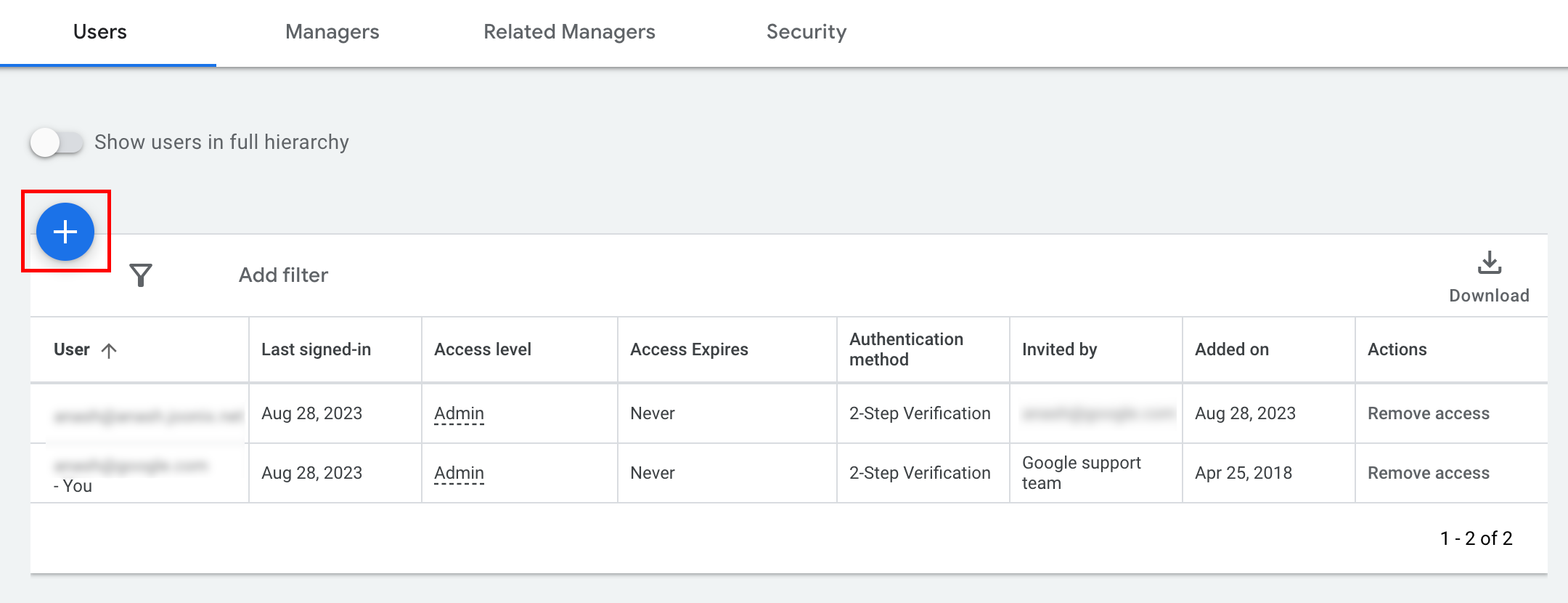
- 依次前往管理 > 访问权限和安全。
- 点击用户标签页下方的 按钮。
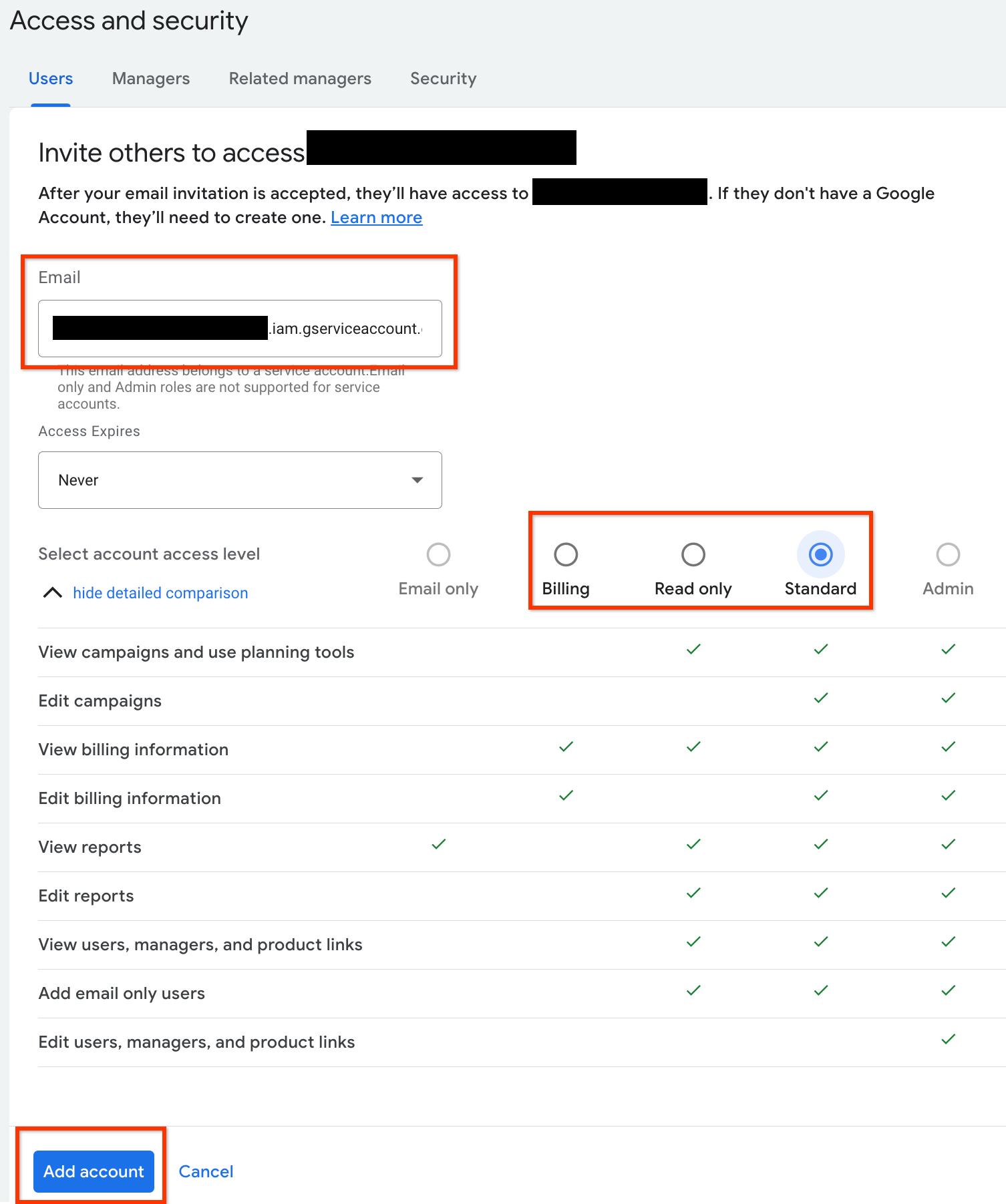
- 在电子邮件输入框中输入服务账号电子邮件地址。
选择适当的账号访问权限级别,然后点击添加账号按钮。请注意,服务账号不支持“电子邮件”访问权限级别。
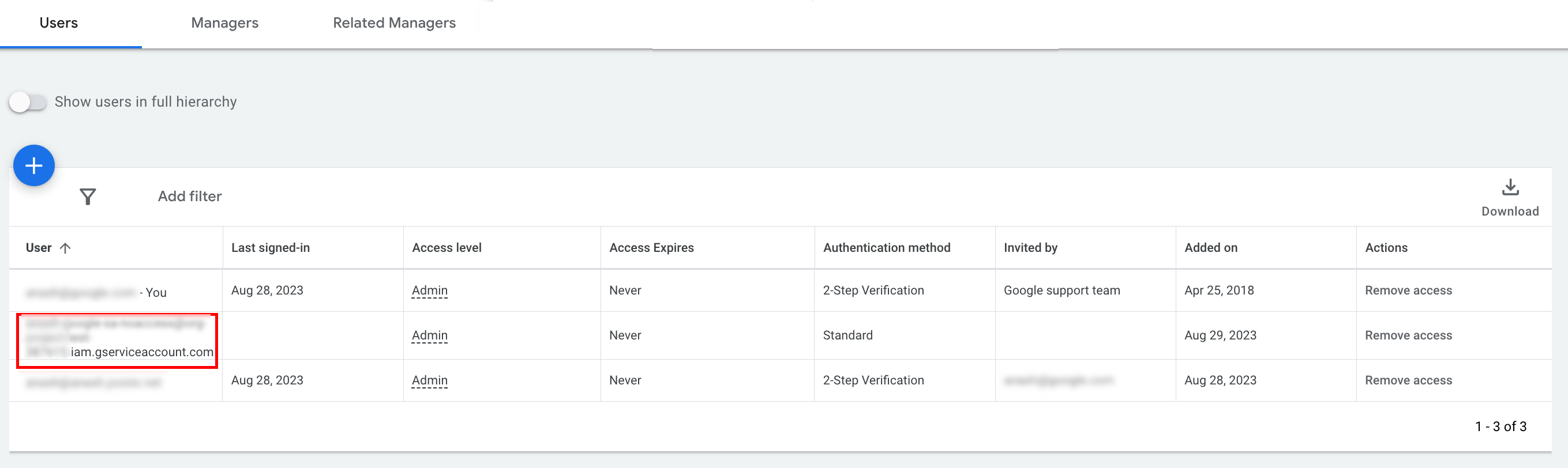
- 系统会向服务账号授予访问权限。
- [可选] 您无法在初始设置期间向服务账号授予管理员访问权限。如果您的 API 调用需要管理员访问权限,您可以按如下方式升级访问权限。
- 点击访问权限级别列中服务账号的访问权限级别旁边的下拉箭头。
- 从下拉列表中选择管理员。
下载工具和客户端库
您可以选择下载客户端库或 HTTP 客户端,具体取决于您希望如何进行 API 调用。
使用客户端库
下载并安装您选择的客户端库。
使用 HTTP 客户端 (REST)
curl
下载并安装 curl,这是一款通过网址传输数据的命令行工具。
Google Cloud 命令行界面
按照 Google Cloud CLI 安装指南安装 gcloud CLI。
本指南其余部分的说明已通过验证,可与以下版本的 gcloud 工具搭配使用,但由于应用行为或命令行选项存在差异,可能无法与之前的版本搭配使用。
:~$ gcloud version
Google Cloud SDK 492.0.0
alpha 2024.09.06
beta 2024.09.06
bq 2.1.8
bundled-python3-unix 3.11.9
core 2024.09.06
enterprise-certificate-proxy 0.3.2
gcloud-crc32c 1.0.0
gsutil 5.30
进行 API 调用
选择您偏好的客户端,了解如何发出 API 调用:
Java
客户端库工件已发布到 Maven Central 制品库。
如需管理依赖项版本并防止冲突,请参阅 Google Ads API 物料清单 (BOM) 指南。
如果您未使用 BOM,请使用以下任一构建工具将客户端库直接添加到您的项目中:
Maven:将以下依赖项添加到您的 pom.xml 文件中:
<dependency>
  <groupId>com.google.api-ads</groupId>
  <artifactId>google-ads</artifactId>
  <version>46.1.0</version>
</dependency>
Gradle:将以下依赖项添加到 build.gradle 文件中:
implementation 'com.google.api-ads:google-ads:46.1.0'
在您的主目录(Linux 和 macOS 上为 ~/ads.properties,Windows 上为 %USERPROFILE%\ads.properties)中创建一个 ads.properties 文件,其中包含以下内容:
api.googleads.serviceAccountSecretsPath=JSON_KEY_FILE_PATH
api.googleads.loginCustomerId=INSERT_LOGIN_CUSTOMER_ID_HERE
在运行 API 请求之前,请先创建 GoogleAdsClient 实例。默认情况下,fromPropertiesFile() 会从主目录中的 ads.properties 文件加载凭据:
GoogleAdsClient googleAdsClient;
try {
  googleAdsClient = GoogleAdsClient.newBuilder().fromPropertiesFile().build();
} catch (IOException e) {
  System.err.printf("Failed to create GoogleAdsClient: %s%n", e);
  throw new RuntimeException("Initialization failed", e);
}
接下来,使用 GoogleAdsService.SearchStream 运行广告系列报告,以高效地流式传输大型结果集并检索您账号中的广告系列:
private void runExample(GoogleAdsClient googleAdsClient, long customerId) {
try (GoogleAdsServiceClient googleAdsServiceClient =
googleAdsClient.getLatestVersion().createGoogleAdsServiceClient()) {
String query = "SELECT campaign.id, campaign.name FROM campaign ORDER BY campaign.id";
// Constructs the SearchGoogleAdsStreamRequest.
SearchGoogleAdsStreamRequest request =
SearchGoogleAdsStreamRequest.newBuilder()
.setCustomerId(Long.toString(customerId))
.setQuery(query)
.build();
// Creates and issues a search Google Ads stream request that will retrieve all campaigns.
ServerStream<SearchGoogleAdsStreamResponse> stream =
googleAdsServiceClient.searchStreamCallable().call(request);
// Iterates through and prints all of the results in the stream response.
for (SearchGoogleAdsStreamResponse response : stream) {
for (GoogleAdsRow googleAdsRow : response.getResultsList()) {
System.out.printf(
"Campaign with ID %d and name '%s' was found.%n",
googleAdsRow.getCampaign().getId(), googleAdsRow.getCampaign().getName());
}
}
}
}
C#
客户端库软件包会发布到 NuGet.org 制品库。首先,添加对 Google.Ads.GoogleAds 软件包的 NuGet 软件包引用:
dotnet add package Google.Ads.GoogleAds --version 27.4.0如需进行 API 调用,请根据您的配置设置(例如 appsettings.json、环境变量或自定义设置)创建一个 GoogleAdsConfig 对象,并将其传递给 GoogleAdsClient 实例以进行初始化:
GoogleAdsConfig config = new GoogleAdsConfig()
{
    OAuth2Mode = OAuth2Flow.SERVICE_ACCOUNT,
    OAuth2SecretsJsonPath = "JSON_KEY_FILE_PATH",
    LoginCustomerId = "INSERT_LOGIN_CUSTOMER_ID_HERE"
};
GoogleAdsClient client = new GoogleAdsClient(config);
接下来,使用 GoogleAdsService.SearchStream 方法运行广告系列报告,以检索您账号中的广告系列。本指南不涉及报告的详细信息。
public void Run(GoogleAdsClient client, long customerId)
{
// Get the GoogleAdsService.
GoogleAdsServiceClient googleAdsService = client.GetService(
Services.V25.GoogleAdsService);
// Create a query that will retrieve all campaigns.
string query = @"SELECT
campaign.id,
campaign.name,
campaign.network_settings.target_content_network
FROM campaign
ORDER BY campaign.id";
try
{
// Issue a search request.
googleAdsService.SearchStream(customerId.ToString(), query,
delegate (SearchGoogleAdsStreamResponse resp)
{
foreach (GoogleAdsRow googleAdsRow in resp.Results)
{
Console.WriteLine("Campaign with ID {0} and name '{1}' was found.",
googleAdsRow.Campaign.Id, googleAdsRow.Campaign.Name);
}
}
);
}
catch (GoogleAdsException e)
{
Console.WriteLine("Failure:");
Console.WriteLine($"Message: {e.Message}");
Console.WriteLine($"Failure: {e.Failure}");
Console.WriteLine($"Request ID: {e.RequestId}");
throw;
}
}
PHP
客户端库软件包已发布到 Packagist 代码库。确保您安装了兼容的 PHP 版本和 Composer,然后切换到项目的根目录,并运行以下命令以在项目的 vendor/ 目录中安装该库及其依赖项:
composer require googleads/google-ads-php:35.1.0从 GitHub 代码库中复制 google_ads_php.ini 文件,将其保存在您的主目录或项目的根目录中,然后对其进行修改以添加您的凭据:
[GOOGLE_ADS]
loginCustomerId = "INSERT_LOGIN_CUSTOMER_ID_HERE"

[OAUTH2]
jsonKeyFilePath = "JSON_KEY_FILE_PATH"
scopes = "https://www.googleapis.com/auth/adwords"
使用 google_ads_php.ini 配置文件创建 GoogleAdsClient 实例:
use Google\Ads\GoogleAds\Lib\OAuth2TokenBuilder;
use Google\Ads\GoogleAds\Lib\V25\GoogleAdsClientBuilder;

$oauth2Credential = (new OAuth2TokenBuilder())
    ->fromFile('/path/to/google_ads_php.ini')
    ->build();

$googleAdsClient = (new GoogleAdsClientBuilder())
    ->fromFile('/path/to/google_ads_php.ini')
    ->withOAuth2Credential($oauth2Credential)
    ->build();
接下来,使用 GoogleAdsService.SearchStream 方法运行广告系列报告,以检索您账号中的广告系列:
public static function runExample(GoogleAdsClient $googleAdsClient, int $customerId)
{
$googleAdsServiceClient = $googleAdsClient->getGoogleAdsServiceClient();
// Creates a query that retrieves all campaigns.
$query = 'SELECT campaign.id, campaign.name FROM campaign ORDER BY campaign.id';
// Issues a search stream request.
/** @var GoogleAdsServerStreamDecorator $stream */
$stream = $googleAdsServiceClient->searchStream(
SearchGoogleAdsStreamRequest::build($customerId, $query)
);
// Iterates over all rows in all messages and prints the requested field values for
// the campaign in each row.
foreach ($stream->iterateAllElements() as $googleAdsRow) {
/** @var GoogleAdsRow $googleAdsRow */
printf(
"Campaign with ID %d and name '%s' was found.%s",
$googleAdsRow->getCampaign()->getId(),
$googleAdsRow->getCampaign()->getName(),
PHP_EOL
);
}
}
Python
Python 版 Google Ads API 客户端库在 PyPI 上分发。确保您已安装受支持的 Python 版本,然后使用 pip 安装该库:
python -m pip install google-ads==33.0.0如需对 API 调用进行身份验证,请配置 google-ads.yaml 文件:
- 从 GitHub 代码库下载示例
google-ads.yaml文件的副本。 - 将该文件保存在您的主目录 (
~/google-ads.yaml) 或自定义路径中。 打开
google-ads.yaml并更新它以包含您的凭据:login_customer_id: INSERT_LOGIN_CUSTOMER_ID_HERE json_key_file_path: JSON_KEY_FILE_PATH在初始化客户端之前配置日志记录,以便库捕获任何初始化或配置警告。以下示例将库的记录器配置为将
INFO日志输出到标准输出 (stdout):
import logging
import sys

logger = logging.getLogger("google.ads.googleads.client")
logger.setLevel(logging.INFO)
logger.addHandler(logging.StreamHandler(sys.stdout))
通过调用 GoogleAdsClient.load_from_storage 方法并传递 google-ads.yaml 文件的路径来创建 GoogleAdsClient 实例:
from google.ads.googleads.client import GoogleAdsClient

client = GoogleAdsClient.load_from_storage("path/to/google-ads.yaml")
如果您省略路径实参,load_from_storage() 默认会在您的主目录 (~/google-ads.yaml) 中搜索配置文件。
接下来,使用 GoogleAdsService.SearchStream 方法运行广告系列报告,以检索您账号中的广告系列:
def main(client: GoogleAdsClient, customer_id: str) -> None:
ga_service: GoogleAdsServiceClient = client.get_service("GoogleAdsService")
query: str = """
SELECT
campaign.id,
campaign.name
FROM campaign
ORDER BY campaign.id"""
# Issues a search request using streaming.
stream: Iterator[SearchGoogleAdsStreamResponse] = ga_service.search_stream(
customer_id=customer_id, query=query
)
for batch in stream:
rows: List[GoogleAdsRow] = batch.results
for row in rows:
print(
f"Campaign with ID {row.campaign.id} and name "
f'"{row.campaign.name}" was found.'
)
Ruby
客户端库的 Ruby gem 发布在 RubyGems 上。确保您已安装受支持的 Ruby 版本,并使用 Bundler 安装该库:
将该 gem 添加到应用的
Gemfile中:gem 'google-ads-googleads', '~> 45.1.0'运行以下命令来安装 gem:
bundle install
如需配置凭据,请执行以下操作:
- 从 GitHub 代码库复制示例
google_ads_config.rb文件。 - 将该文件保存在项目的根目录或主目录 (
~) 中。 打开
google_ads_config.rb,然后将占位值替换为您的 Google Ads API 凭据:Google::Ads::GoogleAds::Config.new do |c| c.login_customer_id = 'INSERT_LOGIN_CUSTOMER_ID_HERE' c.keyfile = 'JSON_KEY_FILE_PATH' end通过传递配置文件的路径 (
google_ads_config.rb) 来创建GoogleAdsClient实例:
client = Google::Ads::GoogleAds::GoogleAdsClient.new(
  'path/to/google_ads_config.rb'
)
接下来,使用 GoogleAdsService.SearchStream 方法运行广告系列报告,以检索您账号中的广告系列:
def get_campaigns(customer_id)
# GoogleAdsClient will read a config file from
# ENV['HOME']/google_ads_config.rb when called without parameters
client = Google::Ads::GoogleAds::GoogleAdsClient.new
responses = client.service.google_ads.search_stream(
customer_id: customer_id,
query: 'SELECT campaign.id, campaign.name FROM campaign ORDER BY campaign.id',
)
responses.each do |response|
response.results.each do |row|
puts "Campaign with ID #{row.campaign.id} and name '#{row.campaign.name}' was found."
end
end
end
Perl
Perl 客户端库通过 CPAN 分发,需要 Perl 5.28 或更高版本以及 cpan 或 cpanm 软件包管理器。
在您选择的目录中克隆
google-ads-perl代码库:git clone https://github.com/googleads/google-ads-perl.git进入
google-ads-perl目录,然后运行以下命令来安装所需的依赖项并构建库:cd google-ads-perl cpan install Module::Build perl Build.PL perl Build installdeps perl Build perl Build install
如需配置凭据,请执行以下操作:
将示例
googleads.properties配置文件从 GitHub 代码库复制到您的主目录 (~/googleads.properties):cp googleads.properties ~/googleads.properties修改
~/googleads.properties以包含您的凭据:jsonKeyFilePath=JSON_KEY_FILE_PATH loginCustomerId=INSERT_LOGIN_CUSTOMER_ID_HERE通过传递配置的
googleads.properties文件(例如~/googleads.properties)的路径来创建Client实例:
my $api_client = Google::Ads::GoogleAds::Client->new({
  properties_file => "/path/to/googleads.properties"
});
接下来,使用 GoogleAdsService.SearchStream 方法运行广告系列报告,以检索您账号中的广告系列:
sub get_campaigns {
my ($api_client, $customer_id) = @_;
# Create a search Google Ads stream request that will retrieve all campaigns.
my $search_stream_request =
Google::Ads::GoogleAds::V25::Services::GoogleAdsService::SearchGoogleAdsStreamRequest
->new({
customerId => $customer_id,
query =>
"SELECT campaign.id, campaign.name FROM campaign ORDER BY campaign.id"
});
# Get the GoogleAdsService.
my $google_ads_service = $api_client->GoogleAdsService();
my $search_stream_handler =
Google::Ads::GoogleAds::Utils::SearchStreamHandler->new({
service => $google_ads_service,
request => $search_stream_request
});
# Issue a search request and process the stream response to print the requested
# field values for the campaign in each row.
$search_stream_handler->process_contents(
sub {
my $google_ads_row = shift;
printf "Campaign with ID %d and name '%s' was found.\n",
$google_ads_row->{campaign}{id}, $google_ads_row->{campaign}{name};
});
return 1;
}
执行时,该脚本会流式传输匹配的行,并输出您账号中每个广告系列的 ID 和名称。
curl
首先,在 gcloud CLI 中将服务账号设置为有效凭据。
gcloud auth login --cred-file=JSON_KEY_FILE_PATH接下来,获取 Google Ads API 的 OAuth 2.0 访问令牌。
gcloud auth \
  print-access-token \
  --scopes='https://www.googleapis.com/auth/adwords'
创建一个名为 query.json 的文件,其中包含您的 Google Ads 查询语言 (GAQL) 请求:
{
  "query": "SELECT campaign.id, campaign.name, campaign.network_settings.target_content_network FROM campaign ORDER BY campaign.id"
}
使用 GoogleAdsService.SearchStream 方法运行广告系列报告,以检索您账号中的广告系列:
curl -i -X POST \
  https://googleads.googleapis.com/v25/customers/CUSTOMER_ID/googleAds:searchStream \
  -H "Content-Type: application/json" \
  -H "Authorization: Bearer ACCESS_TOKEN" \
  -H "login-customer-id: LOGIN_CUSTOMER_ID" \
--data-binary "@query.json"如果您在进行首次调用时遇到错误,请参阅处理 API 错误,了解问题排查指南。