

بازاریابی مجدد پویا به پویش شما امکان میدهد آگهیهایی را ارائه کند که با رفتار گذشته کاربر مطابقت دارد. وقتی کاربری به فهرست بازاریابی مجدد پویا اضافه میشود، شناسه کسبوکار دارایی نیز در پیکسل پیگیری ارائه میشود. وقتی کاربری از فهرست آگهیای را میبیند، محتوای آگهی بهطور پویا از AssetSet اصلی ارائه میشود.
این راهنما فرایند مدیریت پویشهای بازاریابی مجدد پویا را با داراییهای محتوای پویا شرح میدهد.
ساختن داراییها برای ارائه در پویش بازاریابی مجدد پویا
میتوانید از «میانای برنامهسازی کاربردی» برای مدیریت داراییهایی که حاوی محتوای سفارشی برای
آگهیتان است استفاده کنید. Asset حاوی شناسههای کسبوکار مختص دامنه است (مانند program_id یا location_id) که با پارامترهای ارسالشده توسط پیکسل ردیابی در سایت شما مطابقت دارد، بههمراه محتوای سفارشیشده برای ارائه در آگهی.
جاوا
// Creates a DynamicEducationAsset. // See https://support.google.com/google-ads/answer/6053288?#zippy=%2Ceducation for a // detailed explanation of the field format. DynamicEducationAsset educationAsset = DynamicEducationAsset.newBuilder() // Defines meta-information about the school and program. .setSchoolName("The University of Unknown") .setAddress("Building 1, New York, 12345, USA") .setProgramName("BSc. Computer Science") .setSubject("Computer Science") .setProgramDescription("Slinging code for fun and profit!") // Sets up the program ID which is the ID that should be specified in the tracking // pixel. .setProgramId("bsc-cs-uofu") // Sets up the location ID which may additionally be specified in the tracking pixel. .setLocationId("nyc") .setImageUrl("https://gaagl.page.link/Eit5") .setAndroidAppLink("android-app://com.example.android/http/example.com/gizmos?1234") .setIosAppLink("exampleApp://content/page") .setIosAppStoreId(123L) .build(); Asset asset = Asset.newBuilder() .setDynamicEducationAsset(educationAsset) .addFinalUrls("https://www.example.com") .build(); // Creates an operation to add the asset. AssetOperation operation = AssetOperation.newBuilder().setCreate(asset).build(); // Connects to the API. try (AssetServiceClient client = googleAdsClient.getLatestVersion().createAssetServiceClient()) { // Sends the mutate request. MutateAssetsResponse response = client.mutateAssets(String.valueOf(params.customerId), ImmutableList.of(operation)); // Prints some information about the response. String resourceName = response.getResults(0).getResourceName(); System.out.printf("Created a dynamic education asset with resource name %s.%n", resourceName); return resourceName; }
C#
/// <summary> /// Creates an Asset to use in dynamic remarketing. /// </summary> /// <param name="client">The Google Ads client.</param> /// <param name="customerId">The Google Ads customer ID.</param> /// <returns>The resource name of the newly created asset.</returns> private string CreateAsset(GoogleAdsClient client, long customerId) { AssetServiceClient assetService = client.GetService(Services.V26.AssetService); // Creates a DynamicEducationAsset. // See https://support.google.com/google-ads/answer/6053288?#zippy=%2Ceducation for a // detailed explanation of the field format. DynamicEducationAsset educationAsset = new DynamicEducationAsset() { // Defines meta-information about the school and program. SchoolName = "The University of Unknown", Address = "Building 1, New York, 12345, USA", ProgramName = "BSc. Computer Science", Subject = "Computer Science", ProgramDescription = "Slinging code for fun and profit!", // Sets up the program ID which is the ID that should be specified in // the tracking pixel. ProgramId = "bsc-cs-uofu", // Sets up the location ID which may additionally be specified in the // tracking pixel. LocationId = "nyc", ImageUrl = "https://gaagl.page.link/Eit5", AndroidAppLink = "android-app://com.example.android/http/example.com/gizmos?1234", IosAppLink = "exampleApp://content/page", IosAppStoreId = 123L }; Asset asset = new Asset() { DynamicEducationAsset = educationAsset, // The final_urls list must not be empty FinalUrls = { "https://www.example.com" } }; // Creates an operation to add the asset. AssetOperation operation = new AssetOperation() { Create = asset }; // Sends the mutate request. MutateAssetsResponse response = assetService.MutateAssets(customerId.ToString(), new[] { operation }); // Prints some information about the response. string resourceName = response.Results[0].ResourceName; Console.Write($"Created a dynamic education asset with resource name {resourceName}."); return resourceName; }
PHP
// Creates a dynamic education asset. // See https://support.google.com/google-ads/answer/6053288?#zippy=%2Ceducation for a // detailed explanation of the field format. $dynamicEducationAsset = new DynamicEducationAsset( [ // Defines meta-information about the school and program. 'school_name' => 'The University of Unknown', 'address' => 'Building 1, New York, 12345, USA', 'program_name' => 'BSc. Computer Science', 'subject' => 'Computer Science', 'program_description' => 'Slinging code for fun and profit!', // Sets up the program ID which is the ID that should be specified in the tracking // pixel. 'program_id' => 'bsc-cs-uofu', // Sets up the location ID which may additionally be specified in the tracking pixel. 'location_id' => 'nyc', 'image_url' => 'https://gaagl.page.link/Eit5', 'android_app_link' => 'android-app://com.example.android/http/example.com/gizmos?1234', 'ios_app_link' => 'exampleApp://content/page', 'ios_app_store_id' => 123 ] ); // Wraps the dynamic education asset in an asset. $asset = new Asset( [ 'dynamic_education_asset' => $dynamicEducationAsset, 'final_urls' => ['https://www.example.com'] ] ); // Creates an asset operation. $assetOperation = new AssetOperation(); $assetOperation->setCreate($asset); // Issues a mutate request to add the asset and prints its information. $assetServiceClient = $googleAdsClient->getAssetServiceClient(); $response = $assetServiceClient->mutateAssets( MutateAssetsRequest::build($customerId, [$assetOperation]) ); $assetResourceName = $response->getResults()[0]->getResourceName(); printf( "Created a dynamic education asset with resource name: '%s'.%s", $assetResourceName, PHP_EOL ); return $assetResourceName;
Python
def create_asset(client: GoogleAdsClient, customer_id: str) -> str: """Creates a DynamicEducationAsset. See https://support.google.com/google-ads/answer/6053288?#zippy=%2Ceducation for a detailed explanation of the field format. Args: client: an initialized GoogleAdsClient instance. customer_id: a client customer ID. Returns: The resource name for an asset. """ # Creates an operation to add the asset. operation: AssetOperation = client.get_type("AssetOperation") asset: Asset = operation.create # The final_urls list must not be empty asset.final_urls.append("https://www.example.com") education_asset: DynamicEducationAsset = asset.dynamic_education_asset # Defines meta-information about the school and program. education_asset.school_name = "The University of Unknown" education_asset.address = "Building 1, New York, 12345, USA" education_asset.program_name = "BSc. Computer Science" education_asset.subject = "Computer Science" education_asset.program_description = "Slinging code for fun and profit!" # Sets up the program ID which is the ID that should be specified in the # tracking pixel. education_asset.program_id = "bsc-cs-uofu" # Sets up the location ID which may additionally be specified in the # tracking pixel. education_asset.location_id = "nyc" education_asset.image_url = "https://gaagl.page.link/Eit5" education_asset.android_app_link = ( "android-app://com.example.android/http/example.com/gizmos?1234" ) education_asset.ios_app_link = "exampleApp://content/page" education_asset.ios_app_store_id = 123 asset_service: AssetServiceClient = client.get_service("AssetService") response: MutateAssetsResponse = asset_service.mutate_assets( customer_id=customer_id, operations=[operation] ) resource_name: str = response.results[0].resource_name print( f"Created a dynamic education asset with resource name '{resource_name}'" ) return resource_name
Ruby
def create_asset(client, customer_id) # Creates a DynamicEducationAsset. # See https://support.google.com/google-ads/answer/6053288?#zippy=%2Ceducation for a # detailed explanation of the field format. # Creates an operation to add the asset. operation = client.operation.create_resource.asset do |asset| asset.final_urls << 'https://www.example.com' asset.dynamic_education_asset = client.resource.dynamic_education_asset do |dea| # Defines meta-information about the school and program. dea.school_name = 'The University of Unknown' dea.address = 'Building 1, New York, 12345, USA' dea.program_name = 'BSc. Computer Science' dea.subject = 'Computer Science' dea.program_description = 'Slinging code for fun and profit!' # Sets up the program ID which is the ID that should be specified in the # tracking pixel. dea.program_id = 'bsc-cs-uofu' # Sets up the location ID which may additionally be specified in the # tracking pixel. dea.location_id = 'nyc' dea.image_url = 'https://gaagl.page.link/Eit5' dea.android_app_link = 'android-app://com.example.android/http/example.com/gizmos?1234' dea.ios_app_link = 'exampleApp://content/page' dea.ios_app_store_id = 123 end end # Sends the mutate request. response = client.service.asset.mutate_assets( customer_id: customer_id, operations: [operation], ) resource_name = response.results.first.resource_name puts "Created a dynamic education asset with resource name '#{resource_name}'" resource_name end
پرل
# Create a DynamicEducationAsset. # See https://support.google.com/google-ads/answer/6053288?#zippy=%2Ceducation # for a detailed explanation of the field format. my $education_asset = Google::Ads::GoogleAds::V26::Common::DynamicEducationAsset->new({ # Define meta-information about the school and program. schoolName => "The University of Unknown", address => "Building 1, New York, 12345, USA", programName => "BSc. Computer Science", subject => "Computer Science", programDescription => "Slinging code for fun and profit!", # Set up the program ID which is the ID that should be specified in the # tracking pixel. programId => "bsc-cs-uofu", # Set up the location ID which may additionally be specified in the tracking pixel. locationId => "nyc", imageUrl => "https://gaagl.page.link/Eit5", androidAppLink => "android-app://com.example.android/http/example.com/gizmos?1234", iosAppLink => "exampleApp://content/page", iosAppStoreId => 123 }); my $asset = Google::Ads::GoogleAds::V26::Resources::Asset->new({ dynamicEducationAsset => $education_asset, finalUrls => ["https://www.example.com"]}); # Create an operation to add the asset. my $operation = Google::Ads::GoogleAds::V26::Services::AssetService::AssetOperation->new({ create => $asset }); # Send the mutate request. my $response = $api_client->AssetService()->mutate({ customerId => $customer_id, operations => [$operation]}); # Print some information about the response. my $resource_name = $response->{results}[0]{resourceName}; printf "Created a dynamic education asset with resource name '%s'.\n", $resource_name; return $resource_name;
فر کردن
مشخص کردن شناسههای پیگیری دارایی
هر Asset بازاریابی مجدد پویا هم شناسه سیستم داخلی (asset.id) دارد و هم یک یا چند شناسه کسبوکار مختص دامنه که با نوع دارایی آن تعریف میشود. اگرچه چندین منبع Asset در یک حساب میتوانند شناسه کسبوکار یکسانی داشته باشند، اما فقط یک دارایی با شناسه کسبوکار مشخص در یک AssetSet مجاز است.
برای مثال، درمورد
DynamicEducationAsset،
dynamic_education_asset.program_id و درصورت تمایل
dynamic_education_asset.location_id را در پیکسل ردیابی مشخص کنید.
asset.id را در پیکسل رهگیری مشخص نکنید، زیرا این شناسه سیستم داخلی
در خارج از Google Ads API معنایی ندارد.
داراییها را در یک AssetSet بستهبندی کنید
AssetSet نشاندهنده مجموعه
Asset اشیایی است که میتوانند برای بازاریابی مجدد پویا
در پویشی خاص استفاده شوند. AssetSet میتواند با پویشهای زیادی منسوب شود
که میتوانند درصورت نیاز از همان گروه داراییها مجدداً استفاده کنند. این شبیه به نحوه
مشخص کردن «فید داده» برای پویش بازاریابی مجدد پویا در میانای کاربری Google Ads است.
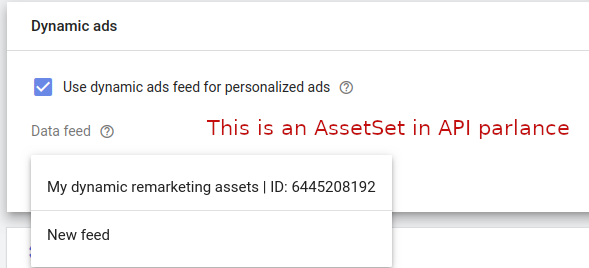
ابتدا، یک AssetSet جدید برای نگهداری داراییهایتان ایجاد کنید:
جاوا
// Creates an AssetSet which will be used to link the dynamic remarketing assets to a campaign. AssetSet assetSet = AssetSet.newBuilder() .setName("My dynamic remarketing assets " + CodeSampleHelper.getPrintableDateTime()) .setType(AssetSetType.DYNAMIC_EDUCATION) .build(); // Creates an operation to add the link. AssetSetOperation operation = AssetSetOperation.newBuilder().setCreate(assetSet).build(); try (AssetSetServiceClient serviceClient = googleAdsClient.getLatestVersion().createAssetSetServiceClient()) { // Sends the mutate request. MutateAssetSetsResponse response = serviceClient.mutateAssetSets( String.valueOf(params.customerId), ImmutableList.of(operation)); // Prints some information about the response. String resourceName = response.getResults(0).getResourceName(); System.out.printf("Created asset set with resource name %s.%n", resourceName); return resourceName; }
C#
/// <summary> /// Creates the asset set. /// </summary> /// <param name="client">The Google Ads client.</param> /// <param name="customerId">The Google Ads customer ID.</param> /// <returns>The resource name of the asset set.</returns> private string CreateAssetSet(GoogleAdsClient client, long customerId) { AssetSetServiceClient assetSetService = client.GetService( Services.V26.AssetSetService); // Creates an AssetSet which will be used to link the dynamic remarketing assets // to a campaign. AssetSet assetSet = new AssetSet() { Name = "My dynamic remarketing assets " + ExampleUtilities.GetRandomString(), Type = AssetSetType.DynamicEducation }; // Creates an operation to add the link. AssetSetOperation operation = new AssetSetOperation() { Create = assetSet }; // Sends the mutate request. MutateAssetSetsResponse response = assetSetService.MutateAssetSets( customerId.ToString(), new[] { operation }); // Prints some information about the response. string resourceName = response.Results[0].ResourceName; Console.WriteLine($"Created asset set with resource name {resourceName}."); return resourceName; }
PHP
// Creates an asset set which will be used to link the dynamic remarketing assets to a // campaign. $assetSet = new AssetSet( [ 'name' => 'My dynamic remarketing assets ' . Helper::getPrintableDatetime(), 'type' => AssetSetType::DYNAMIC_EDUCATION ] ); // Creates an asset set operation. $assetSetOperation = new AssetSetOperation(); $assetSetOperation->setCreate($assetSet); // Issues a mutate request to add the asset set and prints its information. $assetSetServiceClient = $googleAdsClient->getAssetSetServiceClient(); $response = $assetSetServiceClient->mutateAssetSets( MutateAssetSetsRequest::build($customerId, [$assetSetOperation]) ); $assetSetResourceName = $response->getResults()[0]->getResourceName(); printf( "Created an asset set with resource name: '%s'.%s", $assetSetResourceName, PHP_EOL ); return $assetSetResourceName;
Python
def create_asset_set(client: GoogleAdsClient, customer_id: str) -> str: """Creates an AssetSet. The AssetSet will be used to link the dynamic remarketing assets to a campaign. Args: client: an initialized GoogleAdsClient instance. customer_id: a client customer ID. Returns: The resource name for an asset set. """ # Creates an operation to create the asset set. operation: AssetSetOperation = client.get_type("AssetSetOperation") asset_set: AssetSet = operation.create asset_set.name = f"My dynamic remarketing assets {datetime.now()}" asset_set.type_ = client.enums.AssetSetTypeEnum.DYNAMIC_EDUCATION asset_set_service: AssetSetServiceClient = client.get_service( "AssetSetService" ) response: MutateAssetSetsResponse = asset_set_service.mutate_asset_sets( customer_id=customer_id, operations=[operation] ) resource_name: str = response.results[0].resource_name print(f"Created asset set with resource name '{resource_name}'") return resource_name
Ruby
def create_asset_set(client, customer_id) # Creates an AssetSet which will be used to link the dynamic remarketing assets to a campaign. # Creates an operation to add the asset set. operation = client.operation.create_resource.asset_set do |asset_set| asset_set.name = "My dynamic remarketing assets #{Time.now}" asset_set.type = :DYNAMIC_EDUCATION end # Sends the mutate request. response = client.service.asset_set.mutate_asset_sets( customer_id: customer_id, operations: [operation], ) resource_name = response.results.first.resource_name puts "Created asset set with resource name '#{resource_name}'" resource_name end
پرل
# Create an AssetSet which will be used to link the dynamic remarketing assets # to a campaign. my $asset_set = Google::Ads::GoogleAds::V26::Resources::AssetSet->new({ name => "My dynamic remarketing assets #" . uniqid(), type => DYNAMIC_EDUCATION }); # Create an operation to add the AssetSet. my $operation = Google::Ads::GoogleAds::V26::Services::AssetSetService::AssetSetOperation-> new({ create => $asset_set }); # Send the mutate request. my $response = $api_client->AssetSetService()->mutate({ customerId => $customer_id, operations => [$operation]}); # Print some information about the response. my $resource_name = $response->{results}[0]{resourceName}; printf "Created asset set with resource name '%s'.\n", $resource_name; return $resource_name;
فر کردن
سپس، داراییها را بااستفاده از
AssetSetAsset با AssetSet مرتبط کنید:
جاوا
AssetSetAsset assetSetAsset = AssetSetAsset.newBuilder() .setAsset(assetResourceName) .setAssetSet(assetSetResourceName) .build(); // Creates an operation to add the link. AssetSetAssetOperation operation = AssetSetAssetOperation.newBuilder().setCreate(assetSetAsset).build(); try (AssetSetAssetServiceClient client = googleAdsClient.getLatestVersion().createAssetSetAssetServiceClient()) { // Sends the mutate request. // Note this is the point that the API will enforce uniqueness of the // DynamicEducationAsset.product_id field. You can have any number of assets with the same // product_id, however, only one Asset is allowed per AssetSet with the same product ID. MutateAssetSetAssetsResponse response = client.mutateAssetSetAssets( String.valueOf(params.customerId), ImmutableList.of(operation)); // Prints some information about the response. String resourceName = response.getResults(0).getResourceName(); System.out.printf("Created AssetSetAsset link with resource name %s.%n", resourceName); }
C#
/// <summary> /// Adds an Asset to an AssetSet by creating an AssetSetAsset link. /// </summary> /// <param name="client">The Google Ads client.</param> /// <param name="customerId">The Google Ads customer ID.</param> /// <param name="assetResourceName">Name of the asset resource.</param> /// <param name="assetSetResourceName">Name of the asset set resource.</param> private void AddAssetsToAssetSet(GoogleAdsClient client, long customerId, string assetResourceName, string assetSetResourceName) { AssetSetAssetServiceClient assetSetAssetService = client.GetService( Services.V26.AssetSetAssetService); AssetSetAsset assetSetAsset = new AssetSetAsset() { Asset = assetResourceName, AssetSet = assetSetResourceName }; // Creates an operation to add the link. AssetSetAssetOperation operation = new AssetSetAssetOperation() { Create = assetSetAsset }; // Sends the mutate request. // Note this is the point that the API will enforce uniqueness of the // DynamicEducationAsset.program_id field. You can have any number of // assets with the same program_id, however, only one Asset is allowed // per AssetSet with the same program ID. MutateAssetSetAssetsResponse response = assetSetAssetService.MutateAssetSetAssets( customerId.ToString(), new[] { operation }); // Prints some information about the response. string resourceName = response.Results[0].ResourceName; Console.WriteLine($"Created AssetSetAsset link with resource name {resourceName}."); }
PHP
// Creates an asset set asset. $assetSetAsset = new AssetSetAsset( [ 'asset' => $assetResourceName, 'asset_set' => $assetSetResourceName ] ); // Creates an asset set asset operation. $assetSetAssetOperation = new AssetSetAssetOperation(); $assetSetAssetOperation->setCreate($assetSetAsset); // Issues a mutate request to add the asset set asset and prints its information. // Note this is the point that the API will enforce uniqueness of the // DynamicEducationAsset::program_id field. You can have any number of assets with the same // program_id, however, only one asset is allowed per asset set with the same product ID. $assetSetAssetServiceClient = $googleAdsClient->getAssetSetAssetServiceClient(); $response = $assetSetAssetServiceClient->mutateAssetSetAssets( MutateAssetSetAssetsRequest::build($customerId, [$assetSetAssetOperation]) ); printf( "Created asset set asset link with resource name: '%s'.%s", $response->getResults()[0]->getResourceName(), PHP_EOL );
Python
def add_assets_to_asset_set( client: GoogleAdsClient, asset_resource_name: str, asset_set_resource_name: str, customer_id: str, ) -> None: """Adds an Asset to an AssetSet by creating an AssetSetAsset link. Args: client: an initialized GoogleAdsClient instance. asset_set_resource_name; the resource name for an asset set. asset_resource_name; the resource name for an asset. customer_id: a client customer ID. """ # Creates an operation to add the asset set asset. operation: AssetSetAssetOperation = client.get_type( "AssetSetAssetOperation" ) asset_set_asset: AssetSetAsset = operation.create asset_set_asset.asset = asset_resource_name asset_set_asset.asset_set = asset_set_resource_name asset_set_asset_service: AssetSetAssetServiceClient = client.get_service( "AssetSetAssetService" ) # Note this is the point that the API will enforce uniqueness of the # DynamicEducationAsset.program_id field. You can have any number of assets # with the same program ID, however, only one asset is allowed per asset set # with the same program ID. response: MutateAssetSetAssetsResponse = ( asset_set_asset_service.mutate_asset_set_assets( customer_id=customer_id, operations=[operation] ) ) resource_name: str = response.results[0].resource_name print(f"Created asset set asset link with resource name '{resource_name}'")
Ruby
def add_assets_to_asset_set(client, asset_resource_name, asset_set_resource_name, customer_id) # Creates an operation to add the asset set asset. operation = client.operation.create_resource.asset_set_asset do |asa| asa.asset = asset_resource_name asa.asset_set = asset_set_resource_name end # Sends the mutate request. # # Note this is the point that the API will enforce uniqueness of the # DynamicEducationAsset.program_id field. You can have any number of assets # with the same program ID, however, only one asset is allowed per asset set # with the same program ID. response = client.service.asset_set_asset.mutate_asset_set_assets( customer_id: customer_id, operations: [operation], ) resource_name = response.results.first.resource_name puts "Created asset set asset link with resource name '#{resource_name}'" end
پرل
my $asset_set_asset = Google::Ads::GoogleAds::V26::Resources::AssetSetAsset->new({ asset => $asset_resource_name, assetSet => $asset_set_resource_name }); # Create an operation to add the link. my $operation = Google::Ads::GoogleAds::V26::Services::AssetSetAssetService::AssetSetAssetOperation ->new({ create => $asset_set_asset }); # Send the mutate request. # Note this is the point that the API will enforce uniqueness of the # DynamicEducationAsset.programId field. You can have any number of assets # with the same programId, however, only one Asset is allowed per AssetSet # with the same program ID. my $response = $api_client->AssetSetAssetService()->mutate({ customerId => $customer_id, operations => [$operation]}); # Print some information about the response. my $resource_name = $response->{results}[0]{resourceName}; printf "Created AssetSetAsset link with resource name '%s'.\n", $resource_name;
فر کردن
پیوند دادن AssetSet به پویش با CampaignAssetSet
وقتی AssetSet حاوی محتوای پویایتان را داشتید، آن را به پویشی پیوند دهید تا داراییها بتوانند ارائه شوند. این کار با ایجاد CampaignAssetSet انجام میشود:
جاوا
// Creates a CampaignAssetSet representing the link between an AssetSet and a Campaign. CampaignAssetSet campaignAssetSet = CampaignAssetSet.newBuilder() .setCampaign(ResourceNames.campaign(params.customerId, params.campaignId)) .setAssetSet(assetSetResourceName) .build(); // Creates an operation to add the CampaignAssetSet. CampaignAssetSetOperation operation = CampaignAssetSetOperation.newBuilder().setCreate(campaignAssetSet).build(); // Creates an API connection. try (CampaignAssetSetServiceClient client = googleAdsClient.getLatestVersion().createCampaignAssetSetServiceClient()) { // Issues the mutate request. MutateCampaignAssetSetsResponse response = client.mutateCampaignAssetSets( String.valueOf(params.customerId), ImmutableList.of(operation)); String resourceName = response.getResults(0).getResourceName(); System.out.printf("Created a CampaignAssetSet with resource name %s.%n", resourceName); }
C#
/// <summary> /// Links an AssetSet to Campaign by creating a CampaignAssetSet. /// </summary> /// <param name="client">The Google Ads client.</param> /// <param name="customerId">The Google Ads customer ID.</param> /// <param name="campaignId">ID of the campaign to which the asset is linked. Specify a /// campaign type which supports dynamic remarketing, such as Display.</param> /// <param name="assetSetResourceName">Name of the asset set resource.</param> private void LinkAssetSetToCampaign(GoogleAdsClient client, long customerId, long campaignId, string assetSetResourceName) { CampaignAssetSetServiceClient campaignAssetSetService = client.GetService( Services.V26.CampaignAssetSetService); // Creates a CampaignAssetSet representing the link between an AssetSet and a Campaign. CampaignAssetSet campaignAssetSet = new CampaignAssetSet() { Campaign = ResourceNames.Campaign(customerId, campaignId), AssetSet = assetSetResourceName }; // Creates an operation to add the CampaignAssetSet. CampaignAssetSetOperation operation = new CampaignAssetSetOperation() { Create = campaignAssetSet }; // Issues the mutate request. MutateCampaignAssetSetsResponse response = campaignAssetSetService.MutateCampaignAssetSets( customerId.ToString(), new[] { operation }); string resourceName = response.Results[0].ResourceName; Console.WriteLine($"Created a CampaignAssetSet with resource name {resourceName}."); }
PHP
// Creates a campaign asset set representing the link between an asset set and a campaign. $campaignAssetSet = new CampaignAssetSet( [ 'asset_set' => $assetSetResourceName, 'campaign' => ResourceNames::forCampaign($customerId, $campaignId) ] ); // Creates a campaign asset set operation. $campaignAssetSetOperation = new CampaignAssetSetOperation(); $campaignAssetSetOperation->setCreate($campaignAssetSet); // Issues a mutate request to add the campaign asset set and prints its information. $campaignAssetSetServiceClient = $googleAdsClient->getCampaignAssetSetServiceClient(); $response = $campaignAssetSetServiceClient->mutateCampaignAssetSets( MutateCampaignAssetSetsRequest::build($customerId, [$campaignAssetSetOperation]) ); printf( "Created a campaign asset set with resource name: '%s'.%s", $response->getResults()[0]->getResourceName(), PHP_EOL );
Python
def link_asset_set_to_campaign( client: GoogleAdsClient, asset_set_resource_name: str, customer_id: str, campaign_id: str, ) -> None: """Creates a CampaignAssetSet. The CampaignAssetSet represents the link between an AssetSet and a Campaign. Args: client: an initialized GoogleAdsClient instance. asset_set_resource_name; the resource name for an asset set. customer_id: a client customer ID. campaign_id: the ID for a campaign of a type that supports dynamic remarketing, such as Display. """ googleads_service: GoogleAdsServiceClient = client.get_service( "GoogleAdsService" ) # Creates an operation to add the campaign asset set. operation: CampaignAssetSetOperation = client.get_type( "CampaignAssetSetOperation" ) campaign_asset_set: CampaignAssetSet = operation.create campaign_asset_set.campaign = googleads_service.campaign_path( customer_id, campaign_id ) campaign_asset_set.asset_set = asset_set_resource_name campaign_asset_set_service: CampaignAssetSetServiceClient = ( client.get_service("CampaignAssetSetService") ) response: MutateCampaignAssetSetsResponse = ( campaign_asset_set_service.mutate_campaign_asset_sets( customer_id=customer_id, operations=[operation] ) ) resource_name: str = response.results[0].resource_name print(f"Created a campaign asset set with resource name '{resource_name}'")
Ruby
def link_asset_set_to_campaign(client, asset_set_resource_name, customer_id, campaign_id) # Creates a CampaignAssetSet representing the link between an AssetSet and a Campaign. # Creates an operation to add the campaign asset set. operation = client.operation.create_resource.campaign_asset_set do |cas| cas.campaign = client.path.campaign(customer_id, campaign_id) cas.asset_set = asset_set_resource_name end # Issues the mutate request. response = client.service.campaign_asset_set.mutate_campaign_asset_sets( customer_id: customer_id, operations: [operation], ) resource_name = response.results.first.resource_name puts "Created a campaign asset set with resource name '#{resource_name}'" end
پرل
# Create a CampaignAssetSet representing the link between an AssetSet and a Campaign. my $campaign_asset_set = Google::Ads::GoogleAds::V26::Resources::CampaignAssetSet->new({ campaign => Google::Ads::GoogleAds::V26::Utils::ResourceNames::campaign( $customer_id, $campaign_id ), assetSet => $asset_set_resource_name }); # Create an operation to add the CampaignAssetSet. my $operation = Google::Ads::GoogleAds::V26::Services::CampaignAssetSetService::CampaignAssetSetOperation ->new({ create => $campaign_asset_set }); # Issue the mutate request. my $response = $api_client->CampaignAssetSetService()->mutate({ customerId => $customer_id, operations => [$operation]}); # Print some information about the response. my $resource_name = $response->{results}[0]{resourceName}; printf "Created a CampaignAssetSet with resource name '%s'.\n", $resource_name;
فر کردن
هدفیابی UserList
پساز پیوند دادن AssetSet به پویش خود،
UserList (پرشده با شناسههای کسبوکار پویای
ارسالشده توسط پیکسل ردیابی شما) را با ایجاد یک
AdGroupCriterion با یک
شیء UserListInfo بااستفاده از
AdGroupCriterionService به یک گروه آگهی در پویش پیوست کنید:
جاوا
private void attachUserList( GoogleAdsClient googleAdsClient, long customerId, String adGroupResourceName, long userListId) { String userListResourceName = ResourceNames.userList(customerId, userListId); // Creates the ad group criterion that targets the user list. AdGroupCriterion adGroupCriterion = AdGroupCriterion.newBuilder() .setAdGroup(adGroupResourceName) .setUserList(UserListInfo.newBuilder().setUserList(userListResourceName).build()) .build(); // Creates the ad group criterion operation. AdGroupCriterionOperation operation = AdGroupCriterionOperation.newBuilder().setCreate(adGroupCriterion).build(); // Creates the ad group criterion service client. try (AdGroupCriterionServiceClient adGroupCriterionServiceClient = googleAdsClient.getLatestVersion().createAdGroupCriterionServiceClient()) { // Adds the ad group criterion. MutateAdGroupCriteriaResponse response = adGroupCriterionServiceClient.mutateAdGroupCriteria( Long.toString(customerId), ImmutableList.of(operation)); System.out.printf( "Created ad group criterion with resource name '%s'.%n", response.getResults(0).getResourceName()); } }
C#
private void AttachUserList(GoogleAdsClient client, long customerId, string adGroupResourceName, long userListId) { // Creates the ad group criterion service client. AdGroupCriterionServiceClient adGroupCriterionServiceClient = client.GetService (Services.V26.AdGroupCriterionService); string userListResourceName = ResourceNames.UserList(customerId, userListId); // Creates the ad group criterion that targets the user list. AdGroupCriterion adGroupCriterion = new AdGroupCriterion() { AdGroup = adGroupResourceName, UserList = new UserListInfo() { UserList = userListResourceName } }; // Creates the ad group criterion operation. AdGroupCriterionOperation operation = new AdGroupCriterionOperation() { Create = adGroupCriterion }; // Adds the ad group criterion. MutateAdGroupCriteriaResponse response = adGroupCriterionServiceClient .MutateAdGroupCriteria(customerId.ToString(), new[] { operation }); Console.WriteLine("Created ad group criterion with resource name " + $"'{response.Results.First().ResourceName}'."); }
PHP
private static function attachUserList( GoogleAdsClient $googleAdsClient, int $customerId, string $adGroupResourceName, int $userListId ) { // Creates the ad group criterion that targets the user list. $adGroupCriterion = new AdGroupCriterion( [ 'ad_group' => $adGroupResourceName, 'user_list' => new UserListInfo( [ 'user_list' => ResourceNames::forUserList($customerId, $userListId) ] ) ] ); // Creates an ad group criterion operation. $adGroupCriterionOperation = new AdGroupCriterionOperation(); $adGroupCriterionOperation->setCreate($adGroupCriterion); // Issues a mutate request to add the ad group criterion. $adGroupCriterionServiceClient = $googleAdsClient->getAdGroupCriterionServiceClient(); $response = $adGroupCriterionServiceClient->mutateAdGroupCriteria( MutateAdGroupCriteriaRequest::build($customerId, [$adGroupCriterionOperation]) ); /** * @var AdGroupCriterion $addedAdGroupCriterion */ $addedAdGroupCriterion = $response->getResults()[0]; printf( "Created ad group criterion with resource name '%s'.%s", $addedAdGroupCriterion->getResourceName(), PHP_EOL ); }
Python
def attach_user_list( client: GoogleAdsClient, customer_id: str, ad_group_resource_name: str, user_list_id: int, ) -> None: """Targets a user list with an ad group. Args: client: An initialized GoogleAds client. customer_id: The Google Ads customer ID. ad_group_resource_name: The resource name of the target ad group. user_list_id: The ID of the user list to target for remarketing. """ # Get the AdGroupCriterionService client. ad_group_criterion_service: AdGroupCriterionServiceClient = ( client.get_service("AdGroupCriterionService") ) # Create an ad group criterion operation and set the ad group criterion # values. ad_group_criterion_operation: AdGroupCriterionOperation = client.get_type( "AdGroupCriterionOperation" ) ad_group_criterion: AdGroupCriterion = ad_group_criterion_operation.create ad_group_criterion.ad_group = ad_group_resource_name ad_group_criterion.user_list.user_list = client.get_service( "UserListService" ).user_list_path(customer_id, str(user_list_id)) # Issue a mutate request to add the ad group criterion. ad_group_criterion_response: MutateAdGroupCriteriaResponse = ( ad_group_criterion_service.mutate_ad_group_criteria( customer_id=customer_id, operations=[ad_group_criterion_operation] ) ) print( "Created ad group criterion with resource name " f"'{ad_group_criterion_response.results[0].resource_name}'." )
Ruby
def attach_user_list(client, customer_id, ad_group_resource_name, user_list_id) user_list_resource_name = client.path.user_list(customer_id, user_list_id) # Creates the ad group criterion that targets the user list. ad_group_criterion = client.resource.ad_group_criterion do |agc| agc.ad_group = ad_group_resource_name agc.user_list = client.resource.user_list_info do |ul| ul.user_list = user_list_resource_name end end # Creates the ad group criterion operation. op = client.operation.create_resource.ad_group_criterion(ad_group_criterion) response = client.service.ad_group_criterion.mutate_ad_group_criteria( customer_id: customer_id, operations: [op] ) puts "Created ad group criterion: #{response.results.first.resource_name}" end
پرل
sub attach_user_list { my ($api_client, $customer_id, $ad_group_resource_name, $user_list_id) = @_; # Create the ad group criterion that targets the user list. my $ad_group_criterion = Google::Ads::GoogleAds::V26::Resources::AdGroupCriterion->new({ adGroup => $ad_group_resource_name, userList => Google::Ads::GoogleAds::V26::Common::UserListInfo->new({ userList => Google::Ads::GoogleAds::V26::Utils::ResourceNames::user_list( $customer_id, $user_list_id )})}); # Create an ad group criterion operation. my $ad_group_criterion_operation = Google::Ads::GoogleAds::V26::Services::AdGroupCriterionService::AdGroupCriterionOperation ->new({create => $ad_group_criterion}); # Issue a mutate request to add the ad group criterion. my $ad_group_criteria_response = $api_client->AdGroupCriterionService()->mutate({ customerId => $customer_id, operations => [$ad_group_criterion_operation]}); printf "Created ad group criterion with resource name '%s'.\n", $ad_group_criteria_response->{results}[0]{resourceName}; }
فر کردن
بارگیری گزارشهای پویش بازاریابی مجدد پویای شما
گزارشدهی در سطح دارایی بازاریابی مجدد پویای تکی دردسترس نیست،
که با رفتار تنظیمات قدیمی مبتنی بر فید مطابقت دارد. همچنان میتوانید سنجههای عملکرد سطح پویش و سطح گروه آگهی را بااستفاده از GoogleAdsService بازیابی کنید. همچنین میتوانید برای بازیابی سنجههای عملکرد
(metrics.impressions، metrics.clicks، metrics.cost_micros،
metrics.conversions) که براساس asset_set_type_view.asset_set_type (مثل
DYNAMIC_EDUCATION، DYNAMIC_FLIGHTS، DYNAMIC_HOTELS) بخشبندی شدهاند پُرسمان
asset_set_type_view اجرا کنید.