

Page Summary
-
The Google Ads API consists of resources, which represent entities, and services, which retrieve and manipulate them.
-
A Google Ads account is organized hierarchically, starting with the customer at the top level, followed by campaigns, ad groups, and ad group ads.
-
Every object in Google Ads is identified by an ID, and resources also have a unique
resource_namestring. -
Services allow you to modify objects using mutate requests, retrieve objects and performance statistics with GoogleAdsService, and retrieve metadata with GoogleAdsFieldService.
This guide introduces the primary components that make up the Google Ads API. The Google Ads API consists of resources and services. A resource represents a Google Ads entity, while services retrieve and manipulate Google Ads entities.
Object hierarchy
A Google Ads account can be viewed as a hierarchy of objects.
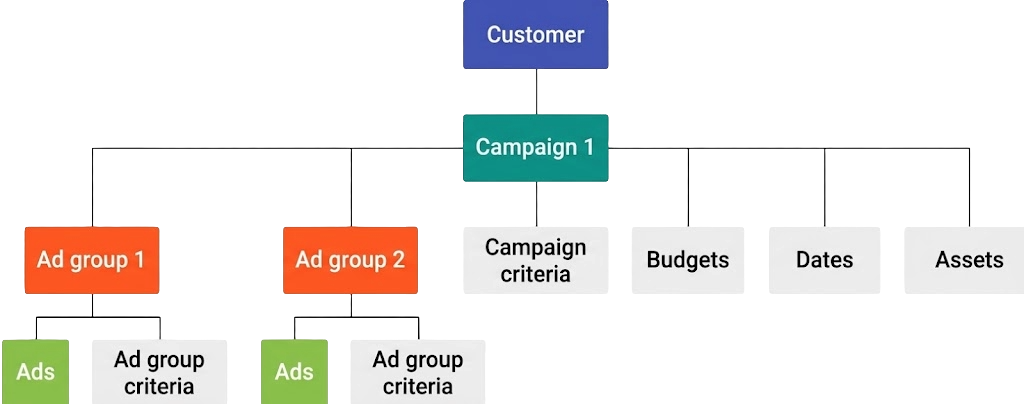
The top-level resource of an account is the customer.
Each customer contains one or more active campaigns.
Each campaign contains one or more ad groups, used to group your ads into logical collections.
An ad group ad represents an ad that you're running in an ad group. Except for App campaigns, which can have only one ad group ad per ad group, each ad group contains one or more ad group ads.
Performance Max campaigns use a different
structure from other campaign types: instead of ad groups and ad group ads, a
Performance Max campaign contains asset groups. You
link creative assets to an asset group using
AssetGroupAsset and attach audience or search
theme signals using AssetGroupSignal.
You can attach one or more AdGroupCriterion
or CampaignCriterion resources to an ad
group or campaign. These represent criteria that define how ads get triggered.
There are many criterion types,
such as keywords, age ranges, and locations. Criteria defined at the campaign
level affect all other resources within the campaign. You can also specify
budgets as well as start and end dates and times for campaigns, or for
individual ads using AdGroupAd.start_date_time and AdGroupAd.end_date_time.
Finally, you can attach assets at the account, campaign, ad group, or asset group level. Assets let you provide extra information to your ads, like phone numbers, street addresses, or promotions. See Assets overview.
Resources
Resources represent the entities within your Google Ads account.
Campaign and AdGroup are
two examples of resources.
Object IDs
Every object in Google Ads is identified by its own ID. Some of these IDs are globally unique across all Google Ads accounts, while others are unique only within a confined scope.
| Object ID | Scope of uniqueness | Globally unique? |
|---|---|---|
| Budget ID | Global | Yes |
| Campaign ID | Global | Yes |
| AdGroup ID | Global | Yes |
| Ad ID | Ad group | No, but (AdGroupId, AdId) pair is globally unique. Sharing an AdId across multiple ad groups is prohibited. |
| AdGroupCriterion ID | Ad group | No, but (AdGroupId, CriterionId) pair is globally unique |
| CampaignCriterion ID | Campaign | No, but (CampaignId, CriterionId) pair is globally unique |
| Label ID | Customer | No, but (CustomerId, LabelId) pair is globally unique |
| UserList ID | Global | Yes |
| Asset ID | Global | Yes |
These ID rules can be useful when designing local storage for your Google Ads objects.
Some objects can be used for multiple entity types. In such cases, the object
contains a type field that describes its contents. For example,
AdGroupAd can refer to an object such as a
responsive search ad, hotel ad, or Demand Gen ad. This value can be accessed
through the AdGroupAd.ad.type field, and returns a
value in the AdType enum. Note that
mutability can vary by version (for example, VideoResponsiveAdInfo on Ad is
mutable in v24 and later).
Resource names
Each resource is uniquely identified by a resource_name string that
concatenates the resource and its parents into a path. For example, campaign
resource names have the form:
customers/customer_id/campaigns/campaign_id
So for a campaign with ID 987654 in the Google Ads account with customer ID
1234567, the resource_name would be:
customers/1234567/campaigns/987654
Services
Services let you retrieve and modify your Google Ads entities. There are three types of services: modification, object and stat retrieval, and metadata retrieval services.
Modify (mutate) objects
Resource-specific services modify instances of an associated resource type using
a mutate request. You can also use
GoogleAdsService.Mutate to perform atomic
mutations across multiple resource types in a single request (such as creating a
campaign budget, campaign, and ad group together).
Examples of resource-specific services:
CustomerServicefor modifying customers.CampaignServicefor modifying campaigns.AdGroupServicefor modifying ad groups.
Each mutate request must include corresponding operation objects. For
example, the CampaignService.MutateCampaigns method expects one or more
instances of CampaignOperation. See
Change objects for a detailed discussion of
operations.
Concurrent mutates
A Google Ads object cannot be modified concurrently by more than one source. This could cause errors to arise if you have multiple users updating the same object with your app, or if you're mutating Google Ads objects in parallel using multiple threads. This includes updating the object from multiple threads in the same application, or from different applications (for example, your app and a simultaneous Google Ads UI session).
The API does not provide a way to lock an object before updating; if two sources
try to simultaneously mutate an object, the API raises a
DatabaseError.CONCURRENT_MODIFICATION_ERROR.
Asynchronous versus synchronous mutates
The Google Ads API mutate methods are synchronous. API calls return a response only after the objects are mutated, requiring you to wait for a response to each request. While this approach is relatively straightforward to code, it could negatively impact load balancing and waste resources if processes are forced to wait for calls to complete.
An alternate approach is to mutate objects asynchronously using
BatchJobService, which performs batches of
operations on multiple services without waiting for their completion. Once a
batch job is submitted, Google Ads API servers execute operations asynchronously,
freeing processes to perform other operations. You can periodically check the
job status for completion.
See the Batch processing guide for more on asynchronous processing.
Mutate validation
Most mutate requests can be validated without actually executing the call against real data. You can test the request for missing parameters and incorrect field values without actually executing the operation.
To use this feature, set the request's optional validate_only boolean field to
true. The request is fully validated as if it were going to be executed, but
the final execution is skipped. If no errors are found, the response is returned
with no mutated results populated (results is empty). If validation fails, the
request fails with a GoogleAdsFailure RPC
error by default (partial_failure = false), or returns a normal response with
operation-specific errors in partial_failure_error when
partial_failure = true.
validate_only is particularly useful in testing ads for common policy
violations. Ads are automatically rejected if they violate policies such as
having specific words, punctuation, capitalization, or length. A single bad ad
could cause an entire batch to fail. Testing a new ad within a validate_only
request can reveal any such violations. Refer to the code example for handling
policy violation errors to see
this in action.
Get objects and performance stats
GoogleAdsService is the single, unified
service for retrieving objects and performance statistics.
All Search and
SearchStream requests for
GoogleAdsService require a query that
specifies the resource to query, the resource attributes and performance metrics
to retrieve, the predicates to use for filtering the request, and the segments
to use to further break down performance statistics. For more information about
query format, see the Google Ads Query Language guide.
Retrieve metadata
GoogleAdsFieldService retrieves
metadata about resources in the Google Ads API, such as the available attributes for a
resource and its data type. See the Resource metadata
guide for details on querying this service.
This service provides information needed in constructing a query to
GoogleAdsService. For convenience, the
information returned by
GoogleAdsFieldService is also available
in the fields reference documentation.