

CustomerService içindeki ListAccessibleCustomers yöntemini kullanarak erişebileceğiniz müşterileri listeleyebilirsiniz. Ancak bu tür bir istekte hangi müşterilerin döndürüldüğünü anlamanız gerekir.
Erişilebilir müşterileri listeleme, Google Ads API'de istekte müşteri kimliği belirtmenizi gerektirmeyen az sayıdaki istekten biridir ve istek, sağlanan tüm login-customer-id değerlerini yoksayar.
Elde edilen müşteri listesi, OAuth kimlik bilgilerinize dayanır. İstek, mevcut kimlik bilgilerinizle doğrudan işlem yapabileceğiniz tüm hesapların listesini döndürür. Bu, hesap hiyerarşisindeki tüm hesapları içermez. Yalnızca kimliği doğrulanmış kullanıcınızın yönetici veya başka haklarla hesaba eklendiği hesapları içerir.
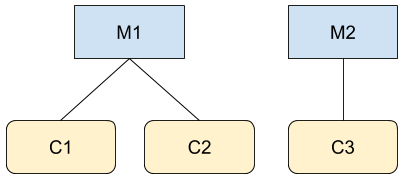
Şekilde gösterilen iki hiyerarşideki M1 ve C3 için yönetici olan A kullanıcısı olduğunuzu düşünün. Google Ads API'ye bir çağrı yaparsanız (örneğin, GoogleAdsService için) M1, C1, C2 ve C3 hesaplarının bilgilerine erişebilirsiniz. Ancak CustomerService.ListAccessibleCustomers çağrısı yalnızca M1 ve C3 değerlerini döndürür. Çünkü kullanıcı A'ın doğrudan erişimi olan tek hesaplar bunlardır.
CustomerService.ListAccessibleCustomers yönteminin kullanımını gösteren bir kod örneği aşağıda verilmiştir:
Java
private void runExample(GoogleAdsClient client) { // Optional: Change credentials to use a different refresh token, to retrieve customers // available for a specific user. // // UserCredentials credentials = // UserCredentials.newBuilder() // .setClientId("INSERT_OAUTH_CLIENT_ID") // .setClientSecret("INSERT_OAUTH_CLIENT_SECRET") // .setRefreshToken("INSERT_REFRESH_TOKEN") // .build(); // // client = client.toBuilder().setCredentials(credentials).build(); try (CustomerServiceClient customerService = client.getLatestVersion().createCustomerServiceClient()) { ListAccessibleCustomersResponse response = customerService.listAccessibleCustomers( ListAccessibleCustomersRequest.newBuilder().build()); System.out.printf("Total results: %d%n", response.getResourceNamesCount()); for (String customerResourceName : response.getResourceNamesList()) { System.out.printf("Customer resource name: %s%n", customerResourceName); } } }
C#
public void Run(GoogleAdsClient client) { // Get the CustomerService. CustomerServiceClient customerService = client.GetService(Services.V25.CustomerService); try { // Retrieve the list of customer resources. string[] customerResourceNames = customerService.ListAccessibleCustomers(); // Display the result. foreach (string customerResourceName in customerResourceNames) { Console.WriteLine( $"Found customer with resource name = '{customerResourceName}'."); } } catch (GoogleAdsException e) { Console.WriteLine("Failure:"); Console.WriteLine($"Message: {e.Message}"); Console.WriteLine($"Failure: {e.Failure}"); Console.WriteLine($"Request ID: {e.RequestId}"); throw; } }
PHP
public static function runExample(GoogleAdsClient $googleAdsClient) { $customerServiceClient = $googleAdsClient->getCustomerServiceClient(); // Issues a request for listing all accessible customers. $accessibleCustomers = $customerServiceClient->listAccessibleCustomers(new ListAccessibleCustomersRequest()); print 'Total results: ' . count($accessibleCustomers->getResourceNames()) . PHP_EOL; // Iterates over all accessible customers' resource names and prints them. foreach ($accessibleCustomers->getResourceNames() as $resourceName) { /** @var string $resourceName */ printf("Customer resource name: '%s'%s", $resourceName, PHP_EOL); } }
Python
def main(client: GoogleAdsClient) -> None: customer_service: CustomerServiceClient = client.get_service( "CustomerService" ) accessible_customers: ListAccessibleCustomersResponse = ( customer_service.list_accessible_customers() ) result_total: int = len(accessible_customers.resource_names) print(f"Total results: {result_total}") resource_names: List[str] = accessible_customers.resource_names for resource_name in resource_names: # resource_name is implicitly str print(f'Customer resource name: "{resource_name}"')
Ruby
def list_accessible_customers() # GoogleAdsClient will read a config file from # ENV['HOME']/google_ads_config.rb when called without parameters client = Google::Ads::GoogleAds::GoogleAdsClient.new accessible_customers = client.service.customer.list_accessible_customers().resource_names accessible_customers.each do |resource_name| puts "Customer resource name: #{resource_name}" end end
Perl
sub list_accessible_customers { my ($api_client) = @_; my $list_accessible_customers_response = $api_client->CustomerService()->list_accessible_customers(); printf "Total results: %d.\n", scalar @{$list_accessible_customers_response->{resourceNames}}; foreach my $resource_name (@{$list_accessible_customers_response->{resourceNames}}) { printf "Customer resource name: '%s'.\n", $resource_name; } return 1; }
curl
# Returns the resource names of customers directly accessible by the user # authenticating the call. # # Variables: # API_VERSION, # OAUTH2_ACCESS_TOKEN: # See https://developers.google.com/google-ads/api/rest/auth#request_headers # for details. # curl -f --request GET \ "https://googleads.googleapis.com/v${API_VERSION}/customers:listAccessibleCustomers" \ --header "Content-Type: application/json" \ --header "Authorization: Bearer ${OAUTH2_ACCESS_TOKEN}" \
İptal edilen hesapları listeleme
Bir yönetici hesabının altında bulunan ve iptal edilmiş hesapları almak için doğrudan customer_client kaynağını sorgulayın ve status ölçütüne göre filtreleyin:
SELECT
  customer_client.id,
  customer_client.descriptive_name,
  customer_client.status
FROM customer_client
WHERE customer_client.status = 'CANCELED'