

Bạn có thể liệt kê những khách hàng mà bạn có thể truy cập bằng phương thức
ListAccessibleCustomers trong
CustomerService. Tuy nhiên, bạn phải hiểu những khách hàng nào được trả về trong loại yêu cầu này.
Liệt kê những khách hàng mà bạn có thể truy cập là một trong số ít yêu cầu trong Google Ads API mà bạn không cần chỉ định mã khách hàng trong yêu cầu và yêu cầu này sẽ bỏ qua mọi login-customer-id được cung cấp.
Danh sách khách hàng kết quả dựa trên thông tin xác thực OAuth của bạn. Yêu cầu này sẽ trả về danh sách tất cả các tài khoản mà bạn có thể hành động trực tiếp dựa trên thông tin xác thực hiện tại của mình. Danh sách này không nhất thiết phải bao gồm tất cả các tài khoản trong hệ phân cấp tài khoản mà chỉ bao gồm những tài khoản mà người dùng được xác thực đã được thêm vào với vai trò quản trị viên hoặc các quyền khác trong tài khoản.
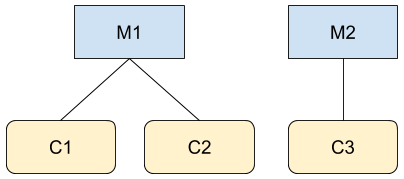
Giả sử bạn là người dùng A và là quản trị viên của M1 và C3 trong hai hệ phân cấp được minh hoạ trong hình. Nếu bạn thực hiện lệnh gọi đến Google Ads API, chẳ
ng hạn như đến GoogleAdsService, bạn có
thể truy cập vào thông tin của các tài khoản M1, C1, C2 và C3. Tuy nhiên, lệnh gọi đến
CustomerService.ListAccessibleCustomers
sẽ chỉ trả về M1 và C3 vì đó là những tài khoản duy nhất mà người dùng A
có quyền truy cập trực tiếp.
Sau đây là ví dụ về mã minh hoạ cách sử dụng phương thức
CustomerService.ListAccessibleCustomers:
Java
private void runExample(GoogleAdsClient client) { // Optional: Change credentials to use a different refresh token, to retrieve customers // available for a specific user. // // UserCredentials credentials = // UserCredentials.newBuilder() // .setClientId("INSERT_OAUTH_CLIENT_ID") // .setClientSecret("INSERT_OAUTH_CLIENT_SECRET") // .setRefreshToken("INSERT_REFRESH_TOKEN") // .build(); // // client = client.toBuilder().setCredentials(credentials).build(); try (CustomerServiceClient customerService = client.getLatestVersion().createCustomerServiceClient()) { ListAccessibleCustomersResponse response = customerService.listAccessibleCustomers( ListAccessibleCustomersRequest.newBuilder().build()); System.out.printf("Total results: %d%n", response.getResourceNamesCount()); for (String customerResourceName : response.getResourceNamesList()) { System.out.printf("Customer resource name: %s%n", customerResourceName); } } }
C#
public void Run(GoogleAdsClient client) { // Get the CustomerService. CustomerServiceClient customerService = client.GetService(Services.V25.CustomerService); try { // Retrieve the list of customer resources. string[] customerResourceNames = customerService.ListAccessibleCustomers(); // Display the result. foreach (string customerResourceName in customerResourceNames) { Console.WriteLine( $"Found customer with resource name = '{customerResourceName}'."); } } catch (GoogleAdsException e) { Console.WriteLine("Failure:"); Console.WriteLine($"Message: {e.Message}"); Console.WriteLine($"Failure: {e.Failure}"); Console.WriteLine($"Request ID: {e.RequestId}"); throw; } }
PHP
public static function runExample(GoogleAdsClient $googleAdsClient) { $customerServiceClient = $googleAdsClient->getCustomerServiceClient(); // Issues a request for listing all accessible customers. $accessibleCustomers = $customerServiceClient->listAccessibleCustomers(new ListAccessibleCustomersRequest()); print 'Total results: ' . count($accessibleCustomers->getResourceNames()) . PHP_EOL; // Iterates over all accessible customers' resource names and prints them. foreach ($accessibleCustomers->getResourceNames() as $resourceName) { /** @var string $resourceName */ printf("Customer resource name: '%s'%s", $resourceName, PHP_EOL); } }
Python
def main(client: GoogleAdsClient) -> None: customer_service: CustomerServiceClient = client.get_service( "CustomerService" ) accessible_customers: ListAccessibleCustomersResponse = ( customer_service.list_accessible_customers() ) result_total: int = len(accessible_customers.resource_names) print(f"Total results: {result_total}") resource_names: List[str] = accessible_customers.resource_names for resource_name in resource_names: # resource_name is implicitly str print(f'Customer resource name: "{resource_name}"')
Ruby
def list_accessible_customers() # GoogleAdsClient will read a config file from # ENV['HOME']/google_ads_config.rb when called without parameters client = Google::Ads::GoogleAds::GoogleAdsClient.new accessible_customers = client.service.customer.list_accessible_customers().resource_names accessible_customers.each do |resource_name| puts "Customer resource name: #{resource_name}" end end
Perl
sub list_accessible_customers { my ($api_client) = @_; my $list_accessible_customers_response = $api_client->CustomerService()->list_accessible_customers(); printf "Total results: %d.\n", scalar @{$list_accessible_customers_response->{resourceNames}}; foreach my $resource_name (@{$list_accessible_customers_response->{resourceNames}}) { printf "Customer resource name: '%s'.\n", $resource_name; } return 1; }
curl
# Returns the resource names of customers directly accessible by the user # authenticating the call. # # Variables: # API_VERSION, # OAUTH2_ACCESS_TOKEN: # See https://developers.google.com/google-ads/api/rest/auth#request_headers # for details. # curl -f --request GET \ "https://googleads.googleapis.com/v${API_VERSION}/customers:listAccessibleCustomers" \ --header "Content-Type: application/json" \ --header "Authorization: Bearer ${OAUTH2_ACCESS_TOKEN}" \
Liệt kê các tài khoản đã huỷ
Để truy xuất các tài khoản trong một tài khoản người quản lý đã bị huỷ, hãy trực tiếp truy vấn tài nguyên customer_client và lọc theo status:
SELECT
  customer_client.id,
  customer_client.descriptive_name,
  customer_client.status
FROM customer_client
WHERE customer_client.status = 'CANCELED'