

CustomerService의 ListAccessibleCustomers 메서드를 사용하여 액세스할 수 있는 고객을 나열할 수 있습니다. 하지만 이 유형의 요청에서 어떤 고객이 반환되는지 이해해야 합니다.
액세스 가능한 고객을 나열하는 것은 요청에 고객 ID를 지정하지 않아도 되는 Google Ads API의 몇 안 되는 요청 중 하나이며, 요청은 제공된 login-customer-id를 무시합니다.
결과 고객 목록은 OAuth 사용자 인증 정보를 기반으로 합니다. 이 요청은 현재 사용자 인증 정보를 기준으로 직접 조치를 취할 수 있는 모든 계정의 목록을 반환합니다. 여기에는 계정 계층 구조 내의 모든 계정이 포함되지 않으며, 인증된 사용자가 계정에서 관리자 또는 기타 권한으로 추가된 계정만 포함됩니다.
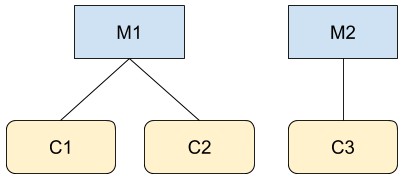
그림에 표시된 두 계층 구조에서 M1 및 C3의 관리자인 사용자 A라고 가정해 보겠습니다. Google Ads API를 호출하는 경우(예: GoogleAdsService) 계정 M1, C1, C2, C3의 정보에 액세스할 수 있습니다. 하지만 CustomerService.ListAccessibleCustomers를 호출하면 사용자 A이 직접 액세스할 수 있는 계정은 M1와 C3뿐이므로 이 두 계정만 반환됩니다.
다음은 CustomerService.ListAccessibleCustomers 메서드의 사용을 보여주는 코드 예입니다.
자바
private void runExample(GoogleAdsClient client) { // Optional: Change credentials to use a different refresh token, to retrieve customers // available for a specific user. // // UserCredentials credentials = // UserCredentials.newBuilder() // .setClientId("INSERT_OAUTH_CLIENT_ID") // .setClientSecret("INSERT_OAUTH_CLIENT_SECRET") // .setRefreshToken("INSERT_REFRESH_TOKEN") // .build(); // // client = client.toBuilder().setCredentials(credentials).build(); try (CustomerServiceClient customerService = client.getLatestVersion().createCustomerServiceClient()) { ListAccessibleCustomersResponse response = customerService.listAccessibleCustomers( ListAccessibleCustomersRequest.newBuilder().build()); System.out.printf("Total results: %d%n", response.getResourceNamesCount()); for (String customerResourceName : response.getResourceNamesList()) { System.out.printf("Customer resource name: %s%n", customerResourceName); } } }
C#
public void Run(GoogleAdsClient client) { // Get the CustomerService. CustomerServiceClient customerService = client.GetService(Services.V25.CustomerService); try { // Retrieve the list of customer resources. string[] customerResourceNames = customerService.ListAccessibleCustomers(); // Display the result. foreach (string customerResourceName in customerResourceNames) { Console.WriteLine( $"Found customer with resource name = '{customerResourceName}'."); } } catch (GoogleAdsException e) { Console.WriteLine("Failure:"); Console.WriteLine($"Message: {e.Message}"); Console.WriteLine($"Failure: {e.Failure}"); Console.WriteLine($"Request ID: {e.RequestId}"); throw; } }
PHP
public static function runExample(GoogleAdsClient $googleAdsClient) { $customerServiceClient = $googleAdsClient->getCustomerServiceClient(); // Issues a request for listing all accessible customers. $accessibleCustomers = $customerServiceClient->listAccessibleCustomers(new ListAccessibleCustomersRequest()); print 'Total results: ' . count($accessibleCustomers->getResourceNames()) . PHP_EOL; // Iterates over all accessible customers' resource names and prints them. foreach ($accessibleCustomers->getResourceNames() as $resourceName) { /** @var string $resourceName */ printf("Customer resource name: '%s'%s", $resourceName, PHP_EOL); } }
Python
def main(client: GoogleAdsClient) -> None: customer_service: CustomerServiceClient = client.get_service( "CustomerService" ) accessible_customers: ListAccessibleCustomersResponse = ( customer_service.list_accessible_customers() ) result_total: int = len(accessible_customers.resource_names) print(f"Total results: {result_total}") resource_names: List[str] = accessible_customers.resource_names for resource_name in resource_names: # resource_name is implicitly str print(f'Customer resource name: "{resource_name}"')
Ruby
def list_accessible_customers() # GoogleAdsClient will read a config file from # ENV['HOME']/google_ads_config.rb when called without parameters client = Google::Ads::GoogleAds::GoogleAdsClient.new accessible_customers = client.service.customer.list_accessible_customers().resource_names accessible_customers.each do |resource_name| puts "Customer resource name: #{resource_name}" end end
Perl
sub list_accessible_customers { my ($api_client) = @_; my $list_accessible_customers_response = $api_client->CustomerService()->list_accessible_customers(); printf "Total results: %d.\n", scalar @{$list_accessible_customers_response->{resourceNames}}; foreach my $resource_name (@{$list_accessible_customers_response->{resourceNames}}) { printf "Customer resource name: '%s'.\n", $resource_name; } return 1; }
curl
# Returns the resource names of customers directly accessible by the user # authenticating the call. # # Variables: # API_VERSION, # OAUTH2_ACCESS_TOKEN: # See https://developers.google.com/google-ads/api/rest/auth#request_headers # for details. # curl -f --request GET \ "https://googleads.googleapis.com/v${API_VERSION}/customers:listAccessibleCustomers" \ --header "Content-Type: application/json" \ --header "Authorization: Bearer ${OAUTH2_ACCESS_TOKEN}" \
취소된 계정 나열
취소된 관리자 계정의 계정을 가져오려면 customer_client 리소스를 직접 쿼리하고 status로 필터링합니다.
SELECT
  customer_client.id,
  customer_client.descriptive_name,
  customer_client.status
FROM customer_client
WHERE customer_client.status = 'CANCELED'