

Anda dapat mencantumkan pelanggan yang dapat diakses dengan metode
ListAccessibleCustomers di
CustomerService. Namun, Anda harus memahami pelanggan mana yang ditampilkan dalam jenis permintaan ini.
Mencantumkan pelanggan yang dapat diakses adalah salah satu dari beberapa permintaan di Google Ads API yang tidak mengharuskan Anda menentukan ID pelanggan dalam permintaan, dan permintaan akan mengabaikan login-customer-id yang diberikan.
Daftar pelanggan yang dihasilkan akan didasarkan pada kredensial OAuth Anda. Permintaan tersebut akan menampilkan daftar semua akun yang dapat ditindaklanjuti secara langsung dengan kredensial Anda saat ini. Daftar ini tidak selalu mencakup semua akun dalam hierarki akun. Lebih tepatnya, daftar ini hanya akan menyertakan akun yang mana pengguna terautentikasi Anda telah ditambahkan dengan hak administrator atau hak lainnya di akun tersebut.
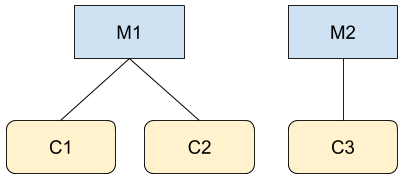
Bayangkan Anda adalah pengguna A yang juga seorang administrator untuk M1 dan C3 dalam dua
hierarki yang ditampilkan dalam gambar. Jika Anda melakukan panggilan ke Google Ads API, misalnya untuk GoogleAdsService, Anda dapat mengakses informasi untuk akun M1, C1, C2, dan C3. Namun, panggilan ke
CustomerService.ListAccessibleCustomers
hanya akan menampilkan M1 dan C3 karena hanya kedua akun tersebut yang dapat diakses
langsung oleh pengguna A.
Berikut adalah contoh kode yang menggambarkan penggunaan
metode
CustomerService.ListAccessibleCustomers:
Java
private void runExample(GoogleAdsClient client) { // Optional: Change credentials to use a different refresh token, to retrieve customers // available for a specific user. // // UserCredentials credentials = // UserCredentials.newBuilder() // .setClientId("INSERT_OAUTH_CLIENT_ID") // .setClientSecret("INSERT_OAUTH_CLIENT_SECRET") // .setRefreshToken("INSERT_REFRESH_TOKEN") // .build(); // // client = client.toBuilder().setCredentials(credentials).build(); try (CustomerServiceClient customerService = client.getLatestVersion().createCustomerServiceClient()) { ListAccessibleCustomersResponse response = customerService.listAccessibleCustomers( ListAccessibleCustomersRequest.newBuilder().build()); System.out.printf("Total results: %d%n", response.getResourceNamesCount()); for (String customerResourceName : response.getResourceNamesList()) { System.out.printf("Customer resource name: %s%n", customerResourceName); } } }
C#
public void Run(GoogleAdsClient client) { // Get the CustomerService. CustomerServiceClient customerService = client.GetService(Services.V25.CustomerService); try { // Retrieve the list of customer resources. string[] customerResourceNames = customerService.ListAccessibleCustomers(); // Display the result. foreach (string customerResourceName in customerResourceNames) { Console.WriteLine( $"Found customer with resource name = '{customerResourceName}'."); } } catch (GoogleAdsException e) { Console.WriteLine("Failure:"); Console.WriteLine($"Message: {e.Message}"); Console.WriteLine($"Failure: {e.Failure}"); Console.WriteLine($"Request ID: {e.RequestId}"); throw; } }
PHP
public static function runExample(GoogleAdsClient $googleAdsClient) { $customerServiceClient = $googleAdsClient->getCustomerServiceClient(); // Issues a request for listing all accessible customers. $accessibleCustomers = $customerServiceClient->listAccessibleCustomers(new ListAccessibleCustomersRequest()); print 'Total results: ' . count($accessibleCustomers->getResourceNames()) . PHP_EOL; // Iterates over all accessible customers' resource names and prints them. foreach ($accessibleCustomers->getResourceNames() as $resourceName) { /** @var string $resourceName */ printf("Customer resource name: '%s'%s", $resourceName, PHP_EOL); } }
Python
def main(client: GoogleAdsClient) -> None: customer_service: CustomerServiceClient = client.get_service( "CustomerService" ) accessible_customers: ListAccessibleCustomersResponse = ( customer_service.list_accessible_customers() ) result_total: int = len(accessible_customers.resource_names) print(f"Total results: {result_total}") resource_names: List[str] = accessible_customers.resource_names for resource_name in resource_names: # resource_name is implicitly str print(f'Customer resource name: "{resource_name}"')
Ruby
def list_accessible_customers() # GoogleAdsClient will read a config file from # ENV['HOME']/google_ads_config.rb when called without parameters client = Google::Ads::GoogleAds::GoogleAdsClient.new accessible_customers = client.service.customer.list_accessible_customers().resource_names accessible_customers.each do |resource_name| puts "Customer resource name: #{resource_name}" end end
Perl
sub list_accessible_customers { my ($api_client) = @_; my $list_accessible_customers_response = $api_client->CustomerService()->list_accessible_customers(); printf "Total results: %d.\n", scalar @{$list_accessible_customers_response->{resourceNames}}; foreach my $resource_name (@{$list_accessible_customers_response->{resourceNames}}) { printf "Customer resource name: '%s'.\n", $resource_name; } return 1; }
curl
# Returns the resource names of customers directly accessible by the user # authenticating the call. # # Variables: # API_VERSION, # OAUTH2_ACCESS_TOKEN: # See https://developers.google.com/google-ads/api/rest/auth#request_headers # for details. # curl -f --request GET \ "https://googleads.googleapis.com/v${API_VERSION}/customers:listAccessibleCustomers" \ --header "Content-Type: application/json" \ --header "Authorization: Bearer ${OAUTH2_ACCESS_TOKEN}" \
Mencantumkan akun yang dibatalkan
Untuk mengambil akun yang dibatalkan di akun pengelola, kueri resource
customer_client secara langsung dan filter menurut status:
SELECT
  customer_client.id,
  customer_client.descriptive_name,
  customer_client.status
FROM customer_client
WHERE customer_client.status = 'CANCELED'