

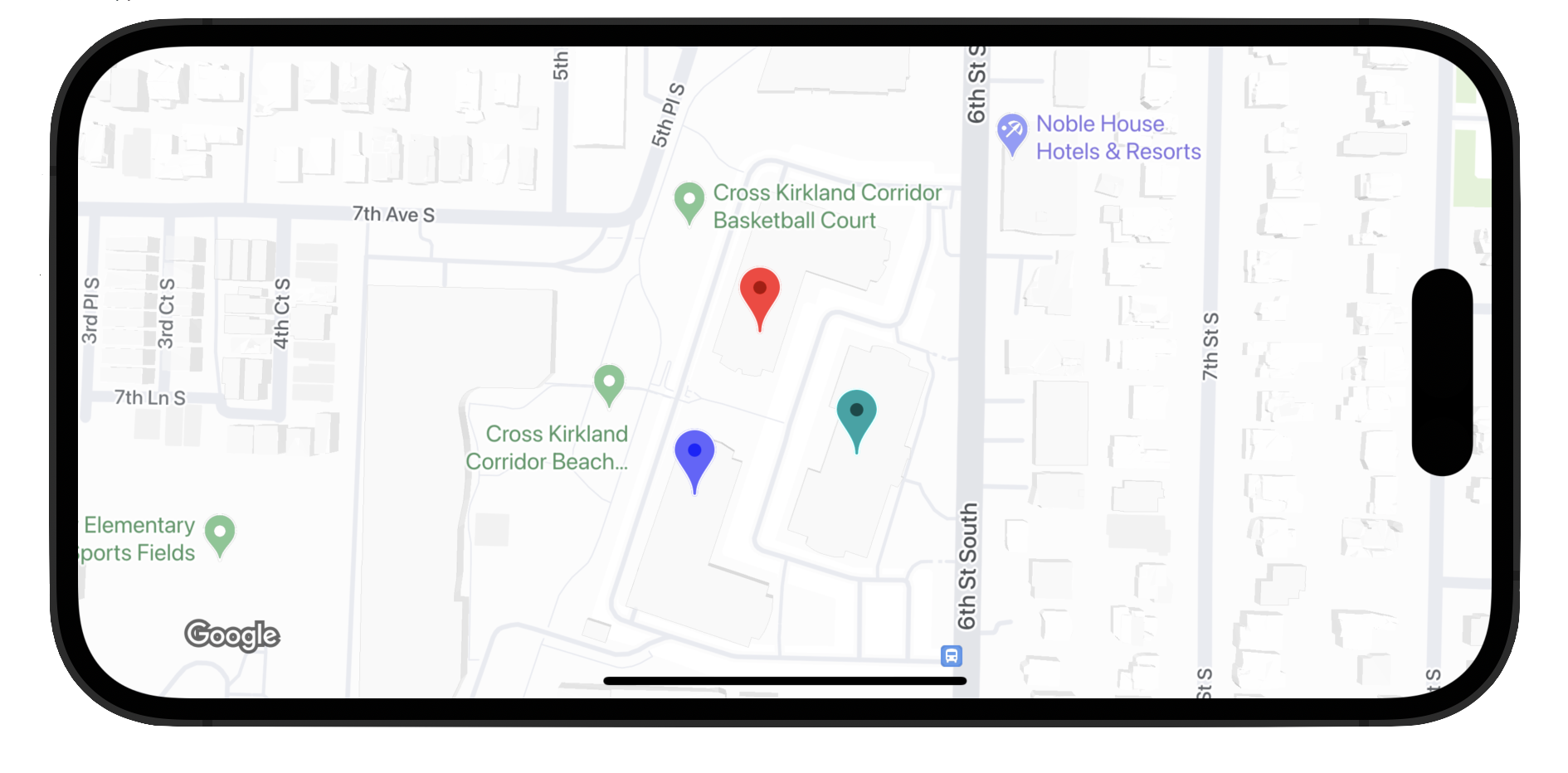
تستخدِم العلامات المتقدّمة فئتين لتحديد العلامات: تقدّم فئة
GMSAdvancedMarker قدرات العلامة التلقائية، وتحتوي فئة
GMSPinImageOptions
على خيارات لمزيد من التخصيص. توضّح لك هذه الصفحة كيفية تخصيص العلامات بالطرق التالية:
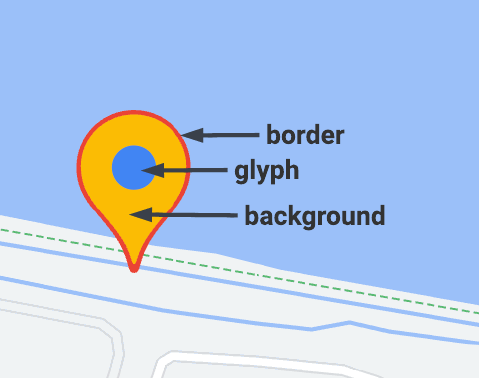
- تغيير لون الخلفية
- تغيير لون الحدود
- تغيير لون الرمز
- تغيير نص الرمز
- إتاحة العروض المخصّصة والصور المتحركة باستخدام سمة iconView
تغيير لون الخلفية
استخدِم الخيار GMSPinImageOptions.backgroundColor ل
تغيير لون خلفية العلامة.
Swift
//...

let options = GMSPinImageOptions()
options.backgroundColor = .blue

let pinImage = GMSPinImage(options: options)
advancedMarker.icon = pinImage

advancedMarker.map = mapView
Objective-C
//...

GMSPinImageOptions *options = [[GMSPinImageOptions alloc] init];
options.backgroundColor = [UIColor blueColor];

GMSPinImage *pin = [GMSPinImage pinImageWithOptions:options];
customTextMarker.icon = pin;

customTextMarker.map = mapView;
تغيير لون الحدود
استخدِم الخيار
GMSPinImageOptions.borderColor
لتغيير لون خلفية العلامة.
Swift
//...

let options = GMSPinImageOptions()
options.borderColor = .blue

let pinImage = GMSPinImage(options: options)
advancedMarker.icon = pinImage

advancedMarker.map = mapView
Objective-C
//...

GMSPinImageOptions *options = [[GMSPinImageOptions alloc] init];
options.backgroundColor = [UIColor blueColor];

GMSPinImage *pin = [GMSPinImage pinImageWithOptions:options];
advancedMarker.icon = pin;

advancedMarker.map = mapView;
تغيير لون الرمز
استخدِم رمز
GMSPinImageGlyph.glyphColor
لتغيير لون خلفية العلامة.
Swift
//...

let options = GMSPinImageOptions()

let glyph = GMSPinImageGlyph(glyphColor: .yellow)
options.glyph = glyph

let glyphColor = GMSPinImage(options: options)

advancedMarker.icon = glyphColor
advancedMarker.map = mapView
Objective-C
//...

GMSPinImageOptions *options = [[GMSPinImageOptions alloc] init];

options.glyph = [[GMSPinImageGlyph alloc] initWithGlyphColor:[UIColor yellowColor]];
GMSPinImage *glyphColor = [GMSPinImage pinImageWithOptions:options];

advancedMarker.icon = glyphColor;
advancedMarker.map = mapView;
تغيير نص الرمز
استخدِم الرمز GMSPinImageGlyph لتغيير نص الرمز المميّز لمؤشر.
Swift
//...

let options = GMSPinImageOptions()

let glyph = GMSPinImageGlyph(text: "ABC", textColor: .white)
options.glyph = glyph

let pinImage = GMSPinImage(options: options)

advancedMarker.icon = pinImage
advancedMarker.map = mapView
Objective-C
//...

GMSPinImageOptions *options = [[GMSPinImageOptions alloc] init];

options.glyph = [[GMSPinImageGlyph alloc] initWithText:@"ABC" textColor:[UIColor whiteColor]];
GMSPinImage *pin = [GMSPinImage pinImageWithOptions:options];

customTextMarker.icon = pin;
customTextMarker.map = mapView;
إتاحة الملفات الشخصية المخصّصة والصور المتحركة باستخدام الموقع iconView
على غرار GMSMarker، تتيح السمة GMSAdvancedMarker
أيضًا استخدام العلامات التي تحتوي على
iconView.
تتيح سمة iconView إضافة تأثيرات متحركة إلى كل السمات التي يمكن إضافة تأثيرات متحركة إليها في
UIView باستثناء إطار ومركز. ولا تتيح استخدام علامات تعرض iconViews
وicons على الخريطة نفسها.
Swift
//...

let advancedMarker = GMSAdvancedMarker(position: coordinate)
advancedMarker.iconView = customView()
advancedMarker.map = mapView

func customView() -> UIView {
// return your custom UIView.
}
Objective-C
//...

GMSAdvancedMarker *advancedMarker = [GMSAdvancedMarker markerWithPosition:kCoordinate];
advancedMarker.iconView = [self customView];
advancedMarker.map = self.mapView;

-   (UIView *)customView {
  // return custom view
}
قيود التصميم
لا تتيح GMSAdvancedMarker بشكل مباشر قيود التنسيق
لعناصر iconView. ومع ذلك، يمكنك ضبط قيود التنسيق لعناصر iconView ضمن واجهة المستخدم. عند إنشاء العرض، يجب تمرير العنصر
frame أو size إلى العلامة.
Swift
//do not set advancedMarker.iconView.translatesAutoresizingMaskIntoConstraints = false

let advancedMarker = GMSAdvancedMarker(position: coordinate)
let customView = customView()

//set frame
customView.frame = CGRect(0, 0, width, height)

advancedMarker.iconView = customView
Objective-C
//do not set advancedMarker.iconView.translatesAutoresizingMaskIntoConstraints = NO;

GMSAdvancedMarker *advancedMarker = [GMSAdvancedMarker markerWithPosition:kCoordinate];

CustomView *customView = [self customView];

//set frame
customView.frame = CGRectMake(0, 0, width, height);

advancedMarker.iconView = customView;