


בסמנים מתקדמים נעשה שימוש בשתי מחלקות כדי להגדיר סמנים: המחלקה GMSAdvancedMarker מספקת יכולות של סמנים שמוגדרים כברירת מחדל, והמחלקה GMSPinImageOptions מכילה אפשרויות להתאמה אישית נוספת. בדף הזה מוסבר איך להתאים אישית סמנים בדרכים הבאות:
- שינוי צבע הרקע
- שינוי צבע הגבול
- שינוי צבע הגליף
- שינוי הטקסט של הגליף
- תמיכה בתצוגות ובאנימציות בהתאמה אישית באמצעות המאפיין iconView
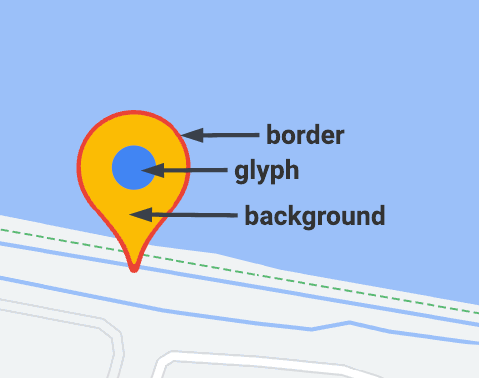
שינוי צבע הרקע
משתמשים באפשרות GMSPinImageOptions.backgroundColor כדי לשנות את צבע הרקע של סמן.
Swift
//...

let options = GMSPinImageOptions()
options.backgroundColor = .blue

let pinImage = GMSPinImage(options: options)
advancedMarker.icon = pinImage

advancedMarker.map = mapView
Objective-C
//...

GMSPinImageOptions *options = [[GMSPinImageOptions alloc] init];
options.backgroundColor = [UIColor blueColor];

GMSPinImage *pin = [GMSPinImage pinImageWithOptions:options];
customTextMarker.icon = pin;

customTextMarker.map = mapView;
שינוי צבע הגבול
כדי לשנות את צבע הרקע של סמן, משתמשים באפשרות GMSPinImageOptions.borderColor.
Swift
//...

let options = GMSPinImageOptions()
options.borderColor = .blue

let pinImage = GMSPinImage(options: options)
advancedMarker.icon = pinImage

advancedMarker.map = mapView
Objective-C
//...

GMSPinImageOptions *options = [[GMSPinImageOptions alloc] init];
options.backgroundColor = [UIColor blueColor];

GMSPinImage *pin = [GMSPinImage pinImageWithOptions:options];
advancedMarker.icon = pin;

advancedMarker.map = mapView;
שינוי צבע הגליף
משתמשים ב-GMSPinImageGlyph.glyphColor כדי לשנות את צבע הרקע של סמן.
Swift
//...

let options = GMSPinImageOptions()

let glyph = GMSPinImageGlyph(glyphColor: .yellow)
options.glyph = glyph

let pinImage = GMSPinImage(options: options)

advancedMarker.icon = pinImage
advancedMarker.map = mapView
Objective-C
//...

GMSPinImageOptions *options = [[GMSPinImageOptions alloc] init];

options.glyph = [[GMSPinImageGlyph alloc] initWithGlyphColor:[UIColor yellowColor]];
GMSPinImage *pinImage = [GMSPinImage pinImageWithOptions:options];

advancedMarker.icon = pinImage;
advancedMarker.map = mapView;
שינוי הטקסט של הגליף
משתמשים ב-GMSPinImageGlyph כדי לשנות את טקסט הגליף של סמן.
Swift
//...

let options = GMSPinImageOptions()

let glyph = GMSPinImageGlyph(text: "ABC", textColor: .white)
options.glyph = glyph

let pinImage = GMSPinImage(options: options)

advancedMarker.icon = pinImage
advancedMarker.map = mapView
Objective-C
//...

GMSPinImageOptions *options = [[GMSPinImageOptions alloc] init];

options.glyph = [[GMSPinImageGlyph alloc] initWithText:@"ABC" textColor:[UIColor whiteColor]];
GMSPinImage *pin = [GMSPinImage pinImageWithOptions:options];

customTextMarker.icon = pin;
customTextMarker.map = mapView;
תמיכה בתצוגות ובאנימציות בהתאמה אישית באמצעות המאפיין iconView
בדומה ל-GMSMarker, גם GMSAdvancedMarker תומך בסמנים עם iconView.
המאפיין iconView תומך באנימציה של כל המאפיינים של UIView שניתן להוסיף להם אנימציה, חוץ מ-frame ו-center. הוא לא תומך בסמנים עם iconViews ו-icons שמוצגים באותה מפה.
Swift
//...

let advancedMarker = GMSAdvancedMarker(position: coordinate)
advancedMarker.iconView = customView()
advancedMarker.map = mapView

func customView() -> UIView {
// return your custom UIView.
}
Objective-C
//...

GMSAdvancedMarker *advancedMarker = [GMSAdvancedMarker markerWithPosition:kCoordinate];
advancedMarker.iconView = [self customView];
advancedMarker.map = self.mapView;

-   (UIView *)customView {
  // return custom view
}
אילוצים בפריסה
GMSAdvancedMarker לא תומך ישירות באילוצי פריסה של iconView. עם זאת, אפשר להגדיר אילוצים לפריסה של רכיבים בממשק המשתמש ב-iconView. כשיוצרים את התצוגה, צריך להעביר את האובייקט frame או size לסמן.
Swift
//do not set advancedMarker.iconView.translatesAutoresizingMaskIntoConstraints = false

let advancedMarker = GMSAdvancedMarker(position: coordinate)
let customView = customView()

//set frame
customView.frame = CGRect(0, 0, width, height)

advancedMarker.iconView = customView
Objective-C
//do not set advancedMarker.iconView.translatesAutoresizingMaskIntoConstraints = NO;

GMSAdvancedMarker *advancedMarker = [GMSAdvancedMarker markerWithPosition:kCoordinate];

CustomView *customView = [self customView];

//set frame
customView.frame = CGRectMake(0, 0, width, height);

advancedMarker.iconView = customView;