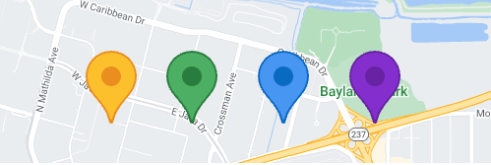
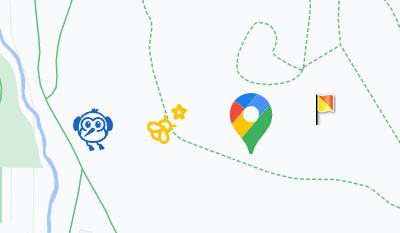
ऐडवांस मार्कर की मदद से, बेहतर परफ़ॉर्मेंस वाले मार्कर बनाए और पसंद के मुताबिक बनाए जा सकते हैं. डिफ़ॉल्ट मार्कर के बैकग्राउंड, बॉर्डर, और ग्लिफ़ के रंग को पसंद के मुताबिक बनाएं. साथ ही, डिफ़ॉल्ट मार्कर आइकॉन को अपनी पसंद के ग्राफ़िक इमेज से बदलें.
ऐडवांस मार्कर, AdvancedMarker टाइप के ऑब्जेक्ट होते हैं. यह Marker का सबक्लास होता है.
ऐडवांस मार्कर की मदद से, सभी मौजूदा Marker प्रॉपर्टी को पसंद के मुताबिक बनाया जा सकता है. जैसे:
डिफ़ॉल्ट मार्कर के बैकग्राउंड, ग्लिफ़, और बॉर्डर के रंग को पसंद के मुताबिक बनाएं.
मार्कर के तौर पर Android व्यू का इस्तेमाल करना
डिफ़ॉल्ट मार्कर आइकॉन को Android
View
से बदलें, जिसमें पूरी तरह से कस्टम मार्कर मौजूद हो.
मार्कर कोलिशन का व्यवहार सेट करना
यह तय करें कि जब कोई मार्कर किसी दूसरे मार्कर या मैप लेबल से टकराता है, तो उसका व्यवहार कैसा होना चाहिए. मार्कर की ऊंचाई की जानकारी सिर्फ़ वेक्टर मैप पर उपलब्ध होती है.
[[["समझने में आसान है","easyToUnderstand","thumb-up"],["मेरी समस्या हल हो गई","solvedMyProblem","thumb-up"],["अन्य","otherUp","thumb-up"]],[["वह जानकारी मौजूद नहीं है जो मुझे चाहिए","missingTheInformationINeed","thumb-down"],["बहुत मुश्किल है / बहुत सारे चरण हैं","tooComplicatedTooManySteps","thumb-down"],["पुराना","outOfDate","thumb-down"],["अनुवाद से जुड़ी समस्या","translationIssue","thumb-down"],["सैंपल / कोड से जुड़ी समस्या","samplesCodeIssue","thumb-down"],["अन्य","otherDown","thumb-down"]],["आखिरी बार 2026-09-19 (UTC) को अपडेट किया गया."],[],["Advanced markers enable highly customizable and performant markers on maps. Users can personalize the default marker's background, border, and glyph colors, or substitute it with a custom graphic image or an Android `View`. These markers support standard `Marker` properties like title, snippet, click, and drag events. Unique features include colored pins, `View`-based markers, and collision behavior control. Users can customize the default marker's properties and specify how markers interact with other elements.\n"]]