

ฟีเจอร์ที่โดดเด่นอย่างหนึ่งของแอปพลิเคชันบนอุปกรณ์เคลื่อนที่คือการรับรู้ถึงตำแหน่ง ผู้ใช้มือถือพกพาอุปกรณ์ติดตัวไปทุกที่ และการเพิ่มการรับรู้ถึงตำแหน่งลงในแอปจะช่วยให้ผู้ใช้ได้รับประสบการณ์การใช้งานที่เกี่ยวข้องกับบริบทมากขึ้น
ตัวอย่างโค้ด
ที่เก็บ ApiDemos ใน GitHub มี ตัวอย่างที่แสดงให้เห็นถึงการใช้ตำแหน่งบนแผนที่ ดังนี้
Kotlin
- MyLocationDemoActivity: การใช้ เลเยอร์ตำแหน่งของฉัน รวมถึงสิทธิ์รันไทม์
- LocationSourceDemoActivity: การใช้
LocationSourceที่กำหนดเอง - CurrentPlaceDetailsOnMap: การค้นหา ตำแหน่งปัจจุบันของอุปกรณ์ Android และแสดงรายละเอียดของสถานที่ (ธุรกิจ หรือจุดที่น่าสนใจอื่นๆ) ในตำแหน่งนั้น ดูบทแนะนำเกี่ยวกับการแสดง รายละเอียดของสถานที่ปัจจุบันบนแผนที่
Java
- MyLocationDemoActivity: การใช้ เลเยอร์ตำแหน่งของฉัน รวมถึงสิทธิ์รันไทม์
- LocationSourceDemoActivity: การใช้
LocationSourceที่กำหนดเอง - CurrentPlaceDetailsOnMap: การค้นหา ตำแหน่งปัจจุบันของอุปกรณ์ Android และแสดงรายละเอียดของสถานที่ (ธุรกิจ หรือจุดที่น่าสนใจอื่นๆ) ในตำแหน่งนั้น ดูบทแนะนำเกี่ยวกับการแสดง รายละเอียดของสถานที่ปัจจุบันบนแผนที่
การทำงานกับข้อมูลตำแหน่ง
ข้อมูลตำแหน่งที่อุปกรณ์ Android เข้าถึงได้ ได้แก่ ตำแหน่งปัจจุบันของอุปกรณ์ ซึ่งระบุโดยใช้เทคโนโลยีต่างๆ ร่วมกัน ทิศทางและวิธีการเคลื่อนที่ รวมถึงอุปกรณ์ได้เคลื่อนที่ข้ามขอบเขตทางภูมิศาสตร์ที่กำหนดไว้ล่วงหน้าหรือเขตพื้นที่เสมือนหรือไม่ คุณสามารถเลือกวิธีทำงานกับข้อมูลตำแหน่งได้หลายวิธีตามความต้องการของแอปพลิเคชัน
- เลเยอร์ตำแหน่งของฉัน เป็นวิธีง่ายๆ ในการแสดงตำแหน่งของอุปกรณ์บนแผนที่ โดยเลเยอร์นี้ไม่ได้ให้ข้อมูล
- เราขอแนะนำให้ใช้ Google Play services Location API สำหรับคำขอข้อมูลตำแหน่งทั้งหมดที่ส่งผ่านโปรแกรม
- อินเทอร์เฟซ
LocationSourceช่วยให้คุณระบุ โปรแกรมแจ้งตำแหน่งที่กำหนดเองได้
สิทธิ์เข้าถึงตำแหน่ง
หากแอปของคุณต้องเข้าถึงตำแหน่งของผู้ใช้ คุณต้องขอสิทธิ์โดยเพิ่มสิทธิ์เข้าถึงตำแหน่ง ที่เกี่ยวข้องของ Android ลงในแอป
Android มีสิทธิ์เข้าถึงตำแหน่ง 2 รายการ ได้แก่ ACCESS_COARSE_LOCATION และ ACCESS_FINE_LOCATION สิทธิ์ที่คุณเลือกจะเป็นตัวกำหนดความแม่นยำของตำแหน่งที่ API แสดงผล
android.permission.ACCESS_COARSE_LOCATION\- อนุญาตให้ API แสดงผลตำแหน่งโดยประมาณของอุปกรณ์ สิทธิ์นี้จะให้ค่าประมาณตำแหน่งของอุปกรณ์จากบริการตำแหน่งตามที่ อธิบายไว้ในเอกสารเกี่ยวกับความแม่นยำของตำแหน่งโดยประมาณandroid.permission.ACCESS_FINE_LOCATION- อนุญาตให้ API กำหนดตำแหน่งที่แม่นยำที่สุดเท่าที่จะเป็นไปได้จากโปรแกรมแจ้งตำแหน่งที่มีอยู่ ซึ่งรวมถึงระบบดาวเทียมนำร่อง (GPS) ตลอดจนข้อมูล Wi-Fi และอินเทอร์เน็ตมือถือ
เพิ่มสิทธิ์ลงในไฟล์ Manifest ของแอป
หากแอปของคุณต้องการเพียงตำแหน่งโดยประมาณเพื่อให้ทำงานได้ ให้เพิ่มสิทธิ์ ACCESS_COARSE_LOCATION ลงในไฟล์ Manifest ของแอป
<manifest xmlns:android="http://schemas.android.com/apk/res/android"
    package="com.example.myapp" >
  ...
  <uses-permission android:name="android.permission.ACCESS_COARSE_LOCATION"/>
  ...
</manifest>
อย่างไรก็ตาม หากต้องการตำแหน่งที่แน่นอน ให้เพิ่มทั้งสิทธิ์ ACCESS_COARSE_LOCATION และ ACCESS_FINE_LOCATION ลงในไฟล์ Manifest ของแอป
<manifest xmlns:android="http://schemas.android.com/apk/res/android"
    package="com.example.myapp" >
  ...
  <uses-permission android:name="android.permission.ACCESS_COARSE_LOCATION"/>
  <uses-permission android:name="android.permission.ACCESS_FINE_LOCATION"/>
  ...
</manifest>
ขอสิทธิ์รันไทม์
Android 6.0 (Marshmallow) ได้เปิดตัวโมเดลใหม่สำหรับการจัดการสิทธิ์ ซึ่งช่วยให้กระบวนการสำหรับผู้ใช้เมื่อติดตั้งและอัปเกรดแอปง่ายขึ้น หากแอปของคุณกำหนดเป้าหมายเป็น API ระดับ 23 ขึ้นไป คุณจะใช้โมเดลสิทธิ์ใหม่ได้
หากแอปของคุณรองรับโมเดลสิทธิ์ใหม่และอุปกรณ์ใช้ Android 6.0 (Marshmallow) ขึ้นไป ผู้ใช้ไม่จำเป็นต้องให้สิทธิ์ใดๆ เมื่อติดตั้งหรืออัปเกรดแอป แอปต้องตรวจสอบว่ามีสิทธิ์ที่จำเป็นในรันไทม์หรือไม่ และขอสิทธิ์หากไม่มี ระบบจะแสดงกล่องโต้ตอบเพื่อขอสิทธิ์จากผู้ใช้
คุณควรขอสิทธิ์ตามบริบทเพื่อให้ผู้ใช้ได้รับประสบการณ์การใช้งานที่ดีที่สุด หากตำแหน่งมีความสำคัญต่อการทำงานของแอป คุณควรขอสิทธิ์เข้าถึงตำแหน่งเมื่อเริ่มต้นแอป วิธีที่ดีในการดำเนินการนี้คือการใช้หน้าจอต้อนรับหรือวิซาร์ดที่ให้ข้อมูลแก่ผู้ใช้เกี่ยวกับเหตุผลที่ต้องมีสิทธิ์
หากแอปต้องใช้สิทธิ์สำหรับฟังก์ชันการทำงานบางส่วนเท่านั้น คุณควรขอสิทธิ์เข้าถึงตำแหน่งในเวลาที่แอปดำเนินการที่ต้องใช้สิทธิ์
แอปต้องจัดการกรณีที่ผู้ใช้ไม่ให้สิทธิ์ได้อย่างเหมาะสม ตัวอย่างเช่น หากฟีเจอร์หนึ่งๆ ต้องใช้สิทธิ์ แอปสามารถปิดใช้ฟีเจอร์นั้นได้ หากสิทธิ์มีความสำคัญต่อการทำงานของแอป แอปสามารถปิดใช้ฟังก์ชันการทำงานทั้งหมดและแจ้งให้ผู้ใช้ทราบว่าต้องให้สิทธิ์
ตัวอย่างโค้ดต่อไปนี้จะตรวจสอบสิทธิ์โดยใช้ไลบรารี AndroidX ก่อนที่จะเปิดใช้เลเยอร์ตำแหน่งของฉัน จากนั้นจะจัดการผลลัพธ์ของ
คำขอสิทธิ์โดยใช้
ActivityCompat.OnRequestPermissionsResultCallback
จากไลบรารี Support:
Kotlin
// Copyright 2020 Google LLC // // Licensed under the Apache License, Version 2.0 (the "License"); // you may not use this file except in compliance with the License. // You may obtain a copy of the License at // // http://www.apache.org/licenses/LICENSE-2.0 // // Unless required by applicable law or agreed to in writing, software // distributed under the License is distributed on an "AS IS" BASIS, // WITHOUT WARRANTIES OR CONDITIONS OF ANY KIND, either express or implied. // See the License for the specific language governing permissions and // limitations under the License. package com.example.kotlindemos import android.Manifest import android.annotation.SuppressLint import android.content.pm.PackageManager import android.location.Location import android.os.Bundle import android.view.View import android.widget.Toast import androidx.core.app.ActivityCompat import androidx.core.app.ActivityCompat.OnRequestPermissionsResultCallback import androidx.core.content.ContextCompat import com.example.common_ui.R import com.example.kotlindemos.PermissionUtils.PermissionDeniedDialog.Companion.newInstance import com.example.kotlindemos.PermissionUtils.isPermissionGranted import com.google.android.gms.maps.GoogleMap import com.google.android.gms.maps.GoogleMap.OnMyLocationButtonClickListener import com.google.android.gms.maps.GoogleMap.OnMyLocationClickListener import com.google.android.gms.maps.OnMapReadyCallback import com.google.android.gms.maps.SupportMapFragment /** * This demo shows how GMS Location can be used to check for changes to the users location. The * "My Location" button uses GMS Location to set the blue dot representing the users location. * Permission for [Manifest.permission.ACCESS_FINE_LOCATION] and [Manifest.permission.ACCESS_COARSE_LOCATION] * are requested at run time. If either permission is not granted, the Activity is finished with an error message. */ class MyLocationDemoActivity : SamplesBaseActivity(), OnMyLocationButtonClickListener, OnMyLocationClickListener, OnMapReadyCallback, OnRequestPermissionsResultCallback { /** * Flag indicating whether a requested permission has been denied after returning in * [.onRequestPermissionsResult]. */ private var permissionDenied = false private lateinit var map: GoogleMap override fun onCreate(savedInstanceState: Bundle?) { super.onCreate(savedInstanceState) setContentView(R.layout.my_location_demo) val mapFragment = supportFragmentManager.findFragmentById(R.id.map) as SupportMapFragment? mapFragment?.getMapAsync(this) applyInsets(findViewById<View?>(R.id.map_container)) } override fun onMapReady(googleMap: GoogleMap) { map = googleMap googleMap.setOnMyLocationButtonClickListener(this) googleMap.setOnMyLocationClickListener(this) enableMyLocation() } /** * Enables the My Location layer if the fine location permission has been granted. */ @SuppressLint("MissingPermission") private fun enableMyLocation() { // 1. Check if permissions are granted, if so, enable the my location layer if (ContextCompat.checkSelfPermission( this, Manifest.permission.ACCESS_FINE_LOCATION ) == PackageManager.PERMISSION_GRANTED || ContextCompat.checkSelfPermission( this, Manifest.permission.ACCESS_COARSE_LOCATION ) == PackageManager.PERMISSION_GRANTED ) { map.isMyLocationEnabled = true return } // 2. If if a permission rationale dialog should be shown if (ActivityCompat.shouldShowRequestPermissionRationale( this, Manifest.permission.ACCESS_FINE_LOCATION ) || ActivityCompat.shouldShowRequestPermissionRationale( this, Manifest.permission.ACCESS_COARSE_LOCATION ) ) { PermissionUtils.RationaleDialog.newInstance( LOCATION_PERMISSION_REQUEST_CODE, true ).show(supportFragmentManager, "dialog") return } // 3. Otherwise, request permission ActivityCompat.requestPermissions( this, arrayOf( Manifest.permission.ACCESS_FINE_LOCATION, Manifest.permission.ACCESS_COARSE_LOCATION ), LOCATION_PERMISSION_REQUEST_CODE ) } override fun onMyLocationButtonClick(): Boolean { Toast.makeText(this, "MyLocation button clicked", Toast.LENGTH_SHORT) .show() // Return false so that we don't consume the event and the default behavior still occurs // (the camera animates to the user's current position). return false } override fun onMyLocationClick(location: Location) { Toast.makeText(this, "Current location:\n$location", Toast.LENGTH_LONG) .show() } override fun onRequestPermissionsResult( requestCode: Int, permissions: Array<String>, grantResults: IntArray ) { if (requestCode != LOCATION_PERMISSION_REQUEST_CODE) { super.onRequestPermissionsResult( requestCode, permissions, grantResults ) return } if (isPermissionGranted( permissions, grantResults, Manifest.permission.ACCESS_FINE_LOCATION ) || isPermissionGranted( permissions, grantResults, Manifest.permission.ACCESS_COARSE_LOCATION ) ) { // Enable the my location layer if the permission has been granted. enableMyLocation() } else { // Permission was denied. Display an error message // Display the missing permission error dialog when the fragments resume. permissionDenied = true } } override fun onResumeFragments() { super.onResumeFragments() if (permissionDenied) { // Permission was not granted, display error dialog. showMissingPermissionError() permissionDenied = false } } /** * Displays a dialog with error message explaining that the location permission is missing. */ private fun showMissingPermissionError() { newInstance(true).show(supportFragmentManager, "dialog") } companion object { /** * Request code for location permission request. * * @see .onRequestPermissionsResult */ private const val LOCATION_PERMISSION_REQUEST_CODE = 1 } }
Java
// Copyright 2020 Google LLC // // Licensed under the Apache License, Version 2.0 (the "License"); // you may not use this file except in compliance with the License. // You may obtain a copy of the License at // // http://www.apache.org/licenses/LICENSE-2.0 // // Unless required by applicable law or agreed to in writing, software // distributed under the License is distributed on an "AS IS" BASIS, // WITHOUT WARRANTIES OR CONDITIONS OF ANY KIND, either express or implied. // See the License for the specific language governing permissions and // limitations under the License. package com.example.mapdemo; import android.Manifest.permission; import android.annotation.SuppressLint; import com.google.android.gms.maps.GoogleMap; import com.google.android.gms.maps.GoogleMap.OnMyLocationButtonClickListener; import com.google.android.gms.maps.GoogleMap.OnMyLocationClickListener; import com.google.android.gms.maps.OnMapReadyCallback; import com.google.android.gms.maps.SupportMapFragment; import android.Manifest; import android.content.pm.PackageManager; import android.location.Location; import android.os.Bundle; import androidx.annotation.NonNull; import androidx.appcompat.app.AppCompatActivity; import androidx.core.app.ActivityCompat; import androidx.core.content.ContextCompat; import android.widget.Toast; /** * This demo shows how GMS Location can be used to check for changes to the users location. The "My * Location" button uses GMS Location to set the blue dot representing the users location. * Permission for {@link android.Manifest.permission#ACCESS_FINE_LOCATION} and {@link * android.Manifest.permission#ACCESS_COARSE_LOCATION} are requested at run time. If either * permission is not granted, the Activity is finished with an error message. */ public class MyLocationDemoActivity extends SamplesBaseActivity implements OnMyLocationButtonClickListener, OnMyLocationClickListener, OnMapReadyCallback, ActivityCompat.OnRequestPermissionsResultCallback { /** * Request code for location permission request. * * @see #onRequestPermissionsResult(int, String[], int[]) */ private static final int LOCATION_PERMISSION_REQUEST_CODE = 1; /** * Flag indicating whether a requested permission has been denied after returning in {@link * #onRequestPermissionsResult(int, String[], int[])}. */ private boolean permissionDenied = false; private GoogleMap map; @Override protected void onCreate(Bundle savedInstanceState) { super.onCreate(savedInstanceState); setContentView(com.example.common_ui.R.layout.my_location_demo); SupportMapFragment mapFragment = (SupportMapFragment) getSupportFragmentManager().findFragmentById(com.example.common_ui.R.id.map); mapFragment.getMapAsync(this); applyInsets(findViewById(com.example.common_ui.R.id.map_container)); } @Override public void onMapReady(@NonNull GoogleMap googleMap) { map = googleMap; map.setOnMyLocationButtonClickListener(this); map.setOnMyLocationClickListener(this); enableMyLocation(); } /** * Enables the My Location layer if the fine location permission has been granted. */ @SuppressLint("MissingPermission") private void enableMyLocation() { // 1. Check if permissions are granted, if so, enable the my location layer if (ContextCompat.checkSelfPermission(this, Manifest.permission.ACCESS_FINE_LOCATION) == PackageManager.PERMISSION_GRANTED || ContextCompat.checkSelfPermission(this, permission.ACCESS_COARSE_LOCATION) == PackageManager.PERMISSION_GRANTED) { map.setMyLocationEnabled(true); return; } // 2. Otherwise, request location permissions from the user. PermissionUtils.requestLocationPermissions(this, LOCATION_PERMISSION_REQUEST_CODE, true); } @Override public boolean onMyLocationButtonClick() { Toast.makeText(this, "MyLocation button clicked", Toast.LENGTH_SHORT).show(); // Return false so that we don't consume the event and the default behavior still occurs // (the camera animates to the user's current position). return false; } @Override public void onMyLocationClick(@NonNull Location location) { Toast.makeText(this, "Current location:\n" + location, Toast.LENGTH_LONG).show(); } @Override public void onRequestPermissionsResult(int requestCode, @NonNull String[] permissions, @NonNull int[] grantResults) { if (requestCode != LOCATION_PERMISSION_REQUEST_CODE) { super.onRequestPermissionsResult(requestCode, permissions, grantResults); return; } if (PermissionUtils.isPermissionGranted(permissions, grantResults, Manifest.permission.ACCESS_FINE_LOCATION) || PermissionUtils .isPermissionGranted(permissions, grantResults, Manifest.permission.ACCESS_COARSE_LOCATION)) { // Enable the my location layer if the permission has been granted. enableMyLocation(); } else { // Permission was denied. Display an error message // Display the missing permission error dialog when the fragments resume. permissionDenied = true; } } @Override protected void onResumeFragments() { super.onResumeFragments(); if (permissionDenied) { // Permission was not granted, display error dialog. showMissingPermissionError(); permissionDenied = false; } } /** * Displays a dialog with error message explaining that the location permission is missing. */ private void showMissingPermissionError() { PermissionUtils.PermissionDeniedDialog .newInstance(true).show(getSupportFragmentManager(), "dialog"); } }
เลเยอร์ตำแหน่งของฉัน
คุณสามารถใช้เลเยอร์ตำแหน่งของฉันและปุ่มตำแหน่งของฉันเพื่อแสดงตำแหน่งปัจจุบันของผู้ใช้บนแผนที่ เรียกใช้ mMap.setMyLocationEnabled() เพื่อเปิดใช้เลเยอร์ตำแหน่งของฉันบนแผนที่
ตัวอย่างต่อไปนี้แสดงการใช้งานเลเยอร์ตำแหน่งของฉันอย่างง่าย
Kotlin
// Copyright 2020 Google LLC // // Licensed under the Apache License, Version 2.0 (the "License"); // you may not use this file except in compliance with the License. // You may obtain a copy of the License at // // http://www.apache.org/licenses/LICENSE-2.0 // // Unless required by applicable law or agreed to in writing, software // distributed under the License is distributed on an "AS IS" BASIS, // WITHOUT WARRANTIES OR CONDITIONS OF ANY KIND, either express or implied. // See the License for the specific language governing permissions and // limitations under the License. package com.google.maps.example.kotlin import android.annotation.SuppressLint import android.location.Location import android.os.Bundle import android.widget.Toast import androidx.appcompat.app.AppCompatActivity import com.google.android.gms.maps.GoogleMap import com.google.android.gms.maps.GoogleMap.OnMyLocationButtonClickListener import com.google.android.gms.maps.GoogleMap.OnMyLocationClickListener import com.google.android.gms.maps.OnMapReadyCallback import com.google.android.gms.maps.SupportMapFragment import com.google.maps.example.R internal class MyLocationLayerActivity : AppCompatActivity(), OnMyLocationButtonClickListener, OnMyLocationClickListener, OnMapReadyCallback { override fun onCreate(savedInstanceState: Bundle?) { super.onCreate(savedInstanceState) setContentView(R.layout.activity_my_location) val mapFragment = supportFragmentManager.findFragmentById(R.id.map) as SupportMapFragment mapFragment.getMapAsync(this) } @SuppressLint("MissingPermission") override fun onMapReady(map: GoogleMap) { // TODO: Before enabling the My Location layer, you must request // location permission from the user. This sample does not include // a request for location permission. map.isMyLocationEnabled = true map.setOnMyLocationButtonClickListener(this) map.setOnMyLocationClickListener(this) } override fun onMyLocationClick(location: Location) { Toast.makeText(this, "Current location:\n$location", Toast.LENGTH_LONG) .show() } override fun onMyLocationButtonClick(): Boolean { Toast.makeText(this, "MyLocation button clicked", Toast.LENGTH_SHORT) .show() // Return false so that we don't consume the event and the default behavior still occurs // (the camera animates to the user's current position). return false } }
Java
// Copyright 2020 Google LLC // // Licensed under the Apache License, Version 2.0 (the "License"); // you may not use this file except in compliance with the License. // You may obtain a copy of the License at // // http://www.apache.org/licenses/LICENSE-2.0 // // Unless required by applicable law or agreed to in writing, software // distributed under the License is distributed on an "AS IS" BASIS, // WITHOUT WARRANTIES OR CONDITIONS OF ANY KIND, either express or implied. // See the License for the specific language governing permissions and // limitations under the License. package com.google.maps.example; import android.annotation.SuppressLint; import android.location.Location; import android.os.Bundle; import android.widget.Toast; import androidx.annotation.NonNull; import androidx.appcompat.app.AppCompatActivity; import com.google.android.gms.maps.GoogleMap; import com.google.android.gms.maps.OnMapReadyCallback; import com.google.android.gms.maps.SupportMapFragment; class MyLocationLayerActivity extends AppCompatActivity implements GoogleMap.OnMyLocationButtonClickListener, GoogleMap.OnMyLocationClickListener, OnMapReadyCallback { @Override protected void onCreate(Bundle savedInstanceState) { super.onCreate(savedInstanceState); setContentView(R.layout.activity_my_location); SupportMapFragment mapFragment = (SupportMapFragment) getSupportFragmentManager().findFragmentById(R.id.map); mapFragment.getMapAsync(this); } @SuppressLint("MissingPermission") @Override public void onMapReady(GoogleMap map) { // TODO: Before enabling the My Location layer, you must request // location permission from the user. This sample does not include // a request for location permission. map.setMyLocationEnabled(true); map.setOnMyLocationButtonClickListener(this); map.setOnMyLocationClickListener(this); } @Override public void onMyLocationClick(@NonNull Location location) { Toast.makeText(this, "Current location:\n" + location, Toast.LENGTH_LONG) .show(); } @Override public boolean onMyLocationButtonClick() { Toast.makeText(this, "MyLocation button clicked", Toast.LENGTH_SHORT) .show(); // Return false so that we don't consume the event and the default behavior still occurs // (the camera animates to the user's current position). return false; } }
เมื่อเปิดใช้เลเยอร์ตำแหน่งของฉันแล้ว ปุ่มตำแหน่งของฉันจะปรากฏที่มุมขวาบนของแผนที่ เมื่อผู้ใช้คลิกปุ่ม กล้องจะแสดงแผนที่ไว้ตรงกลางตำแหน่งปัจจุบันของอุปกรณ์ หากทราบตำแหน่ง ตำแหน่งจะแสดงบนแผนที่เป็นจุดสีน้ำเงินขนาดเล็กหากอุปกรณ์อยู่กับที่ หรือเป็นรูปตัววีหากอุปกรณ์กำลังเคลื่อนที่
ภาพหน้าจอต่อไปนี้แสดงปุ่มตำแหน่งของฉันที่ด้านขวาบนและจุดสีน้ำเงินตำแหน่งของฉันที่กึ่งกลางแผนที่
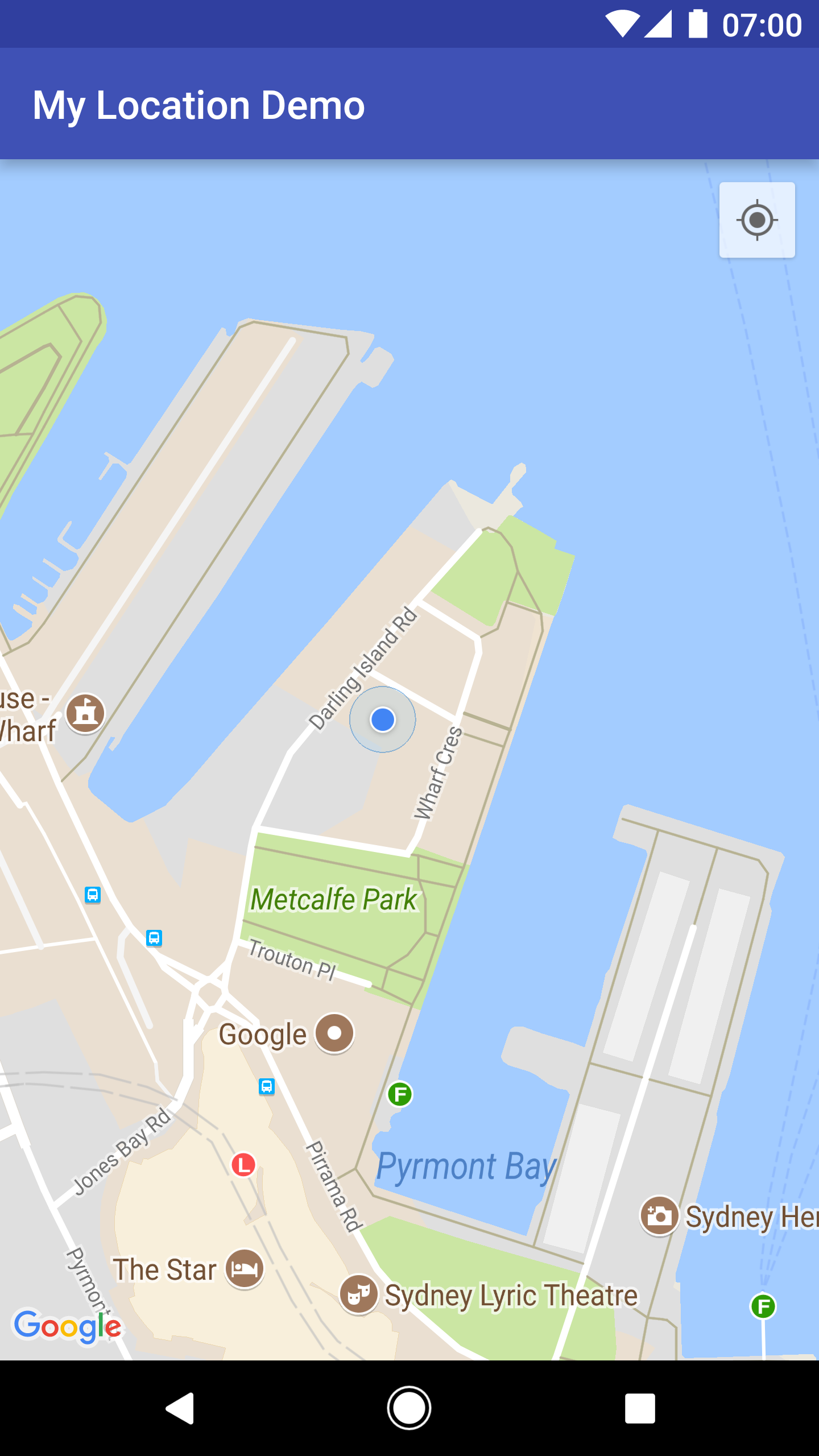
คุณสามารถป้องกันไม่ให้ปุ่มตำแหน่งของฉันปรากฏโดยเรียกใช้ UiSettings.setMyLocationButtonEnabled(false)
แอปของคุณสามารถตอบสนองต่อเหตุการณ์ต่อไปนี้ได้
- หากผู้ใช้คลิกปุ่มตำแหน่งของฉัน แอปจะได้รับการเรียกกลับ
onMyLocationButtonClick()จากGoogleMap.OnMyLocationButtonClickListener - หากผู้ใช้คลิกจุดสีน้ำเงินตำแหน่งของฉัน แอปจะได้รับการเรียกกลับจาก
GoogleMap.OnMyLocationClickListeneronMyLocationClick()
Google Play services Location API
บริการ Google Play API สถานที่ เป็นวิธีที่แนะนำในการเพิ่มการรับรู้ถึงตำแหน่งลงในแอปพลิเคชัน Android โดยมีฟังก์ชันการทำงานที่ช่วยให้คุณทำสิ่งต่อไปนี้ได้
- กำหนดตำแหน่งของอุปกรณ์
- ฟังการเปลี่ยนแปลงตำแหน่ง
- กำหนดโหมดการขนส่ง หากอุปกรณ์กำลังเคลื่อนที่
- สร้างและตรวจสอบภูมิภาคทางภูมิศาสตร์ที่กำหนดไว้ล่วงหน้า ซึ่งเรียกว่าเขตพื้นที่เสมือน
Location API ช่วยให้คุณสร้างแอปพลิเคชันที่ประหยัดพลังงานและรับรู้ถึงตำแหน่งได้อย่างง่ายดาย Location API จะเผยแพร่เป็นส่วนหนึ่งของ Google Play services SDK เช่นเดียวกับ Maps SDK สำหรับ Android ดูข้อมูลเพิ่มเติมเกี่ยวกับ Location API ได้ที่คลาสการฝึกอบรม Android เรื่องMaking Your App Location Aware หรือเอกสารอ้างอิง Location API ตัวอย่างโค้ดรวมอยู่ใน Google Play services SDK