

設定即時服務中斷
即時中斷是一組功能,可提醒使用者路線上的中斷情形,並讓使用者回報及驗證遇到的中斷情形。干擾因素包括車禍、交通壅塞、警察和固定式測速照相機、施工、車道封閉和特定天氣狀況。本頁說明即時中斷功能及其設定選項,包括使用自訂導航 UI 的應用程式注意事項。
即時異動功能
Navigation SDK 包含下列即時中斷功能,是核心導航體驗的一部分:這些功能可供設定,且預設為啟用。下列各節將進一步說明功能和可用的設定選項。
沿途的互動式交通異動摘要
應用程式顯示路線時 (無論是在路線總覽或導航期間),任何目前的中斷情況都會以摘要圖說的形式顯示在路線上。啟用車流量圖層後,地圖也會顯示路線外的交通中斷情況。摘要包含圖示,指出服務中斷類型。
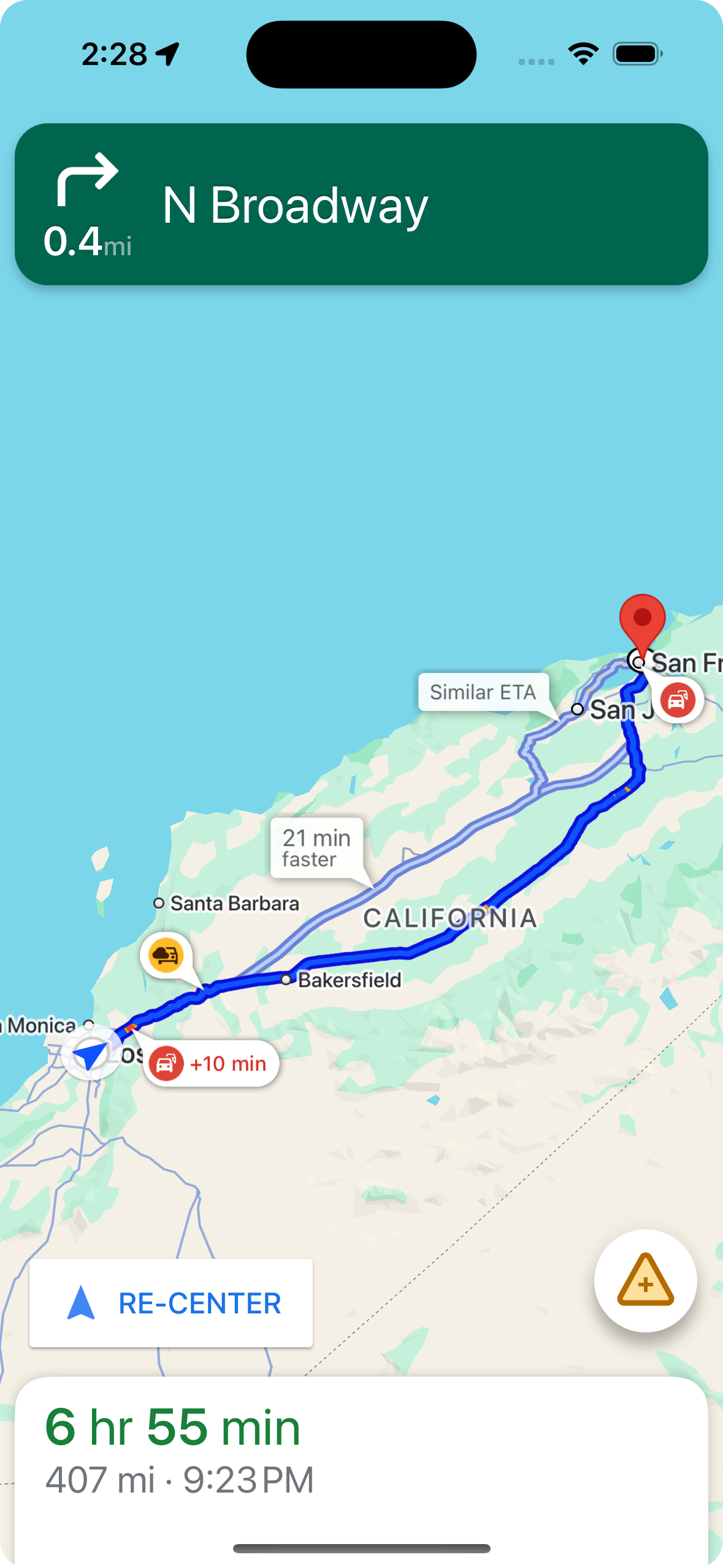
您可以使用 shouldDisplayPrompts 控制沿途中斷摘要的顯示,這項設定也會控制使用者接近中斷點時,是否顯示自動快訊。
mapView.navigator.shouldDisplayPrompts = true
在使用者輕觸摘要時顯示中斷詳情
輕觸中斷摘要,即可開啟資訊卡查看更多詳細資料。這項設定適用於路線上和路線外的摘要,但只有在啟用路況圖層時,才會顯示路線外的摘要。資訊卡會顯示中斷類型、上次回報時間,有時還會提供選項,讓你投票表示中斷情況是否仍存在。資訊卡類型和設定選項會因使用者是否處於導航模式而異。
開始導航前,在路線總覽上顯示摘要資訊卡
開始導航前,使用者可以輕觸地圖或路線總覽上的路線內或路線外摘要,開啟資訊卡。必須啟用車流量圖層,才能顯示路線外標示。資訊卡會提供更多服務中斷詳情。
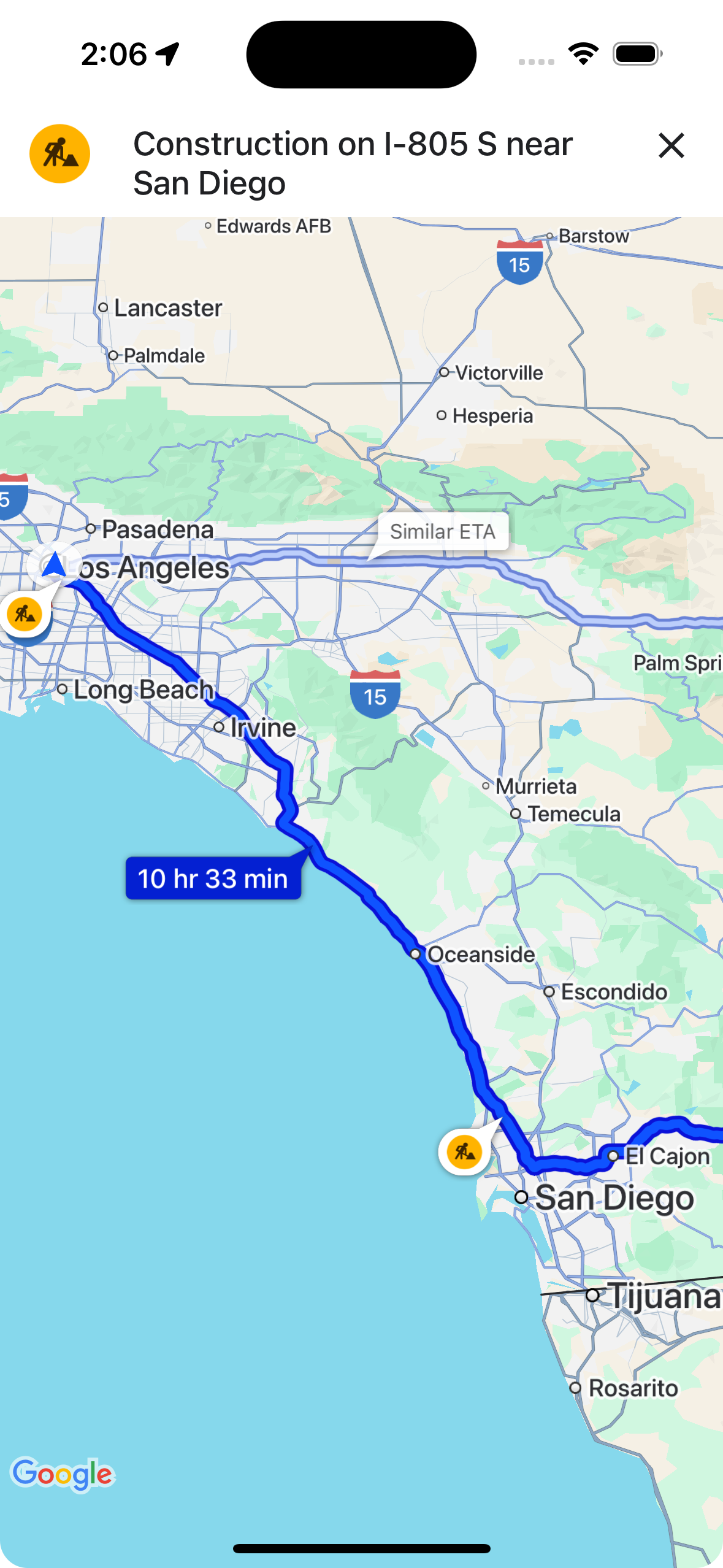
您可以使用 showsIncidentCards,控制使用者是否能輕觸路線總覽上的中斷摘要,顯示更多資訊。
mapView.settings.showsIncidentCards = true
導航期間顯示摘要資訊卡
在導航期間,使用者可以輕觸路線上或路線外的中斷摘要,開啟資訊卡。資訊卡會顯示中斷類型和上次回報時間,並提供按鈕讓使用者投票,表示中斷情形是否仍存在。
使用者可對 5 公里內路線上和路線外的路況中斷事件投票,但道路封閉除外。Google 會處理這些投票,判斷是否要繼續顯示服務中斷資訊。其他 Google 地圖和 Navigation SDK 使用者也可能在地圖上看到投票結果。
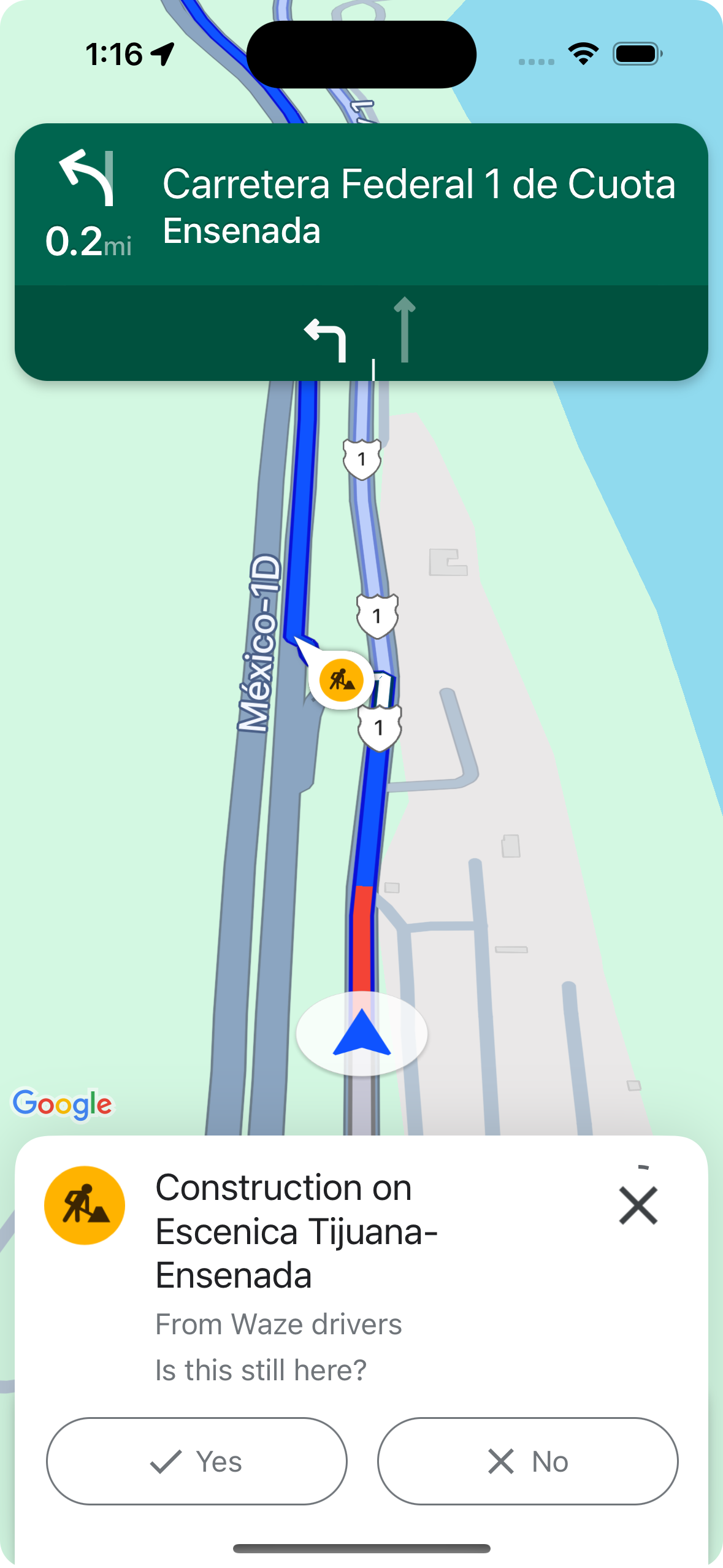
您可以使用 shouldDisplayPrompts,控制導航期間是否顯示及可否輕觸中斷摘要,以及沿路線顯示摘要和使用者接近中斷點時顯示自動快訊。
mapView.navigator.shouldDisplayPrompts = true
導航期間自動顯示交通異動快訊,並提供投票功能
在導航期間,當使用者接近路線上的中斷點時,系統會顯示提示,提供中斷點的相關資訊,並顯示按鈕,讓使用者投票決定中斷點是否仍存在。Google 會處理使用者提交的投票,並可能在 Google 地圖和 Navigation SDK 中向其他使用者顯示,以及用來判斷是否要繼續顯示中斷情形。
您可以使用 shouldDisplayPrompts 設定導航期間的快訊提示顯示方式,這項設定也會控制沿途摘要的顯示方式。
mapView.navigator.shouldDisplayPrompts = true
在導航期間回報交通異動
在操作模式下,導航 UI 會顯示一個按鈕,讓使用者回報路線上的新路況。使用者輕觸按鈕後,系統會顯示選單,列出可回報的服務中斷類型。 使用者提交的回報會由 Google 處理,並可能顯示在地圖上,供其他 Google 地圖和 Navigation SDK 使用者查看。
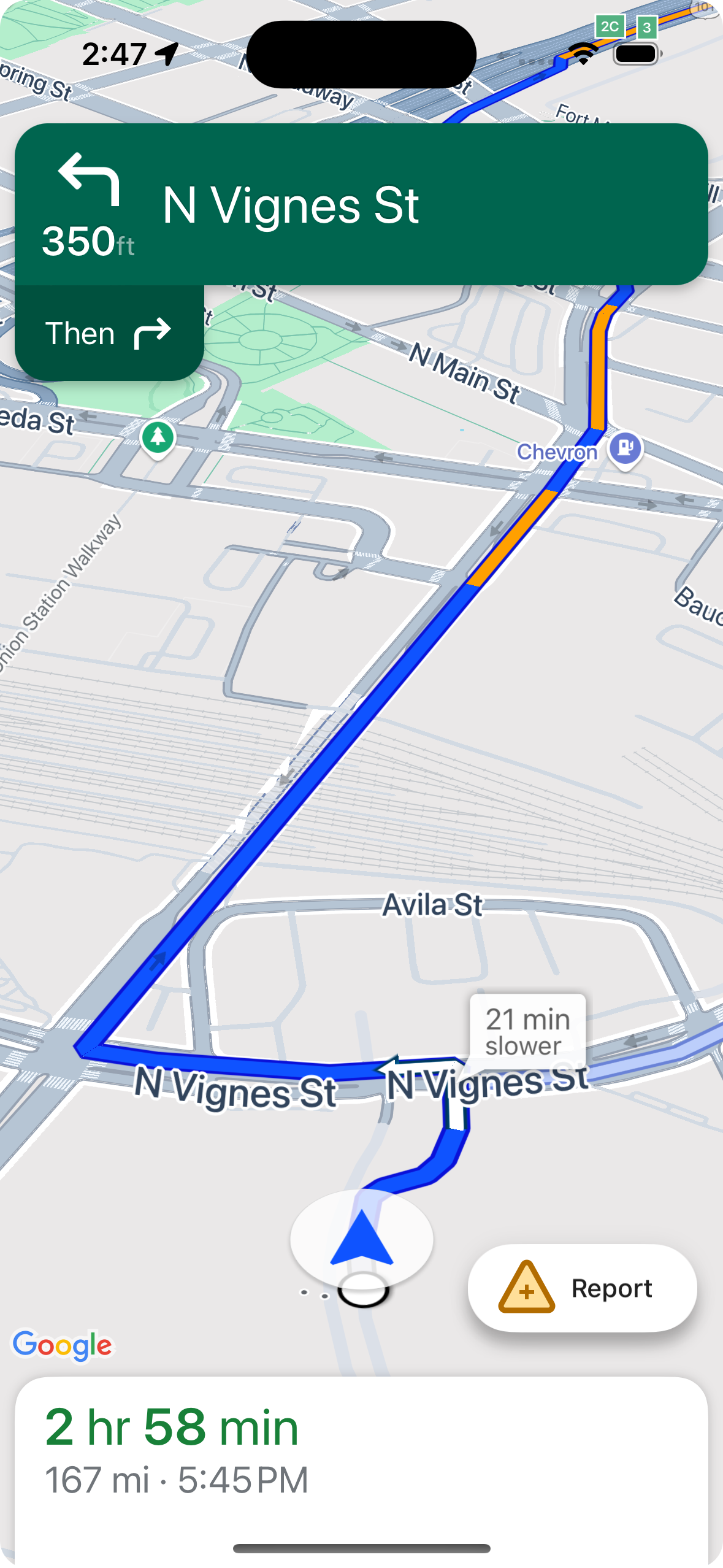
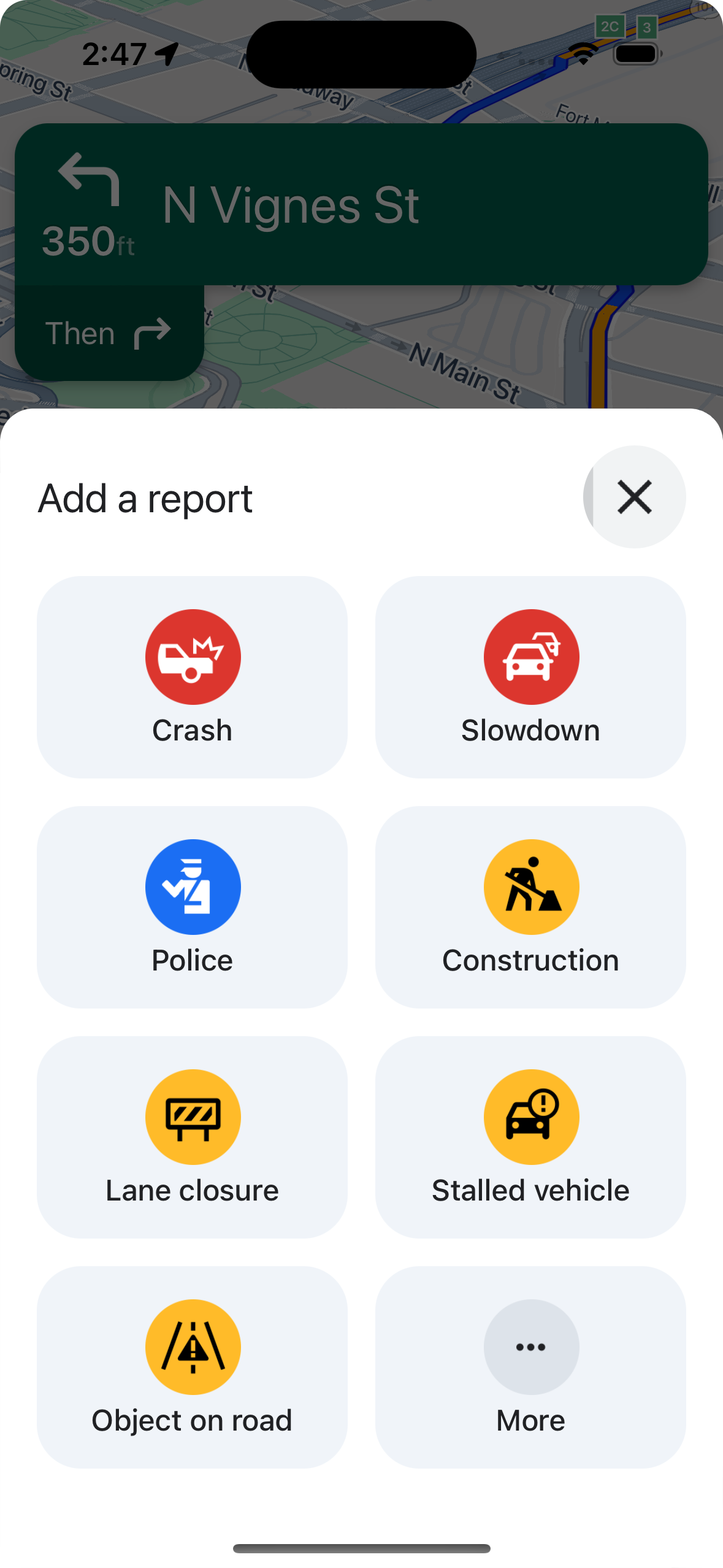
顯示或隱藏標準報表按鈕
您可以使用 navigationReportIncidentButtonEnabled 設定在導航期間是否顯示標準回報按鈕。
// Enables the incident reporting FAB to show in situations where incident
// reporting is possible.
mapView.settings.navigationReportIncidentButtonEnabled = true
新增自訂報表按鈕
您可以在導航 UI 中新增自訂回報按鈕,取代標準中斷回報按鈕。使用者點選自訂按鈕時,您可以呼叫 presentReportIncidentsPanel 方法,觸發顯示檢舉選單。新增自訂回報按鈕前,請先呼叫 reportIncidentsAvailable,確認應用程式處於導航模式,且使用者位於支援回報功能的國家/地區。如果未滿足上述任一條件,就不會顯示檢舉選單。
  // Check if reporting is available before displaying your button
  let isReportingAvailable = mapview.isIncidentReportingAvailable()
  customReportingIncidentButton.isHidden = !isReportingAvailable
  customReportingIncidentButton.addTarget(self, action: #selector(didTapReportIncidentButton), for: .touchUpInside)

  // Trigger the reporting flow if the button is clicked
  func didTapReportIncidentButton() {
          mapView.presentReportIncidentsPanel(self) { [weak self] error in
              guard let self = self else { return }
              if let error = error as NSError? {
                  if error.domain == GMSMapViewPresentReportIncidentPanelErrorDomain {
                      let errorCode = GMSMapViewPresentReportIncidentPanelErrorCode(rawValue: error.code)

                      switch errorCode {
                      case .internal:
                          self.showErrorMessage(
                              title: "Error Presenting Report Incident Panel",
                              message: "An internal error occurred."
                          )
                      case .reportingNotAvailable:
                          self.showErrorMessage(
                              title: "Error Presenting Report Incident Panel",
                              message: "Reporting is not available."
                          )
                      case .none:
                          self.showErrorMessage(
                              title: "Error Presenting Report Incident Panel",
                              message: "An unknown error occurred."
                          )
                      }
                  } else {
                      // Handle other potential errors (e.g., network errors)
                      self.showErrorMessage(
                          title: "Error Presenting Report Incident Panel",
                          message: "An unexpected error occurred: \(error.localizedDescription)"
                      )
                  }
              }
              // If error is nil, the panel was presented successfully. You can add any extra logic here.
          }
     }
使用自訂導覽 UI
如果 Navigation SDK 導入作業包含自訂 UI 元素,請務必考量即時中斷元素,以免發生衝突。
回報按鈕位置
根據預設,回報路況中斷按鈕位於地圖底部/尾端角落,如果是從左到右的語言,則位於右側;如果是從右到左的語言,則位於左側。如需移動檢舉按鈕,為自訂 UI 元素騰出空間,請使用bottomTrailingButtonsLayoutGuide。Swift
// Create a new layout guide
let topRightLayoutGuide = UILayoutGuide()
self.view.addLayoutGuide(topRightLayoutGuide)

// Activate constraints using fixed constants here as an example
// assuming the current reporting button is of fixed height
topRightLayoutGuide.topAnchor.constraint(equalTo: _mapView.navigationHeaderLayoutGuide.bottomAnchor, constant: 50).isActive = true
topRightLayoutGuide.trailingAnchor.constraint(equalTo: self.view.safeAreaLayoutGuide.trailingAnchor, constant: -14).isActive = true

// Assign the layout guide
_mapView.bottomTrailingButtonsLayoutGuide = topRightLayoutGuide

// Create an alternate layout guide to use when the header and the footer are not full width
let topRightAlternateLayoutGuide = UILayoutGuide()
self.view.addLayoutGuide(topRightAlternateLayoutGuide)

// Activate constraints using fixed constants here as an example
// assuming the current RTD button is of fixed height
topRightAlternateLayoutGuide.topAnchor.constraint(equalTo: _mapView.navigationHeaderLayoutGuide.bottomAnchor, constant: 20).isActive = true
topRightAlternateLayoutGuide.trailingAnchor.constraint(equalTo: self.view.safeAreaLayoutGuide.trailingAnchor, constant: -10).isActive = true

// Assign the layout guide
_mapView.bottomTrailingButtonsAlternateLayoutGuide = topRightAlternateLayoutGuide
Objective-C
// Create a new layout guide
UILayoutGuide *topRightLayoutGuide = [[UILayoutGuide alloc] init];
[self.view addLayoutGuide:topRightLayoutGuide];

// Activate constraints using fixed constants here as an example
// assuming the current RTD button is of fixed height
[[topRightLayoutGuide.topAnchor
    constraintEqualToAnchor:_mapView.navigationHeaderLayoutGuide.bottomAnchor
                   constant:50]
    setActive:YES];

[[topRightLayoutGuide.trailingAnchor
    constraintEqualToAnchor:self.view.safeAreaLayoutGuide.trailingAnchor
                   constant:-14]
    setActive:YES];

// Assign the layout guide
_mapView.bottomTrailingButtonsLayoutGuide = topRightLayoutGuide;

// Create an alternate layout guide to use when the header and the footer are not full width
UILayoutGuide *topRightAlternateLayoutGuide = [[UILayoutGuide alloc] init];
[self.view addLayoutGuide:topRightAlternateLayoutGuide];

// Activate constraints using fixed constants here as an example
// assuming the current RTD button is of fixed height
[[topRightAlternateLayoutGuide.topAnchor
    constraintEqualToAnchor:_mapView.navigationHeaderLayoutGuide.bottomAnchor
                   constant:50]
    setActive:YES];

[[topRightAlternateLayoutGuide.trailingAnchor
    constraintEqualToAnchor:self.view.safeAreaLayoutGuide.trailingAnchor
                   constant:-14]
    setActive:YES];

// Assign the layout guide
_mapView.bottomTrailingButtonsAlternateLayoutGuide = topRightAlternateLayoutGuide;
Prompt Visibility API (實驗版)
Prompt Visibility API 可協助您避免 Navigation SDK 產生的 UI 元素與自訂 UI 元素發生衝突。方法是新增事件監聽器,在 Navigation SDK UI 元素即將顯示之前,以及元素移除後,接收回呼。您可以接收即時中斷元素的事件回呼,包括資訊卡、提示和中斷回報選單,以及 Navigation SDK 產生的其他通知。Swift
// Additional methods added to GMSNavigatorListener
...
func navigatorWillPresentPrompt(_ navigator: GMSNavigator) {
  // Hide any sort of custom UI element.
}

func navigatorDidDismissPrompt(_ navigator: GMSNavigator) {
  // Show any sort of custom UI element.
}
...
Objective-C
// Additional methods added to GMSNavigatorListener
...
- (void)navigatorWillPresentPrompt:(GMSNavigator *)navigator {
  // Hide any sort of custom UI element.
}

- (void)navigatorDidDismissPrompt:(GMSNavigator *)navigator {
  // Show any sort of custom UI element.
}
...