

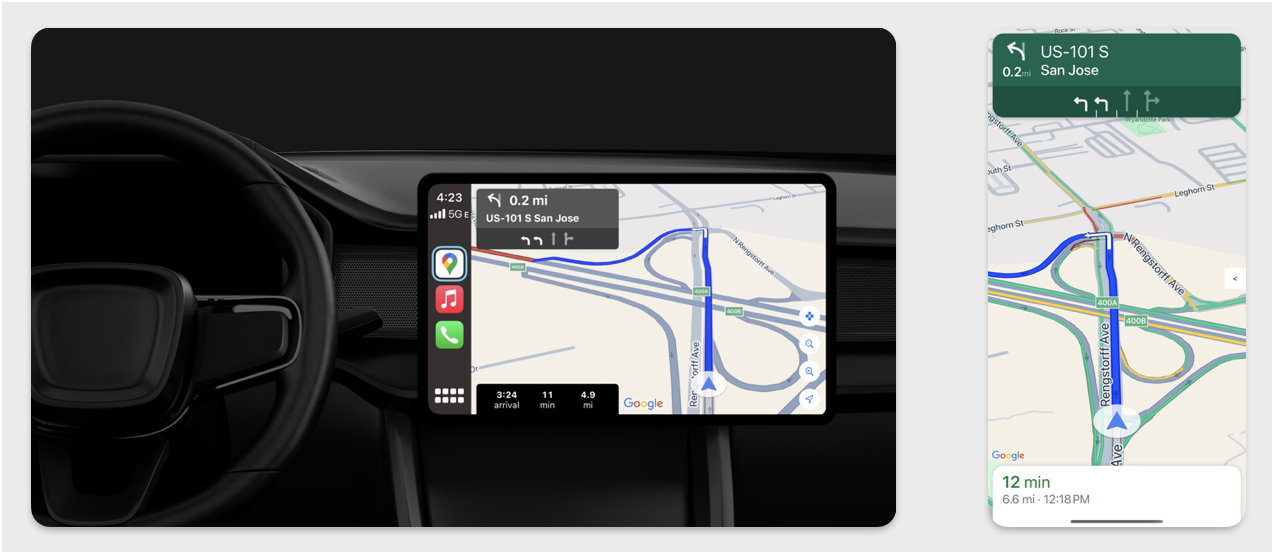
ส่วนนี้จะอธิบายวิธีใช้ Navigation SDK กับไลบรารี Apple CarPlay เพื่อแสดงประสบการณ์การนำทางของแอปในเครื่องเล่นวิทยุในแผงหน้าปัด หากระบบในแผงหน้าปัดของคนขับรองรับ CarPlay คนขับจะใช้แอปของคุณบนจอแสดงผลของรถยนต์ได้โดยตรงด้วยการเชื่อมต่อโทรศัพท์กับเครื่อง การนำทางด้วยเสียงจะทำงานผ่านลำโพงของรถด้วย
คุณสร้างแอป CarPlay จากชุดเทมเพลต UI ที่ Apple มีให้ แอปของคุณมีหน้าที่เลือกเทมเพลตที่จะแสดงและให้ข้อมูลภายในเทมเพลต
ระบบในแผงหน้าปัดจะแสดงองค์ประกอบแบบอินเทอร์แอกทีฟที่ผ่านการรับรองด้านความปลอดภัย เพื่อให้ผู้ขับขี่สามารถนำทางไปยังจุดหมายได้อย่างปลอดภัยโดยไม่มีสิ่งรบกวนที่ไม่จำเป็น นอกจากนี้ คุณยังเขียนโปรแกรมแอปเพื่อให้คนขับโต้ตอบกับฟีเจอร์เฉพาะแอปได้ เช่น การยอมรับหรือปฏิเสธคำสั่งซื้อ หรือการดูตำแหน่งของลูกค้าบนแผนที่ นอกจากนี้ คุณยังตั้งโปรแกรมการอัปเดตสถานะการสั่งซื้อให้ปรากฏในหน่วยบนแดชบอร์ดได้ด้วย
ตั้งค่า
เริ่มด้วย CarPlay
ก่อนอื่น ให้ทำความคุ้นเคยกับเอกสารประกอบของ Apple ดังนี้
ตั้งค่า Navigation SDK
- เมื่ออ่านเอกสารประกอบของ Apple แล้ว คุณก็พร้อมที่จะทำงานกับ Navigation SDK
- ตั้งค่าโปรเจ็กต์หากคุณยังไม่ได้ผสานรวม Navigation SDK เข้ากับแอป
- เปิดใช้ฟีดคำแนะนำแบบเลี้ยวต่อเลี้ยวสำหรับแอป
- ไม่บังคับ ใช้ไอคอนที่สร้างขึ้นจาก Navigation SDK
- วาดแผนที่โดยใช้คลาส
GMSMapViewที่ระบุไว้ในคลาส UIView ดูข้อมูลเพิ่มเติมได้ที่นำทางตามเส้นทาง ป้อนข้อมูลCPNavigationSessionด้วยข้อมูลจากไลบรารี TurnByTurn
วาด UI ของแผนที่และการนำทาง
คลาส GMSMapView จะแสดงผลแผนที่ และ CPMapTemplate จะแสดงผล UI บนหน้าจอ CarPlay ซึ่งมีฟังก์ชันการทำงานส่วนใหญ่เหมือนกับ GMSMapView สำหรับโทรศัพท์ แต่มีการโต้ตอบที่จำกัด
Swift
init(window: CPWindow) {
    super.init(nibName: nil, bundle: nil)
    self.window = window

    // More CPMapTemplate initialization

}

override func viewDidLoad() {
    super.viewDidLoad()

    let mapViewOptions = GMSMapViewOptions()
    mapViewOptions.screen = window.screen
    mapViewOptions.frame = self.view.bounds

    mapView = GMSMapView(options: mapViewOptions)
    mapView.autoresizingMask = [.flexibleHeight, .flexibleWidth]
    mapView.settings.isNavigationHeaderEnabled = false
    mapView.settings.isNavigationFooterEnabled = false

    // Disable buttons: in CarPlay, no part of the map is clickable.
    // The app should instead place these buttons in the appropriate slots of the CarPlay template.
    mapView.settings.compassButton = false
    mapView.settings.isRecenterButtonEnabled = false
    mapView.shouldDisplaySpeedometer = false
    mapView.isMyLocationEnabled = true

    self.view.addSubview(mapView)
}
Objective-C
- (instancetype)initWithWindow:(CPWindow *)window {
  self = [super initWithNibName:nil bundle:nil];
  if (self) {
    _window = window;

  // More CPMapTemplate initialization
  }
}

- (void)viewDidLoad {
  [super viewDidLoad];
  GMSMapViewOptions *options = [[GMSMapViewOptions alloc] init];
  options.screen = _window.screen;
  options.frame = self.view.bounds;
  _mapView = [[GMSMapView alloc] initWithOptions:options];
  _mapView.autoresizingMask = UIViewAutoresizingFlexibleHeight | UIViewAutoresizingFlexibleWidth;
  _mapView.settings.navigationHeaderEnabled = NO;
  _mapView.settings.navigationFooterEnabled = NO;

  // Disable buttons: in CarPlay, no part of the map is clickable.
  // The app should instead place these buttons in the appropriate slots of the CarPlay template.
  _mapView.settings.compassButton = NO;
  _mapView.settings.recenterButtonEnabled = NO;

  _mapView.shouldDisplaySpeedometer = NO;
  _mapView.myLocationEnabled = YES;

  [self.view addSubview:_mapView];
}
เปิดใช้การโต้ตอบกับแผนที่
CarPlay จำกัดการโต้ตอบกับพื้นผิวหน้าจอไว้ที่ชุดเมธอด CPMapTemplateDelegate เพื่อความปลอดภัยของผู้ขับขี่ ใช้ Callback เหล่านี้เพื่อรองรับการโต้ตอบของผู้ขับขี่กับแผนที่บนหน้าจอในแผงหน้าปัดแบบจำกัด
หากต้องการรองรับการดำเนินการเพิ่มเติมของผู้ใช้ ให้สร้างอาร์เรย์ของ CPMapButton และกำหนดให้กับ CPMapTemplate.mapButtons
โค้ดต่อไปนี้จะสร้างการโต้ตอบการเลื่อนและปุ่มเพื่อเลื่อน ซูมเข้าและออก และระบุตำแหน่งของผู้ใช้
การโต้ตอบกับการเลื่อน
Swift
// MARK: CPMapTemplateDelegate
func mapTemplate(_ mapTemplate: CPMapTemplate, panBeganWith direction: CPMapTemplate.PanDirection) {

}

func mapTemplate(_ mapTemplate: CPMapTemplate, panWith direction: CPMapTemplate.PanDirection) {
    let scrollAmount = scrollAmount(for: direction)
    let scroll = GMSCameraUpdate.scrollBy(x: scrollAmount.x, y: scrollAmount.y)
    mapView.animate(with: scroll)
}

func mapTemplate(_ mapTemplate: CPMapTemplate, panEndedWith direction: CPMapTemplate.PanDirection) {
}

func scrollAmount(for panDirection: CPMapTemplate.PanDirection) -> CGPoint {
    let scrollDistance = 80.0
    var scrollAmount = CGPoint(x: 0, y: 0)
    switch panDirection {
        case .left:
            scrollAmount.x -= scrollDistance
            break;
        case .right:
            scrollAmount.x += scrollDistance
            break;
        case .up:
            scrollAmount.y += scrollDistance
            break;
        case .down:
            scrollAmount.y -= scrollDistance
            break;
        default:
            break;
    }
    if scrollAmount.x != 0 && scrollAmount.y != 0 {
        // Adjust length if scrolling diagonally.
        scrollAmount = CGPointMake(scrollAmount.x * sqrt(1.0/2.0), scrollAmount.y * sqrt(1.0/2.0))
    }
    return scrollAmount
}
Objective-C
#pragma mark - CPMapTemplateDelegate

- (void)mapTemplate:(CPMapTemplate *)mapTemplate panBeganWithDirection:(CPPanDirection)direction {
}

- (void)mapTemplate:(CPMapTemplate *)mapTemplate panWithDirection:(CPPanDirection)direction {
CGPoint scrollAmount = [self scrollAmountForPanDirection:direction];
GMSCameraUpdate *scroll = [GMSCameraUpdate scrollByX:scrollAmount.x Y:scrollAmount.y];
[_mapView animateWithCameraUpdate:scroll];
}

- (void)mapTemplate:(CPMapTemplate *)mapTemplate panEndedWithDirection:(CPPanDirection)direction {
}
- (CGPoint)scrollAmountForPanDirection:(CPPanDirection)direction {
  static const CGFloat scrollDistance = 80.;
  CGPoint scrollAmount = {0., 0.};
  if (direction & CPPanDirectionLeft) {
    scrollAmount.x = -scrollDistance;
  }
  if (direction & CPPanDirectionRight) {
    scrollAmount.x = scrollDistance;
  }
  if (direction & CPPanDirectionUp) {
    scrollAmount.y = -scrollDistance;
  }
  if (direction & CPPanDirectionDown) {
    scrollAmount.y = scrollDistance;
  }
  if (scrollAmount.x != 0 && scrollAmount.y != 0) {
  // Adjust length if scrolling diagonally.
  scrollAmount =
    CGPointMake(scrollAmount.x * (CGFloat)M_SQRT1_2, scrollAmount.y * (CGFloat)M_SQRT1_2);
  }
  return scrollAmount;
}
การใช้งานปุ่มทั่วไป
Swift
// MARK: Create Buttons

func createMapButtons() -> [CPMapButton] {
    let panButton = mapButton(systemImageName: "dpad.fill") { [weak self] in
        self?.didTapPanButton()
    }

    let zoomOutButton = mapButton(systemImageName: "minus.magnifyingglass") { [weak self] in
        self?.didTapZoomOutButton()
    }

    let zoomInButton = mapButton(systemImageName: "plus.magnifyingglass") { [weak self] in
        self?.didTapZoomInButton()
    }

    let myLocationButton = mapButton(systemImageName: "location") { [weak self] in
        self?.didTapMyLocationButton()
    }

    let mapButtons = [panButton, zoomOutButton, zoomInButton, myLocationButton]
    return mapButtons
}

func mapButton(systemImageName: String, handler: @escaping () -> Void) -> CPMapButton {

}


// MARK: Button callbacks

@objc func didTapPanButton() {
    mapTemplate?.showPanningInterface(animated: true)
}

@objc func didTapZoomOutButton() {
    mapView.animate(with: GMSCameraUpdate.zoomOut())
}

@objc func didTapZoomInButton() {
    mapView.animate(with: GMSCameraUpdate.zoomIn())
}

@objc func didTapMyLocationButton() {
    if let lastLocation = lastLocation {
        let cameraPosition = GMSCameraPosition(target: lastLocation.coordinate, zoom: 15)
        mapView.animate(to: cameraPosition)
    }
}
Objective-C
#pragma mark - Create Buttons

- (NSArray<CPMapButton *>*)createMapButtons {
    NSMutableArray<CPMapButton *> *mapButtons = [NSMutableArray<CPMapButton *> array];

    __weak __typeof__(self) weakSelf = self;
    CPMapButton *panButton = [self mapButtonWithSystemImageNamed:@"dpad.fill"
                                                        handler:^(CPMapButton *_) {
                                                        [weakSelf didTapPanButton];
                                                        }];
    [mapButtons addObject:panButton];

    CPMapButton *zoomOutButton =
        [self mapButtonWithSystemImageNamed:@"minus.magnifyingglass"
                                    handler:^(CPMapButton *_Nonnull mapButon) {
                                    [weakSelf didTapZoomOutButton];
                                    }];
    [mapButtons addObject:zoomOutButton];

    CPMapButton *zoomInButton =
        [self mapButtonWithSystemImageNamed:@"plus.magnifyingglass"
                                    handler:^(CPMapButton *_Nonnull mapButon) {
                                    [weakSelf didTapZoomInButton];
                                    }];
    [mapButtons addObject:zoomInButton];

    CPMapButton *myLocationButton =
        [self mapButtonWithSystemImageNamed:@"location"
                                    handler:^(CPMapButton *_Nonnull mapButton) {
                                    [weakSelf didTapMyLocationButton];
                                    }];
    [mapButtons addObject:myLocationButton];
    return mapButtons;
}

#pragma mark - Button Callbacks

- (void)didTapZoomOutButton {
[_mapView animateWithCameraUpdate:[GMSCameraUpdate zoomOut]];
}

- (void)didTapZoomInButton {
[_mapView animateWithCameraUpdate:[GMSCameraUpdate zoomIn]];
}

- (void)didTapMyLocationButton {
CLLocation *location = self.lastLocation;
if (location) {
    GMSCameraPosition *position =
        [[GMSCameraPosition alloc] initWithTarget:self.lastLocation.coordinate zoom:15.];
    [_mapView animateToCameraPosition:position];
}
}

- (void)didTapPanButton {
[_mapTemplate showPanningInterfaceAnimated:YES];
_isPanningInterfaceEnabled = YES;
}

- (void)didTapStopPanningButton {
[_mapTemplate dismissPanningInterfaceAnimated:YES];
_isPanningInterfaceEnabled = NO;
}
หมายเหตุ: คุณเลือกเส้นทางอื่นบนหน้าจอ CarPlay ไม่ได้ โดยต้องเลือกจากโทรศัพท์ก่อนที่ CarPlay จะเริ่มทำงาน
แสดงคำแนะนำการนำทาง
ส่วนนี้จะอธิบายวิธีตั้งค่า Listener สำหรับฟีดข้อมูลและวิธีป้อนข้อมูลเส้นทางการนำทางในแผงคำแนะนำและแผงการประมาณการเดินทาง ดูข้อมูลเพิ่มเติมได้ที่ส่วน "สร้างแอปการนำทาง CarPlay" ของคู่มือการเขียนโปรแกรมแอป CarPlay
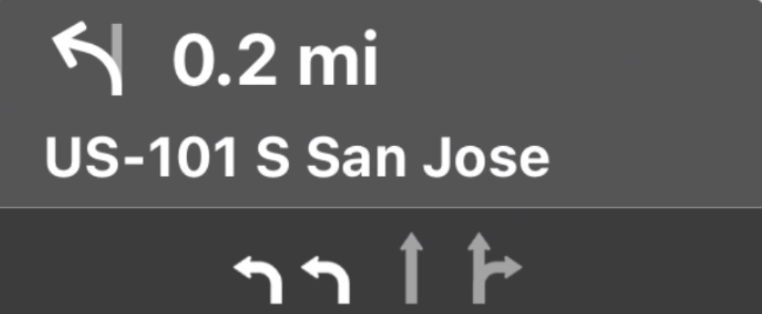
แผงคำแนะนำและค่าประมาณการเดินทางจะแสดงการ์ดการนำทางที่แสดงข้อมูลการนำทางที่เกี่ยวข้องกับการเดินทางปัจจุบัน ไลบรารี TurnByTurn ใน Navigation SDK ช่วยให้ข้อมูลบางอย่าง เช่น สัญลักษณ์ ข้อความ และเวลาที่เหลือได้
ตั้งค่า Listener
ทำตามวิธีการตั้งค่า Listener เหตุการณ์ในรายละเอียดเกี่ยวกับฟีดข้อมูลแบบเลี้ยวต่อเลี้ยว
ป้อนข้อมูลการนำทาง
ส่วนแรกของตัวอย่างโค้ดต่อไปนี้แสดงวิธีสร้างค่าประมาณการเดินทางของ CarPlay โดยการแปล GMSNavigationNavInfo.timeToCurrentStepSeconds เป็น CPTravelEstimate คุณสามารถอ่านข้อมูลเพิ่มเติมเกี่ยวกับองค์ประกอบเหล่านี้และองค์ประกอบอื่นๆ ของการแสดงผลได้ในรายละเอียดเกี่ยวกับฟีดข้อมูลแบบเลี้ยวต่อเลี้ยว
ส่วนที่ 2 ของตัวอย่างแสดงวิธีสร้างออบเจ็กต์และจัดเก็บไว้ในช่อง userInfo ของ CPManuevers ซึ่งจะกำหนดCPManeuverDisplayStyle
ซึ่งใช้สำหรับข้อมูลคำแนะนำช่องทางด้วย ดูข้อมูลเพิ่มเติมได้ที่คู่มือการเขียนโปรแกรมแอป CarPlay ของ Apple
Swift
// Get a CPTravelEstimate from GMSNavigationNavInfo
func getTravelEstimates(from navInfo:GMSNavigationNavInfo) -> CPTravelEstimates {
    let distanceRemaining = navInfo.roundedDistance(navInfo.distanceToCurrentStepMeters)
    let timeRemaining = navInfo.roundedTime(navInfo.timeToCurrentStepSeconds)
    let travelEstimates = CPTravelEstimates(distanceRemaining: distanceRemaining, timeRemaining: timeRemaining)
    return travelEstimates
}

//  Create an object to be stored in the userInfo field of CPManeuver to determine the CPManeuverDisplayStyle.

/** An object to be stored in the userInfo field of a CPManeuver. */

struct ManeuverUserInfo {
    var stepInfo: GMSNavigationStepInfo
    var isLaneGuidance: Bool
}

func mapTemplate(_ mapTemplate: CPMapTemplate, displayStyleFor maneuver: CPManeuver) -> CPManeuverDisplayStyle {
    let userInfo = maneuver.userInfo
    if let maneuverUserInfo = userInfo as? ManeuverUserInfo {
        return maneuverUserInfo.isLaneGuidance ? .symbolOnly : .leadingSymbol
    }
    return .leadingSymbol
}

// Get a CPManeuver with instructionVariants and symbolImage from GMSNavigationStepInfo
func getManeuver(for stepInfo: GMSNavigationStepInfo) -> CPManeuver {
    let maneuver = CPManeuver()
    maneuver.userInfo = ManeuverUserInfo(stepInfo: stepInfo, isLaneGuidance: false)
    switch stepInfo.maneuver {
        case .destination:
            maneuver.instructionVariants = ["Your destination is ahead."]
            break
        case .destinationLeft:
            maneuver.instructionVariants = ["Your destination is ahead on your left."]
            break
        case .destinationRight:
            maneuver.instructionVariants = ["Your destination is ahead on your right."]
            break
        default:
            maneuver.attributedInstructionVariants = currentNavInfo?.instructions(forStep: stepInfo, options: instructionOptions)
            break
    }
    maneuver.symbolImage = stepInfo.maneuverImage(with: instructionOptions.imageOptions)
    return maneuver
}

// Get the lane image for a CPManeuver from GMSNavigationStepInfo
func laneGuidanceManeuver(for stepInfo: GMSNavigationStepInfo) -> CPManeuver? {
    let maneuver = CPManeuver()
    maneuver.userInfo = ManeuverUserInfo(stepInfo: stepInfo, isLaneGuidance: true)
    let lanesImage = stepInfo.lanesImage(with: imageOptions)
    guard let lanesImage = lanesImage else { return nil }
    maneuver.symbolImage = lanesImage
    return maneuver
}
Objective-C
// Get a CPTravelEstimate from GMSNavigationNavInfo
- (nonull CPTravelEstimates *)travelEstimates:(GMSNavigationNavInfo *_Nonnull navInfo) {
NSMeasurement<NSUnitLength *> *distanceRemaining = [navInfo roundedDistance:navInfo.distanceToCurrentStepMeters];
NSTimeInterval timeRemaining = [navInfo roundedTime:navInfo.timeToCurrentStepSeconds];
CPTravelEstimate* travelEstimate = [[CPTravelEstimates alloc] initWithDistanceRemaining:distanceRemaining
                                                timeRemaining:timeRemaining];
}
//  Create an object to be stored in the userInfo field of CPManeuver to determine the CPManeuverDisplayStyle.

/** An object to be stored in the userInfo field of a CPManeuver. */
@interface ManeuverUserInfo : NSObject

@property(nonatomic, readonly, nonnull) GMSNavigationStepInfo *stepInfo;
@property(nonatomic, readonly, getter=isLaneGuidance) BOOL laneGuidance;

- (nonnull instancetype)initWithStepInfo:(GMSNavigationStepInfo *)stepInfo
                        isLaneGuidance:(BOOL)isLaneGuidance NS_DESIGNATED_INITIALIZER;

- (instancetype)init NS_UNAVAILABLE;

@end

- (CPManeuverDisplayStyle)mapTemplate:(CPMapTemplate *)mapTemplate
            displayStyleForManeuver:(nonnull CPManeuver *)maneuver {
ManeuverUserInfo *userInfo = maneuver.userInfo;
return userInfo.laneGuidance ? CPManeuverDisplayStyleSymbolOnly : CPManeuverDisplayStyleDefault;
}
// Get a CPManeuver with instructionVariants and symbolImage from GMSNavigationStepInfo
- (nonnull CPManeuver *)maneuverForStep:(nonnull GMSNavigationStepInfo *)stepInfo {
CPManeuver *maneuver = [[CPManeuver alloc] init];
maneuver.userInfo = [[ManeuverUserInfo alloc] initWithStepInfo:stepInfo isLaneGuidance:NO];
switch (stepInfo.maneuver) {
    case GMSNavigationManeuverDestination:
    maneuver.instructionVariants = @[ @"Your destination is ahead." ];
    break;
    case GMSNavigationManeuverDestinationLeft:
    maneuver.instructionVariants = @[ @"Your destination is ahead on your left." ];
    break;
    case GMSNavigationManeuverDestinationRight:
    maneuver.instructionVariants = @[ @"Your destination is ahead on your right." ];
    break;
    default: {
    maneuver.attributedInstructionVariants =
        [_currentNavInfo instructionsForStep:stepInfo options:_instructionOptions];
    break;
    }
}
maneuver.symbolImage = [stepInfo maneuverImageWithOptions:_instructionOptions.imageOptions];
return maneuver;
}
// Get the lane image for a CPManeuver from GMSNavigationStepInfo
- (nullable CPManeuver *)laneGuidanceManeuverForStep:(nonnull GMSNavigationStepInfo *)stepInfo {
CPManeuver *maneuver = [[CPManeuver alloc] init];
maneuver.userInfo = [[ManeuverUserInfo alloc] initWithStepInfo:stepInfo isLaneGuidance:YES];
UIImage *lanesImage = [stepInfo lanesImageWithOptions:_imageOptions];
if (!lanesImage) {
    return nil;
}
maneuver.symbolImage = lanesImage;
return maneuver;
}
การบังคับรถ
CarPlay ใช้คลาส CPManeuver เพื่อให้คำแนะนำแบบเลี้ยวต่อเลี้ยว ดูข้อมูลเพิ่มเติมเกี่ยวกับการบังคับทิศทางและคำแนะนำช่องทางเดินรถได้ที่รายละเอียดเกี่ยวกับฟีดข้อมูลแบบเลี้ยวต่อเลี้ยว
เอกสารประกอบที่เกี่ยวข้อง
- https://developer.apple.com/carplay/
- https://developer.apple.com/carplay/documentation/CarPlay-App-Programming-Guide.pdf
- https://developer.apple.com/design/human-interface-guidelines/carplay
- รายละเอียดเกี่ยวกับฟีดข้อมูลแบบเลี้ยวต่อเลี้ยว
- นำทางตามเส้นทาง