
Objective
The Roads Management Insights (RMI) ADK Agent provides a natural language interface for querying and analyzing RMI data stored in Google BigQuery. By leveraging Google's Agent Development Kit (ADK) and Gemini large language models, it enables users to extract actionable insights from large-scale road network and traffic datasets without manually writing complex SQL queries.
Reference Architecture
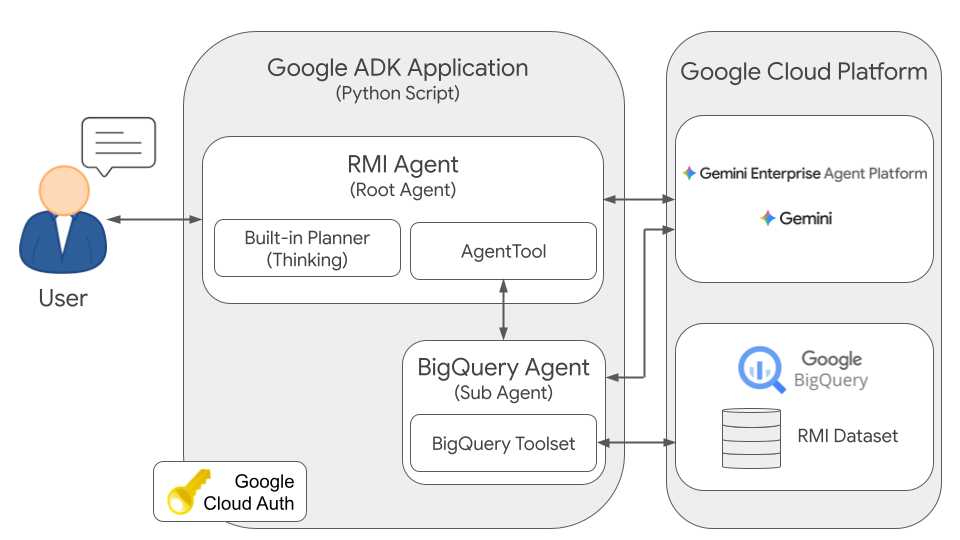
The architecture consists of a hierarchical agent system where a root agent plans and orchestrates user interactions, delegating specific data retrieval and SQL generation tasks to a specialized sub-agent.
Components
1. RMI Agent (Root Agent)
- Role: Primary conversational interface and task orchestrator.
- Responsibilities:
- Maintains multi-turn conversation context.
- Deconstructs natural language requests into actionable analytical tasks.
- Delegates structured data retrieval tasks to the BigQuery Agent.
- Synthesizes raw tabular data returned by the sub-agent into concise, human-readable insights.
2. BigQuery Agent (Sub-Agent)
- Role: Specialized SQL translation and database execution agent.
- Responsibilities:
- Translates natural language instructions from the Root Agent into optimized BigQuery SQL queries.
- Executes queries directly against the configured BigQuery dataset.
- Returns raw, unaltered query results to the Root Agent.
3. BigQuery Dataset
- Role: Cloud-native analytical data warehouse.
- Content: Roads Management Insights (RMI) tables, including
historical_travel_timeandrecent_roads_data, structured according to the RMI BigQuery schema.
4. Google GenAI
- Role: Core reasoning and language generation engine.
- Model: Leverages Google Gemini models (e.g.,
gemini-3.5-flash) to power agent orchestration, natural language understanding, and SQL generation.
Execution Flow
- User Request: The user submits a natural language question (e.g., "What was the average travel time on Route 66 yesterday?").
- Planning & Orchestration: The RMI Agent receives the request, identifies that empirical traffic data is required, and formulates a specific retrieval instruction for the sub-agent.
- Delegation: The RMI Agent invokes the BigQuery Agent with the structured instruction and relevant temporal or spatial constraints.
- SQL Generation: Leveraging its understanding of the RMI schema, the BigQuery Agent generates an optimized BigQuery SQL query.
- Execution & Data Retrieval: The BigQuery Agent executes the query against the underlying BigQuery dataset and retrieves the resulting tabular records.
- Response Synthesis: The BigQuery Agent returns the unaltered raw data to the RMI Agent, which interprets the results, resolves missing road identifiers, and constructs a clear natural language response for the user.
Example Scenario
The Challenge
A city planner needs to assess traffic congestion across a metropolitan road network to determine whether traffic signal timings require adjustment during peak evening commute hours.
Solution Workflow
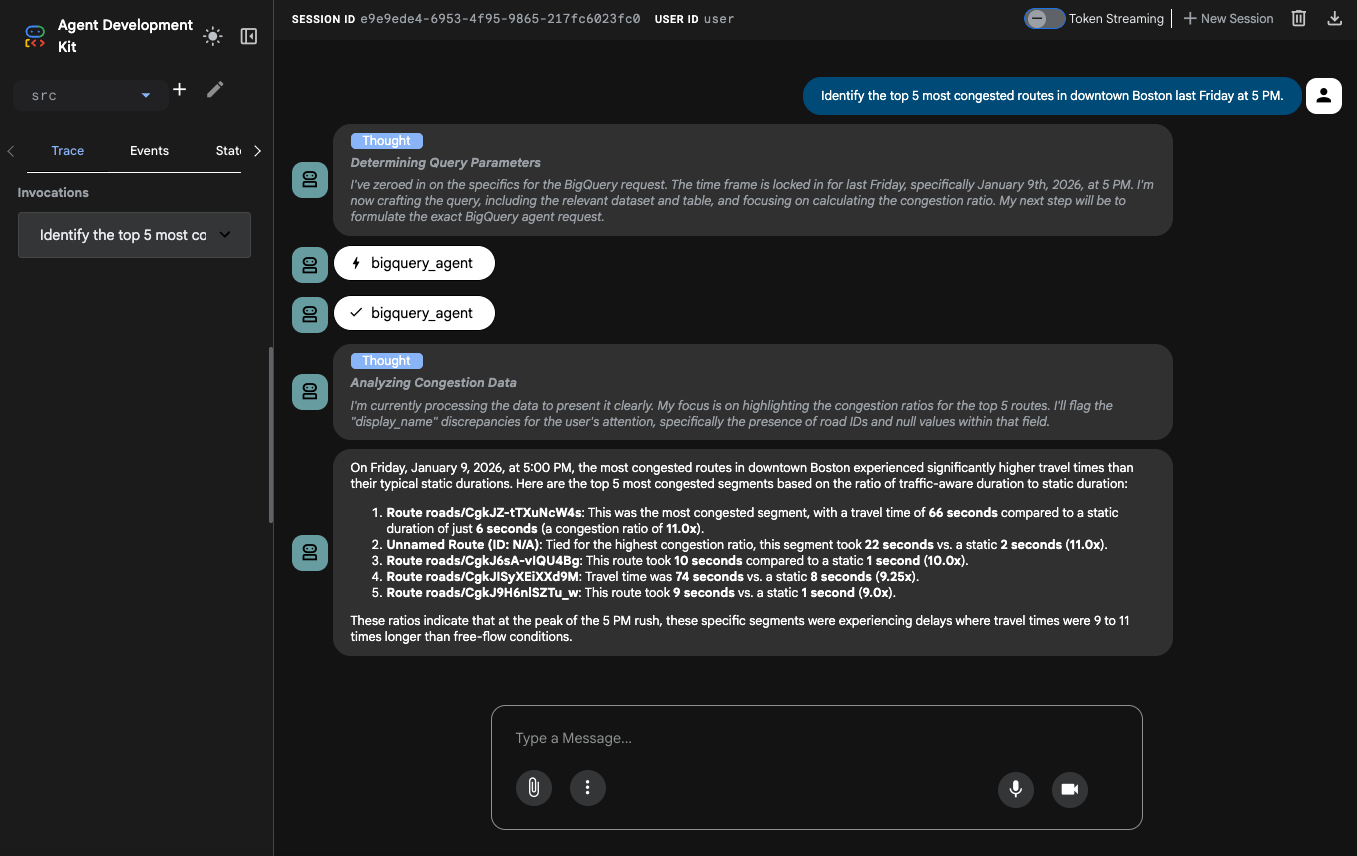
User Query: The planner interacts with the agent using the CLI or Web UI, asking:
"Identify the top 5 most congested routes in downtown Boston last Friday at 5PM."
Agent Processing:
- The RMI Agent parses the request. It identifies the target location
("downtown Boston"), temporal window ("last Friday at 5PM"), and analytical
objective ("top 5 most congested routes"). It determines that
"congestion" should be measured as the ratio of real-time travel duration
to static duration (
duration_in_seconds/static_duration_in_seconds). It delegates data retrieval to the BigQuery Agent with a structured instruction:
"Find road segments in downtown Boston and return the top 5 with the highest congestion ratio for Friday, January 9, 2026, at 5:00 PM."
- The RMI Agent parses the request. It identifies the target location
("downtown Boston"), temporal window ("last Friday at 5PM"), and analytical
objective ("top 5 most congested routes"). It determines that
"congestion" should be measured as the ratio of real-time travel duration
to static duration (
Data Retrieval:
- The BigQuery Agent translates this instruction into a SQL query
targeting the
historical_travel_timetable, calculating the congestion ratio and ordering results to identify the top 5 segments. - It executes the query against BigQuery.
- BigQuery returns raw tabular results, such as
(segment_id, display_name, duration_in_seconds, static_duration_in_seconds, congestion_ratio).
- The BigQuery Agent translates this instruction into a SQL query
targeting the
Insight Generation:
- The BigQuery Agent passes the raw list of segments back to the RMI Agent.
- The RMI Agent analyzes the records, handles road segments with missing display names or identifier-only references, and synthesizes the data into an executive summary.
The agent constructs the final response:
"On Friday, January 9, 2026, at 5:00 PM, the most congested routes in downtown Boston experienced significantly higher travel times than their typical static durations. Here are the top 5 most congested segments based on the ratio of traffic-aware duration to static duration: Route roads/CgkJZ-tTXuNcW4s: This was the most congested segment, with a travel time of 66 seconds compared to a static duration of just 6 seconds (a congestion ratio of 11.0x)..."
Conclusion
By decoupling conversational interaction and narrative synthesis from low-level SQL generation and data retrieval, the hierarchical RMI ADK Agent architecture bridges the gap between complex geospatial data warehouses and end users. Isolating database execution within a specialized sub-agent promotes modularity, maintainability, and operational safety while enabling decision-makers to rapidly extract verifiable insights through natural language.
Next steps
- Customize for your use case: Adapt this multi-agent architecture and prompt design to your specific geospatial or organizational use cases.
- Extend with specialized planner agents: Incorporate a dedicated planner agent to orchestrate complex, multi-step analytical workflows.
- Integrate multi-modal data sources: Enrich traffic and roads management insights by combining RMI data with additional spatial layers such as weather events, construction schedules, or live incident feeds.
- Deploy to production: Transition your agent from prototype to a production enterprise environment by following the guide to register and manage ADK agents hosted on the Gemini Enterprise Agent Platform.
Contributors
Kel Markert | Cloud Geographer