

توضّح هذه الصفحة كيفية إنشاء تطبيق Chat يتلقّى الأحداث من Chat باستخدام Cloud Pub/Sub. تكون هذه البنية مفيدة إذا كان تطبيق Chat محميًا بجدار حماية أو إذا كنت تريد إرسال أحداث أو تلقّيها بشأن مساحة أو مستخدم في Chat باستخدام Google Workspace Events API.
يوضّح المخطط التالي بنية تطبيق دردشة تم إنشاؤه باستخدام Pub/Sub:
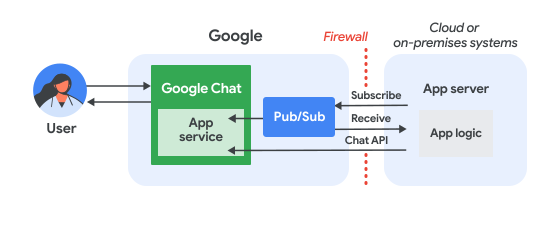
في الرسم البياني السابق، يتضمّن تفاعل المستخدم مع تطبيق Pub/Sub Chat تدفّق المعلومات التالي:
يتفاعل المستخدم مع تطبيق Chat من خلال، على سبيل المثال، إرسال رسالة إليه أو إصدار أمر أو إضافته إلى مساحة في Chat أو إزالته منها.
يرسل Chat الرسالة إلى موضوع Pub/Sub.
يشترك خادم التطبيق، وهو إما نظام مستند إلى السحابة الإلكترونية أو نظام محلي يحتوي على منطق تطبيق Chat، في موضوع Pub/Sub لتلقّي الرسالة من خلال جدار الحماية.
يمكن لتطبيق Chat اختياريًا استدعاء واجهة برمجة تطبيقات Chat لنشر الرسائل بشكل غير متزامن أو تنفيذ عمليات أخرى.
المتطلبات الأساسية
Node.js
- حساب Google Workspace تابع للعمل أو لمؤسسة مع إمكانية الوصول إلى Google Chat
- مشروع Google Cloud تم تفعيل الفوترة فيه للتأكّد من تفعيل الفوترة في مشروع حالي، يُرجى الاطّلاع على التأكّد من حالة الفوترة في مشاريعك. لإنشاء مشروع وإعداد الفوترة، يُرجى الاطّلاع على مقالة إنشاء مشروع على Google Cloud.
- Node.js 14 أو إصدار أحدث
- npm، وهي أداة لإدارة الحِزم
- مشروع Node.js تم إعداده لبدء مشروع جديد، أنشئ مجلدًا جديدًا وانتقِل إليه، ثم نفِّذ الأمر التالي في واجهة سطر الأوامر:
npm init
Python
- حساب Google Workspace تابع للعمل أو لمؤسسة مع إمكانية الوصول إلى Google Chat
- مشروع Google Cloud تم تفعيل الفوترة فيه للتأكّد من تفعيل الفوترة في مشروع حالي، يُرجى الاطّلاع على التأكّد من حالة الفوترة في مشاريعك. لإنشاء مشروع وإعداد الفوترة، يُرجى الاطّلاع على مقالة إنشاء مشروع على Google Cloud.
- الإصدار 3.6 أو الإصدارات الأحدث من Python
- أداة إدارة الحِزم pip
جافا
- حساب Google Workspace تابع للعمل أو لمؤسسة مع إمكانية الوصول إلى Google Chat
- مشروع Google Cloud تم تفعيل الفوترة فيه للتأكّد من تفعيل الفوترة في مشروع حالي، يُرجى الاطّلاع على التأكّد من حالة الفوترة في مشاريعك. لإنشاء مشروع وإعداد الفوترة، يُرجى الاطّلاع على مقالة إنشاء مشروع على Google Cloud.
- Java 11 أو إصدار أحدث
- أداة إدارة الحِزم Maven
تفعيل واجهات برمجة التطبيقات
قبل استخدام واجهات Google APIs، عليك تفعيلها في مشروع على Google Cloud. يمكنك تفعيل واجهة برمجة تطبيق واحدة أو أكثر في مشروع واحد على Google Cloud.في Google Cloud Console، فعِّل واجهة برمجة التطبيقات Google Chat API وواجهة برمجة التطبيقات Pub/Sub API.
إعداد Pub/Sub
أنشئ موضوعًا في Pub/Sub يمكن أن يرسل إليه Chat API الرسائل. ننصحك باستخدام موضوع واحد لكل تطبيق Chat.
أنشئ حساب خدمة لتطبيق Chat من أجل منح الإذن باستخدام Pub/Sub وChat، واحفظ ملف المفتاح الخاص في دليل العمل.
أنشئ اشتراكًا في السحب في الموضوع.
امنح دور المشترك في Pub/Sub على الاشتراك لحساب الخدمة الذي أنشأته سابقًا.
كتابة النص البرمجي
في هذا القسم، يمكنك تحديد منطق التطبيق لتطبيق Chat. يمكنك كتابة نص برمجي تتم المصادقة عليه باستخدام Google Cloud والاشتراك في موضوع Pub/Sub لتلقّي الأحداث من Chat، مثل عندما يرسل مستخدم رسالة إلى تطبيق Chat.
عندما يتلقّى النص البرمجي رسالة، يعالج بيانات الحدث ويستخدم واجهة Google Chat API لنشر ردّ للمستخدم أو المساحة. يتيح هذا الإعداد لتطبيق Chat العمل من خلال جدار الحماية مع إمكانية التفاعل مع مستخدمي Chat.
Node.js
في واجهة سطر الأوامر، قدِّم بيانات اعتماد حساب الخدمة:
export GOOGLE_APPLICATION_CREDENTIALS=SERVICE_ACCOUNT_FILE_PATHفي واجهة سطر الأوامر، أدخِل رقم تعريف مشروع Google Cloud:
export PROJECT_ID=PROJECT_IDفي واجهة سطر الأوامر، أدخِل رقم تعريف الاشتراك في Pub/Sub الذي أنشأته سابقًا:
export SUBSCRIPTION_ID=SUBSCRIPTION_IDفي دليل العمل، أنشئ ملفًا باسم
package.json.في ملف
package.json، ألصِق الرمز التالي:{ "name": "pub-sub-app", "version": "1.0.0", "description": "Google Chat App that listens for messages via Cloud Pub/Sub", "main": "index.js", "scripts": { "start": "node index.js", "test": "echo \"Error: no test specified\" && exit 1" }, "dependencies": { "@google-apps/chat": "^0.4.0", "@google-cloud/pubsub": "^4.5.0" }, "license": "Apache-2.0" }في دليل العمل، أنشئ ملفًا باسم
index.js.في
index.js، الصِق الرمز التالي:const {ChatServiceClient} = require('@google-apps/chat'); const {MessageReplyOption} = require('@google-apps/chat').protos.google.chat.v1.CreateMessageRequest; const {PubSub} = require('@google-cloud/pubsub'); const {SubscriberClient} = require('@google-cloud/pubsub/build/src/v1'); // Receives messages from a pull subscription. function receiveMessages() { const chat = new ChatServiceClient({ keyFile: process.env.GOOGLE_APPLICATION_CREDENTIALS, scopes: ['https://www.googleapis.com/auth/chat.bot'], }); const subscriptionPath = new SubscriberClient() .subscriptionPath(process.env.PROJECT_ID, process.env.SUBSCRIPTION_ID) const subscription = new PubSub() .subscription(subscriptionPath); // Handle incoming message, then acknowledge the received message const messageHandler = message => { console.log(`Id : ${message.id}`); const event = JSON.parse(message.data); console.log(`Data : ${JSON.stringify(event)}`); // Post the response to Google Chat. const request = formatRequest(event); if (request != null) { chat.createMessage(request); } // Acknowledge the message. message.ack(); } subscription.on('message', messageHandler); console.log(`Listening for messages on ${subscriptionPath}`); // Keep main thread from exiting while waiting for messages setTimeout(() => { subscription.removeListener('message', messageHandler); console.log(`Stopped listening for messages.`); }, 60 * 1000); } // Send message to Google Chat based on the type of event function formatRequest(event) { const chatEvent = event.chat || {}; // If the app was removed, we don't respond. if (chatEvent.removedFromSpacePayload) { console.log(`App removed from space.`); return null; } const payload = chatEvent.messagePayload || chatEvent.addedToSpacePayload; const spaceName = payload?.space?.name; if (!spaceName) { console.log('No space name in event.'); return null; } if (chatEvent.addedToSpacePayload) { // An app can also be added to a space by @mentioning it in a // message. In that case, we fall through to the message case // and let the app respond. If the app was added using the // invite flow, we just post a thank you message in the space. return { parent: spaceName, message: { text: 'Thank you for adding me!' }, }; } else if (chatEvent.messagePayload) { // In case of message, post the response in the same thread. const message = chatEvent.messagePayload.message; return { parent: spaceName, messageReplyOption: MessageReplyOption.REPLY_MESSAGE_FALLBACK_TO_NEW_THREAD, message: { text: 'You said: `' + message.text + '`', thread: { name: message.thread.name }, }, }; } } if (!process.env.PROJECT_ID) { console.log('Missing PROJECT_ID env var.'); process.exit(1); } if (!process.env.SUBSCRIPTION_ID) { console.log('Missing SUBSCRIPTION_ID env var.'); process.exit(1); } if (!process.env.GOOGLE_APPLICATION_CREDENTIALS) { console.log('Missing GOOGLE_APPLICATION_CREDENTIALS env var.'); process.exit(1); } receiveMessages();
Python
في واجهة سطر الأوامر، قدِّم بيانات اعتماد حساب الخدمة:
export GOOGLE_APPLICATION_CREDENTIALS=SERVICE_ACCOUNT_FILE_PATHفي واجهة سطر الأوامر، أدخِل رقم تعريف مشروع Google Cloud:
export PROJECT_ID=PROJECT_IDفي واجهة سطر الأوامر، أدخِل رقم تعريف الاشتراك في Pub/Sub الذي أنشأته سابقًا:
export SUBSCRIPTION_ID=SUBSCRIPTION_IDفي دليل العمل، أنشئ ملفًا باسم
requirements.txt.في ملف
requirements.txt، ألصِق الرمز التالي:google-cloud-pubsub>=2.23.0 google-apps-chat==0.1.9في دليل العمل، أنشئ ملفًا باسم
app.py.في
app.py، الصِق الرمز التالي:import json import logging import os import sys import time from google.apps import chat_v1 as google_chat from google.cloud import pubsub_v1 from google.oauth2.service_account import Credentials def receive_messages(): """Receives messages from a pull subscription.""" scopes = ['https://www.googleapis.com/auth/chat.bot'] service_account_key_path = os.environ.get('GOOGLE_APPLICATION_CREDENTIALS') creds = Credentials.from_service_account_file(service_account_key_path) chat = google_chat.ChatServiceClient( credentials=creds, client_options={'scopes': scopes} ) project_id = os.environ.get('PROJECT_ID') subscription_id = os.environ.get('SUBSCRIPTION_ID') subscriber = pubsub_v1.SubscriberClient() subscription_path = subscriber.subscription_path(project_id, subscription_id) # Handle incoming message, then acknowledge the received message def callback(message): event = json.loads(message.data) logging.info('Data : %s', event) # Post the response to Google Chat. request = format_request(event) if request is not None: chat.create_message(request) # Acknowledge the message. message.ack() subscriber.subscribe(subscription_path, callback = callback) logging.info('Listening for messages on %s', subscription_path) # Keep main thread from exiting while waiting for messages while True: time.sleep(60) def format_request(event): """Send message to Google Chat based on the type of event. Args: event: A dictionary with the event data. """ chat_event = event.get('chat', {}) # If the app was removed, we don't respond. if 'removedFromSpacePayload' in chat_event: logging.info('App removed from space.') return payload = chat_event.get('messagePayload') or chat_event.get( 'addedToSpacePayload' ) space_name = payload.get('space', {}).get('name') if payload else None if not space_name: logging.warning('No space name in event.') return if 'addedToSpacePayload' in chat_event: # An app can also be added to a space by @mentioning it in a # message. In that case, we fall through to the message case # and let the app respond. If the app was added using the # invite flow, we just post a thank you message in the space. return google_chat.CreateMessageRequest( parent = space_name, message = { 'text': 'Thank you for adding me!' } ) elif 'messagePayload' in chat_event: # In case of message, post the response in the same thread. message = chat_event['messagePayload']['message'] return google_chat.CreateMessageRequest( parent = space_name, message_reply_option = google_chat.CreateMessageRequest.MessageReplyOption.REPLY_MESSAGE_FALLBACK_TO_NEW_THREAD, message = { 'text': 'You said: `' + message['text'] + '`', 'thread': { 'name': message['thread']['name'] } } ) if __name__ == '__main__': if 'PROJECT_ID' not in os.environ: logging.error('Missing PROJECT_ID env var.') sys.exit(1) if 'SUBSCRIPTION_ID' not in os.environ: logging.error('Missing SUBSCRIPTION_ID env var.') sys.exit(1) if 'GOOGLE_APPLICATION_CREDENTIALS' not in os.environ: logging.error('Missing GOOGLE_APPLICATION_CREDENTIALS env var.') sys.exit(1) logging.basicConfig( level=logging.INFO, style='{', format='{levelname:.1}{asctime} {filename}:{lineno}] {message}') receive_messages()
جافا
في واجهة سطر الأوامر، قدِّم بيانات اعتماد حساب الخدمة:
export GOOGLE_APPLICATION_CREDENTIALS=SERVICE_ACCOUNT_FILE_PATHفي واجهة سطر الأوامر، أدخِل رقم تعريف مشروع Google Cloud:
export PROJECT_ID=PROJECT_IDفي واجهة سطر الأوامر، أدخِل رقم تعريف الاشتراك في Pub/Sub الذي أنشأته سابقًا:
export SUBSCRIPTION_ID=SUBSCRIPTION_IDفي دليل العمل، أنشئ ملفًا باسم
pom.xml.في ملف
pom.xml، ألصِق الرمز التالي:<project xmlns="http://maven.apache.org/POM/4.0.0" xmlns:xsi="http://www.w3.org/2001/XMLSchema-instance" xsi:schemaLocation="http://maven.apache.org/POM/4.0.0 http://maven.apache.org/xsd/maven-4.0.0.xsd"> <modelVersion>4.0.0</modelVersion> <groupId>com.google.chat.addon</groupId> <artifactId>pubsub-addon-chat-app</artifactId> <version>0.1.0</version> <name>pubsub-addon-chat-app-java</name> <properties> <maven.compiler.release>11</maven.compiler.release> <project.build.sourceEncoding>UTF-8</project.build.sourceEncoding> </properties> <dependencyManagement> <dependencies> <dependency> <groupId>com.google.cloud</groupId> <artifactId>libraries-bom</artifactId> <version>26.41.0</version> <!-- Use a recent BOM version --> <type>pom</type> <scope>import</scope> </dependency> </dependencies> </dependencyManagement> <dependencies> <!-- Google Chat GAPIC library --> <dependency> <groupId>com.google.cloud</groupId> <artifactId>google-cloud-chat</artifactId> </dependency> <!-- Google Cloud Pub/Sub library --> <dependency> <groupId>com.google.cloud</groupId> <artifactId>google-cloud-pubsub</artifactId> </dependency> <!-- Google Apps Add-ons Event Object --> <dependency> <groupId>com.google.apps.addons.v1</groupId> <artifactId>google-apps-addons-v1-java</artifactId> <version>0.2.0</version> <!-- Check for latest version --> </dependency> <!-- Protobuf JSON utility --> <dependency> <groupId>com.google.protobuf</groupId> <artifactId>protobuf-java-util</artifactId> </dependency> <!-- Google Auth Library --> <dependency> <groupId>com.google.auth</groupId> <artifactId>google-auth-library-oauth2-http</artifactId> </dependency> <dependency> <groupId>com.google.api</groupId> <artifactId>gax</artifactId> </dependency> <!-- JSON utilities for PubSub message (if needed, though protobuf-java-util is primary for EventObject) --> <dependency> <groupId>com.fasterxml.jackson.core</groupId> <artifactId>jackson-databind</artifactId> <version>2.14.2</version> </dependency> <dependency> <groupId>org.slf4j</groupId> <artifactId>slf4j-jdk14</artifactId> <version>1.7.36</version> <scope>runtime</scope> </dependency> </dependencies> <build> <plugins> <plugin> <groupId>org.apache.maven.plugins</groupId> <artifactId>maven-compiler-plugin</artifactId> <version>3.13.0</version> <configuration> <source>11</source> <target>11</target> </configuration> </plugin> <plugin> <groupId>org.codehaus.mojo</groupId> <artifactId>exec-maven-plugin</artifactId> <version>3.3.0</version> <configuration> <mainClass>Main</mainClass> </configuration> </plugin> </plugins> </build> </project>في دليل العمل، أنشئ بنية الدليل
src/main/java.في الدليل
src/main/java، أنشئ ملفًا باسمMain.java.في
Main.java، الصِق الرمز التالي:import com.fasterxml.jackson.databind.JsonNode; import com.fasterxml.jackson.databind.ObjectMapper; import com.google.api.gax.core.FixedCredentialsProvider; import com.google.auth.oauth2.GoogleCredentials; import com.google.chat.v1.ChatServiceClient; import com.google.chat.v1.ChatServiceSettings; import com.google.chat.v1.CreateMessageRequest; import com.google.chat.v1.CreateMessageRequest.MessageReplyOption; import com.google.chat.v1.Message; import com.google.chat.v1.Thread; import com.google.cloud.pubsub.v1.AckReplyConsumer; import com.google.cloud.pubsub.v1.MessageReceiver; import com.google.cloud.pubsub.v1.Subscriber; import com.google.pubsub.v1.ProjectSubscriptionName; import com.google.pubsub.v1.PubsubMessage; import java.io.FileInputStream; import java.util.Collections; public class Main { public static final String PROJECT_ID_ENV_PROPERTY = "PROJECT_ID"; public static final String SUBSCRIPTION_ID_ENV_PROPERTY = "SUBSCRIPTION_ID"; public static final String CREDENTIALS_PATH_ENV_PROPERTY = "GOOGLE_APPLICATION_CREDENTIALS"; public static void main(String[] args) throws Exception { ProjectSubscriptionName subscriptionName = ProjectSubscriptionName.of( System.getenv(Main.PROJECT_ID_ENV_PROPERTY), System.getenv(Main.SUBSCRIPTION_ID_ENV_PROPERTY)); // Instantiate app, which implements an asynchronous message receiver. EchoApp echoApp = new EchoApp(); // Create a subscriber for <var>SUBSCRIPTION_ID</var> bound to the message receiver final Subscriber subscriber = Subscriber.newBuilder(subscriptionName, echoApp).build(); System.out.println("Subscriber is listening to events..."); subscriber.startAsync(); // Wait for termination subscriber.awaitTerminated(); } } /** * A demo app which implements {@link MessageReceiver} to receive messages. * It echoes incoming messages. */ class EchoApp implements MessageReceiver { // Path to the private key JSON file of the service account to be used for posting response // messages to Google Chat. // In this demo, we are using the same service account for authorizing with Cloud Pub/Sub to // receive messages and authorizing with Google Chat to post messages. If you are using // different service accounts, set the path to the private key JSON file of the service // account used to post messages to Google Chat here. private static final String SERVICE_ACCOUNT_KEY_PATH = System.getenv(Main.CREDENTIALS_PATH_ENV_PROPERTY); // Developer code for Google Chat API scope. private static final String GOOGLE_CHAT_API_SCOPE = "https://www.googleapis.com/auth/chat.bot"; private static final String ADDED_RESPONSE = "Thank you for adding me!"; ChatServiceClient chatServiceClient; EchoApp() throws Exception { GoogleCredentials credential = GoogleCredentials.fromStream(new FileInputStream(SERVICE_ACCOUNT_KEY_PATH)) .createScoped(Collections.singleton(GOOGLE_CHAT_API_SCOPE)); // Create the ChatServiceSettings with the app credentials ChatServiceSettings chatServiceSettings = ChatServiceSettings.newBuilder() .setCredentialsProvider(FixedCredentialsProvider.create(credential)) .build(); // Set the Chat service client chatServiceClient = ChatServiceClient.create(chatServiceSettings); } // Called when a message is received by the subscriber. @Override public void receiveMessage(PubsubMessage pubsubMessage, AckReplyConsumer consumer) { System.out.println("Id : " + pubsubMessage.getMessageId()); // Handle incoming message, then acknowledge the received message try { ObjectMapper mapper = new ObjectMapper(); JsonNode dataJson = mapper.readTree(pubsubMessage.getData().toStringUtf8()); System.out.println("Data : " + dataJson.toString()); handle(dataJson); consumer.ack(); } catch (Exception e) { System.out.println(e); // Negative acknowledgement makes Pub/Sub redeliver the message. consumer.nack(); } } // Send message to Google Chat based on the type of event. public void handle(JsonNode eventJson) throws Exception { // Google Chat events for add-ons are wrapped in a 'chat' object. if (!eventJson.has("chat")) { System.out.println("Ignored: Not a Chat event (missing 'chat' field)."); return; } JsonNode chatNode = eventJson.get("chat"); CreateMessageRequest createMessageRequest = null; if (chatNode.has("messagePayload")) { // HANDLE MESSAGE JsonNode messagePayload = chatNode.get("messagePayload"); JsonNode message = messagePayload.get("message"); JsonNode space = messagePayload.get("space"); String spaceName = space.get("name").asText(); String userText = message.has("text") ? message.get("text").asText() : ""; String threadName = message.has("thread") ? message.get("thread").get("name").asText() : ""; System.out.println("Received message in " + spaceName + ": " + userText); createMessageRequest = CreateMessageRequest.newBuilder() .setParent(spaceName) .setMessageReplyOption(MessageReplyOption.REPLY_MESSAGE_FALLBACK_TO_NEW_THREAD) .setMessage( Message.newBuilder() .setText("You said: `" + userText + "`") .setThread(Thread.newBuilder().setName(threadName).build()) .build()) .build(); } else if (chatNode.has("addedToSpacePayload")) { // HANDLE ADDED TO SPACE JsonNode addedPayload = chatNode.get("addedToSpacePayload"); JsonNode space = addedPayload.get("space"); String spaceName = space.get("name").asText(); System.out.println("Added to space: " + spaceName); createMessageRequest = CreateMessageRequest.newBuilder() .setParent(spaceName) .setMessage(Message.newBuilder().setText(ADDED_RESPONSE).build()) .build(); } else if (chatNode.has("removedFromSpacePayload")) { System.out.println("Removed from space."); return; } else { System.out.println("Ignored: Unhandled Chat event type."); return; } if (createMessageRequest != null) { // Post the response to Google Chat. chatServiceClient.createMessage(createMessageRequest); System.out.println("Sent reply."); } } }
ضبط إعدادات تطبيق Chat
اضبط تطبيق Chat في Google Cloud Console لتقديم تفاصيل مثل اسمه وأفاتاره، ولإعداد الاتصال بموضوع Pub/Sub.
من خلال الربط بموضوع Pub/Sub، يمكنك السماح لتطبيق Chat بإرسال الأحداث إلى تطبيقك. ويمكن للبرنامج النصي الذي يشترك في الموضوع تلقّي هذه الأحداث والردّ على المستخدمين.
في Google Cloud Console، انتقِل إلى القائمة > واجهات برمجة التطبيقات والخدمات > واجهات برمجة التطبيقات والخدمات المفعَّلة > Google Chat API > الإعدادات.
ضبط تطبيق Chat لخدمة Pub/Sub:
- في حقل اسم التطبيق، أدخِل
Add-on Chat App. - في عنوان URL للأفاتار، أدخِل
https://developers.google.com/workspace/add-ons/images/quickstart-app-avatar.png. - في الوصف، أدخِل
Quickstart app. - ضمن الوظائف، اختَر الانضمام إلى المساحات والمحادثات الجماعية.
- ضِمن إعدادات الربط، اختَر Cloud Pub/Sub والصِق اسم موضوع Pub/Sub الذي أنشأته سابقًا.
- ضمن مستوى الرؤية، اختَر إتاحة تطبيق Google Chat هذا لأشخاص ومجموعات معيّنة في نطاقك وأدخِل عنوان بريدك الإلكتروني.
- ضمن السجلات، اختَر تسجيل الأخطاء في خدمة تسجيل البيانات.
- في حقل اسم التطبيق، أدخِل
انقر على حفظ.
بعد إعداد تطبيق Chat، عليك تعديل إعدادات Pub/Sub.
- في صفحة إعداد Chat API، ضمن إعدادات الاتصال، انسخ البريد الإلكتروني لحساب الخدمة، وهو عنوان بريد إلكتروني فريد تم إنشاؤه لمشروعك على Google Cloud.
امنح Chat الإذن بالنشر في الموضوع من خلال تعيين دور ناشر Pub/Sub لعنوان البريد الإلكتروني لحساب الخدمة الذي نسخته سابقًا.
التطبيق جاهز لتلقّي الرسائل والردّ عليها في Chat.
تشغيل النص البرمجي
في واجهة سطر الأوامر، انتقِل إلى دليل العمل ونفِّذ النص البرمجي:
Node.js
npm install
npm start
Python
python -m venv env
source env/bin/activate
pip install -r requirements.txt -U
python app.py
جافا
mvn compile exec:java -Dexec.mainClass=Main
عند تشغيل الرمز، يبدأ التطبيق في الاستماع إلى الرسائل المنشورة في موضوع Pub/Sub.
اختبار تطبيق Chat
لاختبار تطبيق Chat، افتح مساحة رسالة مباشرة باستخدام تطبيق Chat وأرسِل رسالة:
افتح Google Chat باستخدام حساب Google Workspace الذي قدّمته عند إضافة نفسك كمختبِر موثوق به.
- انقر على محادثة جديدة.
- في حقل إضافة مستخدم واحد أو أكثر، اكتب اسم تطبيق Chat.
اختَر تطبيق Chat من النتائج. سيتم فتح رسالة مباشرة.
- في الرسالة المباشرة الجديدة مع التطبيق، اكتب
Helloواضغط علىenter.
لإضافة مختبِرين موثوق بهم والتعرّف على مزيد من المعلومات حول اختبار الميزات التفاعلية، يُرجى الاطّلاع على مقالة اختبار الميزات التفاعلية لتطبيقات Google Chat.
تحديد المشاكل وحلّها
عندما يعرض تطبيق أو بطاقة في Google Chat خطأً، تعرض واجهة Chat رسالة تفيد بحدوث خطأ. أو "تعذّرت معالجة طلبك". في بعض الأحيان، لا تعرض واجهة مستخدم Chat أي رسالة خطأ، ولكن ينتج تطبيق Chat أو البطاقة نتيجة غير متوقّعة، مثلاً، قد لا تظهر رسالة البطاقة.
على الرغم من أنّه قد لا تظهر رسالة خطأ في واجهة مستخدم Chat، تتوفّر رسائل خطأ وصفية وبيانات سجلّات لمساعدتك في إصلاح الأخطاء عند تفعيل تسجيل الأخطاء لتطبيقات Chat. للحصول على مساعدة في عرض الأخطاء وتصحيحها وتحديد المشاكل فيها، يُرجى الاطّلاع على تحديد مشاكل Google Chat وحلّها.
تَنظيم
لتجنُّب تحمّل رسوم في حسابك على Google Cloud مقابل الموارد المستخدَمة في هذا البرنامج التعليمي، ننصحك بحذف مشروع على السحابة الإلكترونية.
- في Google Cloud Console، انتقِل إلى صفحة إدارة الموارد. انقر على القائمة > إدارة الهوية وإمكانية الوصول والمشرف > إدارة الموارد.
- في قائمة المشاريع، اختَر المشروع الذي تريد حذفه، ثم انقر على حذف .
- في مربّع الحوار، اكتب رقم تعريف المشروع، ثم انقر على إيقاف لحذف المشروع.
مواضيع ذات صلة
لإضافة المزيد من الميزات إلى تطبيق Chat، راجِع ما يلي: