
ब्रेडक्रंब (BreadcrumbList) का स्ट्रक्चर्ड डेटा
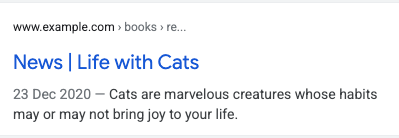
किसी पेज पर मौजूद ब्रेडक्रंब ट्रेल से यह पता चलता है कि साइट के पेजों के क्रम में कोई पेज किस जगह पर है. साथ ही, इससे उपयोगकर्ताओं को साइट के बारे में समझने और बेहतर तरीके से एक्सप्लोर करने में मदद मिल सकती है. उपयोगकर्ता, ब्रेडक्रंब में शामिल साइट के पेजों के क्रम में, नीचे से ऊपर की तरफ़ जा सकता है. वह ब्रेडक्रंब ट्रेल में शामिल आखिरी ब्रेडक्रंब से, एक-एक करके सभी लेवल पर जा सकता है.
सुविधा की उपलब्धता
यह सुविधा, डेस्कटॉप पर उन सभी भाषाओं और देशों में उपलब्ध है जहां Google Search उपलब्ध है.
स्ट्रक्चर्ड डेटा को जोड़ने का तरीका
स्ट्रक्चर्ड डेटा, किसी पेज के बारे में जानकारी देने और पेज के कॉन्टेंट को कैटगरी में बांटने का एक स्टैंडर्ड फ़ॉर्मैट है. अगर आपको स्ट्रक्चर्ड डेटा के बारे में ज़्यादा जानकारी नहीं है, तो स्ट्रक्चर्ड डेटा के काम करने का तरीका देखें.
स्ट्रक्चर्ड डेटा बनाने, उसकी जांच करने, और उसे रिलीज़ करने के बारे में खास जानकारी यहां दी गई है.
- ज़रूरी प्रॉपर्टी जोड़ें. जिस फ़ॉर्मैट का इस्तेमाल हो रहा है उसके हिसाब से जानें कि पेज पर स्ट्रक्चर्ड डेटा कहां डालना है.
- दिशा-निर्देशों का पालन करें.
- ज़्यादा बेहतर नतीजों (रिच रिज़ल्ट) की जांच का इस्तेमाल करके, अपने कोड की पुष्टि करें. साथ ही, सभी ज़रूरी गड़बड़ियों को ठीक करें. ऐसी अन्य समस्याओं को भी ठीक करें जो टूल में फ़्लैग की जा सकती हैं. ऐसा इसलिए, क्योंकि इससे आपके स्ट्रक्चर्ड डेटा की क्वालिटी को बेहतर बनाने में मदद मिल सकती है. हालांकि, ज़्यादा बेहतर नतीजों (रिच रिज़ल्ट) में शामिल होने के लिए, यह ज़रूरी नहीं है.
- स्ट्रक्चर्ड डेटा वाले कुछ पेजों को डिप्लॉय करें. इसके बाद, यूआरएल जांचने वाला टूल इस्तेमाल करके देखें कि Google को पेज कैसा दिखेगा. पक्का करें कि Google आपका पेज ऐक्सेस कर सकता हो. साथ ही, देखें कि उस पेज को robots.txt फ़ाइल और
noindexटैग से ब्लॉक न किया गया हो या लॉग इन करना ज़रूरी न हो. अगर पेज ठीक लगता है, तो Google को अपने यूआरएल फिर से क्रॉल करने के लिए कहा जा सकता है. - Google को आगे होने वाले बदलावों की जानकारी देने के लिए हमारा सुझाव है कि आप साइटमैप सबमिट करें. Search Console साइटमैप एपीआई की मदद से, इसे ऑटोमेट भी किया जा सकता है.
उदाहरण
किसी वेब पेज पर मौजूद जानकारी को खोज नतीजों में बेहतर ढंग से दिखाने के लिए, Google Search ब्रेडक्रंब मार्कअप का इस्तेमाल करता है. उपयोगकर्ता अक्सर किसी ऐसे पेज पर पहुंच जाते हैं जो उनकी खोज क्वेरी से मेल नहीं खाता, जैसा कि ब्रेडक्रंब इस्तेमाल किए जाने के इन मामलों में दिखाया गया है. उपयोगकर्ता को खोज नतीजों में बार-बार एक ही वेब पेज दिख सकता है. ऐसे में ब्रेडक्रंब, Google Search में की गई क्वेरी के मुताबिक कॉन्टेंट को अलग-अलग हिस्सों में बांटता है. फ़िक्शनल बुक के लिए दिए जाने वाले पुरस्कार के विजेता दिखाने वाले पेज पर, इन ब्रेडक्रंब ट्रेल का इस्तेमाल किया जा सकता है:
एक ब्रेडक्रंब ट्रेल
अगर पेज पर ले जाने वाला सिर्फ़ एक ब्रेडक्रंब ट्रेल मौजूद है, तो पेज पर यह ब्रेडक्रंब ट्रेल दिखाया जा सकता है:
किताबें ›साइंस फ़िक्शन ›पुरस्कार विजेता
JSON-LD
ब्रेडक्रंब को दिखाने के लिए, JSON-LD में इसका उदाहरण देखें:
<html>
  <head>
    <title>Award Winners</title>
    <script type="application/ld+json">
    {
      "@context": "https://schema.org",
      "@type": "BreadcrumbList",
      "itemListElement": [{
        "@type": "ListItem",
        "position": 1,
        "name": "Books",
        "item": "https://example.com/books"
      },{
        "@type": "ListItem",
        "position": 2,
        "name": "Science Fiction",
        "item": "https://example.com/books/sciencefiction"
      },{
        "@type": "ListItem",
        "position": 3,
        "name": "Award Winners"
      }]
    }
    </script>
  </head>
  <body>
  </body>
</html>
RDFa
ब्रेडक्रंब को दिखाने के लिए, RDFa में इसका उदाहरण देखें:
<html>
  <head>
    <title>Award Winners</title>
  </head>
  <body>
    <ol vocab="https://schema.org/" typeof="BreadcrumbList">
      <li property="itemListElement" typeof="ListItem">
        <a property="item" typeof="WebPage"
            href="https://example.com/books">
          <span property="name">Books</span></a>
        <meta property="position" content="1">
      </li>
      ›
      <li property="itemListElement" typeof="ListItem">
        <a property="item" typeof="WebPage"
            href="https://example.com/books/sciencefiction">
          <span property="name">Science Fiction</span></a>
        <meta property="position" content="2">
      </li>
      ›
      <li property="itemListElement" typeof="ListItem">
        <span property="name">Award Winners</span>
        <meta property="position" content="3">
      </li>
    </ol>
  </body>
</html>
माइक्रोडेटा
ब्रेडक्रंब को दिखाने के लिए, माइक्रोडेटा में इसका उदाहरण देखें:
<html>
  <head>
    <title>Award Winners</title>
  </head>
  <body>
    <ol itemscope itemtype="https://schema.org/BreadcrumbList">
      <li itemprop="itemListElement" itemscope
          itemtype="https://schema.org/ListItem">
        <a itemprop="item" href="https://example.com/books">
            <span itemprop="name">Books</span></a>
        <meta itemprop="position" content="1" />
      </li>
      ›
      <li itemprop="itemListElement" itemscope
          itemtype="https://schema.org/ListItem">
        <a itemscope itemtype="https://schema.org/WebPage"
           itemprop="item" itemid="https://example.com/books/sciencefiction"
           href="https://example.com/books/sciencefiction">
          <span itemprop="name">Science Fiction</span></a>
        <meta itemprop="position" content="2" />
      </li>
      ›
      <li itemprop="itemListElement" itemscope
          itemtype="https://schema.org/ListItem">
        <span itemprop="name">Award winners</span>
        <meta itemprop="position" content="3" />
      </li>
    </ol>
  </body>
</html>
एचटीएमएल
यहां विज़ुअल डिज़ाइन के हिस्से के तौर पर, पेज में एचटीएमएल ब्रेडक्रंब ब्लॉक का एक उदाहरण दिया गया है.
<html>
  <head>
    <title>Award Winners</title>
  </head>
  <body>
    <ol>
      <li>
        <a href="https://www.example.com/books">Books</a>
      </li>
      <li>
        <a href="https://www.example.com/sciencefiction">Science Fiction</a>
      </li>
      <li>
        Award Winners
      </li>
    </ol>
  </body>
</html>
एक से ज़्यादा ब्रेडक्रंब ट्रेल
अगर आपकी साइट के किसी पेज पर पहुंचने के कई तरीके हैं, तो एक पेज के लिए कई ब्रेडक्रंब ट्रेल तय किए जा सकते हैं. यह एक ब्रेडक्रंब ट्रेल है जो उस पेज पर ले जाती है जहां उन किताबों की जानकारी दी गई है जिन्हें पुरस्कार मिला है:
किताबें ›साइंस फ़िक्शन ›पुरस्कार विजेता
यहां एक और ब्रेडक्रंब ट्रेल है, जो उसी पेज पर ले जाती है:
साहित्य › पुरस्कार विजेता
JSON-LD
यहां JSON-LD का उदाहरण दिया गया है, जो कई ब्रेडक्रंब ट्रेल को दिखाता है:
<html>
  <head>
    <title>Award Winners</title>
    <script type="application/ld+json">
    [{
      "@context": "https://schema.org",
      "@type": "BreadcrumbList",
      "itemListElement": [{
        "@type": "ListItem",
        "position": 1,
        "name": "Books",
        "item": "https://example.com/books"
      },{
        "@type": "ListItem",
        "position": 2,
        "name": "Science Fiction",
        "item": "https://example.com/books/sciencefiction"
      },{
        "@type": "ListItem",
        "position": 3,
        "name": "Award Winners"
      }]
    },
    {
      "@context": "https://schema.org",
      "@type": "BreadcrumbList",
      "itemListElement": [{
        "@type": "ListItem",
        "position": 1,
        "name": "Literature",
        "item": "https://example.com/literature"
      },{
        "@type": "ListItem",
        "position": 2,
        "name": "Award Winners"
      }]
    }]
    </script>
  </head>
  <body>
  </body>
</html>
RDFa
यहां RDFa का उदाहरण दिया गया है, जो कई ब्रेडक्रंब ट्रेल को दिखाता है:
<html>
  <head>
    <title>Award Winners</title>
  </head>
  <body>
    <ol vocab="https://schema.org/" typeof="BreadcrumbList">
      <li property="itemListElement" typeof="ListItem">
        <a property="item" typeof="WebPage"
            href="https://example.com/books">
          <span property="name">Books</span></a>
        <meta property="position" content="1">
      </li>
      ›
      <li property="itemListElement" typeof="ListItem">
        <a property="item" typeof="WebPage"
            href="https://example.com/books/sciencefiction">
          <span property="name">Science Fiction</span></a>
        <meta property="position" content="2">
      </li>
      ›
      <li property="itemListElement" typeof="ListItem">
        <a property="item" typeof="WebPage"
            href="https://example.com/books/sciencefiction/awardwinners">
          <span property="name">Award Winners</span></a>
        <meta property="position" content="3">
      </li>
    </ol>
    <ol vocab="https://schema.org/" typeof="BreadcrumbList">
      <li property="itemListElement" typeof="ListItem">
        <a property="item" typeof="WebPage"
            href="https://example.com/literature">
          <span property="name">Literature</span></a>
        <meta property="position" content="1">
      </li>
      ›
      <li property="itemListElement" typeof="ListItem">
        <span property="name">Award Winners</span>
        <meta property="position" content="2">
      </li>
    </ol>
  </body>
</html>
माइक्रोडेटा
यहां माइक्रोडेटा का उदाहरण दिया गया है, जो कई ब्रेडक्रंब ट्रेल को दिखाता है:
<html>
  <head>
    <title>Award Winners</title>
  </head>
  <body>
    <ol itemscope itemtype="https://schema.org/BreadcrumbList">
      <li itemprop="itemListElement" itemscope
          itemtype="https://schema.org/ListItem">
        <a itemprop="item" href="https://example.com/books">
            <span itemprop="name">Books</span></a>
        <meta itemprop="position" content="1" />
      </li>
      ›
      <li itemprop="itemListElement" itemscope
          itemtype="https://schema.org/ListItem">
        <a itemscope itemtype="https://schema.org/WebPage"
           itemprop="item" itemid="https://example.com/books/sciencefiction"
           href="https://example.com/books/sciencefiction">
          <span itemprop="name">Science Fiction</span></a>
        <meta itemprop="position" content="2" />
      </li>
      ›
      <li itemprop="itemListElement" itemscope
          itemtype="https://schema.org/ListItem">
        <a itemprop="item" href="https://example.com/books/sciencefiction/awardwinners">
          <span itemprop="name">Award Winners</span></a>
        <meta itemprop="position" content="3" />
      </li>
    </ol>
    <ol itemscope itemtype="https://schema.org/BreadcrumbList">
      <li itemprop="itemListElement" itemscope
          itemtype="https://schema.org/ListItem">
        <a itemprop="item" href="https://example.com/literature">
          <span itemprop="name">Literature</span></a>
        <meta itemprop="position" content="1" />
      </li>
      ›
      <li itemprop="itemListElement" itemscope
          itemtype="https://schema.org/ListItem">
        <span itemprop="name">Award Winners</span>
        <meta itemprop="position" content="2" />
      </li>
    </ol>
  </body>
</html>
एचटीएमएल
यहां विज़ुअल डिज़ाइन के हिस्से के तौर पर, पेज में एचटीएमएल ब्रेडक्रंब ब्लॉक का एक उदाहरण दिया गया है.
<html>
  <head>
    <title>Award Winners</title>
  </head>
  <body>
    <ol>
      <li>
        <a href="https://www.example.com/books">Books</a>
      </li>
      <li>
        <a href="https://www.example.com/books/sciencefiction">Science Fiction</a>
      </li>
      <li>
        Award Winners
      </li>
    </ol>
    <ol>
      <li>
        <a href="https://www.example.com/literature">Literature</a>
      </li>
      <li>
        Award Winners
      </li>
    </ol>
  </body>
</html>
दिशा-निर्देश
अगर आप चाहते हैं कि Google Search में आपकी साइट, ब्रेडक्रंब के साथ दिखे, तो इसके लिए आपको इन दिशा-निर्देशों का पालन करना होगा.
- Search पर कॉन्टेंट दिखाने के बुनियादी दिशा-निर्देश
- स्ट्रक्चर्ड डेटा के बारे में सामान्य दिशा-निर्देश
हमारा सुझाव है कि आप यूआरएल स्ट्रक्चर को शेयर करने के बजाय, उस वेब पेज का एक खास उपयोगकर्ता पाथ दिखाने वाले ब्रेडक्रंब उपलब्ध कराएं. टॉप लेवल पाथ (आपकी साइट का डोमेन या होस्ट का नाम) या पेज के लिए, ब्रेडक्रंब ListItem को शामिल करना ज़रूरी नहीं है.
अलग-अलग तरह के स्ट्रक्चर्ड डेटा की परिभाषा
ब्रेडक्रंब तय करने के लिए, ऐसा BreadcrumbList दें जिसमें कम से कम दो
ListItems हों. आपका कॉन्टेंट ब्रेडक्रंब के साथ दिखे, इसके लिए आपको ज़रूरी प्रॉपर्टी शामिल करनी होंगी.
BreadcrumbList
BreadcrumbList एक कंटेनर आइटम है, जिसमें सूची के सभी एलिमेंट होते हैं. BreadcrumbList की पूरी जानकारी schema.org/BreadcrumbList पर मौजूद है.
Google के साथ काम करने वाली प्रॉपर्टी ये हैं:
| ज़रूरी प्रॉपर्टी | |
|---|---|
itemListElement |
एक खास क्रम में लगी ब्रेडक्रंब की सूची. हर ब्रेडक्रंब के लिए एक
{ "@context": "https://schema.org", "@type": "BreadcrumbList", "itemListElement": [{ "@type": "ListItem", "position": 1, "name": "Books", "item": "https://example.com/books" },{ "@type": "ListItem", "position": 2, "name": "Authors", "item": "https://example.com/books/authors" },{ "@type": "ListItem", "position": 3, "name": "Ann Leckie", "item": "https://example.com/books/authors/annleckie" }] } |
ListItem
ListItem में सूची के किसी खास आइटम की जानकारी होती है. ListItem की पूरी जानकारी schema.org/ListItem पर मौजूद है.
Google के साथ काम करने वाली प्रॉपर्टी ये हैं:
| ज़रूरी प्रॉपर्टी | |
|---|---|
item |
ऐसे वेबपेज का यूआरएल जो ब्रेडक्रंब दिखाता हो.
अगर ब्रेडक्रंब, ब्रेडक्रंब ट्रेल में आखिरी आइटम है, तो |
name |
उपयोगकर्ता को दिखाए जाने वाले ब्रेडक्रंब का शीर्षक. अगर |
position |
ब्रेडक्रंब ट्रेल में किसी ब्रेडक्रंब की जगह. क्रम संख्या 1, ब्रेडक्रंब की शुरुआत बताती है. |
Search Console की मदद से, ज़्यादा बेहतर नतीजों (रिच रिज़ल्ट) पर नज़र रखना
Search Console एक ऐसा टूल है जिसकी मदद से, आप Google Search में अपने पेज की परफ़ॉर्मेंस पर नज़र रख सकते हैं. Google Search के नतीजों में अपनी साइट को शामिल कराने के लिए, आपको Search Console में साइन अप करने की ज़रूरत नहीं है. हालांकि, इससे आपको यह समझने में मदद मिलेगी कि Google आपकी साइट को कैसे देखता है. साथ ही, इसकी मदद से, साइट की परफ़ॉर्मेंस को भी बेहतर बनाया जा सकता है. हमारा सुझाव है कि आप इन मामलों में Search Console देखें:
- पहली बार स्ट्रक्चर्ड डेटा इस्तेमाल करने के बाद
- नए टेंप्लेट जारी करने या कोड को अपडेट करने के बाद
- समय-समय पर ट्रैफ़िक का विश्लेषण करते समय
पहली बार स्ट्रक्चर्ड डेटा इस्तेमाल करने के बाद
जब Google, आपके पेजों को इंडेक्स कर ले, तब ज़्यादा बेहतर नतीजों (रिच रिज़ल्ट) की स्थिति वाली रिपोर्ट का इस्तेमाल करके, उन गड़बड़ियों को देखें जिन्हें ठीक करने की ज़रूरत है. आम तौर पर, मान्य आइटम की संख्या में बढ़ोतरी होगी और अमान्य आइटम की संख्या में कोई बढ़ोतरी नहीं होगी. अगर आपको स्ट्रक्चर्ड डेटा में गड़बड़ियां मिलती हैं, तो:
- अमान्य आइटम ठीक करें.
- लाइव यूआरएल की जांच करें और देखें कि गड़बड़ी ठीक हुई है या नहीं.
- स्थिति की रिपोर्ट का इस्तेमाल करके, पुष्टि करने का अनुरोध करें.
नए टेंप्लेट जारी करने या कोड को अपडेट करने के बाद
अपनी वेबसाइट में अहम बदलाव करने पर, स्ट्रक्चर्ड डेटा के अमान्य आइटम की संख्या में बढ़ोतरी पर नज़र रखें.- अगर आपको अमान्य आइटम की संख्या में बढ़ोतरी दिखती है, तो हो सकता है कि आपने ऐसा नया टेंप्लेट रोल आउट किया हो जो काम नहीं करता हो. इसके अलावा, यह भी हो सकता है कि आपकी साइट, मौजूदा टेंप्लेट से नए और खराब तरीके से इंटरैक्ट कर रही हो.
- अगर आपको मान्य आइटम की संख्या में कमी दिखती है, यानी वह अमान्य आइटम की संख्या में बढ़ोतरी से मेल नहीं खाती है, तो हो सकता है कि अब आप पेजों में स्ट्रक्चर्ड डेटा एम्बेड नहीं कर रहे हैं. गड़बड़ी की वजह जानने के लिए, यूआरएल जांचने वाले टूल का इस्तेमाल करें.
समय-समय पर ट्रैफ़िक का विश्लेषण करना
परफ़ॉर्मेंस रिपोर्ट का इस्तेमाल करके, Google Search से आने वाले ट्रैफ़िक का विश्लेषण करें. आपको डेटा से पता चलेगा कि आपका पेज Search में, ज़्यादा बेहतर नतीजे (रिच रिज़ल्ट) के तौर पर कितनी बार दिखता है. साथ ही, यह भी पता चलेगा कि लोग उस पर कितनी बार क्लिक करते हैं और खोज के नतीजों में आपकी साइट के दिखने की औसत जगह क्या है. आपके पास इन नतीजों को Search Console API की मदद से अपने-आप देखने का भी विकल्प है.समस्या हल करना
अगर आपको स्ट्रक्चर्ड डेटा लागू करने या डीबग करने में कोई समस्या आ रही है, तो यहां कुछ ऐसे रिसॉर्स दिए गए हैं जिनसे आपको मदद मिल सकती है.
- अगर आपने कॉन्टेंट मैनेजमेंट सिस्टम (सीएमएस) का इस्तेमाल किया है या कोई दूसरा व्यक्ति आपकी साइट को मैनेज कर रहा है, तो उससे मदद मांगें. उन्हें Search Console का वह मैसेज ज़रूर फ़ॉरवर्ड करें जिसमें समस्या के बारे में बताया गया है.
- Google यह गारंटी नहीं देता है कि जिन पेजों में स्ट्रक्चर्ड डेटा का इस्तेमाल हुआ है वे खोज के नतीजों में दिखेंगे. Google आपके कॉन्टेंट को ज़्यादा बेहतर नतीजों (रिच रिज़ल्ट) में क्यों नहीं दिखा सकता, इसकी आम वजहें जानने के लिए, स्ट्रक्चर्ड डेटा से जुड़े सामान्य दिशा-निर्देश देखें.
- आपके स्ट्रक्चर्ड डेटा में कोई गड़बड़ी हो सकती है. स्ट्रक्चर्ड डेटा से जुड़ी गड़बड़ियों की सूची और पार्स न किए जा सकने वाले स्ट्रक्चर्ड डेटा की रिपोर्ट देखें.
- अगर आपके किसी पेज पर मौजूद स्ट्रक्चर्ड डेटा के ख़िलाफ़ कोई मैन्युअल ऐक्शन लिया गया है, तो उसे अनदेखा कर दिया जाएगा. हालांकि, वह पेज अब भी Google Search के नतीजों में दिख सकता है. स्ट्रक्चर्ड डेटा से जुड़ी समस्याएं ठीक करने के लिए, मैन्युअल ऐक्शन की रिपोर्ट का इस्तेमाल करें.
- आपका कॉन्टेंट, तय किए गए दिशा-निर्देशों का पालन करता है या नहीं, यह जानने के लिए दिशा-निर्देशों को फिर से देखें. स्पैम वाला कॉन्टेंट या मार्कअप इस्तेमाल करने की वजह से, समस्या हो सकती है. हालांकि, यह हो सकता है कि इसकी वजह, सिंटैक्स की समस्या न हो. इस वजह से, 'ज़्यादा बेहतर नतीजों (रिच रिज़ल्ट) का टेस्ट' में इन समस्याओं की पहचान न हो पा रही हो.
- स्ट्रक्चर्ड डेटा से जुड़ी समस्याओं की वजह से, खोज के नतीजों में आपकी साइट का कॉन्टेंट अलग तरह से दिख सकता है. Search Console में इन समस्याओं की पहचान करने, इन्हें हल करने, और इनकी पुष्टि करने का सिलसिलेवार तरीका जानने के लिए, शामिल नहीं किए गए रिच रिज़ल्ट या रिच रिज़ल्ट की कुल संख्या में गिरावट आने की समस्या हल करना गाइड का इस्तेमाल करें.
- पेज को फिर से क्रॉल करने और इंडेक्स करने में कुछ समय लग सकता है. याद रखें कि पेज को पब्लिश करने के बाद, Google को उसे ढूंढने और क्रॉल करने में कुछ दिन लग सकते हैं. क्रॉल और इंडेक्स करने के बारे में सामान्य सवालों के जवाब पाने के लिए, Google Search पर क्रॉल करने और इंडेक्स करने से जुड़े अक्सर पूछे जाने वाले सवाल देखें.
- Google Search Central फ़ोरम में सवाल पोस्ट करें.