

توضّح هذه الصفحة كيفية إنشاء صفحة رئيسية للرسائل المباشرة باستخدام تطبيق Google Chat. الصفحة الرئيسية، التي يُشار إليها باسم الصفحة الرئيسية للتطبيق في Google Chat API، هي واجهة بطاقة قابلة للتخصيص تظهر في علامة التبويب الصفحة الرئيسية ضمن مساحات الرسائل المباشرة على الخاص بين مستخدم وتطبيق Chat.

على عكس تطبيقات المضيفة الأخرى في Google Workspace، لا تعرض الإضافات التي توسّع Chat صفحة رئيسية في لوحة الوصول السريع على يسار الشاشة، ولا تستخدم addOns.common.homepageTrigger في ملف البيان.
بدلاً من ذلك، يعرض Chat صفحتك الرئيسية كبطاقة في علامة التبويب الصفحة الرئيسية ضمن رسالة مباشرة على الخاص مع تطبيق Chat، ويتم إعدادها في وحدة تحكّم Google Cloud.
يمكنك استخدام "صفحة التطبيق الرئيسية" لمشاركة نصائح حول التفاعل مع تطبيق Chat، أو عرض لوحة بيانات مخصّصة للمستخدم، أو السماح للمستخدمين بالوصول إلى خدمة أو أداة خارجية وضبطها من Chat.
استخدِم "أداة إنشاء البطاقات" لتصميم واجهات المستخدم والمراسلة ومعاينتها لتطبيقات Chat:
فتح "أداة إنشاء البطاقات"المتطلبات الأساسية
HTTP
تطبيق Google Chat يتلقّى تفاعلات المستخدمين ويردّ عليها. لإنشاء أحدها، أكمل البداية السريعة لبروتوكول HTTP.
برمجة التطبيقات
تطبيق Google Chat يتلقّى تفاعلات المستخدمين ويردّ عليها. لإنشاء تطبيق، عليك إكمال دليل البدء السريع في برمجة تطبيقات.
ضبط إعدادات "الصفحة الرئيسية للتطبيق" في تطبيق Chat
لتفعيل ميزة "صفحة التطبيق الرئيسية"، فعِّل الخيار تفعيل ميزة "صفحة التطبيق الرئيسية" واضبط المشغّل الخاص بصفحة التطبيق الرئيسية في Google Cloud Console. يتلقّى تطبيق Chat حدث تشغيل صفحة التطبيق الرئيسية عندما يفتح المستخدم علامة التبويب الصفحة الرئيسية في رسالة مباشرة على الخاص مع تطبيق Chat.
لضبط إعدادات "مركز التطبيقات" في Google Cloud Console، اتّبِع الخطوات التالية:
في Google Cloud Console، انتقِل إلى القائمة > واجهات برمجة التطبيقات والخدمات > واجهات برمجة التطبيقات والخدمات المفعَّلة > Google Chat API > الإعدادات.
ضِمن الميزات التفاعلية، تأكَّد من تفعيل تفعيل الميزات التفاعلية، ثم ضَع علامة في المربّع إتاحة "الصفحة الرئيسية للتطبيق" ضِمن الوظائف.
ضمن إعدادات الاتصال > المشغّلات، حدِّد معالج "الصفحة الرئيسية للتطبيق" في حقل الصفحة الرئيسية للتطبيق استنادًا إلى بنية تطبيق Chat:
- HTTP: أدخِل عنوان URL لنقطة نهاية HTTPS التي تعالج طلبات "الصفحة الرئيسية للتطبيق" (أو ضَع علامة في المربّع بجانب استخدام عنوان URL لنقطة نهاية HTTP الشائعة لجميع المشغّلات لكي يتلقّى عنوان URL لنقطة نهاية HTTP الشائعة جميع الأحداث).
- برمجة تطبيقات Google: أدخِل اسم دالة رد الاتصال في "برمجة تطبيقات Google" التي تنشئ بطاقة الصفحة الرئيسية وتعرضها (القيمة التلقائية هي
onAppHome).
انقر على حفظ.
التعامل مع عنصر حدث "الصفحة الرئيسية للتطبيق"
عندما يفتح مستخدم علامة التبويب الصفحة الرئيسية في رسالة مباشرة على الخاص مع تطبيق Chat، يرسل Chat عنصر حدث إلى نقطة نهاية "الصفحة الرئيسية للتطبيق" أو دالّة رد الاتصال.
على عكس أحداث التفاعل مع المساحة أو الرسالة، لا يتضمّن عنصر حدث "الصفحة الرئيسية للتطبيق" الأوّلي حمولة تفاعل موحّدة (مثل messagePayload). ويتضمّن الحقول التالية:
commonEventObject: يشملclientPlatformوhostApp("CHAT") وuserLocaleوuserTimezone.chat.user: مستخدم Chat الذي فتح علامة التبويب الصفحة الرئيسيةchat.eventTime: الطابع الزمني الذي فتح فيه المستخدم علامة التبويب الصفحة الرئيسية.
إنشاء بطاقة "شاشة التطبيق الرئيسية"
عندما يفتح المستخدم علامة التبويب الصفحة الرئيسية، تعامَل مع حدث التشغيل الصفحة الرئيسية للتطبيق من خلال عرض عنصر RenderActions يتضمّن إجراء تنقّل pushCard وCard. لإنشاء تجربة تفاعلية، يمكن أن تحتوي البطاقة على تطبيقات مصغّرة تفاعلية، مثل الأزرار أو حقول إدخال النصوص.
HTTP
{
  "action": {
    "navigations": [
      {
        "pushCard": {
          "header": {
            "title": "Welcome to App Home"
          },
          "sections": [
            {
              "widgets": [
                {
                  "textParagraph": {
                    "text": "Manage your settings and view your dashboard here."
                  }
                },
                {
                  "buttonList": {
                    "buttons": [
                      {
                        "text": "Refresh",
                        "onClick": {
                          "action": {
                            "function": "https://example.com/updateAppHome"
                          }
                        }
                      }
                    ]
                  }
                }
              ]
            }
          ]
        }
      }
    ]
  }
}
برمجة التطبيقات
/**
 * Builds and returns the App Home card when a user opens the Home tab.
 *
 * @param {Object} event The event object from Google Chat.
 * @return {ActionResponse} The RenderActions response pushing the homepage card.
 */
function onAppHome(event) {
  const card = CardService.newCardBuilder()
      .setHeader(
          CardService.newCardHeader().setTitle('Welcome to App Home'))
      .addSection(
          CardService.newCardSection()
              .addWidget(
                  CardService.newTextParagraph().setText(
                      'Manage your settings and view your dashboard here.'))
              .addWidget(
                  CardService.newButtonSet().addButton(
                      CardService.newTextButton()
                          .setText('Refresh')
                          .setOnClickAction(
                              CardService.newAction().setFunctionName(
                                  'updateAppHome')))))
      .build();

  return CardService.newActionResponseBuilder()
      .setNavigation(CardService.newNavigation().pushCard(card))
      .build();
}
الردّ على تفاعلات "الصفحة الرئيسية للتطبيق"
إذا كانت بطاقة "الصفحة الرئيسية للتطبيق" تحتوي على تطبيقات مصغّرة تفاعلية، مثل الأزرار أو إدخالات النماذج، يؤدي النقر على زر إلى إرسال عنصر حدث يحتوي على chat.buttonClickedPayload (بالإضافة إلى commonEventObject.parameters وcommonEventObject.formInputs) إلى وظيفة الإجراء أو نقطة النهاية التي تم ضبطها للزر.
لتعديل بطاقة "الصفحة الرئيسية للتطبيق" استجابةً لتفاعل المستخدم، عليك عرض عنصر RenderActions يتضمّن إجراء تنقّل updateCard. لمزيد من المعلومات حول قراءة مدخلات النماذج من التطبيقات المصغّرة التفاعلية، يُرجى الاطّلاع على قراءة مدخلات بيانات النماذج التي أدخلها المستخدمون على البطاقات.
HTTP
{
  "action": {
    "navigations": [
      {
        "updateCard": {
          "header": {
            "title": "Welcome to App Home"
          },
          "sections": [
            {
              "widgets": [
                {
                  "textParagraph": {
                    "text": "Last updated: 2026-10-02T23:00:00Z"
                  }
                }
              ]
            }
          ]
        }
      }
    ]
  }
}
برمجة التطبيقات
/**
 * Updates the App Home card when a user clicks the Refresh button.
 *
 * @param {Object} event The event object from Google Chat.
 * @return {ActionResponse} The RenderActions response updating the homepage card.
 */
function updateAppHome(event) {
  const updatedCard = CardService.newCardBuilder()
      .setHeader(
          CardService.newCardHeader().setTitle('Welcome to App Home'))
      .addSection(
          CardService.newCardSection().addWidget(
              CardService.newTextParagraph().setText(
                  'Last updated: ' + new Date().toTimeString())))
      .build();

  return CardService.newActionResponseBuilder()
      .setNavigation(CardService.newNavigation().updateCard(updatedCard))
      .build();
}
فتح مربّعات الحوار من "الصفحة الرئيسية للتطبيق"
يمكن لتطبيق Chat أيضًا الردّ على التفاعلات في "مركز التطبيقات" من خلال فتح مربّعات حوار.
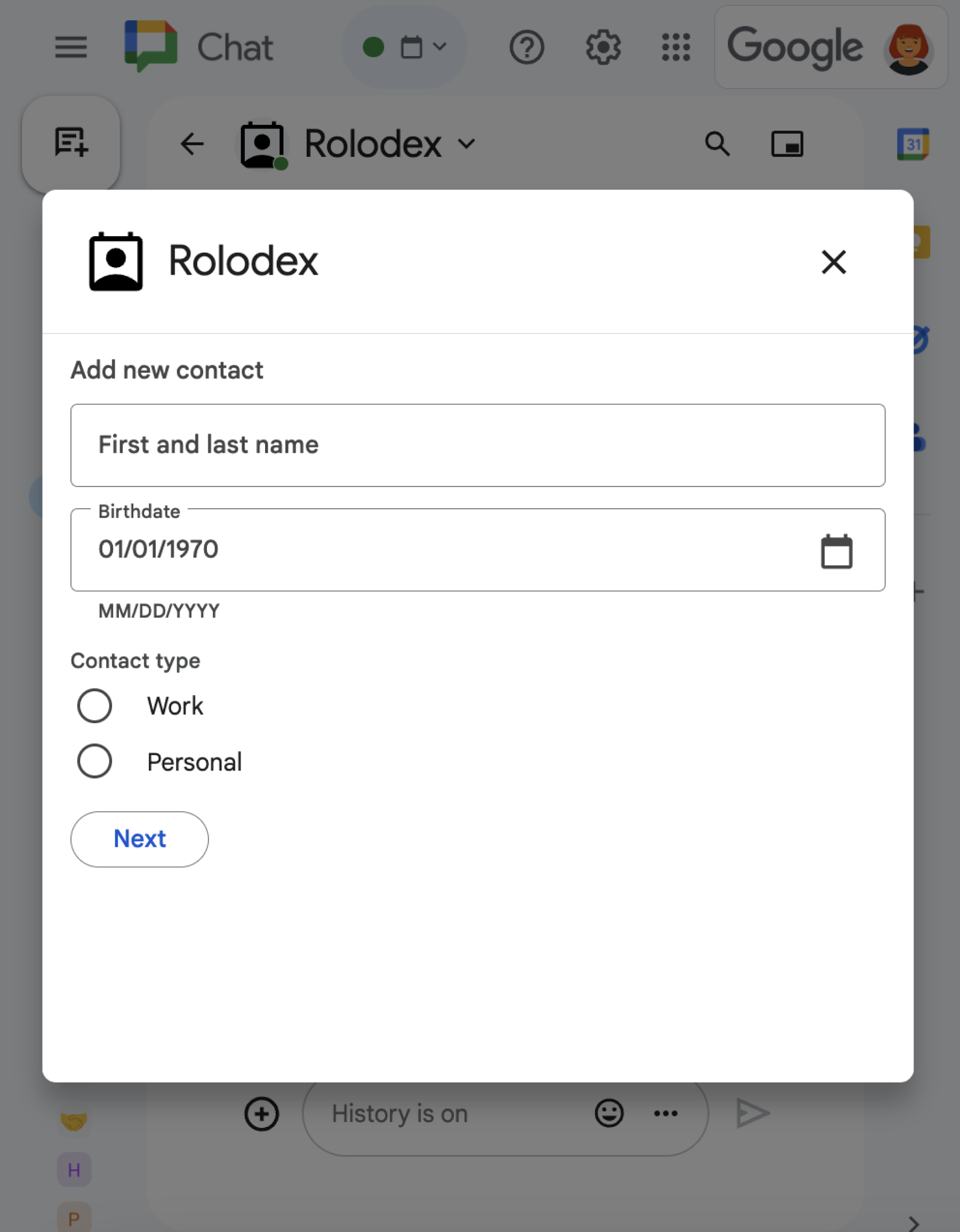
للتعرّف على كيفية فتح مربّعات الحوار وتعديلها وإغلاقها باستخدام RenderActions
(pushCard وupdateCard وendNavigation: "CLOSE_DIALOG")، يُرجى الاطّلاع على
فتح مربّعات الحوار التفاعلية.
المواضيع ذات الصلة
- تلقّي تفاعلات المستخدمين والردّ عليها
- فتح مربّعات الحوار التفاعلية
- قراءة بيانات النماذج التي أدخلها المستخدمون على البطاقات
- عرض نماذج من تطبيقات Chat
تطبيقات Chat التي ليست إضافات: إنشاء صفحة رئيسية لتطبيق Chat
إذا كنت تحتفظ بتطبيق Chat ليس إضافة في Google Workspace، يرسل Chat حدث تفاعل APP_HOME عندما يفتح المستخدم علامة التبويب الصفحة الرئيسية، ويرسل أحداث تفاعل CARD_CLICKED أو SUBMIT_FORM عندما يتفاعل المستخدم مع التطبيقات المصغّرة في بطاقة "الصفحة الرئيسية للتطبيق".
لترقية تطبيق Chat ليس إضافة إلى إطار عمل إضافات Google Workspace، يُرجى الاطّلاع على تحويل تطبيق Google Chat إلى إضافة Google Workspace.
إنشاء بطاقة "الصفحة الرئيسية للتطبيق" في تطبيق Chat ليس إضافة
في تطبيق Chat ليس إضافة، عالِج حدث التفاعل APP_HOME من خلال عرض ردّ يتضمّن الحقل renderActions ذو المستوى الأعلى مع pushCard navigation:
Node.js
Python
جافا
برمجة التطبيقات
يرسل هذا المثال رسالة بطاقة من خلال عرض ملف JSON للبطاقة. يمكنك أيضًا استخدام خدمة البطاقات في "برمجة تطبيقات Google".
الردّ على تفاعلات "صفحة التطبيق الرئيسية" في تطبيق Chat ليس إضافة
في تطبيق Chat ليس إضافة، عالِج أحداث التفاعل CARD_CLICKED أو SUBMIT_FORM من بطاقة "الصفحة الرئيسية للتطبيق" من خلال عرض ردّ يحتوي على حقل renderActions ذي مستوى أعلى مع عملية التنقّل updateCard:
Node.js
Python
جافا
برمجة التطبيقات
يرسل هذا المثال رسالة بطاقة من خلال عرض ملف JSON للبطاقة. يمكنك أيضًا استخدام خدمة البطاقات في "برمجة تطبيقات Google".