

На этой странице объясняется, как создать главную страницу для личных сообщений в вашем приложении Google Chat. Главная страница, называемая в API Google Chat « домашней страницей приложения », представляет собой настраиваемый карточный интерфейс, который отображается на вкладке «Главная» в пространствах личных сообщений между пользователем и приложением Chat.

На главной странице приложения вы можете делиться советами по взаимодействию с приложением «Чат» или предоставлять пользователям доступ к внешним сервисам или инструментам из приложения «Чат» и разрешать им их использование.
Используйте конструктор карточек для разработки и предварительного просмотра сообщений и пользовательских интерфейсов для чат-приложений:
Откройте конструктор карточек.Предварительные требования
Node.js
Приложение Google Chat, которое получает и обрабатывает события взаимодействия . Чтобы создать интерактивное приложение чата с использованием HTTP-сервиса, выполните следующие действия в этом кратком руководстве .Python
Приложение Google Chat, которое получает и обрабатывает события взаимодействия . Чтобы создать интерактивное приложение чата с использованием HTTP-сервиса, выполните следующие действия в этом кратком руководстве .Java
Приложение Google Chat, которое получает и обрабатывает события взаимодействия . Чтобы создать интерактивное приложение чата с использованием HTTP-сервиса, выполните следующие действия в этом кратком руководстве .Apps Script
Приложение Google Chat, которое получает и обрабатывает события взаимодействия . Чтобы создать интерактивное приложение чата в Apps Script, выполните следующие действия в этом кратком руководстве .Настройте главный экран вашего приложения «Чат».
Для поддержки функции «Главная страница приложения» необходимо настроить ваше приложение «Чат» на получение событий взаимодействия APP_HOME . Ваше приложение «Чат» получает это событие всякий раз, когда пользователь нажимает на вкладку «Главная» в личном сообщении в приложении «Чат».
Чтобы обновить параметры конфигурации в консоли Google Cloud, выполните следующие действия:
- В консоли Google Cloud перейдите в «Меню» > «API и сервисы» > «Включенные API и сервисы» > «Google Chat API» > «Конфигурация» . Перейдите в раздел «Конфигурация Chat API».
- В разделе «Интерактивные функции» перейдите в раздел «Функциональность» и выберите «Домашняя страница приложения поддержки» .
- Если ваше приложение для чата использует HTTP-сервис, перейдите в настройки подключения и укажите конечную точку в поле «URL-адрес домашней страницы приложения» . Вы можете использовать тот же URL-адрес, который указали в поле «URL-адрес конечной точки HTTP» .
- Нажмите « Сохранить ».
Создайте главную карточку приложения
Когда пользователь открывает главный экран приложения, ваше приложение чата должно обработать событие взаимодействия APP_HOME , вернув экземпляр RenderActions с навигацией pushCard и объектом Card . Для создания интерактивного интерфейса карта может содержать интерактивные виджеты, такие как кнопки или текстовые поля ввода, которые приложение чата может обрабатывать и на которые может отвечать, добавляя дополнительные карты или диалоговое окно.
В следующем примере приложение «Чат» отображает начальную карточку на главной странице, на которой указано время создания карточки и кнопка. Когда пользователь нажимает кнопку, приложение «Чат» возвращает обновленную карточку, на которой отображается время создания обновленной карточки.
Node.js
Python
Java
Apps Script
Реализуйте функцию onAppHome , которая вызывается после всех событий взаимодействия APP_HOME :
В этом примере отправляется сообщение в виде карточки, возвращая JSON-объект с именем карточки . Вы также можете использовать службу создания карточек Apps Script .
Реагируйте на действия, происходящие на главной странице приложения.
Если на главной странице вашего приложения присутствуют интерактивные виджеты, такие как кнопки или поля ввода, ваше приложение «Чат» должно обрабатывать соответствующие события взаимодействия, возвращая экземпляр RenderActions с навигацией updateCard . Для получения дополнительной информации об обработке интерактивных виджетов см. раздел «Обработка информации, введенной пользователями» .
В предыдущем примере на начальном экране приложения отображалась кнопка. При каждом нажатии пользователем этой кнопки срабатывает событие взаимодействия CARD_CLICKED , которое запускает функцию updateAppHome для обновления экрана приложения, как показано в следующем коде:
Node.js
Python
Java
Apps Script
В этом примере отправляется сообщение в виде карточки, возвращая JSON-объект с именем карточки . Вы также можете использовать службу создания карточек Apps Script .
Открыть диалоги
Ваше приложение «Чат» также может отвечать на сообщения на главной странице приложения, открывая диалоговые окна .
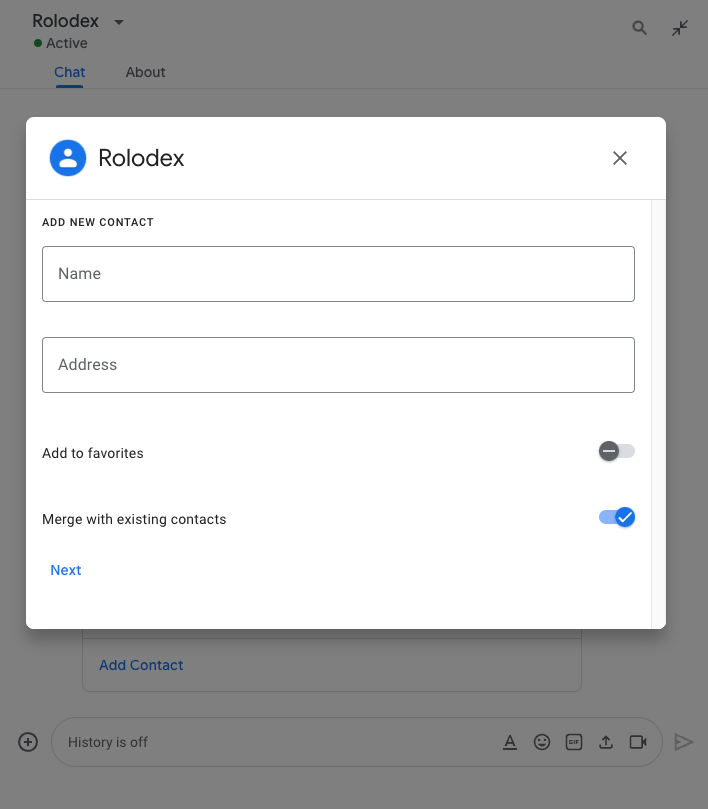
Чтобы открыть диалоговое окно с главного экрана приложения, обработайте соответствующее событие взаимодействия, вернув renderActions с навигацией updateCard , содержащей объект Card . В следующем примере приложение «Чат» реагирует на нажатие кнопки на карточке главного экрана приложения, обрабатывая событие взаимодействия CARD_CLICKED и открывая диалоговое окно:
{ renderActions: { action: { navigations: [{ updateCard: { sections: [{
  header: "Add new contact",
  widgets: [{ "textInput": {
    label: "Name",
    type: "SINGLE_LINE",
    name: "contactName"
  }}, { textInput: {
    label: "Address",
    type: "MULTIPLE_LINE",
    name: "address"
  }}, { decoratedText: {
    text: "Add to favorites",
    switchControl: {
      controlType: "SWITCH",
      name: "saveFavorite"
    }
  }}, { decoratedText: {
    text: "Merge with existing contacts",
    switchControl: {
      controlType: "SWITCH",
      name: "mergeContact",
      selected: true
    }
  }}, { buttonList: { buttons: [{
    text: "Next",
    onClick: { action: { function: "openSequentialDialog" }}
  }]}}]
}]}}]}}}
Для закрытия диалога обработайте следующие события взаимодействия:
-
CLOSE_DIALOG: Закрывает диалоговое окно и возвращает на главную страницу приложения «Чат». -
CLOSE_DIALOG_AND_EXECUTE: Закрывает диалоговое окно и обновляет главную страницу приложения.
В следующем примере кода используется CLOSE_DIALOG для закрытия диалогового окна и возврата на главную страницу приложения:
{ renderActions: { action: {
  navigations: [{ endNavigation: { action: "CLOSE_DIALOG" }}]
}}}
Для сбора информации от пользователей можно также создавать последовательные диалоги. Чтобы узнать, как создавать последовательные диалоги, см. раздел «Открытие диалогов и ответы на них» .
Связанные темы
- Посмотрите примеры приложений для чата , использующих главную страницу приложения.
- Открывайте диалоги и отвечайте на них .