Wyświetl podgląd linków z elementami inteligentnymi

Z tej strony dowiesz się, jak utworzyć dodatek do Google Workspace, który umożliwia użytkownikom Dokumentów, Arkuszy i Prezentacji Google wyświetlanie podglądu linków z usługi innej firmy.

Dodatek do Google Workspace może wykrywać linki do Twojej usługi i wyświetlać użytkownikom prośbę o wyświetlenie ich podglądu. Możesz skonfigurować dodatek tak, aby wyświetlał podgląd wielu wzorców adresów URL, np. linków do zgłoszeń do pomocy, potencjalnych klientów i profili pracowników.

Jak użytkownicy wyświetlają podgląd linków

Aby wyświetlić podgląd linków, użytkownicy wchodzą w interakcję z elementami inteligentnymi i kartami.
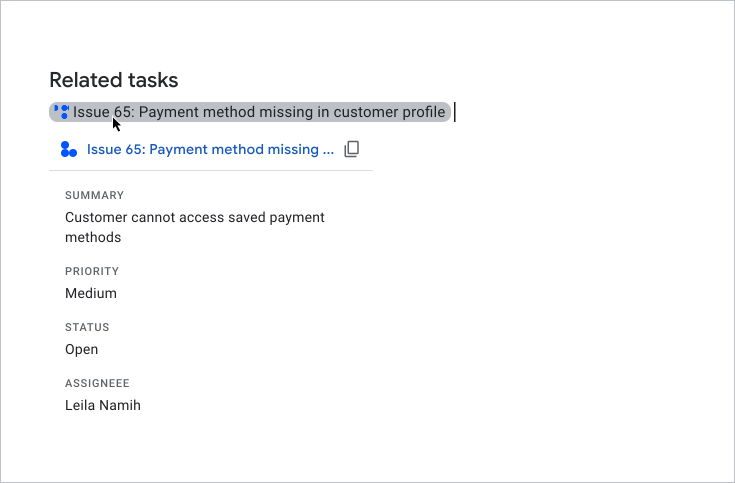
Użytkownik wyświetla podgląd karty

Gdy użytkownicy wpisują lub wklejają adres URL w dokumencie lub arkuszu kalkulacyjnym, Dokumenty lub Arkusze Google wyświetlają prośbę o zastąpienie linku elementem inteligentnym. Element inteligentny wyświetla ikonę oraz krótki tytuł lub opis treści linku. Gdy użytkownik najedzie kursorem na element, zobaczy interfejs karty, który wyświetla podgląd dodatkowych informacji o pliku lub linku.

Z tego filmu dowiesz się, jak użytkownik może przekonwertować link na element inteligentny i wyświetlić podgląd karty:

Jak użytkownicy wyświetlają podgląd linków w Prezentacjach

Elementy inteligentne innych firm nie są obsługiwane w przypadku podglądu linków w Prezentacjach. Gdy użytkownicy wpisują lub wklejają adres URL w prezentacji, Prezentacje wyświetlają prośbę o zastąpienie linku jego tytułem jako tekstem połączonym, a nie elementem. Gdy użytkownik najedzie kursorem na tytuł linku, zobaczy interfejs karty, który wyświetla podgląd informacji o linku.

Na tym obrazie widać, jak wygląda podgląd linku w Prezentacjach:

Przykład podglądu linku w Prezentacjach

Wymagania wstępne

Apps Script

Node.js

Python

Java

Opcjonalnie: konfigurowanie uwierzytelniania w usłudze innej firmy

Jeśli Twój dodatek łączy się z usługą, która wymaga autoryzacji, użytkownicy muszą się w niej uwierzytelnić, aby wyświetlić podgląd linków. Oznacza to, że gdy użytkownicy po raz pierwszy wkleją link z Twojej usługi do pliku Dokumentów, Arkuszy lub Prezentacji, Twój dodatek musi wywołać proces autoryzacji.

Aby skonfigurować usługę OAuth lub niestandardowy monit o autoryzację, przeczytaj artykuł Łączenie dodatku z usługą innej firmy.

W tej sekcji dowiesz się, jak skonfigurować podgląd linków w dodatku. Obejmuje to te czynności:

  1. Konfigurowanie podglądu linków w pliku manifestu dodatku.
  2. Tworzenie interfejsu elementu inteligentnego i karty dla linków.

Konfigurowanie podglądu linków

Aby skonfigurować podgląd linków, w pliku manifestu dodatku określ te sekcje i pola:

  1. W sekcji addOns dodaj pole docs, aby rozszerzyć Dokumenty, pole sheets, aby rozszerzyć Arkusze, oraz pole slides, aby rozszerzyć Prezentacje.
  2. W każdym polu zaimplementuj wyzwalacz linkPreviewTriggers, który zawiera runFunction (tę funkcję zdefiniujesz w następnej sekcji Tworzenie elementu inteligentnego i karty).

    Więcej informacji o polach, które możesz określić w wyzwalaczu linkPreviewTriggers , znajdziesz w dokumentacji referencyjnej dotyczącej plików manifestu Apps Script lub zasobów wdrożenia w przypadku innych środowisk wykonawczych.

  3. W polu oauthScopes dodaj zakres https://www.googleapis.com/auth/workspace.linkpreview, aby użytkownicy mogli autoryzować dodatek do wyświetlania podglądu linków w ich imieniu.

Jako przykład zobacz sekcje oauthScopes i addons w tym pliku manifestu, który konfiguruje podgląd linków w usłudze zgłoszeń do zespołu pomocy.

{
  "oauthScopes": [
    "https://www.googleapis.com/auth/workspace.linkpreview"
  ],
  "addOns": {
    "common": {
      "name": "Preview support cases",
      "logoUrl": "https://www.example.com/images/company-logo.png",
      "layoutProperties": {
        "primaryColor": "#dd4b39"
      }
    },
    "docs": {
      "linkPreviewTriggers": [
        {
          "runFunction": "caseLinkPreview",
          "patterns": [
            {
              "hostPattern": "example.com",
              "pathPrefix": "support/cases"
            },
            {
              "hostPattern": "*.example.com",
              "pathPrefix": "cases"
            },
            {
              "hostPattern": "cases.example.com"
            }
          ],
          "labelText": "Support case",
          "logoUrl": "https://www.example.com/images/support-icon.png",
          "localizedLabelText": {
            "es": "Caso de soporte"
          }
        }
      ]
    },
    "sheets": {
      "linkPreviewTriggers": [
        {
          "runFunction": "caseLinkPreview",
          "patterns": [
            {
              "hostPattern": "example.com",
              "pathPrefix": "support/cases"
            },
            {
              "hostPattern": "*.example.com",
              "pathPrefix": "cases"
            },
            {
              "hostPattern": "cases.example.com"
            }
          ],
          "labelText": "Support case",
          "logoUrl": "https://www.example.com/images/support-icon.png",
          "localizedLabelText": {
            "es": "Caso de soporte"
          }
        }
      ]
    },
    "slides": {
      "linkPreviewTriggers": [
        {
          "runFunction": "caseLinkPreview",
          "patterns": [
            {
              "hostPattern": "example.com",
              "pathPrefix": "support/cases"
            },
            {
              "hostPattern": "*.example.com",
              "pathPrefix": "cases"
            },
            {
              "hostPattern": "cases.example.com"
            }
          ],
          "labelText": "Support case",
          "logoUrl": "https://www.example.com/images/support-icon.png",
          "localizedLabelText": {
            "es": "Caso de soporte"
          }
        }
      ]
    }
  }
}

W tym przykładzie dodatek do Google Workspace wyświetla podgląd linków w usłudze zgłoszeń do zespołu pomocy firmy. Dodatek określa 3 wzorce adresów URL, aby wyświetlać podgląd linków. Gdy link pasuje do jednego z wzorców adresów URL, funkcja wywołania zwrotnego caseLinkPreview tworzy i wyświetla kartę oraz element inteligentny w Dokumentach, Arkuszach lub Prezentacjach i zastępuje adres URL tytułem linku.

Tworzenie elementu inteligentnego i karty

Aby zwrócić element inteligentny i kartę dla linku, musisz zaimplementować wszystkie funkcje określone w obiekcie linkPreviewTriggers.

Gdy użytkownik wejdzie w interakcję z linkiem pasującym do określonego wzorca adresu URL, uruchomi się wyzwalacz linkPreviewTriggers, a jego funkcja wywołania zwrotnego przekaże obiekt zdarzenia EDITOR_NAME.matchedUrl.url jako argument. Używasz ładunku tego obiektu zdarzenia, aby utworzyć element inteligentny i kartę na potrzeby podglądu linku.

Jeśli na przykład użytkownik wyświetli podgląd linku https://www.example.com/cases/123456 w Dokumentach, zostanie zwrócony ten ładunek zdarzenia:

JSON

{
  "docs": {
    "matchedUrl": {
        "url": "https://www.example.com/support/cases/123456"
    }
  }
}

Aby utworzyć interfejs karty, użyj widżetów do wyświetlania informacji o linku. Możesz też utworzyć działania, które umożliwiają użytkownikom otwieranie linku lub modyfikowanie jego zawartości. Listę dostępnych widżetów i działań znajdziesz w sekcji Obsługiwane komponenty kart podglądu.

Aby utworzyć element inteligentny i kartę na potrzeby podglądu linku:

  1. Zaimplementuj funkcję określoną w sekcji linkPreviewTriggers pliku manifestu dodatku:
    1. Funkcja musi przyjmować obiekt zdarzenia zawierający EDITOR_NAME.matchedUrl.url jako argument i zwracać pojedynczy Card obiekt.
    2. Jeśli Twoja usługa wymaga autoryzacji, funkcja musi też wywoływać proces autoryzacji.
  2. W przypadku każdej karty podglądu zaimplementuj wszystkie funkcje wywołania zwrotnego, które zapewniają interaktywność widżetów w interfejsie. Jeśli na przykład dodasz przycisk „Wyświetl link”, możesz utworzyć działanie, które określa funkcję wywołania zwrotnego, aby otworzyć link w nowym oknie. Więcej informacji o interakcjach z widżetami znajdziesz w sekcji Działania dodatku.

Ten kod tworzy funkcję wywołania zwrotnego caseLinkPreview dla Dokumentów:

Apps Script

apps-script/3p-resources/3p-resources.gs
/**
* Entry point for a support case link preview.
*
* @param {!Object} event The event object.
* @return {!Card} The resulting preview link card.
*/
function caseLinkPreview(event) {

  // If the event object URL matches a specified pattern for support case links.
  if (event.docs.matchedUrl.url) {

    // Uses the event object to parse the URL and identify the case details.
    const caseDetails = parseQuery(event.docs.matchedUrl.url);

    // Builds a preview card with the case name, and description
    const caseHeader = CardService.newCardHeader()
      .setTitle(`Case ${caseDetails["name"][0]}`);
    const caseDescription = CardService.newTextParagraph()
      .setText(caseDetails["description"][0]);

    // Returns the card.
    // Uses the text from the card's header for the title of the smart chip.
    return CardService.newCardBuilder()
      .setHeader(caseHeader)
      .addSection(CardService.newCardSection().addWidget(caseDescription))
      .build();
  }
}

/**
* Extracts the URL parameters from the given URL.
*
* @param {!string} url The URL to parse.
* @return {!Map} A map with the extracted URL parameters.
*/
function parseQuery(url) {
  const query = url.split("?")[1];
  if (query) {
    return query.split("&")
    .reduce(function(o, e) {
      var temp = e.split("=");
      var key = temp[0].trim();
      var value = temp[1].trim();
      value = isNaN(value) ? value : Number(value);
      if (o[key]) {
        o[key].push(value);
      } else {
        o[key] = [value];
      }
      return o;
    }, {});
  }
  return null;
}

Node.js

node/3p-resources/index.js
/**
 * 
 * A support case link preview.
 *
 * @param {!URL} url The event object.
 * @return {!Card} The resulting preview link card.
 */
function caseLinkPreview(url) {
  // Builds a preview card with the case name, and description
  // Uses the text from the card's header for the title of the smart chip.
  // Parses the URL and identify the case details.
  const name = `Case ${url.searchParams.get("name")}`;
  return {
    action: {
      linkPreview: {
        title: name,
        previewCard: {
          header: {
            title: name
          },
          sections: [{
            widgets: [{
              textParagraph: {
                text: url.searchParams.get("description")
              }
            }]
          }]
        }
      }
    }
  };
}

Python

python/3p-resources/create_link_preview/main.py
def case_link_preview(url):
    """A support case link preview.
    Args:
      url: A matching URL.
    Returns:
      The resulting preview link card.
    """

    # Parses the URL and identify the case details.
    query_string = parse_qs(url.query)
    name = f'Case {query_string["name"][0]}'
    # Uses the text from the card's header for the title of the smart chip.
    return {
        "action": {
            "linkPreview": {
                "title": name,
                "previewCard": {
                    "header": {
                        "title": name
                    },
                    "sections": [{
                        "widgets": [{
                            "textParagraph": {
                                "text": query_string["description"][0]
                            }
                        }]
                    }],
                }
            }
        }
    }

Java

java/3p-resources/src/main/java/CreateLinkPreview.java
/**
 * A support case link preview.
 *
 * @param url A matching URL.
 * @return The resulting preview link card.
 */
JsonObject caseLinkPreview(URL url) throws UnsupportedEncodingException {
  // Parses the URL and identify the case details.
  Map<String, String> caseDetails = new HashMap<String, String>();
  for (String pair : url.getQuery().split("&")) {
      caseDetails.put(URLDecoder.decode(pair.split("=")[0], "UTF-8"), URLDecoder.decode(pair.split("=")[1], "UTF-8"));
  }

  // Builds a preview card with the case name, and description
  // Uses the text from the card's header for the title of the smart chip.
  JsonObject cardHeader = new JsonObject();
  String caseName = String.format("Case %s", caseDetails.get("name"));
  cardHeader.add("title", new JsonPrimitive(caseName));

  JsonObject textParagraph = new JsonObject();
  textParagraph.add("text", new JsonPrimitive(caseDetails.get("description")));

  JsonObject widget = new JsonObject();
  widget.add("textParagraph", textParagraph);

  JsonArray widgets = new JsonArray();
  widgets.add(widget);

  JsonObject section = new JsonObject();
  section.add("widgets", widgets);

  JsonArray sections = new JsonArray();
  sections.add(section);

  JsonObject previewCard = new JsonObject();
  previewCard.add("header", cardHeader);
  previewCard.add("sections", sections);

  JsonObject linkPreview = new JsonObject();
  linkPreview.add("title", new JsonPrimitive(caseName));
  linkPreview.add("previewCard", previewCard);

  JsonObject action = new JsonObject();
  action.add("linkPreview", linkPreview);

  JsonObject renderActions = new JsonObject();
  renderActions.add("action", action);

  return renderActions;
}

Obsługiwane komponenty kart podglądu

Dodatki do Google Workspace obsługują te widżety i działania w przypadku kart podglądu linków:

Apps Script

Pole usługi kart Typ
TextParagraph Widżet
DecoratedText Widżet
Image Widżet
IconImage Widżet
ButtonSet Widżet
TextButton Widżet
ImageButton Widżet
Grid Widżet
Divider Widżet
OpenLink Działanie
Navigation Działanie
Obsługiwana jest tylko metoda updateCard.

JSON

Pole karty (google.apps.card.v1) Typ
TextParagraph Widżet
DecoratedText Widżet
Image Widżet
Icon Widżet
ButtonList Widżet
Button Widżet
Grid Widżet
Divider Widżet
OpenLink Działanie
Navigation Działanie
Obsługiwana jest tylko metoda updateCard.

Kompletny przykład: dodatek do zgłoszeń do zespołu pomocy

Ten przykład przedstawia dodatek do Google Workspace, który wyświetla podgląd linków do zgłoszeń do pomocy firmy w Dokumentach Google.

Przykład wykonuje te czynności:

  • Wyświetla podgląd linków do zgłoszeń do pomocy, np. https://www.example.com/support/cases/1234. Element inteligentny wyświetla ikonę pomocy, a karta podglądu zawiera identyfikator zgłoszenia i opis.
  • Jeśli ustawienia regionalne użytkownika są ustawione na język hiszpański, element inteligentny lokalizuje pole labelText na język hiszpański.

Plik manifestu

Apps Script

apps-script/3p-resources/appsscript.json
{
  "timeZone": "America/New_York",
  "exceptionLogging": "STACKDRIVER",
  "runtimeVersion": "V8",
  "oauthScopes": [
    "https://www.googleapis.com/auth/workspace.linkpreview",
    "https://www.googleapis.com/auth/workspace.linkcreate"
  ],
  "addOns": {
    "common": {
      "name": "Manage support cases",
      "logoUrl": "https://developers.google.com/workspace/add-ons/images/support-icon.png",
      "layoutProperties": {
        "primaryColor": "#dd4b39"
      }
    },
    "docs": {
      "linkPreviewTriggers": [
        {
          "runFunction": "caseLinkPreview",
          "patterns": [
            {
              "hostPattern": "example.com",
              "pathPrefix": "support/cases"
            },
            {
              "hostPattern": "*.example.com",
              "pathPrefix": "cases"
            },
            {
              "hostPattern": "cases.example.com"
            }
          ],
          "labelText": "Support case",
          "localizedLabelText": {
            "es": "Caso de soporte"
          },
          "logoUrl": "https://developers.google.com/workspace/add-ons/images/support-icon.png"
        }
      ],
      "createActionTriggers": [
        {
          "id": "createCase",
          "labelText": "Create support case",
          "localizedLabelText": {
            "es": "Crear caso de soporte"
          },
          "runFunction": "createCaseInputCard",
          "logoUrl": "https://developers.google.com/workspace/add-ons/images/support-icon.png"
        }
      ]
    }
  }
}

JSON

{
  "oauthScopes": [
    "https://www.googleapis.com/auth/workspace.linkpreview"
  ],
  "addOns": {
    "common": {
      "name": "Preview support cases",
      "logoUrl": "https://developers.google.com/workspace/add-ons/images/support-icon.png",
      "layoutProperties": {
        "primaryColor": "#dd4b39"
      }
    },
    "docs": {
      "linkPreviewTriggers": [
        {
          "runFunction": "URL",
          "patterns": [
            {
              "hostPattern": "example.com",
              "pathPrefix": "support/cases"
            },
            {
              "hostPattern": "*.example.com",
              "pathPrefix": "cases"
            },
            {
              "hostPattern": "cases.example.com"
            }
          ],
          "labelText": "Support case",
          "localizedLabelText": {
            "es": "Caso de soporte"
          },
          "logoUrl": "https://developers.google.com/workspace/add-ons/images/support-icon.png"
        }
      ]
    }
  }
}

Kod

Apps Script

apps-script/3p-resources/3p-resources.gs
/**
* Entry point for a support case link preview.
*
* @param {!Object} event The event object.
* @return {!Card} The resulting preview link card.
*/
function caseLinkPreview(event) {

  // If the event object URL matches a specified pattern for support case links.
  if (event.docs.matchedUrl.url) {

    // Uses the event object to parse the URL and identify the case details.
    const caseDetails = parseQuery(event.docs.matchedUrl.url);

    // Builds a preview card with the case name, and description
    const caseHeader = CardService.newCardHeader()
      .setTitle(`Case ${caseDetails["name"][0]}`);
    const caseDescription = CardService.newTextParagraph()
      .setText(caseDetails["description"][0]);

    // Returns the card.
    // Uses the text from the card's header for the title of the smart chip.
    return CardService.newCardBuilder()
      .setHeader(caseHeader)
      .addSection(CardService.newCardSection().addWidget(caseDescription))
      .build();
  }
}

/**
* Extracts the URL parameters from the given URL.
*
* @param {!string} url The URL to parse.
* @return {!Map} A map with the extracted URL parameters.
*/
function parseQuery(url) {
  const query = url.split("?")[1];
  if (query) {
    return query.split("&")
    .reduce(function(o, e) {
      var temp = e.split("=");
      var key = temp[0].trim();
      var value = temp[1].trim();
      value = isNaN(value) ? value : Number(value);
      if (o[key]) {
        o[key].push(value);
      } else {
        o[key] = [value];
      }
      return o;
    }, {});
  }
  return null;
}

Node.js

node/3p-resources/index.js
/**
 * Responds to any HTTP request related to link previews.
 *
 * @param {Object} req An HTTP request context.
 * @param {Object} res An HTTP response context.
 */
exports.createLinkPreview = (req, res) => {
  const event = req.body;
  if (event.docs.matchedUrl.url) {
    const url = event.docs.matchedUrl.url;
    const parsedUrl = new URL(url);
    // If the event object URL matches a specified pattern for preview links.
    if (parsedUrl.hostname === 'example.com') {
      if (parsedUrl.pathname.startsWith('/support/cases/')) {
        return res.json(caseLinkPreview(parsedUrl));
      }
    }
  }
};


/**
 * 
 * A support case link preview.
 *
 * @param {!URL} url The event object.
 * @return {!Card} The resulting preview link card.
 */
function caseLinkPreview(url) {
  // Builds a preview card with the case name, and description
  // Uses the text from the card's header for the title of the smart chip.
  // Parses the URL and identify the case details.
  const name = `Case ${url.searchParams.get("name")}`;
  return {
    action: {
      linkPreview: {
        title: name,
        previewCard: {
          header: {
            title: name
          },
          sections: [{
            widgets: [{
              textParagraph: {
                text: url.searchParams.get("description")
              }
            }]
          }]
        }
      }
    }
  };
}

Python

python/3p-resources/create_link_preview/main.py
from typing import Any, Mapping
from urllib.parse import urlparse, parse_qs

import flask
import functions_framework


@functions_framework.http
def create_link_preview(req: flask.Request):
    """Responds to any HTTP request related to link previews.
    Args:
      req: An HTTP request context.
    Returns:
      An HTTP response context.
    """
    event = req.get_json(silent=True)
    if event["docs"]["matchedUrl"]["url"]:
        url = event["docs"]["matchedUrl"]["url"]
        parsed_url = urlparse(url)
        # If the event object URL matches a specified pattern for preview links.
        if parsed_url.hostname == "example.com":
            if parsed_url.path.startswith("/support/cases/"):
                return case_link_preview(parsed_url)

    return {}


def case_link_preview(url):
    """A support case link preview.
    Args:
      url: A matching URL.
    Returns:
      The resulting preview link card.
    """

    # Parses the URL and identify the case details.
    query_string = parse_qs(url.query)
    name = f'Case {query_string["name"][0]}'
    # Uses the text from the card's header for the title of the smart chip.
    return {
        "action": {
            "linkPreview": {
                "title": name,
                "previewCard": {
                    "header": {
                        "title": name
                    },
                    "sections": [{
                        "widgets": [{
                            "textParagraph": {
                                "text": query_string["description"][0]
                            }
                        }]
                    }],
                }
            }
        }
    }

Java

java/3p-resources/src/main/java/CreateLinkPreview.java
import com.google.cloud.functions.HttpFunction;
import com.google.cloud.functions.HttpRequest;
import com.google.cloud.functions.HttpResponse;
import com.google.gson.Gson;
import com.google.gson.JsonArray;
import com.google.gson.JsonObject;
import com.google.gson.JsonPrimitive;

import java.io.UnsupportedEncodingException;
import java.net.URL;
import java.net.URLDecoder;
import java.util.HashMap;
import java.util.Map;

public class CreateLinkPreview implements HttpFunction {
  private static final Gson gson = new Gson();

  /**
   * Responds to any HTTP request related to link previews.
   *
   * @param request An HTTP request context.
   * @param response An HTTP response context.
   */
  @Override
  public void service(HttpRequest request, HttpResponse response) throws Exception {
    JsonObject event = gson.fromJson(request.getReader(), JsonObject.class);
    String url = event.getAsJsonObject("docs")
        .getAsJsonObject("matchedUrl")
        .get("url")
        .getAsString();
    URL parsedURL = new URL(url);
    // If the event object URL matches a specified pattern for preview links.
    if ("example.com".equals(parsedURL.getHost())) {
      if (parsedURL.getPath().startsWith("/support/cases/")) {
        response.getWriter().write(gson.toJson(caseLinkPreview(parsedURL)));
        return;
      }
    }

    response.getWriter().write("{}");
  }


  /**
   * A support case link preview.
   *
   * @param url A matching URL.
   * @return The resulting preview link card.
   */
  JsonObject caseLinkPreview(URL url) throws UnsupportedEncodingException {
    // Parses the URL and identify the case details.
    Map<String, String> caseDetails = new HashMap<String, String>();
    for (String pair : url.getQuery().split("&")) {
        caseDetails.put(URLDecoder.decode(pair.split("=")[0], "UTF-8"), URLDecoder.decode(pair.split("=")[1], "UTF-8"));
    }

    // Builds a preview card with the case name, and description
    // Uses the text from the card's header for the title of the smart chip.
    JsonObject cardHeader = new JsonObject();
    String caseName = String.format("Case %s", caseDetails.get("name"));
    cardHeader.add("title", new JsonPrimitive(caseName));

    JsonObject textParagraph = new JsonObject();
    textParagraph.add("text", new JsonPrimitive(caseDetails.get("description")));

    JsonObject widget = new JsonObject();
    widget.add("textParagraph", textParagraph);

    JsonArray widgets = new JsonArray();
    widgets.add(widget);

    JsonObject section = new JsonObject();
    section.add("widgets", widgets);

    JsonArray sections = new JsonArray();
    sections.add(section);

    JsonObject previewCard = new JsonObject();
    previewCard.add("header", cardHeader);
    previewCard.add("sections", sections);

    JsonObject linkPreview = new JsonObject();
    linkPreview.add("title", new JsonPrimitive(caseName));
    linkPreview.add("previewCard", previewCard);

    JsonObject action = new JsonObject();
    action.add("linkPreview", linkPreview);

    JsonObject renderActions = new JsonObject();
    renderActions.add("action", action);

    return renderActions;
  }

}