

Page Summary
-
Google Workspace add-ons use cards to build user interfaces within the host application's sidebar, offering navigation and interactive elements.
-
Cards can be contextual, appearing in specific situations like opening an email, or non-contextual, like when viewing your inbox.
-
Card-based interfaces are built using cards, widgets, and actions, offering a structured way to present information and controls.
-
Add-ons built with Apps Script utilize the Card service, while other languages require formatted JSON for card rendering.
-
These interfaces are automatically styled, responsive across devices, and require no HTML/CSS knowledge for basic creation.
Google Workspace add-ons are card-based. Editor add-ons are HTML-based.
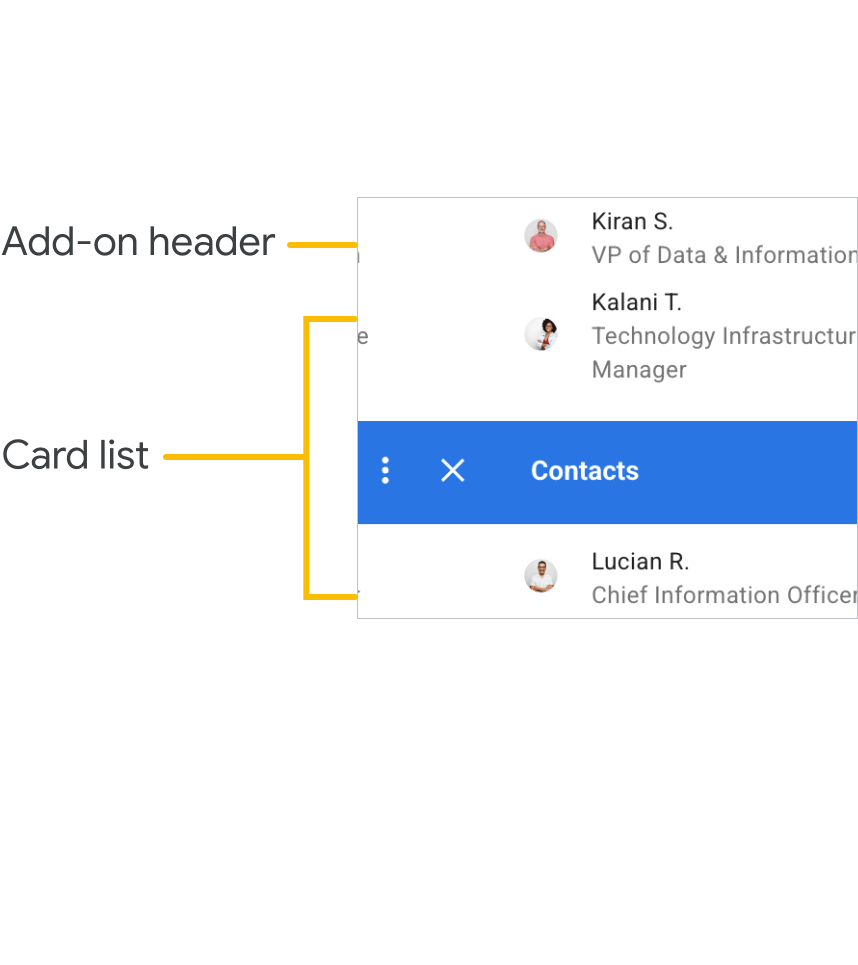
Add-ons present information and user controls in the sidebar of the host application UI. An Google Workspace add-on consists of a main identifying toolbar along with one or more cards.
Each card represents a particular 'page' of your add-on's UI. Navigating to a new card is usually just a matter of creating that card and pushing it onto an internal card stack. You can define navigation flows between cards for a rich interaction experience.
Cards can be non-contextual or contextual. Contextual cards are presented to the user when the host application is in a specific context, such as when opening a Gmail message or Google Calendar event. Non-contextual cards (such as homepages) are presented to the user outside of a specific context of the host—for example, when the user is viewing their Gmail inbox, main Google Drive folder, or Calendar.
Google Workspace add-ons built in Google Apps Script use the Card service to create user interfaces out of cards. Add-ons built in other languages must return properly formatted JSON for the interface to render as cards.
Each card consists of a header and one or more card sections. Each section is composed of a set of widgets. Widgets display information to the user or provide interaction controls like buttons.
Card-based interfaces have the following benefits:
- No knowledge of HTML or CSS is needed to create card-based interfaces.
- Cards and widgets are automatically styled to work well with the Google Workspace applications they extend.
- Card-based interfaces work on both desktop and mobile devices, but you only need to define the interface once.
Gmail is the only host application that can be extended by Google Workspace add-ons on mobile.
Create card-based interfaces
When building card-based add-ons, it's important to understand certain concepts and design patterns. The following guides provide the information you need to build effective card-based add-ons:
- Cards
- Homepages
- Widgets
- Actions
- Event objects
- Constructing cards
- Building interactive cards
- Navigating between cards
- Using universal actions
- Adding autocomplete to text inputs
- Accessing user locales and timezones
- Connecting to non-Google services
- Style guide
- Best Practices
Reference these pages when creating cards and implementing UI behavior. You might also find the following additional samples useful to reference when implementing your add-on:
Google Workspace add-on "Cats" quickstart
This add-on sample shows an add-on UI with multiple pages and homepages.
Google Workspace add-on: "Translate"
This add-on sample shows a add-on that lets users translate text from within Docs, Sheets, and Slides.
Google Workspace add-on: "Teams List"
This add-on sample shows a more complex Google Workspace add-on sample that shows user information about Gmail message recipients, Drive file editors, or Calendar event attendees. You can only use this add-on inside a domain, since it uses the Directory API to retrieve user information.