Предварительный просмотр ссылок в сообщениях Google Chat

Чтобы предотвратить переключение контекста при отправке пользователями ссылки в Google Chat, ваше приложение для чата может предварительно просмотреть ссылку, прикрепив к сообщению карточку с дополнительной информацией, которая позволит пользователям совершать действия прямо из Google Chat.

Например, представьте себе пространство Google Chat, в котором находятся все сотрудники службы поддержки клиентов компании, а также приложение для чата под названием Case-y. Сотрудники часто делятся ссылками на обращения в службу поддержки в этом пространстве, и каждый раз их коллеги должны открывать ссылку на обращение, чтобы увидеть такие детали, как ответственный, статус и тема. Аналогично, если кто-то хочет взять на себя ответственность за обращение или изменить его статус, ему также необходимо открыть ссылку.

Функция предварительного просмотра ссылок позволяет встроенному в систему чат-приложению Case-y прикреплять карточку с указанием ответственного лица, статуса и темы всякий раз, когда кто-то делится ссылкой на обращение. Кнопки на карточке позволяют агентам брать на себя управление обращением и изменять его статус непосредственно из потока чата.

Когда кто-то добавляет ссылку в свое сообщение, появляется значок, указывающий на то, что приложение для чата может предварительно просмотреть эту ссылку.
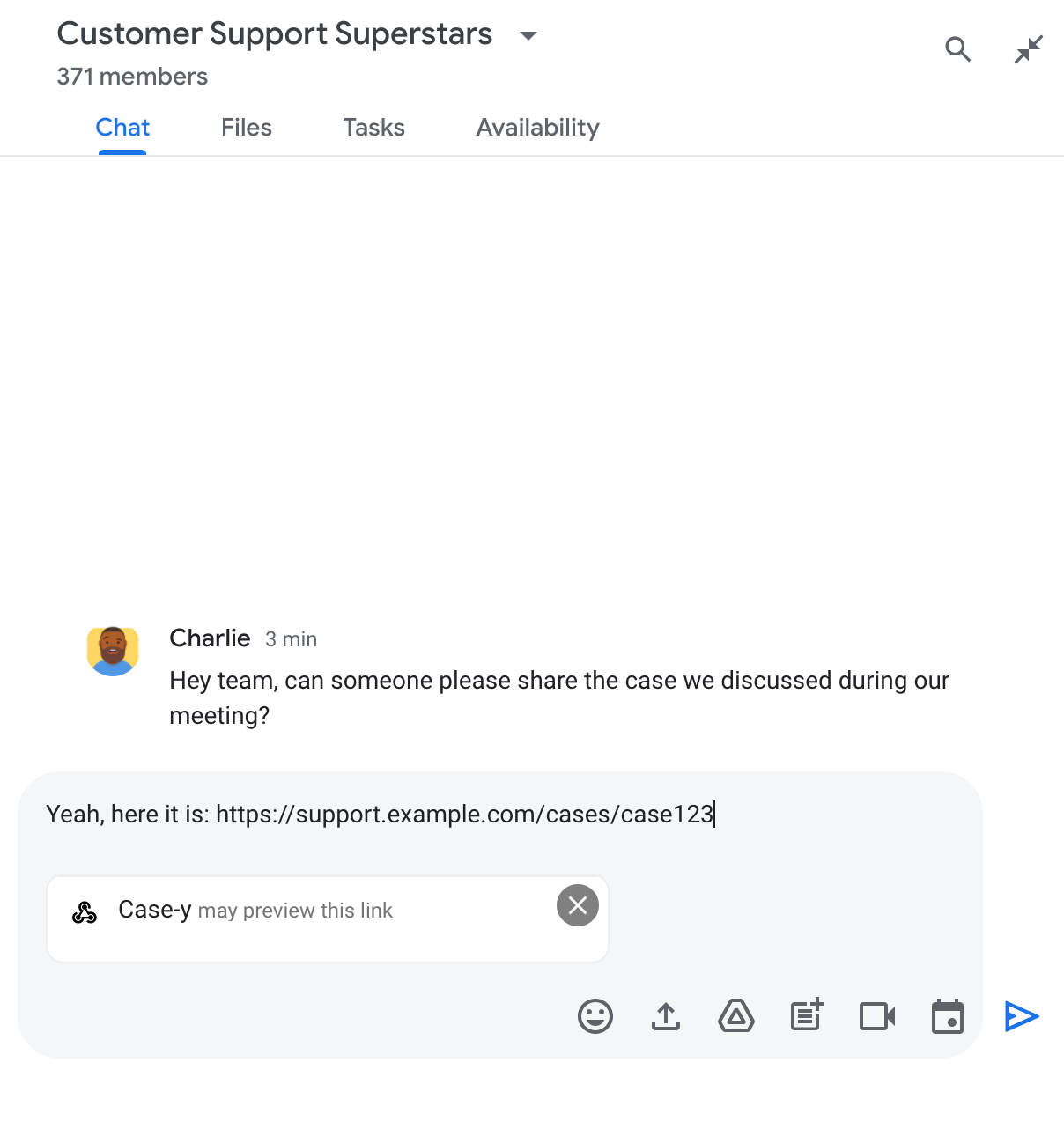
Индикатор, указывающий на то, что приложение чата может предварительно просмотреть ссылку.

После отправки сообщения ссылка отправляется в приложение «Чат», которое затем генерирует и прикрепляет карточку к сообщению пользователя.
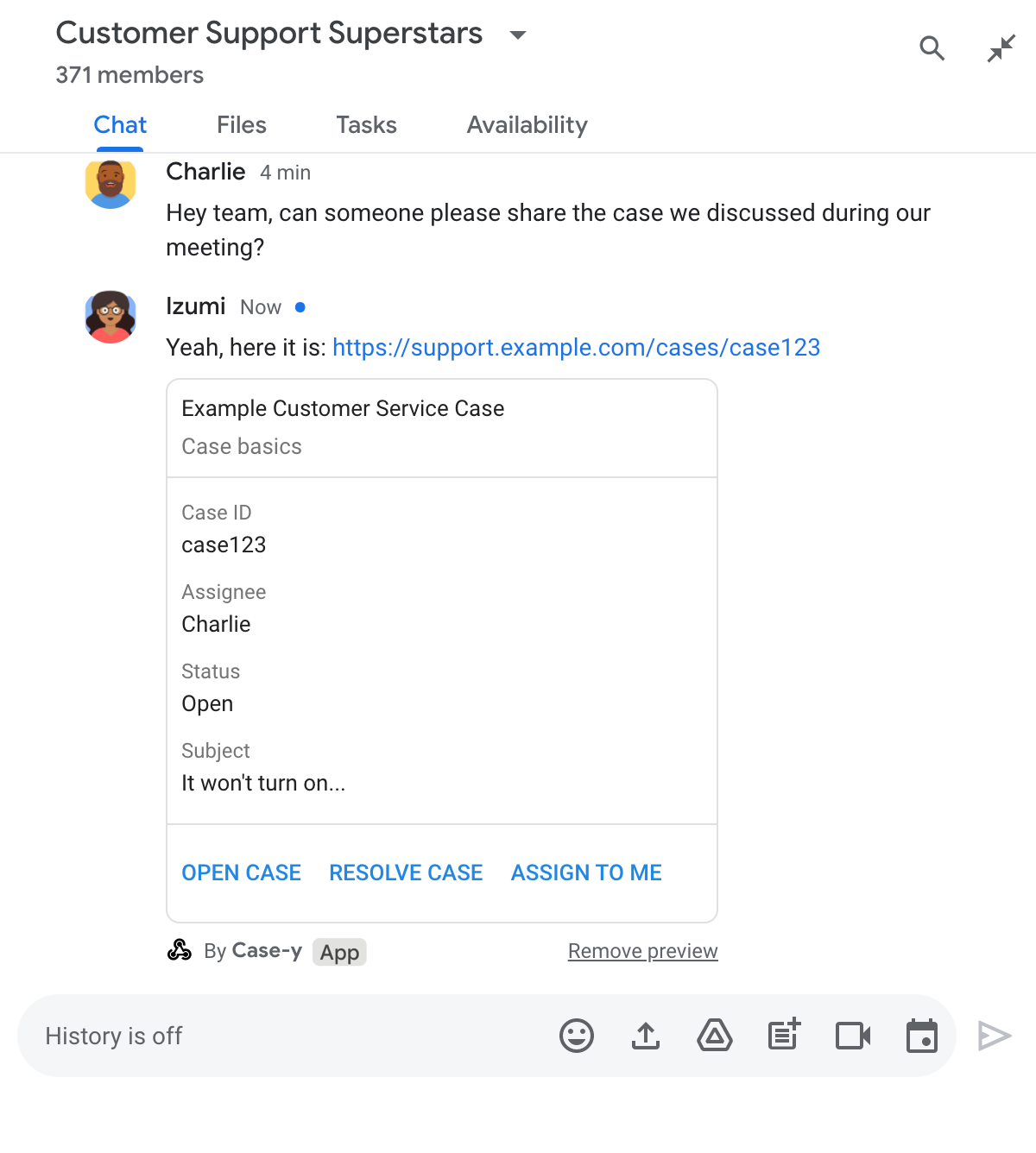
Приложение для чата показывает предварительный просмотр ссылки, прикрепляя к сообщению карточку.

Помимо ссылки, карточка содержит дополнительную информацию о ней, включая интерактивные элементы, такие как кнопки. Ваше приложение для чата может обновлять прикрепленную карточку в ответ на действия пользователя, например, нажатия кнопок.

Если пользователь не хочет, чтобы приложение «Чат» показывало предварительный просмотр его ссылки, прикрепляя к сообщению карточку, он может запретить предварительный просмотр, нажав кнопку на панели предварительного просмотра. Пользователи могут удалить прикрепленную карточку в любое время, нажав кнопку «Удалить предварительный просмотр» .

Предварительные требования

HTTP

Дополнение для Google Workspace, расширяющее функциональность Google Chat. Чтобы создать его, выполните краткое руководство по HTTP .

Apps Script

Дополнение для Google Workspace, расширяющее функциональность Google Chat. Чтобы создать его, выполните действия, описанные в кратком руководстве по Apps Script .

Зарегистрируйте определенные ссылки — например example.com , support.example.com и support.example.com/cases/ — в качестве шаблонов URL-адресов на странице конфигурации вашего приложения чата в консоли Google Cloud, чтобы ваше приложение чата могло просматривать их.
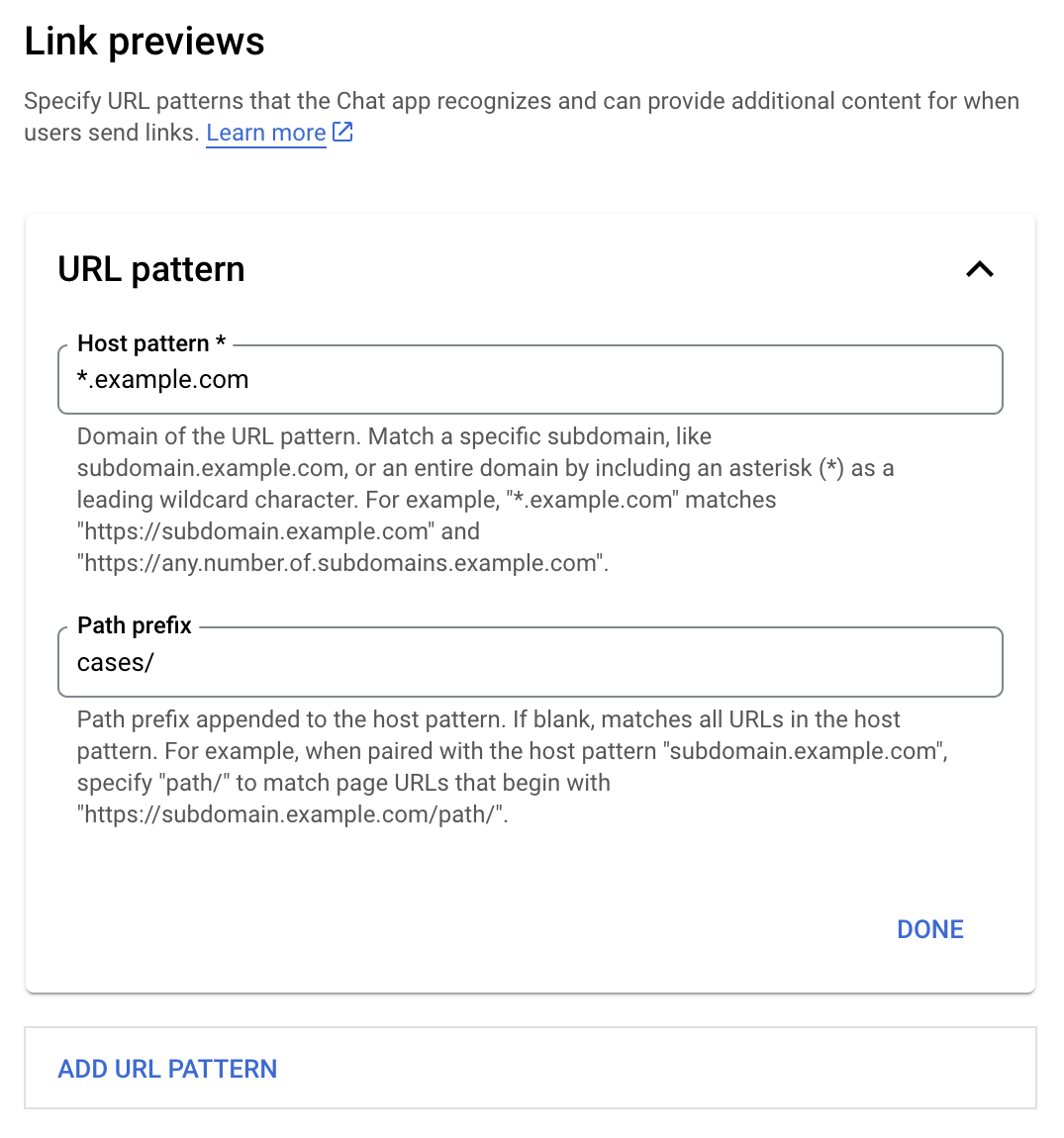
Меню настроек предварительного просмотра ссылок

  1. Откройте консоль Google Cloud .
  2. Рядом с надписью "Google Cloud" нажмите стрелку вниз и откройте проект вашего приложения "Чат".
  3. В поле поиска введите Google Chat API и нажмите Google Chat API .
  4. Нажмите «Управление» > «Конфигурация» .
  5. В разделе «Предварительный просмотр ссылок» добавьте или отредактируйте шаблон URL-адреса.
    1. Чтобы настроить предварительный просмотр ссылок для нового шаблона URL, нажмите «Добавить шаблон URL» .
    2. Чтобы отредактировать конфигурацию существующего шаблона URL-адреса, нажмите стрелку вниз .
  6. В поле « Шаблон хоста» введите домен URL-шаблона. Приложение «Чат» отобразит ссылки на этот домен.

    Чтобы приложение «Чат» отображало предварительный просмотр ссылок для определенного поддомена, например, subdomain.example.com , укажите этот поддомен.

    Чтобы приложение «Чат» отображало ссылки предварительного просмотра для всего домена, укажите символ подстановки со звездочкой (*) в качестве поддомена. Например, *.example.com соответствует subdomain.example.com и any.number.of.subdomains.example.com .

  7. В поле «Префикс пути» введите путь, который будет добавлен к домену шаблона хоста.

    Чтобы сопоставить все URL-адреса в домене шаблона хоста, оставьте поле «Префикс пути» пустым.

    Например, если шаблон Host — support.example.com , то для сопоставления URL-адресов обращений, размещенных по адресу support.example.com/cases/ , введите cases/ .

  8. Нажмите «Готово» .

  9. Нажмите « Сохранить ».

Теперь, всякий раз, когда кто-либо добавляет ссылку, соответствующую шаблону URL-адреса предварительного просмотра ссылки, в сообщение в чате, где используется ваше приложение для чата, ваше приложение отображает предварительный просмотр этой ссылки.

После настройки предварительного просмотра ссылки для заданной ссылки ваше приложение чата сможет распознать и просмотреть ее, добавив к ней дополнительную информацию.

В чатах, включающих ваше приложение для чата, когда сообщение пользователя содержит ссылку, соответствующую шаблону URL-адреса предварительного просмотра ссылки, ваше приложение для чата получает объект события с объектом MessagePayload . В полезной нагрузке объект message.matchedUrl содержит ссылку, которую пользователь включил в сообщение:

JSON

message: {
  matchedUrl: {
    url: "https://support.example.com/cases/case123"
  },
  ... // other message attributes redacted
}

Проверяя наличие поля matchedUrl в содержимом события MESSAGE , ваше приложение чата может добавить к сообщению информацию, включая предварительно просмотренную ссылку. Ваше приложение чата может ответить либо простым текстовым сообщением, либо прикрепить карточку.

Ответьте текстовым сообщением

Для простых ответов ваше приложение «Чат» может предварительно просмотреть ссылку, ответив текстовым сообщением на ссылку. В этом примере к сообщению прикреплен URL-адрес ссылки, соответствующий шаблону URL-адреса предварительного просмотра ссылки.

Node.js

node/chat/preview-link/index.js
// Reply with a text message for URLs of the subdomain "text"
if (chatMessage.matchedUrl.url.includes("text.example.com")) {
  return { hostAppDataAction: { chatDataAction: { createMessageAction: { message: {
    text: 'event.chat.messagePayload.message.matchedUrl.url: ' + chatMessage.matchedUrl.url
  }}}}};
}

Замените FUNCTION_URL на HTTP-адрес конечной точки, обрабатывающей нажатия кнопок.

Python

python/chat/preview-link/main.py
# Reply with a text message for URLs of the subdomain "text"
if "text.example.com" in chatMessage.get('matchedUrl').get('url'):
  return { 'hostAppDataAction': { 'chatDataAction': { 'createMessageAction': { 'message': {
    'text': 'event.chat.messagePayload.message.matchedUrl.url: ' + chatMessage.get('matchedUrl').get('url')
  }}}}}

Замените FUNCTION_URL на HTTP-адрес конечной точки, обрабатывающей нажатия кнопок.

Java

java/chat/preview-link/src/main/java/com/google/chat/previewLink/App.java
// Reply with a text message for URLs of the subdomain "text"
if (chatMessage.at("/matchedUrl/url").asText().contains("text.example.com")) {
  return new GenericJson() {{
    put("hostAppDataAction", new GenericJson() {{
      put("chatDataAction", new GenericJson() {{
        put("createMessageAction", new GenericJson() {{
          put("message", new Message()
            .setText("event.chat.messagePayload.message.matchedUrl.url: " + chatMessage.at("/matchedUrl/url").asText()));
        }});
      }});
    }});
  }};
}

Замените FUNCTION_URL на HTTP-адрес конечной точки, обрабатывающей нажатия кнопок.

Apps Script

apps-script/chat/preview-link/preview-link.gs
// Reply with a text message for URLs of the subdomain "text".
if (chatMessage.matchedUrl.url.includes("text.example.com")) {
  return { hostAppDataAction: { chatDataAction: { createMessageAction: { message: {
    text: 'event.chat.messagePayload.message.matchedUrl.url: ' + chatMessage.matchedUrl.url
  }}}}};
}

Чтобы прикрепить карточку к предварительно просматриваемой ссылке, верните объект действия DataActions с объектом ChatDataActionMarkup типа UpdateInlinePreviewAction .

В следующем примере приложение чата добавляет карточку предварительного просмотра к сообщениям, содержащим URL-адрес support.example.com .

Приложение для чата показывает предварительный просмотр ссылки, прикрепляя к сообщению карточку.

Node.js

node/chat/preview-link/index.js
// Attach a card to the message for URLs of the subdomain "support"
if (chatMessage.matchedUrl.url.includes("support.example.com")) {
  // A hard-coded card is used in this example. In a real-life scenario,
  // the case information would be fetched and used to build the card.
  return { hostAppDataAction: { chatDataAction: { updateInlinePreviewAction: { cardsV2: [{
    cardId: 'attachCard',
    card: {
      header: {
        title: 'Example Customer Service Case',
        subtitle: 'Case basics',
      },
      sections: [{ widgets: [
      { decoratedText: { topLabel: 'Case ID', text: 'case123'}},
      { decoratedText: { topLabel: 'Assignee', text: 'Charlie'}},
      { decoratedText: { topLabel: 'Status', text: 'Open'}},
      { decoratedText: { topLabel: 'Subject', text: 'It won\'t turn on...' }},
      { buttonList: { buttons: [{
        text: 'OPEN CASE',
        onClick: { openLink: {
          url: 'https://support.example.com/orders/case123'
        }},
      }, {
        text: 'RESOLVE CASE',
        onClick: { openLink: {
          url: 'https://support.example.com/orders/case123?resolved=y',
        }},
      }, {
        text: 'ASSIGN TO ME',
        onClick: { action: { function: FUNCTION_URL }}
      }]}}
      ]}]
    }
  }]}}}};
}

Замените FUNCTION_URL на HTTP-адрес конечной точки, обрабатывающей нажатия кнопок.

Python

python/chat/preview-link/main.py
# Attach a card to the message for URLs of the subdomain "support"
if "support.example.com" in chatMessage.get('matchedUrl').get('url'):
  # A hard-coded card is used in this example. In a real-life scenario,
  # the case information would be fetched and used to build the card.
  return { 'hostAppDataAction': { 'chatDataAction': { 'updateInlinePreviewAction': { 'cardsV2': [{
    'cardId': 'attachCard',
    'card': {
      'header': {
        'title': 'Example Customer Service Case',
        'subtitle': 'Case basics',
      },
      'sections': [{ 'widgets': [
      { 'decoratedText': { 'topLabel': 'Case ID', 'text': 'case123'}},
      { 'decoratedText': { 'topLabel': 'Assignee', 'text': 'Charlie'}},
      { 'decoratedText': { 'topLabel': 'Status', 'text': 'Open'}},
      { 'decoratedText': { 'topLabel': 'Subject', 'text': 'It won\'t turn on...' }},
      { 'buttonList': { 'buttons': [{
        'text': 'OPEN CASE',
        'onClick': { 'openLink': {
          'url': 'https://support.example.com/orders/case123'
        }},
      }, {
        'text': 'RESOLVE CASE',
        'onClick': { 'openLink': {
          'url': 'https://support.example.com/orders/case123?resolved=y',
        }},
      }, {
        'text': 'ASSIGN TO ME',
        'onClick': { 'action': { 'function': FUNCTION_URL }}
      }]}}
      ]}]
    }
  }]}}}}

Замените FUNCTION_URL на HTTP-адрес конечной точки, обрабатывающей нажатия кнопок.

Java

java/chat/preview-link/src/main/java/com/google/chat/previewLink/App.java
// Attach a card to the message for URLs of the subdomain "support"
if (chatMessage.at("/matchedUrl/url").asText().contains("support.example.com")) {
  // A hard-coded card is used in this example. In a real-life scenario,
  // the case information would be fetched and used to build the card.
  CardWithId cardV2 = new CardWithId()
    .setCardId("attachCard")
    .setCard(new GoogleAppsCardV1Card()
      .setHeader(new GoogleAppsCardV1CardHeader()
        .setTitle("Example Customer Service Case")
        .setSubtitle("Case basics"))
      .setSections(List.of(new GoogleAppsCardV1Section().setWidgets(List.of(
        new GoogleAppsCardV1Widget().setDecoratedText(new GoogleAppsCardV1DecoratedText()
          .setTopLabel("Case ID")
          .setText("case123")),
        new GoogleAppsCardV1Widget().setDecoratedText(new GoogleAppsCardV1DecoratedText()
          .setTopLabel("Assignee")
          .setText("Charlie")),
        new GoogleAppsCardV1Widget().setDecoratedText(new GoogleAppsCardV1DecoratedText()
          .setTopLabel("Status")
          .setText("Open")),
        new GoogleAppsCardV1Widget().setDecoratedText(new GoogleAppsCardV1DecoratedText()
          .setTopLabel("Subject")
          .setText("It won't turn on...")),
        new GoogleAppsCardV1Widget().setButtonList(new GoogleAppsCardV1ButtonList()
          .setButtons(List.of(
            new GoogleAppsCardV1Button()
              .setText("OPEN CASE")
            .setOnClick(new GoogleAppsCardV1OnClick()
                .setOpenLink(new GoogleAppsCardV1OpenLink()
                  .setUrl("https://support.example.com/orders/case123"))),
            new GoogleAppsCardV1Button()
              .setText("RESOLVE CASE")
            .setOnClick(new GoogleAppsCardV1OnClick()
                .setOpenLink(new GoogleAppsCardV1OpenLink()
                  .setUrl("https://support.example.com/orders/case123?resolved=y"))),
            new GoogleAppsCardV1Button()
              .setText("ASSIGN TO ME")
              .setOnClick(new GoogleAppsCardV1OnClick()
                .setAction(new GoogleAppsCardV1Action().setFunction(FUNCTION_URL)))
          ))
        )
      ))))
    );

  return new GenericJson() {{
    put("hostAppDataAction", new GenericJson() {{
      put("chatDataAction", new GenericJson() {{
        put("updateInlinePreviewAction", new GenericJson() {{
          put("cardsV2", List.of(cardV2));
        }});
      }});
    }});
  }};
}

Замените FUNCTION_URL на HTTP-адрес конечной точки, обрабатывающей нажатия кнопок.

Apps Script

apps-script/chat/preview-link/preview-link.gs
// Attach a card to the message for URLs of the subdomain "support".
if (chatMessage.matchedUrl.url.includes("support.example.com")) {
  // A hard-coded card is used in this example. In a real-life scenario,
  // the case information would be fetched and used to build the card.
  return { hostAppDataAction: { chatDataAction: { updateInlinePreviewAction: { cardsV2: [{
    cardId: 'attachCard',
    card: {
      header: {
        title: 'Example Customer Service Case',
        subtitle: 'Case summary',
      },
      sections: [{ widgets: [
      { decoratedText: { topLabel: 'Case ID', text: 'case123'}},
      { decoratedText: { topLabel: 'Assignee', text: 'Charlie'}},
      { decoratedText: { topLabel: 'Status', text: 'Open'}},
      { decoratedText: { topLabel: 'Subject', text: 'It won\'t turn on...' }},
      { buttonList: { buttons: [{
        text: 'OPEN CASE',
        onClick: { openLink: {
          url: 'https://support.example.com/orders/case123'
        }},
      }, {
        text: 'RESOLVE CASE',
        onClick: { openLink: {
          url: 'https://support.example.com/orders/case123?resolved=y',
        }},
      }, {
        text: 'ASSIGN TO ME',
        // Clicking this button triggers the execution of the function
        // "assign" from the Apps Script project.
        onClick: { action: { function: 'assign'}}
      }]}}
      ]}]
    }
  }]}}}};
}

Ваше приложение для чата может обновлять предварительный просмотр карточки ссылки, когда пользователи взаимодействуют с ней, например, нажимают кнопку на карточке.

Для обновления карточки ваше приложение чата должно возвращать DataActions действия с одним из следующих объектов ChatDataActionMarkup :

  • Если сообщение было отправлено пользователем, верните объект UpdateMessageAction .
  • Если сообщение было отправлено приложением «Чат», верните объект UpdateInlinePreviewAction .

Чтобы определить, кто отправил сообщение, используйте полезную нагрузку события ( buttonClickedPayload ), чтобы проверить, установлен ли отправитель ( message.sender.type ) на HUMAN (пользователь) или BOT (приложение для чата).

В следующем примере показано, как приложение чата обновляет предварительный просмотр ссылки всякий раз, когда пользователь нажимает кнопку « Назначить мне» , обновляя поле «Исполнитель» в карточке и отключая кнопку.
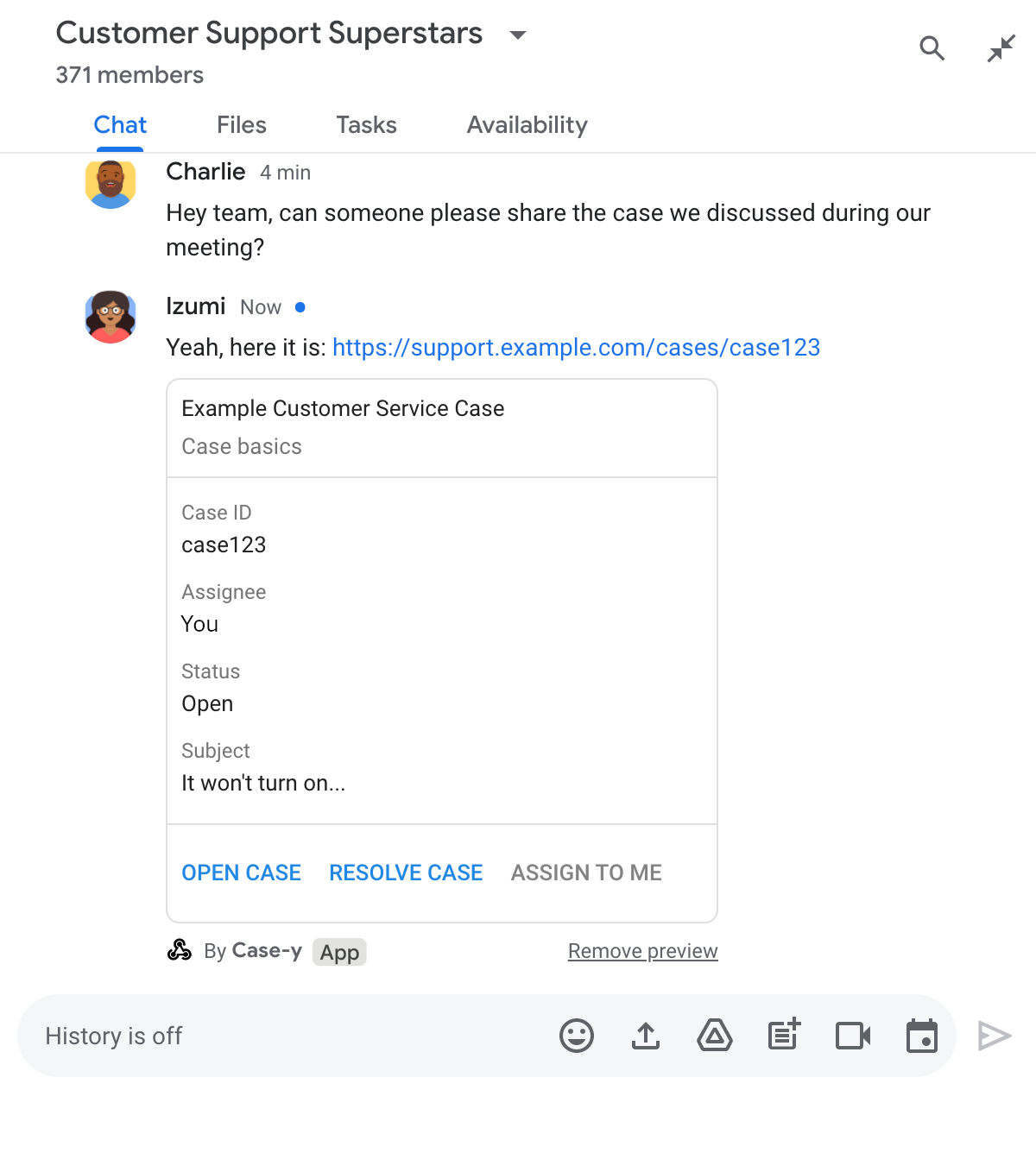
Приложение чата показывает предварительный просмотр ссылки с обновленной версией карточки, прикрепленной к сообщению.

Node.js

node/chat/preview-link/index.js
/**
 * Respond to clicks by assigning and updating the card that's attached to a
 * message previewed link of the pattern "support.example.com".
 *
 * @param {Object} chatMessage The chat message object from Google Workspace Add On event.
 * @return {Object} Action response depending on the message author.
 */
function handleCardClick(chatMessage) {
  // Creates the updated card that displays "You" for the assignee
  // and that disables the button.
  //
  // A hard-coded card is used in this example. In a real-life scenario,
  // an actual assign action would be performed before building the card.
  const message = { cardsV2: [{
    cardId: 'attachCard',
    card: {
      header: {
        title: 'Example Customer Service Case',
        subtitle: 'Case basics',
      },
      sections: [{ widgets: [
        { decoratedText: { topLabel: 'Case ID', text: 'case123'}},
        // The assignee is now "You"
        { decoratedText: { topLabel: 'Assignee', text: 'You'}},
        { decoratedText: { topLabel: 'Status', text: 'Open'}},
        { decoratedText: { topLabel: 'Subject', text: 'It won\'t turn on...' }},
        { buttonList: { buttons: [{
          text: 'OPEN CASE',
          onClick: { openLink: {
            url: 'https://support.example.com/orders/case123'
          }},
        }, {
          text: 'RESOLVE CASE',
          onClick: { openLink: {
            url: 'https://support.example.com/orders/case123?resolved=y',
          }},
        }, {
          text: 'ASSIGN TO ME',
          // The button is now disabled
          disabled: true,
          onClick: { action: { function: FUNCTION_URL }}
        }]}}
      ]}]
    }
  }]};

  // Use the adequate action response type. It depends on whether the message
  // the preview link card is attached to was created by a human or a Chat app.
  if(chatMessage.sender.type === 'HUMAN') {
    return { hostAppDataAction: { chatDataAction: { updateInlinePreviewAction: message }}};
  } else {
    return { hostAppDataAction: { chatDataAction: { updateMessageAction: message }}};
  }
}

Замените FUNCTION_URL на HTTP-адрес конечной точки, обрабатывающей нажатия кнопок.

Python

python/chat/preview-link/main.py
def handle_card_click(chatMessage: dict) -> dict:
  """Respond to clicks by assigning and updating the card that's attached to a
  message previewed link of the pattern "support.example.com".

  - Reply with text messages that echo "text.example.com" link URLs in messages.
  - Attach cards to messages with "support.example.com" link URLs.

  Args:
      chatMessage (Mapping[str, Any]): The chat message object from Google Workspace Add On event.

  Returns:
      Mapping[str, Any]: Action response depending on the message author.
  """
  # Creates the updated card that displays "You" for the assignee
  # and that disables the button.
  #
  # A hard-coded card is used in this example. In a real-life scenario,
  # an actual assign action would be performed before building the card.
  message = { 'cardsV2': [{
    'cardId': 'attachCard',
    'card': {
      'header': {
        'title': 'Example Customer Service Case',
        'subtitle': 'Case basics',
      },
      'sections': [{ 'widgets': [
      { 'decoratedText': { 'topLabel': 'Case ID', 'text': 'case123'}},
      # The assignee is now "You"
      { 'decoratedText': { 'topLabel': 'Assignee', 'text': 'You'}},
      { 'decoratedText': { 'topLabel': 'Status', 'text': 'Open'}},
      { 'decoratedText': { 'topLabel': 'Subject', 'text': 'It won\'t turn on...' }},
      { 'buttonList': { 'buttons': [{
        'text': 'OPEN CASE',
        'onClick': { 'openLink': {
          'url': 'https://support.example.com/orders/case123'
        }},
      }, {
        'text': 'RESOLVE CASE',
        'onClick': { 'openLink': {
          'url': 'https://support.example.com/orders/case123?resolved=y',
        }},
      }, {
        'text': 'ASSIGN TO ME',
        # The button is now disabled
        'disabled': True,
        'onClick': { 'action': { 'function': FUNCTION_URL }}
      }]}}
      ]}]
    }
  }]}

  # Use the adequate action response type. It depends on whether the message
  # the preview link card is attached to was created by a human or a Chat app.
  if chatMessage.get('sender').get('type') == 'HUMAN':
    return { 'hostAppDataAction': { 'chatDataAction': { 'updateInlinePreviewAction': message }}}
  else:
    return { 'hostAppDataAction': { 'chatDataAction': { 'updateMessageAction': message }}}

Замените FUNCTION_URL на HTTP-адрес конечной точки, обрабатывающей нажатия кнопок.

Java

java/chat/preview-link/src/main/java/com/google/chat/previewLink/App.java
/**
 * Respond to clicks by assigning and updating the card that's attached to a
 * message previewed link of the pattern "support.example.com".
 *
 * @param chatMessage The chat message object from Google Workspace Add On event.
 * @return Action response depending on the message author.
 */
GenericJson handleCardClick(JsonNode chatMessage) {
  // Creates the updated card that displays "You" for the assignee
  // and that disables the button.
  //
  // A hard-coded card is used in this example. In a real-life scenario,
  // an actual assign action would be performed before building the card.
  Message message = new Message().setCardsV2(List.of(new CardWithId()
    .setCardId("attachCard")
    .setCard(new GoogleAppsCardV1Card()
      .setHeader(new GoogleAppsCardV1CardHeader()
        .setTitle("Example Customer Service Case")
        .setSubtitle("Case basics"))
      .setSections(List.of(new GoogleAppsCardV1Section().setWidgets(List.of(
        new GoogleAppsCardV1Widget().setDecoratedText(new GoogleAppsCardV1DecoratedText()
          .setTopLabel("Case ID")
          .setText("case123")),
        // The assignee is now "You"
        new GoogleAppsCardV1Widget().setDecoratedText(new GoogleAppsCardV1DecoratedText()
          .setTopLabel("Assignee")
          .setText("You")),
        new GoogleAppsCardV1Widget().setDecoratedText(new GoogleAppsCardV1DecoratedText()
          .setTopLabel("Status")
          .setText("Open")),
        new GoogleAppsCardV1Widget().setDecoratedText(new GoogleAppsCardV1DecoratedText()
          .setTopLabel("Subject")
          .setText("It won't turn on...")),
        new GoogleAppsCardV1Widget().setButtonList(new GoogleAppsCardV1ButtonList()
          .setButtons(List.of(
            new GoogleAppsCardV1Button()
              .setText("OPEN CASE")
              .setOnClick(new GoogleAppsCardV1OnClick()
                .setOpenLink(new GoogleAppsCardV1OpenLink()
                  .setUrl("https://support.example.com/orders/case123"))),
            new GoogleAppsCardV1Button()
              .setText("RESOLVE CASE")
              .setOnClick(new GoogleAppsCardV1OnClick()
                .setOpenLink(new GoogleAppsCardV1OpenLink()
                  .setUrl("https://support.example.com/orders/case123?resolved=y"))),
            new GoogleAppsCardV1Button()
              .setText("ASSIGN TO ME")
              // The button is now disabled
              .setDisabled(true)
              .setOnClick(new GoogleAppsCardV1OnClick()
                .setAction(new GoogleAppsCardV1Action().setFunction(FUNCTION_URL)))
          ))
        )
      ))))
    )
  ));

  // Use the adequate action response type. It depends on whether the message
  // the preview link card is attached to was created by a human or a Chat app.
  if("HUMAN".equals(chatMessage.at("/sender/type").asText())) {
    return new GenericJson() {{
      put("hostAppDataAction", new GenericJson() {{
        put("chatDataAction", new GenericJson() {{
          put("updateInlinePreviewAction", message);
        }});
      }});
    }};
  } else {
    return new GenericJson() {{
      put("hostAppDataAction", new GenericJson() {{
        put("chatDataAction", new GenericJson() {{
          put("updateMessageAction", message);
        }});
      }});
    }};
  }
}

Замените FUNCTION_URL на HTTP-адрес конечной точки, обрабатывающей нажатия кнопок.

Apps Script

apps-script/chat/preview-link/preview-link.gs
/**
 * Assigns and updates the card that's attached to a message with a
 * previewed link of the pattern "support.example.com".
 *
 * @param {Object} event The event object from the Google Workspace add-on.
 * @return {Object} Action response depending on the message author.
 */
function assign(event) {
  // Creates the updated card that displays "You" for the assignee
  // and that disables the button.
  //
  // A hard-coded card is used in this example. In a real-life scenario,
  // an actual assign action would be performed before building the card.
  const message = { cardsV2: [{
    cardId: 'attachCard',
    card: {
      header: {
        title: 'Example Customer Service Case',
        subtitle: 'Case summary',
      },
      sections: [{ widgets: [
        { decoratedText: { topLabel: 'Case ID', text: 'case123'}},
        // The assignee is now "You"
        { decoratedText: { topLabel: 'Assignee', text: 'You'}},
        { decoratedText: { topLabel: 'Status', text: 'Open'}},
        { decoratedText: { topLabel: 'Subject', text: 'It won\'t turn on...' }},
        { buttonList: { buttons: [{
          text: 'OPEN CASE',
          onClick: { openLink: {
            url: 'https://support.example.com/orders/case123'
          }},
        }, {
          text: 'RESOLVE CASE',
          onClick: { openLink: {
            url: 'https://support.example.com/orders/case123?resolved=y',
          }},
        }, {
          text: 'ASSIGN TO ME',
          // The button is now disabled
          disabled: true,
          onClick: { action: { function: 'assign'}}
        }]}}
      ]}]
    }
  }]};

  // Use the adequate action response type. It depends on whether the message
  // the preview link card is attached to was created by a human or a Chat app.
  if(event.chat.buttonClickedPayload.message.sender.type === 'HUMAN') {
    return { hostAppDataAction: { chatDataAction: { updateInlinePreviewAction: message }}};
  } else {
    return { hostAppDataAction: { chatDataAction: { updateMessageAction: message }}};
  }
}

Ограничения и соображения

При настройке предварительного просмотра ссылок для вашего чат-приложения учитывайте следующие ограничения и моменты:

  • Каждое приложение для чата поддерживает предварительный просмотр ссылок для до 5 вариантов URL-адресов.
  • В чат-приложениях предварительно отображается только одна ссылка в сообщении. Если в одном сообщении присутствует несколько ссылок, доступных для предварительного просмотра, отображается только первая из них.
  • В чат-приложениях предварительный просмотр осуществляется только по ссылкам, начинающимся с https:// , поэтому https://support.example.com/cases/ отображается, а support.example.com/cases/ нет.
  • Если сообщение не содержит другой информации, отправляемой в приложение чата, например, команды с косой чертой , то в предварительный просмотр ссылок в приложение чата отправляется только URL-адрес ссылки.
  • Если пользователь отправляет ссылку, приложение чата может обновить карточку предварительного просмотра ссылки только в том случае, если пользователь взаимодействует с карточкой, например, нажимает кнопку. Вызов метода update() API чата для ресурса Message невозможен для асинхронного обновления сообщения пользователя.
  • Приложения для чата должны отображать ссылки для всех участников сообщества, поэтому в сообщении не должно быть поля privateMessageViewer .

При внедрении предварительного просмотра ссылок вам может потребоваться отладка приложения чата путем чтения журналов приложения. Чтобы прочитать журналы, перейдите в раздел « Обозреватель журналов» в консоли Google Cloud.