Visualizzare l'anteprima dei link nei messaggi di Google Chat

Per evitare il cambio di contesto quando gli utenti condividono un link in Google Chat, la tua app Chat può visualizzare l'anteprima del link allegando una scheda al messaggio che fornisce maggiori informazioni e consente agli utenti di eseguire azioni direttamente da Google Chat.

Ad esempio, immagina uno spazio di Chat di Google che includa tutti gli agenti dell'assistenza clienti di un'azienda e un'app Chat denominata Case-y. Gli agenti condividono spesso i link ai casi di assistenza clienti nello spazio Chat e ogni volta i colleghi devono aprire il link del caso per visualizzare dettagli come assegnatario, stato e oggetto. Allo stesso modo, se qualcuno vuole assumere la proprietà di un caso o modificarne lo stato, deve aprire il link.

L'anteprima dei link consente all'app Chat residente nello spazio, Case-y, di allegare una scheda che mostra l'assegnatario, lo stato e l'oggetto ogni volta che qualcuno condivide un link a un caso. I pulsanti sulla scheda consentono agli agenti di assumere la proprietà del caso e di modificarne lo stato direttamente dallo stream della chat.

Quando un utente aggiunge un link al messaggio, viene visualizzato un chip che indica che un'app Chat potrebbe visualizzare l'anteprima del link.
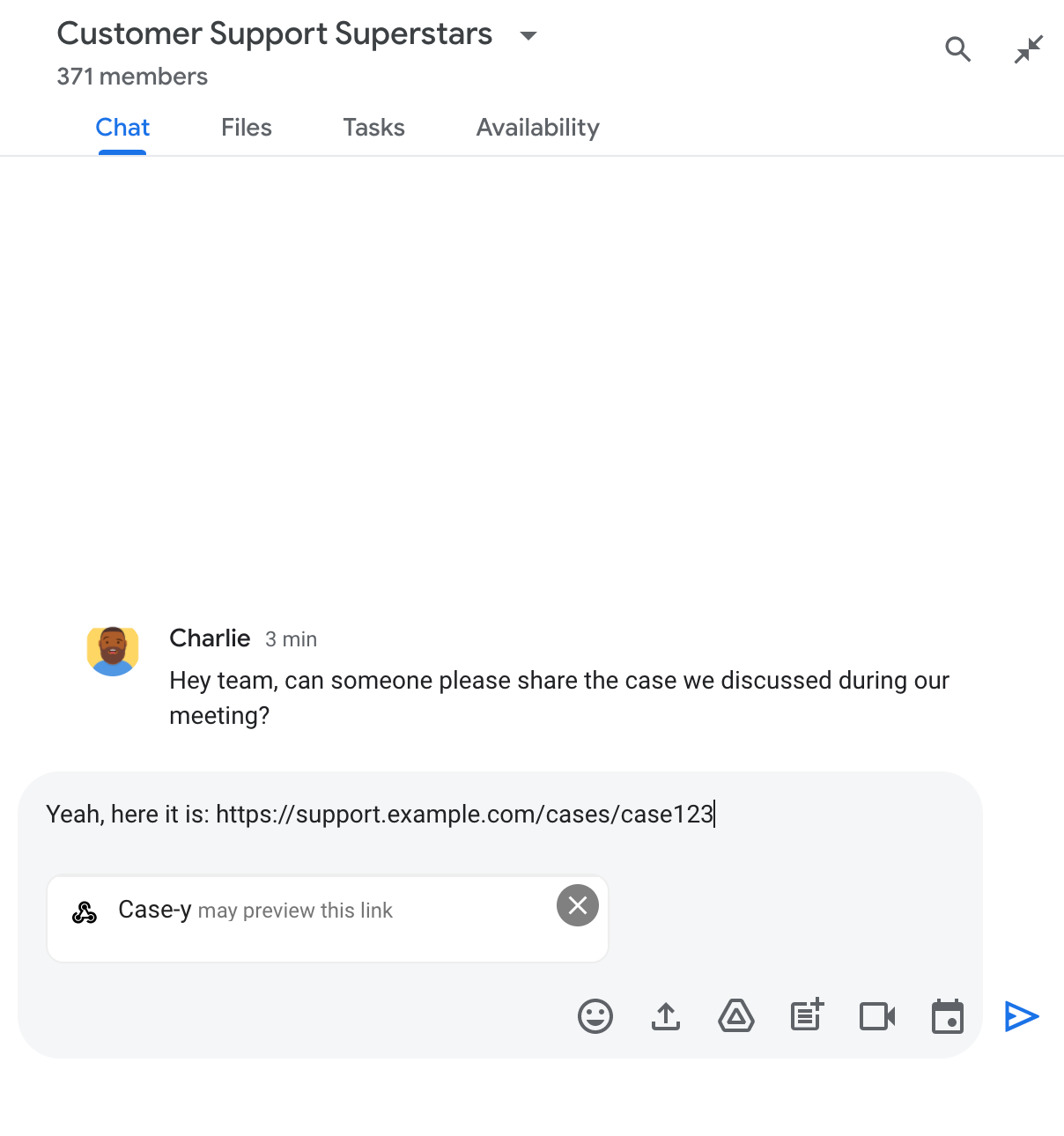
Chip che indica che un'app di chat potrebbe visualizzare l'anteprima di un link

Dopo aver inviato il messaggio, il link viene inviato all'app Chat, che genera e allega la scheda al messaggio dell'utente.
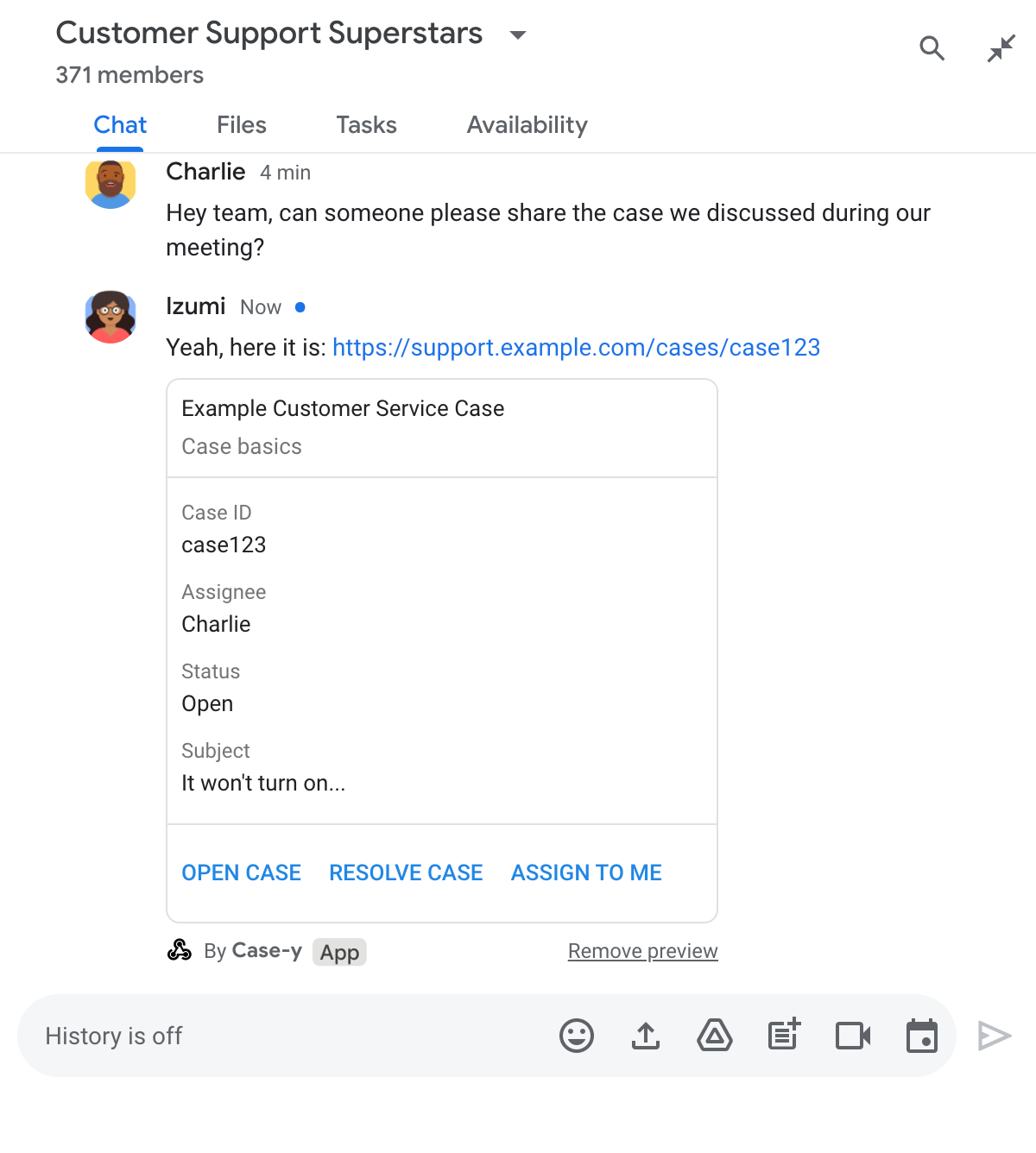
Anteprima di un link nell'app di chat con allegato di una scheda al messaggio

Oltre al link, la scheda fornisce informazioni aggiuntive sul link, inclusi elementi interattivi come i pulsanti. La tua app Chat può aggiornare la scheda allegata in risposta alle interazioni dell'utente, ad esempio ai clic sui pulsanti.

Se un utente non vuole che l'app Chat visualizzi l'anteprima del suo link allegando una scheda al messaggio, può impedire l'anteprima facendo clic su sul chip di anteprima. Gli utenti possono rimuovere la scheda allegata in qualsiasi momento facendo clic su Rimuovi anteprima.

Prerequisiti

HTTP

Un componente aggiuntivo di Google Workspace che estende Google Chat. Per crearne uno, completa la guida rapida HTTP.

Apps Script

Un componente aggiuntivo di Google Workspace che estende Google Chat. Per crearne uno, completa la guida rapida Apps Script.

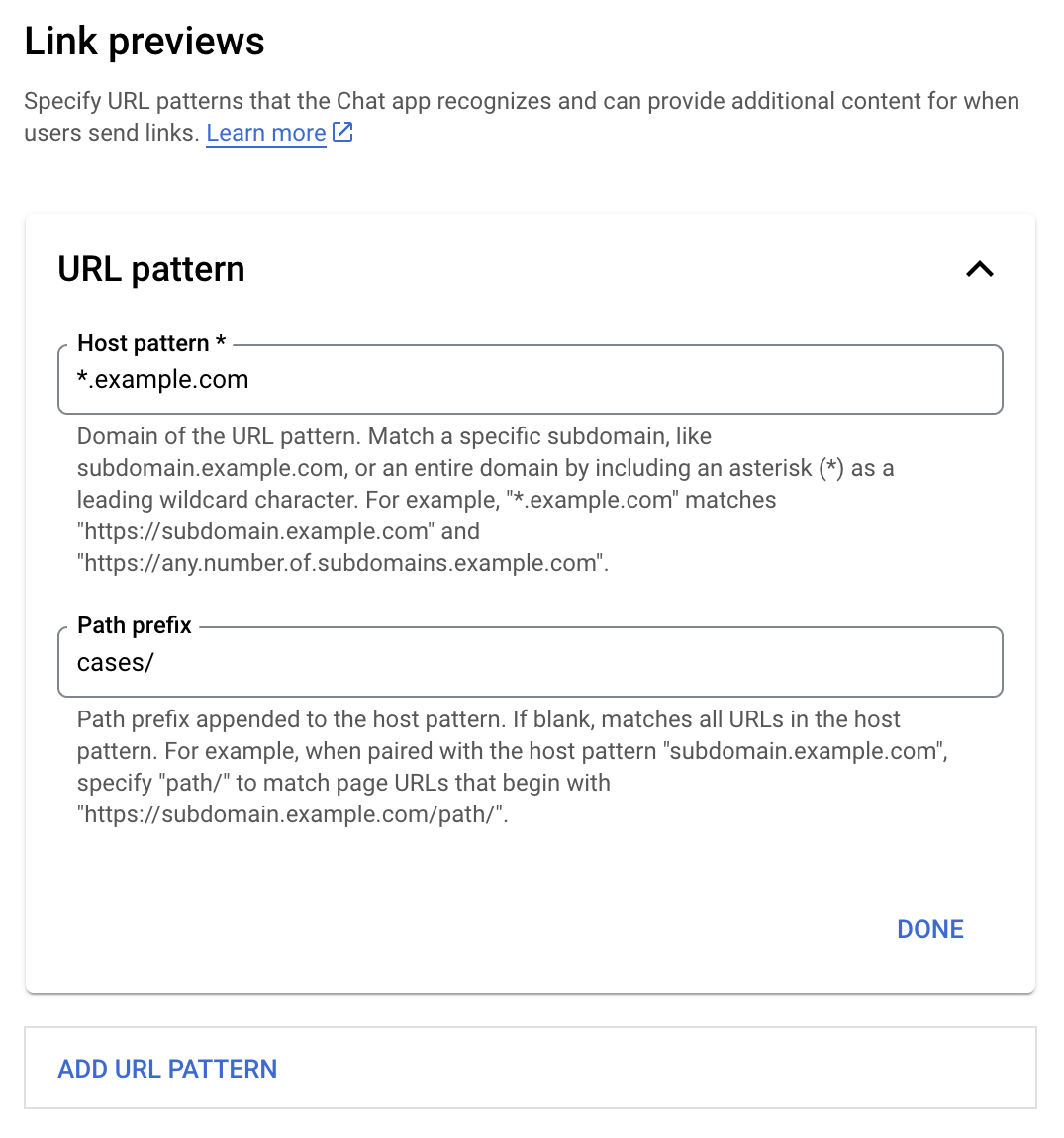
Registra link specifici, ad esempio example.com, support.example.com e support.example.com/cases/, come pattern URL nella pagina di configurazione dell'app Chat nella console Google Cloud in modo che la tua app Chat possa visualizzarne l'anteprima.

Menu di configurazione delle anteprime dei link

  1. Apri la console Google Cloud.
  2. Accanto a "Google Cloud", fai clic sulla Freccia giù e apri il progetto dell'app Chat.
  3. Nel campo di ricerca, digita Google Chat API e fai clic su Google Chat API.
  4. Fai clic su Gestisci > Configurazione.
  5. In Anteprime dei link, aggiungi o modifica un pattern URL.
    1. Per configurare le anteprime dei link per un nuovo pattern URL, fai clic su Aggiungi pattern URL.
    2. Per modificare la configurazione di un pattern URL esistente, fai clic sulla Freccia giù .
  6. Nel campo Pattern host, inserisci il dominio del pattern URL. L'app Chat visualizzerà l'anteprima dei link a questo dominio.

    Per fare in modo che l'app Chat visualizzi l'anteprima dei link per un sottodominio specifico, ad esempio subdomain.example.com, includi il sottodominio.

    Per fare in modo che l'app Chat visualizzi l'anteprima dei link per l'intero dominio, specifica un carattere jolly con un asterisco (*) come sottodominio. Ad esempio, *.example.com corrisponde a subdomain.example.com e any.number.of.subdomains.example.com.

  7. Nel campo Prefisso del percorso, inserisci un percorso da aggiungere al dominio del pattern host.

    Per trovare la corrispondenza con tutti gli URL nel dominio del pattern host, lascia vuoto il campo Prefisso del percorso.

    Ad esempio, se il pattern host è support.example.com, per trovare la corrispondenza con gli URL dei casi ospitati all'indirizzo support.example.com/cases/, inserisci cases/.

  8. Fai clic su Fine.

  9. Fai clic su Salva.

Ora, ogni volta che un utente include un link che corrisponde a un pattern URL di anteprima dei link in un messaggio in uno spazio di Chat che include la tua app Chat, la tua app visualizza l'anteprima del link.

Dopo aver configurato l'anteprima dei link per un determinato link, la tua app Chat può riconoscere e visualizzare l'anteprima del link aggiungendo ulteriori informazioni.

Negli spazi Chat che includono la tua app Chat, quando il messaggio di un utente contiene un link che corrisponde a un pattern URL di anteprima dei link, la tua app Chat riceve un oggetto evento con un MessagePayload. Nel payload, l' message.matchedUrl oggetto contiene il link che l'utente ha incluso nel messaggio:

JSON

message: {
  matchedUrl: {
    url: "https://support.example.com/cases/case123"
  },
  ... // other message attributes redacted
}

Controllando la presenza del campo matchedUrl nel payload dell'evento MESSAGE, la tua app Chat può aggiungere informazioni al messaggio con il link visualizzato in anteprima. La tua app Chat può rispondere con un messaggio di testo di base o allegare una scheda.

Rispondere con un messaggio di testo

Per le risposte di base, la tua app Chat può visualizzare l'anteprima di un link rispondendo con un messaggio di testo a un link. Questo esempio allega un messaggio che ripete l'URL del link che corrisponde a un pattern URL di anteprima dei link.

Node.js

node/chat/preview-link/index.js
// Reply with a text message for URLs of the subdomain "text"
if (chatMessage.matchedUrl.url.includes("text.example.com")) {
  return { hostAppDataAction: { chatDataAction: { createMessageAction: { message: {
    text: 'event.chat.messagePayload.message.matchedUrl.url: ' + chatMessage.matchedUrl.url
  }}}}};
}

Sostituisci FUNCTION_URL con l'endpoint HTTP che gestisce i clic sui pulsanti.

Python

python/chat/preview-link/main.py
# Reply with a text message for URLs of the subdomain "text"
if "text.example.com" in chatMessage.get('matchedUrl').get('url'):
  return { 'hostAppDataAction': { 'chatDataAction': { 'createMessageAction': { 'message': {
    'text': 'event.chat.messagePayload.message.matchedUrl.url: ' + chatMessage.get('matchedUrl').get('url')
  }}}}}

Sostituisci FUNCTION_URL con l'endpoint HTTP che gestisce i clic sui pulsanti.

Java

java/chat/preview-link/src/main/java/com/google/chat/previewLink/App.java
// Reply with a text message for URLs of the subdomain "text"
if (chatMessage.at("/matchedUrl/url").asText().contains("text.example.com")) {
  return new GenericJson() {{
    put("hostAppDataAction", new GenericJson() {{
      put("chatDataAction", new GenericJson() {{
        put("createMessageAction", new GenericJson() {{
          put("message", new Message()
            .setText("event.chat.messagePayload.message.matchedUrl.url: " + chatMessage.at("/matchedUrl/url").asText()));
        }});
      }});
    }});
  }};
}

Sostituisci FUNCTION_URL con l'endpoint HTTP che gestisce i clic sui pulsanti.

Apps Script

apps-script/chat/preview-link/preview-link.gs
// Reply with a text message for URLs of the subdomain "text".
if (chatMessage.matchedUrl.url.includes("text.example.com")) {
  return { hostAppDataAction: { chatDataAction: { createMessageAction: { message: {
    text: 'event.chat.messagePayload.message.matchedUrl.url: ' + chatMessage.matchedUrl.url
  }}}}};
}

Per allegare una scheda a un link visualizzato in anteprima, restituisci l'azione DataActions con l'oggetto ChatDataActionMarkup di tipo UpdateInlinePreviewAction.

Nell'esempio seguente, un'app Chat aggiunge una scheda di anteprima ai messaggi che contengono il pattern URL support.example.com.

Anteprima di un link nell'app di chat con allegato di una scheda al messaggio

Node.js

node/chat/preview-link/index.js
// Attach a card to the message for URLs of the subdomain "support"
if (chatMessage.matchedUrl.url.includes("support.example.com")) {
  // A hard-coded card is used in this example. In a real-life scenario,
  // the case information would be fetched and used to build the card.
  return { hostAppDataAction: { chatDataAction: { updateInlinePreviewAction: { cardsV2: [{
    cardId: 'attachCard',
    card: {
      header: {
        title: 'Example Customer Service Case',
        subtitle: 'Case basics',
      },
      sections: [{ widgets: [
      { decoratedText: { topLabel: 'Case ID', text: 'case123'}},
      { decoratedText: { topLabel: 'Assignee', text: 'Charlie'}},
      { decoratedText: { topLabel: 'Status', text: 'Open'}},
      { decoratedText: { topLabel: 'Subject', text: 'It won\'t turn on...' }},
      { buttonList: { buttons: [{
        text: 'OPEN CASE',
        onClick: { openLink: {
          url: 'https://support.example.com/orders/case123'
        }},
      }, {
        text: 'RESOLVE CASE',
        onClick: { openLink: {
          url: 'https://support.example.com/orders/case123?resolved=y',
        }},
      }, {
        text: 'ASSIGN TO ME',
        onClick: { action: { function: FUNCTION_URL }}
      }]}}
      ]}]
    }
  }]}}}};
}

Sostituisci FUNCTION_URL con l'endpoint HTTP che gestisce i clic sui pulsanti.

Python

python/chat/preview-link/main.py
# Attach a card to the message for URLs of the subdomain "support"
if "support.example.com" in chatMessage.get('matchedUrl').get('url'):
  # A hard-coded card is used in this example. In a real-life scenario,
  # the case information would be fetched and used to build the card.
  return { 'hostAppDataAction': { 'chatDataAction': { 'updateInlinePreviewAction': { 'cardsV2': [{
    'cardId': 'attachCard',
    'card': {
      'header': {
        'title': 'Example Customer Service Case',
        'subtitle': 'Case basics',
      },
      'sections': [{ 'widgets': [
      { 'decoratedText': { 'topLabel': 'Case ID', 'text': 'case123'}},
      { 'decoratedText': { 'topLabel': 'Assignee', 'text': 'Charlie'}},
      { 'decoratedText': { 'topLabel': 'Status', 'text': 'Open'}},
      { 'decoratedText': { 'topLabel': 'Subject', 'text': 'It won\'t turn on...' }},
      { 'buttonList': { 'buttons': [{
        'text': 'OPEN CASE',
        'onClick': { 'openLink': {
          'url': 'https://support.example.com/orders/case123'
        }},
      }, {
        'text': 'RESOLVE CASE',
        'onClick': { 'openLink': {
          'url': 'https://support.example.com/orders/case123?resolved=y',
        }},
      }, {
        'text': 'ASSIGN TO ME',
        'onClick': { 'action': { 'function': FUNCTION_URL }}
      }]}}
      ]}]
    }
  }]}}}}

Sostituisci FUNCTION_URL con l'endpoint HTTP che gestisce i clic sui pulsanti.

Java

java/chat/preview-link/src/main/java/com/google/chat/previewLink/App.java
// Attach a card to the message for URLs of the subdomain "support"
if (chatMessage.at("/matchedUrl/url").asText().contains("support.example.com")) {
  // A hard-coded card is used in this example. In a real-life scenario,
  // the case information would be fetched and used to build the card.
  CardWithId cardV2 = new CardWithId()
    .setCardId("attachCard")
    .setCard(new GoogleAppsCardV1Card()
      .setHeader(new GoogleAppsCardV1CardHeader()
        .setTitle("Example Customer Service Case")
        .setSubtitle("Case basics"))
      .setSections(List.of(new GoogleAppsCardV1Section().setWidgets(List.of(
        new GoogleAppsCardV1Widget().setDecoratedText(new GoogleAppsCardV1DecoratedText()
          .setTopLabel("Case ID")
          .setText("case123")),
        new GoogleAppsCardV1Widget().setDecoratedText(new GoogleAppsCardV1DecoratedText()
          .setTopLabel("Assignee")
          .setText("Charlie")),
        new GoogleAppsCardV1Widget().setDecoratedText(new GoogleAppsCardV1DecoratedText()
          .setTopLabel("Status")
          .setText("Open")),
        new GoogleAppsCardV1Widget().setDecoratedText(new GoogleAppsCardV1DecoratedText()
          .setTopLabel("Subject")
          .setText("It won't turn on...")),
        new GoogleAppsCardV1Widget().setButtonList(new GoogleAppsCardV1ButtonList()
          .setButtons(List.of(
            new GoogleAppsCardV1Button()
              .setText("OPEN CASE")
            .setOnClick(new GoogleAppsCardV1OnClick()
                .setOpenLink(new GoogleAppsCardV1OpenLink()
                  .setUrl("https://support.example.com/orders/case123"))),
            new GoogleAppsCardV1Button()
              .setText("RESOLVE CASE")
            .setOnClick(new GoogleAppsCardV1OnClick()
                .setOpenLink(new GoogleAppsCardV1OpenLink()
                  .setUrl("https://support.example.com/orders/case123?resolved=y"))),
            new GoogleAppsCardV1Button()
              .setText("ASSIGN TO ME")
              .setOnClick(new GoogleAppsCardV1OnClick()
                .setAction(new GoogleAppsCardV1Action().setFunction(FUNCTION_URL)))
          ))
        )
      ))))
    );

  return new GenericJson() {{
    put("hostAppDataAction", new GenericJson() {{
      put("chatDataAction", new GenericJson() {{
        put("updateInlinePreviewAction", new GenericJson() {{
          put("cardsV2", List.of(cardV2));
        }});
      }});
    }});
  }};
}

Sostituisci FUNCTION_URL con l'endpoint HTTP che gestisce i clic sui pulsanti.

Apps Script

apps-script/chat/preview-link/preview-link.gs
// Attach a card to the message for URLs of the subdomain "support".
if (chatMessage.matchedUrl.url.includes("support.example.com")) {
  // A hard-coded card is used in this example. In a real-life scenario,
  // the case information would be fetched and used to build the card.
  return { hostAppDataAction: { chatDataAction: { updateInlinePreviewAction: { cardsV2: [{
    cardId: 'attachCard',
    card: {
      header: {
        title: 'Example Customer Service Case',
        subtitle: 'Case summary',
      },
      sections: [{ widgets: [
      { decoratedText: { topLabel: 'Case ID', text: 'case123'}},
      { decoratedText: { topLabel: 'Assignee', text: 'Charlie'}},
      { decoratedText: { topLabel: 'Status', text: 'Open'}},
      { decoratedText: { topLabel: 'Subject', text: 'It won\'t turn on...' }},
      { buttonList: { buttons: [{
        text: 'OPEN CASE',
        onClick: { openLink: {
          url: 'https://support.example.com/orders/case123'
        }},
      }, {
        text: 'RESOLVE CASE',
        onClick: { openLink: {
          url: 'https://support.example.com/orders/case123?resolved=y',
        }},
      }, {
        text: 'ASSIGN TO ME',
        // Clicking this button triggers the execution of the function
        // "assign" from the Apps Script project.
        onClick: { action: { function: 'assign'}}
      }]}}
      ]}]
    }
  }]}}}};
}

La tua app Chat può aggiornare una scheda di anteprima dei link quando gli utenti interagiscono con essa, ad esempio facendo clic su un pulsante sulla scheda.

Per aggiornare la scheda, la tua app Chat deve restituire l'azione DataActions con uno dei seguenti ChatDataActionMarkup oggetti:

Per determinare chi ha inviato il messaggio, utilizza il payload dell'evento (buttonClickedPayload) per verificare se il mittente (message.sender.type) è impostato su HUMAN (utente) o BOT (app Chat).

L'esempio seguente mostra come un'app Chat aggiorna un'anteprima dei link ogni volta che un utente fa clic sul pulsante Assegna a me aggiornando il campo Assegnatario della scheda e disattivando il pulsante.
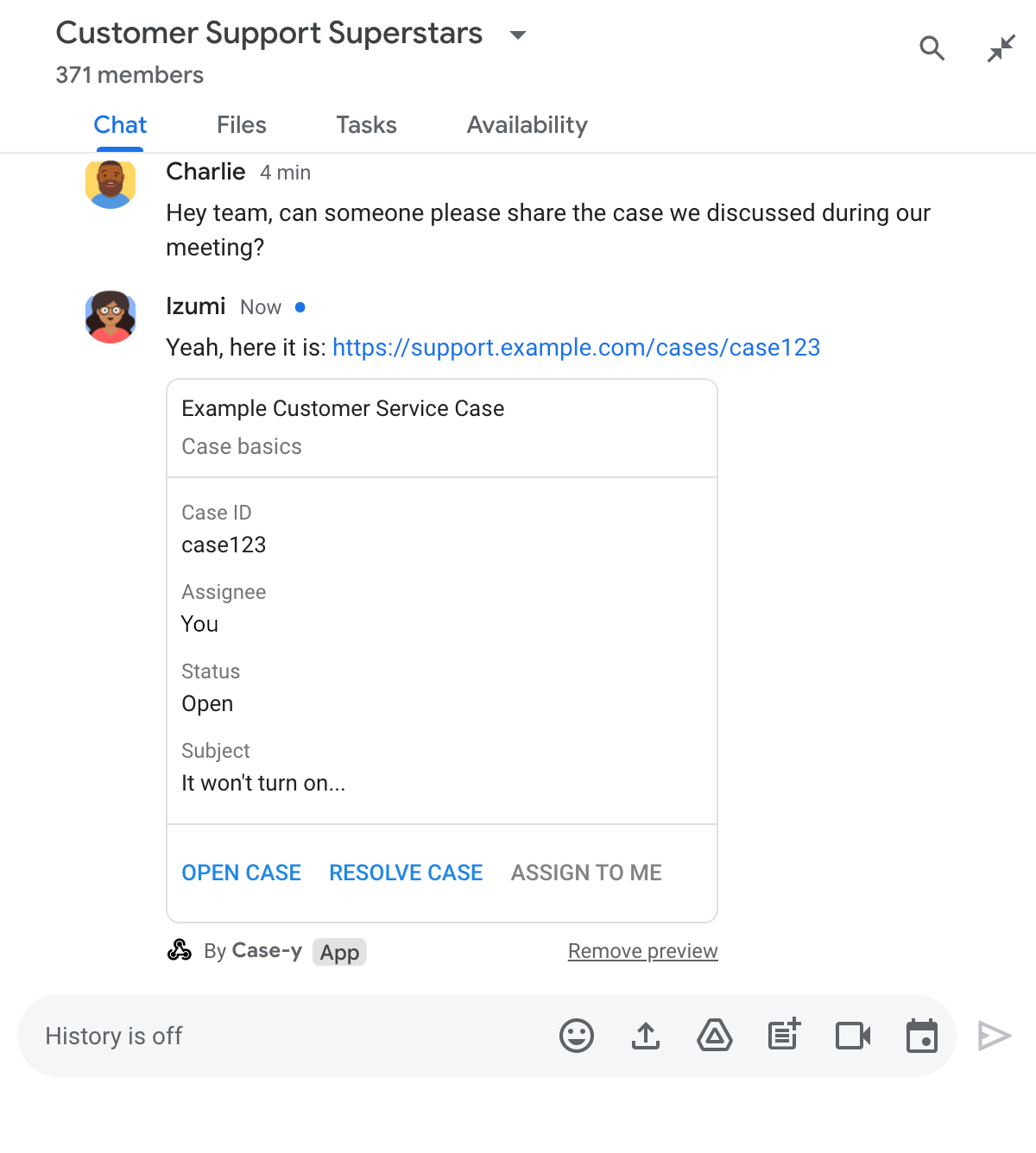
Anteprima di un link con una versione aggiornata di una scheda allegata a un messaggio nell'app di chat

Node.js

node/chat/preview-link/index.js
/**
 * Respond to clicks by assigning and updating the card that's attached to a
 * message previewed link of the pattern "support.example.com".
 *
 * @param {Object} chatMessage The chat message object from Google Workspace Add On event.
 * @return {Object} Action response depending on the message author.
 */
function handleCardClick(chatMessage) {
  // Creates the updated card that displays "You" for the assignee
  // and that disables the button.
  //
  // A hard-coded card is used in this example. In a real-life scenario,
  // an actual assign action would be performed before building the card.
  const message = { cardsV2: [{
    cardId: 'attachCard',
    card: {
      header: {
        title: 'Example Customer Service Case',
        subtitle: 'Case basics',
      },
      sections: [{ widgets: [
        { decoratedText: { topLabel: 'Case ID', text: 'case123'}},
        // The assignee is now "You"
        { decoratedText: { topLabel: 'Assignee', text: 'You'}},
        { decoratedText: { topLabel: 'Status', text: 'Open'}},
        { decoratedText: { topLabel: 'Subject', text: 'It won\'t turn on...' }},
        { buttonList: { buttons: [{
          text: 'OPEN CASE',
          onClick: { openLink: {
            url: 'https://support.example.com/orders/case123'
          }},
        }, {
          text: 'RESOLVE CASE',
          onClick: { openLink: {
            url: 'https://support.example.com/orders/case123?resolved=y',
          }},
        }, {
          text: 'ASSIGN TO ME',
          // The button is now disabled
          disabled: true,
          onClick: { action: { function: FUNCTION_URL }}
        }]}}
      ]}]
    }
  }]};

  // Use the adequate action response type. It depends on whether the message
  // the preview link card is attached to was created by a human or a Chat app.
  if(chatMessage.sender.type === 'HUMAN') {
    return { hostAppDataAction: { chatDataAction: { updateInlinePreviewAction: message }}};
  } else {
    return { hostAppDataAction: { chatDataAction: { updateMessageAction: message }}};
  }
}

Sostituisci FUNCTION_URL con l'endpoint HTTP che gestisce i clic sui pulsanti.

Python

python/chat/preview-link/main.py
def handle_card_click(chatMessage: dict) -> dict:
  """Respond to clicks by assigning and updating the card that's attached to a
  message previewed link of the pattern "support.example.com".

  - Reply with text messages that echo "text.example.com" link URLs in messages.
  - Attach cards to messages with "support.example.com" link URLs.

  Args:
      chatMessage (Mapping[str, Any]): The chat message object from Google Workspace Add On event.

  Returns:
      Mapping[str, Any]: Action response depending on the message author.
  """
  # Creates the updated card that displays "You" for the assignee
  # and that disables the button.
  #
  # A hard-coded card is used in this example. In a real-life scenario,
  # an actual assign action would be performed before building the card.
  message = { 'cardsV2': [{
    'cardId': 'attachCard',
    'card': {
      'header': {
        'title': 'Example Customer Service Case',
        'subtitle': 'Case basics',
      },
      'sections': [{ 'widgets': [
      { 'decoratedText': { 'topLabel': 'Case ID', 'text': 'case123'}},
      # The assignee is now "You"
      { 'decoratedText': { 'topLabel': 'Assignee', 'text': 'You'}},
      { 'decoratedText': { 'topLabel': 'Status', 'text': 'Open'}},
      { 'decoratedText': { 'topLabel': 'Subject', 'text': 'It won\'t turn on...' }},
      { 'buttonList': { 'buttons': [{
        'text': 'OPEN CASE',
        'onClick': { 'openLink': {
          'url': 'https://support.example.com/orders/case123'
        }},
      }, {
        'text': 'RESOLVE CASE',
        'onClick': { 'openLink': {
          'url': 'https://support.example.com/orders/case123?resolved=y',
        }},
      }, {
        'text': 'ASSIGN TO ME',
        # The button is now disabled
        'disabled': True,
        'onClick': { 'action': { 'function': FUNCTION_URL }}
      }]}}
      ]}]
    }
  }]}

  # Use the adequate action response type. It depends on whether the message
  # the preview link card is attached to was created by a human or a Chat app.
  if chatMessage.get('sender').get('type') == 'HUMAN':
    return { 'hostAppDataAction': { 'chatDataAction': { 'updateInlinePreviewAction': message }}}
  else:
    return { 'hostAppDataAction': { 'chatDataAction': { 'updateMessageAction': message }}}

Sostituisci FUNCTION_URL con l'endpoint HTTP che gestisce i clic sui pulsanti.

Java

java/chat/preview-link/src/main/java/com/google/chat/previewLink/App.java
/**
 * Respond to clicks by assigning and updating the card that's attached to a
 * message previewed link of the pattern "support.example.com".
 *
 * @param chatMessage The chat message object from Google Workspace Add On event.
 * @return Action response depending on the message author.
 */
GenericJson handleCardClick(JsonNode chatMessage) {
  // Creates the updated card that displays "You" for the assignee
  // and that disables the button.
  //
  // A hard-coded card is used in this example. In a real-life scenario,
  // an actual assign action would be performed before building the card.
  Message message = new Message().setCardsV2(List.of(new CardWithId()
    .setCardId("attachCard")
    .setCard(new GoogleAppsCardV1Card()
      .setHeader(new GoogleAppsCardV1CardHeader()
        .setTitle("Example Customer Service Case")
        .setSubtitle("Case basics"))
      .setSections(List.of(new GoogleAppsCardV1Section().setWidgets(List.of(
        new GoogleAppsCardV1Widget().setDecoratedText(new GoogleAppsCardV1DecoratedText()
          .setTopLabel("Case ID")
          .setText("case123")),
        // The assignee is now "You"
        new GoogleAppsCardV1Widget().setDecoratedText(new GoogleAppsCardV1DecoratedText()
          .setTopLabel("Assignee")
          .setText("You")),
        new GoogleAppsCardV1Widget().setDecoratedText(new GoogleAppsCardV1DecoratedText()
          .setTopLabel("Status")
          .setText("Open")),
        new GoogleAppsCardV1Widget().setDecoratedText(new GoogleAppsCardV1DecoratedText()
          .setTopLabel("Subject")
          .setText("It won't turn on...")),
        new GoogleAppsCardV1Widget().setButtonList(new GoogleAppsCardV1ButtonList()
          .setButtons(List.of(
            new GoogleAppsCardV1Button()
              .setText("OPEN CASE")
              .setOnClick(new GoogleAppsCardV1OnClick()
                .setOpenLink(new GoogleAppsCardV1OpenLink()
                  .setUrl("https://support.example.com/orders/case123"))),
            new GoogleAppsCardV1Button()
              .setText("RESOLVE CASE")
              .setOnClick(new GoogleAppsCardV1OnClick()
                .setOpenLink(new GoogleAppsCardV1OpenLink()
                  .setUrl("https://support.example.com/orders/case123?resolved=y"))),
            new GoogleAppsCardV1Button()
              .setText("ASSIGN TO ME")
              // The button is now disabled
              .setDisabled(true)
              .setOnClick(new GoogleAppsCardV1OnClick()
                .setAction(new GoogleAppsCardV1Action().setFunction(FUNCTION_URL)))
          ))
        )
      ))))
    )
  ));

  // Use the adequate action response type. It depends on whether the message
  // the preview link card is attached to was created by a human or a Chat app.
  if("HUMAN".equals(chatMessage.at("/sender/type").asText())) {
    return new GenericJson() {{
      put("hostAppDataAction", new GenericJson() {{
        put("chatDataAction", new GenericJson() {{
          put("updateInlinePreviewAction", message);
        }});
      }});
    }};
  } else {
    return new GenericJson() {{
      put("hostAppDataAction", new GenericJson() {{
        put("chatDataAction", new GenericJson() {{
          put("updateMessageAction", message);
        }});
      }});
    }};
  }
}

Sostituisci FUNCTION_URL con l'endpoint HTTP che gestisce i clic sui pulsanti.

Apps Script

apps-script/chat/preview-link/preview-link.gs
/**
 * Assigns and updates the card that's attached to a message with a
 * previewed link of the pattern "support.example.com".
 *
 * @param {Object} event The event object from the Google Workspace add-on.
 * @return {Object} Action response depending on the message author.
 */
function assign(event) {
  // Creates the updated card that displays "You" for the assignee
  // and that disables the button.
  //
  // A hard-coded card is used in this example. In a real-life scenario,
  // an actual assign action would be performed before building the card.
  const message = { cardsV2: [{
    cardId: 'attachCard',
    card: {
      header: {
        title: 'Example Customer Service Case',
        subtitle: 'Case summary',
      },
      sections: [{ widgets: [
        { decoratedText: { topLabel: 'Case ID', text: 'case123'}},
        // The assignee is now "You"
        { decoratedText: { topLabel: 'Assignee', text: 'You'}},
        { decoratedText: { topLabel: 'Status', text: 'Open'}},
        { decoratedText: { topLabel: 'Subject', text: 'It won\'t turn on...' }},
        { buttonList: { buttons: [{
          text: 'OPEN CASE',
          onClick: { openLink: {
            url: 'https://support.example.com/orders/case123'
          }},
        }, {
          text: 'RESOLVE CASE',
          onClick: { openLink: {
            url: 'https://support.example.com/orders/case123?resolved=y',
          }},
        }, {
          text: 'ASSIGN TO ME',
          // The button is now disabled
          disabled: true,
          onClick: { action: { function: 'assign'}}
        }]}}
      ]}]
    }
  }]};

  // Use the adequate action response type. It depends on whether the message
  // the preview link card is attached to was created by a human or a Chat app.
  if(event.chat.buttonClickedPayload.message.sender.type === 'HUMAN') {
    return { hostAppDataAction: { chatDataAction: { updateInlinePreviewAction: message }}};
  } else {
    return { hostAppDataAction: { chatDataAction: { updateMessageAction: message }}};
  }
}

Limiti e considerazioni

Quando configuri le anteprime dei link per la tua app Chat, tieni presente questi limiti e considerazioni:

  • Ogni app Chat supporta le anteprime dei link per un massimo di 5 pattern URL.
  • Le app Chat visualizzano l'anteprima di un link per messaggio. Se in un singolo messaggio sono presenti più link visualizzabili in anteprima, viene visualizzata l'anteprima solo del primo link visualizzabile in anteprima.
  • Le app Chat visualizzano l'anteprima solo dei link che iniziano con https://, quindi https://support.example.com/cases/ viene visualizzato in anteprima, ma support.example.com/cases/ no.
  • A meno che il messaggio non includa altre informazioni inviate all' app Chat, ad esempio un comando slash, solo l'URL del link viene inviato all'app Chat dalle anteprime dei link.
  • Se un utente pubblica il link, un'app Chat può aggiornare la scheda di anteprima dei link solo se gli utenti interagiscono con la scheda, ad esempio con un clic su un pulsante. Non puoi chiamare il metodo update() dell'API Chat sulla risorsa Message per aggiornare in modo asincrono il messaggio di un utente.
  • Le app Chat devono visualizzare l'anteprima dei link per tutti gli utenti dello spazio, quindi il messaggio deve omettere il campo privateMessageViewer.

Quando implementi le anteprime dei link, potresti dover eseguire il debug della tua app Chat leggendo i log dell'app. Per leggere i log, visita Esplora log nella console Google Cloud.