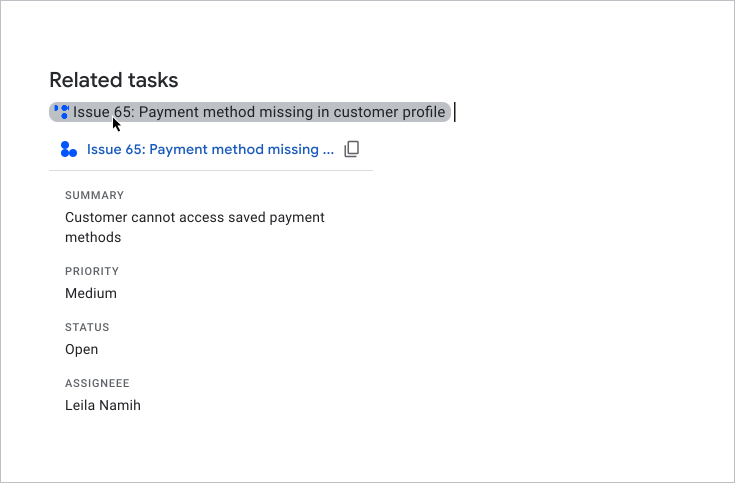
スマートチップを使用したリンクのプレビュー

このページでは、Google ドキュメント、スプレッドシート、スライドのユーザーがサードパーティ サービスのリンクをプレビューできる Google Workspace アドオンを作成する方法について説明します。

Google Workspace アドオンは、サービスのリンクを検出して、ユーザーにプレビューするよう促すことができます。アドオンを構成して、サポートケース、営業見込み客、従業員プロファイルへのリンクなど、複数の URL パターンをプレビューできます。

ユーザーがリンクをプレビューする方法

ユーザーは、リンクをプレビューするために、 スマートチップカードを操作します。

ユーザーがカードをプレビューする

ユーザーがドキュメントまたはスプレッドシートに URL を入力するか貼り付けると、Google ドキュメントまたは Google スプレッドシート でリンクをスマートチップに置換するよう求めるメッセージが表示されます。スマートチップには、リンクされたコンテンツのアイコンと短いタイトルまたは説明が表示されます。ユーザーがチップにカーソルを合わせると、ファイルまたはリンクの詳細情報をプレビューするカード インターフェースが表示されます。

次の動画では、ユーザーがリンクをスマートチップに変換してカードをプレビューする方法を示します。

ユーザーがスライドでリンクをプレビューする方法

スライドのリンク プレビューでは、サードパーティのスマートチップはサポートされていません。ユーザーがプレゼンテーションに URL を入力するか貼り付けると、スライドでリンクをチップではなくリンクされたテキストとしてタイトルに置き換えるよう求めるメッセージが表示されます。ユーザーがリンクのタイトルにカーソルを合わせると、リンクに関する情報をプレビューするカード インターフェースが表示されます。

次の画像は、スライドでのリンク プレビューのレンダリング方法を示しています。
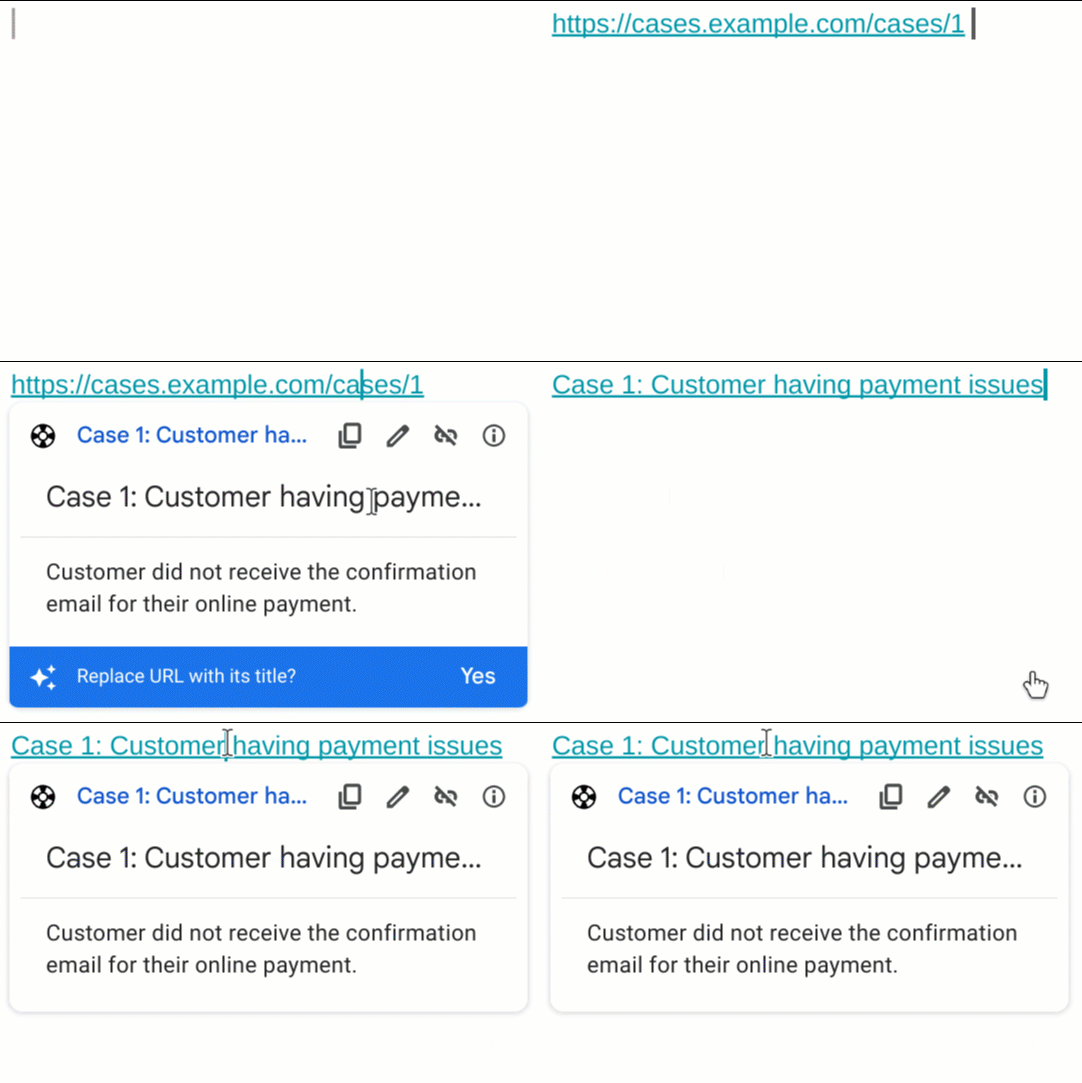
スライドのリンク プレビューの例

前提条件

Apps Script

Node.js

Python

Java

省略可: サードパーティ サービスへの認証を設定する

アドオンが認可を必要とするサービスに接続する場合、ユーザーはリンクをプレビューするためにサービスに対して認証を行う必要があります。つまり、ユーザーがサービスからドキュメント、スプレッドシート、スライドのファイルにリンクを初めて貼り付けるときに、アドオンが認可フローを呼び出す必要があります。

OAuth サービスまたはカスタム認可プロンプトを設定するには、アドオンをサードパーティ サービスに接続するをご覧ください。

このセクションでは、アドオンのリンク プレビューを設定する方法について説明します。手順は次のとおりです。

  1. リンク プレビューを構成するには、アドオンのマニフェストで 設定します。
  2. リンクのスマートチップとカード インターフェースを作成します

リンク プレビューを構成する

リンク プレビューを構成するには、アドオンのマニフェストで次のセクションとフィールドを指定します。

  1. addOns セクションで、ドキュメントを拡張する docs フィールド、スプレッドシートを拡張する sheets フィールド、スライドを拡張する slides フィールドを追加します。
  2. 各フィールドで、linkPreviewTriggers トリガー を実装します。これには、runFunction(この関数は、次の セクションのスマートチップとカードを作成するで定義します)が含まれます。

    linkPreviewTriggers トリガーで指定できるフィールドについては、Apps Script マニフェストまたは 他の ランタイムのデプロイ リソースのリファレンス ドキュメントをご覧ください。

  3. oauthScopes フィールドにスコープ https://www.googleapis.com/auth/workspace.linkpreview を追加して、ユーザーがアドオンに代わってリンクをプレビューする権限を付与できるようにします。

例として、サポートケース サービスのリンク プレビューを構成する次のマニフェストの oauthScopes セクションと addons セクションをご覧ください。

{
  "oauthScopes": [
    "https://www.googleapis.com/auth/workspace.linkpreview"
  ],
  "addOns": {
    "common": {
      "name": "Preview support cases",
      "logoUrl": "https://www.example.com/images/company-logo.png",
      "layoutProperties": {
        "primaryColor": "#dd4b39"
      }
    },
    "docs": {
      "linkPreviewTriggers": [
        {
          "runFunction": "caseLinkPreview",
          "patterns": [
            {
              "hostPattern": "example.com",
              "pathPrefix": "support/cases"
            },
            {
              "hostPattern": "*.example.com",
              "pathPrefix": "cases"
            },
            {
              "hostPattern": "cases.example.com"
            }
          ],
          "labelText": "Support case",
          "logoUrl": "https://www.example.com/images/support-icon.png",
          "localizedLabelText": {
            "es": "Caso de soporte"
          }
        }
      ]
    },
    "sheets": {
      "linkPreviewTriggers": [
        {
          "runFunction": "caseLinkPreview",
          "patterns": [
            {
              "hostPattern": "example.com",
              "pathPrefix": "support/cases"
            },
            {
              "hostPattern": "*.example.com",
              "pathPrefix": "cases"
            },
            {
              "hostPattern": "cases.example.com"
            }
          ],
          "labelText": "Support case",
          "logoUrl": "https://www.example.com/images/support-icon.png",
          "localizedLabelText": {
            "es": "Caso de soporte"
          }
        }
      ]
    },
    "slides": {
      "linkPreviewTriggers": [
        {
          "runFunction": "caseLinkPreview",
          "patterns": [
            {
              "hostPattern": "example.com",
              "pathPrefix": "support/cases"
            },
            {
              "hostPattern": "*.example.com",
              "pathPrefix": "cases"
            },
            {
              "hostPattern": "cases.example.com"
            }
          ],
          "labelText": "Support case",
          "logoUrl": "https://www.example.com/images/support-icon.png",
          "localizedLabelText": {
            "es": "Caso de soporte"
          }
        }
      ]
    }
  }
}

この例では、Google Workspace アドオンは、企業のサポートケース サービスのリンクをプレビューします。アドオンは、リンクをプレビューする 3 つの URL パターンを指定します。リンクが URL パターンのいずれかに一致すると、コールバック関数 caseLinkPreview はドキュメント、スプレッドシート、スライドでカードとスマートチップを作成して表示し、URL をリンクのタイトルに置き換えます。

スマートチップとカードを作成する

リンクのスマートチップとカードを返すには、linkPreviewTriggers オブジェクトで指定した関数を実装する必要があります。

ユーザーが指定された URL パターンに一致するリンクを操作すると、 linkPreviewTriggers トリガーが起動し、そのコールバック関数がイベント オブジェクト EDITOR_NAME.matchedUrl.url を引数として渡します。このイベント オブジェクトのペイロードを使用して、リンク プレビューのスマートチップとカードを作成します。

たとえば、ユーザーがドキュメントでリンク https://www.example.com/cases/123456 をプレビューすると、次のイベント ペイロードが返されます。

JSON

{
  "docs": {
    "matchedUrl": {
        "url": "https://www.example.com/support/cases/123456"
    }
  }
}

カード インターフェースを作成するには、ウィジェットを使用してリンクに関する情報を表示します。ユーザーがリンクを開いたり、その内容を変更したりできるアクションを作成することもできます。使用可能なウィジェットとアクションの一覧については、プレビュー カードでサポートされている コンポーネントをご覧ください

リンク プレビューのスマートチップとカードを作成するには:

  1. アドオンのマニフェストの linkPreviewTriggers セクションで指定した関数を実装します。
    1. 関数は、 EDITOR_NAME.matchedUrl.url を含むイベント オブジェクトを引数として受け取り、 単一の Card オブジェクトを返す必要があります。
    2. サービスで認可が必要な場合は、関数で 認可フローも呼び出す必要があります
  2. プレビュー カードごとに、インターフェースのウィジェットのインタラクティビティを提供するコールバック関数を実装します。たとえば、「リンクを表示」というボタンを追加する場合は、新しいウィンドウでリンクを開くコールバック関数を指定するアクションを作成できます。ウィジェットの操作について詳しくは、アドオンのアクションをご覧ください。

次のコードでは、ドキュメントのコールバック関数 caseLinkPreview を作成します。

Apps Script

apps-script/3p-resources/3p-resources.gs
/**
* Entry point for a support case link preview.
*
* @param {!Object} event The event object.
* @return {!Card} The resulting preview link card.
*/
function caseLinkPreview(event) {

  // If the event object URL matches a specified pattern for support case links.
  if (event.docs.matchedUrl.url) {

    // Uses the event object to parse the URL and identify the case details.
    const caseDetails = parseQuery(event.docs.matchedUrl.url);

    // Builds a preview card with the case name, and description
    const caseHeader = CardService.newCardHeader()
      .setTitle(`Case ${caseDetails["name"][0]}`);
    const caseDescription = CardService.newTextParagraph()
      .setText(caseDetails["description"][0]);

    // Returns the card.
    // Uses the text from the card's header for the title of the smart chip.
    return CardService.newCardBuilder()
      .setHeader(caseHeader)
      .addSection(CardService.newCardSection().addWidget(caseDescription))
      .build();
  }
}

/**
* Extracts the URL parameters from the given URL.
*
* @param {!string} url The URL to parse.
* @return {!Map} A map with the extracted URL parameters.
*/
function parseQuery(url) {
  const query = url.split("?")[1];
  if (query) {
    return query.split("&")
    .reduce(function(o, e) {
      var temp = e.split("=");
      var key = temp[0].trim();
      var value = temp[1].trim();
      value = isNaN(value) ? value : Number(value);
      if (o[key]) {
        o[key].push(value);
      } else {
        o[key] = [value];
      }
      return o;
    }, {});
  }
  return null;
}

Node.js

node/3p-resources/index.js
/**
 * 
 * A support case link preview.
 *
 * @param {!URL} url The event object.
 * @return {!Card} The resulting preview link card.
 */
function caseLinkPreview(url) {
  // Builds a preview card with the case name, and description
  // Uses the text from the card's header for the title of the smart chip.
  // Parses the URL and identify the case details.
  const name = `Case ${url.searchParams.get("name")}`;
  return {
    action: {
      linkPreview: {
        title: name,
        previewCard: {
          header: {
            title: name
          },
          sections: [{
            widgets: [{
              textParagraph: {
                text: url.searchParams.get("description")
              }
            }]
          }]
        }
      }
    }
  };
}

Python

python/3p-resources/create_link_preview/main.py
def case_link_preview(url):
    """A support case link preview.
    Args:
      url: A matching URL.
    Returns:
      The resulting preview link card.
    """

    # Parses the URL and identify the case details.
    query_string = parse_qs(url.query)
    name = f'Case {query_string["name"][0]}'
    # Uses the text from the card's header for the title of the smart chip.
    return {
        "action": {
            "linkPreview": {
                "title": name,
                "previewCard": {
                    "header": {
                        "title": name
                    },
                    "sections": [{
                        "widgets": [{
                            "textParagraph": {
                                "text": query_string["description"][0]
                            }
                        }]
                    }],
                }
            }
        }
    }

Java

java/3p-resources/src/main/java/CreateLinkPreview.java
/**
 * A support case link preview.
 *
 * @param url A matching URL.
 * @return The resulting preview link card.
 */
JsonObject caseLinkPreview(URL url) throws UnsupportedEncodingException {
  // Parses the URL and identify the case details.
  Map<String, String> caseDetails = new HashMap<String, String>();
  for (String pair : url.getQuery().split("&")) {
      caseDetails.put(URLDecoder.decode(pair.split("=")[0], "UTF-8"), URLDecoder.decode(pair.split("=")[1], "UTF-8"));
  }

  // Builds a preview card with the case name, and description
  // Uses the text from the card's header for the title of the smart chip.
  JsonObject cardHeader = new JsonObject();
  String caseName = String.format("Case %s", caseDetails.get("name"));
  cardHeader.add("title", new JsonPrimitive(caseName));

  JsonObject textParagraph = new JsonObject();
  textParagraph.add("text", new JsonPrimitive(caseDetails.get("description")));

  JsonObject widget = new JsonObject();
  widget.add("textParagraph", textParagraph);

  JsonArray widgets = new JsonArray();
  widgets.add(widget);

  JsonObject section = new JsonObject();
  section.add("widgets", widgets);

  JsonArray sections = new JsonArray();
  sections.add(section);

  JsonObject previewCard = new JsonObject();
  previewCard.add("header", cardHeader);
  previewCard.add("sections", sections);

  JsonObject linkPreview = new JsonObject();
  linkPreview.add("title", new JsonPrimitive(caseName));
  linkPreview.add("previewCard", previewCard);

  JsonObject action = new JsonObject();
  action.add("linkPreview", linkPreview);

  JsonObject renderActions = new JsonObject();
  renderActions.add("action", action);

  return renderActions;
}

プレビュー カードでサポートされているコンポーネント

Google Workspace アドオンは、リンク プレビュー カードで次のウィジェットとアクションをサポートしています。

Apps Script

カード サービスのフィールド タイプ
TextParagraph ウィジェット
DecoratedText ウィジェット
Image ウィジェット
IconImage ウィジェット
ButtonSet ウィジェット
TextButton ウィジェット
ImageButton ウィジェット
Grid ウィジェット
Divider ウィジェット
OpenLink アクション
Navigation アクション
updateCard メソッドのみがサポートされています。

JSON

カード(google.apps.card.v1)フィールド タイプ
TextParagraph ウィジェット
DecoratedText ウィジェット
Image ウィジェット
Icon ウィジェット
ButtonList ウィジェット
Button ウィジェット
Grid ウィジェット
Divider ウィジェット
OpenLink アクション
Navigation アクション
updateCard メソッドのみがサポートされています。

完全な例: サポートケース アドオン

次の例では、Google ドキュメントで企業のサポートケースへのリンクをプレビューする Google Workspace アドオンを紹介します。

この例では、次のことを行います。

  • https://www.example.com/support/cases/1234 などのサポートケースへのリンクをプレビューします。スマートチップにはサポート アイコンが表示され、プレビュー カードにはケース ID と説明が表示されます。
  • ユーザーのロケールがスペイン語に設定されている場合、スマートチップは labelText をスペイン語にローカライズします。

マニフェスト

Apps Script

apps-script/3p-resources/appsscript.json
{
  "timeZone": "America/New_York",
  "exceptionLogging": "STACKDRIVER",
  "runtimeVersion": "V8",
  "oauthScopes": [
    "https://www.googleapis.com/auth/workspace.linkpreview",
    "https://www.googleapis.com/auth/workspace.linkcreate"
  ],
  "addOns": {
    "common": {
      "name": "Manage support cases",
      "logoUrl": "https://developers.google.com/workspace/add-ons/images/support-icon.png",
      "layoutProperties": {
        "primaryColor": "#dd4b39"
      }
    },
    "docs": {
      "linkPreviewTriggers": [
        {
          "runFunction": "caseLinkPreview",
          "patterns": [
            {
              "hostPattern": "example.com",
              "pathPrefix": "support/cases"
            },
            {
              "hostPattern": "*.example.com",
              "pathPrefix": "cases"
            },
            {
              "hostPattern": "cases.example.com"
            }
          ],
          "labelText": "Support case",
          "localizedLabelText": {
            "es": "Caso de soporte"
          },
          "logoUrl": "https://developers.google.com/workspace/add-ons/images/support-icon.png"
        }
      ],
      "createActionTriggers": [
        {
          "id": "createCase",
          "labelText": "Create support case",
          "localizedLabelText": {
            "es": "Crear caso de soporte"
          },
          "runFunction": "createCaseInputCard",
          "logoUrl": "https://developers.google.com/workspace/add-ons/images/support-icon.png"
        }
      ]
    }
  }
}

JSON

{
  "oauthScopes": [
    "https://www.googleapis.com/auth/workspace.linkpreview"
  ],
  "addOns": {
    "common": {
      "name": "Preview support cases",
      "logoUrl": "https://developers.google.com/workspace/add-ons/images/support-icon.png",
      "layoutProperties": {
        "primaryColor": "#dd4b39"
      }
    },
    "docs": {
      "linkPreviewTriggers": [
        {
          "runFunction": "URL",
          "patterns": [
            {
              "hostPattern": "example.com",
              "pathPrefix": "support/cases"
            },
            {
              "hostPattern": "*.example.com",
              "pathPrefix": "cases"
            },
            {
              "hostPattern": "cases.example.com"
            }
          ],
          "labelText": "Support case",
          "localizedLabelText": {
            "es": "Caso de soporte"
          },
          "logoUrl": "https://developers.google.com/workspace/add-ons/images/support-icon.png"
        }
      ]
    }
  }
}

コード

Apps Script

apps-script/3p-resources/3p-resources.gs
/**
* Entry point for a support case link preview.
*
* @param {!Object} event The event object.
* @return {!Card} The resulting preview link card.
*/
function caseLinkPreview(event) {

  // If the event object URL matches a specified pattern for support case links.
  if (event.docs.matchedUrl.url) {

    // Uses the event object to parse the URL and identify the case details.
    const caseDetails = parseQuery(event.docs.matchedUrl.url);

    // Builds a preview card with the case name, and description
    const caseHeader = CardService.newCardHeader()
      .setTitle(`Case ${caseDetails["name"][0]}`);
    const caseDescription = CardService.newTextParagraph()
      .setText(caseDetails["description"][0]);

    // Returns the card.
    // Uses the text from the card's header for the title of the smart chip.
    return CardService.newCardBuilder()
      .setHeader(caseHeader)
      .addSection(CardService.newCardSection().addWidget(caseDescription))
      .build();
  }
}

/**
* Extracts the URL parameters from the given URL.
*
* @param {!string} url The URL to parse.
* @return {!Map} A map with the extracted URL parameters.
*/
function parseQuery(url) {
  const query = url.split("?")[1];
  if (query) {
    return query.split("&")
    .reduce(function(o, e) {
      var temp = e.split("=");
      var key = temp[0].trim();
      var value = temp[1].trim();
      value = isNaN(value) ? value : Number(value);
      if (o[key]) {
        o[key].push(value);
      } else {
        o[key] = [value];
      }
      return o;
    }, {});
  }
  return null;
}

Node.js

node/3p-resources/index.js
/**
 * Responds to any HTTP request related to link previews.
 *
 * @param {Object} req An HTTP request context.
 * @param {Object} res An HTTP response context.
 */
exports.createLinkPreview = (req, res) => {
  const event = req.body;
  if (event.docs.matchedUrl.url) {
    const url = event.docs.matchedUrl.url;
    const parsedUrl = new URL(url);
    // If the event object URL matches a specified pattern for preview links.
    if (parsedUrl.hostname === 'example.com') {
      if (parsedUrl.pathname.startsWith('/support/cases/')) {
        return res.json(caseLinkPreview(parsedUrl));
      }
    }
  }
};


/**
 * 
 * A support case link preview.
 *
 * @param {!URL} url The event object.
 * @return {!Card} The resulting preview link card.
 */
function caseLinkPreview(url) {
  // Builds a preview card with the case name, and description
  // Uses the text from the card's header for the title of the smart chip.
  // Parses the URL and identify the case details.
  const name = `Case ${url.searchParams.get("name")}`;
  return {
    action: {
      linkPreview: {
        title: name,
        previewCard: {
          header: {
            title: name
          },
          sections: [{
            widgets: [{
              textParagraph: {
                text: url.searchParams.get("description")
              }
            }]
          }]
        }
      }
    }
  };
}

Python

python/3p-resources/create_link_preview/main.py
from typing import Any, Mapping
from urllib.parse import urlparse, parse_qs

import flask
import functions_framework


@functions_framework.http
def create_link_preview(req: flask.Request):
    """Responds to any HTTP request related to link previews.
    Args:
      req: An HTTP request context.
    Returns:
      An HTTP response context.
    """
    event = req.get_json(silent=True)
    if event["docs"]["matchedUrl"]["url"]:
        url = event["docs"]["matchedUrl"]["url"]
        parsed_url = urlparse(url)
        # If the event object URL matches a specified pattern for preview links.
        if parsed_url.hostname == "example.com":
            if parsed_url.path.startswith("/support/cases/"):
                return case_link_preview(parsed_url)

    return {}


def case_link_preview(url):
    """A support case link preview.
    Args:
      url: A matching URL.
    Returns:
      The resulting preview link card.
    """

    # Parses the URL and identify the case details.
    query_string = parse_qs(url.query)
    name = f'Case {query_string["name"][0]}'
    # Uses the text from the card's header for the title of the smart chip.
    return {
        "action": {
            "linkPreview": {
                "title": name,
                "previewCard": {
                    "header": {
                        "title": name
                    },
                    "sections": [{
                        "widgets": [{
                            "textParagraph": {
                                "text": query_string["description"][0]
                            }
                        }]
                    }],
                }
            }
        }
    }

Java

java/3p-resources/src/main/java/CreateLinkPreview.java
import com.google.cloud.functions.HttpFunction;
import com.google.cloud.functions.HttpRequest;
import com.google.cloud.functions.HttpResponse;
import com.google.gson.Gson;
import com.google.gson.JsonArray;
import com.google.gson.JsonObject;
import com.google.gson.JsonPrimitive;

import java.io.UnsupportedEncodingException;
import java.net.URL;
import java.net.URLDecoder;
import java.util.HashMap;
import java.util.Map;

public class CreateLinkPreview implements HttpFunction {
  private static final Gson gson = new Gson();

  /**
   * Responds to any HTTP request related to link previews.
   *
   * @param request An HTTP request context.
   * @param response An HTTP response context.
   */
  @Override
  public void service(HttpRequest request, HttpResponse response) throws Exception {
    JsonObject event = gson.fromJson(request.getReader(), JsonObject.class);
    String url = event.getAsJsonObject("docs")
        .getAsJsonObject("matchedUrl")
        .get("url")
        .getAsString();
    URL parsedURL = new URL(url);
    // If the event object URL matches a specified pattern for preview links.
    if ("example.com".equals(parsedURL.getHost())) {
      if (parsedURL.getPath().startsWith("/support/cases/")) {
        response.getWriter().write(gson.toJson(caseLinkPreview(parsedURL)));
        return;
      }
    }

    response.getWriter().write("{}");
  }


  /**
   * A support case link preview.
   *
   * @param url A matching URL.
   * @return The resulting preview link card.
   */
  JsonObject caseLinkPreview(URL url) throws UnsupportedEncodingException {
    // Parses the URL and identify the case details.
    Map<String, String> caseDetails = new HashMap<String, String>();
    for (String pair : url.getQuery().split("&")) {
        caseDetails.put(URLDecoder.decode(pair.split("=")[0], "UTF-8"), URLDecoder.decode(pair.split("=")[1], "UTF-8"));
    }

    // Builds a preview card with the case name, and description
    // Uses the text from the card's header for the title of the smart chip.
    JsonObject cardHeader = new JsonObject();
    String caseName = String.format("Case %s", caseDetails.get("name"));
    cardHeader.add("title", new JsonPrimitive(caseName));

    JsonObject textParagraph = new JsonObject();
    textParagraph.add("text", new JsonPrimitive(caseDetails.get("description")));

    JsonObject widget = new JsonObject();
    widget.add("textParagraph", textParagraph);

    JsonArray widgets = new JsonArray();
    widgets.add(widget);

    JsonObject section = new JsonObject();
    section.add("widgets", widgets);

    JsonArray sections = new JsonArray();
    sections.add(section);

    JsonObject previewCard = new JsonObject();
    previewCard.add("header", cardHeader);
    previewCard.add("sections", sections);

    JsonObject linkPreview = new JsonObject();
    linkPreview.add("title", new JsonPrimitive(caseName));
    linkPreview.add("previewCard", previewCard);

    JsonObject action = new JsonObject();
    action.add("linkPreview", linkPreview);

    JsonObject renderActions = new JsonObject();
    renderActions.add("action", action);

    return renderActions;
  }

}