

Halaman ini menjelaskan cara membuat aplikasi Chat yang menerima peristiwa dari Chat menggunakan Pub/Sub. Jenis arsitektur ini untuk aplikasi Chat berguna jika organisasi Anda memiliki firewall, yang dapat mencegah Chat mengirim pesan ke aplikasi Chat Anda, atau jika Anda ingin mengirim atau menerima peristiwa tentang ruang atau pengguna Chat dengan Google Workspace Events API. Namun, arsitektur ini memiliki batasan berikut karena fakta bahwa aplikasi Chat ini hanya dapat mengirim dan menerima pesan asinkron:
- Tidak dapat menggunakan dialog dalam pesan. Sebagai gantinya, gunakan pesan kartu.
- Tidak dapat memperbarui kartu satu per satu dengan respons sinkron. Sebagai gantinya, perbarui
seluruh pesan dengan memanggil
metode
patch.
Diagram berikut menunjukkan arsitektur aplikasi Chat yang dibangun dengan Pub/Sub:
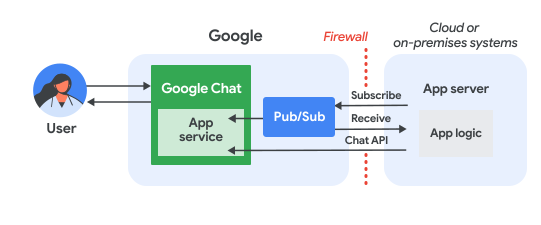
Dalam diagram sebelumnya, pengguna yang berinteraksi dengan aplikasi Chat Pub/Sub memiliki alur informasi berikut:
Pengguna berinteraksi dengan aplikasi Chat, misalnya, mengirim pesan, mengeluarkan perintah, atau menambahkan atau menghapusnya dari ruang Chat, atau peristiwa terjadi di ruang Chat yang aplikasi Chat-nya memiliki langganan aktif.
Chat mengirim pesan ke topik Pub/Sub.
Server aplikasi, yaitu sistem cloud atau lokal yang berisi logika aplikasi Chat, berlangganan topik Pub/Sub untuk menerima pesan melalui firewall.
Secara opsional, aplikasi Chat dapat memanggil Chat API untuk memposting pesan secara asinkron atau melakukan operasi lain.
Prasyarat
Node.js
- Akun Google Workspace Business atau Enterprise dengan akses ke Google Chat.
- Project Google Cloud yang mengaktifkan penagihan. Untuk memeriksa apakah penagihan diaktifkan untuk project yang ada, lihat Memverifikasi status penagihan project Anda. Untuk membuat project dan menyiapkan penagihan, lihat Membuat project Google Cloud.
- Node.js 14 atau yang lebih baru
- Alat pengelolaan paket npm
-
Project Node.js yang telah diinisialisasi. Untuk menginisialisasi project baru, buat dan alihkan ke folder baru, lalu jalankan perintah berikut di antarmuka command line Anda:
npm init
Python
- Akun Google Workspace Business atau Enterprise dengan akses ke Google Chat.
- Project Google Cloud yang mengaktifkan penagihan. Untuk memeriksa apakah penagihan diaktifkan untuk project yang ada, lihat Memverifikasi status penagihan project Anda. Untuk membuat project dan menyiapkan penagihan, lihat Membuat project Google Cloud.
- Python 3.6 atau yang lebih baru
- Alat pengelolaan paket pip
Java
- Akun Google Workspace Business atau Enterprise dengan akses ke Google Chat.
- Project Google Cloud yang mengaktifkan penagihan. Untuk memeriksa apakah penagihan diaktifkan untuk project yang ada, lihat Memverifikasi status penagihan project Anda. Untuk membuat project dan menyiapkan penagihan, lihat Membuat project Google Cloud.
- Java 11 atau yang lebih baru
- Alat pengelolaan paket Maven
Menyiapkan lingkungan
Sebelum menggunakan Google API, Anda harus mengaktifkannya di project Google Cloud. Anda dapat mengaktifkan satu atau beberapa API dalam satu project Google Cloud.Di konsol Google Cloud, aktifkan Google Chat API dan Pub/Sub API.
Menyiapkan Pub/Sub
Buat topik Pub/Sub yang dapat digunakan Chat API untuk mengirim pesan. Sebaiknya gunakan satu topik per aplikasi Chat.
Buat akun layanan untuk aplikasi Chat agar dapat melakukan otorisasi dengan Pub/Sub dan Chat, lalu simpan file kunci pribadi ke direktori kerja Anda.
Buat langganan pull ke topik.
Tetapkan Peran Pelanggan Pub/Sub pada langganan untuk akun layanan yang Anda buat sebelumnya.
Menulis skrip
Di bagian ini, Anda menentukan logika aplikasi untuk aplikasi Chat. Anda menulis skrip yang melakukan autentikasi dengan Google Cloud dan berlangganan topik Pub/Sub untuk menerima peristiwa dari Chat, seperti saat pengguna mengirim pesan ke aplikasi Chat Anda.
Saat menerima pesan, skrip akan memproses data peristiwa dan menggunakan Google Chat API untuk memposting respons kembali ke pengguna atau ruang. Penyiapan ini memungkinkan aplikasi Chat Anda berfungsi di balik firewall sambil tetap berinteraksi dengan pengguna Chat.
Node.js
Di CLI, berikan kredensial akun layanan:
export GOOGLE_APPLICATION_CREDENTIALS=SERVICE_ACCOUNT_FILE_PATHDi CLI, berikan ID project Google Cloud:
export PROJECT_ID=PROJECT_IDDi CLI, berikan ID langganan untuk langganan Pub/Sub yang Anda buat sebelumnya:
export SUBSCRIPTION_ID=SUBSCRIPTION_IDDi direktori kerja Anda, buat file bernama
package.json.Di file
package.json, tempelkan kode berikut:{ "name": "pub-sub-app", "version": "1.0.0", "description": "Google Chat App that listens for messages via Cloud Pub/Sub", "main": "index.js", "scripts": { "start": "node index.js", "test": "echo \"Error: no test specified\" && exit 1" }, "dependencies": { "@google-apps/chat": "^0.4.0", "@google-cloud/pubsub": "^4.5.0" }, "license": "Apache-2.0" }Di direktori kerja Anda, buat file bernama
index.js.Di
index.js, tempelkan kode berikut:const {ChatServiceClient} = require('@google-apps/chat'); const {MessageReplyOption} = require('@google-apps/chat').protos.google.chat.v1.CreateMessageRequest; const {PubSub} = require('@google-cloud/pubsub'); const {SubscriberClient} = require('@google-cloud/pubsub/build/src/v1'); // Receives messages from a pull subscription. function receiveMessages() { const chat = new ChatServiceClient({ keyFile: process.env.GOOGLE_APPLICATION_CREDENTIALS, scopes: ['https://www.googleapis.com/auth/chat.bot'], }); const subscriptionPath = new SubscriberClient() .subscriptionPath(process.env.PROJECT_ID, process.env.SUBSCRIPTION_ID) const subscription = new PubSub() .subscription(subscriptionPath); // Handle incoming message, then acknowledge the received message const messageHandler = message => { console.log(`Id : ${message.id}`); const event = JSON.parse(message.data); console.log(`Data : ${JSON.stringify(event)}`); // Post the response to Google Chat. const request = formatRequest(event); if (request != null) { chat.createMessage(request); } // Acknowledge the message. message.ack(); } subscription.on('message', messageHandler); console.log(`Listening for messages on ${subscriptionPath}`); // Keep main thread from exiting while waiting for messages setTimeout(() => { subscription.removeListener('message', messageHandler); console.log(`Stopped listening for messages.`); }, 60 * 1000); } // Send message to Google Chat based on the type of event function formatRequest(event) { const chatEvent = event.chat || {}; // If the app was removed, we don't respond. if (chatEvent.removedFromSpacePayload) { console.log(`App removed from space.`); return null; } const payload = chatEvent.messagePayload || chatEvent.addedToSpacePayload; const spaceName = payload?.space?.name; if (!spaceName) { console.log('No space name in event.'); return null; } if (chatEvent.addedToSpacePayload) { // An app can also be added to a space by @mentioning it in a // message. In that case, we fall through to the message case // and let the app respond. If the app was added using the // invite flow, we just post a thank you message in the space. return { parent: spaceName, message: { text: 'Thank you for adding me!' }, }; } else if (chatEvent.messagePayload) { // In case of message, post the response in the same thread. const message = chatEvent.messagePayload.message; return { parent: spaceName, messageReplyOption: MessageReplyOption.REPLY_MESSAGE_FALLBACK_TO_NEW_THREAD, message: { text: 'You said: `' + message.text + '`', thread: { name: message.thread.name }, }, }; } } if (!process.env.PROJECT_ID) { console.log('Missing PROJECT_ID env var.'); process.exit(1); } if (!process.env.SUBSCRIPTION_ID) { console.log('Missing SUBSCRIPTION_ID env var.'); process.exit(1); } if (!process.env.GOOGLE_APPLICATION_CREDENTIALS) { console.log('Missing GOOGLE_APPLICATION_CREDENTIALS env var.'); process.exit(1); } receiveMessages();
Python
Di CLI, berikan kredensial akun layanan:
export GOOGLE_APPLICATION_CREDENTIALS=SERVICE_ACCOUNT_FILE_PATHDi CLI, berikan ID project Google Cloud:
export PROJECT_ID=PROJECT_IDDi CLI, berikan ID langganan untuk langganan Pub/Sub yang Anda buat sebelumnya:
export SUBSCRIPTION_ID=SUBSCRIPTION_IDDi direktori kerja Anda, buat file bernama
requirements.txt.Di file
requirements.txt, tempelkan kode berikut:google-cloud-pubsub>=2.23.0 google-apps-chat==0.1.9Di direktori kerja Anda, buat file bernama
app.py.Di
app.py, tempelkan kode berikut:import json import logging import os import sys import time from google.apps import chat_v1 as google_chat from google.cloud import pubsub_v1 from google.oauth2.service_account import Credentials def receive_messages(): """Receives messages from a pull subscription.""" scopes = ['https://www.googleapis.com/auth/chat.bot'] service_account_key_path = os.environ.get('GOOGLE_APPLICATION_CREDENTIALS') creds = Credentials.from_service_account_file(service_account_key_path) chat = google_chat.ChatServiceClient( credentials=creds, client_options={'scopes': scopes} ) project_id = os.environ.get('PROJECT_ID') subscription_id = os.environ.get('SUBSCRIPTION_ID') subscriber = pubsub_v1.SubscriberClient() subscription_path = subscriber.subscription_path(project_id, subscription_id) # Handle incoming message, then acknowledge the received message def callback(message): event = json.loads(message.data) logging.info('Data : %s', event) # Post the response to Google Chat. request = format_request(event) if request is not None: chat.create_message(request) # Acknowledge the message. message.ack() subscriber.subscribe(subscription_path, callback = callback) logging.info('Listening for messages on %s', subscription_path) # Keep main thread from exiting while waiting for messages while True: time.sleep(60) def format_request(event): """Send message to Google Chat based on the type of event. Args: event: A dictionary with the event data. """ chat_event = event.get('chat', {}) # If the app was removed, we don't respond. if 'removedFromSpacePayload' in chat_event: logging.info('App removed from space.') return payload = chat_event.get('messagePayload') or chat_event.get( 'addedToSpacePayload' ) space_name = payload.get('space', {}).get('name') if payload else None if not space_name: logging.warning('No space name in event.') return if 'addedToSpacePayload' in chat_event: # An app can also be added to a space by @mentioning it in a # message. In that case, we fall through to the message case # and let the app respond. If the app was added using the # invite flow, we just post a thank you message in the space. return google_chat.CreateMessageRequest( parent = space_name, message = { 'text': 'Thank you for adding me!' } ) elif 'messagePayload' in chat_event: # In case of message, post the response in the same thread. message = chat_event['messagePayload']['message'] return google_chat.CreateMessageRequest( parent = space_name, message_reply_option = google_chat.CreateMessageRequest.MessageReplyOption.REPLY_MESSAGE_FALLBACK_TO_NEW_THREAD, message = { 'text': 'You said: `' + message['text'] + '`', 'thread': { 'name': message['thread']['name'] } } ) if __name__ == '__main__': if 'PROJECT_ID' not in os.environ: logging.error('Missing PROJECT_ID env var.') sys.exit(1) if 'SUBSCRIPTION_ID' not in os.environ: logging.error('Missing SUBSCRIPTION_ID env var.') sys.exit(1) if 'GOOGLE_APPLICATION_CREDENTIALS' not in os.environ: logging.error('Missing GOOGLE_APPLICATION_CREDENTIALS env var.') sys.exit(1) logging.basicConfig( level=logging.INFO, style='{', format='{levelname:.1}{asctime} {filename}:{lineno}] {message}') receive_messages()
Java
Di CLI, berikan kredensial akun layanan:
export GOOGLE_APPLICATION_CREDENTIALS=SERVICE_ACCOUNT_FILE_PATHDi CLI, berikan ID project Google Cloud:
export PROJECT_ID=PROJECT_IDDi CLI, berikan ID langganan untuk langganan Pub/Sub yang Anda buat sebelumnya:
export SUBSCRIPTION_ID=SUBSCRIPTION_IDDi direktori kerja Anda, buat file bernama
pom.xml.Di file
pom.xml, tempelkan kode berikut:<project xmlns="http://maven.apache.org/POM/4.0.0" xmlns:xsi="http://www.w3.org/2001/XMLSchema-instance" xsi:schemaLocation="http://maven.apache.org/POM/4.0.0 http://maven.apache.org/xsd/maven-4.0.0.xsd"> <modelVersion>4.0.0</modelVersion> <groupId>com.google.chat.addon</groupId> <artifactId>pubsub-addon-chat-app</artifactId> <version>0.1.0</version> <name>pubsub-addon-chat-app-java</name> <properties> <maven.compiler.release>11</maven.compiler.release> <project.build.sourceEncoding>UTF-8</project.build.sourceEncoding> </properties> <dependencyManagement> <dependencies> <dependency> <groupId>com.google.cloud</groupId> <artifactId>libraries-bom</artifactId> <version>26.41.0</version> <!-- Use a recent BOM version --> <type>pom</type> <scope>import</scope> </dependency> </dependencies> </dependencyManagement> <dependencies> <!-- Google Chat GAPIC library --> <dependency> <groupId>com.google.cloud</groupId> <artifactId>google-cloud-chat</artifactId> </dependency> <!-- Google Cloud Pub/Sub library --> <dependency> <groupId>com.google.cloud</groupId> <artifactId>google-cloud-pubsub</artifactId> </dependency> <!-- Google Apps Add-ons Event Object --> <dependency> <groupId>com.google.apps.addons.v1</groupId> <artifactId>google-apps-addons-v1-java</artifactId> <version>0.2.0</version> <!-- Check for latest version --> </dependency> <!-- Protobuf JSON utility --> <dependency> <groupId>com.google.protobuf</groupId> <artifactId>protobuf-java-util</artifactId> </dependency> <!-- Google Auth Library --> <dependency> <groupId>com.google.auth</groupId> <artifactId>google-auth-library-oauth2-http</artifactId> </dependency> <dependency> <groupId>com.google.api</groupId> <artifactId>gax</artifactId> </dependency> <!-- JSON utilities for PubSub message (if needed, though protobuf-java-util is primary for EventObject) --> <dependency> <groupId>com.fasterxml.jackson.core</groupId> <artifactId>jackson-databind</artifactId> <version>2.14.2</version> </dependency> <dependency> <groupId>org.slf4j</groupId> <artifactId>slf4j-jdk14</artifactId> <version>1.7.36</version> <scope>runtime</scope> </dependency> </dependencies> <build> <plugins> <plugin> <groupId>org.apache.maven.plugins</groupId> <artifactId>maven-compiler-plugin</artifactId> <version>3.13.0</version> <configuration> <source>11</source> <target>11</target> </configuration> </plugin> <plugin> <groupId>org.codehaus.mojo</groupId> <artifactId>exec-maven-plugin</artifactId> <version>3.3.0</version> <configuration> <mainClass>Main</mainClass> </configuration> </plugin> </plugins> </build> </project>Di direktori kerja Anda, buat struktur direktori
src/main/java.Di direktori
src/main/java, buat file bernamaMain.java.Di
Main.java, tempelkan kode berikut:import com.fasterxml.jackson.databind.JsonNode; import com.fasterxml.jackson.databind.ObjectMapper; import com.google.api.gax.core.FixedCredentialsProvider; import com.google.auth.oauth2.GoogleCredentials; import com.google.chat.v1.ChatServiceClient; import com.google.chat.v1.ChatServiceSettings; import com.google.chat.v1.CreateMessageRequest; import com.google.chat.v1.CreateMessageRequest.MessageReplyOption; import com.google.chat.v1.Message; import com.google.chat.v1.Thread; import com.google.cloud.pubsub.v1.AckReplyConsumer; import com.google.cloud.pubsub.v1.MessageReceiver; import com.google.cloud.pubsub.v1.Subscriber; import com.google.pubsub.v1.ProjectSubscriptionName; import com.google.pubsub.v1.PubsubMessage; import java.io.FileInputStream; import java.util.Collections; public class Main { public static final String PROJECT_ID_ENV_PROPERTY = "PROJECT_ID"; public static final String SUBSCRIPTION_ID_ENV_PROPERTY = "SUBSCRIPTION_ID"; public static final String CREDENTIALS_PATH_ENV_PROPERTY = "GOOGLE_APPLICATION_CREDENTIALS"; public static void main(String[] args) throws Exception { ProjectSubscriptionName subscriptionName = ProjectSubscriptionName.of( System.getenv(Main.PROJECT_ID_ENV_PROPERTY), System.getenv(Main.SUBSCRIPTION_ID_ENV_PROPERTY)); // Instantiate app, which implements an asynchronous message receiver. EchoApp echoApp = new EchoApp(); // Create a subscriber for <var>SUBSCRIPTION_ID</var> bound to the message receiver final Subscriber subscriber = Subscriber.newBuilder(subscriptionName, echoApp).build(); System.out.println("Subscriber is listening to events..."); subscriber.startAsync(); // Wait for termination subscriber.awaitTerminated(); } } /** * A demo app which implements {@link MessageReceiver} to receive messages. * It echoes incoming messages. */ class EchoApp implements MessageReceiver { // Path to the private key JSON file of the service account to be used for posting response // messages to Google Chat. // In this demo, we are using the same service account for authorizing with Cloud Pub/Sub to // receive messages and authorizing with Google Chat to post messages. If you are using // different service accounts, set the path to the private key JSON file of the service // account used to post messages to Google Chat here. private static final String SERVICE_ACCOUNT_KEY_PATH = System.getenv(Main.CREDENTIALS_PATH_ENV_PROPERTY); // Developer code for Google Chat API scope. private static final String GOOGLE_CHAT_API_SCOPE = "https://www.googleapis.com/auth/chat.bot"; private static final String ADDED_RESPONSE = "Thank you for adding me!"; ChatServiceClient chatServiceClient; EchoApp() throws Exception { GoogleCredentials credential = GoogleCredentials.fromStream(new FileInputStream(SERVICE_ACCOUNT_KEY_PATH)) .createScoped(Collections.singleton(GOOGLE_CHAT_API_SCOPE)); // Create the ChatServiceSettings with the app credentials ChatServiceSettings chatServiceSettings = ChatServiceSettings.newBuilder() .setCredentialsProvider(FixedCredentialsProvider.create(credential)) .build(); // Set the Chat service client chatServiceClient = ChatServiceClient.create(chatServiceSettings); } // Called when a message is received by the subscriber. @Override public void receiveMessage(PubsubMessage pubsubMessage, AckReplyConsumer consumer) { System.out.println("Id : " + pubsubMessage.getMessageId()); // Handle incoming message, then acknowledge the received message try { ObjectMapper mapper = new ObjectMapper(); JsonNode dataJson = mapper.readTree(pubsubMessage.getData().toStringUtf8()); System.out.println("Data : " + dataJson.toString()); handle(dataJson); consumer.ack(); } catch (Exception e) { System.out.println(e); // Negative acknowledgement makes Pub/Sub redeliver the message. consumer.nack(); } } // Send message to Google Chat based on the type of event. public void handle(JsonNode eventJson) throws Exception { // Google Chat events for add-ons are wrapped in a 'chat' object. if (!eventJson.has("chat")) { System.out.println("Ignored: Not a Chat event (missing 'chat' field)."); return; } JsonNode chatNode = eventJson.get("chat"); CreateMessageRequest createMessageRequest = null; if (chatNode.has("messagePayload")) { // HANDLE MESSAGE JsonNode messagePayload = chatNode.get("messagePayload"); JsonNode message = messagePayload.get("message"); JsonNode space = messagePayload.get("space"); String spaceName = space.get("name").asText(); String userText = message.has("text") ? message.get("text").asText() : ""; String threadName = message.has("thread") ? message.get("thread").get("name").asText() : ""; System.out.println("Received message in " + spaceName + ": " + userText); createMessageRequest = CreateMessageRequest.newBuilder() .setParent(spaceName) .setMessageReplyOption(MessageReplyOption.REPLY_MESSAGE_FALLBACK_TO_NEW_THREAD) .setMessage( Message.newBuilder() .setText("You said: `" + userText + "`") .setThread(Thread.newBuilder().setName(threadName).build()) .build()) .build(); } else if (chatNode.has("addedToSpacePayload")) { // HANDLE ADDED TO SPACE JsonNode addedPayload = chatNode.get("addedToSpacePayload"); JsonNode space = addedPayload.get("space"); String spaceName = space.get("name").asText(); System.out.println("Added to space: " + spaceName); createMessageRequest = CreateMessageRequest.newBuilder() .setParent(spaceName) .setMessage(Message.newBuilder().setText(ADDED_RESPONSE).build()) .build(); } else if (chatNode.has("removedFromSpacePayload")) { System.out.println("Removed from space."); return; } else { System.out.println("Ignored: Unhandled Chat event type."); return; } if (createMessageRequest != null) { // Post the response to Google Chat. chatServiceClient.createMessage(createMessageRequest); System.out.println("Sent reply."); } } }
Mengonfigurasi aplikasi Chat
Konfigurasi aplikasi Chat di konsol Google Cloud untuk memberikan detail seperti nama dan avatar, serta menyiapkan koneksi ke topik Pub/Sub.
Dengan terhubung ke topik Pub/Sub, Anda memungkinkan Chat mengirim peristiwa ke aplikasi Anda. Skrip Anda, yang berlangganan topik, kemudian dapat menerima peristiwa ini dan merespons pengguna.
Di Konsol Google Cloud, buka Menu > APIs & Services > Enabled APIs & Services > Google Chat API > Configuration.
Konfigurasi aplikasi Chat untuk Pub/Sub:
- Di App name, masukkan
Quickstart App. - Di Avatar URL, masukkan
https://developers.google.com/workspace/chat/images/quickstart-app-avatar.png. - Di Deskripsi, masukkan
Quickstart app. - Di bagian Functionality, pilih Join spaces and group conversations.
- Di bagian Setelan koneksi, pilih Cloud Pub/Sub dan tempel nama topik Pub/Sub yang Anda buat sebelumnya.
- Di bagian Visibilitas, pilih Jadikan aplikasi Google Chat ini tersedia untuk orang dan grup tertentu di domain Anda, lalu masukkan alamat email Anda.
- Di bagian Logs, pilih Log errors to Logging.
- Di App name, masukkan
Klik Simpan.
Setelah mengonfigurasi aplikasi Chat, Anda harus memperbarui konfigurasi Pub/Sub.
- Di halaman konfigurasi Chat API, di bagian Setelan koneksi, salin Email akun layanan, yang merupakan email unik yang dibuat untuk project Google Cloud Anda.
Berikan izin Chat untuk memublikasikan ke topik dengan menetapkan peran Pub/Sub Publisher ke email akun layanan yang sebelumnya Anda salin.
Aplikasi siap menerima dan membalas pesan di Chat.
Jalankan skrip:
Di CLI, beralihlah ke direktori kerja Anda dan jalankan skrip:
Node.js
npm install
npm start
Python
python -m venv env
source env/bin/activate
pip install -r requirements.txt -U
python app.py
Java
mvn compile exec:java -Dexec.mainClass=Main
Saat Anda menjalankan kode, aplikasi mulai memproses pesan yang dipublikasikan ke topik Pub/Sub.
Menguji aplikasi Chat Anda
Untuk menguji aplikasi Chat Anda, buka ruang pesan langsung dengan aplikasi Chat dan kirim pesan:
Buka Google Chat menggunakan akun Google Workspace yang Anda berikan saat menambahkan diri Anda sebagai penguji tepercaya.
- Klik Percakapan baru.
- Di kolom Tambahkan 1 orang atau lebih, ketik nama aplikasi Chat Anda.
Pilih aplikasi Chat Anda dari hasil. Pesan langsung akan terbuka.
- Di pesan langsung baru dengan aplikasi, ketik
Hellodan tekanenter.
Untuk menambahkan penguji tepercaya dan mempelajari lebih lanjut pengujian fitur interaktif, lihat Menguji fitur interaktif untuk aplikasi Google Chat.
Memecahkan masalah
Saat aplikasi atau kartu Google Chat menampilkan error, antarmuka Chat akan menampilkan pesan yang menyatakan "Terjadi masalah". atau "Tidak dapat memproses permintaan Anda". Terkadang UI Chat tidak menampilkan pesan error apa pun, tetapi aplikasi atau kartu Chat menghasilkan hasil yang tidak terduga; misalnya, pesan kartu mungkin tidak muncul.
Meskipun pesan error mungkin tidak ditampilkan di UI Chat, pesan error deskriptif dan data log tersedia untuk membantu Anda memperbaiki error jika logging error untuk aplikasi Chat diaktifkan. Untuk mendapatkan bantuan dalam melihat, melakukan proses debug, dan memperbaiki error, lihat Memecahkan masalah dan memperbaiki error Google Chat.
Pembersihan
Agar tidak menimbulkan biaya pada akun Google Cloud Anda untuk resource yang digunakan dalam tutorial ini, sebaiknya hapus project Cloud tersebut.
- Di Konsol Google Cloud, buka halaman Manage resources. Klik Menu > IAM & Admin > Kelola Resource.
- Pada daftar project, pilih project yang ingin Anda hapus, lalu klik Hapus .
- Pada dialog, ketik project ID, lalu klik Shut down untuk menghapus project.
Topik terkait
Untuk menambahkan fitur lainnya ke aplikasi Chat Anda, lihat berikut ini:
Aplikasi Chat yang bukan add-on: Membangun aplikasi Google Chat dengan Pub/Sub
Untuk membuat aplikasi Chat yang bukan add-on Google Workspace dengan Pub/Sub, ikuti langkah-langkah berikut untuk memberikan izin publikasi Pub/Sub, menulis skrip, dan mengonfigurasi aplikasi Chat yang bukan add-on.
Memberikan izin Chat untuk memublikasikan ke topik
Berikan izin Chat untuk memublikasikan ke topik Pub/Sub dengan menetapkan peran Pub/Sub Publisher ke akun layanan berikut:
chat-api-push@system.gserviceaccount.com
Menulis skrip untuk aplikasi Chat yang bukan add-on
Node.js
Di CLI, berikan kredensial akun layanan:
export GOOGLE_APPLICATION_CREDENTIALS=SERVICE_ACCOUNT_FILE_PATHDi CLI, berikan ID project Google Cloud:
export PROJECT_ID=PROJECT_IDDi CLI, berikan ID langganan untuk langganan Pub/Sub yang Anda buat sebelumnya:
export SUBSCRIPTION_ID=SUBSCRIPTION_IDDi direktori kerja Anda, buat file bernama
package.json.Di file
package.json, tempelkan kode berikut:Di direktori kerja Anda, buat file bernama
index.js.Di
index.js, tempelkan kode berikut:
Python
Di CLI, berikan kredensial akun layanan:
export GOOGLE_APPLICATION_CREDENTIALS=SERVICE_ACCOUNT_FILE_PATHDi CLI, berikan ID project Google Cloud:
export PROJECT_ID=PROJECT_IDDi CLI, berikan ID langganan untuk langganan Pub/Sub yang Anda buat sebelumnya:
export SUBSCRIPTION_ID=SUBSCRIPTION_IDDi direktori kerja Anda, buat file bernama
requirements.txt.Di file
requirements.txt, tempelkan kode berikut:Di direktori kerja Anda, buat file bernama
app.py.Di
app.py, tempelkan kode berikut:
Java
Di CLI, berikan kredensial akun layanan:
export GOOGLE_APPLICATION_CREDENTIALS=SERVICE_ACCOUNT_FILE_PATHDi CLI, berikan ID project Google Cloud:
export PROJECT_ID=PROJECT_IDDi CLI, berikan ID langganan untuk langganan Pub/Sub yang Anda buat sebelumnya:
export SUBSCRIPTION_ID=SUBSCRIPTION_IDDi direktori kerja Anda, buat file bernama
pom.xml.Di file
pom.xml, tempelkan kode berikut:Di direktori kerja Anda, buat struktur direktori
src/main/java.Di direktori
src/main/java, buat file bernamaMain.java.Di
Main.java, tempelkan kode berikut:
Mengonfigurasi aplikasi Chat yang bukan add-on
Di Konsol Google Cloud, buka Menu > APIs & Services > Enabled APIs & Services > Google Chat API > Configuration.
Konfigurasi aplikasi Chat yang bukan add-on untuk Pub/Sub:
- Hapus tanda centang pada Buat aplikasi Chat ini sebagai add-on Google Workspace. Dialog akan terbuka dan meminta Anda untuk mengonfirmasi. Pada dialog, klik Nonaktifkan.
- Di App name, masukkan
Quickstart App. - Di Avatar URL, masukkan
https://developers.google.com/workspace/chat/images/quickstart-app-avatar.png. - Di Deskripsi, masukkan
Quickstart app. - Di bagian Functionality, pilih Join spaces and group conversations.
- Di bagian Setelan koneksi, pilih Cloud Pub/Sub dan tempel nama topik Pub/Sub yang Anda buat sebelumnya.
- Di bagian Visibilitas, pilih Jadikan aplikasi Google Chat ini tersedia untuk orang dan grup tertentu di domain Anda, lalu masukkan alamat email Anda.
- Di bagian Logs, pilih Log errors to Logging.
Klik Simpan.