This guide outlines the onboarding, production root trusting, and ongoing downstream client registration process for Verifier Registrars (VRs)—identity verification (IDV) providers, aggregators, and platforms that act as their own Certificate Authority (CA) on behalf of multiple downstream End Relying Parties (RPs).
Choose your path RP, Verifier Registrar, or In-Person
Steps on this page
Step A: Submit intake form, Root Certificates & accept ToS
Fill out and submit the Verifier Registrar Onboarding Intake Form. In this form, you provide both your Sandbox and Production Root Certificates. By submitting this onboarding intake form, you are also formally accepting the Google Wallet Verifier Registrar Terms of Service.
Open Verifier Registrar Intake Form
Step B: Sandbox trust & testing
After you submit your intake form, Google adds your sandbox root certificate to the Google Wallet sandbox trust store and notifies you. You can then test your integration in the sandbox using leaf certificates signed by your sandbox root:
- Switch your test device to sandbox mode (Step 1: Set Up the Sandbox) and add the Utopia Sandbox cert to your verifier's trust store.
- Provision a Utopia test ID pass into Google Wallet (Step 2: Create a Test ID).
- Implement your CA leaf certificate profile (
1.3.6.1.4.1.11129.10.1), CBOR metadata, and OpenID4VP flow (Step 3: Integrate as a Verifier Registrar). - Verify every item in Step 4: Test Your Integration.
Step C: Record & submit E2E video demonstrations
When sandbox testing is complete, record end-to-end video demonstrations of the verification flow for your initial (1st) Relying Party and submit them to Google:
- Record both hosting models: Record demonstrations for both verifier-hosted (self-hosted) and merchant-hosted (RP-hosted) flows as applicable.
- Use real display assets: Use actual merchant display assets (Name, Logo, Terms of Service URL) and aggregator display assets in the videos.
- Show the complete journey: Clearly demonstrate the user interface and screens that launch and complete the verification flow.
Step D: Approval & Production Root Trusting
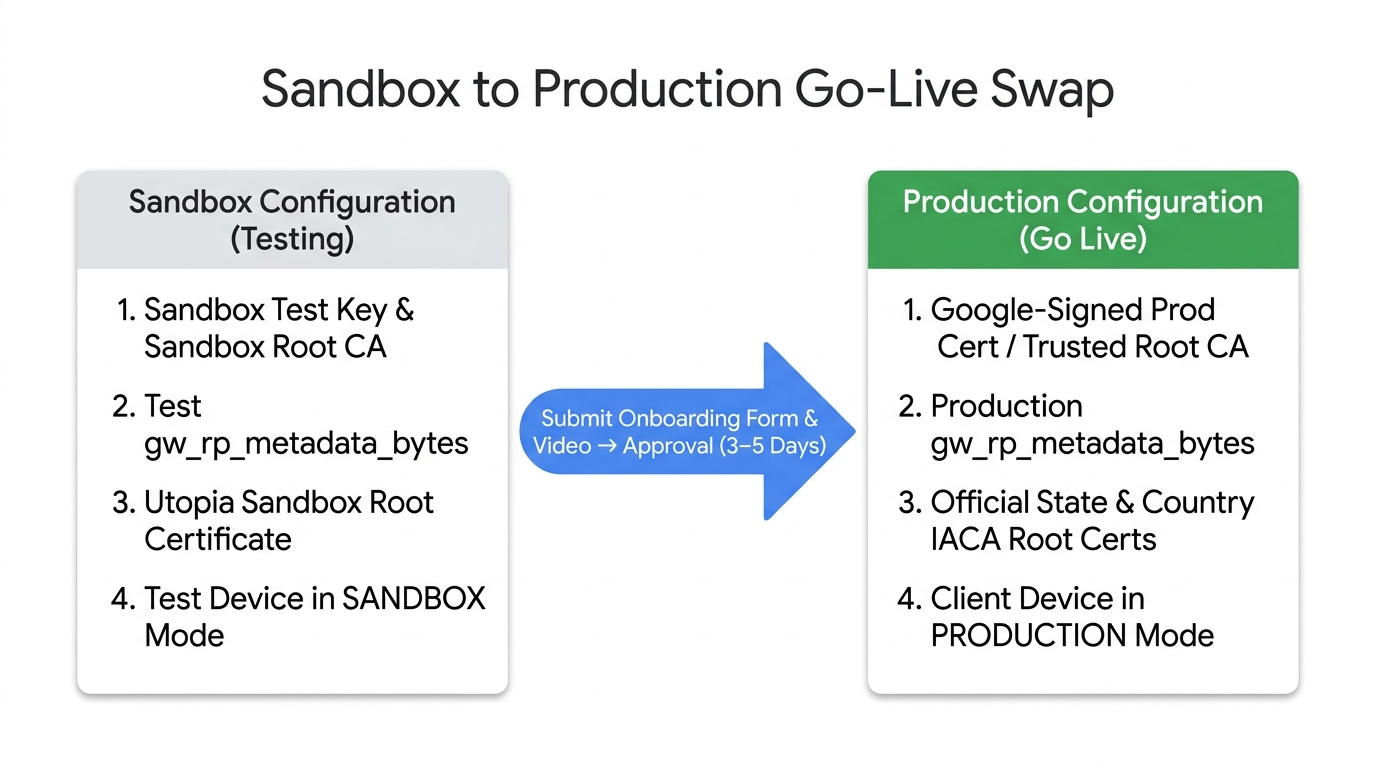
Upon receiving your end-to-end video demonstrations, Google triggers the video
review and approval process while in parallel starting the production root
certificate trusting process. After both processes are completed and approved,
you can begin launching the service for your downstream End RPs (make sure your
production verifier validates issuerAuth against the official
Supported Issuers & IACA Certificates).
Step E: Ongoing End RP onboarding
For each downstream End RP you sign for, you must:
- Inform Google: Use the Verifier Registrar Client Onboarding Form to notify Google of the new RP and its intended use case.
- Configure metadata & unique Subject: Populate the RP's display information
(Name, Logo, Privacy Policy URL) in
RelyingPartyMetadata, include its SHA-256 hash in the custom X.509 extension (1.3.6.1.4.1.11129.10.1), and set a globally unique Distinguished Name (Subject) in their leaf certificate (see Step 3.A: VR technical specifications).
Open Verifier Registrar Client Onboarding Form
Compliance and revocation
- Abuse Monitoring: Google monitors for malicious RP activity and will notify you of any detected abuse.
- Prompt Revocation: You are required to promptly revoke certificates for abusive RPs and publish an updated Certificate Revocation List (CRL).
- Auditing: Google maintains anonymized logs to ensure RP requests match their registered use cases.
Related resources
- Step 3: Integrate as a Verifier Registrar (CA & CBOR Specs)
- Supported Issuers & IACA Certificates
- Verifier Registrar Terms of Service
- Verifier Registrars FAQ