This guide explains how Verifier Registrars (VRs)—identity verification (IDV) providers, aggregators, and platforms verifying users on behalf of multiple downstream clients (End RPs)—configure their Certificate Authority (CA), encode CBOR metadata, and integrate the Digital Credentials API.
Choose your path RP, Verifier Registrar, or In-Person
How Verifier Registrar integration works
As a Verifier Registrar, you act as your own Certificate Authority (CA), signing identity requests for the downstream End Relying Parties (RPs) that you manage. Select any step to jump to its implementation details:
Step A: Configure Your CA Certificate Profile & CBOR Metadata
1. Certificate profile
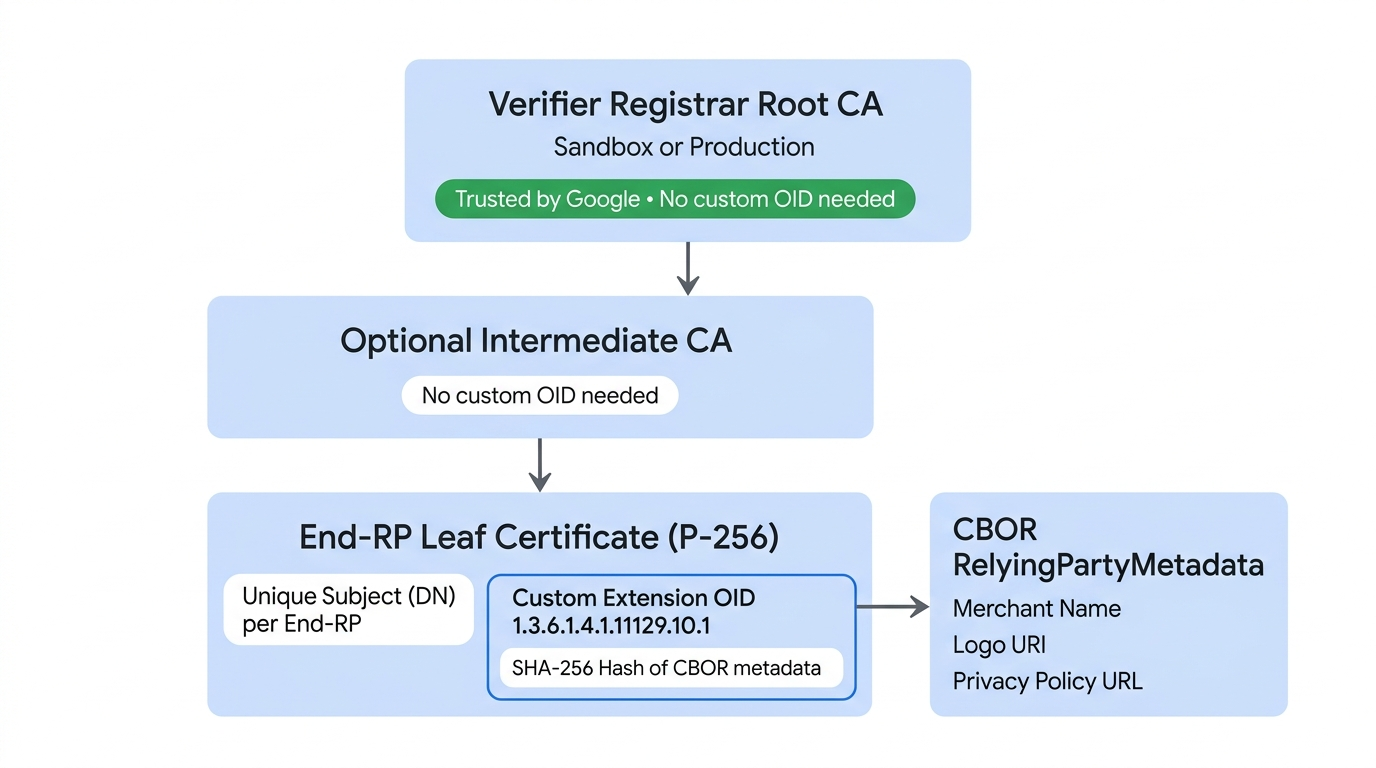
Requests must be signed by standard X.509 v3 leaf certificates (chained to your registered Sandbox or Production Root CA) generated using P-256 / ECDSA and containing a custom Google extension:
- Custom Extension OID:
1.3.6.1.4.1.11129.10.1 - Criticality: Non-critical.
- Content: A SHA-256 hash of the
RelyingPartyMetadataBytes, encoded in an ASN.1OCTET STRING. - Subject (Distinguished Name): Must be globally unique for each downstream End RP you sign for.
Applies to leaf certificates only: These custom extension and Subject requirements apply only to the end-entity (leaf) certificates representing your downstream End RPs. Your Sandbox and Production Root CAs—as well as any intermediate CAs you use—do not require the custom Google OID extension and do not need an End-RP-specific Subject.
2. Metadata schema (CBOR)
Metadata for each downstream End RP (and optional aggregator branding) must be encoded in CBOR format:
; in CDDL for CBOR encoding
; schemaVersion = "v1"

RelyingPartyMetadataBytes = #6.24(bstr .cbor RelyingPartyMetadata)


RelyingPartyMetadata = {
  "schema_version": tstr,
  "display": DisplayInfo,
  "aggregator_info": DisplayInfo  ; Optional: include to show your branding alongside the RP
}

DisplayInfo = {
  "display_name": tstr,
  "logo_uri": tstr,             ; See brand guidelines link in following paragraph
  "privacy_policy_uri": tstr
}
The logo_uri must follow Google Wallet Brand Guidelines.
3. OpenID4VP metadata integration
When formatting your signed OpenID4VP credential request in Step B,
include the Base64URL-encoded RelyingPartyMetadataBytes in the
gw_rp_metadata_bytes field inside the client_metadata object, and include
your End-RP leaf certificate chain in the JWS x5c header.
Supported Formats, Credentials & Capabilities
Google Wallet supports ISO mdoc based Digital IDs over OpenID4VP (Version 1.0) on Android 9 (API level 28) and higher and across supported browsers.
Supported Credentials & Attributes
Look up the doctype_value identifiers (mDL, ID pass, Photo ID) and attribute claim paths you can request from Google Wallet.
Supported Issuers & IACA Certificates
Download the official IACA root certificates for US states, international issuers, and the Sandbox Utopia issuer to validate issuerAuth.
Step B: Format & Sign the Request (Server-Side)
To request credentials from any wallet, you must format your request using
OpenID4VP on your server. You can request a specific credential or multiple
credentials in a single dcql_query object.
JSON Request Example
Here is a sample of an mdoc requestJson request to get identity credentials
from any wallet on an Android device or web.
{
      "requests" : [
        {
          "protocol": "openid4vp-v1-signed",
          "data": {<signed_credential_request>} // This is an object, shouldn't be a string.
        }
      ]
}
Request Encryption
The client_metadata contains the encryption public key for each request.
You'll need to store private keys for each request and use them to authenticate
and authorize the token that you receive from the wallet app.
Integrated OpenID4VP Metadata
When formatting your credential request, you must include the gw_rp_metadata_bytes field inside the client_metadata object (as shown in the sample request code below). This field contains the Base64URL-encoded relying party metadata required by Google Wallet to verify your identity and display your branding to the user.
Credential Request Payload
The credential_request parameter in requestJson contains the following
fields.
Specific Credential
{
  "response_type": "vp_token",
  "response_mode": "dc_api.jwt", // change this to dc_api if you want to demo with a non encrypted response.
  "nonce": "1234",
  "dcql_query": {
    "credentials": [
      {
        "id": "cred1",
        "format": "mso_mdoc",
        "meta": {
          // Use org.iso.18013.5.1.mDL for mDL,
          // com.google.wallet.idcard.1 for ID pass, or
          // org.iso.23220.photoid.1 for ID pass (using photo ID document type)
          "doctype_value": "org.iso.18013.5.1.mDL"
        },
        "claims": [
          {
            "path": [
              "org.iso.18013.5.1",
              "family_name"
            ],
            "intent_to_retain": false // set this to true if you are saving the value of the field
          },
          {
            "path": [
              "org.iso.18013.5.1",
              "given_name"
            ],
            "intent_to_retain": false
          },
          {
            "path": [
              "org.iso.18013.5.1",
              "age_over_18"
            ],
            "intent_to_retain": false
          }
        ]
      }
    ]
  },
  "client_metadata": {
    "jwks": {
      "keys": [ // sample request encryption key
        {
          "kty": "EC",
          "crv": "P-256",
          "x": "pDe667JupOe9pXc8xQyf_H03jsQu24r5qXI25x_n1Zs",
          "y": "w-g0OrRBN7WFLX3zsngfCWD3zfor5-NLHxJPmzsSvqQ",
          "use": "enc",
          "kid" : "1",  // This is required
          "alg" : "ECDH-ES",  // This is required
        }
      ]
    },
    "vp_formats_supported": {
      "mso_mdoc": {
        "deviceauth_alg_values": [
          -7
        ],
        "issuerauth_alg_values": [
          -7
        ]
      }
    },
    "gw_rp_metadata_bytes": "<base64url encoded metadata string>"
  }
}
Any Eligible Credential
Here is the example request for mDL, ID pass, and ID pass (using photo ID document type). The user can proceed with either one.
{
  "response_type": "vp_token",
  "response_mode": "dc_api.jwt", // change this to dc_api if you want to demo with a non encrypted response.
  "nonce": "1234",
  "dcql_query": {
    "credentials": [
      {
        "id": "mdl-request",
        "format": "mso_mdoc",
        "meta": {
          "doctype_value": "org.iso.18013.5.1.mDL"
        },
        "claims": [
          {
            "path": [
              "org.iso.18013.5.1",
              "family_name"
            ],
            "intent_to_retain": false // set this to true if you are saving the value of the field
          },
          {
            "path": [
              "org.iso.18013.5.1",
              "given_name"
            ],
            "intent_to_retain": false
          },
          {
            "path": [
              "org.iso.18013.5.1",
              "age_over_18"
            ],
            "intent_to_retain": false
          }
        ]
      },
      {  // Credential type 2: ID pass
        "id": "id_pass-request",
        "format": "mso_mdoc",
        "meta": {
          "doctype_value": "com.google.wallet.idcard.1"
        },
        "claims": [
          {
            "path": [
              "org.iso.18013.5.1",
              "family_name"
            ],
            "intent_to_retain": false // set this to true if you are saving the value of the field
          },
          {
            "path": [
              "org.iso.18013.5.1",
              "given_name"
            ],
            "intent_to_retain": false
          },
          {
            "path": [
              "org.iso.18013.5.1",
              "age_over_18"
            ],
            "intent_to_retain": false
          }
        ]
      },
      {  // Credential type 3: ID pass (using photo ID document type)
        "id": "photo_id-request",
        "format": "mso_mdoc",
        "meta": {
          "doctype_value": "org.iso.23220.photoid.1"
        },
        "claims": [
          {
            "path": [
              "org.iso.23220.1",
              "family_name"
            ],
            "intent_to_retain": false // set this to true if you are saving the value of the field
          },
          {
            "path": [
              "org.iso.23220.1",
              "given_name"
            ],
            "intent_to_retain": false
          },
          {
            "path": [
              "org.iso.23220.1",
              "age_over_18"
            ],
            "intent_to_retain": false
          }
        ]
      }
    ]
    credential_sets : [
      {
        "options": [
          [ "mdl-request" ],
          [ "id_pass-request" ],
          [ "photo_id-request" ]
        ]
      }
    ]
  },
  "client_metadata": {
    "jwks": {
      "keys": [ // sample request encryption key
        {
          "kty": "EC",
          "crv": "P-256",
          "x": "pDe667JupOe9pXc8xQyf_H03jsQu24r5qXI25x_n1Zs",
          "y": "w-g0OrRBN7WFLX3zsngfCWD3zfor5-NLHxJPmzsSvqQ",
          "use": "enc",
          "kid" : "1",  // This is required
          "alg" : "ECDH-ES",  // This is required
        }
      ]
    },
    "vp_formats_supported": {
      "mso_mdoc": {
        "deviceauth_alg_values": [
          -7
        ],
        "issuerauth_alg_values": [
          -7
        ]
      }
    },
    "gw_rp_metadata_bytes": "<base64url encoded metadata string>"
  }
}
You can request any number of supported attributes from any identity credential stored in Google Wallet.
Signed Requests
Signed Requests (JWT Secured Authorization Requests) encapsulate your verifiable presentation request inside a cryptographically signed JSON Web Token (JWT) using your PKI infrastructure, ensuring request integrity and proving your identity to Google Wallet.
Prerequisites
Before implementing the code changes for signed requests, ensure you have:
- Private Key: You need a private key (for example, Elliptic Curve
ES256) to sign the request, managed on your server. For sandbox testing as a Relying Party, use the Sandbox Test Private Key. - Certificate: You need a standard X.509 certificate derived from your key pair.
- Registration: Ensure your public certificate (or Root CA for Verifier Registrars) is trusted by Google Wallet.
Request Construction Logic
When constructing and signing your OpenID4VP request, pay close attention to the
exact encoding format expected for each field—mixing up base64 and base64url
or padding (=) will cause signature or origin validation to fail:
| Field | Required Encoding / Format | Characters & Padding |
|---|---|---|
client_id (x509_hash:<hash>) |
base64url without padding | Uses URL-safe alphabet (-, _); strip trailing = |
expected_origins (android:apk-key-hash:<hash>) |
Standard base64 without padding | Uses standard alphabet (+, /); strip trailing = |
expected_origins (https://...) |
Lowercase URL without trailing slashes | Example: https://example.com (no trailing /) |
x5c JWS header |
Standard base64 with padding | Uses standard alphabet (+, /); keep trailing = padding |
To construct a request, use your private key and wrap the payload in a JWS:
def construct_openid4vp_request(
    doctypes: list[str],
    requested_fields: list[dict],
    nonce_base64: str,
    jwe_encryption_public_jwk: jwk.JWK,
    is_zkp_request: bool,
    is_signed_request: bool,
    state: dict,
    origin: str
) -> dict:

    # ... [Existing logic to build 'presentation_definition' and basic 'request_payload'] ...

    # ------------------------------------------------------------------
    # SIGNED REQUEST IMPLEMENTATION (JAR)
    # ------------------------------------------------------------------
    if is_signed_request:
        try:
            # 1. Load the Verifier's Certificate
            # We must load the PEM string into a cryptography x509 object
            verifier_cert_obj = x509.load_pem_x509_certificate(
                CERTIFICATE.encode('utf-8'),
                backend=default_backend()
            )

            # 2. Calculate Client ID (x509_hash)
            # We calculate the SHA-256 hash of the DER-encoded certificate.
            cert_der = verifier_cert_obj.public_bytes(serialization.Encoding.DER)
            verifier_fingerprint_bytes = hashlib.sha256(cert_der).digest()

            # Important: Use URL-safe Base64 (base64url: '-', '_') without padding ('=') for client_id
            verifier_fingerprint_b64 = base64.urlsafe_b64encode(verifier_fingerprint_bytes).decode('utf-8').rstrip("=")

            # Format the client_id as required by the spec
            client_id = f'x509_hash:{verifier_fingerprint_b64}'

            # 3. Update Request Payload with JAR specific fields
            request_payload["client_id"] = client_id

            # Explicitly set expected origins to prevent relay attacks
            # Important: Use standard Base64 (not URL-safe) without padding for android:apk-key-hash:
            # origin = f"android:apk-key-hash:{base64.b64encode(apk_cert_hash).decode('utf-8').rstrip('=')}"
            # Format for web origin (lowercase URL without trailing slash): origin = "https://example.com"
            if origin:
                request_payload["expected_origins"] = [origin]

            # 4. Create Signed JWT (JWS)
            # Load the signing private key
            signing_key = jwk.JWK.from_pem(PRIVATE_KEY.encode('utf-8'))

            # Initialize JWS with the JSON payload
            jws_token = jws.JWS(json.dumps(request_payload).encode('utf-8'))

            # Construct the JOSE Header
            # 'x5c' (X.509 Certificate Chain) is critical: it allows the wallet
            # to validate your key against the one registered in the console.
            # Important: Use standard Base64 ('+', '/') WITH padding ('=') for x5c
            x5c_value = base64.b64encode(cert_der).decode('utf-8')

            protected_header = {
                "alg": "ES256",                 # Algorithm (e.g., ES256 or RS256)
                "typ": "oauth-authz-req+jwt",   # Standard type for JAR
                "kid": "1",                     # Key ID
                "x5c": [x5c_value]              # Embed the certificate
            }

            # Sign the token
            jws_token.add_signature(
                key=signing_key,
                alg=None,
                protected=json_encode(protected_header)
            )

            # 5. Return the Request Object
            # Instead of returning the raw JSON, we return the signed JWT string
            # under the 'request' key.
            return {"request": jws_token.serialize(compact=True)}

        except Exception as e:
            print(f"Error signing OpenID4VP request: {e}")
            return None

    # ... [Fallback for unsigned requests] ...
    return request_payload
Step C: Trigger the API (Client-Side)
The entire API request should be generated server-side. Depending on the platform, pass the generated JSON into the platform APIs.
In-App (Android)
To request identity credentials from your Android apps, follow these steps:
Update dependencies
In your project's build.gradle, update your dependencies to use the Credential
Manager (beta):
dependencies {
    implementation("androidx.credentials:credentials:1.5.0-beta01")
    implementation("androidx.credentials:credentials-play-services-auth:1.5.0-beta01")
}
Configure the Credential Manager
To configure and initialize a CredentialManager object, add logic similar to
the following:
// Use your app or activity context to instantiate a client instance of CredentialManager.
val credentialManager = CredentialManager.create(context)
Request Identity attributes
Instead of specifying individual parameters for identity requests, the app
provides them all together as a JSON string within the CredentialOption.
The Credential Manager passes this JSON string along to the available digital
wallets without examining its contents. Each wallet is then responsible for:
- Parsing the JSON string to understand the identity request.
- Determining which of its stored credentials, if any, satisfy the request.
We recommend partners create their requests on the server even for Android app integrations.
You'll use the requestJson from Format & Sign the Request
as the request in the GetDigitalCredentialOption() function call.
// The request in the JSON format to conform with
// the JSON-ified Digital Credentials API request definition.
val requestJson = generateRequestFromServer()
val digitalCredentialOption =
    GetDigitalCredentialOption(requestJson = requestJson)

// Use the option from the previous step to build the `GetCredentialRequest`.
val getCredRequest = GetCredentialRequest(
    listOf(digitalCredentialOption)
)

coroutineScope.launch {
    try {
        val result = credentialManager.getCredential(
            context = activityContext,
            request = getCredRequest
        )
        verifyResult(result)
    } catch (e : GetCredentialException) {
        handleFailure(e)
    }
}
Handle the credential response
Once you get a response back from the wallet, verify whether the response is
successful and contains the credentialJson response:
// Handle the successfully returned credential.
fun verifyResult(result: GetCredentialResponse) {
    val credential = result.credential
    when (credential) {
        is DigitalCredential -> {
            val responseJson = credential.credentialJson
            validateResponseOnServer(responseJson) // make a server call to validate the response
        }
        else -> {
            // Catch any unrecognized credential type here.
            Log.e(TAG, "Unexpected type of credential ${credential.type}")
        }
    }
}

// Handle failure.
fun handleFailure(e: GetCredentialException) {
  when (e) {
        is GetCredentialCancellationException -> {
            // The user intentionally canceled the operation and chose not
            // to share the credential.
        }
        is GetCredentialInterruptedException -> {
            // Retry-able error. Consider retrying the call.
        }
        is NoCredentialException -> {
            // No credential was available.
        }
        else -> Log.w(TAG, "Unexpected exception type ${e::class.java}")
    }
}
The credentialJson response contains an encrypted identityToken (JWT),
defined by the W3C. The Wallet app is responsible for crafting this response.
Example:
{
  "protocol" : "openid4vp-v1-signed",
  "data" : {
    <encrypted_response>
  }
}
Pass this response back to your server to validate its authenticity. See Decrypt & Validate the Response.
Web
To request Identity Credentials using the Digital Credentials API on Chrome or other supported browsers, make the following request:
const credentialResponse = await navigator.credentials.get({
          digital : {
          requests : [
            {
              protocol: "openid4vp-v1-signed",
              data: {<credential_request>} // This is an object, shouldn't be a string.
            }
          ]
        }
      })
Send the response from this API back to your server to validate the credential response.
Step D: Decrypt & Validate the Response (Server-Side)
Once the wallet returns the encrypted identityToken (JWT), you must perform
strict server-side validation before trusting the data.
Decrypt the Response
Use the private key corresponding to the public key sent in the request's
client_metadata to decrypt the JWE. This yields a vp_token.
Python Example:
from jwcrypto import jwe, jwk

# Retrieve the Private Key from Datastore
reader_private_jwk = jwk.JWK.from_json(jwe_private_key_json_str)
# Save public key thumbprint for session transcript
encryption_public_jwk_thumbprint = reader_private_jwk.thumbprint()


# Decrypt the JWE encrypted response from Google Wallet
jwe_object = jwe.JWE()
jwe_object.deserialize(encrypted_jwe_response_from_wallet)
jwe_object.decrypt(reader_private_jwk)
decrypted_payload_bytes = jwe_object.payload
decrypted_data = json.loads(decrypted_payload_bytes)
decrypted_data will result in a vp_token JSON containing the credential:
{
  "vp_token":
  {
    "cred1": ["<base64UrlNoPadding_encoded_credential>"] // This applies to OpenID4VP 1.0 spec.
  }
}
Reconstruct the SessionTranscript & Validate the DeviceResponse
- Create the SessionTranscript from ISO/IEC 18013-5:2021 with an Android or Web specific Handover structure:
SessionTranscript = [
  null,                // DeviceEngagementBytes not available
  null,                // EReaderKeyBytes not available
  [
    "OpenID4VPDCAPIHandover",
    AndroidHandoverDataBytes   // BrowserHandoverDataBytes for Web
  ]
]
For both Android and web handovers, use the same nonce that you used to
generate credential_request.
Android Handover
AndroidHandoverData = [
  origin,             // "android:apk-key-hash:<base64SHA256_ofAppSigningCert>",
  nonce,           // nonce that was used to generate credential request,
  encryption_public_jwk_thumbprint,  // Encryption public key (JWK) Thumbprint
]

AndroidHandoverDataBytes = hashlib.sha256(cbor2.dumps(AndroidHandoverData)).digest()
Browser Handover
BrowserHandoverData =[
  origin,               // Origin URL
  nonce,               //  nonce that was used to generate credential request
  encryption_public_jwk_thumbprint,  // Encryption public key (JWK) Thumbprint
]

BrowserHandoverDataBytes = hashlib.sha256(cbor2.dumps(BrowserHandoverData)).digest()
Using the SessionTranscript, the Device Response must be validated according
to ISO/IEC 18013-5:2021 clause 9.
This validation includes four checks:
- Check the Issuer Cert: Extract the issuer's signing certificate chain from
issuerAuthand validate it against the trusted IACA root certificates. Refer to Supported Issuers & IACA Certificates (and add the Utopia Sandbox cert when testing with a sandbox test ID). - Verify MSO signature (ISO/IEC 18013-5 Section 9.1.2).
- Calculate and check
ValueDigestsfor Data Elements (ISO/IEC 18013-5 Section 9.1.2). - Verify
deviceSignaturesignature (ISO/IEC 18013-5 Section 9.1.3).
{
  "version": "1.0",
  "documents": [
    {
      "docType": "org.iso.18013.5.1.mDL",
      "issuerSigned": {
        "nameSpaces": {...}, // contains data elements
        "issuerAuth": [...]  // COSE_Sign1 w/ issuer PK, mso + sig
      },
      "deviceSigned": {
        "nameSpaces": 24(<< {} >>), // empty
        "deviceAuth": {
          "deviceSignature": [...] // COSE_Sign1 w/ device signature
        }
      }
    }
  ],
  "status": 0
}
Step E (Optional): Privacy-Preserving Age Verification (ZKP)
To support Zero-Knowledge Proofs (for example, verifying a user is over 18
without seeing their exact birthdate), change your request format to
mso_mdoc_zk and provide the required zk_system_type configuration.
For a high-level overview of what ZKP is and its capabilities, see the FAQ.
  ...
  "dcql_query": {
    "credentials": [{
      "id": "cred1",
      "format": "mso_mdoc_zk",
      "meta": {
        "doctype_value": "org.iso.18013.5.1.mDL"
        "zk_system_type": [
        {
          "system": "longfellow-libzk-v1",
          "circuit_hash": "f88a39e561ec0be02bb3dfe38fb609ad154e98decbbe632887d850fc612fea6f", // This will differ if you need more than 1 attribute.
          "num_attributes": 1, // number of attributes (in claims) this has can support
          "version": 5,
          "block_enc_hash": 4096,
          "block_enc_sig": 2945,
        }
        {
          "system": "longfellow-libzk-v1",
          "circuit_hash": "137e5a75ce72735a37c8a72da1a8a0a5df8d13365c2ae3d2c2bd6a0e7197c7c6", // This will differ if you need more than 1 attribute.
          "num_attributes": 1, // number of attributes (in claims) this has can support
          "version": 6,
          "block_enc_hash": 4096,
          "block_enc_sig": 2945,
        }
       ],
       "verifier_message": "challenge"
      },
     "claims": [{
         ...
      "client_metadata": {
        "jwks": {
          "keys": [ // sample request encryption key
            {
              ...
You will get an encrypted zero-knowledge proof back from the wallet. You can validate this proof against issuer IACA certs using Google's longfellow-zk library.
The verifier-service contains a deployment-ready, Docker-based server that lets you validate the response against issuer IACA certs.
You can modify certs.pem to manage the IACA issuer certs that you want to trust.
SDKs, Reference Implementations & Support
Use our open-source libraries, reference server, and web verifier tool to accelerate your implementation:
| Resource / Library | What it provides | Link |
|---|---|---|
| Identity Verifiers Reference Implementation | Sample server and client demonstrating OpenID4VP request generation, JWS signing, JWE decryption, and mdoc response validation. | GitHub Repository |
| Multipaz SDK | Open-source library (OpenWallet Foundation) including DeviceResponseParser for CBOR decoding, SessionTranscript reconstruction, and ISO/IEC 18013-5/7 signature validation. |
openwallet-foundation/multipaz |
| Longfellow ZKP Library & Verifier Service | Open-source library and Docker-based server for verifying Zero-Knowledge Proof (mso_mdoc_zk) age and attribute assertions. |
google/longfellow-zk |
| Interactive Web Verifier Tool | Hosted web verifier to test W3C Digital Credentials API / OpenID4VP requests against Google Wallet. | verifier.multipaz.org |
| OpenID4VP 1.0 Specification | Official OpenID for Verifiable Presentations 1.0 protocol specification. | OpenID4VP Spec |
| FAQ & Developer Support | Answers to common technical integration questions, or email wallet-identity-rp-support@google.com for debugging assistance. |
Technical Integration FAQ |