

Rejestracja jako programista to obowiązkowy, jednorazowy proces konfiguracji, który łączy projekt w chmurze Google z kontem Merchant Center i rejestruje w Google informacje kontaktowe programisty. Dzięki temu możemy wysyłać ważne powiadomienia o usłudze i obowiązkowe aktualizacje do odpowiednich kontaktów technicznych, które podasz.
Ten dokument jest częścią wieloczęściowej serii poświęconej rozpoczynaniu korzystania z Merchant API. Jeśli masz już zarejestrowany interfejs Merchant API, możesz przejść do następnej sekcji: Wstaw pierwszy produkt
Wymagania wstępne
Zanim zarejestrujesz się, aby korzystać z interfejsu Merchant API, musisz spełnić te wymagania:
- Konto Merchant Center: musisz mieć istniejące konto Merchant Center. Rejestracja jest obsługiwana tylko w przypadku kont produkcyjnych. Konta testowe nie kwalifikują się do rejestracji dewelopera.
- Zweryfikowana strona główna: Twoje konto Merchant Center musi mieć zweryfikowaną witrynę. Potwierdza to własność domeny powiązanej z Twoją firmą.
- Dostęp administracyjny do konta Merchant Center: adres e-mail lub konto usługi, którego używasz do autoryzacji wywołania rejestracji, musi mieć na koncie Merchant Center, które rejestrujesz,
ADMINdostęp. Więcej informacji znajdziesz w artykule Autoryzowanie żądań do Merchant API. - Identyfikator projektu Google Cloud: aplikacja musi być powiązana z dedykowanym projektem Google Cloud, aby udostępniać dane logowania do uwierzytelniania. Szczegółowe informacje o tym, gdzie znaleźć identyfikator projektu, znajdziesz w artykule Znajdowanie nazwy, numeru i identyfikatora projektu.
- Prawidłowy adres e-mail powiązany z kontem Google, który podasz jako kontaktowy adres e-mail dewelopera do otrzymywania aktualności od Google. Nie może to być adres e-mail konta usługi. Możesz użyć adresu e-mail, który jest już częścią konta Merchant Center, lub nowego adresu.
Rejestracja jako deweloper w Merchant API
Aby korzystać z interfejsu Merchant API, musisz zarejestrować dane kontaktowe dewelopera i projekt Google Cloud na koncie Merchant Center za pomocą metody registerGcp.
Niezależnie od tego, czy używasz wielu kont sprzedawcy, rejestrację przeprowadzasz raz dla każdego projektu Google Cloud, którego zamierzasz używać. Jeśli korzystasz z wielu projektów Google Cloud, możesz zarejestrować dowolną liczbę z nich na tym samym koncie Merchant Center.
Korzyści z rejestracji
Rejestracja zapewnia te korzyści:
- Tworzenie kontaktu technicznego: tworzy kontakt techniczny w Merchant Center. Google wysyła ważne aktualizacje dotyczące interfejsu API do kontaktu technicznego, np. ogłoszenia o usługach i informacje o nowych funkcjach.
- Zarządzanie wieloma kontami sprzedawcy: umożliwia reprezentowanie punktu kontaktowego dewelopera w przypadku wszystkich kont sprzedawcy, którymi zarządzasz.
Z wyjątkiem rejestracji wszystkie wywołania interfejsu Merchant API z niezarejestrowanego projektu w chmurze Google są blokowane i zwracają kod błędu 401 ze stanem UNAUTHENTICATED oraz ten komunikat o błędzie:
GCP project with id {GCP_ID} and number {GCP_NUMBER} is not registered with the merchant account.
Follow these steps https://developers.google.com/merchant/api/guides/quickstart#register_as_a_developer
to register the GCP project with the merchant account then try calling the API again in 5 minutes.
Istotne kwestie
- Jednorazowa konfiguracja dla każdego projektu w chmurze Google Cloud: rejestracja to jednorazowa konfiguracja dla każdego projektu w chmurze Google Cloud, która dotyczy wszystkich użytkowników i kont usług w projekcie w chmurze Google Cloud. Upewnij się, że interfejs Merchant API jest włączony w projekcie Google Cloud.
- Każdy projekt Google Cloud może być w danym momencie zarejestrowany tylko na jednym koncie Merchant Center: jeśli spróbujesz zarejestrować jeden projekt Google Cloud na kilku kontach Merchant Center jednocześnie, otrzymasz
ALREADY_REGISTEREDbłąd. Podczas rejestracji użyj tego samego adresu e-mail dewelopera. Pamiętaj, że z tym samym kontem Merchant Center można zarejestrować wiele projektów Google Cloud. Wyznaczanie prawidłowego konta dla podmiotów zewnętrznych zarządzających wieloma sprzedawcami: aby zapewnić długoterminową stabilność i uniknąć przerw w działaniu usługi, podmioty zewnętrzne, które reprezentują wielu sprzedawców lub zarządzają nimi, muszą używać odpowiedniej struktury kont w ekosystemie Google. Zalecamy zarejestrowanie konta, które reprezentuje tożsamość Twojej firmy, w zależności od jej typu:
- Platformy handlowe z dotychczasowym kontem zaawansowanym: jeśli Twoja firma działa jako platforma handlowa i ma już konto zaawansowane reprezentujące całą platformę, użyj identyfikatora tego konta.
- Usługi porównywania cen: jeśli jesteś usługą porównywania cen, użyj unikalnego identyfikatora konta usługi porównywania cen lub identyfikatora konta grupy usług porównywania cen.
- Agencje, deweloperzy i inne podmioty zewnętrzne: jeśli jesteś podmiotem zewnętrznym, np. agencją lub deweloperem, który zarządza wieloma kontami sprzedawców i nie ma jednego identyfikatora w Merchant Center reprezentującego Twoją firmę, utwórz nowe, główne konto Merchant Center i poproś o przekształcenie go w konto zaawansowane. Konta zaawansowane mogą zarządzać subkontami i zapewniać niezbędną strukturę dla operacji podmiotów zewnętrznych.
W tabeli poniżej znajdziesz zalecenia dotyczące różnych typów partnerów:
Typ partnera Zalecane konto do rejestracji Platformy handlowe główne (lub największe) konto zaawansowane. Agencje reklamowe samodzielne konto lub konto zaawansowane reprezentujące Twoją firmę; Jeśli dopiero zaczynasz korzystać z Merchant API, zalecamy utworzenie samodzielnego konta. Usługi porównywania cen (CSS) Identyfikator konta grupy usług porównywania cen lub identyfikator konkretnego konta usługi porównywania cen, w zależności od tego, czy konto reprezentuje całą grupę usług porównywania cen, czy tylko konkretną usługę porównywania cen w grupie. Nie używaj konta zaawansowanego usługi porównywania cen. Sprzedawcy lub marki Twoje główne konto reprezentujące Twoją markę. Może to być konto samodzielne lub konto zaawansowane. Dostawcy danych z punktów sprzedaży lub danych o asortymencie główne (lub największe) konto zaawansowane. Inne podmioty zewnętrzne Jeśli masz konto Merchant Center, możesz go użyć do rejestracji. W przeciwnym razie utwórz samodzielne konto firmowe. Następnie zweryfikuj swoją witrynę. Rejestracja tylko na potrzeby głównego konta Merchant Center: rejestrację programisty przeprowadzasz tylko na głównym koncie Merchant Center i stajesz się osobą kontaktową ds. programistów na wszystkich połączonych subkontach Merchant Center. Nie rejestruj każdego subkonta Merchant Center.
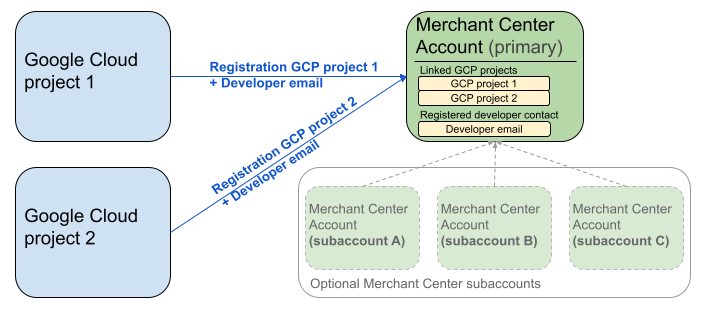
Powyższy diagram przedstawia konfigurację rejestracji w przypadku korzystania z wielu projektów Google Cloud i jednego głównego konta Merchant Center z opcjonalnie wieloma subkontami Merchant Center.
Wymagania dotyczące uwierzytelniania: podczas rejestracji uwierzytelnione konto Merchant Center (na którym znajdują się Twoje dane logowania) musi być zgodne z kontem Merchant Center, które jest używane do podszywania się (czyli kontem, które rejestrujesz). Nie możesz zarejestrować subkonta, jeśli uwierzytelnianie odbywa się za pomocą osobnego konta nadrzędnego lub konta menedżera.
Tylko zweryfikowane konta witryn: rejestracja jest możliwa tylko w przypadku kont Merchant Center ze zweryfikowaną witryną.
Brak rejestracji w przypadku kont testowych: nie możesz zarejestrować kont testowych.
Po zarejestrowaniu adresu e-mail dewelopera:
- Wywołania Merchant API możesz wykonywać w ciągu 5 minut od rejestracji.
- Jeśli adres e-mail należy do istniejącego użytkownika Merchant Center, otrzyma on rolę
API developer. W przeciwnym razie w Merchant Center zostanie utworzony nowy użytkownik, który musi zaakceptować zaproszenie w ciągu 14 dni, aby zapobiec jego wygaśnięciu i konieczności ponownego rozpoczęcia procesu rejestracji. Proces rejestracji kończysz dopiero po kliknięciu przez użytkownika linku z zaproszeniem.
Zadzwoń, aby się zarejestrować
Rejestracja odbywa się przez wywołanie metody registerGcp. Połączenie rejestracyjne możesz wykonać na 2 sposoby:
- Opcja 1. Bezpośrednie wywołania interfejsu API: wysyłasz bezpośrednio nieprzetworzone żądania do punktów końcowych interfejsu API, zwykle za pomocą protokołu HTTP(S). Ręcznie obsługujesz takie aspekty jak tworzenie treści żądania, ustawianie nagłówków (w tym uwierzytelniania) i parsowanie odpowiedzi.
- Opcja 2. Biblioteki klienta: używasz gotowych bibliotek, które zapewniają wygodniejszy sposób interakcji z Merchant API w wybranym języku. Zajmują się uwierzytelnianiem i autoryzacją oraz zapewniają wygodny sposób na abstrahowanie od podstawowej komunikacji HTTP. Aby ułatwić Ci szybkie rozpoczęcie pracy, udostępniamy oficjalne przykłady kodu.
Autoryzacja połączenia rejestracyjnego
Zgodnie z opisem w kroku Autoryzowanie żądań do interfejsu Merchant API masz 2 różne scenariusze uwierzytelniania:
- OAuth 2.0: dla dostawców zewnętrznych lub agencji zarządzających wieloma kontami sprzedawcy.
- Konta usługi: dostęp do własnego konta Merchant Center.
Więcej informacji o autoryzacji wywołania rejestracji znajdziesz w artykule Jak przeprowadzić uwierzytelnianie i autoryzację wywołania rejestracji?
Połączenie rejestracyjne
W przykładach poniżej wywołanie rejestracji jest wykonywane za pomocą bezpośrednich wywołań interfejsu API lub bibliotek klienta.
Wywołanie rejestracji wykonujesz za pomocą metody registerGcp.
POST https://merchantapi.googleapis.com/accounts/v1/accounts/{ACCOUNT_ID}/developerRegistration:registerGcp
Content-Type: application/json
Authorization: Bearer {ACCESS_TOKEN}"

{
  "developerEmail": "{DEVELOPER_EMAIL}"
}
Zastąp te elementy:
ACCOUNT_ID: Twój identyfikator w Merchant CenterACCESS_TOKEN: token autoryzacji do wywołania interfejsu API.DEVELOPER_EMAIL: adres e-mail głównej osoby kontaktowej ds. technicznych;
Pomyślne wywołanie zwraca zasób DeveloperRegistration, który potwierdza stan połączenia:
  "name": "accounts/{ACCOUNT_ID}/developerRegistration",
  "gcpIds": ["{GOOGLE_CLOUD_PROJECT_ID}"]
Python
Pobierz przykłady i postępuj zgodnie z instrukcjami w Google Merchant API Python Samples, aby skonfigurować biblioteki klienta w Pythonie.
from examples.authentication import configuration
from examples.authentication import generate_user_credentials
from google.shopping.merchant_accounts_v1 import DeveloperRegistrationServiceClient
from google.shopping.merchant_accounts_v1 import RegisterGcpRequest
def register_gcp(account_id: str, developer_email: str) -> None:
"""Registers the GCP project used to call the Merchant API with a developer email.
Args:
account_id: The ID of your Merchant Center account.
developer_email: The email address of the developer to register.
"""
# Get OAuth credentials.
credentials = generate_user_credentials.main()
# Create a client to the Developer Registration Service.
client = DeveloperRegistrationServiceClient(credentials=credentials)
# The name has the format: accounts/{account}/developerRegistration
name = f"accounts/{account_id}/developerRegistration"
# Create the request to register the GCP project.
request = RegisterGcpRequest(
name=name,
developer_email=developer_email,
)
# Make the API call and handle potential errors.
try:
print("Sending RegisterGcp request:")
response = client.register_gcp(request=request)
print("Registered GCP project successfully:")
print(response)
except RuntimeError as e:
print(f"An error occurred: {e}")
if __name__ == "__main__":
# Your Merchant Center account ID.
# This can be found in the Merchant Center UI.
_account_id = configuration.Configuration().read_merchant_info()
# The developer email to associate with the GCP project.
_developer_email = "YOUR_EMAIL_HERE"
register_gcp(_account_id, _developer_email)
Java
Pobierz przykłady i postępuj zgodnie z instrukcjami w Google Merchant API Java Samples, aby skonfigurować biblioteki klienta w języku Java.
import com.google.api.gax.core.FixedCredentialsProvider;
import com.google.auth.oauth2.GoogleCredentials;
import com.google.shopping.merchant.accounts.v1.DeveloperRegistration;
import com.google.shopping.merchant.accounts.v1.DeveloperRegistrationName;
import com.google.shopping.merchant.accounts.v1.DeveloperRegistrationServiceClient;
import com.google.shopping.merchant.accounts.v1.DeveloperRegistrationServiceSettings;
import com.google.shopping.merchant.accounts.v1.RegisterGcpRequest;
import shopping.merchant.samples.utils.Authenticator;
import shopping.merchant.samples.utils.Config;
/**
* This class demonstrates how to register the GCP project used to call the Merchant API with a
* developer email.
*/
public class RegisterGcpSample {
public static DeveloperRegistration registerGcp(Config config, String developerEmail) throws Exception {
// Obtains OAuth token based on the user's configuration.
GoogleCredentials credential = new Authenticator().authenticate();
// Creates service settings using the credentials retrieved above.
DeveloperRegistrationServiceSettings developerRegistrationServiceSettings =
DeveloperRegistrationServiceSettings.newBuilder()
.setCredentialsProvider(FixedCredentialsProvider.create(credential))
.build();
// Creates DeveloperRegistration name to identify the DeveloperRegistration.
// The name has the format: accounts/{account}/developerRegistration
String name =
DeveloperRegistrationName.newBuilder()
.setAccount(config.getAccountId().toString())
.build()
.toString();
// Calls the API and propagates any network failures/errors.
try (DeveloperRegistrationServiceClient developerRegistrationServiceClient =
DeveloperRegistrationServiceClient.create(developerRegistrationServiceSettings)) {
// Creates a request to register the GCP project with the developer email.
RegisterGcpRequest request =
RegisterGcpRequest.newBuilder().setName(name).setDeveloperEmail(developerEmail).build();
System.out.println("Sending RegisterGcp request:");
DeveloperRegistration response = developerRegistrationServiceClient.registerGcp(request);
System.out.println(response);
return response;
}
}
public static void main(String[] args) throws Exception {
Config config = Config.load();
String developerEmail = "YOUR_EMAIL_HERE"; // Replace with your email
registerGcp(config, developerEmail);
}
}
PHP
Pobierz przykłady i postępuj zgodnie z instrukcjami w przykładowych bibliotekach klienta PHP interfejsu Google Merchant API, aby skonfigurować biblioteki klienta PHP.
require_once __DIR__ . '/../../../../vendor/autoload.php';
require_once __DIR__ . '/../../../Authentication/Authentication.php';
require_once __DIR__ . '/../../../Authentication/Config.php';
use Google\ApiCore\ApiException;
use Google\Shopping\Merchant\Accounts\V1\Client\DeveloperRegistrationServiceClient;
use Google\Shopping\Merchant\Accounts\V1\RegisterGcpRequest;
/**
* This class demonstrates how to register the GCP project used to call the
* Merchant API with a developer email.
*/
class RegisterGcpSample
{
/**
* A helper function to create the name string for the
* DeveloperRegistration.
*
* @param string $accountId The merchant account ID.
* @return string The name, which has the format:
* `accounts/{account}/developerRegistration`
*/
private static function getName(string $accountId): string
{
return sprintf("accounts/%s/developerRegistration", $accountId);
}
/**
* Registers the GCP project with a developer email.
*
* @param array $config The configuration data for authentication and account ID.
* @param string $developerEmail The email of the developer to register.
*/
public static function registerGcpSample(array $config, string $developerEmail): void
{
// Obtains OAuth credentials from the configuration file.
$credentials = Authentication::useServiceAccountOrTokenFile();
// Creates a configuration object for the client.
$options = ['credentials' => $credentials];
// Creates the DeveloperRegistrationServiceClient.
$developerRegistrationServiceClient = new DeveloperRegistrationServiceClient($options);
// Creates the name of the developer registration to identify it.
$name = self::getName($config['accountId']);
// Calls the API and handles any network failures.
try {
// Creates a request to register the GCP project with the developer email.
$request = new RegisterGcpRequest([
'name' => $name,
'developer_email' => $developerEmail
]);
printf("Sending RegisterGcp request:%s", PHP_EOL);
// The `registerGcp` method returns a `DeveloperRegistration` object
// upon success.
$response = $developerRegistrationServiceClient->registerGcp($request);
print "Successfully registered developer email '$developerEmail' for account {$config['accountId']}.\n";
print_r($response);
} catch (ApiException $e) {
printf("An error occurred: %s%s", $e->getMessage(), PHP_EOL);
}
}
/**
* Helper to execute the sample.
*/
public function callSample(): void
{
$config = Config::generateConfig();
// An email address for a developer to register for the API.
$developerEmail = 'YOUR_EMAIL_HERE'; // Replace with your email
self::registerGcpSample($config, $developerEmail);
}
}
// Executes the sample.
$sample = new RegisterGcpSample();
$sample->callSample();
cURL
curl -X POST "https://merchantapi.googleapis.com/accounts/v1/accounts/{ACCOUNT_ID}/developerRegistration:registerGcp" \
-H "Content-Type: application/json" \
-H "Authorization: Bearer {ACCESS_TOKEN}" \
-d '{
  "developerEmail": "{DEVELOPER_EMAIL}"
}'
Aby dokończyć rejestrację, musisz się upewnić, że co najmniej 1 użytkownik w Merchant Center ma rolę API developer. Aby to zrobić, możesz wykonać jedną z tych czynności:
- Podaj
developerEmaildo metodyregisterGcp. - Dodaj nowego użytkownika, który ma rolę
API developerw interfejsie Merchant Center. - Przypisz rolę
API developerdo istniejącego użytkownika w interfejsie Merchant Center. - Wywołaj metodę
accounts.users.create, aby utworzyć nowego użytkownika i przypisać mu rolęAPI developer. - Przypisz rolę
API developerdo istniejącego użytkownika za pomocą metodyaccounts.users.patch.
Sprawdzone metody po rejestracji
Aby korzystać z zaawansowanego zarządzania dostępem i zapobiegać przyszłym przerwom w działaniu usług, po zakończeniu wstępnej rejestracji zalecamy stosowanie tych sprawdzonych metod:
Przyznaj dodatkowe uprawnienia aplikacji API developer
Gdy zarejestrujesz kontakt dewelopera, automatycznie przypiszemy mu rolę API developer. Ta rola nie obejmuje innych uprawnień niezbędnych do zarządzania kontem Merchant Center ani do wykonywania wszystkich wywołań API. Zalecamy dodanie do deweloperów ról ADMIN lub STANDARD, aby zapewnić im kompleksowy dostęp.
Aby zmodyfikować prawa dostępu użytkownika, użyj metody accounts.users.patch. Prawa dostępu określa się w polu updateMask w treści żądania, aby dodawać lub usuwać role:
PATCH https://merchantapi.googleapis.com/accounts/v1/{ACCOUNT_ID}/users/{DEVELOPER_EMAIL}?update_mask=access_rights
Content-Type: application/json
Authorization: Bearer {ACCESS_TOKEN}"

{
  "name": "accounts/{ACCOUNT_ID}/users/{DEVELOPER_EMAIL}",
  "access_rights": [ "ADMIN", "API_DEVELOPER" ]
}
Python
from examples.authentication import configuration
from examples.authentication import generate_user_credentials
from google.protobuf import field_mask_pb2
from google.shopping.merchant_accounts_v1 import AccessRight
from google.shopping.merchant_accounts_v1 import UpdateUserRequest
from google.shopping.merchant_accounts_v1 import User
from google.shopping.merchant_accounts_v1 import UserServiceClient
FieldMask = field_mask_pb2.FieldMask
_ACCOUNT = configuration.Configuration().read_merchant_info()
def update_user(user_email, user_access_right):
"""Updates a user to make it an admin of the MC account."""
credentials = generate_user_credentials.main()
client = UserServiceClient(credentials=credentials)
# Create user name string
name = "accounts/" + _ACCOUNT + "/users/" + user_email
user = User(name=name, access_rights=[user_access_right])
field_mask = FieldMask(paths=["access_rights"])
try:
request = UpdateUserRequest(user=user, update_mask=field_mask)
print("Sending Update User request")
response = client.update_user(request=request)
print("Updated User Name below")
print(response.name)
except RuntimeError as e:
print(e)
if __name__ == "__main__":
# Modify this email to update the right user
email = "USER_MAIL_ACCOUNT"
access_right = AccessRight.ADMIN
update_user(email, access_right)
Java
import com.google.api.gax.core.FixedCredentialsProvider;
import com.google.auth.oauth2.GoogleCredentials;
import com.google.protobuf.FieldMask;
import com.google.shopping.merchant.accounts.v1.AccessRight;
import com.google.shopping.merchant.accounts.v1.UpdateUserRequest;
import com.google.shopping.merchant.accounts.v1.User;
import com.google.shopping.merchant.accounts.v1.UserName;
import com.google.shopping.merchant.accounts.v1.UserServiceClient;
import com.google.shopping.merchant.accounts.v1.UserServiceSettings;
import shopping.merchant.samples.utils.Authenticator;
import shopping.merchant.samples.utils.Config;
/** This class demonstrates how to update a user to make it an admin of the MC account. */
public class UpdateUserSample {
public static void updateUser(Config config, String email, AccessRight accessRight)
throws Exception {
GoogleCredentials credential = new Authenticator().authenticate();
UserServiceSettings userServiceSettings =
UserServiceSettings.newBuilder()
.setCredentialsProvider(FixedCredentialsProvider.create(credential))
.build();
// Creates user name to identify user.
String name =
UserName.newBuilder()
.setAccount(config.getAccountId().toString())
.setEmail(email)
.build()
.toString();
// Create a user with the updated fields.
User user = User.newBuilder().setName(name).addAccessRights(accessRight).build();
FieldMask fieldMask = FieldMask.newBuilder().addPaths("access_rights").build();
try (UserServiceClient userServiceClient = UserServiceClient.create(userServiceSettings)) {
UpdateUserRequest request =
UpdateUserRequest.newBuilder().setUser(user).setUpdateMask(fieldMask).build();
System.out.println("Sending Update User request");
User response = userServiceClient.updateUser(request);
System.out.println("Updated User Name below");
System.out.println(response.getName());
} catch (Exception e) {
System.out.println(e);
}
}
public static void main(String[] args) throws Exception {
Config config = Config.load();
String email = "testUser@gmail.com";
// Give the user admin rights. Note that all other rights, like
// PERFORMANCE_REPORTING, would be overwritten in this example
// if the user had those access rights before the update.
AccessRight accessRight = AccessRight.ADMIN;
updateUser(config, email, accessRight);
}
}
PHP
use Google\ApiCore\ApiException;
use Google\Protobuf\FieldMask;
use Google\Shopping\Merchant\Accounts\V1\AccessRight;
use Google\Shopping\Merchant\Accounts\V1\UpdateUserRequest;
use Google\Shopping\Merchant\Accounts\V1\User;
use Google\Shopping\Merchant\Accounts\V1\Client\UserServiceClient;
/**
* Updates a user.
*
* @param array $config The configuration data.
* @param string $email The email address of the user.
* @param int $accessRight The access right to grant the user.
* @return void
*/
function updateUser($config, $email, $accessRights): void
{
// Gets the OAuth credentials to make the request.
$credentials = Authentication::useServiceAccountOrTokenFile();
// Creates options config containing credentials for the client to use.
$options = ['credentials' => $credentials];
// Creates a client.
$userServiceClient = new UserServiceClient($options);
// Creates user name to identify user.
$name = 'accounts/' . $config['accountId'] . "/users/" . $email;
$user = (new User())
->setName($name)
->setAccessRights($accessRights);
$fieldMask = (new FieldMask())->setPaths(['access_rights']);
// Calls the API and catches and prints any network failures/errors.
try {
$request = new UpdateUserRequest([
'user' => $user,
'update_mask' => $fieldMask,
]);
print "Sending Update User request\n";
$response = $userServiceClient->updateUser($request);
print "Updated User Name below\n";
print $response->getName() . "\n";
} catch (ApiException $e) {
print $e->getMessage();
}
}
$config = Config::generateConfig();
$email = "testUser@gmail.com";
$accessRights = [AccessRight::ADMIN];
updateUser($config, $email, $accessRights);
cURL
curl -X PATCH \
"https://merchantapi.googleapis.com/accounts/v1/{ACCOUNT_ID}/users/{USER_EMAIL}?update_mask=access_rights" \
-H "Content-Type: application/json" \
-H "Authorization: Bearer {ACCESS_TOKEN}" \
-d '{
  "access_rights": [
    "ADMIN",
    "API_DEVELOPER"
  ]
}'
Dodawanie kolejnych kontaktów dewelopera
Aby uniknąć zakłóceń w działaniu firmy w przypadku, gdy główna osoba kontaktowa dewelopera odejdzie z pracy lub utraci dostęp, konieczne jest posiadanie dodatkowych osób kontaktowych. Zalecamy dodanie w Merchant Center co najmniej 1 dodatkowego użytkownika z rolą API developer, który będzie pełnił funkcję zapasową.
Użytkownika możesz dodać lub zaktualizować za pomocą usługi accounts.users w Merchant API lub na stronie Dostęp i usługi w interfejsie Merchant Center. Proaktywne dodawanie deweloperów zapasowych pozwala utworzyć bardziej odporną integrację, która nie jest zależna od jednej osoby.
PATCH https://merchantapi.googleapis.com/products/v1/accounts/{ACCOUNT_ID}/users
Content-Type: application/json
Authorization: Bearer {ACCESS_TOKEN}"
{
  "user_id": {USER_EMAIL},
  "user": { "access_rights": [ "API_DEVELOPER", "ADMIN" ] }
}
Python
from examples.authentication import configuration
from examples.authentication import generate_user_credentials
from google.shopping.merchant_accounts_v1 import AccessRight
from google.shopping.merchant_accounts_v1 import CreateUserRequest
from google.shopping.merchant_accounts_v1 import User
from google.shopping.merchant_accounts_v1 import UserServiceClient
_ACCOUNT = configuration.Configuration().read_merchant_info()
def get_parent(account_id):
return f"accounts/{account_id}"
def create_user(user_email):
"""Creates a user for a Merchant Center account."""
# Get OAuth credentials
credentials = generate_user_credentials.main()
# Create a UserServiceClient
client = UserServiceClient(credentials=credentials)
# Create parent string
parent = get_parent(_ACCOUNT)
# Create the request
request = CreateUserRequest(
parent=parent,
user_id=user_email,
user=User(
access_rights=[AccessRight.ADMIN, AccessRight.PERFORMANCE_REPORTING]
),
)
try:
print("Sending Create User request")
response = client.create_user(request=request)
print("Inserted User Name below")
print(response.name)
except RuntimeError as e:
print(e)
if __name__ == "__main__":
# Modify this email to create a new user
email = "USER_MAIL_ACCOUNT"
create_user(email)
Java
import com.google.api.gax.core.FixedCredentialsProvider;
import com.google.auth.oauth2.GoogleCredentials;
import com.google.shopping.merchant.accounts.v1.AccessRight;
import com.google.shopping.merchant.accounts.v1.CreateUserRequest;
import com.google.shopping.merchant.accounts.v1.User;
import com.google.shopping.merchant.accounts.v1.UserServiceClient;
import com.google.shopping.merchant.accounts.v1.UserServiceSettings;
import shopping.merchant.samples.utils.Authenticator;
import shopping.merchant.samples.utils.Config;
/** This class demonstrates how to create a user for a Merchant Center account. */
public class CreateUserSample {
private static String getParent(String accountId) {
return String.format("accounts/%s", accountId);
}
public static void createUser(Config config, String email) throws Exception {
// Obtains OAuth token based on the user's configuration.
GoogleCredentials credential = new Authenticator().authenticate();
// Creates service settings using the credentials retrieved above.
UserServiceSettings userServiceSettings =
UserServiceSettings.newBuilder()
.setCredentialsProvider(FixedCredentialsProvider.create(credential))
.build();
// Creates parent to identify where to insert the user.
String parent = getParent(config.getAccountId().toString());
// Calls the API and catches and prints any network failures/errors.
try (UserServiceClient userServiceClient = UserServiceClient.create(userServiceSettings)) {
CreateUserRequest request =
CreateUserRequest.newBuilder()
.setParent(parent)
// This field is the email address of the user.
.setUserId(email)
.setUser(
User.newBuilder()
.addAccessRights(AccessRight.ADMIN)
.addAccessRights(AccessRight.PERFORMANCE_REPORTING)
.build())
.build();
System.out.println("Sending Create User request");
User response = userServiceClient.createUser(request);
System.out.println("Inserted User Name below");
// The last part of the user name will be the email address of the user.
// Format: `accounts/{account}/user/{user}`
System.out.println(response.getName());
} catch (Exception e) {
System.out.println(e);
}
}
public static void main(String[] args) throws Exception {
Config config = Config.load();
// The email address of this user.
String email = "testUser@gmail.com";
createUser(config, email);
}
}
PHP
use Google\ApiCore\ApiException;
use Google\Shopping\Merchant\Accounts\V1\AccessRight;
use Google\Shopping\Merchant\Accounts\V1\CreateUserRequest;
use Google\Shopping\Merchant\Accounts\V1\User;
use Google\Shopping\Merchant\Accounts\V1\Client\UserServiceClient;
/**
* Creates a user.
*
* @param array $config The configuration data.
* @param string $email The email address of the user.
* @return void
*/
function createUser($config, $email): void
{
// Gets the OAuth credentials to make the request.
$credentials = Authentication::useServiceAccountOrTokenFile();
// Creates options config containing credentials for the client to use.
$options = ['credentials' => $credentials];
// Creates a client.
$userServiceClient = new UserServiceClient($options);
// Creates parent to identify where to insert the user.
$parent = sprintf("accounts/%s", $config['accountId']);
// Calls the API and catches and prints any network failures/errors.
try {
$request = new CreateUserRequest([
'parent' => $parent,
'user_id' => $email,
'user' => (new User())
->setAccessRights([AccessRight::ADMIN,AccessRight::PERFORMANCE_REPORTING])
]);
print "Sending Create User request\n";
$response = $userServiceClient->createUser($request);
print "Inserted User Name below\n";
print $response->getName() . "\n";
} catch (ApiException $e) {
print $e->getMessage();
}
}
$config = Config::generateConfig();
$email = "testUser@gmail.com";
createUser($config, $email);
cURL
curl -X PATCH \
"https://merchantapi.googleapis.com/products/v1/accounts/{ACCOUNT_ID}/users/{USER_EMAIL}?update_mask=access_rights" \
-H "Content-Type: application/json" \
-H "Authorization: Bearer {ACCESS_TOKEN}" \
-d '{
  "access_rights": [
    "ADMIN",
    "API_DEVELOPER"
  ]
}'