


借助机器学习套件的生成式 AI 图片说明 API,您可以为图片生成简短的内容说明。这在以下用例中非常有用:
- 生成图片标题
- 生成替代文本,帮助视力障碍用户更好地了解图片内容
- 使用生成的说明作为元数据,帮助用户搜索或整理图片
- 当用户无法查看屏幕时(例如在开车或收听播客时),使用图片的简短说明
主要功能
- 返回输入图片的简短说明
示例结果
| 输入 | 输出 |
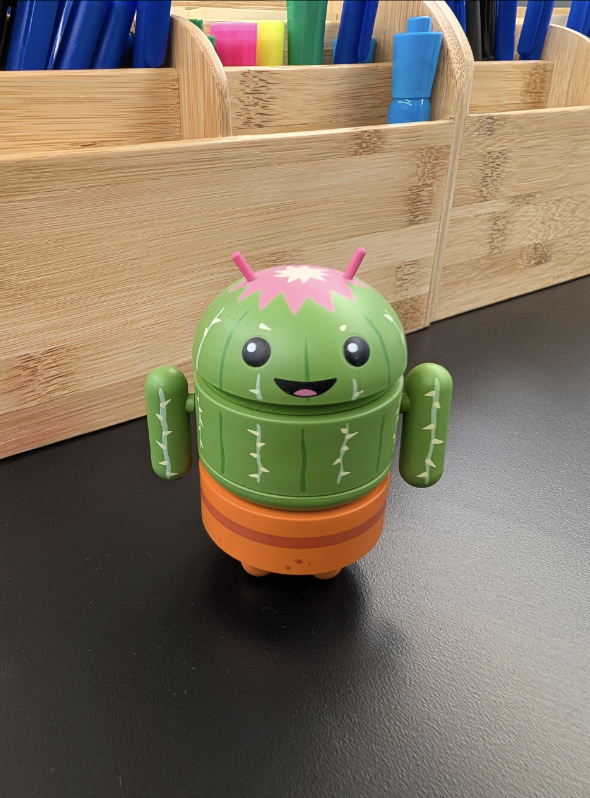
|
一个小型绿色 Android 机器人,外形像仙人掌,坐在 黑色表面上。 |

|
一只小型白色狗,黑鼻子,粉色舌头,在草地上奔跑,背景中有一座桥。 |
使用入门
如需开始使用生成式 AI 图片说明 API,请将此依赖项添加到项目的 build 文件中。
implementation("com.google.mlkit:genai-image-description:1.0.0-beta1")
如需将图片说明 API 集成到您的应用中,首先需要获取
一个 ImageDescriber 客户端。然后,您必须检查必要的设备端模型功能的状态,如果模型尚未在设备上,则下载该模型。在 ImageDescriptionRequest 中准备好图片输入后,
您可以使用客户端运行推理来获取图片说明文本,以及
最后,请记得关闭客户端以释放资源。
Kotlin
// Create an image describer
val options = ImageDescriberOptions.builder(context).build()
val imageDescriber = ImageDescription.getClient(options)

suspend fun prepareAndStartImageDescription(
    bitmap: Bitmap
) {
  // Check feature availability, status will be one of the following:
  // UNAVAILABLE, DOWNLOADABLE, DOWNLOADING, AVAILABLE
  val featureStatus = imageDescriber.checkFeatureStatus().await()

  if (featureStatus == FeatureStatus.DOWNLOADABLE) {
      // Download feature if necessary.
      // If downloadFeature is not called, the first inference request
      // will also trigger the feature to be downloaded if it's not
      // already downloaded.
      imageDescriber.downloadFeature(object : DownloadCallback {
          override fun onDownloadStarted(bytesToDownload: Long) { }

          override fun onDownloadFailed(e: GenAiException) { }

          override fun onDownloadProgress(totalBytesDownloaded: Long) {}

          override fun onDownloadCompleted() {
              startImageDescriptionRequest(bitmap, imageDescriber)
          }
      })
  } else if (featureStatus == FeatureStatus.DOWNLOADING) {
      // Inference request will automatically run once feature is
      // downloaded.
      // If Gemini Nano is already downloaded on the device, the
      // feature-specific LoRA adapter model will be downloaded
      // very quickly. However, if Gemini Nano is not already
      // downloaded, the download process may take longer.
      startImageDescriptionRequest(bitmap, imageDescriber)
  } else if (featureStatus == FeatureStatus.AVAILABLE) {
      startImageDescriptionRequest(bitmap, imageDescriber)
  }
}

fun startImageDescriptionRequest(
    bitmap: Bitmap,
    imageDescriber: ImageDescriber
) {
    // Create task request
    val imageDescriptionRequest = ImageDescriptionRequest
        .builder(bitmap)
        .build()
}

  // Run inference with a streaming callback
  val imageDescriptionResultStreaming =
      imageDescriber.runInference(imageDescriptionRequest) { outputText ->
          // Append new output text to show in UI
          // This callback is called incrementally as the description
          // is generated
      }

  // You can also get a non-streaming response from the request
  // val imageDescription = imageDescriber.runInference(
  //        imageDescriptionRequest).await().description
}

// Be sure to release the resource when no longer needed
// For example, on viewModel.onCleared() or activity.onDestroy()
imageDescriber.close()
Java
// Create an image describer
ImageDescriberOptions options = ImageDescriberOptions.builder(context).build();
ImageDescriber imageDescriber = ImageDescription.getClient(options);

void prepareAndStartImageDescription(
      Bitmap bitmap
) throws ExecutionException, InterruptedException {
  // Check feature availability, status will be one of the following:
  // UNAVAILABLE, DOWNLOADABLE, DOWNLOADING, AVAILABLE
  try {
      int featureStatus = imageDescriber.checkFeatureStatus().get();
      if (featureStatus == FeatureStatus.DOWNLOADABLE) {
          // Download feature if necessary.
          // If downloadFeature is not called, the first inference request
          // will also trigger the feature to be downloaded if it's not
          // already downloaded.
          imageDescriber.downloadFeature(new DownloadCallback() {
              @Override
              public void onDownloadCompleted() {
                  startImageDescriptionRequest(bitmap, imageDescriber);
              }

              @Override
              public void onDownloadFailed(GenAIException e) {}

              @Override
              public void onDownloadProgress(long totalBytesDownloaded) {}

              @Override
              public void onDownloadStarted(long bytesDownloaded) {}
          });
      } else if (featureStatus == FeatureStatus.DOWNLOADING) {
          // Inference request will automatically run once feature is
          // downloaded.
          // If Gemini Nano is already downloaded on the device, the
          // feature-specific LoRA adapter model will be downloaded
          // very quickly. However, if Gemini Nano is not already
          // downloaded, the download process may take longer.
          startImageDescriptionRequest(bitmap, imageDescriber);
      } else if (featureStatus == FeatureStatus.AVAILABLE) {
          startImageDescriptionRequest(bitmap, imageDescriber);
      }
  } catch (ExecutionException | InterruptedException e) {
      e.printStackTrace();
  }
}

void startImageDescriptionRequest(
     Bitmap bitmap,
     ImageDescriber imageDescriber
) {
  // Create task request
  ImageDescriptionRequest imageDescriptionRequest =
          ImageDescriptionRequest.builder(bitmap).build();

  // Start image description request with streaming response
  imageDescriber.runInference(imageDescriptionRequest, newText -> {
      // Append new output text to show in UI
      // This callback is called incrementally as the description
      // is generated
  });

  // You can also get a non-streaming response from the request
  // String imageDescription = imageDescriber.runInference(
  //        imageDescriptionRequest).get().getDescription();
}

// Be sure to release the resource when no longer needed
// For example, on viewModel.onCleared() or activity.onDestroy()
imageDescriber.close();
支持的功能和限制
生成式 AI 图片说明 API 支持英语,未来将支持更多语言。该 API 会返回图片的简短说明。
特定功能配置(由 ImageDescriberOptions 指定)的可用性可能因特定设备的配置以及已下载到设备上的模型而异。
开发者确保设备支持具有所请求 ImageDescriberOptions 的预期 API 功能的最可靠方法是调用
checkFeatureStatus() 方法。此方法可在运行时提供设备上功能可用性的明确状态。
常见的设置问题
机器学习套件生成式 AI API 依赖于 Android AICore 应用来访问 Gemini Nano。当设备刚刚设置(包括重置)或 AICore 应用刚刚重置(例如清除数据、卸载然后重新安装)时,AICore 应用可能没有足够的时间来完成初始化(包括从服务器下载最新配置)。因此,机器学习套件生成式 AI API 可能无法按预期运行。以下是您可能会看到的常见设置错误消息以及处理方法:
| 错误消息示例 | 处理方法 |
| AICore 失败,错误类型为 4-CONNECTION_ERROR,错误代码为 601-BINDING_FAILURE:AICore 服务无法绑定。 | 如果您在设备设置后立即使用机器学习套件生成式 AI API 安装应用,或者在安装应用后卸载 AICore,则可能会发生这种情况。更新 AICore 应用,然后重新安装应用,应该可以解决此问题。 |
| AICore 失败,错误类型为 3-PREPARATION_ERROR,错误代码为 606-FEATURE_NOT_FOUND:功能 ... 不可用。 |
如果 AICore 尚未完成下载最新配置,则可能会发生这种情况。当设备连接到互联网时,通常需要几分钟到几小时才能更新。重新启动设备可以加快更新速度。
请注意,如果设备的引导加载程序已解锁,您也会看到此错误 - 此 API 不支持引导加载程序已解锁的设备。 |
| AICore 失败,错误类型为 1-DOWNLOAD_ERROR,错误代码为 0-UNKNOWN:功能 ... 失败,失败状态为 0,错误 esz 为 UNAVAILABLE:无法解析主机 ... | 保持网络连接,等待几分钟,然后重试。 |