
Users can set learning goals for courses and assignments in Google Classroom.
The same learning goals are also exposed in Classroom API. You can
set, retrieve, and modify learning standard sets on Course
resources and learning goals on CourseWork,
CourseWorkMaterial, and Rubric resources.
This guide describes how to access and modify learning goals and standard sets
using the Classroom API.
How it works
Data source
Learning goals in Classroom rely on stable globally unique identifiers (GUIDs)
provided by the Satchel Rosetta Exchange
(formerly CASE Network). Standards in the Exchange are organized into trees of
nodes, where the root is a comprehensive standard set for a particular subject
and child nodes describe progressively more specific learning outcomes. The
identifier for any node with a standard code or leaf node in the network can be
set as a learning goal on a CourseWork, while any non-leaf node can be set as
a learning standard set on a Course.
- Learning standard sets for a
Courseresource represent the group of standards that appear in the Classroom UI when teachers tag learning goals. - Learning goals attached to a
CourseWork,CourseWorkMaterial, orRubricresource represent the standard or skills associated with that assignment, question, material, or specific rubric criterion.
Google uses five pieces of information from Satchel Rosetta Exchange:
- Document ID: A GUID for a root-level node. This ID matches a top-level standards container and is common to all child nodes.
- Document Title: The human-readable name of the entire standard document.
- Item ID: A GUID for a single standard (that is, a non-root node).
- Standard Title: The human-readable descriptive text of a single standard.
- Standard Code: A human-readable abbreviation for a specific standard.
Find values for standards and goals
To understand where to find these values, consider an example Mathematics standard from New York State. Start at the root node:
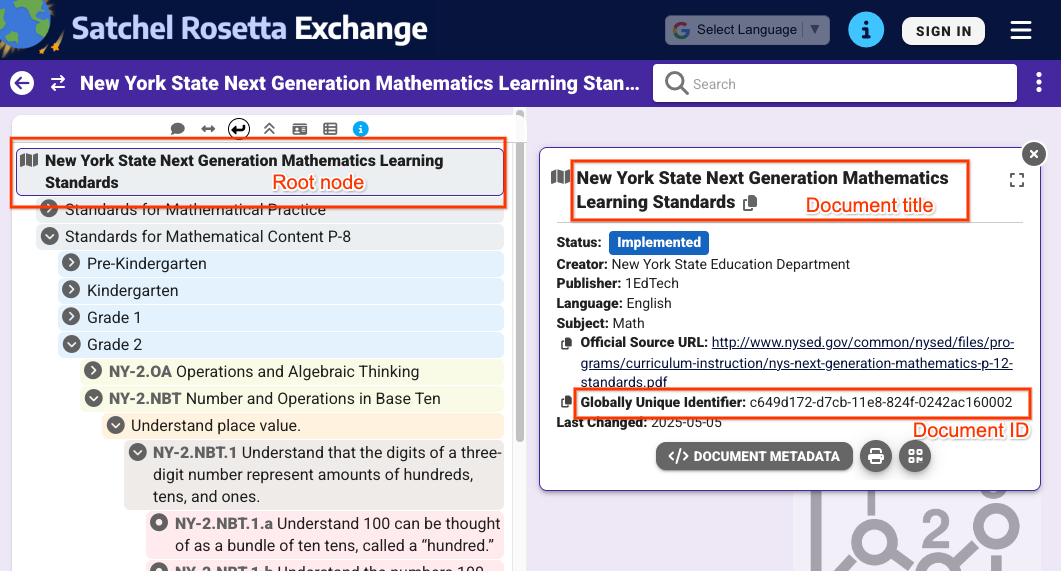 Figure
1: View of a root node when selected in Satchel Rosetta Exchange. This shows
the document title and document ID, which are common to all nodes on this page.
Figure
1: View of a root node when selected in Satchel Rosetta Exchange. This shows
the document title and document ID, which are common to all nodes on this page.
From the view in Figure 1, you can extract the following values:
- Document ID:
c649d172-d7cb-11e8-824f-0242ac160002 - Document Title:
New York State Next Generation Mathematics Learning
Standards
To get values for an individual standard, click into a standard and expand its metadata:
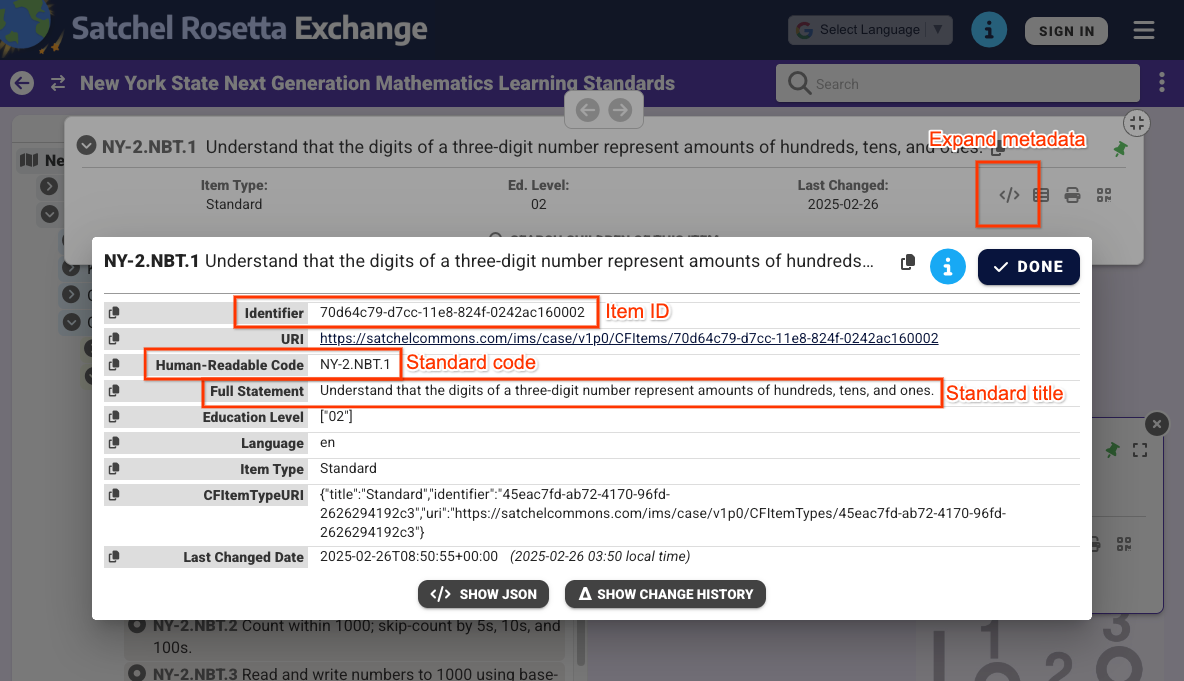 Figure
2: View of a non-root node's metadata when selected in Satchel Rosetta
Exchange. This shows the item ID, standard code, and standard title. These
values are specific to only this standard.
Figure
2: View of a non-root node's metadata when selected in Satchel Rosetta
Exchange. This shows the item ID, standard code, and standard title. These
values are specific to only this standard.
From the view in Figure 2, you can find the following values:
- Item ID:
70d64c79-d7cc-11e8-824f-0242ac160002 - Standard Title:
Understand that the digits of a three-digit number represent amounts of hundreds, tens, and ones. - Standard Code:
NY-2.NBT.4
Note that the document and item IDs can also be extracted from each node's
Satchel Rosetta Exchange URL. These URLs follow the pattern
https://rosetta.commongoodlt.com/{document_id}/{item_id}.
Maximum linked items
- Each
Coursecan have up to 20 learning standard sets. - Each
CourseWorkcan have up to 10 learning goals. - Each Rubric
Criterioncan have 1 learning goal.
Manage Course learning standard sets
Modify learning standard sets
To modify Course learning standard sets, populate the
Course.learningStandardSettings field with standardSets objects. Each
standardSet must contain a caseGuid object, which includes a
caseDocumentId and optionally a caseItemId.
You can add learning standard sets using any Course mutate request, such as
courses.create() or courses.patch() with
the learningStandardSettings update mask.
The following example sets two standard sets on an existing course.
Python
service = build("classroom", "v1", credentials=creds)
course = {
    "learningStandardSettings": {
        # Each Course can have up to 20 learning standard sets.
        "standardSets": [
            # Construct a GUID for the NYS Next Gen Math Standards top-level node.
            # This is a top-level non-leaf node, so it only has a Document ID.
            {
                "caseGuid": {
                    "caseDocumentId": "c649d172-d7cb-11e8-824f-0242ac160002"
                }
            },
            # Construct a GUID for the AAS ELA21.AAS.K Standard node.
            # This is a mid-level non-leaf node, so it has both Document and Item IDs.
            {
                "caseGuid": {
                    "caseDocumentId": "bfc264b3-b4d1-4780-84ff-26b12e6945a6",
                    "caseItemId": "ada2cc30-7d6d-494e-8c6b-c998bae98f0b",
                }
            },
        ]
    }
}

course = (
    service.courses()
    .patch(
      id=course_id,
      updateMask="learningStandardSettings",
      body=course,
      # Specify the preview version while the feature is in Developer Preview.
      # Learning standards and goals are supported in V1_20260316_PREVIEW and
      # later.
      previewVersion="V1_20260316_PREVIEW")
    .execute()
)
print(f"Course updated: {course.get('name')}")
Retrieve learning standard sets
To see a course's current learning standard sets, inspect the
Course.learningStandardSettings field. This field contains a series of
standardSets objects, and can be empty if no learning standard sets are
present on the course.
Note that each standardSet in the response contains the standard's description
and its root document title. These texts also appear for teachers and students
in the Classroom UI. You also receive the
sourceDataAvailabilityStatus, which indicates whether the standard is
available in the Satchel Rosetta Exchange.
{
  "id": "123456789",
  "name": "LSS test class",
  "learningStandardSettings": {
    "standardSets": [
      {
        "caseGuid": {
          "caseDocumentId": "c649d172-d7cb-11e8-824f-0242ac160002"
        },
        "documentTitle": "New York State Next Generation Mathematics Learning Standards",
        "sourceDataAvailabilityStatus": "LEARNING_STANDARD_AVAILABLE"
      },
      {
        "caseGuid": {
          "caseDocumentId": "bfc264b3-b4d1-4780-84ff-26b12e6945a6",
          "caseItemId": "ada2cc30-7d6d-494e-8c6b-c998bae98f0b"
        },
        "documentTitle": "AAS English Language Arts (2021)",
        "standardTitle": "Kindergarten",
        "sourceDataAvailabilityStatus": "LEARNING_STANDARD_AVAILABLE"
      }
    ]
  }
}
Manage CourseWork, CouseWorkMaterial, and Rubric learning goals
Modify learning goals
Learning goals can be attached to CourseWork,
CourseWorkMaterial, and Rubric Criterion
resources in any mutate request. Set document and item identifiers in the
CourseWork.learningGoals or Rubric.Criterion.learningGoal fields. These are
the same identifiers as described previously.
Note that learning goals attached to Rubric criteria must have already been
attached to the assignment that the Rubric is linked to.
The following example creates a CourseWork assignment with two attached
learning goals.
Python
# Create a CourseWork assignment with two attached learning goals.
service = build("classroom", "v1", credentials=creds)
coursework = {
    "title": "Ant colonies",
    "description": "Read the article about ant colonies and complete the quiz.",
    "materials": [
        {"link": {"url": "http://example.com/ant-colonies"}},
        {"link": {"url": "http://example.com/ant-quiz"}},
    ],
    "workType": "ASSIGNMENT",
    "state": "PUBLISHED",
    # Each CourseWork can have up to 10 learning goals.
    "learningGoals": [
        {
            "learningStandardInfo": {
                # Construct a GUID for the ELA21.AAS.11.11c Standard node.
                # This is a non-root node, so it has both Document and Item IDs.
                "caseGuid": {
                    "caseDocumentId": "bfc264b3-b4d1-4780-84ff-26b12e6945a6",
                    "caseItemId": "6d922f1f-b580-42a1-b6d2-5ee5b39c561d",
                }
            }
        },
        {
            "learningStandardInfo": {
                # Construct a GUID for the ELA21.AAS.11.22a Standard node.
                # This is a non-root node, so it has both Document and Item IDs.
                "caseGuid": {
                    "caseDocumentId": "bfc264b3-b4d1-4780-84ff-26b12e6945a6",
                    "caseItemId": "a684609a-c3ec-42da-8b7f-7a325b31ea4a",
                }
            }
        },
    ],
}

coursework = (
    service.courses()
    .courseWork()
    .create(
      courseId=course_id,
      body=coursework,
      # Specify the preview version while the feature is in Developer Preview.
      # Learning standards and goals are supported in V1_20260316_PREVIEW and
      # later.
      previewVersion="V1_20260316_PREVIEW")
    .execute()
)
print(f"Assignment created with ID {coursework.get('id')}")
The following example creates a Rubric with a learning goal attached to each
criterion.
Python
# Create a new Rubric with a learning goal attached to each criterion.
service = build("classroom", "v1", credentials=creds)
body = {
    "criteria": [
        {
            "title": "Argument",
            "description": "How well structured your argument is.",
            "levels": [
                {
                    "title": "Convincing",
                    "description": "A compelling case is made.",
                    "points": 30,
                },
                {
                    "title": "Passable",
                    "description": "Missing some evidence.",
                    "points": 20,
                },
                {
                    "title": "Needs Work",
                    "description": "Not enough strong evidence.",
                    "points": 0,
                },
            ],
            # Each Criterion can have one learning goal.
            "learningGoal": {
                "learningStandardInfo": {
                    # Construct a GUID for the ELA21.AAS.11.11c Standard node.
                    # This is a non-root node, so it has both Document and Item IDs.
                    "caseGuid": {
                        "caseDocumentId": "bfc264b3-b4d1-4780-84ff-26b12e6945a6",
                        "caseItemId": "6d922f1f-b580-42a1-b6d2-5ee5b39c561d",
                    }
                }
            },
        },
        {
            "title": "Spelling",
            "description": "How well you spelled all the words.",
            "levels": [
                {"title": "Perfect", "description": "No mistakes.", "points": 20},
                {"title": "Great", "description": "A mistake or two.", "points": 15},
                {"title": "Needs Work", "description": "Many mistakes.", "points": 5},
            ],
            # Each Criterion can have one learning goal.
            "learningGoal": {
                "learningStandardInfo": {
                    # Construct a GUID for the ELA21.AAS.11.22a Standard node.
                    # This is a non-root node, so it has both Document and Item IDs.
                    "caseGuid": {
                        "caseDocumentId": "bfc264b3-b4d1-4780-84ff-26b12e6945a6",
                        "caseItemId": "a684609a-c3ec-42da-8b7f-7a325b31ea4a",
                    }
                }
            },
        },
    ]
}

rubric = (
    service.courses()
    .courseWork()
    .rubrics()
    .create(
      courseId=course_id,
      courseWorkId=coursework_id,
      body=body,
      # Specify the preview version while the feature is in Developer Preview.
      # Learning standards and goals are supported in V1_20260316_PREVIEW and
      # later.
      previewVersion="V1_20260316_PREVIEW")
    .execute()
)
print(f"Rubric created with ID {rubric.get('id')}")
Retrieve learning goals
To see the current learning goals on an assignment, question, or material,
inspect the CourseWork.learningGoals field. Each learning goal object contains
the root-level document title and the learning standard code.
Note that teachers can also add skill tags to coursework and materials in the Classroom UI. Skill tags are not accessible in the API.
{
  "course_id": "123456789",
  "id": "987654321",
  "title": "Test ELA Assignment",
  "state": "PUBLISHED",
  "learningGoals": [
    {
      "id": "871768554412",
      "courseId": "123456789",
      "learningStandardInfo": {
        "standardCode": "ELA21.AAS.11.22a",
        "caseGuid": {
          "caseDocumentId": "bfc264b3-b4d1-4780-84ff-26b12e6945a6",
          "caseItemId": "a684609a-c3ec-42da-8b7f-7a325b31ea4a"
        }
      },
      "title": "Identify a sentence that uses correct capitalization (i.e., beginning of sentence, names, cities, states, countries, towns, titles, days, months)."
    },
    {
      "id": "871768554411",
      "courseId": "123456789",
      "learningStandardInfo": {
        "standardCode": "ELA21.AAS.11.11c",
        "caseGuid": {
          "caseDocumentId": "bfc264b3-b4d1-4780-84ff-26b12e6945a6",
          "caseItemId": "6d922f1f-b580-42a1-b6d2-5ee5b39c561d"
        }
      },
      "title": "Compose argumentative texts by stating a topic, providing reasons that support the argument, and providing an appropriate conclusion related to the topic."
    }
  ]
}
Similar data is returned with Rubric responses, containing one learningGoal
per criterion.