

配置实时中断
实时中断是一组功能,可提醒用户其路线上的中断情况,并允许用户报告和验证他们遇到的中断情况。中断的示例包括交通事故、交通拥堵、警察和测速摄像头、施工、车道封闭以及某些天气状况。本页介绍了实时中断功能及其配置选项,包括使用自定义导航界面的应用的注意事项。
实时中断功能
Navigation SDK 包含以下实时中断功能,这些功能是核心导航体验的一部分:这些功能可配置,并且默认处于启用状态。以下部分详细介绍了这些功能和可用的配置选项。
沿途的互动式中断标注
当应用在路线概览中或在有效导航期间显示路线时,所有当前中断情况都会以标注的形式显示在路线上。启用路况图层后,地图上还会显示偏离路线的交通中断情况。标注包含一个图标,用于指示中断类型。
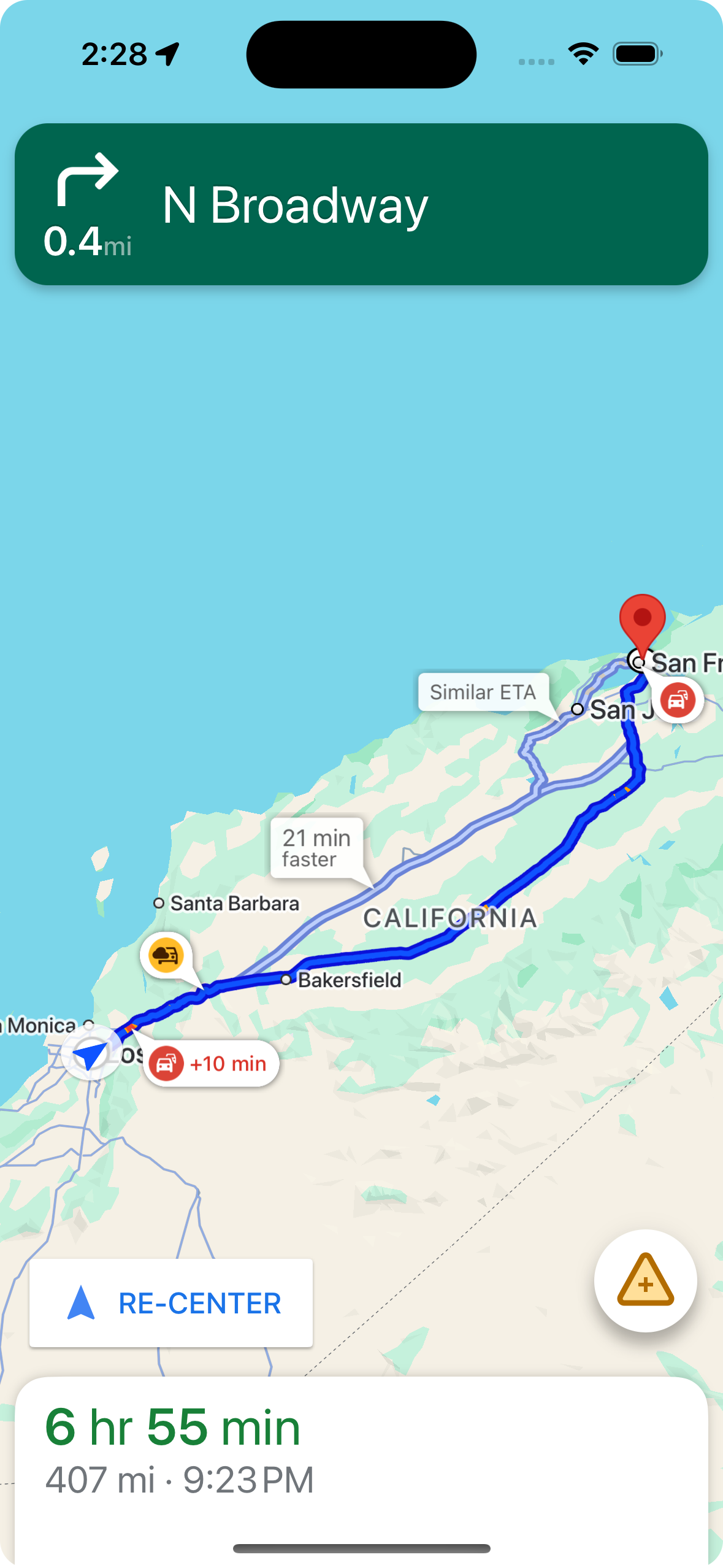
您可以使用 shouldDisplayPrompts 控制沿路线显示的中断标注,该属性还可控制用户接近中断时自动提醒的显示。
mapView.navigator.shouldDisplayPrompts = true
在用户点按标注时显示中断详情
点按中断标注会打开一个包含更多详细信息的资讯卡片。这适用于沿途和非沿途标注,但只有在启用流量图层后,系统才会显示非沿途标注。该卡片会显示中断类型、上次报告中断的时间,有时还会显示一个选项,供您投票表决中断是否仍然存在。信息卡片类型及其配置选项因用户是否处于有效导航状态而异。
在开始主动导航之前,路线概览中的标注信息卡
在开始主动导航之前,用户可以点按地图或路线概览中的沿途或非沿途标注,以打开信息卡片。若要使用偏离路线的标注,需要启用流量图层。信息卡片会提供有关中断的更多详细信息。
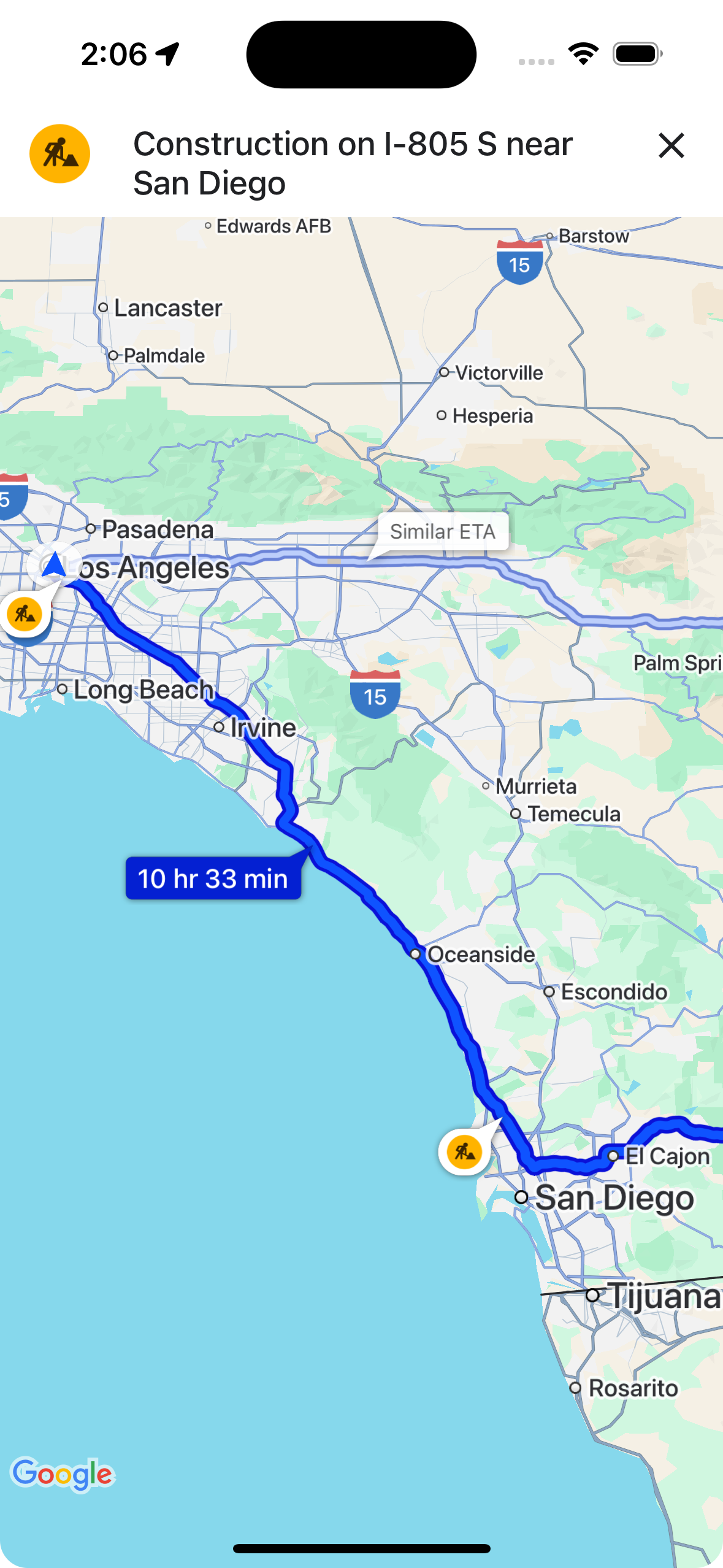
您可以使用 showsIncidentCards 控制用户在路线概览中点按中断信息以显示更多信息的能力。
mapView.settings.showsIncidentCards = true
在有效导航期间显示标注信息卡片
在导航期间,用户可以点按路线上的或路线外的中断标注,以打开信息卡片。该卡片会显示中断类型和上次报告的时间,并包含供用户投票表决中断是否仍然存在的按钮。
用户可以针对距离自己 5 公里以内的路线中和路线外的中断情况(不包括道路封闭)进行投票。Google 会处理这些投票,以帮助确定是否继续显示中断信息。其他 Google 地图和 Navigation SDK 用户也可能会在地图上看到这些投票。
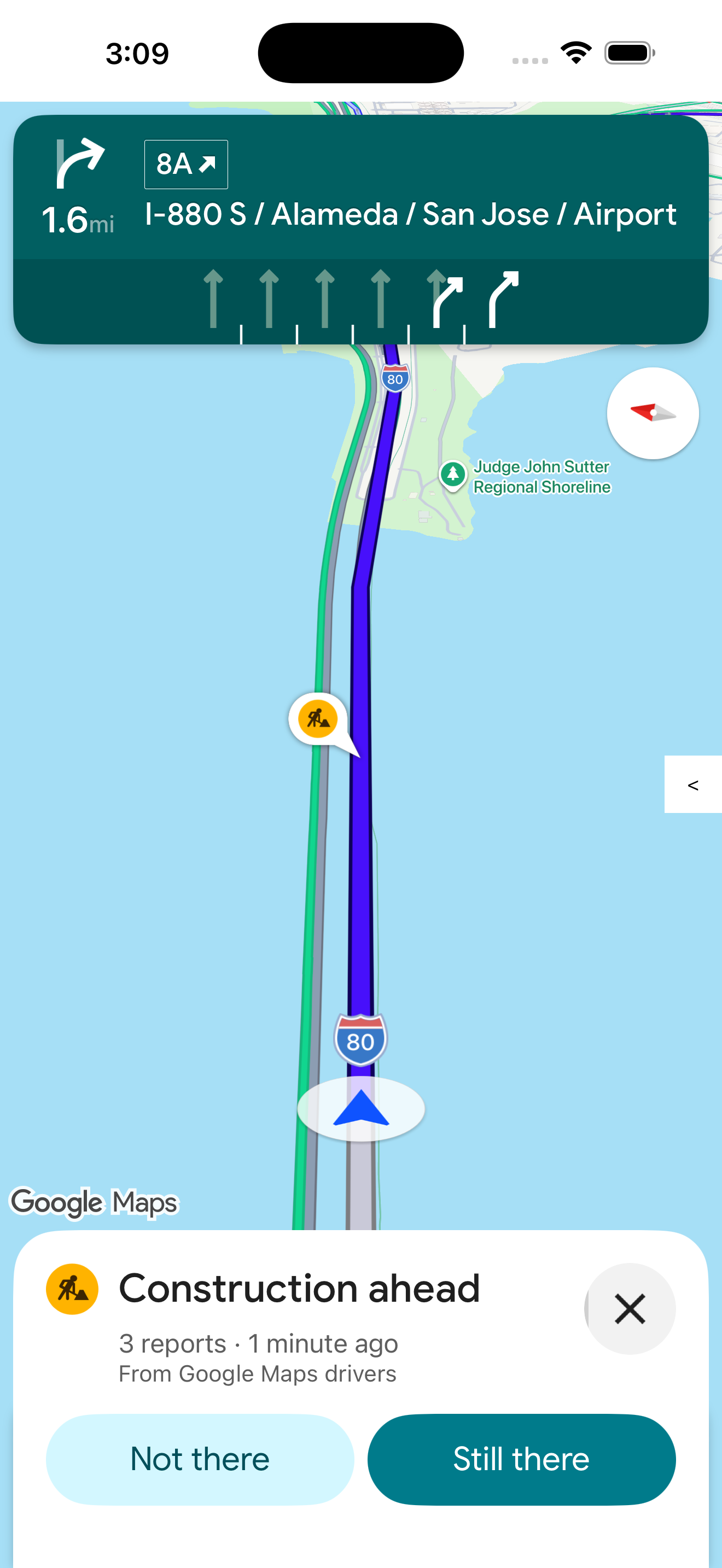
您可以使用 shouldDisplayPrompts 控制在有效导航期间中断信息的显示和可点按性,该方法还可控制沿路线显示信息以及在用户接近中断时显示自动提醒。
mapView.navigator.shouldDisplayPrompts = true
在导航期间提供自动路况异常提醒和投票功能
在导航处于有效状态期间,当用户接近路线上的中断时,系统会显示一条提示,其中包含有关中断的信息以及用于投票表决中断是否仍然存在的按钮。 用户提交的投票由 Google 处理,可能会在地图上显示给其他 Google 地图和 Navigation SDK 用户,也可能会用于确定是否继续显示中断信息。
您可以使用 shouldDisplayPrompts 配置在有效导航期间显示提醒提示,该属性还可控制沿途的标注的显示。
mapView.navigator.shouldDisplayPrompts = true
在有效导航期间报告路况异常
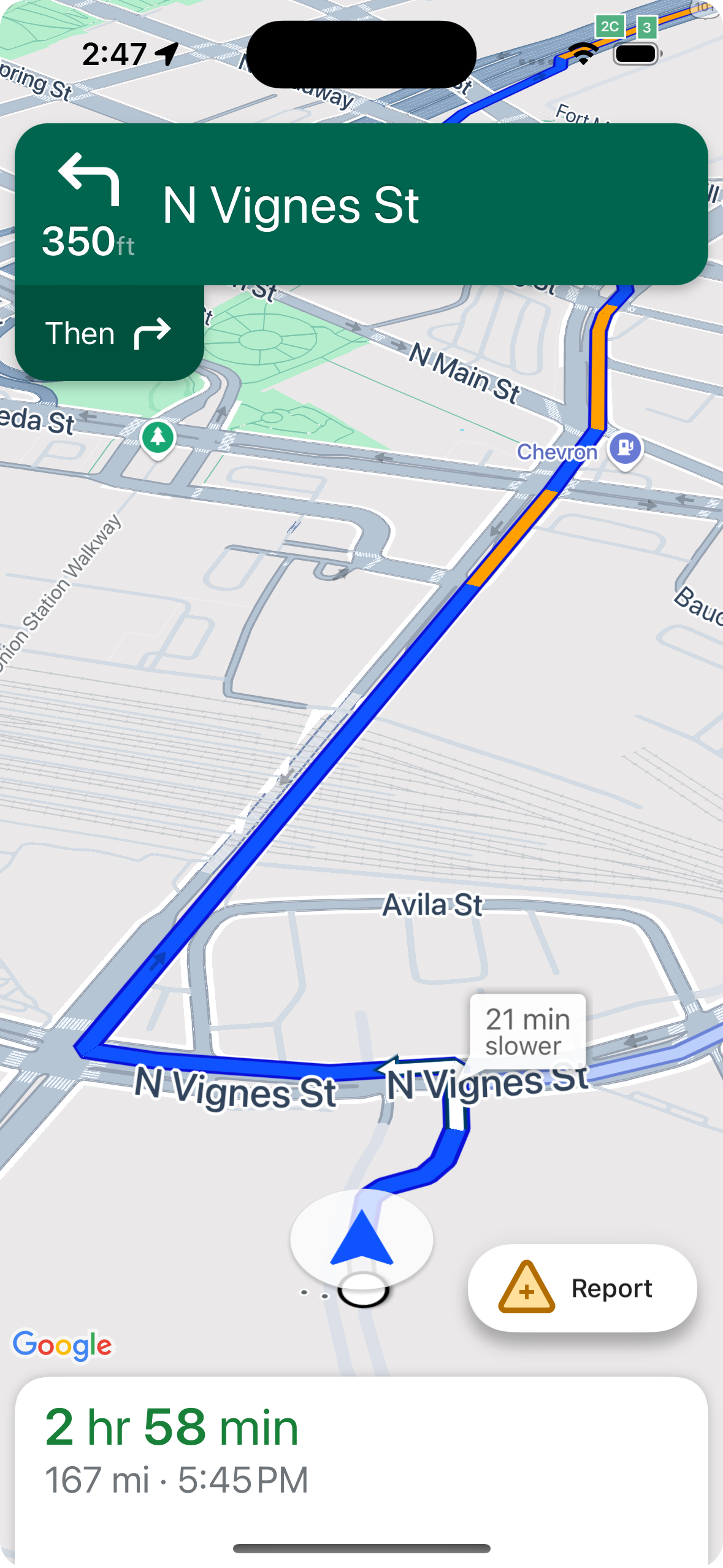
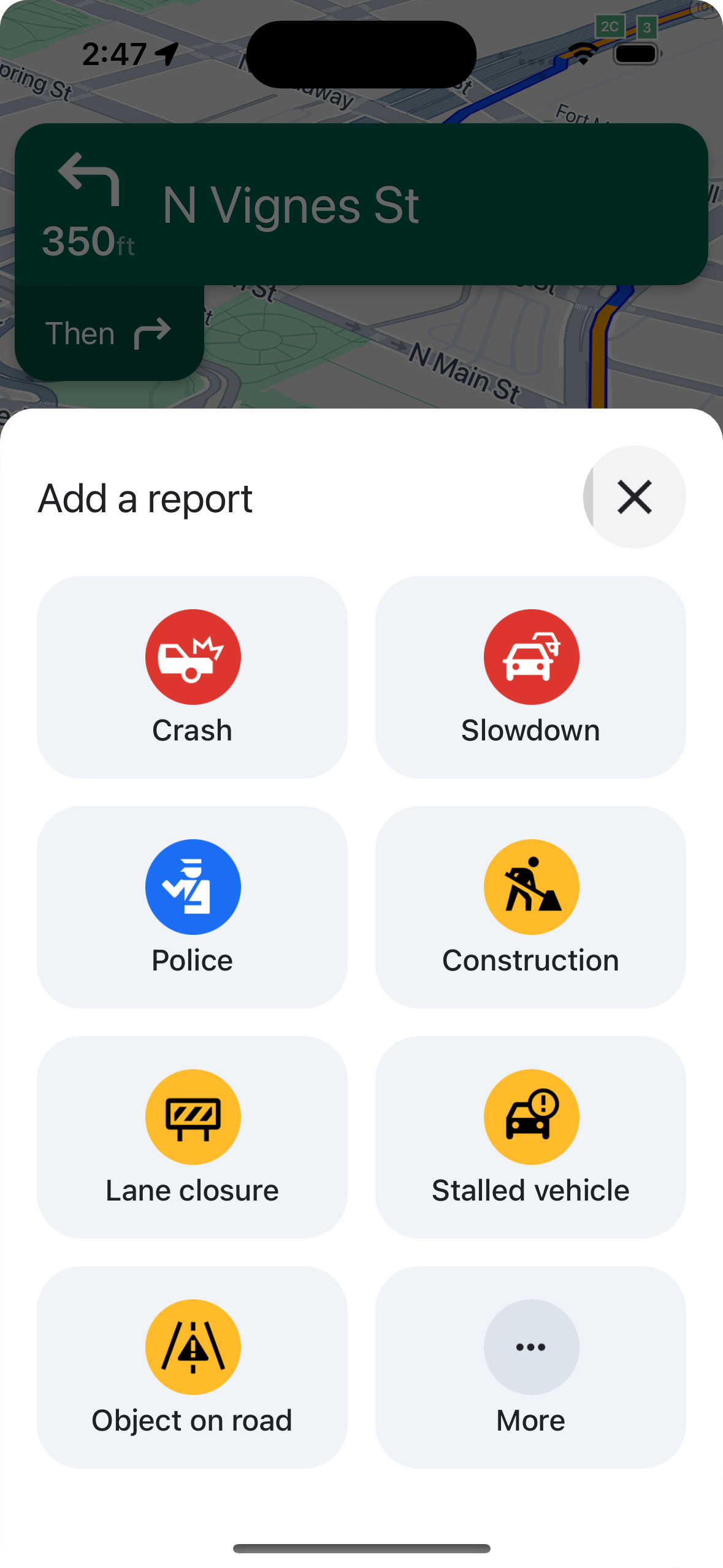
在有效导航模式下,导航界面上会显示一个按钮,供用户报告路线上的新中断情况。当用户点按该按钮时,系统会显示一个菜单,其中列出了可举报的干扰类型。 用户提交的报告会由 Google 处理,并可能会在地图上显示给其他 Google 地图和 Navigation SDK 用户。
显示或隐藏标准报告按钮
您可以使用 navigationReportIncidentButtonEnabled 配置在有效导航期间标准报告按钮的可见性。
// Enables the incident reporting FAB to show in situations where incident
// reporting is possible.
mapView.settings.navigationReportIncidentButtonEnabled = true
添加自定义报告按钮
您可以向导航界面添加自定义报告按钮,以取代标准的中断报告按钮。当用户点击自定义按钮时,您可以通过调用 presentReportIncidentsPanel 方法来触发报告菜单的显示。在添加自定义举报按钮之前,请通过调用 reportIncidentsAvailable 验证应用是否处于有效导航状态,以及用户是否位于已启用举报功能的国家/地区。如果这两个条件中任一条件不成立,则不会显示举报菜单。
  // Check if reporting is available before displaying your button
  let isReportingAvailable = mapview.isIncidentReportingAvailable()
  customReportingIncidentButton.isHidden = !isReportingAvailable
  customReportingIncidentButton.addTarget(self, action: #selector(didTapReportIncidentButton), for: .touchUpInside)

  // Trigger the reporting flow if the button is clicked
  func didTapReportIncidentButton() {
          mapView.presentReportIncidentsPanel(self) { [weak self] error in
              guard let self = self else { return }
              if let error = error as NSError? {
                  if error.domain == GMSMapViewPresentReportIncidentPanelErrorDomain {
                      let errorCode = GMSMapViewPresentReportIncidentPanelErrorCode(rawValue: error.code)

                      switch errorCode {
                      case .internal:
                          self.showErrorMessage(
                              title: "Error Presenting Report Incident Panel",
                              message: "An internal error occurred."
                          )
                      case .reportingNotAvailable:
                          self.showErrorMessage(
                              title: "Error Presenting Report Incident Panel",
                              message: "Reporting is not available."
                          )
                      case .none:
                          self.showErrorMessage(
                              title: "Error Presenting Report Incident Panel",
                              message: "An unknown error occurred."
                          )
                      }
                  } else {
                      // Handle other potential errors (e.g., network errors)
                      self.showErrorMessage(
                          title: "Error Presenting Report Incident Panel",
                          message: "An unexpected error occurred: \(error.localizedDescription)"
                      )
                  }
              }
              // If error is nil, the panel was presented successfully. You can add any extra logic here.
          }
     }
使用自定义导航界面
如果您的 Navigation SDK 实现包含自定义界面元素,您需要考虑实时中断元素,以避免冲突。
报告按钮的位置
默认情况下,中断报告按钮位于地图的底部末端/尾随角,即对于从左到右书写的语言,位于右侧;对于从右到左书写的语言,位于左侧。如果您需要移动报告按钮以留出空间来放置自定义界面元素,请使用bottomTrailingButtonsLayoutGuide。
Swift
// Create a new layout guide
let topRightLayoutGuide = UILayoutGuide()
self.view.addLayoutGuide(topRightLayoutGuide)

// Activate constraints using fixed constants here as an example
// assuming the current reporting button is of fixed height
topRightLayoutGuide.topAnchor.constraint(equalTo: _mapView.navigationHeaderLayoutGuide.bottomAnchor, constant: 50).isActive = true
topRightLayoutGuide.trailingAnchor.constraint(equalTo: self.view.safeAreaLayoutGuide.trailingAnchor, constant: -14).isActive = true

// Assign the layout guide
_mapView.bottomTrailingButtonsLayoutGuide = topRightLayoutGuide

// Create an alternate layout guide to use when the header and the footer are not full width
let topRightAlternateLayoutGuide = UILayoutGuide()
self.view.addLayoutGuide(topRightAlternateLayoutGuide)

// Activate constraints using fixed constants here as an example
// assuming the current RTD button is of fixed height
topRightAlternateLayoutGuide.topAnchor.constraint(equalTo: _mapView.navigationHeaderLayoutGuide.bottomAnchor, constant: 20).isActive = true
topRightAlternateLayoutGuide.trailingAnchor.constraint(equalTo: self.view.safeAreaLayoutGuide.trailingAnchor, constant: -10).isActive = true

// Assign the layout guide
_mapView.bottomTrailingButtonsAlternateLayoutGuide = topRightAlternateLayoutGuide
Objective-C
// Create a new layout guide
UILayoutGuide *topRightLayoutGuide = [[UILayoutGuide alloc] init];
[self.view addLayoutGuide:topRightLayoutGuide];

// Activate constraints using fixed constants here as an example
// assuming the current RTD button is of fixed height
[[topRightLayoutGuide.topAnchor
    constraintEqualToAnchor:_mapView.navigationHeaderLayoutGuide.bottomAnchor
                   constant:50]
    setActive:YES];

[[topRightLayoutGuide.trailingAnchor
    constraintEqualToAnchor:self.view.safeAreaLayoutGuide.trailingAnchor
                   constant:-14]
    setActive:YES];

// Assign the layout guide
_mapView.bottomTrailingButtonsLayoutGuide = topRightLayoutGuide;

// Create an alternate layout guide to use when the header and the footer are not full width
UILayoutGuide *topRightAlternateLayoutGuide = [[UILayoutGuide alloc] init];
[self.view addLayoutGuide:topRightAlternateLayoutGuide];

// Activate constraints using fixed constants here as an example
// assuming the current RTD button is of fixed height
[[topRightAlternateLayoutGuide.topAnchor
    constraintEqualToAnchor:_mapView.navigationHeaderLayoutGuide.bottomAnchor
                   constant:50]
    setActive:YES];

[[topRightAlternateLayoutGuide.trailingAnchor
    constraintEqualToAnchor:self.view.safeAreaLayoutGuide.trailingAnchor
                   constant:-14]
    setActive:YES];

// Assign the layout guide
_mapView.bottomTrailingButtonsAlternateLayoutGuide = topRightAlternateLayoutGuide;
Prompt Visibility API(实验性)
通过添加监听器,在 Navigation SDK 界面元素即将显示之前以及该元素被移除后立即接收回调,提示可见性 API 可帮助您避免 Navigation SDK 生成的界面元素与您自己的自定义界面元素之间发生冲突。您可以接收实时中断元素的回调,包括信息卡片、提示和中断报告菜单,以及 Navigation SDK 生成的其他通知。Swift
// Additional methods added to GMSNavigatorListener
...
func navigatorWillPresentPrompt(_ navigator: GMSNavigator) {
  // Hide any sort of custom UI element.
}

func navigatorDidDismissPrompt(_ navigator: GMSNavigator) {
  // Show any sort of custom UI element.
}
...
Objective-C
// Additional methods added to GMSNavigatorListener
...
- (void)navigatorWillPresentPrompt:(GMSNavigator *)navigator {
  // Hide any sort of custom UI element.
}

- (void)navigatorDidDismissPrompt:(GMSNavigator *)navigator {
  // Show any sort of custom UI element.
}
...