
پوشه ها را ایجاد و پر کنید

پوشه‌ها فایل‌هایی هستند که فقط حاوی فراداده (metadata) هستند و می‌توانند برای سازماندهی فایل‌ها در گوگل درایو استفاده شوند. آن‌ها دارای ویژگی‌های زیر هستند:

  • یک پوشه، فایلی با نوع MIME application/vnd.google-apps.folder است و پسوندی ندارد.
  • از نام مستعار root می‌توان برای ارجاع به پوشه ریشه در هر جایی که شناسه فایل ارائه شده باشد، استفاده کرد.

برای اطلاعات بیشتر در مورد محدودیت‌های پوشه Drive، به محدودیت‌های فایل و پوشه مراجعه کنید.

این راهنما نحوه انجام برخی از کارهای اساسی مربوط به پوشه را توضیح می‌دهد.

ایجاد پوشه

برای ایجاد یک پوشه، از متد files.create() به همراه mimeType از application/vnd.google-apps.folder و یک name استفاده کنید. نمونه کد زیر نحوه ایجاد یک پوشه با استفاده از یک کتابخانه کلاینت را نشان می‌دهد:

جاوا

‎drive/snippets/drive_v3/src/main/java/CreateFolder.java‎‏
import com.google.api.client.googleapis.json.GoogleJsonResponseException;
import com.google.api.client.http.HttpRequestInitializer;
import com.google.api.client.http.javanet.NetHttpTransport;
import com.google.api.client.json.gson.GsonFactory;
import com.google.api.services.drive.Drive;
import com.google.api.services.drive.DriveScopes;
import com.google.api.services.drive.model.File;
import com.google.auth.http.HttpCredentialsAdapter;
import com.google.auth.oauth2.GoogleCredentials;
import java.io.IOException;
import java.util.Arrays;

/* Class to demonstrate use of Drive's create folder API */
public class CreateFolder {


  /**
   * Create new folder.
   *
   * @return Inserted folder id if successful, {@code null} otherwise.
   * @throws IOException if service account credentials file not found.
   */
  public static String createFolder() throws IOException {
    // Load pre-authorized user credentials from the environment.
    // TODO(developer) - See https://developers.google.com/identity for
    // guides on implementing OAuth2 for your application.
    GoogleCredentials credentials = GoogleCredentials.getApplicationDefault()
        .createScoped(Arrays.asList(DriveScopes.DRIVE_FILE));
    HttpRequestInitializer requestInitializer = new HttpCredentialsAdapter(
        credentials);

    // Build a new authorized API client service.
    Drive service = new Drive.Builder(new NetHttpTransport(),
        GsonFactory.getDefaultInstance(),
        requestInitializer)
        .setApplicationName("Drive samples")
        .build();
    // File's metadata.
    File fileMetadata = new File();
    fileMetadata.setName("Test");
    fileMetadata.setMimeType("application/vnd.google-apps.folder");
    try {
      File file = service.files().create(fileMetadata)
          .setFields("id")
          .execute();
      System.out.println("Folder ID: " + file.getId());
      return file.getId();
    } catch (GoogleJsonResponseException e) {
      // TODO(developer) - handle error appropriately
      System.err.println("Unable to create folder: " + e.getDetails());
      throw e;
    }
  }
}

پایتون

‎drive/snippets/drive-v3/file_snippet/create_folder.py‎‏ ...
import google.auth
from googleapiclient.discovery import build
from googleapiclient.errors import HttpError


def create_folder():
  """Create a folder and prints the folder ID
  Returns : Folder Id

  Load pre-authorized user credentials from the environment.
  TODO(developer) - See https://developers.google.com/identity
  for guides on implementing OAuth2 for the application.
  """
  creds, _ = google.auth.default()

  try:
    # create drive api client
    service = build("drive", "v3", credentials=creds)
    file_metadata = {
        "name": "Invoices",
        "mimeType": "application/vnd.google-apps.folder",
    }

    # pylint: disable=maybe-no-member
    file = service.files().create(body=file_metadata, fields="id").execute()
    print(f'Folder ID: "{file.get("id")}".')
    return file.get("id")

  except HttpError as error:
    print(f"An error occurred: {error}")
    return None


if __name__ == "__main__":
  create_folder()

نود جی اس

‎drive/snippets/drive_v3/file_snippets/create_folder.js‎‏
import {GoogleAuth} from 'google-auth-library';
import {google} from 'googleapis';

/**
 * Creates a new folder in Google Drive.
 * @return {Promise<string|null|undefined>} The ID of the created folder.
 */
async function createFolder() {
  // Authenticate with Google and get an authorized client.
  // TODO (developer): Use an appropriate auth mechanism for your app.
  const auth = new GoogleAuth({
    scopes: 'https://www.googleapis.com/auth/drive',
  });

  // Create a new Drive API client (v3).
  const service = google.drive({version: 'v3', auth});

  // The metadata for the new folder.
  const fileMetadata = {
    name: 'Invoices',
    mimeType: 'application/vnd.google-apps.folder',
  };

  // Create the new folder.
  const file = await service.files.create({
    requestBody: fileMetadata,
    fields: 'id',
  });

  // Print the ID of the new folder.
  console.log('Folder Id:', file.data.id);
  return file.data.id;
}

پی اچ پی

‎drive/snippets/drive_v3/src/DriveCreateFolder.php‎‏
<?php
use Google\Client;
use Google\Service\Drive;
function createFolder()
{
    try {
        $client = new Client();
        $client->useApplicationDefaultCredentials();
        $client->addScope(Drive::DRIVE);
        $driveService = new Drive($client);
        $fileMetadata = new Drive\DriveFile(array(
            'name' => 'Invoices',
            'mimeType' => 'application/vnd.google-apps.folder'));
        $file = $driveService->files->create($fileMetadata, array(
            'fields' => 'id'));
        printf("Folder ID: %s\n", $file->id);
        return $file->id;

    }catch(Exception $e) {
       echo "Error Message: ".$e;
    }
}

دات نت

‎drive/snippets/drive_v3/DriveV3Snippets/CreateFolder.cs‎‏
using Google.Apis.Auth.OAuth2;
using Google.Apis.Drive.v3;
using Google.Apis.Services;

namespace DriveV3Snippets
{
    // Class to demonstrate use of Drive create folder API.
    public class CreateFolder
    {
        /// <summary>
        /// Creates a new folder.
        /// </summary>
        /// <returns>created folder id, null otherwise</returns>
        public static string DriveCreateFolder()
        {
            try
            {
                /* Load pre-authorized user credentials from the environment.
                 TODO(developer) - See https://developers.google.com/identity for 
                 guides on implementing OAuth2 for your application. */
                GoogleCredential credential = GoogleCredential.GetApplicationDefault()
                    .CreateScoped(DriveService.Scope.Drive);

                // Create Drive API service.
                var service = new DriveService(new BaseClientService.Initializer
                {
                    HttpClientInitializer = credential,
                    ApplicationName = "Drive API Snippets"
                });

                // File metadata
                var fileMetadata = new Google.Apis.Drive.v3.Data.File()
                {
                    Name = "Invoices",
                    MimeType = "application/vnd.google-apps.folder"
                };

                // Create a new folder on drive.
                var request = service.Files.Create(fileMetadata);
                request.Fields = "id";
                var file = request.Execute();
                // Prints the created folder id.
                Console.WriteLine("Folder ID: " + file.Id);
                return file.Id;
            }
            catch (Exception e)
            {
                // TODO(developer) - handle error appropriately
                if (e is AggregateException)
                {
                    Console.WriteLine("Credential Not found");
                }
                else
                {
                    throw;
                }
            }
            return null;
        }
    }
}

ایجاد فایل در یک پوشه خاص

برای ایجاد یک فایل در یک پوشه خاص، از متد files.create() استفاده کنید و شناسه پوشه را در ویژگی parents فایل مشخص کنید.

ویژگی parents شناسه پوشه والد حاوی فایل را در خود نگه می‌دارد. ویژگی parents می‌تواند هنگام ایجاد فایل‌ها در یک پوشه سطح بالا یا هر پوشه دیگری استفاده شود.

یک فایل فقط می‌تواند یک پوشه والد داشته باشد. تعیین چندین والد پشتیبانی نمی‌شود. اگر فیلد parents مشخص نشده باشد، فایل مستقیماً در پوشه My Drive کاربر قرار می‌گیرد.

نمونه کد زیر نحوه ایجاد یک فایل در یک پوشه خاص با استفاده از یک کتابخانه کلاینت را نشان می‌دهد:

جاوا

‎drive/snippets/drive_v3/src/main/java/UploadToFolder.java‎‏
import com.google.api.client.googleapis.json.GoogleJsonResponseException;
import com.google.api.client.http.FileContent;
import com.google.api.client.http.HttpRequestInitializer;
import com.google.api.client.http.javanet.NetHttpTransport;
import com.google.api.client.json.gson.GsonFactory;
import com.google.api.services.drive.Drive;
import com.google.api.services.drive.DriveScopes;
import com.google.api.services.drive.model.File;
import com.google.auth.http.HttpCredentialsAdapter;
import com.google.auth.oauth2.GoogleCredentials;
import java.io.IOException;
import java.util.Arrays;
import java.util.Collections;

/* Class to demonstrate Drive's upload to folder use-case. */
public class UploadToFolder {

  /**
   * Upload a file to the specified folder.
   *
   * @param realFolderId Id of the folder.
   * @return Inserted file metadata if successful, {@code null} otherwise.
   * @throws IOException if service account credentials file not found.
   */
  public static File uploadToFolder(String realFolderId) throws IOException {
    // Load pre-authorized user credentials from the environment.
    // TODO(developer) - See https://developers.google.com/identity for
    // guides on implementing OAuth2 for your application.
    GoogleCredentials credentials = GoogleCredentials.getApplicationDefault()
        .createScoped(Arrays.asList(DriveScopes.DRIVE_FILE));
    HttpRequestInitializer requestInitializer = new HttpCredentialsAdapter(
        credentials);

    // Build a new authorized API client service.
    Drive service = new Drive.Builder(new NetHttpTransport(),
        GsonFactory.getDefaultInstance(),
        requestInitializer)
        .setApplicationName("Drive samples")
        .build();

    // File's metadata.
    File fileMetadata = new File();
    fileMetadata.setName("photo.jpg");
    fileMetadata.setParents(Collections.singletonList(realFolderId));
    java.io.File filePath = new java.io.File("files/photo.jpg");
    FileContent mediaContent = new FileContent("image/jpeg", filePath);
    try {
      File file = service.files().create(fileMetadata, mediaContent)
          .setFields("id, parents")
          .execute();
      System.out.println("File ID: " + file.getId());
      return file;
    } catch (GoogleJsonResponseException e) {
      // TODO(developer) - handle error appropriately
      System.err.println("Unable to upload file: " + e.getDetails());
      throw e;
    }
  }
}

پایتون

‎drive/snippets/drive-v3/file_snippet/upload_to_folder.py‎‏ (فایل قطعه کد)
import google.auth
from googleapiclient.discovery import build
from googleapiclient.errors import HttpError
from googleapiclient.http import MediaFileUpload


def upload_to_folder(folder_id):
  """Upload a file to the specified folder and prints file ID, folder ID
  Args: Id of the folder
  Returns: ID of the file uploaded

  Load pre-authorized user credentials from the environment.
  TODO(developer) - See https://developers.google.com/identity
  for guides on implementing OAuth2 for the application.
  """
  creds, _ = google.auth.default()

  try:
    # create drive api client
    service = build("drive", "v3", credentials=creds)

    file_metadata = {"name": "photo.jpg", "parents": [folder_id]}
    media = MediaFileUpload(
        "download.jpeg", mimetype="image/jpeg", resumable=True
    )
    # pylint: disable=maybe-no-member
    file = (
        service.files()
        .create(body=file_metadata, media_body=media, fields="id")
        .execute()
    )
    print(f'File ID: "{file.get("id")}".')
    return file.get("id")

  except HttpError as error:
    print(f"An error occurred: {error}")
    return None


if __name__ == "__main__":
  upload_to_folder(folder_id="1s0oKEZZXjImNngxHGnY0xed6Mw-tvspu")

نود جی اس

‎drive/snippets/drive_v3/file_snippets/upload_to_folder.js‎‏
import fs from 'node:fs';
import {GoogleAuth} from 'google-auth-library';
import {google} from 'googleapis';

/**
 * Uploads a file to the specified folder.
 * @param {string} folderId The ID of the folder to upload the file to.
 * @return {Promise<string>} The ID of the uploaded file.
 */
async function uploadToFolder(folderId) {
  // Authenticate with Google and get an authorized client.
  // TODO (developer): Use an appropriate auth mechanism for your app.
  const auth = new GoogleAuth({
    scopes: 'https://www.googleapis.com/auth/drive',
  });

  // Create a new Drive API client (v3).
  const service = google.drive({version: 'v3', auth});

  // The request body for the file to be uploaded.
  const requestBody = {
    name: 'photo.jpg',
    parents: [folderId],
  };

  // The media content to be uploaded.
  const media = {
    mimeType: 'image/jpeg',
    body: fs.createReadStream('files/photo.jpg'),
  };

  // Upload the file to the specified folder.
  const file = await service.files.create({
    requestBody,
    media,
    fields: 'id',
  });

  // Print the ID of the uploaded file.
  console.log('File Id:', file.data.id);
  if (!file.data.id) {
    throw new Error('File ID not found.');
  }
  return file.data.id;
}

پی اچ پی

‎drive/snippets/drive_v3/src/DriveUploadToFolder.php‎‏
<?php
use Google\Client;
use Google\Service\Drive;
function uploadToFolder($folderId)
{
    try {
        $client = new Client();
        $client->useApplicationDefaultCredentials();
        $client->addScope(Drive::DRIVE);
        $driveService = new Drive($client);
        $fileMetadata = new Drive\DriveFile(array(
            'name' => 'photo.jpg',
            'parents' => array($folderId)
        ));
        $content = file_get_contents('../files/photo.jpg');
        $file = $driveService->files->create($fileMetadata, array(
            'data' => $content,
            'mimeType' => 'image/jpeg',
            'uploadType' => 'multipart',
            'fields' => 'id'));
        printf("File ID: %s\n", $file->id);
        return $file->id;
    } catch (Exception $e) {
        echo "Error Message: " . $e;
    }
}
require_once 'vendor/autoload.php';
uploadToFolder();

دات نت

‎drive/snippets/drive_v3/DriveV3Snippets/UploadToFolder.cs‎‏
using Google.Apis.Auth.OAuth2;
using Google.Apis.Drive.v3;
using Google.Apis.Services;

namespace DriveV3Snippets
{
    // Class to demonstrate use of Drive upload to folder.
    public class UploadToFolder
    {
        /// <summary>
        /// Upload a file to the specified folder.
        /// </summary>
        /// <param name="filePath">Image path to upload.</param>
        /// <param name="folderId">Id of the folder.</param>
        /// <returns>Inserted file metadata if successful, null otherwise</returns>
        public static Google.Apis.Drive.v3.Data.File DriveUploadToFolder
            (string filePath, string folderId)
        {
            try
            {
                /* Load pre-authorized user credentials from the environment.
                 TODO(developer) - See https://developers.google.com/identity for
                 guides on implementing OAuth2 for your application. */
                GoogleCredential credential = GoogleCredential.GetApplicationDefault()
                    .CreateScoped(DriveService.Scope.Drive);

                // Create Drive API service.
                var service = new DriveService(new BaseClientService.Initializer
                {
                    HttpClientInitializer = credential,
                    ApplicationName = "Drive API Snippets"
                });

                // Upload file photo.jpg in specified folder on drive.
                var fileMetadata = new Google.Apis.Drive.v3.Data.File()
                {
                    Name = "photo.jpg",
                    Parents = new List<string>
                    {
                        folderId
                    }
                };
                FilesResource.CreateMediaUpload request;
                // Create a new file on drive.
                using (var stream = new FileStream(filePath,
                           FileMode.Open))
                {
                    // Create a new file, with metadata and stream.
                    request = service.Files.Create(
                        fileMetadata, stream, "image/jpeg");
                    request.Fields = "id";
                    request.Upload();
                }
                var file = request.ResponseBody;
                // Prints the uploaded file id.
                Console.WriteLine("File ID: " + file.Id);
                return file;
            }
            catch (Exception e)
            {
                // TODO(developer) - handle error appropriately
                if (e is AggregateException)
                {
                    Console.WriteLine("Credential Not found");
                }
                else if (e is FileNotFoundException)
                {
                    Console.WriteLine("File not found");
                }
                else if (e is DirectoryNotFoundException)
                {
                    Console.WriteLine("Directory Not found");
                }
                else
                {
                    throw;
                }
            }
            return null;
        }
    }
}

جابجایی فایل‌ها بین پوشه‌ها

برای انتقال فایل‌ها، باید شناسه‌ی ویژگی parents را به‌روزرسانی کنید.

برای اضافه کردن یا حذف والدها برای یک فایل موجود، از متد files.update() به همراه پارامترهای کوئری addParents و removeParents استفاده کنید.

یک فایل فقط می‌تواند یک پوشه والد داشته باشد. تعیین چندین والد پشتیبانی نمی‌شود.

نمونه کد زیر نحوه جابجایی یک فایل بین پوشه‌ها با استفاده از یک کتابخانه کلاینت را نشان می‌دهد:

جاوا

‎drive/snippets/drive_v3/src/main/java/MoveFileToFolder.java‎‏
import com.google.api.client.googleapis.json.GoogleJsonResponseException;
import com.google.api.client.http.HttpRequestInitializer;
import com.google.api.client.http.javanet.NetHttpTransport;
import com.google.api.client.json.gson.GsonFactory;
import com.google.api.services.drive.Drive;
import com.google.api.services.drive.DriveScopes;
import com.google.api.services.drive.model.File;
import com.google.auth.http.HttpCredentialsAdapter;
import com.google.auth.oauth2.GoogleCredentials;
import java.io.IOException;
import java.util.Arrays;
import java.util.List;

/* Class to demonstrate use case for moving file to folder.*/
public class MoveFileToFolder {


  /**
   * @param fileId   Id of file to be moved.
   * @param folderId Id of folder where the fill will be moved.
   * @return list of parent ids for the file.
   */
  public static List<String> moveFileToFolder(String fileId, String folderId)
      throws IOException {
        /* Load pre-authorized user credentials from the environment.
        TODO(developer) - See https://developers.google.com/identity for
        guides on implementing OAuth2 for your application.*/
    GoogleCredentials credentials = GoogleCredentials.getApplicationDefault()
        .createScoped(Arrays.asList(DriveScopes.DRIVE_FILE));
    HttpRequestInitializer requestInitializer = new HttpCredentialsAdapter(
        credentials);
    // Build a new authorized API client service.
    Drive service = new Drive.Builder(new NetHttpTransport(),
        GsonFactory.getDefaultInstance(),
        requestInitializer)
        .setApplicationName("Drive samples")
        .build();

    // Retrieve the existing parents to remove
    File file = service.files().get(fileId)
        .setFields("parents")
        .execute();
    StringBuilder previousParents = new StringBuilder();
    for (String parent : file.getParents()) {
      previousParents.append(parent);
      previousParents.append(',');
    }
    try {
      // Move the file to the new folder
      file = service.files().update(fileId, null)
          .setAddParents(folderId)
          .setRemoveParents(previousParents.toString())
          .setFields("id, parents")
          .execute();

      return file.getParents();
    } catch (GoogleJsonResponseException e) {
      // TODO(developer) - handle error appropriately
      System.err.println("Unable to move file: " + e.getDetails());
      throw e;
    }
  }
}

پایتون

‎drive/snippets/drive-v3/file_snippet/move_file_to_folder.py‎‏ ...
import google.auth
from googleapiclient.discovery import build
from googleapiclient.errors import HttpError


def move_file_to_folder(file_id, folder_id):
  """Move specified file to the specified folder.
  Args:
      file_id: Id of the file to move.
      folder_id: Id of the folder
  Print: An object containing the new parent folder and other meta data
  Returns : Parent Ids for the file

  Load pre-authorized user credentials from the environment.
  TODO(developer) - See https://developers.google.com/identity
  for guides on implementing OAuth2 for the application.
  """
  creds, _ = google.auth.default()

  try:
    # call drive api client
    service = build("drive", "v3", credentials=creds)

    # pylint: disable=maybe-no-member
    # Retrieve the existing parents to remove
    file = service.files().get(fileId=file_id, fields="parents").execute()
    previous_parents = ",".join(file.get("parents"))
    # Move the file to the new folder
    file = (
        service.files()
        .update(
            fileId=file_id,
            addParents=folder_id,
            removeParents=previous_parents,
            fields="id, parents",
        )
        .execute()
    )
    return file.get("parents")

  except HttpError as error:
    print(f"An error occurred: {error}")
    return None


if __name__ == "__main__":
  move_file_to_folder(
      file_id="1KuPmvGq8yoYgbfW74OENMCB5H0n_2Jm9",
      folder_id="1jvTFoyBhUspwDncOTB25kb9k0Fl0EqeN",
  )

نود جی اس

‎drive/snippets/drive_v3/file_snippets/move_file_to_folder.js‎‏
import {GoogleAuth} from 'google-auth-library';
import {google} from 'googleapis';

/**
 * Moves a file to a new folder in Google Drive.
 * @param {string} fileId The ID of the file to move.
 * @param {string} folderId The ID of the folder to move the file to.
 * @return {Promise<number>} The status of the move operation.
 */
async function moveFileToFolder(fileId, folderId) {
  // Authenticate with Google and get an authorized client.
  // TODO (developer): Use an appropriate auth mechanism for your app.
  const auth = new GoogleAuth({
    scopes: 'https://www.googleapis.com/auth/drive',
  });

  // Create a new Drive API client (v3).
  const service = google.drive({version: 'v3', auth});

  // Get the file's metadata to retrieve its current parents.
  const file = await service.files.get({
    fileId,
    fields: 'parents',
  });

  // Get the current parents as a comma-separated string.
  const previousParents = (file.data.parents ?? []).join(',');

  // Move the file to the new folder.
  const result = await service.files.update({
    fileId,
    addParents: folderId,
    removeParents: previousParents,
    fields: 'id, parents',
  });

  // Print the status of the move operation.
  console.log(result.status);
  return result.status;
}

پی اچ پی

‎drive/snippets/drive_v3/src/DriveMoveFileToFolder.php‎‏
<?php
use Google\Client;
use Google\Service\Drive;
use Google\Service\Drive\DriveFile;
function moveFileToFolder($fileId,$folderId)
{
    try {
        $client = new Client();
        $client->useApplicationDefaultCredentials();
        $client->addScope(Drive::DRIVE);
        $driveService = new Drive($client);
        $emptyFileMetadata = new DriveFile();
        // Retrieve the existing parents to remove
        $file = $driveService->files->get($fileId, array('fields' => 'parents'));
        $previousParents = join(',', $file->parents);
        // Move the file to the new folder
        $file = $driveService->files->update($fileId, $emptyFileMetadata, array(
            'addParents' => $folderId,
            'removeParents' => $previousParents,
            'fields' => 'id, parents'));
        return $file->parents;
    } catch(Exception $e) {
        echo "Error Message: ".$e;
    }
}

دات نت

‎drive/snippets/drive_v3/DriveV3Snippets/MoveFileToFolder.cs‎‏
using Google;
using Google.Apis.Auth.OAuth2;
using Google.Apis.Drive.v3;
using Google.Apis.Services;

namespace DriveV3Snippets
{
    // Class to demonstrate use-case of Drive move file to folder.
    public class MoveFileToFolder
    {
        /// <summary>
        /// Move specified file to the specified folder.
        /// </summary>
        /// <param name="fileId">Id of file to be moved.</param>
        /// <param name="folderId">Id of folder where the fill will be moved.</param>
        /// <returns>list of parent ids for the file, null otherwise.</returns>
        public static IList<string> DriveMoveFileToFolder(string fileId,
            string folderId)
        {
            try
            {
                /* Load pre-authorized user credentials from the environment.
                 TODO(developer) - See https://developers.google.com/identity for 
                 guides on implementing OAuth2 for your application. */
                GoogleCredential credential = GoogleCredential.GetApplicationDefault()
                    .CreateScoped(DriveService.Scope.Drive);

                // Create Drive API service.
                var service = new DriveService(new BaseClientService.Initializer
                {
                    HttpClientInitializer = credential,
                    ApplicationName = "Drive API Snippets"
                });

                // Retrieve the existing parents to remove
                var getRequest = service.Files.Get(fileId);
                getRequest.Fields = "parents";
                var file = getRequest.Execute();
                var previousParents = String.Join(",", file.Parents);
                // Move the file to the new folder
                var updateRequest =
                    service.Files.Update(new Google.Apis.Drive.v3.Data.File(),
                        fileId);
                updateRequest.Fields = "id, parents";
                updateRequest.AddParents = folderId;
                updateRequest.RemoveParents = previousParents;
                file = updateRequest.Execute();

                return file.Parents;
            }
            catch (Exception e)
            {
                // TODO(developer) - handle error appropriately
                if (e is AggregateException)
                {
                    Console.WriteLine("Credential Not found");
                }
                else if (e is GoogleApiException)
                {
                    Console.WriteLine("File or Folder not found");
                }
                else
                {
                    throw;
                }
            }
            return null;
        }
    }
}

محدودیت‌های فایل و پوشه

فایل‌ها و پوشه‌های درایو محدودیت‌هایی برای ذخیره‌سازی دارند.

محدودیت کاربر-مورد

هر کاربر می‌تواند تا ۵۰۰ میلیون آیتم ایجاد شده توسط آن حساب را داشته باشد. وقتی به این محدودیت برسد، کاربر دیگر نمی‌تواند آیتم‌هایی را در Drive ایجاد یا آپلود کند. آنها همچنان می‌توانند آیتم‌های موجود را مشاهده و ویرایش کنند. برای ایجاد مجدد فایل‌ها، کاربران باید آیتم‌ها را به طور دائم حذف کنند یا از حساب دیگری استفاده کنند. برای اطلاعات بیشتر، به حذف شده‌ها یا حذف فایل‌ها و پوشه‌ها مراجعه کنید.

اشیایی که در این حد شمارش می‌شوند عبارتند از:

  • مواردی که توسط کاربر در Drive ایجاد یا آپلود شده‌اند
  • مواردی که توسط کاربر ایجاد شده‌اند اما اکنون متعلق به شخص دیگری هستند
  • اقلام موجود در سطل زباله
  • میانبرها
  • میانبرهای شخص ثالث

اشیایی که جزو این حد به حساب نمی‌آیند عبارتند از:

  • موارد حذف‌شده دائمی
  • مواردی که با کاربر به اشتراک گذاشته شده اما متعلق به شخص دیگری است
  • مواردی که متعلق به کاربر هستند اما توسط شخص دیگری ایجاد شده‌اند

تلاش برای افزودن بیش از ۵۰۰ میلیون آیتم، پاسخ کد وضعیت HTTP activeItemCreationLimitExceeded را برمی‌گرداند.

توجه داشته باشید که حساب‌های کاربری سرویس نمی‌توانند مالک هیچ فایلی باشند. در عوض، آنها باید فایل‌ها و پوشه‌ها را در درایوهای مشترک آپلود کنند، یا از OAuth 2.0 برای آپلود موارد از طرف یک کاربر انسانی استفاده کنند.

محدودیت تعداد آیتم‌های پوشه

هر پوشه در My Drive کاربر محدودیت ۵۰۰۰۰۰ مورد دارد. این محدودیت شامل پوشه اصلی My Drive نمی‌شود. مواردی که جزو این محدودیت محسوب می‌شوند عبارتند از:

برای اطلاعات بیشتر در مورد محدودیت‌های پوشه، به محدودیت‌های پوشه در Google Drive مراجعه کنید.

محدودیت عمق پوشه

درایو من یک کاربر نمی‌تواند بیش از ۱۰۰ سطح پوشه تو در تو داشته باشد. این بدان معناست که یک پوشه فرزند نمی‌تواند در زیر پوشه‌ای با عمق بیش از ۹۹ سطح ذخیره شود. این محدودیت فقط برای پوشه‌های فرزند اعمال می‌شود. یک فایل فرزند با نوع MIME غیر از application/vnd.google-apps.folder از این محدودیت مستثنی است.

برای مثال، در نمودار زیر، یک پوشه جدید می‌تواند درون پوشه شماره ۹۹ قرار گیرد، اما نمی‌تواند درون پوشه شماره ۱۰۰ قرار گیرد. با این حال، پوشه شماره ۱۰۰ می‌تواند فایل‌ها را مانند هر پوشه Drive دیگری ذخیره کند:
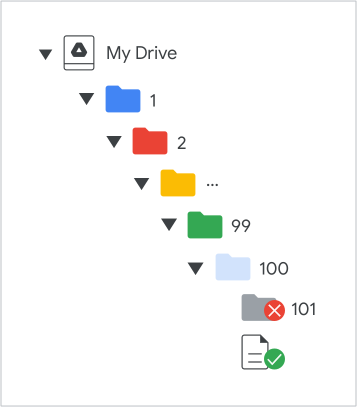
محدودیت عمق پوشه درایو.

تلاش برای افزودن بیش از ۱۰۰ سطح پوشه، پاسخ کد وضعیت HTTP با عنوان myDriveHierarchyDepthLimitExceeded را برمی‌گرداند.