

หน้านี้อธิบายวิธีที่นักพัฒนาแอปบุคคลที่สามสามารถใช้ บริการแก้ปัญหา เพื่อสร้างหน้าการวินิจฉัยในแอปสำหรับธุรกิจของตน
คุณสามารถใช้ Accounts API เพื่อดู ปัญหาที่ส่งผลต่อธุรกิจ บัญชี และบัญชีที่คุณ มีสิทธิ์เข้าถึง
คุณมีหน้าที่รับผิดชอบในการปฏิบัติตามนโยบายโฆษณา Shopping และข้อมูลที่แสดงฟรี Google Shopping ขอสงวนสิทธิ์ในการบังคับใช้นโยบายเหล่านี้และดำเนินการตามความเหมาะสมหากเราพบเนื้อหาหรือพฤติกรรมที่ละเมิดนโยบายเหล่านี้
คุณสามารถใช้บริการนี้เพื่อสร้าง UI ที่คล้ายกับหน้าการวินิจฉัยบัญชี Merchant Center และหน้าปัญหาเกี่ยวกับสินค้า
บริการแก้ปัญหาใช้ได้กับ UI ของบุคคลที่สามเท่านั้น ควรทริกเกอร์คำขอเมื่อธุรกิจโต้ตอบกับ UI ของแอปพลิเคชัน หากต้องการทำให้ การวินิจฉัยบัญชีธุรกิจของคุณเป็นไปโดยอัตโนมัติ โปรดดูคู่มือปัญหาเกี่ยวกับบัญชี
เราขอแนะนำให้คุณระบุหน้าต่อไปนี้ในแอปเพื่อช่วยธุรกิจในการแก้ปัญหา
- การวินิจฉัยบัญชี
- การวินิจฉัยผลิตภัณฑ์
ตัวเลือกต่างๆ สำหรับการใช้หน้าการวินิจฉัย
คุณสามารถใช้หน้าการวินิจฉัยได้หลายวิธี เลือกตัวเลือกที่กำหนดวิธีจัดการการดำเนินการวินิจฉัยที่ซับซ้อนตามความต้องการ ในคำขอ คุณสามารถตั้งค่า user_input_action_option เป็นตัวเลือกใดตัวเลือกหนึ่งต่อไปนี้
REDIRECT_TO_MERCHANT_CENTER: นี่คือตัวเลือกเริ่มต้น ระบบยังไม่ได้ใช้การดำเนินการที่ต้องแสดงเนื้อหาเพิ่มเติมหรือรับข้อมูลเพิ่มเติมจากธุรกิจอย่างเต็มรูปแบบในแอป สำหรับการดำเนินการเหล่านี้ API จะมีลิงก์เพื่อเปลี่ยนเส้นทางไปยังหน้าที่เกี่ยวข้องใน Merchant Center ซึ่งธุรกิจสามารถดำเนินการได้BUILT_IN_USER_INPUT_ACTIONS: คุณสามารถใช้การดำเนินการที่ซับซ้อนซึ่งต้องใช้ข้อมูลจากผู้ใช้เป็นโซลูชันในแอปในแอปพลิเคชันของคุณ
ใช้หน้าการวินิจฉัย
ส่วนนี้จะอธิบายวิธีใช้หน้าการวินิจฉัย โดยจะใช้ตัวเลือกเริ่มต้น (แบบง่าย) เพื่อจัดการการดำเนินการที่ซับซ้อนเป็นการเปลี่ยนเส้นทางไปยัง Merchant Center
การใช้งาน
เราขอแนะนำให้หน้าการวินิจฉัยมีโฟลว์ดังนี้
- ธุรกิจเปิดหน้าการวินิจฉัยในแอป
- แอปขอการวินิจฉัยโดยเรียกใช้บริการ
issueresolution
ตัวอย่างคำขอ
POST https://merchantapi.googleapis.com/issueresolution/v1/accounts/{ACCOUNT_ID}:renderaccountissues?timeZone=America/Los_Angeles&languageCode=en-GB { }
แทนที่ {ACCOUNT_ID} ด้วยตัวระบุที่ไม่ซ้ำของ บัญชีที่คุณต้องการทริกเกอร์การประมวลผลการดำเนินการ
แอปจะแสดงการวินิจฉัยและการดำเนินการที่แนะนำจากคำตอบให้ธุรกิจ ตัวอย่างคำตอบ
{
  "renderedIssues": [
    {
      "title": "Misrepresentation",
      "impact": {
        "message": "Prevents all products from showing in all countries",
        "severity": "ERROR",
        "breakdowns": [
          {
            "regions": [
              {
                "code": "001",
                "name": "All countries"
              }
            ],
            "details": [
              "Products not showing organically"
            ]
          }
        ]
      },
      "prerenderedContent": "\u003cdiv class=\"issue-detail\"\u003e\u003cdiv class=\"issue-content\"\u003e\u003cp class=\"content-element\"\u003e\u003cspan class=\"segment\"\u003eBased on the information available about your business, there is reason to believe that customers are being misled on Google. Review the Misrepresentation policy and make changes to your Merchant Center and/or online store.u003c/span\u003e\u003c/p\u003e\u003cp class=\"content-element root-causes-intro\"\u003e\u003cspan class=\"segment\"\u003eMake sure your Merchant Center and online store follow the following best practices / guidelines\u003c/span\u003e\u003c/p\u003e\u003cul class=\"content-element root-causes\"\u003e\u003cli\u003e\u003cp\u003e\u003cspan class=\"segment\"\u003eProvide transparency about your business identity, business model, policies and how your customers can interact with you\u003c/span\u003e\u003c/p\u003e\u003c/li\u003e\u003cli\u003e\u003cp\u003e\u003cspan class=\"segment\"\u003ePromote your online reputation by showing reviews or highlighting any badges or seals of approval\u003c/span\u003e\u003c/p\u003e\u003c/li\u003e\u003cli\u003e\u003cp class=\"tooltip tooltip-style-info\"\u003e\u003cspan class=\"segment\"\u003eUse a professional design for your online store that includes an SSL certificate\u003c/span\u003e\u003cspan class=\"tooltip-icon\"\u003e\u003cbr\u003e\u003c/span\u003e\u003cspan class=\"tooltip-text\"\u003e\u003cspan class=\"segment\"\u003eMake sure it's accessible for all users without any redirects and doesn't have any placeholders for text and images.u003c/span\u003e\u003c/span\u003e\u003c/p\u003e\u003c/li\u003e\u003cli\u003e\u003cp class=\"tooltip tooltip-style-info\"\u003e\u003cspan class=\"segment\"\u003eProvide information in the business information settings in your Merchant Center\u003c/span\u003e\u003cspan class=\"tooltip-icon\"\u003e\u003cbr\u003e\u003c/span\u003e\u003cspan class=\"tooltip-text\"\u003e\u003cspan class=\"segment\"\u003eLink any relevant third-party platforms to your Merchant Center and create a Google Business Profile.u003c/span\u003e\u003c/span\u003e\u003c/p\u003e\u003c/li\u003e\u003cli\u003e\u003cp\u003e\u003cspan class=\"segment\"\u003eFollow SEO guidelines, improve your eligibility for seller ratings and match your product data in your Merchant Center with your online store\u003c/span\u003e\u003c/p\u003e\u003c/li\u003e\u003c/ul\u003e\u003ca href=\"https://support.google.com/merchants/answer/6150127?hl=en-US\" class=\"content-element\"\u003eLearn more about the Misrepresentation policy\u003c/a\u003e\u003c/div\u003e\u003c/div\u003e",
      "actions": [
        {
          "externalAction": {
            "type": "REVIEW_ACCOUNT_ISSUE_IN_MERCHANT_CENTER",
            "uri": "https://merchants.google.com/mc/products/diagnostics/accountissues?a=672911686&hl=en-US"
          },
          "buttonLabel": "Request review",
          "isAvailable": true
        }
      ],
      "prerenderedOutOfCourtDisputeSettlement": "\u003cdetails class=\"ods-section\"\u003e\u003csummary\u003eShow additional options available to you\u003c/summary\u003e\u003cp class=\"ods-description\"\u003e\u003cspan class=\"segment\"\u003eYou may have the option to request an external appeal. You'll also be asked to provide your routing and reference IDs.\u003c/span\u003e \u003ca href=\"https://support.google.com/european-union-digital-services-act-redress-options?hl=en-GB\" target=\"_blank\" class=\"segment\"\u003eLearn more about external appeals\u003c/a\u003e\u003c/p\u003e\u003cp class=\"ods-param ods-routing-id\"\u003e\u003cspan class=\"segment ods-param-header\"\u003eRouting ID:\u003c/span\u003e \u003cspan class=\"segment ods-param-value\"\u003eRDAX\u003c/span\u003e\u003c/p\u003e\u003cp class=\"ods-param ods-reference-id\"\u003e\u003cspan class=\"segment ods-param-header\"\u003eReference ID:\u003c/span\u003e \u003cspan class=\"segment ods-param-value\"\u003e672911686\u003c/span\u003e\u003c/p\u003e\u003c/details\u003e"
    },
    {
      "title": "Adult-oriented content",
      "impact": {
        "message": "Prevents all products from showing in all countries",
        "severity": "ERROR",
        "breakdowns": [
          {
            "regions": [
              {
                "code": "001",
                "name": "All countries"
              }
            ],
            "details": [
              "Products not showing organically"
            ]
          }
        ]
      },
      "prerenderedContent": "\u003cdiv class=\"issue-detail\"\u003e\u003cdiv class=\"callout-banners\"\u003e\u003cdiv class=\"callout-banner callout-banner-info\"\u003e\u003cp\u003e\u003cspan class=\"segment\"\u003eReview requested on Aug 9, 2023. It can take a few days to complete.u003c/span\u003e\u003c/p\u003e\u003c/div\u003e\u003c/div\u003e\u003cdiv class=\"issue-content\"\u003e\u003cp class=\"content-element\"\u003e\u003cspan class=\"segment\"\u003eThere was a problem identified with the sale of prohibited adult products on your online store. In the case that you are intentionally selling adult items, enable Adult content in Settings in your Merchant Center. In your product file, use the \u003c/span\u003e\u003cspan class=\"segment segment-attribute\"\u003eadult\u003c/span\u003e\u003cspan class=\"segment\"\u003e attribute for specific products.u003c/span\u003e\u003c/p\u003e\u003cp class=\"content-element root-causes-intro\"\u003e\u003cspan class=\"segment\"\u003eMake sure the products meet the policy requirements\u003c/span\u003e\u003c/p\u003e\u003cul class=\"content-element root-causes\"\u003e\u003cli\u003e\u003cp class=\"tooltip tooltip-style-info\"\u003e\u003cspan class=\"segment\"\u003eAdult oriented content may be prohibited or restricted depending on the product sold and the country it is sold\u003c/span\u003e\u003cspan class=\"tooltip-icon\"\u003e\u003cbr\u003e\u003c/span\u003e\u003cspan class=\"tooltip-text\"\u003e\u003cspan class=\"segment\"\u003eSee a full list of countries in the HelpCenter\u003c/span\u003e\u003c/span\u003e\u003c/p\u003e\u003c/li\u003e\u003cli\u003e\u003cp class=\"tooltip tooltip-style-info\"\u003e\u003cspan class=\"segment\"\u003eDon't list sexually explicit content that is intended to arouse or includes content such as text, image, audio, or video of graphic sexual acts intended to arouse\u003c/span\u003e\u003cspan class=\"tooltip-icon\"\u003e\u003cbr\u003e\u003c/span\u003e\u003cspan class=\"tooltip-text\"\u003e\u003cspan class=\"segment\"\u003eExamples: Graphic depictions of sexual acts in progress, including hardcore pornography, any type of genital, anal, or oral sexual activity; graphic depictions of masturbation or genital arousal and language explicitly referencing arousal, masturbation, cartoon porn, or hentai\u003c/span\u003e\u003c/span\u003e\u003c/p\u003e\u003c/li\u003e\u003c/ul\u003e\u003ca href=\"https://support.google.com/merchants/answer/6150138?hl=en-US#wycd-restricted-adult-content\" class=\"content-element\"\u003eLearn more about the Adult-oriented content policy\u003c/a\u003e\u003c/div\u003e\u003c/div\u003e"
    },
    {
      "title": "Missing return and refund policy",
      "impact": {
        "message": "Limits visibility of all products in all countries",
        "severity": "ERROR",
        "breakdowns": [
          {
            "regions": [
              {
                "code": "001",
                "name": "All countries"
              }
            ],
            "details": [
              "Limited visibility for products showing organically"
            ]
          }
        ]
      },
      "prerenderedContent": "\u003cdiv class=\"issue-detail\"\u003e\u003cdiv class=\"issue-content\"\u003e\u003cp class=\"content-element\"\u003e\u003cspan class=\"segment\"\u003eThere was a problem identified with the return and/or refund policy of your online store. Update your return or refund policy to provide customers a transparent shopping experience.u003c/span\u003e\u003c/p\u003e\u003cp class=\"content-element root-causes-intro\"\u003e\u003cspan class=\"segment\"\u003eMake sure your products meet the Shopping policy requirements\u003c/span\u003e\u003c/p\u003e\u003cul class=\"content-element root-causes\"\u003e\u003cli\u003e\u003cp class=\"tooltip tooltip-style-info\"\u003e\u003cspan class=\"segment\"\u003eIt's available on your online store\u003c/span\u003e\u003cspan class=\"tooltip-icon\"\u003e\u003cbr\u003e\u003c/span\u003e\u003cspan class=\"tooltip-text\"\u003e\u003cspan class=\"segment\"\u003eWe recommend that you have a separate landing page for your policy and link to it from the other pages on your online store, so that it's easy to find.u003c/span\u003e\u003c/span\u003e\u003c/p\u003e\u003c/li\u003e\u003cli\u003e\u003cp class=\"tooltip tooltip-style-info\"\u003e\u003cspan class=\"segment\"\u003eIt's available in the language of the country you're selling in or in English\u003c/span\u003e\u003cspan class=\"tooltip-icon\"\u003e\u003cbr\u003e\u003c/span\u003e\u003cspan class=\"tooltip-text\"\u003e\u003cspan class=\"segment\"\u003eMake sure that the return and/or refund policy is available in the target language or in English. Ideally, users should be given the option to select the return and/or refund policy in their own language.u003c/span\u003e\u003c/span\u003e\u003c/p\u003e\u003c/li\u003e\u003cli\u003e\u003cp\u003e\u003cspan class=\"segment\"\u003eIt's accessible to everyone visiting your online store, without having to log in, sign up or enter any personal information\u003c/span\u003e\u003c/p\u003e\u003c/li\u003e\u003c/ul\u003e\u003ca href=\"https://support.google.com/merchants/answer/9158778?hl=en-US\" class=\"content-element\"\u003eLearn more about Missing return and refund policy\u003c/a\u003e\u003c/div\u003e\u003c/div\u003e",
      "actions": [
        {
          "externalAction": {
            "type": "REVIEW_ACCOUNT_ISSUE_IN_MERCHANT_CENTER",
            "uri": "https://merchants.google.com/mc/products/diagnostics/accountissues?a=672911686&hl=en-US"
          },
         "buttonLabel": "Request review",
         "isAvailable": true
        }
      ]
    }
  ]
}
เราขอแนะนำให้คุณแสดงปัญหาตามลำดับที่ได้รับ โดยมี
titleและimpact.messageนอกจากนี้ เรายังขอแนะนำให้คุณแสดงimpact.breakdownsของปัญหาเมื่อธุรกิจวางตัวชี้เหนือชื่อหรือคำอธิบายปัญหาธุรกิจคลิกปัญหาจากรายการ
แอปจะแสดง
impactโดยละเอียดของแต่ละปัญหาตามcountry,destination,prerendered_content,prerendered_out_of_court_dispute_settlementและปุ่มสำหรับactionsที่ธุรกิจสามารถดำเนินการเพื่อแก้ปัญหา การดำเนินการมีหลายประเภท ดังนี้- การดำเนินการภายนอก: ชี้ไปยังหน้าภายนอก เช่น ใน Merchant Center ซึ่งธุรกิจสามารถแก้ปัญหาได้
- การดำเนินการแบบง่ายในตัว: ชี้ไปยังหน้าในแอปพลิเคชันที่ ธุรกิจสามารถแก้ปัญหาได้
- การดำเนินการที่ต้องใช้ข้อมูลจากผู้ใช้ในตัว: เปิดกล่องโต้ตอบที่ธุรกิจสามารถ
ระบุข้อมูลที่จำเป็นและขอการดำเนินการได้ การดำเนินการประเภทนี้จะใช้ได้ก็ต่อเมื่อมีการขอ
BUILT_IN_USER_INPUT_ACTIONS
- ธุรกิจทำตามวิธีการเพื่อแก้ปัญหา
- ธุรกิจโหลดหน้าการวินิจฉัยในแอปอีกครั้ง
- แอปส่งคำขออื่นไปยังบริการ
IssueResolutionและแสดงรายการปัญหาที่อัปเดต
คุณสามารถเปรียบเทียบข้อมูลที่แอปที่เสร็จสมบูรณ์แล้วแสดงกับ หน้าการวินิจฉัยใน Merchant Center เพื่อยืนยันการ ใช้งาน
ภาพจำลอง UI
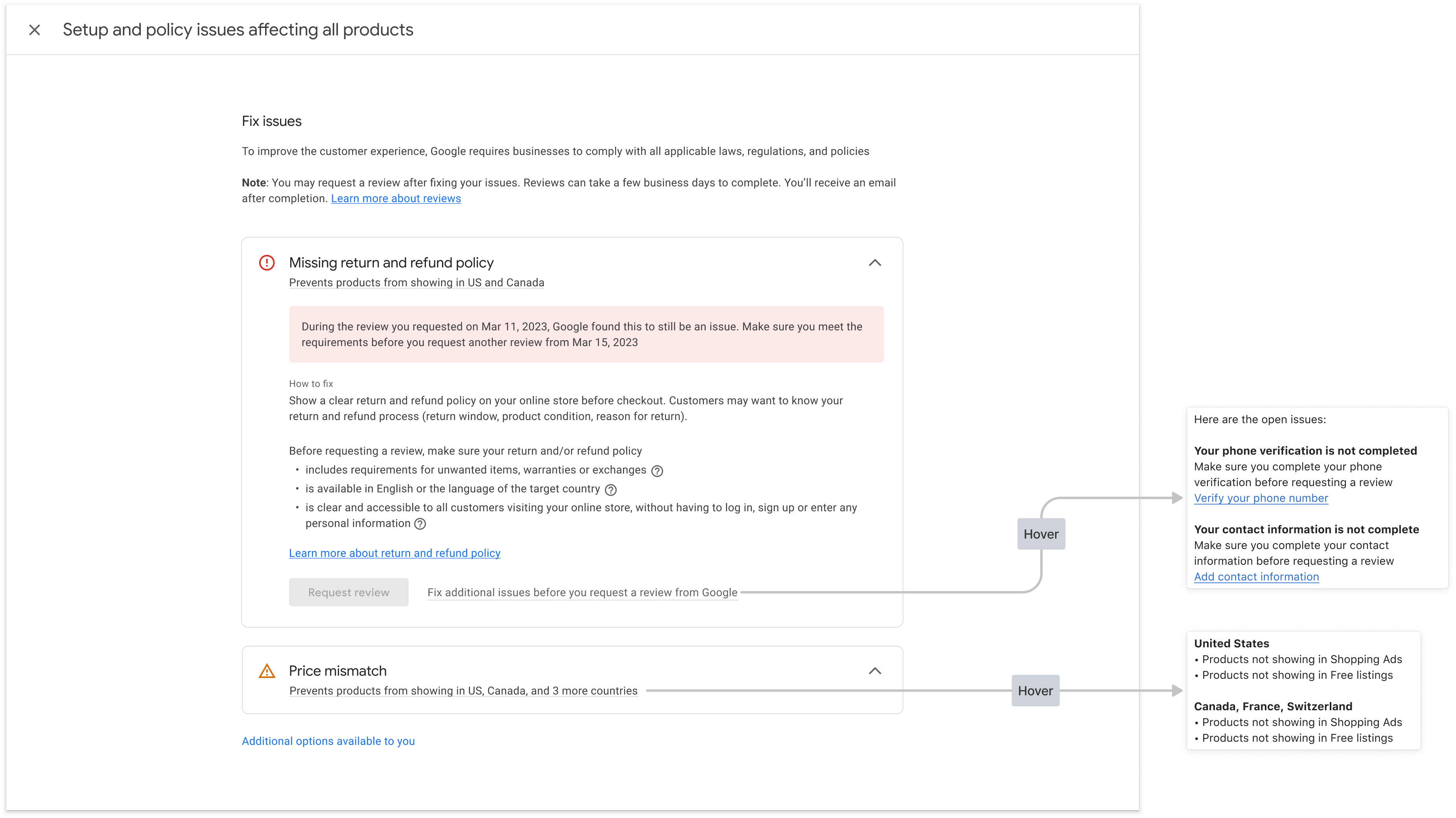
นี่คือตัวอย่างวิธีแสดงข้อมูลจากคำตอบ renderaccountissues ในหน้าการวินิจฉัยบัญชี ระบบจะแมปออบเจ็กต์ใน UI กับช่อง API ที่เกี่ยวข้องในภาพจำลอง คุณสามารถสร้างหน้าที่คล้ายกันสำหรับปัญหาเกี่ยวกับสินค้า
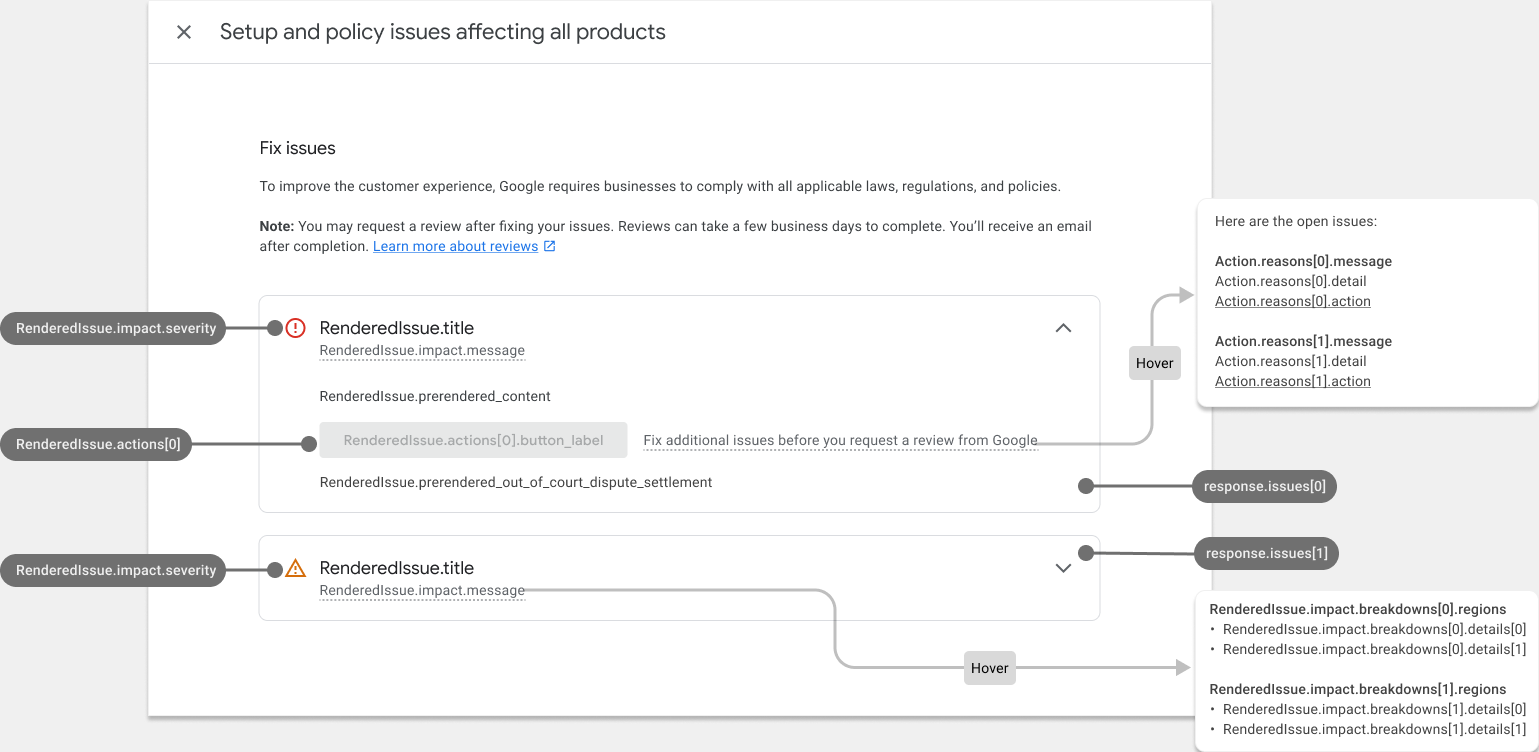
หน้าการวินิจฉัยบัญชีที่ป้อนข้อมูลแล้วจะมีลักษณะดังนี้
จัดรูปแบบ HTML ที่แสดงผลล่วงหน้า
คำตอบจากการเรียกใช้บริการแก้ปัญหาจะมีช่อง prerendered_content ซึ่งเป็นรายละเอียดของแต่ละปัญหาใน HTML คุณสามารถฝังเนื้อหา HTML นี้ลงใน UI ได้โดยตรงเพื่อแสดงปัญหาในรูปแบบที่อ่านง่าย
คุณอาจเห็นองค์ประกอบ HTML ที่มีคลาส new-element ระบบจะใช้คลาส new-element กับองค์ประกอบที่เพิ่มลงใน HTML หลังจากที่คุณผสานรวมกับบริการ IssueResolution เราขอแนะนำให้ซ่อนองค์ประกอบที่มีคลาส new-element เพื่อให้คุณจัดรูปแบบองค์ประกอบเหล่านี้ได้ก่อนที่จะแสดงต่อผู้ใช้ในแอป
ตัวอย่างค่าช่อง prerendered_content
<div class="issue-detail">
  <div class="callout-banners">
    <div class="callout-banner callout-banner-info"><p><span class="segment">Review requested on Aug 9, 2023. It can take a few days to complete.</span>
    </p></div>
  </div>
  <div class="issue-content"><p class="content-element"><span class="segment">There was a problem identified with the sale of prohibited adult products on your online store. In the case that you are intentionally selling adult items, enable Adult content in Settings in your Merchant Center. In your product file, use the </span><span
      class="segment segment-attribute">adult</span><span class="segment"> attribute for specific products.</span>
  </p>
    <p class="content-element root-causes-intro"><span class="segment">Make sure the products meet the policy requirements</span>
    </p>
    <ul class="content-element root-causes">
      <li><p class="tooltip tooltip-style-info"><span class="segment">Adult oriented content may be prohibited or restricted depending on the product sold and the country it is sold</span><span
          class="tooltip-icon"><br></span><span class="tooltip-text"><span class="segment">See a full list of countries in the HelpCenter</span></span>
      </p></li>
      <li><p class="tooltip tooltip-style-info"><span class="segment">Don't list sexually explicit content that is intended to arouse or includes content such as text, image, audio, or video of graphic sexual acts intended to arouse</span><span
          class="tooltip-icon"><br></span><span class="tooltip-text"><span class="segment">Examples: Graphic depictions of sexual acts in progress, including hardcore pornography, any type of genital, anal, or oral sexual activity; graphic depictions of masturbation or genital arousal and language explicitly referencing arousal, masturbation, cartoon porn, or hentai</span></span>
      </p></li>
    </ul>
    <a href="https://support.google.com/merchants/answer/6150138?hl=en-US#wycd-restricted-adult-content"
       class="content-element">Learn more about the Adult-oriented content policy</a></div>
</div>
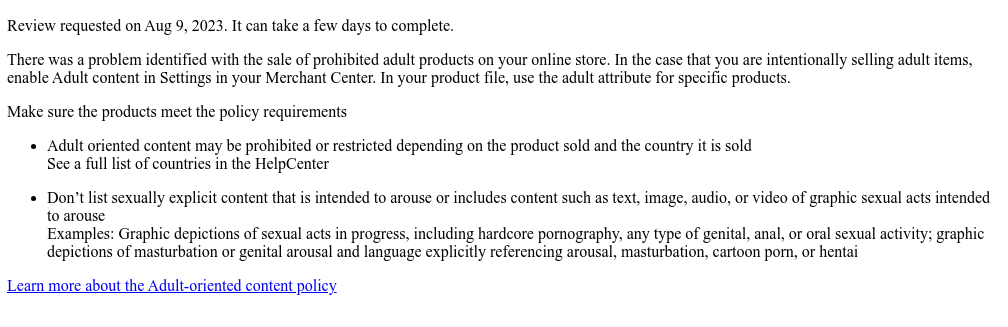
ลักษณะที่ปรากฏหากคุณฝัง HTML prerendered_content ก่อนหน้าในแอปโดยไม่มีการจัดรูปแบบ
คุณสามารถใช้คลาส CSS หลายคลาสเพื่อปรับวิธีแสดงเนื้อหาใน UI นี่คือตัวอย่าง CSS ที่คุณใช้ได้
issue-detail {
  text-align: left;
  width: 700px;
  border-radius: 8px;
  background: white;
  margin: 16px;
  padding: 16px;
}

.content-element {
  margin: 8px 0 8px 0;
  display: block;
}

/* callout banners */
.callout-banners {
  margin: 0 0 16px 0;
}

.callout-banner {
  display: block;
  padding: 16px 16px 6px 16px;
  margin: 0 0 8px 0;
  border-radius: 8px;
}

.callout-banner-info {
  background: #e8f0fe;
}

.callout-banner-warning {
  background: #fef7e0;
}

.callout-banner-error {
  background: #fce8e6;
}

/* add an icon to the callout banner */
.callout-banner p {
  background-repeat: no-repeat;
  padding-left: 32px;
}

.callout-banner-error p {
  background-image: url("https://fonts.gstatic.com/s/i/short-term/release/googlesymbols/error/default/20px.svg");
}

.callout-banner-warning p {
  background-image: url("https://fonts.gstatic.com/s/i/short-term/release/googlesymbols/warning/default/20px.svg");
}

.callout-banner-info p {
  background-image: url("https://fonts.gstatic.com/s/i/short-term/release/googlesymbols/search/default/20px.svg");
}

/* segments with style */
.segment-attribute {
  color: #198639;
  font-family: monospace, monospace;
}

.segment-bold {
  font-weight: bold;
}

.segment-italic {
  font-style: italic;
}

/* tooltip */
.tooltip {
  position: relative;
}

.tooltip-style-info .tooltip-icon:before {
  content: '(i)';
  font-style: normal;
  font-weight: normal;
  text-decoration: inherit;
  margin-left: 5px;
}

.tooltip-style-question .tooltip-icon:before {
  content: '(?)';
  font-style: normal;
  font-weight: normal;
  text-decoration: inherit;
  margin-left: 5px;
}

.tooltip .tooltip-text {
  visibility: hidden;
  text-align: left;
  background: white;
  border-radius: 8px;
  padding: 5px 0;
  border: 1px solid;
  padding: 10px;
  box-shadow: 3px 7px 12px #c1c1c1;
  position: absolute;
  z-index: 1;
}

.tooltip:hover .tooltip-text {
  visibility: visible;
}

/* table */
table.content-element {
  margin: 16px 0 16px 0;
  border: 1px solid #ccc;
  border-collapse: collapse;
  margin: 1em 0;
}

table.content-element th {
  background-color: #eee;
}

table.content-element th, table td {
  border: 1px solid #ddd;
  font-size: 0.9em;
  padding: 0.3em 1em;
}

/* hidde elements added in future, until they are supported in your application */
.new-element {
  visibility: hidden;
}
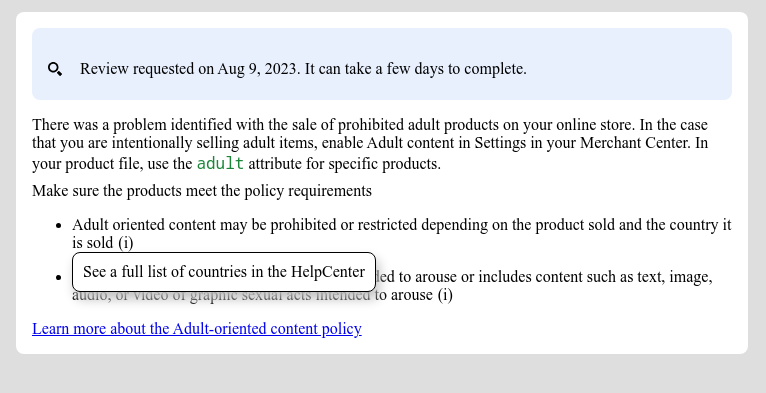
ลักษณะที่ปรากฏของเนื้อหาที่แสดงผลหากคุณใช้ CSS ก่อนหน้า
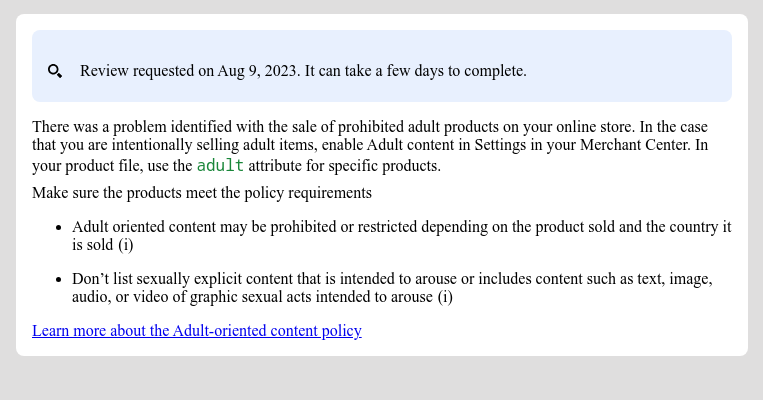
นอกจากนี้ คุณยังกำหนดค่าและแสดงคำแนะนำเครื่องมือด้วย CSS ได้ด้วย
ใช้การดำเนินการในตัวที่ต้องใช้ข้อมูลจากผู้ใช้
การดำเนินการในตัวที่ต้องใช้ข้อมูลจากผู้ใช้ช่วยให้คุณมอบความสามารถในการวินิจฉัยที่ซับซ้อนเป็นโซลูชันในแอปในแอปพลิเคชันของคุณได้ เราขอแนะนำให้ใช้การดำเนินการนี้เป็นกล่องโต้ตอบที่ธุรกิจสามารถระบุข้อมูล อ่านข้อมูลเพิ่มเติม และยืนยันคำขอได้
การดำเนินการแต่ละรายการจะมีโฟลว์การดำเนินการอย่างน้อย 1 รายการ การดำเนินการบางอย่างอาจมีโฟลว์มากกว่า 1 รายการ เช่น อาจมีโฟลว์ที่แตกต่างกันเมื่อธุรกิจขอรับการตรวจสอบเพิ่มเติมเนื่องจากไม่เห็นด้วยกับการตัดสินใจ และมีโฟลว์ที่แตกต่างกันเมื่อธุรกิจแก้ไขปัญหาแล้ว
หากต้องการขอข้อมูลเพื่อใช้การดำเนินการที่ซับซ้อนซึ่งต้องใช้ข้อมูลจากผู้ใช้ คุณต้องตั้งค่าช่อง user_input_action_option เป็นค่า BUILT_IN_USER_INPUT_ACTIONS
POST https://merchantapi.googleapis.com/issueresolution/v1/accounts/{ACCOUNT_ID}:renderaccountissues?timeZone=America/Los_Angeles&languageCode=en-GB
{
"user_input_action_option": "BUILT_IN_USER_INPUT_ACTIONS"
}
แทนที่ {ACCOUNT_ID} ด้วยตัวระบุที่ไม่ซ้ำของ บัญชีที่คุณต้องการทริกเกอร์การประมวลผลการดำเนินการ
การใช้งาน
เราขอแนะนำให้หน้าการวินิจฉัยที่ขอข้อมูลจากผู้ใช้มีโฟลว์ดังนี้
ผู้ใช้คลิกปุ่มการดำเนินการ
- หากมีโฟลว์หลายรายการ แอปจะเสนอโฟลว์ทั้งหมดเพื่อให้ผู้ใช้เลือกได้ตามความตั้งใจ
- ผู้ใช้เลือกโฟลว์
แอปจะแสดงชื่อ ข้อความ คำอธิบายประกอบ และแบบฟอร์มข้อมูลจากผู้ใช้สำหรับโฟลว์การดำเนินการที่เลือก เราขอแนะนำให้คุณแสดงรายละเอียดเหล่านี้ในกล่องโต้ตอบ
- คำอธิบายประกอบ (หากมี) จะมีข้อมูลสำคัญที่มุ่งช่วยให้ผู้ใช้เข้าใจวิธีทำงานของการดำเนินการและสิ่งที่ต้องทำเพื่อให้ประสบความสำเร็จได้ดียิ่งขึ้น เราขอแนะนำให้ไฮไลต์ข้อความนี้และจัดรูปแบบตามความรุนแรงของคำอธิบายประกอบ
- หากมีช่องป้อนข้อมูลในโฟลว์ คุณต้องแสดงช่องเหล่านั้นเพื่อให้ผู้ใช้ระบุค่าได้ หากช่องป้อนข้อมูลมีเครื่องหมายว่าต้องระบุ แอปไม่ควรอนุญาตให้ธุรกิจส่งคำขอก่อนที่จะ ระบุค่า
ผู้ใช้อ่านข้อมูลและระบุค่าที่ขอ
ผู้ใช้ยืนยันคำขอโดยคลิกปุ่ม
แอปจะทริกเกอร์การประมวลผลการดำเนินการโดยเรียกใช้บริการแก้ปัญหา ตัวอย่างคำขอ
POST https://merchantapi.googleapis.com/issueresolution/v1/accounts/{ACCOUNT_ID}:triggeraction

{
  actionContext: "ActionContextValue=",
  actionInput: { actionFlowId: "flow1",
  inputValues: [
  { input_field_id: "input1", checkbox_input_value: { value: true } }
  ]
}
แทนที่ {ACCOUNT_ID} ด้วยตัวระบุที่ไม่ซ้ำของ บัญชีที่คุณต้องการทริกเกอร์การประมวลผลการดำเนินการ
แอปจะแสดงข้อความยืนยันที่ส่งคืนจากบริการ
IssueResolution- หากบริการส่งคืนข้อผิดพลาดในการตรวจสอบที่มีสถานะ
INVALID_ARGUMENTข้อผิดพลาดนั้นจะมีข้อมูลโดยละเอียดและข้อความแสดงข้อผิดพลาดที่แปลเป็นภาษาท้องถิ่นซึ่งควรแสดงต่อธุรกิจ เราขอแนะนำให้แสดงข้อผิดพลาดดังกล่าวไว้ใกล้กับช่องป้อนข้อมูลที่ได้รับผลกระทบ ตัวอย่างคำตอบ
{ "error": { "code": 400, "message": "[actionInput.inputValues] Invalid user input", "status": "INVALID_ARGUMENT", "details": [ { "@type": "type.googleapis.com/google.rpc.ErrorInfo", "reason": "invalid", "domain": "global" }, { "@type": "type.googleapis.com/google.rpc.BadRequest", "fieldViolations": [ { "field": "actionInput.inputValues.input", "description": "The field is required" } ] } ] } }- หากบริการส่งคืนสถานะที่ไม่ถูกต้องหรือข้อผิดพลาดภายใน ซึ่งระบุโดยสถานะ
FAILED_PRECONDITIONและINTERNALแอปควรแจ้งให้ธุรกิจโหลดหน้าอีกครั้งหรือลองอีกครั้งในภายหลัง
- หากบริการส่งคืนข้อผิดพลาดในการตรวจสอบที่มีสถานะ