

Page Summary
-
Route Optimization API leverages Google Maps data and custom parameters to generate efficient routes for fleets, considering factors like time, cost, and vehicle capacity.
-
Businesses like logistics companies, on-demand delivery services, and field service providers can use the API to automate dispatch, optimize delivery routes, and improve overall operational efficiency.
-
The API offers synchronous and asynchronous options for route calculation and provides detailed route plans with assigned tasks, vehicle routes, and performance metrics.
-
Users can define objectives such as travel efficiency, on-time arrival, and load balancing, along with constraints like driver work hours and vehicle capacity for tailored optimization.
-
To begin, set up a Google Cloud project, construct a basic request, and explore advanced scenarios to create customized route optimization solutions.
Route Optimization is a Google Maps Platform API that generates optimized route plans for single or multiple vehicles and their stops.
Why use the Route Optimization API
Improve the operational efficiency of your transportation fleet with the help of route plans. Adjust your routes for cost, time constraints, customer needs, and any other business objective. For example:
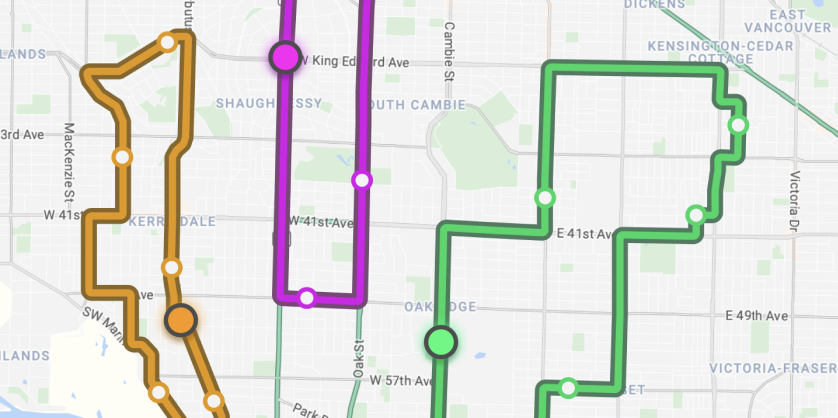
- A logistics company can save time and resources by scheduling next-day shipments while optimizing the deliveries for time efficiency, cost saving, on-time delivery, and driver and end customer satisfaction.
- An on-demand food delivery company can make their dispatch process quicker and more effective by choosing the best active driver to pick up new orders and inserting them in their existing routes.
- A field service provider can improve their efficiency and customer satisfaction by assigning providers to appointments and finding the optimal stop sequence for more than one appointment, all while re-optimizing routes when challenges come up.
What you can do with the Route Optimization API
Use Route Optimization API to optimize your fleet's routes and tasks assignments based on your own objectives and constraints.
- Objectives: Your business goals.
- Constraints: The limitations of your physical assets.
| Objectives | Constraints | ||
|---|---|---|---|
| Travel efficiency | Optimize basic travel routes using parameters like distance and time-to-destination. | Drivers work hours | Assign routes to drivers based on their work hours and breaks. |
| On-time arrival | Prioritize a pickup, delivery, or service to arrive before a specific time. | Vehicle capacity | Assign a vehicle to a task based on the amount of load it can carry. |
| Vehicle use cost | Minimize the number of vehicles required to perform a task. | Time windows | Have a shipment or task arrive in a specific time slot. |
| Load balancing | Fairly distribute tasks across a fleet of vehicles and personnel. | Dependencies and compatibility | Optimize your fleet routes based on your types of vehicle, task sequence, or shipment conditions. |
How the Route Optimization API works
The Route Optimization API can be accessed using REST, gRPC, and client libraries, and it calculates the most efficient routes for your fleet.
Your request can be as simple as routing a single vehicle with a few drop-offs, or as complex as detailing your entire company's workflow. The request defines your unique routing model, which can include details such as:
- Shipments: The tasks that need to be completed, including pickup and delivery locations, service durations, and load sizes.
- Vehicles: The fleet available to complete the tasks, including travel modes, start and end locations, and carrying capacities.
- Time constraints: Precise time windows for shipments, as well as driver shift times and required breaks.
- Cost parameters: Factors that influence the optimization, such as cost per kilometer, cost per hour, and penalties for missed deliveries.
The service then returns an optimized route plan that respects every constraint and objective you set. The response contains the calculated routes and includes details such as:
- Visit sequences: The exact order of pickups and deliveries for each vehicle.
- Assigned shipments: Which vehicle is responsible for which task.
- Estimated times: Arrival and departure times for each visit, factoring in travel time and service duration.
- Route metrics: The total cost, total travel distance, and total time for the individual routes and the overall plan.
For more information about constructing a request and interpreting a response, see Make your first request and Interpret the response.
Resources
The API offers four endpoints to handle different request sizes and solve times. To learn how to pick the right one, see Choose an endpoint.
| Endpoint | Description and data returned | Return format |
|---|---|---|
OptimizeTours |
A blocking endpoint for single requests with short solve times. Returns an optimized route directly in the response. | JSON or gRPC proto |
OptimizeToursLongRunning |
A non-blocking endpoint for single requests with long solve times. Returns a Long-Running Operation (LRO) ID. | JSON or gRPC proto |
OptimizeToursUri |
A non-blocking endpoint for single, large requests (> 8MB). Reads from and writes directly to Google Cloud Storage. Returns a Long-Running Operation (LRO) ID. | JSON or gRPC proto |
BatchOptimizeTours |
A non-blocking endpoint to process multiple independent requests simultaneously using Google Cloud Storage. Returns a Long-Running Operation (LRO) ID. | JSON or gRPC proto |
How to use the Route Optimization API
| 1 | Get set up | Start with Set up your Google Cloud project and complete the setup instructions that follow. |
| 2 | Run a basic request and receive a response | After setup, start with sending a basic request and get the response, following Construct a Request and Interpret the Response. |
| 3 | Try a more advanced scenario and start creating your own request | Explore example scenarios starting with Pickup and Delivery Stop Order Optimization and start building requests that match your use cases. |
Available client libraries
For a list of the available client libraries for Route Optimization API, see Client Libraries.
What's next
- Start using the Route Optimization API: Go to Run a Basic Request.
- Understand billing: Usage and Billing
- See sample code and libraries: Client Libraries and Open Source.
- Follow best practices: Best Practices Using Route Optimization API Web Services