

مكوّن "علامات الأماكن"
يتيح لك مكوّن "علامات الأماكن" إنشاء تعليقات توضيحية مخصّصة على الخريطة تعرض معلومات أساسية عن الأماكن مباشرةً على الخريطة. يمكنك عرض محتوى مثل تقييم مكان أو نوعه أو حالة فتحه أو إغلاقه أو النطاق السعري أو نص مخصّص (على سبيل المثال، تصنيف من إنشاء الذكاء الاصطناعي أو رقم خط سير الرحلة). يوفّر ذلك للمستخدمين تجربة استكشاف أكثر إفادةً على الخريطة بدون الحاجة إلى النقر على بطاقة مكان مفصّلة.
توفّر في حزمة تطوير البرامج بالاستناد إلى بيانات خرائط Google للتطبيقات المتوافقة مع Android.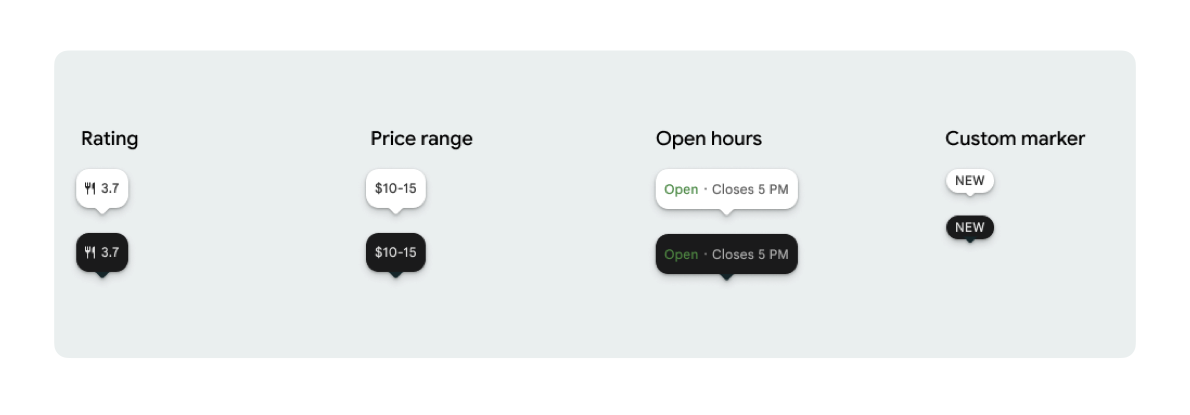
يمكنك عرض رمز علامة واحد ونص علامة اختياري لكل PlaceMarker.
في ما يلي الرموز المتاحة:
-
Type: تمثّل هذه السمة نوع المكان. -
None: لا يوجد رمز.
-
Rating: نتيجة التقييم. PriceRange: نطاق السعر (على سبيل المثال، 10-20 دولار أمريكي)-
OpenStatus: ما إذا كان النشاط التجاري مفتوحًا أو مغلقًا -
Custom: نص مخصّص (على سبيل المثال، "رائج").
يمكنك الإشارة إلى المكان باستخدام رقم تعريف المكان (PlaceId) أو اسم المرجع (ResourceName) أو الإحداثيات الجغرافية (Coordinates).
متطلبات العرض وتحديد المصدر
عند عرض محدّدات الخريطة في حزمة أدوات "خرائط Google" الجاهزة للأماكن، يجب ألا تظهر محدّدات الخريطة بشكل منفصل. يجب أن تكون تفاعلية وتفتح "مكوّن تفاصيل المكان" أو "صندوق الإضاءة" المرتبط عند النقر أو اللمس لتوفير العلامة التجارية المطلوبة من Google، وتحديد مصدر المحتوى، وعرض مسارات "الإبلاغ عن مشكلة".
اطّلِع على متطلبات تحديد مصدر الصور والمراجعات في الحالات التي تكون فيها المساحة محدودة.
أمثلة على علامات المواقع الجغرافية
نوفّر وظائف @Composable Jetpack Compose لإزالة الحمل الزائد لبرنامج تضمين View-to-Compose وتجنُّب مشاكل عدم تطابق السمات.
عمليات التخصيص الأساسية للعلامات
يوضّح مثال الرمز التالي عمليات التخصيص الأساسية لعلامة تحديد الموقع، بما في ذلك إخفاء طرف فقاعة تفسيرية كلامية المثلثة للعلامة التلقائية.
Kotlin
import androidx.compose.runtime.Composable
import com.google.android.libraries.places.compose.PlaceMarker
import com.google.android.libraries.places.compose.marker.MarkerIcon
import com.google.android.libraries.places.compose.marker.MarkerText
import com.google.android.libraries.places.compose.PlaceReference

@Composable
fun DefaultMarker() {
    PlaceMarker(
        reference = PlaceReference.PlaceId("PLACE_ID"),
        icon = MarkerIcon.None,
        beakPresence = false, // remove beak
    )
}

@Composable
fun RatingMarker() {
    PlaceMarker(
        reference = PlaceReference.PlaceId("PLACE_ID"),
        icon = MarkerIcon.None,
        text = MarkerText.Rating
    )
}

@Composable
fun TypeAndRatingMarker() {
    PlaceMarker(
        reference = PlaceReference.PlaceId("PLACE_ID"),
        icon = MarkerIcon.Type,
        text = MarkerText.Rating

    )
}

@Composable
fun PriceRangeMarker() {
    PlaceMarker(
        reference = PlaceReference.ResourceName("places/PLACE_RESOURCE_NAME"),
        icon = MarkerIcon.None,
        text = MarkerText.PriceRange
    )
}

@Composable
fun OpenStatusMarker() {
   PlaceMarker(
       reference = PlaceReference.Coordinates(latitude = 37.7749, longitude = -122.4194),
        icon = MarkerIcon.None,
        text = MarkerText.OpenStatus
   )
}

@Composable
fun CustomTextMarker() {
    PlaceMarker(
        reference = PlaceReference.PlaceId("PLACE_ID"),
        icon = MarkerIcon.None,
        // Custom text accepts a String to display a number (e.g. "3") or text (e.g. "NEW")
        text = MarkerText.Custom("NEW")
    )
}
إنشاء متتبِّع نقرات
يمكنك تقديم onClick ردّ اتصال لتفعيل إجراءات مخصّصة عند النقر على علامة مستقلة. ومع ذلك، عند عرض العلامة على خريطة (على سبيل المثال، داخل MarkerComposable)، يتم اعتراض أحداث النقر من خلال الخريطة. في هذه الحالة، يجب استخدام معالج onClick الخاص بـ MarkerComposable بدلاً من معالج العلامة.
يوضّح مثال الرمز البرمجي التالي كيفية استخدام معالج onClick الخاص بالدالة MarkerComposable.
Kotlin
import android.util.Log
import androidx.compose.runtime.Composable
import com.google.android.libraries.places.compose.PlaceMarker
import com.google.android.libraries.places.compose.marker.MarkerIcon
import com.google.android.libraries.places.compose.PlaceReference


/**
 * PlaceMarker used outside of a map (e.g. in a list, bottom sheet, or custom overlay).
 *
 * There is no host component that provides a default click behavior here, so PlaceMarker's own
 * `onClick` is the only way for a developer to react to a tap. This is why `onClick` must stay
 * on the PlaceMarker API.
 */
@Composable
fun ClickableMarkerWithCustomConfig() {
   PlaceMarker(
       reference = PlaceReference.PlaceId("PLACE_ID"),
       icon = MarkerIcon.Type,

       onClick = { place ->
           openPlaceCard(place.id) // developer might want to open the place card
           Log.i("PlacesMarker", "Marker was tapped by user!")
       }
   )
}

/**
 * PlaceMarker used as the content of a MarkerComposable on a GoogleMap.
 *
 * MarkerComposable does NOT add PlaceMarker to the touch-input hierarchy: it snapshots the
 * composable into a bitmap and hands that bitmap to the Maps renderer as the marker icon. The
 * rendered marker is a map object, not a Compose node, so:
 *
 *   - PlaceMarker's own `onClick` would never be invoked here (no touch events ever reach it).
 *   - The tap is delivered by the Maps SDK to MarkerComposable's `onClick`, which is the only
 *     click entry point on a map.
 *
 * Accordingly, the state-based `PlaceMarker(state = ...)` overload used below deliberately does
 * not expose an `onClick` parameter, so the correct handler is the only one available.
 */
@Composable
fun PlaceMarkerOnMap(markerState: PlaceMarkerState) {
  GoogleMap(
    modifier = Modifier.fillMaxSize(),
    cameraPositionState = rememberCameraPositionState(),
  ) {
    markerState.location?.let { position ->
      MarkerComposable(
        state = rememberUpdatedMarkerState(position = position),
        // this is the click handler for the map use case.
        onClick = {
          markerState.place?.let { place -> openPlaceCard(place.id) }
          true // consume the event
        },
      ) {
        PlaceMarker(state = markerState)
      }
    }
  }
}
التعامل مع حالة التحميل وعمليات معاودة الاتصال
يوضّح مثال الرمز البرمجي التالي كيفية تقديم دوال ردّ الاتصال للتعامل مع أخطاء عرض البيانات أو البيانات غير المتوفّرة.
Kotlin
import android.util.Log
import androidx.compose.runtime.Composable
import com.google.android.libraries.places.compose.PlaceMarker
import com.google.android.libraries.places.compose.marker.MarkerIcon
import com.google.android.libraries.places.compose.PlaceReference

@Composable
fun StatusHandlingMarker() {
    PlaceMarker(
        reference = PlaceReference.PlaceId("PLACE_ID"),
        icon = MarkerIcon.Type,
        // Triggered when attribute data is successfully fetched and the marker is rendered.
        // Returns a minimal Place object with ID, location (LatLng), and viewport fields set.
        onMarkerLoaded = { place ->
            Log.i("PlacesMarker", "Marker successfully loaded for place ID: ${place.id}")
        },
        // Triggered when data fetching fails or required attribute data is missing for the place.
        // Returns an optional Place object and an Exception describing the root cause.
        onMarkerLoadFailed = { place, exception ->
            Log.e("PlacesMarker", "Failed to load marker for place ID: ${place?.id}", exception)
        }
    )
}
استخدام PlaceMarkerState لوضع علامات على الخريطة
يتم عرض عنصر المكان مع الموقع الجغرافي ونافذة العرض لمساعدتك في تحديد موضع العلامة.
Kotlin
// Step 1: Obtain configured handle in a single 1-line call (PlaceMarker mounted internally)
val markerState = rememberPlaceMarkerState(
  reference = PlaceReference.PlaceId(placeId),
  icon = MarkerIcon.Type
)

// Step 2: Pass PlaceMarkerState.location and PlaceMarker(state = PlaceMarkerState) directly to the map marker
GoogleMap(...) {
  markerState.location?.let { position ->
    MarkerComposable(
      state = rememberMarkerState(position = position),
      onClick = {
        markerState.place?.let { place ->
          // Handle marker click
        }
        true
      }
    ) {
      PlaceMarker(state = markerState) // Render marker UI content directly on map canvas
    }
  }
}
تغيير حجم علامة المقياس إلى حجم مخصّص
Kotlin
// Off the map: scale with a one-line modifier.
// Modifier.scale is a draw-time transform, so the bubble, beak, icon and text all scale together.
@Composable
fun ScaledMarker() {
  PlaceMarker(
    reference = PlaceReference.PlaceId(placeId),
    icon = MarkerIcon.Type,
    text = MarkerText.Rating,
    modifier = Modifier.scale(2.1f),
  )
}

// On the map: scale by overriding LocalDensity.
// MarkerComposable snapshots its content into a marker bitmap sized to the measured layout bounds.
// Modifier.scale does not change those bounds, so the marker would be clipped and blurry. Scaling
// the density re-measures every dp and sp inside the marker, so the bitmap, the layout bounds and
// the map hit target all grow with it.
@Composable
fun ScaledMarkerOnMap(markerState: PlaceMarkerState) {
  val density = LocalDensity.current
  val scaledDensity = remember(density) {
    Density(density = density.density * 2.1f, fontScale = density.fontScale * 2.1f)
  }
  GoogleMap(...) {
    markerState.location?.let { position ->
      MarkerComposable(
        state = rememberUpdatedMarkerState(position = position),
        anchor = Offset(0.5f, 1.0f),
      ) {
        CompositionLocalProvider(LocalDensity provides scaledDensity) {
          PlaceMarker(state = markerState)
        }
      }
    }
  }
}