
Place Markers component
The Place Markers component lets you create customizable map annotations that display key Place information directly on the map. You can display content such as a place's rating, place type, open or closed status, price range, or custom text (for instance, an AI-generated label or itinerary number). This provides your users with a more informative map exploration experience without requiring them to tap into a detailed place card.
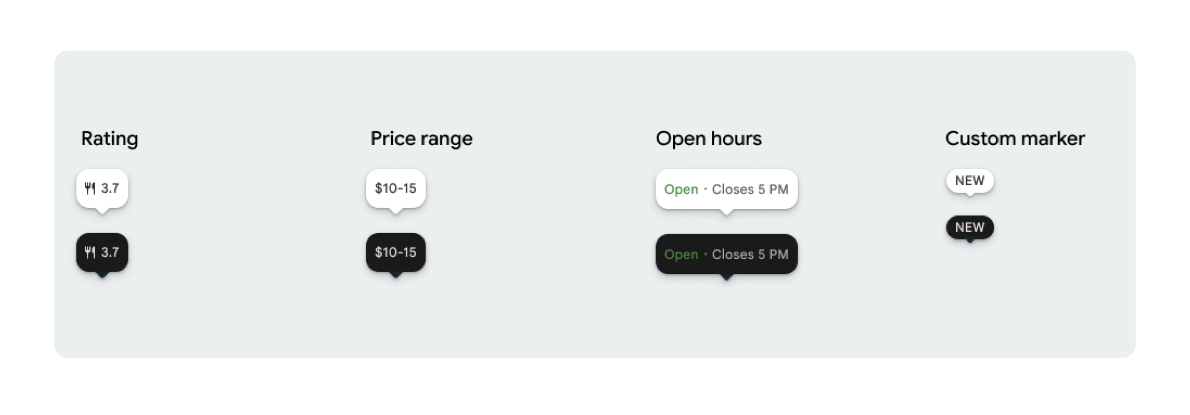
You can display one marker icon and optional marker text per PlaceMarker.
The available icons are:
Type: The type of place.None: No icon.
Rating: Rating score.PriceRange: Price range (for example, $10-20).OpenStatus: Whether a business is open or closed.Custom: Custom text (for example, "POPULAR").
Reference the place using a Place ID (PlaceId), Resource name (ResourceName), or geographic coordinates (Coordinates).
Display and attribution requirements
When Places UI Kit map markers are displayed, markers must not appear in isolation. They must be interactive and open an associated Place Details Component or Lightbox upon click or tap to provide required Google branding, contributor attribution, and Report a Problem flows.
See our photos and reviews attribution requirements for scenarios where space is limited.
Place Marker examples
We provide Jetpack Compose @Composable functions to eliminate View-to-Compose wrapper overhead and avoid theme mismatch issues.
Basic marker customizations
The following code example demonstrates basic place marker customizations, including hiding the triangular speech bubble beak for the default marker.
Kotlin
import androidx.compose.runtime.Composable
import com.google.android.libraries.places.compose.PlaceMarker
import com.google.android.libraries.places.compose.marker.MarkerIcon
import com.google.android.libraries.places.compose.marker.MarkerText
import com.google.android.libraries.places.compose.PlaceReference

@Composable
fun DefaultMarker() {
    PlaceMarker(
        reference = PlaceReference.PlaceId("PLACE_ID"),
        icon = MarkerIcon.None,
        beakPresence = false, // remove beak
    )
}

@Composable
fun RatingMarker() {
    PlaceMarker(
        reference = PlaceReference.PlaceId("PLACE_ID"),
        icon = MarkerIcon.None,
        text = MarkerText.Rating
    )
}

@Composable
fun TypeAndRatingMarker() {
    PlaceMarker(
        reference = PlaceReference.PlaceId("PLACE_ID"),
        icon = MarkerIcon.Type,
        text = MarkerText.Rating

    )
}

@Composable
fun PriceRangeMarker() {
    PlaceMarker(
        reference = PlaceReference.ResourceName("places/PLACE_RESOURCE_NAME"),
        icon = MarkerIcon.None,
        text = MarkerText.PriceRange
    )
}

@Composable
fun OpenStatusMarker() {
   PlaceMarker(
       reference = PlaceReference.Coordinates(latitude = 37.7749, longitude = -122.4194),
        icon = MarkerIcon.None,
        text = MarkerText.OpenStatus
   )
}

@Composable
fun CustomTextMarker() {
    PlaceMarker(
        reference = PlaceReference.PlaceId("PLACE_ID"),
        icon = MarkerIcon.None,
        // Custom text accepts a String to display a number (e.g. "3") or text (e.g. "NEW")
        text = MarkerText.Custom("NEW")
    )
}
Create a click listener
You can provide an onClick callback to trigger custom actions when a standalone marker is tapped. However, when the marker is rendered on a map (for instance, inside a MarkerComposable), tap events are intercepted by the map. In this case, you must use the MarkerComposable's onClick handler instead of the marker's.
The following code example shows how to use MarkerComposable's onClick handler.
Kotlin
import android.util.Log
import androidx.compose.runtime.Composable
import com.google.android.libraries.places.compose.PlaceMarker
import com.google.android.libraries.places.compose.marker.MarkerIcon
import com.google.android.libraries.places.compose.PlaceReference


/**
 * PlaceMarker used outside of a map (e.g. in a list, bottom sheet, or custom overlay).
 *
 * There is no host component that provides a default click behavior here, so PlaceMarker's own
 * `onClick` is the only way for a developer to react to a tap. This is why `onClick` must stay
 * on the PlaceMarker API.
 */
@Composable
fun ClickableMarkerWithCustomConfig() {
   PlaceMarker(
       reference = PlaceReference.PlaceId("PLACE_ID"),
       icon = MarkerIcon.Type,

       onClick = { place ->
           openPlaceCard(place.id) // developer might want to open the place card
           Log.i("PlacesMarker", "Marker was tapped by user!")
       }
   )
}

/**
 * PlaceMarker used as the content of a MarkerComposable on a GoogleMap.
 *
 * MarkerComposable does NOT add PlaceMarker to the touch-input hierarchy: it snapshots the
 * composable into a bitmap and hands that bitmap to the Maps renderer as the marker icon. The
 * rendered marker is a map object, not a Compose node, so:
 *
 *   - PlaceMarker's own `onClick` would never be invoked here (no touch events ever reach it).
 *   - The tap is delivered by the Maps SDK to MarkerComposable's `onClick`, which is the only
 *     click entry point on a map.
 *
 * Accordingly, the state-based `PlaceMarker(state = ...)` overload used below deliberately does
 * not expose an `onClick` parameter, so the correct handler is the only one available.
 */
@Composable
fun PlaceMarkerOnMap(markerState: PlaceMarkerState) {
  GoogleMap(
    modifier = Modifier.fillMaxSize(),
    cameraPositionState = rememberCameraPositionState(),
  ) {
    markerState.location?.let { position ->
      MarkerComposable(
        state = rememberUpdatedMarkerState(position = position),
        // this is the click handler for the map use case.
        onClick = {
          markerState.place?.let { place -> openPlaceCard(place.id) }
          true // consume the event
        },
      ) {
        PlaceMarker(state = markerState)
      }
    }
  }
}
Handle load status and callbacks
The following code example demonstrates how to provide callbacks to handle rendering or missing data errors.
Kotlin
import android.util.Log
import androidx.compose.runtime.Composable
import com.google.android.libraries.places.compose.PlaceMarker
import com.google.android.libraries.places.compose.marker.MarkerIcon
import com.google.android.libraries.places.compose.PlaceReference

@Composable
fun StatusHandlingMarker() {
    PlaceMarker(
        reference = PlaceReference.PlaceId("PLACE_ID"),
        icon = MarkerIcon.Type,
        // Triggered when attribute data is successfully fetched and the marker is rendered.
        // Returns a minimal Place object with ID, location (LatLng), and viewport fields set.
        onMarkerLoaded = { place ->
            Log.i("PlacesMarker", "Marker successfully loaded for place ID: ${place.id}")
        },
        // Triggered when data fetching fails or required attribute data is missing for the place.
        // Returns an optional Place object and an Exception describing the root cause.
        onMarkerLoadFailed = { place, exception ->
            Log.e("PlacesMarker", "Failed to load marker for place ID: ${place?.id}", exception)
        }
    )
}
Use PlaceMarkerState to put markers on map
The Place object is returned with location and viewport to help you decide where to put the marker.
Kotlin
// Step 1: Obtain configured handle in a single 1-line call (PlaceMarker mounted internally)
val markerState = rememberPlaceMarkerState(
  reference = PlaceReference.PlaceId(placeId),
  icon = MarkerIcon.Type
)

// Step 2: Pass PlaceMarkerState.location and PlaceMarker(state = PlaceMarkerState) directly to the map marker
GoogleMap(...) {
  markerState.location?.let { position ->
    MarkerComposable(
      state = rememberMarkerState(position = position),
      onClick = {
        markerState.place?.let { place ->
          // Handle marker click
        }
        true
      }
    ) {
      PlaceMarker(state = markerState) // Render marker UI content directly on map canvas
    }
  }
}
Scale marker to a custom size
Kotlin
// Off the map: scale with a one-line modifier.
// Modifier.scale is a draw-time transform, so the bubble, beak, icon and text all scale together.
@Composable
fun ScaledMarker() {
  PlaceMarker(
    reference = PlaceReference.PlaceId(placeId),
    icon = MarkerIcon.Type,
    text = MarkerText.Rating,
    modifier = Modifier.scale(2.1f),
  )
}

// On the map: scale by overriding LocalDensity.
// MarkerComposable snapshots its content into a marker bitmap sized to the measured layout bounds.
// Modifier.scale does not change those bounds, so the marker would be clipped and blurry. Scaling
// the density re-measures every dp and sp inside the marker, so the bitmap, the layout bounds and
// the map hit target all grow with it.
@Composable
fun ScaledMarkerOnMap(markerState: PlaceMarkerState) {
  val density = LocalDensity.current
  val scaledDensity = remember(density) {
    Density(density = density.density * 2.1f, fontScale = density.fontScale * 2.1f)
  }
  GoogleMap(...) {
    markerState.location?.let { position ->
      MarkerComposable(
        state = rememberUpdatedMarkerState(position = position),
        anchor = Offset(0.5f, 1.0f),
      ) {
        CompositionLocalProvider(LocalDensity provides scaledDensity) {
          PlaceMarker(state = markerState)
        }
      }
    }
  }
}