
The Navigation SDK for Android offers enhanced ways to specify waypoints, or
navigation points, providing more accurate routing and a better arrival
experience, especially for destinations with multiple entrances or specific
navigation points. You can route to precise locations using a
navigationPointToken, which is a string that encodes a location and additional
route context. You can also combine latitude and longitude coordinates with a
Place ID for added context.
Background
Prior to v7.4, you could define a Waypoint using either latitude and longitude
coordinates or a Place ID. While sometimes effective, routing
solely to a latitude and longitude can sometimes lead to suboptimal drop-off or
pick-up points, particularly for large venues, parks, or buildings with multiple
entrances. The result might snap to the nearest road segment, which may not be
the most convenient or correct navigation point.
The enhanced waypoint options address this by allowing more context to be provided.
Use a navigation point token
For the most precise routing to specific navigation points like entrances,
loading docks, or designated pick-up areas, you can use a
navigationPointToken. This token is obtained by calling the destinations
method of the Geocoding
API. It represents a
specific, routable navigation point associated with a place.
To specify a Navigation Point token:
- Obtain a
navigationPointTokenfrom the Destinations method of the Geocoding API response. - Create a
Waypointusing thesetNavigationPointToken()method in the builder.
Note: When using setNavigationPointToken(), you cannot simultaneously use
setLatLng() or setPlaceIdString(). These methods are mutually exclusive with
setNavigationPointToken().
// Assuming 'navPointToken' is a String obtained from the destinations method of the Geocoding API
// Assuming 'destinationName' is a String title for the waypoint

Waypoint waypointWithToken = Waypoint.builder()
    .setTitle(destinationName)
    .setNavigationPointToken(navPointToken)
    .build();

// Use this waypoint in navigator.setDestinations()
Use navigation point tokens and route tokens
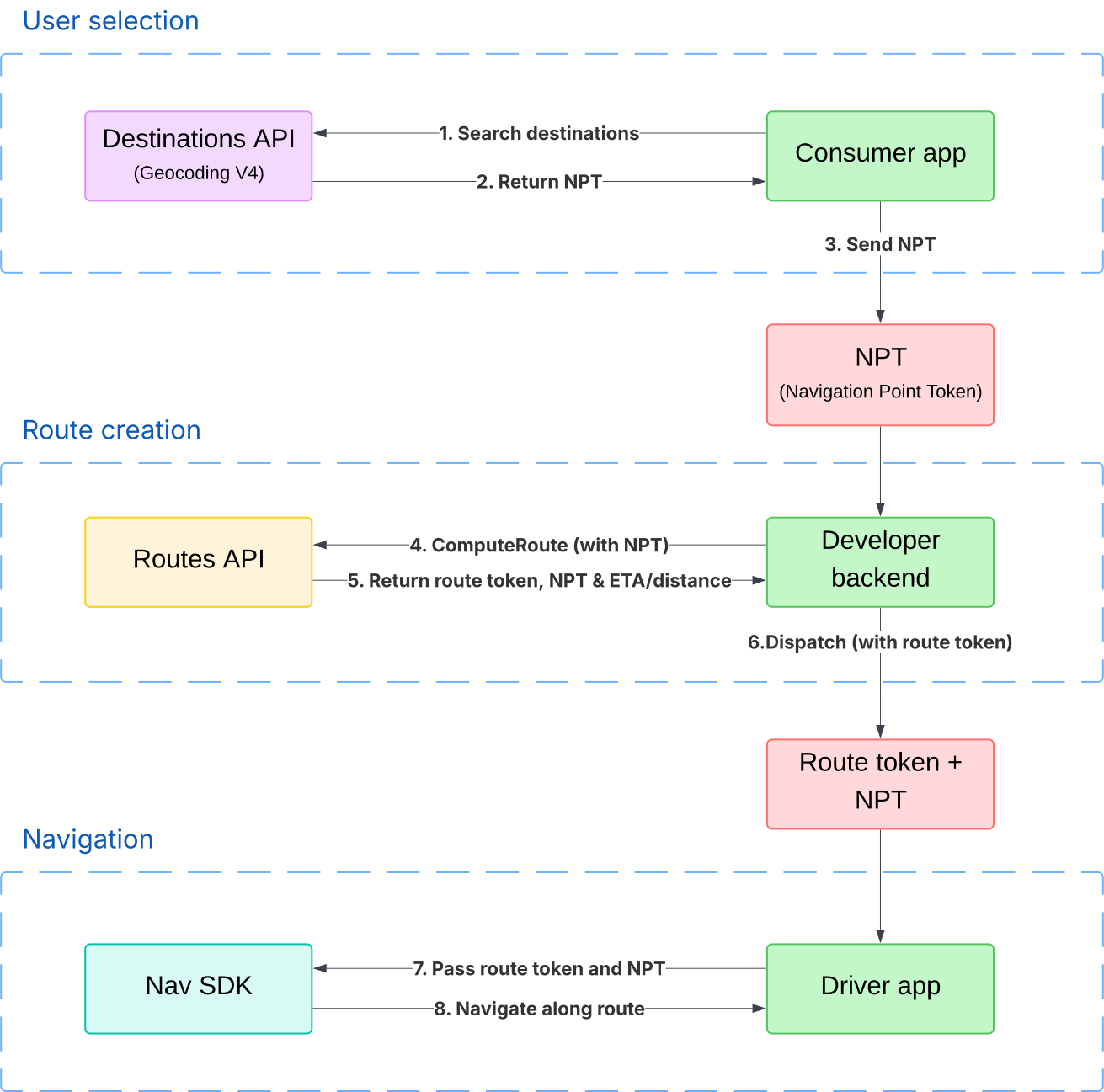
You can retrieve a navigation point token through the Geocoding API, retrieve a route token from the Routes API, and then pass both the navigation point token and the route token to the Navigation SDK. This is useful in scenarios like rideshare or delivery, where you use the Routes API to calculate a trip price and you want the precision of a navigation point token.
The route token biases the route chosen by the Navigation SDK toward the route that was used for pricing. This reduces the risk of longer or shorter routes being used for the trip, which can create "price shocks."
See the Routes API documentation for more information about specifying a location using a navigation point token and creating a route token. See "Plan a route" to learn how to plan a route using a route token.
This diagram shows how a rideshare or delivery app would use navigation point tokens and route tokens together:
Combine Place ID and latitude and longitude
Starting with v7.4, you can provide both a Place ID and latitude and longitude
coordinates when creating a Waypoint. This method is useful when you want to
specify a precise point (the lat/lng) while still providing the context of the
overall place (the Place ID). This allows the Navigation SDK to provide a richer
arrival experience by highlighting the destination building or showing nearby
points of interest related to the Place ID.
// Assuming 'placeId' is the Place ID String
// Assuming 'lat' and 'lng' are the double values for latitude and longitude
// Assuming 'destinationName' is a String title for the waypoint

Waypoint waypointWithPlaceIdAndLatLng = Waypoint.builder()
    .setTitle(destinationName)
    .setPlaceIdString(placeId)
    .setLatLng(lat, lng)
    .build();

// Use this waypoint in navigator.setDestinations()
Considerations
When you provide both placeId and latlng:
- The route primarily targets the specified
latlng. - The
placeIdis used as context to enhance the arrival experience. - Fallback: If the SDK determines that the provided
placeIdcorresponds to a feature that is too far from the givenlatlng, theplaceIdwill be ignored. In this scenario, routing will proceed to thelatlngonly, and the place-specific arrival experience enhancements won't be available.
Summary of valid waypoint configurations
| Method | setLatLng() |
setPlaceIdString() |
setNavigationPointToken() |
Routing behavior | Destination highlighting |
|---|---|---|---|---|---|
| Latitude/longitude coordinates only | set | absent | absent | Routes to road segment nearest to the defined coordinates | Shown if destination can be inferred with high confidence |
| Place ID only | absent | set | absent | Routes to the default navigation point for the Place ID | From Place ID |
| Navigation point token only | absent | absent | set | Routes to the precise navigation point represented by the token | From destination defined in original destinations method of the Geocoding API request |
| Latitude/longitude coordinates and Place ID combined | set | set | absent | Routes to road segment nearest to the defined coordinates | From Place ID, though not shown if Place ID is too far from the latitude/longitude coordinates |