

В этом руководстве показано, как использовать Google Mobile Ads SDK (Legacy) для загрузки и отображения рекламы из Unity Ads с помощью медиации , рассматриваются вопросы назначения ставок и интеграции каскадной модели. В нем описывается, как добавить Unity Ads в конфигурацию медиации рекламного блока, а также как интегрировать SDK и адаптер Unity Ads в приложение Android.
Поддерживаемые интеграции и форматы рекламы
Адаптер медиации для Unity Ads обладает следующими возможностями:
| Интеграция | |
|---|---|
| Торги | |
| Водопад | 1 |
| Форматы | |
| Баннер | |
| Интерстициальный | |
| Награжден | |
| Родной | |
Предварительные требования
Прежде чем продолжить, проверьте следующее:
- Android API уровня 24 или более поздней версии.
- [Для участия в торгах]: Чтобы интегрировать все поддерживаемые форматы рекламы в систему торгов, используйте адаптер Unity версии 4.16.0.1 или более поздней ( рекомендуется последняя версия ).
Последняя версия Google Mobile Ads SDK (Legacy) .
Шаг 1: Настройка параметров в пользовательском интерфейсе Unity Ads.
Зарегистрируйтесь или войдите в Unity Ads.
Создать проект
На панели управления Unity Ads перейдите в раздел «Проекты» и нажмите «Создать» .

Заполните форму и нажмите «Создать» , чтобы добавить свой проект.

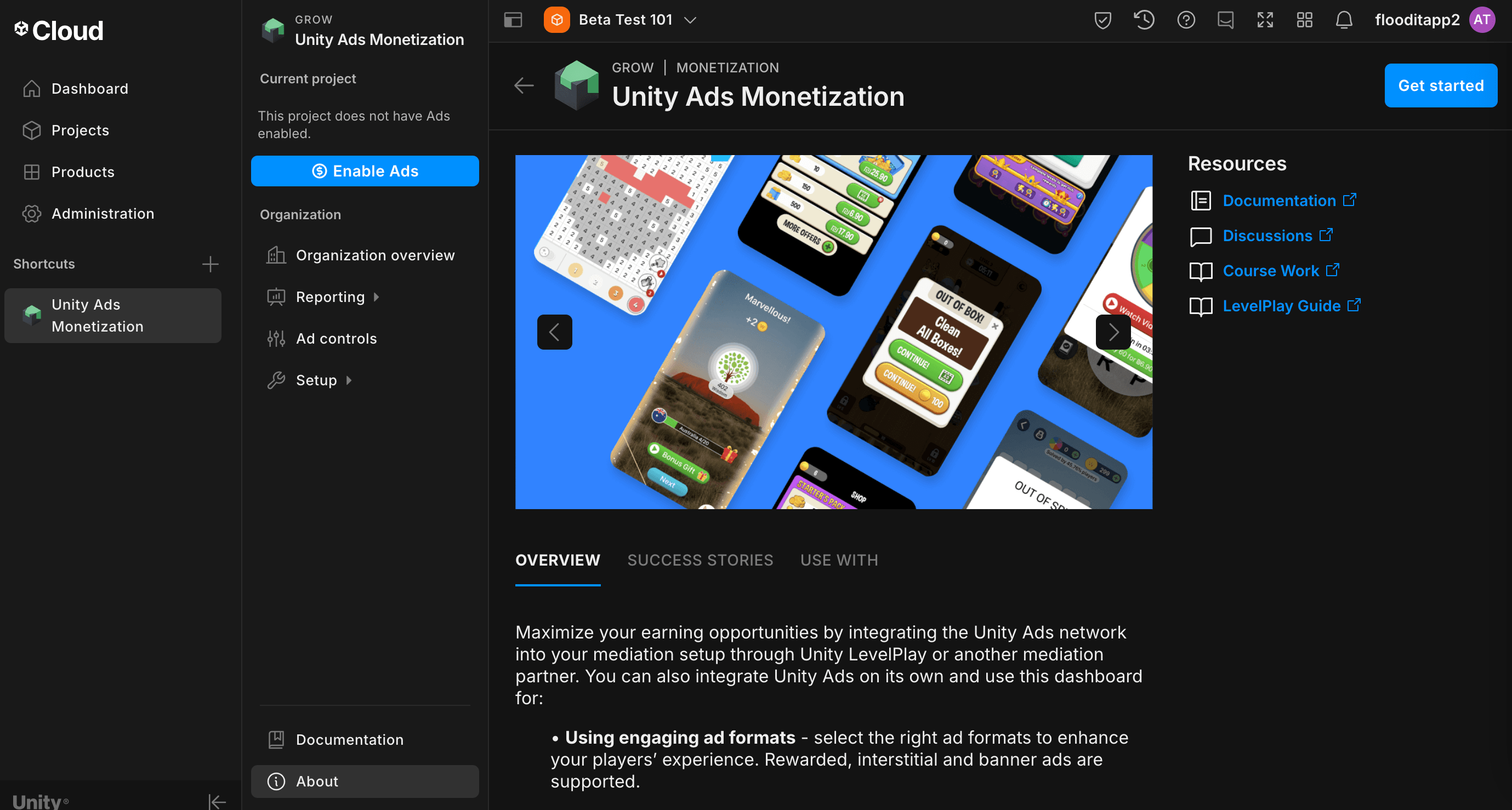
Перейдите в раздел «Монетизация Unity Ads» , затем нажмите « Начать» .
В окне «Новый проект» выберите «Я буду использовать Mediation и Google Admob в качестве партнера по Mediation» , затем нажмите «Далее» .

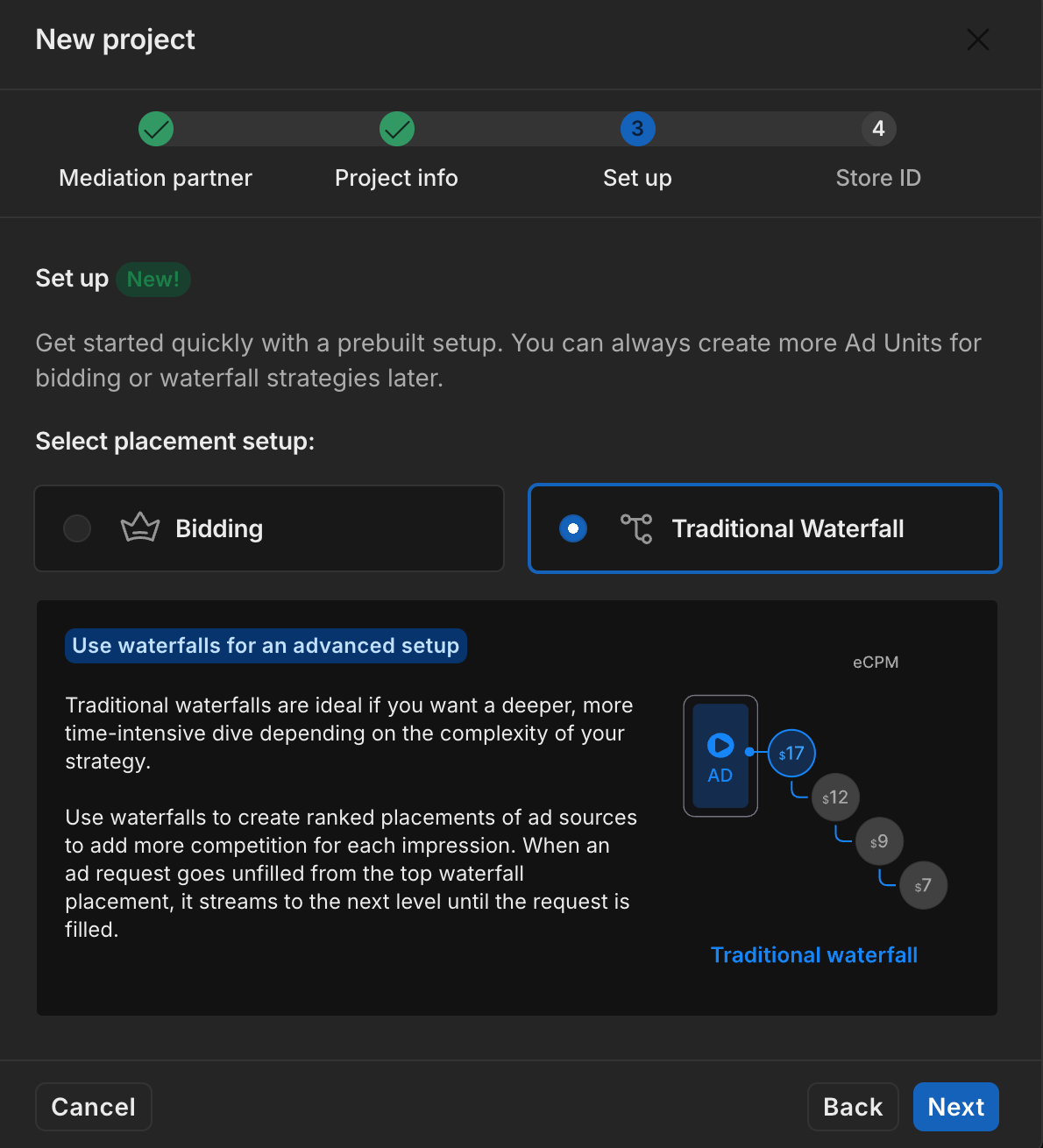
Выберите пункт «Настройки рекламы», затем нажмите «Далее» .

Выберите параметры размещения, затем нажмите «Далее» .
Торги

Водопад
Заполните форму, затем нажмите «Добавить проект» .

Запишите идентификатор игры .

Создавайте рекламные блоки и места размещения.
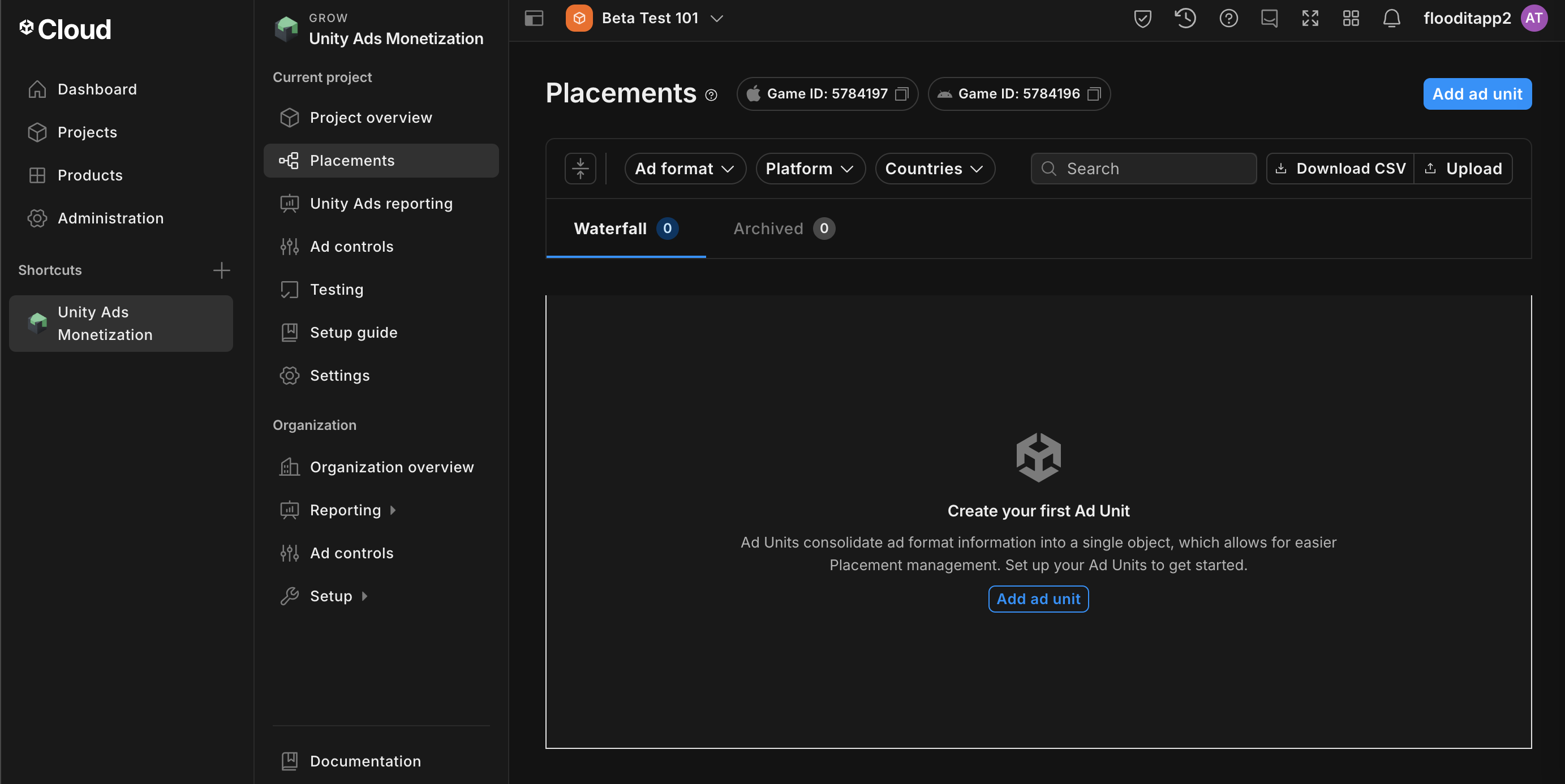
Перейдите в раздел «Монетизация Unity Ads» > «Размещения» , затем выберите свой проект и нажмите «Добавить рекламный блок» .
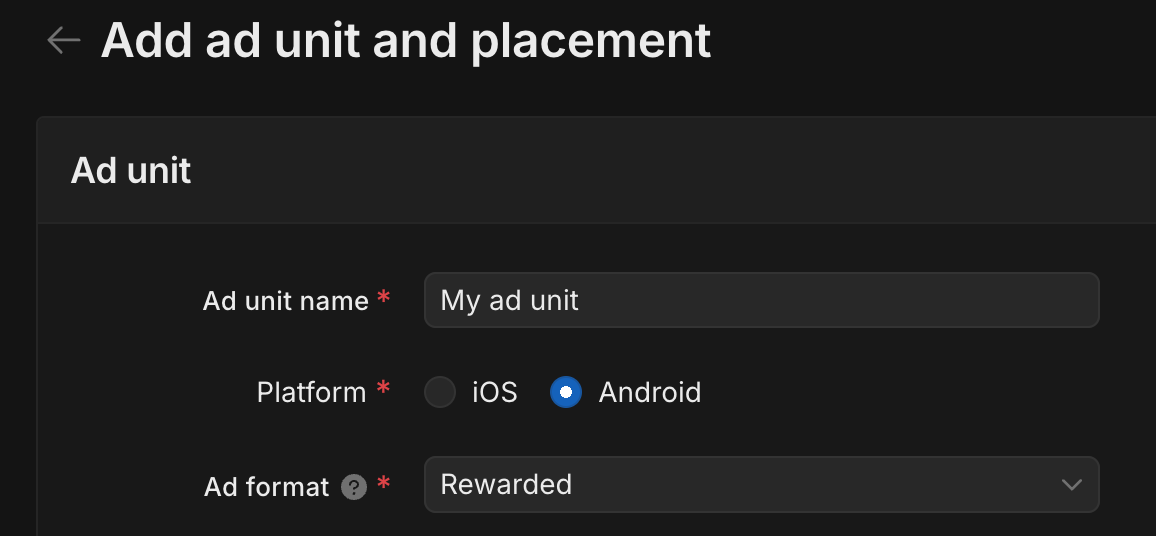
Введите название рекламного блока , затем выберите платформу и формат объявления .
Перейдите в раздел Монетизация > Размещение , затем нажмите Добавить рекламный блок .
Введите название рекламного блока , затем выберите платформу и формат объявления .
Для настройки выберите «Каскад» . В поле «Размещение» введите название размещения , геотеги и цель .

Запишите идентификатор места прохождения практики .
Наконец, нажмите «Добавить рекламный блок» , чтобы сохранить рекламный блок и место размещения.
Найдите ключ API для отчетов по рекламе в Unity.
Торги
Этот шаг не требуется для интеграции с системами торгов.
Водопад
Перейдите в раздел «Монетизация Unity Ads» > «Управление API» и запишите ключ API в поле «Доступ к API статистики монетизации» .
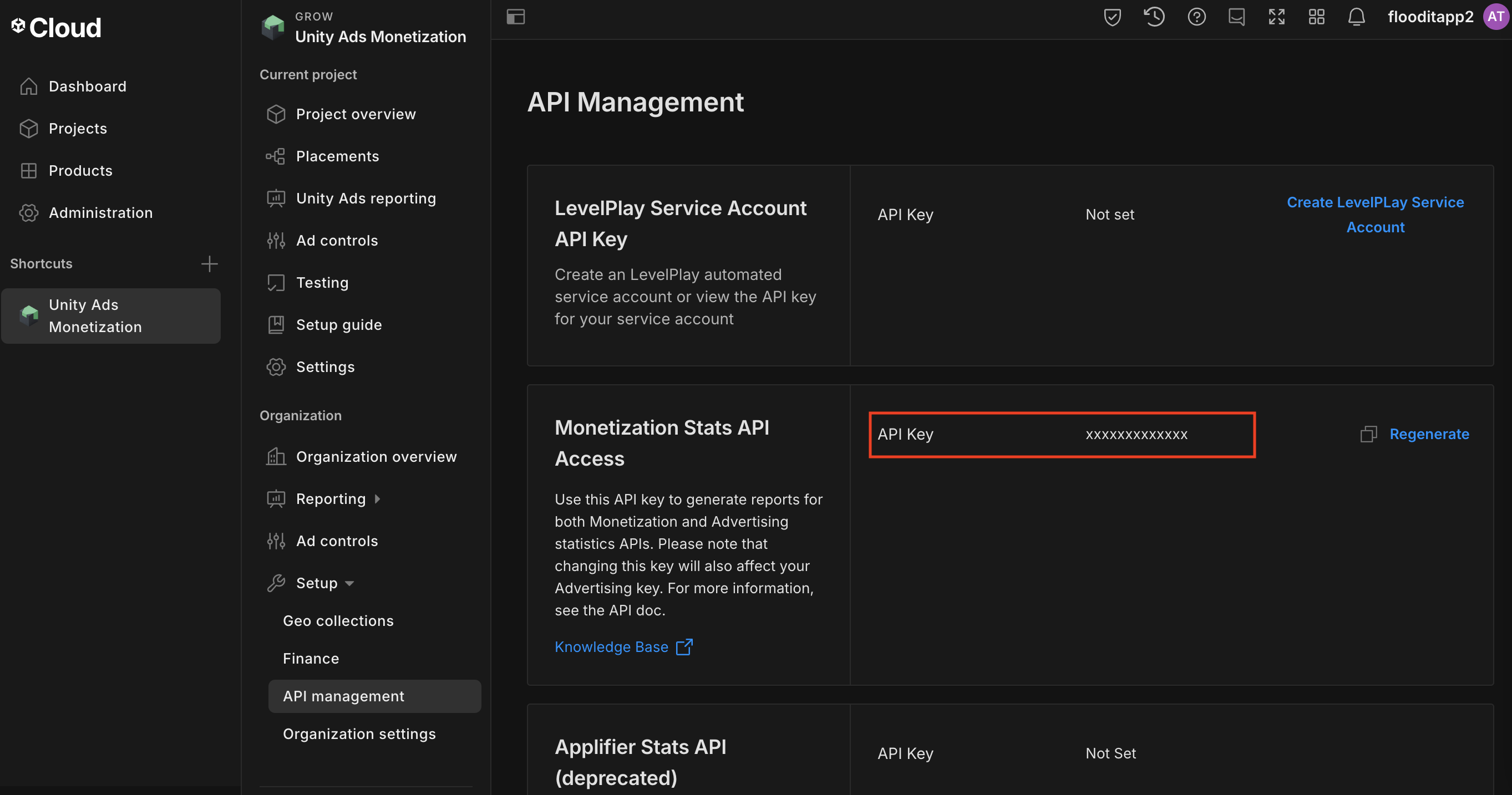
Затем перейдите в раздел «Монетизация Unity Ads» > «Настройки организации» и запишите идентификатор ядра организации .

Обновите файл app-ads.txt.
Файл app-ads.txt, созданный в рамках инициативы IAB Tech Lab для авторизованных продавцов приложений , помогает гарантировать, что рекламный инвентарь вашего приложения продается только через авторизованные вами каналы. Чтобы предотвратить значительные потери дохода от рекламы, вам потребуется внедрить файл app-ads.txt . Если вы еще этого не сделали, создайте файл app-ads.txt для Ad Manager .
Чтобы использовать файл app-ads.txt для Unity Ads, см. раздел «Первоначальная настройка файла app-ads.txt» .
Включите тестовый режим
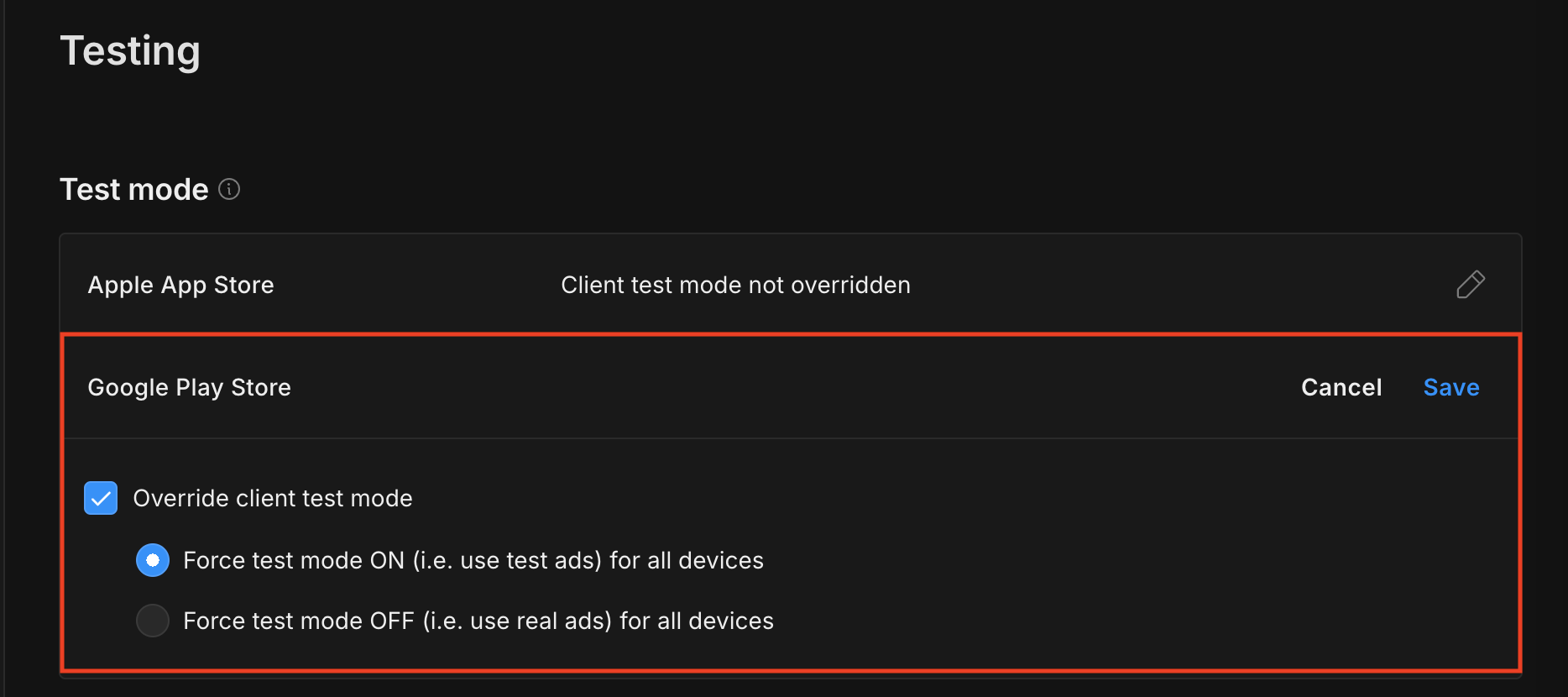
Тестовый режим можно включить на панели управления Unity Ads . Перейдите в раздел «Монетизация Unity Ads» > «Тестирование» .
Вы можете принудительно включить тестовый режим для своего приложения, нажав кнопку редактирования рядом с Google Play Store , включив параметр «Переопределить тестовый режим клиента» и выбрав «Принудительно включить тестовый режим (т.е. использовать тестовую рекламу) для всех устройств» .
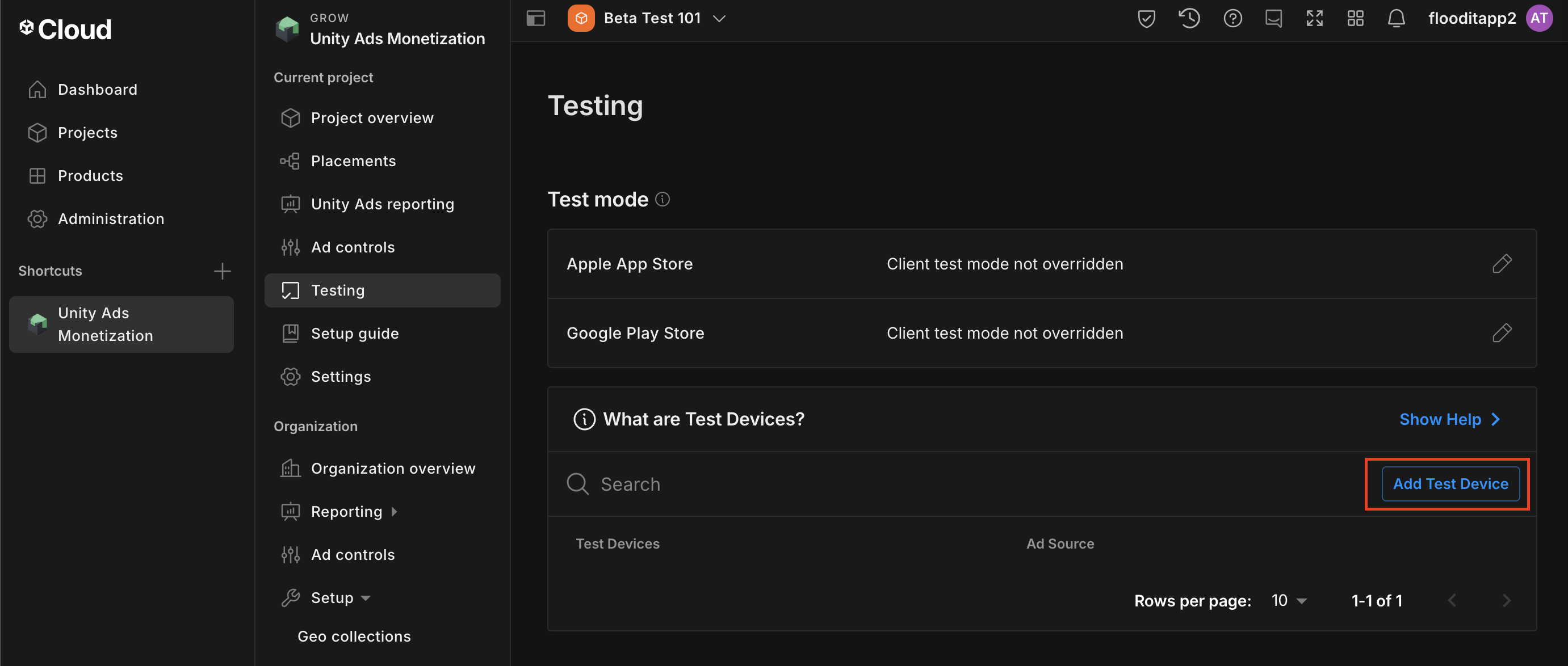
В качестве альтернативы вы можете включить тестовый режим для определенных устройств, нажав кнопку «Добавить тестовое устройство» .
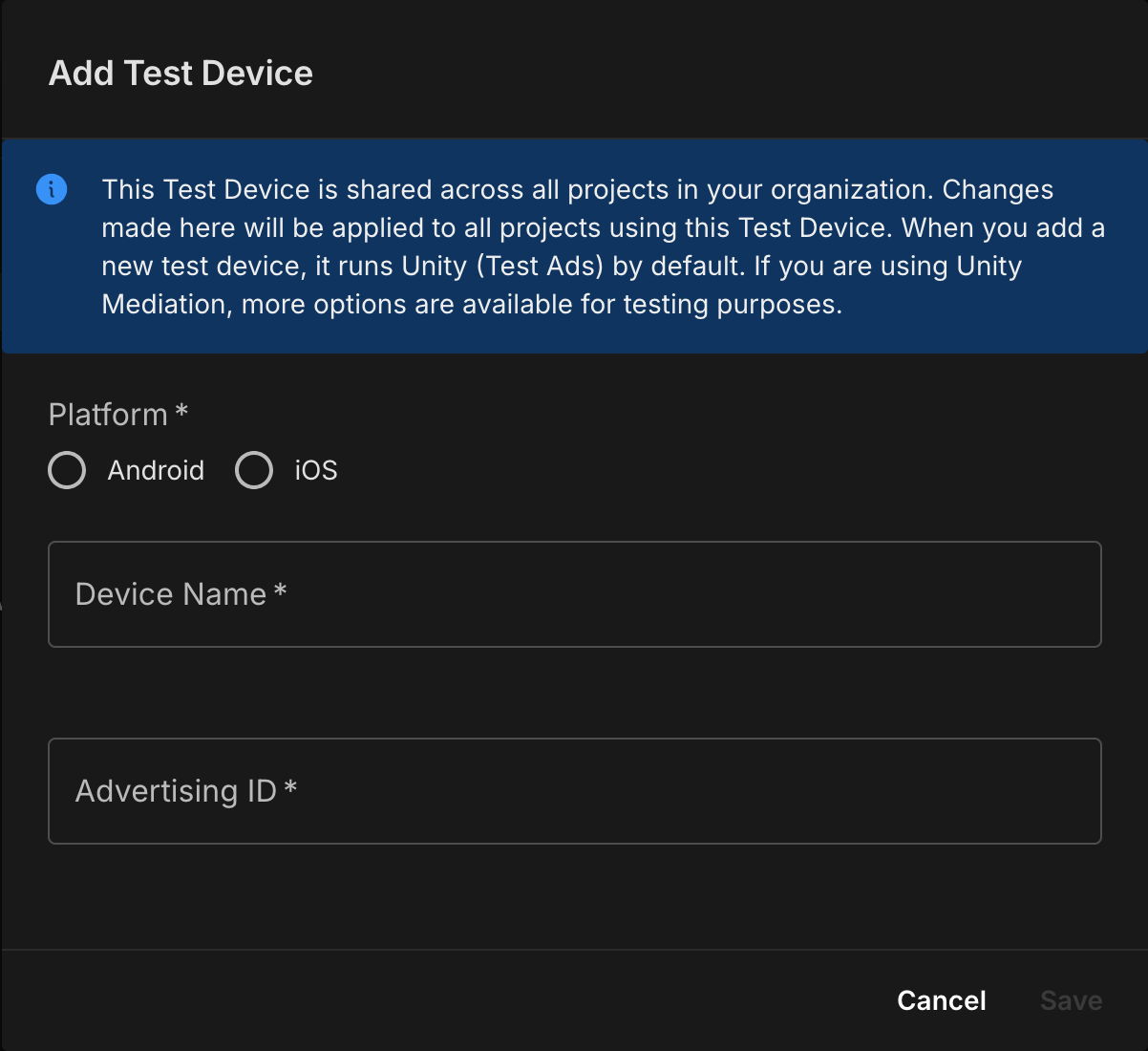
Введите данные вашего тестового устройства, затем нажмите «Сохранить» .
Шаг 2: Настройте запросы Unity Ads в пользовательском интерфейсе Ad Manager.
Войдите в свой аккаунт в Ad Manager .
Добавить рекламу Unity в компании
Торги
Этот шаг не требуется для интеграции с системами торгов.
Водопад
Перейдите в раздел Администрирование > Компании , затем нажмите кнопку «Новая компания» на вкладке «Все компании» . Выберите «Рекламная сеть» .

Выберите Unity Ads в качестве рекламной сети , введите уникальное имя и включите медиацию . Включите автоматический сбор данных и введите ключ API и основной идентификатор организации, полученные в предыдущем разделе.
Вводить имя пользователя или пароль не требуется. После завершения нажмите «Сохранить» .

Включить безопасный обмен сигналами
Торги
Перейдите в раздел Администрирование > Глобальные настройки . Перейдите на вкладку настроек учетной записи Ad Exchange , просмотрите и включите параметр «Безопасный обмен сигналами» . Нажмите «Сохранить» .

Водопад
Этот шаг не требуется для интеграций с каскадной моделью распределения.
Передайте защищенный сигнал в запросах на участие в торгах.
Торги
Перейдите в раздел «Инвентарь» > «Защищенные сигналы» . В разделе «Защищенные сигналы» найдите Unity Ads и включите «Включить интеграцию с приложением» .

Нажмите « Сохранить ».
Водопад
Этот шаг не требуется для интеграций с каскадной моделью распределения.
Обеспечьте безопасный обмен сигналами для торгов с использованием SDK.
Торги
Перейдите в раздел «Доставка» > «Настройки канала спроса» . На вкладке «Настройки по умолчанию» включите параметр «Разрешить безопасный обмен сигналами для торгов SDK» .

Нажмите « Сохранить ».
Водопад
Этот шаг не требуется для интеграций с каскадной моделью распределения.
Настройка ставок в Unity Ads
Торги
Перейдите в раздел «Доставка» > «Участники торгов» и нажмите « Перейти к торгам SDK» .

Нажмите «Новый участник торгов» .

Выберите Unity Ads в качестве участника торгов.

Нажмите «Продолжить» , чтобы включить функцию «SDK Bidding» для этого участника торгов.

Нажмите «Готово» .
Водопад
Этот шаг не требуется для интеграций с каскадной моделью распределения.
Настройка сопоставления рекламных блоков
Торги
Перейдите в раздел «Доставка» > «Участники торгов» и нажмите « Перейти к торгам SDK» .
Выберите компанию для размещения рекламы в Unity.
Перейдите на вкладку «Сопоставление рекламных блоков» и нажмите «Создать новое сопоставление рекламных блоков» .

Выберите «Конкретный рекламный блок» . Выберите рекламный блок и формат, тип инвентаря — «Мобильное приложение» , и ваше мобильное приложение . Затем введите идентификатор игры и идентификатор размещения, полученные в предыдущем разделе.
Наконец, нажмите «Сохранить» .

Водопад
Перейдите в раздел «Доставка» > «Группы доходности» и нажмите кнопку «Создать новую группу доходности» . Выберите свой склад и приложение .

Прокрутите страницу до раздела «Партнеры Yield» и нажмите «Добавить партнера по посредничеству» .

Выберите компанию, которую вы создали для Unity Ads в предыдущем разделе. В качестве типа интеграции выберите «Посредничество Mobile SDK» , в качестве платформы — «Android» , а в качестве статуса — «Активный» .
Введите идентификатор игры и идентификатор размещения, полученные в предыдущем разделе, а также значение CPM по умолчанию . Нажмите « Сохранить» .

Добавить Unity Ads в список рекламных партнеров, соответствующих требованиям GDPR и законодательства штатов США.
Чтобы добавить Unity Ads в список рекламных партнеров, соответствующих европейским и американским государственным нормативным требованиям, в пользовательском интерфейсе Ad Manager, выполните действия, описанные в настройках европейских и американских нормативных требований .
Шаг 3: Импортируйте SDK и адаптер Unity Ads.
Интеграция с Android Studio (рекомендуется)
В файл gradle на уровне приложения добавьте следующие зависимости реализации:
Котлин
dependencies {
    implementation("com.google.android.gms:play-services-ads:25.5.0")
    implementation("com.unity3d.ads:unity-ads:4.20.0")
    implementation("com.google.ads.mediation:unity:4.20.0.1")
}
Классный
dependencies {
    implementation 'com.google.android.gms:play-services-ads:25.5.0'
    implementation 'com.unity3d.ads:unity-ads:4.20.0'
    implementation 'com.google.ads.mediation:unity:4.20.0.1'
}
Ручная интеграция
Загрузите последнюю версию Unity Ads SDK (
unity-ads.aar) из их репозитория на GitHub и добавьте её в свой проект.Перейдите к артефактам адаптера Unity Ads в репозитории Maven Google. Выберите последнюю версию, загрузите файл
.aarадаптера Unity Ads и добавьте его в свой проект.
Шаг 4: Внедрите настройки конфиденциальности в Unity Ads SDK.
Согласие ЕС и GDPR
В соответствии с Политикой Google по согласию пользователей в ЕС , вы должны предоставлять пользователям в Европейской экономической зоне (ЕЭЗ), Великобритании и Швейцарии определенную информацию и получать их согласие на использование файлов cookie или других локальных хранилищ, если это требуется по закону, а также на сбор, передачу и использование персональных данных для персонализации рекламы. Данная политика отражает требования Директивы ЕС о защите конфиденциальности в электронных коммуникациях (ePrivacy Directive) и Общего регламента по защите данных (GDPR). Вы несете ответственность за проверку того, что согласие передано каждому источнику рекламы в вашей цепочке медиации.
Адаптер Unity Ads для Android версии 4.19.0.1 и более поздних версий поддерживает передачу сигналов согласия GDPR от платформ управления согласием, интегрированных с Transparency and Consent Framework (TCF) от IAB, в SDK Unity Ads. Для получения дополнительной информации см. раздел «Настройка конфигурации согласия TCF или без TCF» .
Законы штатов США о защите частной жизни
Законы США о защите конфиденциальности требуют предоставления пользователям права отказаться от «продажи» их «личной информации» (как это определено в законе), при этом отказ предлагается через заметную ссылку «Не продавать мою личную информацию» на главной странице «продающей» стороны. Руководство по соблюдению законов США о защите конфиденциальности предлагает возможность включения ограниченной обработки данных для показа рекламы Google, но Google не может применить эту настройку к каждой рекламной сети в вашей цепочке посредничества. Поэтому вы должны определить каждую рекламную сеть в вашей цепочке посредничества, которая может участвовать в продаже личной информации, и следовать указаниям каждой из этих сетей для обеспечения соответствия требованиям.
В версии SDK 2.0.0 в Unity Ads добавлен API для поддержки настроек конфиденциальности. Следующий пример кода показывает, как передать эту информацию о согласии в SDK Unity Ads. Если вы решите передавать информацию о согласии в SDK Unity Ads вручную, рекомендуется вызывать этот код перед запросом рекламы через Google Mobile Ads SDK (Legacy) .
Java
MetaData ccpaMetaData = new MetaData(this);
ccpaMetaData.set("privacy.consent", true);
ccpaMetaData.commit();
Котлин
val ccpaMetaData = MetaData(this)
ccpaMetaData["privacy.consent"] = true
ccpaMetaData.commit()
Более подробную информацию о соответствии Unity Ads Закону о защите персональных данных потребителей, а также о значениях, которые можно указать в каждом методе, см. в разделе «Соответствие Закону о защите персональных данных потребителей» .
лечение по возрасту
Адаптер медиации Unity Ads версии 4.16.6.0 и более поздних версий перенаправляет настройки, предназначенные для детей , и настройки для пользователей младше возраста согласия в Unity Ads.
Для обработки этих сигналов для каждого пользователя Unity Ads требует включения параметра « Смешанная аудитория» на панели управления монетизацией Unity. Дополнительную информацию о включении параметра «Смешанная аудитория» для вашего проекта см. в разделе «Настройка возрастных ограничений на уровне игры» .
Шаг 5: Добавьте необходимый код
Загрузить рекламу с контекстом активности
При загрузке баннерной, межстраничной и нативной рекламы передавайте контекст Activity . Без контекста активности загрузка рекламы завершится неудачей.
Шаг 6: Протестируйте свою реализацию.
Включить тестовые объявления
Убедитесь, что вы зарегистрировали свое тестовое устройство в Ad Manager и включили тестовый режим в пользовательском интерфейсе Unity Ads.
Проверить тестовые объявления
Чтобы убедиться, что вы получаете тестовые объявления от Unity Ads, включите тестирование одного источника объявлений в инспекторе объявлений, используя источники объявлений Unity Ads (Bidding) и Unity Ads (Waterfall ).
коды ошибок
Если адаптер не получает объявление от Unity Ads, издатели могут проверить основную причину ошибки в ответе на объявление, используя ResponseInfo.getAdapterResponses() из следующих классов:
com.google.ads.mediation.unity.UnityAdapter
com.google.ads.mediation.unity.UnityMediationAdapter
Вот коды и соответствующие сообщения, которые выдает адаптер UnityAds, когда реклама не загружается:
| Код ошибки | Причина |
|---|---|
| 0-10 | SDK UnityAds вернул ошибку. Подробности см. в коде . |
| 101 | Параметры сервера UnityAds, настроенные в пользовательском интерфейсе Ad Manager, отсутствуют/недействительны. |
| 102 | UnityAds вернул рекламное место с состоянием NO_FILL. |
| 103 | UnityAds вернул объявление с состоянием DISABLED. |
| 104 | UnityAds попытался показать рекламу с нулевым контекстом. |
| 105 | Контекст, используемый для инициализации, загрузки и/или показа рекламы в Unity Ads, не является экземпляром Activity. |
| 106 | UnityAds попытался показать рекламу, которая ещё не готова к показу. |
| 107 | UnityAds не поддерживается на этом устройстве. |
| 108 | В UnityAds можно загрузить только одно объявление на одном рекламном месте одновременно. |
| 109 | Программа UnityAds завершила работу с ошибкой. |
| 110 | Запрошенный размер объявления не соответствует размеру баннера, поддерживаемому UnityAds. |
| 111 | UnityAds вернул ошибку инициализации. |
| 112 | В Unity Ads был возвращен пустой или нулевой токен для размещения ставок. |
| 200-204 | Ошибка, специфичная для баннера UnityAds. Подробности см. в коде . |
Список изменений адаптера Unity Ads для Android Mediation
Версия 4.20.1.0 (в разработке)
Версия 4.20.0.2 (в разработке)
- Зафиксируйте зависимость адаптера от Kotlin на версии 1.9.0 (минимальная версия Kotlin, поддерживаемая GMA NextGen SDK).
Версия 4.20.0.1
- Удалено требование наличия контекста Activity в качестве адаптера для загрузки баннерной рекламы.
- Обновлен сбор сигналов торгов: теперь при получении пустого сигнала происходит сбой и сообщается об ошибке.
Разработано и протестировано с помощью:
- Версия Google Mobile Ads SDK: 25.4.0.
- Google Mobile Ads Next-Gen SDK версии 1.4.0.
- Версия Unity Ads SDK: 4.20.0.
Версия 4.20.0.0
- Подтверждена совместимость с Unity Ads SDK 4.20.0.
Разработано и протестировано с помощью:
- Версия Google Mobile Ads SDK: 25.4.0.
- Google Mobile Ads Next-Gen SDK версии 1.3.1.
- Версия Unity Ads SDK: 4.20.0.
Версия 4.19.0.1
- Теперь адаптер автоматически пересылает согласие на обработку персональных данных в соответствии с GDPR, содержащееся в файле
IABTCF_AddtlConsentв SDK Unity Ads, если требования GDPR применяются. - Обновлено: теперь отображается информация о показах рекламы при показе межстраничной рекламы Unity.
Разработано и протестировано с помощью:
- Версия Google Mobile Ads SDK: 25.4.0.
- Google Mobile Ads Next-Gen SDK версии 1.3.1.
- Версия Unity Ads SDK: 4.19.0.
Версия 4.19.0.0
- Подтверждена совместимость с Unity Ads SDK 4.19.0.
Разработано и протестировано с помощью:
- Версия Google Mobile Ads SDK: 25.4.0.
- Google Mobile Ads Next-Gen SDK версии 1.2.1.
- Версия Unity Ads SDK: 4.19.0.
Версия 4.18.1.0
- Удалена старая реализация API для межстраничной рекламы. Адаптер начнет использовать новую реализацию API.
- Подтверждена совместимость с Unity Ads SDK 4.18.1.
Разработано и протестировано с помощью:
- Версия Google Mobile Ads SDK: 25.3.0.
- Google Mobile Ads Next-Gen SDK версии 1.2.1.
- Версия Unity Ads SDK: 4.18.1.
Версия 4.18.0.0
- Добавлено свойство для сборки адаптера с зависимостью от GMA Next-Gen SDK.
- Подтверждена совместимость с Unity Ads SDK 4.18.0.
Разработано и протестировано с помощью:
- Версия Google Mobile Ads SDK: 25.2.0.
- Google Mobile Ads Next-Gen SDK версии 1.0.1.
- Версия Unity Ads SDK: 4.18.0.
Версия 4.17.0.0
- Подтверждена совместимость с Unity Ads SDK 4.17.0.
Разработано и протестировано с помощью:
- Версия Google Mobile Ads SDK: 25.0.0.
- Версия Unity Ads SDK: 4.17.0.
Версия 4.16.6.0
- Добавлена поддержка пересылки параметра
tagForUnderAgeOfConsentиз Google Mobile Ads SDK в Unity Ads SDK. - Подтверждена совместимость с Unity Ads SDK 4.16.6.
Разработано и протестировано с помощью:
- Версия Google Mobile Ads SDK: 24.9.0.
- Версия Unity Ads SDK: 4.16.6.
Версия 4.16.5.0
- Подтверждена совместимость с Unity Ads SDK 4.16.5.
Разработано и протестировано с помощью:
- Версия Google Mobile Ads SDK: 24.8.0.
- Версия Unity Ads SDK: 4.16.5.
Версия 4.16.4.0
- Подтверждена совместимость с Unity Ads SDK 4.16.4.
Разработано и протестировано с помощью:
- Версия Google Mobile Ads SDK: 24.7.0.
- Версия Unity Ads SDK: 4.16.4.
Версия 4.16.3.0
- Подтверждена совместимость с Unity Ads SDK 4.16.3.
Разработано и протестировано с помощью:
- Версия Google Mobile Ads SDK: 24.7.0.
- Версия Unity Ads SDK: 4.16.3.
Версия 4.16.2.0
- Добавлен параметр формата при получении токена сигнала из SDK Unity Ads.
- Удалена старая реализация API для баннеров. Примечание: новая реализация API для баннеров уже существует в адаптере, и GMA SDK будет использовать её.
- Добавлен код ошибки для идентификации сбоя отображения из-за превышения времени ожидания.
- Удалены ссылки на объекты
Contextна уровне класса для решения проблем с утечками памяти. - Подтверждена совместимость с Unity Ads SDK 4.16.2.
Разработано и протестировано с помощью:
- Версия Google Mobile Ads SDK: 24.6.0.
- Версия Unity Ads SDK: 4.16.2.
Версия 4.16.1.0
- Подтверждена совместимость с Unity Ads SDK 4.16.1.
Разработано и протестировано с помощью:
- Версия Google Mobile Ads SDK: 24.5.0.
- Версия Unity Ads SDK: 4.16.1.
Версия 4.16.0.1
- Удалена проверка размера из адаптера для баннерной RTB-рекламы.
Разработано и протестировано с помощью:
- Версия Google Mobile Ads SDK: 24.5.0.
- Версия Unity Ads SDK: 4.16.0.
Версия 4.16.0.0
- Подтверждена совместимость с Unity Ads SDK 4.16.0.
Разработано и протестировано с помощью:
- Версия Google Mobile Ads SDK: 24.5.0.
- Версия Unity Ads SDK: 4.16.0.
Версия 4.15.1.0
- Подтверждена совместимость с Unity Ads SDK 4.15.1.
Разработано и протестировано с помощью:
- Версия Google Mobile Ads SDK: 24.4.0.
- Версия Unity Ads SDK: 4.15.1.
Версия 4.15.0.0
- Внесены изменения, которые теперь приводят к ошибке сбора сигналов для RTB-баннерной рекламы, если контекст не является активностью (поскольку Unity Ads SDK требует контекст активности для загрузки RTB-баннерной рекламы). Это исправление повысит вероятность успешной загрузки рекламы для издателей.
- Подтверждена совместимость с Unity Ads SDK 4.15.0.
Разработано и протестировано с помощью:
- Версия Google Mobile Ads SDK: 24.3.0.
- Версия Unity Ads SDK: 4.15.0.
Версия 4.14.2.0
- Подтверждена совместимость с Unity Ads SDK 4.14.2.
Разработано и протестировано с помощью:
- Версия Google Mobile Ads SDK: 24.2.0.
- Версия Unity Ads SDK: 4.14.2.
Версия 4.14.1.0
- Подтверждена совместимость с Unity Ads SDK 4.14.1.
Разработано и протестировано с помощью:
- Версия Google Mobile Ads SDK: 24.1.0.
- Версия Unity Ads SDK: 4.14.1.
Версия 4.14.0.0
- Подтверждена совместимость с Unity Ads SDK 4.14.0.
Разработано и протестировано с помощью:
- Версия Google Mobile Ads SDK: 24.0.0.
- Версия Unity Ads SDK: 4.14.0.
Версия 4.13.2.0
- Обновлен минимально необходимый уровень Android API до 23.
- Обновлена минимально необходимая версия Google Mobile Ads SDK до 24.0.0.
Разработано и протестировано с помощью:
- Версия Google Mobile Ads SDK: 24.0.0.
- Версия Unity Ads SDK: 4.13.2.
Версия 4.13.1.0
- Подтверждена совместимость с Unity Ads SDK 4.13.1.
Разработано и протестировано с помощью:
- Версия Google Mobile Ads SDK: 23.6.0.
- Версия Unity Ads SDK: 4.13.1.
Версия 4.13.0.0
- Из адаптера удалены ненужные проверки контекста
Activity. - Подтверждена совместимость с Unity Ads SDK 4.13.0.
Разработано и протестировано с помощью:
- Версия Google Mobile Ads SDK: 23.6.0.
- Версия Unity Ads SDK: 4.13.0.
Версия 4.12.5.1
- Исправлены ошибки загрузки баннерной рекламы, возникающие при назначении ставок, путем установки идентификатора объекта при загрузке объявлений.
Разработано и протестировано с помощью:
- Версия Google Mobile Ads SDK: 23.6.0.
- Версия Unity Ads SDK: 4.12.5.
Версия 4.12.5.0
- Подтверждена совместимость с Unity Ads SDK 4.12.5.
Разработано и протестировано с помощью:
- Версия Google Mobile Ads SDK: 23.5.0.
- Версия Unity Ads SDK: 4.12.5.
Версия 4.12.4.0
- Подтверждена совместимость с Unity Ads SDK 4.12.4.
Разработано и протестировано с помощью:
- Версия Google Mobile Ads SDK: 23.3.0.
- Версия Unity Ads SDK: 4.12.4.
Версия 4.12.3.0
- Подтверждена совместимость с Unity Ads SDK 4.12.3.
Разработано и протестировано с помощью:
- Версия Google Mobile Ads SDK: 23.3.0.
- Версия Unity Ads SDK: 4.12.3.
Версия 4.12.2.0
- Подтверждена совместимость с Unity Ads SDK 4.12.2.
Разработано и протестировано с помощью:
- Версия Google Mobile Ads SDK: 23.2.0.
- Версия Unity Ads SDK 4.12.2.
Версия 4.12.1.0
- Подтверждена совместимость с Unity Ads SDK 4.12.1.
Разработано и протестировано с помощью:
- Версия Google Mobile Ads SDK: 23.2.0.
- Версия Unity Ads SDK: 4.12.1.
Версия 4.12.0.0
- Подтверждена совместимость с Unity Ads SDK 4.12.0.
Разработано и протестировано с помощью:
- Версия Google Mobile Ads SDK: 23.1.0.
- Версия Unity Ads SDK: 4.12.0.
Версия 4.11.3.0
- Добавлена поддержка назначения ставок для баннерной, межстраничной и рекламной рекламы с вознаграждением.
- Подтверждена совместимость с Unity Ads SDK 4.11.3.
Разработано и протестировано с помощью:
- Версия Google Mobile Ads SDK: 23.1.0.
- Версия Unity Ads SDK: 4.11.3.
Версия 4.11.2.0
- Подтверждена совместимость с Unity Ads SDK 4.11.2.
Разработано и протестировано с помощью:
- Версия Google Mobile Ads SDK: 23.0.0.
- Версия Unity Ads SDK: 4.11.2.
Версия 4.10.0.0
- Обновлена минимально необходимая версия Google Mobile Ads SDK до 23.0.0.
- Подтверждена совместимость с Unity Ads SDK 4.10.0.
Разработано и протестировано с помощью:
- Версия Google Mobile Ads SDK: 23.0.0.
- Версия Unity Ads SDK: 4.10.0.
Версия 4.9.3.0
- Подтверждена совместимость с Unity Ads SDK 4.9.3.
Разработано и протестировано с помощью:
- Версия Google Mobile Ads SDK: 22.6.0.
- Версия Unity Ads SDK: 4.9.3.
Версия 4.9.2.0
- Подтверждена совместимость с Unity Ads SDK 4.9.2.
Разработано и протестировано с помощью:
- Версия Google Mobile Ads SDK: 22.3.0.
- Версия Unity Ads SDK: 4.9.2.
Версия 4.9.1.0
- Обновлена минимально необходимая версия Google Mobile Ads SDK до 22.3.0.
- Подтверждена совместимость с Unity Ads SDK 4.9.1.
Разработано и протестировано с помощью:
- Версия Google Mobile Ads SDK: 22.3.0.
- Версия Unity Ads SDK: 4.9.1.
Версия 4.8.0.0
- Сообщает о показах рекламы, когда SDK Unity Ads вызывает новый метод обратного вызова onBannerShown().
- Подтверждена совместимость с Unity Ads SDK 4.8.0.
Разработано и протестировано с помощью:
- Версия Google Mobile Ads SDK: 22.2.0.
- Версия Unity Ads SDK: 4.8.0.
Версия 4.7.1.0
- Подтверждена совместимость с Unity Ads SDK 4.7.1.
Разработано и протестировано с помощью:
- Версия Google Mobile Ads SDK: 22.1.0.
- Версия Unity Ads SDK: 4.7.1.
Версия 4.7.0.0
- Подтверждена совместимость с Unity Ads SDK 4.7.0.
Разработано и протестировано с помощью:
- Версия Google Mobile Ads SDK: 22.0.0.
- Версия Unity Ads SDK: 4.7.0.
Версия 4.6.1.1
- Адаптер обновлен для использования нового класса
VersionInfo. - Обновлена минимально необходимая версия Google Mobile Ads SDK до 22.0.0.
Разработано и протестировано с помощью:
- Версия Google Mobile Ads SDK: 22.0.0.
- Версия Unity Ads SDK: 4.6.1.
Версия 4.6.1.0
- Подтверждена совместимость с Unity Ads SDK 4.6.1.
Разработано и протестировано с помощью:
- Версия Google Mobile Ads SDK: 21.5.0
- Версия Unity Ads SDK: 4.6.1.
Версия 4.6.0.0
- Добавлена поддержка пересылки информации, соответствующей требованиям COPPA, в SDK Unity Ads.
- Подтверждена совместимость с Unity Ads SDK 4.6.0.
- Обновлена минимально необходимая версия Google Mobile Ads SDK до 21.5.0.
Разработано и протестировано с помощью:
- Версия Google Mobile Ads SDK: 21.5.0
- Версия Unity Ads SDK: 4.6.0.
Версия 4.5.0.0
- Подтверждена совместимость с Unity Ads SDK 4.5.0.
- Обновлена минимально необходимая версия Google Mobile Ads SDK до 21.4.0.
Разработано и протестировано с помощью:
- Версия Google Mobile Ads SDK: 21.4.0
- Версия Unity Ads SDK: 4.5.0.
Версия 4.4.1.0
- Подтверждена совместимость с Unity Ads SDK 4.4.1.
Разработано и протестировано с помощью:
- Версия Google Mobile Ads SDK: 21.2.0
- Версия Unity Ads SDK: 4.4.1.
Версия 4.4.0.0
- Подтверждена совместимость с Unity Ads SDK 4.4.0.
- Обновлена минимально необходимая версия Google Mobile Ads SDK до 21.2.0.
Разработано и протестировано с помощью:
- Версия Google Mobile Ads SDK: 21.2.0
- Версия Unity Ads SDK: 4.4.0.
Версия 4.3.0.0
- Подтверждена совместимость с Unity Ads SDK 4.3.0.
- Теперь функция обратного вызова
onAdOpened()перенаправляется при начале воспроизведения межстраничной и рекламной рекламы с вознаграждением.
Разработано и протестировано с помощью:
- Версия Google Mobile Ads SDK: 21.1.0
- Версия Unity Ads SDK: 4.3.0.
Версия 4.2.1.1
- Обновлены
compileSdkVersionиtargetSdkVersionдо API 31. - Обновлена минимально необходимая версия Google Mobile Ads SDK до 21.0.0.
Разработано и протестировано с помощью:
- Версия Google Mobile Ads SDK: 21.0.0.
- Версия Unity Ads SDK: 4.2.1.
Версия 4.2.1.0
- Подтверждена совместимость с Unity Ads SDK 4.2.1.
Разработано и протестировано с помощью:
- Версия Google Mobile Ads SDK: 20.6.0.
- Версия Unity Ads SDK: 4.2.1.
Версия 4.1.0.0
- Подтверждена совместимость с Unity Ads SDK 4.1.0.
Разработано и протестировано с помощью:
- Версия Google Mobile Ads SDK: 20.6.0.
- Версия Unity Ads SDK: 4.1.0.
Версия 4.0.1.0
- Подтверждена совместимость с Unity Ads SDK 4.0.1.
- Обновлена минимально необходимая версия Google Mobile Ads SDK до 20.6.0.
Разработано и протестировано с помощью:
- Версия Google Mobile Ads SDK: 20.6.0.
- Версия Unity Ads SDK: 4.0.1.
Версия 4.0.0.0
- Подтверждена совместимость с Unity Ads SDK 4.0.0.
- Обновлена минимально необходимая версия Google Mobile Ads SDK до 20.5.0.
Разработано и протестировано с помощью:
- Версия Google Mobile Ads SDK: 20.5.0.
- Версия Unity Ads SDK 4.0.0.
Версия 3.7.5.0
- Подтверждена совместимость с Unity Ads SDK 3.7.5.
Разработано и протестировано с помощью:
- Версия Google Mobile Ads SDK: 20.2.0.
- Версия Unity Ads SDK: 3.7.5.
Версия 3.7.4.0
- Подтверждена совместимость с Unity Ads SDK 3.7.4.
Разработано и протестировано с помощью:
- Версия Google Mobile Ads SDK: 20.2.0.
- Версия Unity Ads SDK: 3.7.4.
Версия 3.7.2.0
- Подтверждена совместимость с Unity Ads SDK 3.7.2.
- Обновлена минимально необходимая версия Google Mobile Ads SDK до 20.2.0.
Разработано и протестировано с помощью:
- Версия Google Mobile Ads SDK: 20.2.0.
- Версия Unity Ads SDK: 3.7.2.
Версия 3.7.1.0
- Подтверждена совместимость с Unity Ads SDK 3.7.1.
- Обновлена минимально необходимая версия Google Mobile Ads SDK до 20.1.0.
Разработано и протестировано с помощью:
- Версия Google Mobile Ads SDK: 20.1.0.
- Версия Unity Ads SDK: 3.7.1.
Версия 3.6.2.0
- Подтверждена совместимость с Unity Ads SDK 3.6.2.
- Исправлена ошибка, из-за которой в рекламных объявлениях с вознаграждением не перенаправлялись запросы на клики.
- SDK UnityAds был удален из комплекта поставки адаптера. Теперь издателям необходимо вручную добавлять SDK UnityAds в качестве дополнительной зависимости.
- Обновлена минимально необходимая версия Google Mobile Ads SDK до 19.8.0.
Разработано и протестировано с помощью:
- Версия Google Mobile Ads SDK: 19.8.0.
- Версия Unity Ads SDK: 3.6.2.
Версия 3.6.0.0
- Подтверждена совместимость с Unity Ads SDK 3.6.0.
- Обновлена минимально необходимая версия Google Mobile Ads SDK до 19.6.0.
Разработано и протестировано с помощью:
- Версия Google Mobile Ads SDK: 19.6.0.
- Версия Unity Ads SDK: 3.6.0.
Версия 3.5.1.1
- Исправлена ошибка, возникавшая при попытке запросить показ нескольких межстраничных и рекламных объявлений с вознаграждением.
Разработано и протестировано с помощью:
- Версия Google Mobile Ads SDK: 19.5.0.
- Версия Unity Ads SDK: 3.5.1.
Версия 3.5.1.0
- Подтверждена совместимость с Unity Ads SDK 3.5.1.
- Исправлена ошибка, из-за которой запросы на показ умных баннерных объявлений завершались с ошибкой.
Разработано и протестировано с помощью:
- Версия Google Mobile Ads SDK: 19.5.0.
- Версия Unity Ads SDK: 3.5.1.
Версия 3.5.0.0
- Подтверждена совместимость с Unity Ads SDK 3.5.0.
- Добавлена поддержка адаптивных баннеров.
- Обновлена минимально необходимая версия Google Mobile Ads SDK до 19.5.0.
Разработано и протестировано с помощью:
- Версия Google Mobile Ads SDK: 19.5.0.
- Версия Unity Ads SDK: 3.5.0.
Версия 3.4.8.0
- Исправлена ошибка
NullPointerException, возникающая при уничтожении баннерной рекламы. - Обновлена минимально необходимая версия Google Mobile Ads SDK до 19.3.0.
Разработано и протестировано с помощью:
- Версия Google Mobile Ads SDK: 19.3.0.
- Версия Unity Ads SDK: 3.4.8.
Версия 3.4.6.1
- Создан адаптер, который не включает в себя встроенный SDK Unity Ads. Это дает издателям возможность использовать сервисы Unity Ads при работе с Unity, чтобы избежать проблем с конфликтующими зависимостями.
- Издатели могут использовать эту функцию, добавив зависимость
com.google.ads.mediation:unity-adapter-only:xyzpв файлbuild.gradleна уровне приложения.
- Издатели могут использовать эту функцию, добавив зависимость
Разработано и протестировано с помощью:
- Версия Google Mobile Ads SDK: 19.1.0.
- Версия Unity Ads SDK: 3.4.6.
Версия 3.4.6.0
- Подтверждена совместимость с Unity Ads SDK 3.4.6.
- Теперь адаптер перенаправляет вызов функции обратного вызова
onAdOpened()при нажатии на баннерную рекламу.
Разработано и протестировано с помощью:
- Версия Google Mobile Ads SDK: 19.1.0.
- Версия Unity Ads SDK: 3.4.6.
Версия 3.4.2.3
- Добавлены описательные коды ошибок и причины сбоев при загрузке/отображении адаптера.
- Обновлена минимально необходимая версия Google Mobile Ads SDK до 19.1.0.
Разработано и протестировано с помощью:
- Версия Google Mobile Ads SDK: 19.1.0.
- Версия Unity Ads SDK: 3.4.2.
Версия 3.4.2.2
- Исправлена ошибка
ConcurrentModificationException, приводившая к сбою программы Unity Ads.
Разработано и протестировано с помощью:
- Версия Google Mobile Ads SDK: 19.0.1.
- Версия Unity Ads SDK: 3.4.2.
Версия 3.4.2.1
- Улучшена обработка ошибок Unity для более раннего распознавания сбоев инициализации и загрузки рекламы, а также для сокращения времени ожидания.
- Обновлена минимально необходимая версия Google Mobile Ads SDK до 19.0.1.
Разработано и протестировано с помощью:
- Версия Google Mobile Ads SDK: 19.0.1.
- Версия Unity Ads SDK: 3.4.2.
Версия 3.4.2.0
- Подтверждена совместимость с Unity Ads SDK 3.4.2.
- Обновлена минимально необходимая версия Google Mobile Ads SDK до 18.3.0.
Разработано и протестировано с помощью:
- Версия Google Mobile Ads SDK: 18.3.0.
- Версия Unity Ads SDK: 3.4.2.
Версия 3.4.0.0
- Подтверждена совместимость с Unity Ads SDK 3.4.0.
- Обновлена минимально необходимая версия Google Mobile Ads SDK до 18.3.0.
Разработано и протестировано с помощью:
- Версия Google Mobile Ads SDK: 18.3.0.
- Версия Unity Ads SDK: 3.4.0.
Версия 3.3.0.0
- Подтверждена совместимость с Unity Ads SDK 3.3.0.
Разработано и протестировано с помощью:
- Версия Google Mobile Ads SDK: 18.2.0.
- Версия Unity Ads SDK: 3.3.0.
Версия 3.2.0.1
- Исправлена ошибка NullPointerException, приводившая к сбою при вызове
loadAd()до вызоваUnityAds.initialize(). - Обновлена минимально необходимая версия Google Mobile Ads SDK до 18.2.0.
Версия 3.2.0.0
- Исправлена ошибка, из-за которой запросы на показ баннерной рекламы завершались с ошибкой.
- Подтверждена совместимость с Unity Ads SDK 3.2.0.
- Перевел адаптер на AndroidX.
- Обновлена минимально необходимая версия Google Mobile Ads SDK до 18.1.1.
Версия 3.1.0.0
- Добавлена поддержка гибких размеров баннерной рекламы.
- Адаптер не обрабатывает запрос на показ рекламы, если запрошенный размер несовместим ни с одним из размеров баннеров Unity Ads.
- Подтверждена совместимость с Unity Ads SDK 3.1.0.
Версия 3.0.1.0
- Подтверждена совместимость с Unity Ads SDK 3.0.1.
- Исправлена ошибка, вызывавшая ошибку «NPE» при показе межстраничной рекламы.
Версия 3.0.0.2
- Обновлен адаптер для поддержки нового API с системой вознаграждений, находящегося в стадии открытого бета-тестирования.
- Обновлена минимально необходимая версия Google Mobile Ads SDK до 17.2.0.
Версия 3.0.0.1
- Добавлена поддержка баннерной рекламы Unity Ads.
Версия 3.0.0.0
- Подтверждена совместимость с Unity Ads SDK 3.0.0.
Версия 2.3.0.0
- Подтверждена совместимость с Unity Ads SDK 2.3.0.
Версия 2.2.1.1
- В адаптер внесены изменения, позволяющие вызывать событие
onRewardedVideoComplete()для показа рекламы.
Версия 2.2.1.0
- Подтверждена совместимость с Unity Ads SDK 2.2.1.
Версия 2.2.0.0
- Подтверждена совместимость с Unity Ads SDK 2.2.0.
Версия 2.1.2.0
- Подтверждена совместимость с Unity Ads SDK 2.1.2.
Версия 2.1.1.0
- Подтверждена совместимость с Unity Ads SDK 2.1.1.
Версия 2.1.0.0
- Обновлен адаптер для обеспечения совместимости с Unity Ads SDK 2.1.0.
Версия 2.0.8.0
- Подтверждена совместимость с Unity Ads SDK 2.0.8.
Версия 2.0.7.0
- Используйте отчеты о кликах Unity Ads (статистика кликов AdMob и Unity Ads будет совпадать).
- Добавлена поддержка обратного вызова onAdLeftApplication.
Версия 2.0.6.0
- Подтверждена совместимость с Unity Ads SDK 2.0.6.
Версия 2.0.5.0
- Теперь адаптеры можно добавить в качестве зависимости компиляции, добавив следующий код в тег dependencies файла build.gradle:
compile 'com.google.ads.mediation:unity:2.0.5.0' - Теперь адаптер распространяется в виде файла .aar вместо .jar (см. README для получения дополнительных инструкций).
Версия 2.0.4.0
- Исправлена ошибка, из-за которой рекламные видеоролики с вознаграждением не загружались, если сначала загружалась межстраничная реклама.
Версия 2.0.2.0
- Изменена система именования версий на [Версия Unity Ads SDK].[Версия патча адаптера].
- Обновлена минимально необходимая версия Unity Ads SDK до v2.0.2.
- Обновлена минимально необходимая версия Google Mobile Ads SDK до v9.0.0.
- Приложениям больше не нужно вызывать UnityAds.changeActivity(this).
Версия 1.0.0
- Первый релиз. Поддерживает видеорекламу с вознаграждением и межстраничную рекламу.
В этом руководстве показано, как использовать Google Mobile Ads SDK (Legacy) для загрузки и отображения рекламы из Unity Ads с помощью медиации , рассматриваются вопросы назначения ставок и интеграции каскадной модели. В нем описывается, как добавить Unity Ads в конфигурацию медиации рекламного блока, а также как интегрировать SDK и адаптер Unity Ads в приложение Android.
Поддерживаемые интеграции и форматы рекламы
Адаптер медиации для Unity Ads обладает следующими возможностями:
| Интеграция | |
|---|---|
| Торги | |
| Водопад | 1 |
| Форматы | |
| Баннер | |
| Интерстициальный | |
| Награжден | |
| Родной | |
Предварительные требования
Прежде чем продолжить, проверьте следующее:
- Android API уровня 24 или более поздней версии.
- [Для участия в торгах]: Чтобы интегрировать все поддерживаемые форматы рекламы в систему торгов, используйте адаптер Unity версии 4.16.0.1 или более поздней ( рекомендуется последняя версия ).
Последняя версия Google Mobile Ads SDK (Legacy) .
Шаг 1: Настройка параметров в пользовательском интерфейсе Unity Ads.
Зарегистрируйтесь или войдите в Unity Ads.
Создать проект
На панели управления Unity Ads перейдите в раздел «Проекты» и нажмите «Создать» .
Заполните форму и нажмите «Создать» , чтобы добавить свой проект.
Перейдите в раздел «Монетизация Unity Ads» , затем нажмите « Начать» .
В окне «Новый проект» выберите «Я буду использовать Mediation и Google Admob в качестве партнера по Mediation» , затем нажмите «Далее» .
Выберите пункт «Настройки рекламы», затем нажмите «Далее» .
Выберите параметры размещения, затем нажмите «Далее» .
Торги
Водопад
Заполните форму, затем нажмите «Добавить проект» .
Запишите идентификатор игры .
Создавайте рекламные блоки и места размещения.
Перейдите в раздел «Монетизация Unity Ads» > «Размещения» , затем выберите свой проект и нажмите «Добавить рекламный блок» .
Введите название рекламного блока , затем выберите платформу и формат объявления .
Перейдите в раздел Монетизация > Размещение , затем нажмите Добавить рекламный блок .
Введите название рекламного блока , затем выберите платформу и формат объявления .
Для настройки выберите «Каскад» . В поле «Размещение» введите название размещения , геотеги и цель .
Запишите идентификатор места прохождения практики .
Наконец, нажмите «Добавить рекламный блок» , чтобы сохранить рекламный блок и место размещения.
Найдите ключ API для отчетов по рекламе в Unity.
Торги
Этот шаг не требуется для интеграции с системами торгов.
Водопад
Перейдите в раздел «Монетизация Unity Ads» > «Управление API» и запишите ключ API в поле «Доступ к API статистики монетизации» .
Затем перейдите в раздел «Монетизация Unity Ads» > «Настройки организации» и запишите идентификатор ядра организации .
Обновите файл app-ads.txt.
Файл app-ads.txt, созданный в рамках инициативы IAB Tech Lab для авторизованных продавцов приложений , помогает гарантировать, что рекламный инвентарь вашего приложения продается только через авторизованные вами каналы. Чтобы предотвратить значительные потери дохода от рекламы, вам потребуется внедрить файл app-ads.txt . Если вы еще этого не сделали, создайте файл app-ads.txt для Ad Manager .
Чтобы использовать файл app-ads.txt для Unity Ads, см. раздел «Первоначальная настройка файла app-ads.txt» .
Включите тестовый режим
Тестовый режим можно включить на панели управления Unity Ads . Перейдите в раздел «Монетизация Unity Ads» > «Тестирование» .
Вы можете принудительно включить тестовый режим для своего приложения, нажав кнопку редактирования рядом с Google Play Store , включив параметр «Переопределить тестовый режим клиента» и выбрав «Принудительно включить тестовый режим (т.е. использовать тестовую рекламу) для всех устройств» .
В качестве альтернативы вы можете включить тестовый режим для определенных устройств, нажав кнопку «Добавить тестовое устройство» .
Введите данные вашего тестового устройства, затем нажмите «Сохранить» .
Шаг 2: Настройте запросы Unity Ads в пользовательском интерфейсе Ad Manager.
Войдите в свой аккаунт в Ad Manager .
Добавить рекламу Unity в компании
Торги
Этот шаг не требуется для интеграции с системами торгов.
Водопад
Перейдите в раздел Администрирование > Компании , затем нажмите кнопку «Новая компания» на вкладке «Все компании» . Выберите «Рекламная сеть» .
Выберите Unity Ads в качестве рекламной сети , введите уникальное имя и включите медиацию . Включите автоматический сбор данных и введите ключ API и основной идентификатор организации, полученные в предыдущем разделе.
Вводить имя пользователя или пароль не требуется. После завершения нажмите «Сохранить» .
Включить безопасный обмен сигналами
Торги
Перейдите в раздел Администрирование > Глобальные настройки . Перейдите на вкладку настроек учетной записи Ad Exchange , просмотрите и включите параметр «Безопасный обмен сигналами» . Нажмите «Сохранить» .
Водопад
Этот шаг не требуется для интеграций с каскадной моделью распределения.
Передайте защищенный сигнал в запросах на участие в торгах.
Торги
Перейдите в раздел «Инвентарь» > «Защищенные сигналы» . В разделе «Защищенные сигналы» найдите Unity Ads и включите «Включить интеграцию с приложением» .
Нажмите « Сохранить ».
Водопад
Этот шаг не требуется для интеграций с каскадной моделью распределения.
Обеспечьте безопасный обмен сигналами для торгов с использованием SDK.
Торги
Перейдите в раздел «Доставка» > «Настройки канала спроса» . На вкладке «Настройки по умолчанию» включите параметр «Разрешить безопасный обмен сигналами для торгов SDK» .
Нажмите « Сохранить ».
Водопад
Этот шаг не требуется для интеграций с каскадной моделью распределения.
Настройка ставок в Unity Ads
Торги
Перейдите в раздел «Доставка» > «Участники торгов» и нажмите « Перейти к торгам SDK» .
Нажмите «Новый участник торгов» .
Выберите Unity Ads в качестве участника торгов.
Нажмите «Продолжить» , чтобы включить функцию «SDK Bidding» для этого участника торгов.
Нажмите «Готово» .
Водопад
Этот шаг не требуется для интеграций с каскадной моделью распределения.
Настройка сопоставления рекламных блоков
Торги
Перейдите в раздел «Доставка» > «Участники торгов» и нажмите « Перейти к торгам SDK» .
Select the company for Unity Ads.
Go to the Ad unit mapping tab and click New ad unit mapping .
Choose Specific ad unit . Select an ad unit and format, Mobile app as the Inventory type , and your Mobile application . Then, enter Game ID and Placement ID obtained in the previous section.
Finally, click Save .
Водопад
Navigate to Delivery > Yield groups and click the New yield group button. Select your Inventory and App .
Scroll to Yield partners and click Add mediation partner .
Select the company you created for Unity Ads in the previous section. Choose Mobile SDK mediation as the Integration type , Android as the Platform , and Active as the Status .
Enter the Game ID and Placement ID obtained in the previous section, and the Default CPM value. Click Save .
Add Unity Ads to GDPR and US state regulations ad partners list
Follow the steps in European regulations settings and US state regulations settings to add Unity Ads to the European and US state regulations ad partners list in the Ad Manager UI.
Step 3: Import the Unity Ads SDK and adapter
Android Studio integration (recommended)
In your app-level gradle file, add the following implementation dependencies:
Котлин
dependencies {
    implementation("com.google.android.gms:play-services-ads:25.5.0")
    implementation("com.unity3d.ads:unity-ads:4.20.0")
    implementation("com.google.ads.mediation:unity:4.20.0.1")
}
Классный
dependencies {
    implementation 'com.google.android.gms:play-services-ads:25.5.0'
    implementation 'com.unity3d.ads:unity-ads:4.20.0'
    implementation 'com.google.ads.mediation:unity:4.20.0.1'
}
Ручная интеграция
Download the latest Unity Ads SDK (
unity-ads.aar) from their GitHub repository and add it to your project.Navigate to the Unity Ads adapter artifacts on Google's Maven Repository. Select the latest version, download the Unity Ads adapter's
.aarfile, and add it to your project.
Step 4: Implement privacy settings on Unity Ads SDK
EU consent and GDPR
В соответствии с Политикой Google по согласию пользователей в ЕС , вы должны предоставлять пользователям в Европейской экономической зоне (ЕЭЗ), Великобритании и Швейцарии определенную информацию и получать их согласие на использование файлов cookie или других локальных хранилищ, если это требуется по закону, а также на сбор, передачу и использование персональных данных для персонализации рекламы. Данная политика отражает требования Директивы ЕС о защите конфиденциальности в электронных коммуникациях (ePrivacy Directive) и Общего регламента по защите данных (GDPR). Вы несете ответственность за проверку того, что согласие передано каждому источнику рекламы в вашей цепочке медиации.
Unity Ads Android adapter version 4.19.0.1 and later supports passing GDPR consent signals from consent management platforms that integrate with IAB's Transparency and Consent Framework (TCF) to Unity Ads SDK. For more information, see Set up a TCF or non-TCF consent configuration .
Законы штатов США о защите частной жизни
Законы США о защите конфиденциальности требуют предоставления пользователям права отказаться от «продажи» их «личной информации» (как это определено в законе), при этом отказ предлагается через заметную ссылку «Не продавать мою личную информацию» на главной странице «продающей» стороны. Руководство по соблюдению законов США о защите конфиденциальности предлагает возможность включения ограниченной обработки данных для показа рекламы Google, но Google не может применить эту настройку к каждой рекламной сети в вашей цепочке посредничества. Поэтому вы должны определить каждую рекламную сеть в вашей цепочке посредничества, которая может участвовать в продаже личной информации, и следовать указаниям каждой из этих сетей для обеспечения соответствия требованиям.
In SDK version 2.0.0, Unity Ads added an API to support privacy settings. The following sample code shows how to pass this consent information to the Unity Ads SDK. Should you choose to pass consent information to the Unity Ads SDK manually, it is recommended that this code is called prior to requesting ads through Google Mobile Ads SDK (Legacy) .
Java
MetaData ccpaMetaData = new MetaData(this);
ccpaMetaData.set("privacy.consent", true);
ccpaMetaData.commit();
Котлин
val ccpaMetaData = MetaData(this)
ccpaMetaData["privacy.consent"] = true
ccpaMetaData.commit()
See Unity Ads' Consumer privacy act compliance for more details and the values that can be provided in each method.
Set age treatment
Unity Ads mediation adapter version 4.16.6.0 and later forwards the child-directed setting and users under the age of consent setting to Unity Ads.
To process these signals on a per-user basis, Unity Ads requires you to enable the Mixed Audience designation in the Unity Monetization dashboard. For more information about enabling a mixed audience designation on your project, see Setting game-level age designations .
Шаг 5: Добавьте необходимый код
Load ad with Activity context
Pass Activity context when loading Banner, Interstitial and Native ad formats. Without activity context, ad load will fail.
Шаг 6: Протестируйте свою реализацию.
Включить тестовые объявления
Make sure you register your test device for Ad Manager and enable test mode in Unity Ads UI.
Проверить тестовые объявления
To verify that you are receiving test ads from Unity Ads, enable single ad source testing in ad inspector using the Unity Ads (Bidding) and Unity Ads (Waterfall) ad source(s).
коды ошибок
If the adapter fails to receive an ad from Unity Ads, publishers can check the underlying error from the ad response using ResponseInfo.getAdapterResponses() under the following classes:
com.google.ads.mediation.unity.UnityAdapter
com.google.ads.mediation.unity.UnityMediationAdapter
Here are the codes and accompanying messages thrown by the UnityAds adapter when an ad fails to load:
| Код ошибки | Причина |
|---|---|
| 0-10 | UnityAds SDK returned an error. See code for more details. |
| 101 | UnityAds server parameters configured in the Ad Manager UI are missing/invalid. |
| 102 | UnityAds returned a placement with a NO_FILL state. |
| 103 | UnityAds returned a placement with a DISABLED state. |
| 104 | UnityAds tried to show an ad with a null context. |
| 105 | Context used to initialize, load and/or show ads from Unity Ads is not an Activity instance. |
| 106 | UnityAds tried to show an ad that's not ready to be shown. |
| 107 | UnityAds is not supported on the device. |
| 108 | UnityAds can only load 1 ad per placement at a time. |
| 109 | UnityAds finished with an ERROR state. |
| 110 | The requested ad size does not match a UnityAds supported banner size. |
| 111 | UnityAds returned an initialization error. |
| 112 | Unity Ads returned a null or empty bidding token. |
| 200-204 | UnityAds Banner specific error. See code for more details. |
Unity Ads Android Mediation Adapter Changelog
Version 4.20.1.0 (In progress)
Version 4.20.0.2 (In progress)
- Pin the adapter's Kotlin dependency to 1.9.0 (the min Kotlin version supported by GMA NextGen SDK).
Version 4.20.0.1
- Removed adapter requirement of an Activity context for loading banner ads.
- Updated bidding signal collection to fail and report an error if an empty signal is received.
Built and tested with:
- Google Mobile Ads SDK version 25.4.0.
- Google Mobile Ads Next-Gen SDK version 1.4.0.
- Unity Ads SDK version 4.20.0.
Version 4.20.0.0
- Verified compatibility with Unity Ads SDK 4.20.0.
Built and tested with:
- Google Mobile Ads SDK version 25.4.0.
- Google Mobile Ads Next-Gen SDK version 1.3.1.
- Unity Ads SDK version 4.20.0.
Version 4.19.0.1
- Adapter now automatically forwards GDPR consent found inside
IABTCF_AddtlConsentto the Unity Ads SDK if GDPR applies. - Updated to report ad impression when Unity's interstitial ad is displayed.
Built and tested with:
- Google Mobile Ads SDK version 25.4.0.
- Google Mobile Ads Next-Gen SDK version 1.3.1.
- Unity Ads SDK version 4.19.0.
Version 4.19.0.0
- Verified compatibility with Unity Ads SDK 4.19.0.
Built and tested with:
- Google Mobile Ads SDK version 25.4.0.
- Google Mobile Ads Next-Gen SDK version 1.2.1.
- Unity Ads SDK version 4.19.0.
Version 4.18.1.0
- Removed old API implementation for interstitial ads. Adapter will start using the new API implementation.
- Verified compatibility with Unity Ads SDK 4.18.1.
Built and tested with:
- Google Mobile Ads SDK version 25.3.0.
- Google Mobile Ads Next-Gen SDK version 1.2.1.
- Unity Ads SDK version 4.18.1.
Version 4.18.0.0
- Added property to build the adapter with GMA Next-Gen SDK dependency.
- Verified compatibility with Unity Ads SDK 4.18.0.
Built and tested with:
- Google Mobile Ads SDK version 25.2.0.
- Google Mobile Ads Next-Gen SDK version 1.0.1.
- Unity Ads SDK version 4.18.0.
Version 4.17.0.0
- Verified compatibility with Unity Ads SDK 4.17.0.
Built and tested with:
- Google Mobile Ads SDK version 25.0.0.
- Unity Ads SDK version 4.17.0.
Version 4.16.6.0
- Added support for forwarding the
tagForUnderAgeOfConsentGoogle Mobile Ads SDK parameter to the Unity Ads SDK. - Verified compatibility with Unity Ads SDK 4.16.6.
Built and tested with:
- Google Mobile Ads SDK version 24.9.0.
- Unity Ads SDK version 4.16.6.
Version 4.16.5.0
- Verified compatibility with Unity Ads SDK 4.16.5.
Built and tested with:
- Google Mobile Ads SDK version 24.8.0.
- Unity Ads SDK version 4.16.5.
Version 4.16.4.0
- Verified compatibility with Unity Ads SDK 4.16.4.
Built and tested with:
- Google Mobile Ads SDK version 24.7.0.
- Unity Ads SDK version 4.16.4.
Version 4.16.3.0
- Verified compatibility with Unity Ads SDK 4.16.3.
Built and tested with:
- Google Mobile Ads SDK version 24.7.0.
- Unity Ads SDK version 4.16.3.
Version 4.16.2.0
- Added format parameter when getting signal token from Unity Ads SDK.
- Removed old banner API implementation. Note: New banner API implementation already exists in the adapter and GMA SDK will use that.
- Added an error code to identify show failure due to timeout.
- Removed class-level references to
Contextobjects to help with memory leak issues. - Verified compatibility with Unity Ads SDK 4.16.2.
Built and tested with:
- Google Mobile Ads SDK version 24.6.0.
- Unity Ads SDK version 4.16.2.
Version 4.16.1.0
- Verified compatibility with Unity Ads SDK 4.16.1.
Built and tested with:
- Google Mobile Ads SDK version 24.5.0.
- Unity Ads SDK version 4.16.1.
Version 4.16.0.1
- Removed size check from the adapter for banner RTB ads.
Built and tested with:
- Google Mobile Ads SDK version 24.5.0.
- Unity Ads SDK version 4.16.0.
Version 4.16.0.0
- Verified compatibility with Unity Ads SDK 4.16.0.
Built and tested with:
- Google Mobile Ads SDK version 24.5.0.
- Unity Ads SDK version 4.16.0.
Version 4.15.1.0
- Verified compatibility with Unity Ads SDK 4.15.1.
Built and tested with:
- Google Mobile Ads SDK version 24.4.0.
- Unity Ads SDK version 4.15.1.
Version 4.15.0.0
- Updated to fail signal collection for RTB banner ads if the context is not an activity (since Unity Ads SDK requires activity context to load RTB banner ads). This fix will increase ad load success rate for publishers.
- Verified compatibility with Unity Ads SDK 4.15.0.
Built and tested with:
- Google Mobile Ads SDK version 24.3.0.
- Unity Ads SDK version 4.15.0.
Version 4.14.2.0
- Verified compatibility with Unity Ads SDK 4.14.2.
Built and tested with:
- Google Mobile Ads SDK version 24.2.0.
- Unity Ads SDK version 4.14.2.
Version 4.14.1.0
- Verified compatibility with Unity Ads SDK 4.14.1.
Built and tested with:
- Google Mobile Ads SDK version 24.1.0.
- Unity Ads SDK version 4.14.1.
Version 4.14.0.0
- Verified compatibility with Unity Ads SDK 4.14.0.
Built and tested with:
- Google Mobile Ads SDK version 24.0.0.
- Unity Ads SDK version 4.14.0.
Version 4.13.2.0
- Updated the minimum required Android API level to 23.
- Updated the minimum required Google Mobile Ads SDK version to 24.0.0.
Built and tested with:
- Google Mobile Ads SDK version 24.0.0.
- Unity Ads SDK version 4.13.2.
Version 4.13.1.0
- Verified compatibility with Unity Ads SDK 4.13.1.
Built and tested with:
- Google Mobile Ads SDK version 23.6.0.
- Unity Ads SDK version 4.13.1.
Version 4.13.0.0
- Removed unnecessary
Activitycontext checks from the adapter. - Verified compatibility with Unity Ads SDK 4.13.0.
Built and tested with:
- Google Mobile Ads SDK version 23.6.0.
- Unity Ads SDK version 4.13.0.
Version 4.12.5.1
- Fixed bidding banner ad load failures by setting the object ID when loading ads.
Built and tested with:
- Google Mobile Ads SDK version 23.6.0.
- Unity Ads SDK version 4.12.5.
Version 4.12.5.0
- Verified compatibility with Unity Ads SDK 4.12.5.
Built and tested with:
- Google Mobile Ads SDK version 23.5.0.
- Unity Ads SDK version 4.12.5.
Version 4.12.4.0
- Verified compatibility with Unity Ads SDK 4.12.4.
Built and tested with:
- Google Mobile Ads SDK version 23.3.0.
- Unity Ads SDK version 4.12.4.
Version 4.12.3.0
- Verified compatibility with Unity Ads SDK 4.12.3.
Built and tested with:
- Google Mobile Ads SDK version 23.3.0.
- Unity Ads SDK version 4.12.3.
Version 4.12.2.0
- Verified compatibility with Unity Ads SDK 4.12.2.
Built and tested with:
- Google Mobile Ads SDK version 23.2.0.
- Unity Ads SDK version 4.12.2.
Version 4.12.1.0
- Verified compatibility with Unity Ads SDK 4.12.1.
Built and tested with:
- Google Mobile Ads SDK version 23.2.0.
- Unity Ads SDK version 4.12.1.
Version 4.12.0.0
- Verified compatibility with Unity Ads SDK 4.12.0.
Built and tested with:
- Google Mobile Ads SDK version 23.1.0.
- Unity Ads SDK version 4.12.0.
Version 4.11.3.0
- Added bidding support for banner, interstitial and rewarded ad formats.
- Verified compatibility with Unity Ads SDK 4.11.3.
Built and tested with:
- Google Mobile Ads SDK version 23.1.0.
- Unity Ads SDK version 4.11.3.
Version 4.11.2.0
- Verified compatibility with Unity Ads SDK 4.11.2.
Built and tested with:
- Google Mobile Ads SDK version 23.0.0.
- Unity Ads SDK version 4.11.2.
Version 4.10.0.0
- Updated the minimum required Google Mobile Ads SDK version to 23.0.0.
- Verified compatibility with Unity Ads SDK 4.10.0.
Built and tested with:
- Google Mobile Ads SDK version 23.0.0.
- Unity Ads SDK version 4.10.0.
Version 4.9.3.0
- Verified compatibility with Unity Ads SDK 4.9.3.
Built and tested with:
- Google Mobile Ads SDK version 22.6.0.
- Unity Ads SDK version 4.9.3.
Version 4.9.2.0
- Verified compatibility with Unity Ads SDK 4.9.2.
Built and tested with:
- Google Mobile Ads SDK version 22.3.0.
- Unity Ads SDK version 4.9.2.
Version 4.9.1.0
- Updated the minimum required Google Mobile Ads SDK version to 22.3.0.
- Verified compatibility with Unity Ads SDK 4.9.1.
Built and tested with:
- Google Mobile Ads SDK version 22.3.0.
- Unity Ads SDK version 4.9.1.
Version 4.8.0.0
- Reports ad impression when Unity Ads SDK invokes its new onBannerShown() callback method.
- Verified compatibility with Unity Ads SDK 4.8.0.
Built and tested with:
- Google Mobile Ads SDK version 22.2.0.
- Unity Ads SDK version 4.8.0.
Version 4.7.1.0
- Verified compatibility with Unity Ads SDK 4.7.1.
Built and tested with:
- Google Mobile Ads SDK version 22.1.0.
- Unity Ads SDK version 4.7.1.
Version 4.7.0.0
- Verified compatibility with Unity Ads SDK 4.7.0.
Built and tested with:
- Google Mobile Ads SDK version 22.0.0.
- Unity Ads SDK version 4.7.0.
Version 4.6.1.1
- Updated adapter to use new
VersionInfoclass. - Updated the minimum required Google Mobile Ads SDK version to 22.0.0.
Built and tested with:
- Google Mobile Ads SDK version 22.0.0.
- Unity Ads SDK version 4.6.1.
Version 4.6.1.0
- Verified compatibility with Unity Ads SDK 4.6.1.
Built and tested with:
- Google Mobile Ads SDK version 21.5.0
- Unity Ads SDK version 4.6.1.
Version 4.6.0.0
- Added support for forwarding COPPA information to the Unity Ads SDK.
- Verified compatibility with Unity Ads SDK 4.6.0.
- Updated the minimum required Google Mobile Ads SDK version to 21.5.0.
Built and tested with:
- Google Mobile Ads SDK version 21.5.0
- Unity Ads SDK version 4.6.0.
Версия 4.5.0.0
- Verified compatibility with Unity Ads SDK 4.5.0.
- Updated the minimum required Google Mobile Ads SDK version to 21.4.0.
Built and tested with:
- Google Mobile Ads SDK version 21.4.0
- Unity Ads SDK version 4.5.0.
Version 4.4.1.0
- Verified compatibility with Unity Ads SDK 4.4.1.
Built and tested with:
- Google Mobile Ads SDK version 21.2.0
- Unity Ads SDK version 4.4.1.
Version 4.4.0.0
- Verified compatibility with Unity Ads SDK 4.4.0.
- Updated the minimum required Google Mobile Ads SDK version to 21.2.0.
Built and tested with:
- Google Mobile Ads SDK version 21.2.0
- Unity Ads SDK version 4.4.0.
Version 4.3.0.0
- Verified compatibility with Unity Ads SDK 4.3.0.
- The
onAdOpened()callback is now forwarded when interstitial and rewarded ads start playing.
Built and tested with:
- Google Mobile Ads SDK version 21.1.0
- Unity Ads SDK version 4.3.0.
Version 4.2.1.1
- Updated
compileSdkVersionandtargetSdkVersionto API 31. - Updated the minimum required Google Mobile Ads SDK version to 21.0.0.
Built and tested with:
- Google Mobile Ads SDK version 21.0.0.
- Unity Ads SDK version 4.2.1.
Version 4.2.1.0
- Verified compatibility with Unity Ads SDK 4.2.1.
Built and tested with:
- Google Mobile Ads SDK version 20.6.0.
- Unity Ads SDK version 4.2.1.
Version 4.1.0.0
- Verified compatibility with Unity Ads SDK 4.1.0.
Built and tested with:
- Google Mobile Ads SDK version 20.6.0.
- Unity Ads SDK version 4.1.0.
Version 4.0.1.0
- Verified compatibility with Unity Ads SDK 4.0.1.
- Updated the minimum required Google Mobile Ads SDK version to 20.6.0.
Built and tested with:
- Google Mobile Ads SDK version 20.6.0.
- Unity Ads SDK version 4.0.1.
Version 4.0.0.0
- Verified compatibility with Unity Ads SDK 4.0.0.
- Updated the minimum required Google Mobile Ads SDK version to 20.5.0.
Built and tested with:
- Google Mobile Ads SDK version 20.5.0.
- Unity Ads SDK version 4.0.0.
Version 3.7.5.0
- Verified compatibility with Unity Ads SDK 3.7.5.
Built and tested with:
- Google Mobile Ads SDK version 20.2.0.
- Unity Ads SDK version 3.7.5.
Version 3.7.4.0
- Verified compatibility with Unity Ads SDK 3.7.4.
Built and tested with:
- Google Mobile Ads SDK version 20.2.0.
- Unity Ads SDK version 3.7.4.
Version 3.7.2.0
- Verified compatibility with Unity Ads SDK 3.7.2.
- Updated the minimum required Google Mobile Ads SDK version to 20.2.0.
Built and tested with:
- Google Mobile Ads SDK version 20.2.0.
- Unity Ads SDK version 3.7.2.
Version 3.7.1.0
- Verified compatibility with Unity Ads SDK 3.7.1.
- Updated the minimum required Google Mobile Ads SDK version to 20.1.0.
Built and tested with:
- Google Mobile Ads SDK version 20.1.0.
- Unity Ads SDK version 3.7.1.
Version 3.6.2.0
- Verified compatibility with Unity Ads SDK 3.6.2.
- Fixed an issue where rewarded ads were not forwarding click callbacks.
- The UnityAds SDK has been removed from the bundled adapter build. Publishers are now required to manually include the UnityAds SDK as an additional dependency.
- Updated the minimum required Google Mobile Ads SDK version to 19.8.0.
Built and tested with:
- Google Mobile Ads SDK version 19.8.0.
- Unity Ads SDK version 3.6.2.
Version 3.6.0.0
- Verified compatibility with Unity Ads SDK 3.6.0.
- Updated the minimum required Google Mobile Ads SDK version to 19.6.0.
Built and tested with:
- Google Mobile Ads SDK version 19.6.0.
- Unity Ads SDK version 3.6.0.
Version 3.5.1.1
- Fixed an issue where when trying to request for multiple interstitial and rewarded ads.
Built and tested with:
- Google Mobile Ads SDK version 19.5.0.
- Unity Ads SDK version 3.5.1.
Version 3.5.1.0
- Verified compatibility with Unity Ads SDK 3.5.1.
- Fixed an issue that causes smart banner ad requests to fail.
Built and tested with:
- Google Mobile Ads SDK version 19.5.0.
- Unity Ads SDK version 3.5.1.
Version 3.5.0.0
- Verified compatibility with Unity Ads SDK 3.5.0.
- Added adaptive banner support.
- Updated the minimum required Google Mobile Ads SDK version to 19.5.0.
Built and tested with:
- Google Mobile Ads SDK version 19.5.0.
- Unity Ads SDK version 3.5.0.
Version 3.4.8.0
- Fixed a
NullPointerExceptionerror that occurs when a banner ad is destroyed. - Updated the minimum required Google Mobile Ads SDK version to 19.3.0.
Built and tested with:
- Google Mobile Ads SDK version 19.3.0.
- Unity Ads SDK version 3.4.8.
Version 3.4.6.1
- Created an adapter build that does not include the Unity Ads SDK bundled in. This gives publishers an option to use the Unity Ads Services when mediating on Unity to avoid conflicting dependency issues.
- Publishers may opt to use this by including the
com.google.ads.mediation:unity-adapter-only:xyzpdependency on their app-levelbuild.gradlefile.
- Publishers may opt to use this by including the
Built and tested with:
- Google Mobile Ads SDK version 19.1.0.
- Unity Ads SDK version 3.4.6.
Version 3.4.6.0
- Verified compatibility with Unity Ads SDK 3.4.6.
- Adapter now forwards the
onAdOpened()callback when a banner ad is clicked.
Built and tested with:
- Google Mobile Ads SDK version 19.1.0.
- Unity Ads SDK version 3.4.6.
Version 3.4.2.3
- Added descriptive error codes and reasons for adapter load/show failures.
- Updated the minimum required Google Mobile Ads SDK version to 19.1.0.
Built and tested with:
- Google Mobile Ads SDK version 19.1.0.
- Unity Ads SDK version 3.4.2.
Version 3.4.2.2
- Fixed a
ConcurrentModificationExceptioncrash that occurred when Unity Ads returns an error.
Built and tested with:
- Google Mobile Ads SDK version 19.0.1.
- Unity Ads SDK version 3.4.2.
Version 3.4.2.1
- Improved forwarding of Unity's errors to recognize initialization and ad load failures earlier and reduce timeouts.
- Updated the minimum required Google Mobile Ads SDK version to 19.0.1.
Built and tested with:
- Google Mobile Ads SDK version 19.0.1.
- Unity Ads SDK version 3.4.2.
Version 3.4.2.0
- Verified compatibility with Unity Ads SDK 3.4.2.
- Updated the minimum required Google Mobile Ads SDK version to 18.3.0.
Built and tested with:
- Google Mobile Ads SDK version 18.3.0.
- Unity Ads SDK version 3.4.2.
Version 3.4.0.0
- Verified compatibility with Unity Ads SDK 3.4.0.
- Updated the minimum required Google Mobile Ads SDK version to 18.3.0.
Built and tested with:
- Google Mobile Ads SDK version 18.3.0.
- Unity Ads SDK version 3.4.0.
Version 3.3.0.0
- Verified compatibility with Unity Ads SDK 3.3.0.
Built and tested with:
- Google Mobile Ads SDK version 18.2.0.
- Unity Ads SDK version 3.3.0.
Версия 3.2.0.1
- Fixed a null pointer exception crash that occurred when calling
loadAd()before callingUnityAds.initialize(). - Updated the minimum required Google Mobile Ads SDK version to 18.2.0.
Версия 3.2.0.0
- Fixed an issue that caused Banner Ad requests to fail.
- Verified compatibility with Unity Ads SDK 3.2.0.
- Migrated the adapter to AndroidX.
- Updated the minimum required Google Mobile Ads SDK version to 18.1.1.
Версия 3.1.0.0
- Added support for flexible banner ad sizes.
- Adapter fails the ad request if the requested size isn't compatible with any Unity Ads banner sizes
- Verified compatibility with Unity Ads SDK 3.1.0.
Version 3.0.1.0
- Verified compatibility with Unity Ads SDK 3.0.1.
- Fixed a bug that caused 'NPE' while showing an interstitial ad.
Version 3.0.0.2
- Updated adapter to support new open-beta Rewarded API.
- Updated the minimum required Google Mobile Ads SDK version to 17.2.0.
Версия 3.0.0.1
- Added support for Unity Ads Banner.
Версия 3.0.0.0
- Verified compatibility with Unity Ads SDK 3.0.0.
Версия 2.3.0.0
- Verified compatibility with Unity Ads SDK 2.3.0.
Версия 2.2.1.1
- Updated the adapter to invoke the
onRewardedVideoComplete()ad event.
Версия 2.2.1.0
- Verified compatibility with Unity Ads SDK 2.2.1.
Версия 2.2.0.0
- Verified compatibility with Unity Ads SDK 2.2.0.
Версия 2.1.2.0
- Verified compatibility with Unity Ads SDK 2.1.2.
Версия 2.1.1.0
- Verified compatibility with Unity Ads SDK 2.1.1.
Версия 2.1.0.0
- Updated the adapter to make it compatible with Unity Ads SDK 2.1.0.
Версия 2.0.8.0
- Verified compatibility with Unity Ads SDK 2.0.8.
Версия 2.0.7.0
- Using Unity Ads's click reporting (AdMob and Unity Ads click statistics will match up).
- Added onAdLeftApplication callback support.
Версия 2.0.6.0
- Verified compatibility with Unity Ads SDK 2.0.6.
Версия 2.0.5.0
- The adapters can now be added as a compile dependency by adding the following to the build.gradle file's dependencies tag:
compile 'com.google.ads.mediation:unity:2.0.5.0' - Moved to distributing the adapter as an aar instead of a jar file (see README for additional instructions).
Версия 2.0.4.0
- Fixed a bug that caused rewarded video ads to fail to load when an interstitial ad was loaded first.
Версия 2.0.2.0
- Changed the version naming system to [Unity Ads SDK version].[adapter patch version].
- Updated the minimum required Unity Ads SDK to v2.0.2.
- Updated the minimum required Google Mobile Ads SDK to v9.0.0.
- Apps are no longer required to call UnityAds.changeActivity(this).
Версия 1.0.0
- Initial release. Supports reward-based video ads and interstitial ads.
This guide shows you how to use Google Mobile Ads SDK (Legacy) to load and display ads from Unity Ads using mediation , covering bidding and waterfall integrations. It covers how to add Unity Ads to an ad unit's mediation configuration, and how to integrate the Unity Ads SDK and adapter into an Android app.
Поддерживаемые интеграции и форматы рекламы
The mediation adapter for Unity Ads has the following capabilities:
| Интеграция | |
|---|---|
| Торги | |
| Водопад | 1 |
| Форматы | |
| Баннер | |
| Интерстициальный | |
| Награжден | |
| Родной | |
Предварительные требования
Прежде чем продолжить, проверьте следующее:
- Android API уровня 24 или более поздней версии.
- [For bidding]: To integrate all supported ad formats in bidding, use Unity adapter 4.16.0.1 or later ( latest version recommended ).
Latest Google Mobile Ads SDK (Legacy) version.
Step 1: Set up configurations in Unity Ads UI
Sign up or log in to Unity Ads.
Создать проект
On the Unity Ads dashboard , navigate to Projects and click New .
Fill out the form and click Create to add your project.
Navigate to Unity Ads Monetization , then click Get started .
In the New Project modal, select I will use Mediation and Google Admob for Mediation Partner , then click Next .
Select the option for ad settings, then click Next .
Select your placement setup, then click Next .
Торги
Водопад
Fill out the form, then click Add project .
Take note of the Game ID .
Create ad units and placements
Navigate to Unity Ads Monetization > Placements , then select your project and click Add ad unit .
Enter an Ad unit name , then select your Platform and Ad format .
Navigate to Monetization > Placements , then click Add Ad Unit .
Enter an Ad Unit Name , then select your Platform and Ad Format .
Select Waterfall for the Setup . Under Placement , enter the Placement name , GEO Tagging and Target .
Take note of the Placement ID .
Finally, click Add ad unit to save your ad unit and placement.
Locate Unity Ads Reporting API key
Торги
This step isn't required for bidding integrations.
Водопад
Navigate to the Unity Ads Monetization > API management and take note of the API Key in Monetization Stats API Access .
Then, navigate to the Unity Ads Monetization > Organization Settings and take note of the Organization core ID .
Обновите файл app-ads.txt.
Файл app-ads.txt, созданный в рамках инициативы IAB Tech Lab для авторизованных продавцов приложений , помогает гарантировать, что рекламный инвентарь вашего приложения продается только через авторизованные вами каналы. Чтобы предотвратить значительные потери дохода от рекламы, вам потребуется внедрить файл app-ads.txt . Если вы еще этого не сделали, создайте файл app-ads.txt для Ad Manager .
To implement app-ads.txt for Unity Ads, see setting up app-ads.txt for the first time .
Включите тестовый режим
Test mode can be enabled from the Unity Ads dashboard . Navigate to Unity Ads Monetization > Testing .
You can force test mode for your app by clicking the edit button beside Google Play Store , enabling Override client test mode and selecting Force test mode ON (ie use test ads) for all devices .
Alternatively, you can enable test mode for specific devices by clicking Add Test Device .
Enter your test device details, then click Save .
Step 2: Set up Unity Ads demand in Ad Manager UI
Sign in to your Ad Manager account .
Add Unity Ads in Companies
Торги
This step isn't required for bidding integrations.
Водопад
Navigate to Admin > Companies , then click the New company button in the All companies tab. Select Ad network .
Select Unity Ads as the Ad network , enter a unique Name and enable Mediation . Turn on Automatic data collection , and enter the API Key and Organization core ID obtained in the previous section.
You don't need to enter a Username or Password . Click Save when done.
Enable secure signal sharing
Торги
Navigate to Admin > Global settings . Go to the Ad Exchange account settings tab and review and turn on Secure signal sharing . Click Save .
Водопад
This step isn't required for waterfall integrations.
Share secure signal on bid requests
Торги
Navigate to Inventory > Secure Signals . Under Secure signals , search for Unity Ads and turn on Enable app integration .
Нажмите « Сохранить ».
Водопад
This step isn't required for waterfall integrations.
Allow secure signal sharing for SDK Bidding
Торги
Navigate to Delivery > Demand channel settings . In the Default settings tab, turn on Allow secure signal sharing for SDK Bidding .
Нажмите « Сохранить ».
Водопад
This step isn't required for waterfall integrations.
Configure Unity Ads bidding
Торги
Navigate to Delivery > Bidders , and click Go to SDK Bidding .
Click New bidder .
Select Unity Ads as the bidder.
Click Continue to enable SDK Bidding for this bidder.
Нажмите «Готово» .
Водопад
This step isn't required for waterfall integrations.
Configure ad unit mapping
Торги
Navigate to Delivery > Bidders , and click Go to SDK Bidding .
Select the company for Unity Ads.
Go to the Ad unit mapping tab and click New ad unit mapping .
Choose Specific ad unit . Select an ad unit and format, Mobile app as the Inventory type , and your Mobile application . Then, enter Game ID and Placement ID obtained in the previous section.
Finally, click Save .
Водопад
Navigate to Delivery > Yield groups and click the New yield group button. Select your Inventory and App .
Scroll to Yield partners and click Add mediation partner .
Select the company you created for Unity Ads in the previous section. Choose Mobile SDK mediation as the Integration type , Android as the Platform , and Active as the Status .
Enter the Game ID and Placement ID obtained in the previous section, and the Default CPM value. Click Save .
Add Unity Ads to GDPR and US state regulations ad partners list
Follow the steps in European regulations settings and US state regulations settings to add Unity Ads to the European and US state regulations ad partners list in the Ad Manager UI.
Step 3: Import the Unity Ads SDK and adapter
Android Studio integration (recommended)
In your app-level gradle file, add the following implementation dependencies:
Котлин
dependencies {
    implementation("com.google.android.gms:play-services-ads:25.5.0")
    implementation("com.unity3d.ads:unity-ads:4.20.0")
    implementation("com.google.ads.mediation:unity:4.20.0.1")
}
Классный
dependencies {
    implementation 'com.google.android.gms:play-services-ads:25.5.0'
    implementation 'com.unity3d.ads:unity-ads:4.20.0'
    implementation 'com.google.ads.mediation:unity:4.20.0.1'
}
Ручная интеграция
Download the latest Unity Ads SDK (
unity-ads.aar) from their GitHub repository and add it to your project.Navigate to the Unity Ads adapter artifacts on Google's Maven Repository. Select the latest version, download the Unity Ads adapter's
.aarfile, and add it to your project.
Step 4: Implement privacy settings on Unity Ads SDK
EU consent and GDPR
В соответствии с Политикой Google по согласию пользователей в ЕС , вы должны предоставлять пользователям в Европейской экономической зоне (ЕЭЗ), Великобритании и Швейцарии определенную информацию и получать их согласие на использование файлов cookie или других локальных хранилищ, если это требуется по закону, а также на сбор, передачу и использование персональных данных для персонализации рекламы. Данная политика отражает требования Директивы ЕС о защите конфиденциальности в электронных коммуникациях (ePrivacy Directive) и Общего регламента по защите данных (GDPR). Вы несете ответственность за проверку того, что согласие передано каждому источнику рекламы в вашей цепочке медиации.
Unity Ads Android adapter version 4.19.0.1 and later supports passing GDPR consent signals from consent management platforms that integrate with IAB's Transparency and Consent Framework (TCF) to Unity Ads SDK. For more information, see Set up a TCF or non-TCF consent configuration .
Законы штатов США о защите частной жизни
Законы США о защите конфиденциальности требуют предоставления пользователям права отказаться от «продажи» их «личной информации» (как это определено в законе), при этом отказ предлагается через заметную ссылку «Не продавать мою личную информацию» на главной странице «продающей» стороны. Руководство по соблюдению законов США о защите конфиденциальности предлагает возможность включения ограниченной обработки данных для показа рекламы Google, но Google не может применить эту настройку к каждой рекламной сети в вашей цепочке посредничества. Поэтому вы должны определить каждую рекламную сеть в вашей цепочке посредничества, которая может участвовать в продаже личной информации, и следовать указаниям каждой из этих сетей для обеспечения соответствия требованиям.
In SDK version 2.0.0, Unity Ads added an API to support privacy settings. The following sample code shows how to pass this consent information to the Unity Ads SDK. Should you choose to pass consent information to the Unity Ads SDK manually, it is recommended that this code is called prior to requesting ads through Google Mobile Ads SDK (Legacy) .
Java
MetaData ccpaMetaData = new MetaData(this);
ccpaMetaData.set("privacy.consent", true);
ccpaMetaData.commit();
Котлин
val ccpaMetaData = MetaData(this)
ccpaMetaData["privacy.consent"] = true
ccpaMetaData.commit()
See Unity Ads' Consumer privacy act compliance for more details and the values that can be provided in each method.
Set age treatment
Unity Ads mediation adapter version 4.16.6.0 and later forwards the child-directed setting and users under the age of consent setting to Unity Ads.
To process these signals on a per-user basis, Unity Ads requires you to enable the Mixed Audience designation in the Unity Monetization dashboard. For more information about enabling a mixed audience designation on your project, see Setting game-level age designations .
Шаг 5: Добавьте необходимый код
Load ad with Activity context
Pass Activity context when loading Banner, Interstitial and Native ad formats. Without activity context, ad load will fail.
Шаг 6: Протестируйте свою реализацию.
Включить тестовые объявления
Make sure you register your test device for Ad Manager and enable test mode in Unity Ads UI.
Проверить тестовые объявления
To verify that you are receiving test ads from Unity Ads, enable single ad source testing in ad inspector using the Unity Ads (Bidding) and Unity Ads (Waterfall) ad source(s).
коды ошибок
If the adapter fails to receive an ad from Unity Ads, publishers can check the underlying error from the ad response using ResponseInfo.getAdapterResponses() under the following classes:
com.google.ads.mediation.unity.UnityAdapter
com.google.ads.mediation.unity.UnityMediationAdapter
Here are the codes and accompanying messages thrown by the UnityAds adapter when an ad fails to load:
| Код ошибки | Причина |
|---|---|
| 0-10 | UnityAds SDK returned an error. See code for more details. |
| 101 | UnityAds server parameters configured in the Ad Manager UI are missing/invalid. |
| 102 | UnityAds returned a placement with a NO_FILL state. |
| 103 | UnityAds returned a placement with a DISABLED state. |
| 104 | UnityAds tried to show an ad with a null context. |
| 105 | Context used to initialize, load and/or show ads from Unity Ads is not an Activity instance. |
| 106 | UnityAds tried to show an ad that's not ready to be shown. |
| 107 | UnityAds is not supported on the device. |
| 108 | UnityAds can only load 1 ad per placement at a time. |
| 109 | UnityAds finished with an ERROR state. |
| 110 | The requested ad size does not match a UnityAds supported banner size. |
| 111 | UnityAds returned an initialization error. |
| 112 | Unity Ads returned a null or empty bidding token. |
| 200-204 | UnityAds Banner specific error. See code for more details. |
Unity Ads Android Mediation Adapter Changelog
Version 4.20.1.0 (In progress)
Version 4.20.0.2 (In progress)
- Pin the adapter's Kotlin dependency to 1.9.0 (the min Kotlin version supported by GMA NextGen SDK).
Version 4.20.0.1
- Removed adapter requirement of an Activity context for loading banner ads.
- Updated bidding signal collection to fail and report an error if an empty signal is received.
Built and tested with:
- Google Mobile Ads SDK version 25.4.0.
- Google Mobile Ads Next-Gen SDK version 1.4.0.
- Unity Ads SDK version 4.20.0.
Version 4.20.0.0
- Verified compatibility with Unity Ads SDK 4.20.0.
Built and tested with:
- Google Mobile Ads SDK version 25.4.0.
- Google Mobile Ads Next-Gen SDK version 1.3.1.
- Unity Ads SDK version 4.20.0.
Version 4.19.0.1
- Adapter now automatically forwards GDPR consent found inside
IABTCF_AddtlConsentto the Unity Ads SDK if GDPR applies. - Updated to report ad impression when Unity's interstitial ad is displayed.
Built and tested with:
- Google Mobile Ads SDK version 25.4.0.
- Google Mobile Ads Next-Gen SDK version 1.3.1.
- Unity Ads SDK version 4.19.0.
Version 4.19.0.0
- Verified compatibility with Unity Ads SDK 4.19.0.
Built and tested with:
- Google Mobile Ads SDK version 25.4.0.
- Google Mobile Ads Next-Gen SDK version 1.2.1.
- Unity Ads SDK version 4.19.0.
Version 4.18.1.0
- Removed old API implementation for interstitial ads. Adapter will start using the new API implementation.
- Verified compatibility with Unity Ads SDK 4.18.1.
Built and tested with:
- Google Mobile Ads SDK version 25.3.0.
- Google Mobile Ads Next-Gen SDK version 1.2.1.
- Unity Ads SDK version 4.18.1.
Version 4.18.0.0
- Added property to build the adapter with GMA Next-Gen SDK dependency.
- Verified compatibility with Unity Ads SDK 4.18.0.
Built and tested with:
- Google Mobile Ads SDK version 25.2.0.
- Google Mobile Ads Next-Gen SDK version 1.0.1.
- Unity Ads SDK version 4.18.0.
Version 4.17.0.0
- Verified compatibility with Unity Ads SDK 4.17.0.
Built and tested with:
- Google Mobile Ads SDK version 25.0.0.
- Unity Ads SDK version 4.17.0.
Version 4.16.6.0
- Added support for forwarding the
tagForUnderAgeOfConsentGoogle Mobile Ads SDK parameter to the Unity Ads SDK. - Verified compatibility with Unity Ads SDK 4.16.6.
Built and tested with:
- Google Mobile Ads SDK version 24.9.0.
- Unity Ads SDK version 4.16.6.
Version 4.16.5.0
- Verified compatibility with Unity Ads SDK 4.16.5.
Built and tested with:
- Google Mobile Ads SDK version 24.8.0.
- Unity Ads SDK version 4.16.5.
Version 4.16.4.0
- Verified compatibility with Unity Ads SDK 4.16.4.
Built and tested with:
- Google Mobile Ads SDK version 24.7.0.
- Unity Ads SDK version 4.16.4.
Version 4.16.3.0
- Verified compatibility with Unity Ads SDK 4.16.3.
Built and tested with:
- Google Mobile Ads SDK version 24.7.0.
- Unity Ads SDK version 4.16.3.
Version 4.16.2.0
- Added format parameter when getting signal token from Unity Ads SDK.
- Removed old banner API implementation. Note: New banner API implementation already exists in the adapter and GMA SDK will use that.
- Added an error code to identify show failure due to timeout.
- Removed class-level references to
Contextobjects to help with memory leak issues. - Verified compatibility with Unity Ads SDK 4.16.2.
Built and tested with:
- Google Mobile Ads SDK version 24.6.0.
- Unity Ads SDK version 4.16.2.
Version 4.16.1.0
- Verified compatibility with Unity Ads SDK 4.16.1.
Built and tested with:
- Google Mobile Ads SDK version 24.5.0.
- Unity Ads SDK version 4.16.1.
Version 4.16.0.1
- Removed size check from the adapter for banner RTB ads.
Built and tested with:
- Google Mobile Ads SDK version 24.5.0.
- Unity Ads SDK version 4.16.0.
Version 4.16.0.0
- Verified compatibility with Unity Ads SDK 4.16.0.
Built and tested with:
- Google Mobile Ads SDK version 24.5.0.
- Unity Ads SDK version 4.16.0.
Version 4.15.1.0
- Verified compatibility with Unity Ads SDK 4.15.1.
Built and tested with:
- Google Mobile Ads SDK version 24.4.0.
- Unity Ads SDK version 4.15.1.
Version 4.15.0.0
- Updated to fail signal collection for RTB banner ads if the context is not an activity (since Unity Ads SDK requires activity context to load RTB banner ads). This fix will increase ad load success rate for publishers.
- Verified compatibility with Unity Ads SDK 4.15.0.
Built and tested with:
- Google Mobile Ads SDK version 24.3.0.
- Unity Ads SDK version 4.15.0.
Version 4.14.2.0
- Verified compatibility with Unity Ads SDK 4.14.2.
Built and tested with:
- Google Mobile Ads SDK version 24.2.0.
- Unity Ads SDK version 4.14.2.
Version 4.14.1.0
- Verified compatibility with Unity Ads SDK 4.14.1.
Built and tested with:
- Google Mobile Ads SDK version 24.1.0.
- Unity Ads SDK version 4.14.1.
Version 4.14.0.0
- Verified compatibility with Unity Ads SDK 4.14.0.
Built and tested with:
- Google Mobile Ads SDK version 24.0.0.
- Unity Ads SDK version 4.14.0.
Version 4.13.2.0
- Updated the minimum required Android API level to 23.
- Updated the minimum required Google Mobile Ads SDK version to 24.0.0.
Built and tested with:
- Google Mobile Ads SDK version 24.0.0.
- Unity Ads SDK version 4.13.2.
Version 4.13.1.0
- Verified compatibility with Unity Ads SDK 4.13.1.
Built and tested with:
- Google Mobile Ads SDK version 23.6.0.
- Unity Ads SDK version 4.13.1.
Version 4.13.0.0
- Removed unnecessary
Activitycontext checks from the adapter. - Verified compatibility with Unity Ads SDK 4.13.0.
Built and tested with:
- Google Mobile Ads SDK version 23.6.0.
- Unity Ads SDK version 4.13.0.
Version 4.12.5.1
- Fixed bidding banner ad load failures by setting the object ID when loading ads.
Built and tested with:
- Google Mobile Ads SDK version 23.6.0.
- Unity Ads SDK version 4.12.5.
Version 4.12.5.0
- Verified compatibility with Unity Ads SDK 4.12.5.
Built and tested with:
- Google Mobile Ads SDK version 23.5.0.
- Unity Ads SDK version 4.12.5.
Version 4.12.4.0
- Verified compatibility with Unity Ads SDK 4.12.4.
Built and tested with:
- Google Mobile Ads SDK version 23.3.0.
- Unity Ads SDK version 4.12.4.
Version 4.12.3.0
- Verified compatibility with Unity Ads SDK 4.12.3.
Built and tested with:
- Google Mobile Ads SDK version 23.3.0.
- Unity Ads SDK version 4.12.3.
Version 4.12.2.0
- Verified compatibility with Unity Ads SDK 4.12.2.
Built and tested with:
- Google Mobile Ads SDK version 23.2.0.
- Unity Ads SDK version 4.12.2.
Version 4.12.1.0
- Verified compatibility with Unity Ads SDK 4.12.1.
Built and tested with:
- Google Mobile Ads SDK version 23.2.0.
- Unity Ads SDK version 4.12.1.
Version 4.12.0.0
- Verified compatibility with Unity Ads SDK 4.12.0.
Built and tested with:
- Google Mobile Ads SDK version 23.1.0.
- Unity Ads SDK version 4.12.0.
Version 4.11.3.0
- Added bidding support for banner, interstitial and rewarded ad formats.
- Verified compatibility with Unity Ads SDK 4.11.3.
Built and tested with:
- Google Mobile Ads SDK version 23.1.0.
- Unity Ads SDK version 4.11.3.
Version 4.11.2.0
- Verified compatibility with Unity Ads SDK 4.11.2.
Built and tested with:
- Google Mobile Ads SDK version 23.0.0.
- Unity Ads SDK version 4.11.2.
Version 4.10.0.0
- Updated the minimum required Google Mobile Ads SDK version to 23.0.0.
- Verified compatibility with Unity Ads SDK 4.10.0.
Built and tested with:
- Google Mobile Ads SDK version 23.0.0.
- Unity Ads SDK version 4.10.0.
Version 4.9.3.0
- Verified compatibility with Unity Ads SDK 4.9.3.
Built and tested with:
- Google Mobile Ads SDK version 22.6.0.
- Unity Ads SDK version 4.9.3.
Version 4.9.2.0
- Verified compatibility with Unity Ads SDK 4.9.2.
Built and tested with:
- Google Mobile Ads SDK version 22.3.0.
- Unity Ads SDK version 4.9.2.
Version 4.9.1.0
- Updated the minimum required Google Mobile Ads SDK version to 22.3.0.
- Verified compatibility with Unity Ads SDK 4.9.1.
Built and tested with:
- Google Mobile Ads SDK version 22.3.0.
- Unity Ads SDK version 4.9.1.
Version 4.8.0.0
- Reports ad impression when Unity Ads SDK invokes its new onBannerShown() callback method.
- Verified compatibility with Unity Ads SDK 4.8.0.
Built and tested with:
- Google Mobile Ads SDK version 22.2.0.
- Unity Ads SDK version 4.8.0.
Version 4.7.1.0
- Verified compatibility with Unity Ads SDK 4.7.1.
Built and tested with:
- Google Mobile Ads SDK version 22.1.0.
- Unity Ads SDK version 4.7.1.
Version 4.7.0.0
- Verified compatibility with Unity Ads SDK 4.7.0.
Built and tested with:
- Google Mobile Ads SDK version 22.0.0.
- Unity Ads SDK version 4.7.0.
Version 4.6.1.1
- Updated adapter to use new
VersionInfoclass. - Updated the minimum required Google Mobile Ads SDK version to 22.0.0.
Built and tested with:
- Google Mobile Ads SDK version 22.0.0.
- Unity Ads SDK version 4.6.1.
Version 4.6.1.0
- Verified compatibility with Unity Ads SDK 4.6.1.
Built and tested with:
- Google Mobile Ads SDK version 21.5.0
- Unity Ads SDK version 4.6.1.
Version 4.6.0.0
- Added support for forwarding COPPA information to the Unity Ads SDK.
- Verified compatibility with Unity Ads SDK 4.6.0.
- Updated the minimum required Google Mobile Ads SDK version to 21.5.0.
Built and tested with:
- Google Mobile Ads SDK version 21.5.0
- Unity Ads SDK version 4.6.0.
Версия 4.5.0.0
- Verified compatibility with Unity Ads SDK 4.5.0.
- Updated the minimum required Google Mobile Ads SDK version to 21.4.0.
Built and tested with:
- Google Mobile Ads SDK version 21.4.0
- Unity Ads SDK version 4.5.0.
Version 4.4.1.0
- Verified compatibility with Unity Ads SDK 4.4.1.
Built and tested with:
- Google Mobile Ads SDK version 21.2.0
- Unity Ads SDK version 4.4.1.
Version 4.4.0.0
- Verified compatibility with Unity Ads SDK 4.4.0.
- Updated the minimum required Google Mobile Ads SDK version to 21.2.0.
Built and tested with:
- Google Mobile Ads SDK version 21.2.0
- Unity Ads SDK version 4.4.0.
Version 4.3.0.0
- Verified compatibility with Unity Ads SDK 4.3.0.
- The
onAdOpened()callback is now forwarded when interstitial and rewarded ads start playing.
Built and tested with:
- Google Mobile Ads SDK version 21.1.0
- Unity Ads SDK version 4.3.0.
Version 4.2.1.1
- Updated
compileSdkVersionandtargetSdkVersionto API 31. - Updated the minimum required Google Mobile Ads SDK version to 21.0.0.
Built and tested with:
- Google Mobile Ads SDK version 21.0.0.
- Unity Ads SDK version 4.2.1.
Version 4.2.1.0
- Verified compatibility with Unity Ads SDK 4.2.1.
Built and tested with:
- Google Mobile Ads SDK version 20.6.0.
- Unity Ads SDK version 4.2.1.
Version 4.1.0.0
- Verified compatibility with Unity Ads SDK 4.1.0.
Built and tested with:
- Google Mobile Ads SDK version 20.6.0.
- Unity Ads SDK version 4.1.0.
Version 4.0.1.0
- Verified compatibility with Unity Ads SDK 4.0.1.
- Updated the minimum required Google Mobile Ads SDK version to 20.6.0.
Built and tested with:
- Google Mobile Ads SDK version 20.6.0.
- Unity Ads SDK version 4.0.1.
Version 4.0.0.0
- Verified compatibility with Unity Ads SDK 4.0.0.
- Updated the minimum required Google Mobile Ads SDK version to 20.5.0.
Built and tested with:
- Google Mobile Ads SDK version 20.5.0.
- Unity Ads SDK version 4.0.0.
Version 3.7.5.0
- Verified compatibility with Unity Ads SDK 3.7.5.
Built and tested with:
- Google Mobile Ads SDK version 20.2.0.
- Unity Ads SDK version 3.7.5.
Version 3.7.4.0
- Verified compatibility with Unity Ads SDK 3.7.4.
Built and tested with:
- Google Mobile Ads SDK version 20.2.0.
- Unity Ads SDK version 3.7.4.
Version 3.7.2.0
- Verified compatibility with Unity Ads SDK 3.7.2.
- Updated the minimum required Google Mobile Ads SDK version to 20.2.0.
Built and tested with:
- Google Mobile Ads SDK version 20.2.0.
- Unity Ads SDK version 3.7.2.
Version 3.7.1.0
- Verified compatibility with Unity Ads SDK 3.7.1.
- Updated the minimum required Google Mobile Ads SDK version to 20.1.0.
Built and tested with:
- Google Mobile Ads SDK version 20.1.0.
- Unity Ads SDK version 3.7.1.
Version 3.6.2.0
- Verified compatibility with Unity Ads SDK 3.6.2.
- Fixed an issue where rewarded ads were not forwarding click callbacks.
- The UnityAds SDK has been removed from the bundled adapter build. Publishers are now required to manually include the UnityAds SDK as an additional dependency.
- Updated the minimum required Google Mobile Ads SDK version to 19.8.0.
Built and tested with:
- Google Mobile Ads SDK version 19.8.0.
- Unity Ads SDK version 3.6.2.
Version 3.6.0.0
- Verified compatibility with Unity Ads SDK 3.6.0.
- Updated the minimum required Google Mobile Ads SDK version to 19.6.0.
Built and tested with:
- Google Mobile Ads SDK version 19.6.0.
- Unity Ads SDK version 3.6.0.
Version 3.5.1.1
- Fixed an issue where when trying to request for multiple interstitial and rewarded ads.
Built and tested with:
- Google Mobile Ads SDK version 19.5.0.
- Unity Ads SDK version 3.5.1.
Version 3.5.1.0
- Verified compatibility with Unity Ads SDK 3.5.1.
- Fixed an issue that causes smart banner ad requests to fail.
Built and tested with:
- Google Mobile Ads SDK version 19.5.0.
- Unity Ads SDK version 3.5.1.
Version 3.5.0.0
- Verified compatibility with Unity Ads SDK 3.5.0.
- Added adaptive banner support.
- Updated the minimum required Google Mobile Ads SDK version to 19.5.0.
Built and tested with:
- Google Mobile Ads SDK version 19.5.0.
- Unity Ads SDK version 3.5.0.
Version 3.4.8.0
- Fixed a
NullPointerExceptionerror that occurs when a banner ad is destroyed. - Updated the minimum required Google Mobile Ads SDK version to 19.3.0.
Built and tested with:
- Google Mobile Ads SDK version 19.3.0.
- Unity Ads SDK version 3.4.8.
Version 3.4.6.1
- Created an adapter build that does not include the Unity Ads SDK bundled in. This gives publishers an option to use the Unity Ads Services when mediating on Unity to avoid conflicting dependency issues.
- Publishers may opt to use this by including the
com.google.ads.mediation:unity-adapter-only:xyzpdependency on their app-levelbuild.gradlefile.
- Publishers may opt to use this by including the
Built and tested with:
- Google Mobile Ads SDK version 19.1.0.
- Unity Ads SDK version 3.4.6.
Version 3.4.6.0
- Verified compatibility with Unity Ads SDK 3.4.6.
- Adapter now forwards the
onAdOpened()callback when a banner ad is clicked.
Built and tested with:
- Google Mobile Ads SDK version 19.1.0.
- Unity Ads SDK version 3.4.6.
Version 3.4.2.3
- Added descriptive error codes and reasons for adapter load/show failures.
- Updated the minimum required Google Mobile Ads SDK version to 19.1.0.
Built and tested with:
- Google Mobile Ads SDK version 19.1.0.
- Unity Ads SDK version 3.4.2.
Version 3.4.2.2
- Fixed a
ConcurrentModificationExceptioncrash that occurred when Unity Ads returns an error.
Built and tested with:
- Google Mobile Ads SDK version 19.0.1.
- Unity Ads SDK version 3.4.2.
Version 3.4.2.1
- Improved forwarding of Unity's errors to recognize initialization and ad load failures earlier and reduce timeouts.
- Updated the minimum required Google Mobile Ads SDK version to 19.0.1.
Built and tested with:
- Google Mobile Ads SDK version 19.0.1.
- Unity Ads SDK version 3.4.2.
Version 3.4.2.0
- Verified compatibility with Unity Ads SDK 3.4.2.
- Updated the minimum required Google Mobile Ads SDK version to 18.3.0.
Built and tested with:
- Google Mobile Ads SDK version 18.3.0.
- Unity Ads SDK version 3.4.2.
Version 3.4.0.0
- Verified compatibility with Unity Ads SDK 3.4.0.
- Updated the minimum required Google Mobile Ads SDK version to 18.3.0.
Built and tested with:
- Google Mobile Ads SDK version 18.3.0.
- Unity Ads SDK version 3.4.0.
Version 3.3.0.0
- Verified compatibility with Unity Ads SDK 3.3.0.
Built and tested with:
- Google Mobile Ads SDK version 18.2.0.
- Unity Ads SDK version 3.3.0.
Версия 3.2.0.1
- Fixed a null pointer exception crash that occurred when calling
loadAd()before callingUnityAds.initialize(). - Updated the minimum required Google Mobile Ads SDK version to 18.2.0.
Версия 3.2.0.0
- Fixed an issue that caused Banner Ad requests to fail.
- Verified compatibility with Unity Ads SDK 3.2.0.
- Migrated the adapter to AndroidX.
- Updated the minimum required Google Mobile Ads SDK version to 18.1.1.
Версия 3.1.0.0
- Added support for flexible banner ad sizes.
- Adapter fails the ad request if the requested size isn't compatible with any Unity Ads banner sizes
- Verified compatibility with Unity Ads SDK 3.1.0.
Version 3.0.1.0
- Verified compatibility with Unity Ads SDK 3.0.1.
- Fixed a bug that caused 'NPE' while showing an interstitial ad.
Version 3.0.0.2
- Updated adapter to support new open-beta Rewarded API.
- Updated the minimum required Google Mobile Ads SDK version to 17.2.0.
Версия 3.0.0.1
- Added support for Unity Ads Banner.
Версия 3.0.0.0
- Verified compatibility with Unity Ads SDK 3.0.0.
Версия 2.3.0.0
- Verified compatibility with Unity Ads SDK 2.3.0.
Версия 2.2.1.1
- Updated the adapter to invoke the
onRewardedVideoComplete()ad event.
Версия 2.2.1.0
- Verified compatibility with Unity Ads SDK 2.2.1.
Версия 2.2.0.0
- Verified compatibility with Unity Ads SDK 2.2.0.
Версия 2.1.2.0
- Verified compatibility with Unity Ads SDK 2.1.2.
Версия 2.1.1.0
- Verified compatibility with Unity Ads SDK 2.1.1.
Версия 2.1.0.0
- Updated the adapter to make it compatible with Unity Ads SDK 2.1.0.
Версия 2.0.8.0
- Verified compatibility with Unity Ads SDK 2.0.8.
Версия 2.0.7.0
- Using Unity Ads's click reporting (AdMob and Unity Ads click statistics will match up).
- Added onAdLeftApplication callback support.
Версия 2.0.6.0
- Verified compatibility with Unity Ads SDK 2.0.6.
Версия 2.0.5.0
- The adapters can now be added as a compile dependency by adding the following to the build.gradle file's dependencies tag:
compile 'com.google.ads.mediation:unity:2.0.5.0' - Moved to distributing the adapter as an aar instead of a jar file (see README for additional instructions).
Версия 2.0.4.0
- Fixed a bug that caused rewarded video ads to fail to load when an interstitial ad was loaded first.
Версия 2.0.2.0
- Changed the version naming system to [Unity Ads SDK version].[adapter patch version].
- Updated the minimum required Unity Ads SDK to v2.0.2.
- Updated the minimum required Google Mobile Ads SDK to v9.0.0.
- Apps are no longer required to call UnityAds.changeActivity(this).
Версия 1.0.0
- Initial release. Supports reward-based video ads and interstitial ads.
This guide shows you how to use Google Mobile Ads SDK (Legacy) to load and display ads from Unity Ads using mediation , covering bidding and waterfall integrations. It covers how to add Unity Ads to an ad unit's mediation configuration, and how to integrate the Unity Ads SDK and adapter into an Android app.
Поддерживаемые интеграции и форматы рекламы
The mediation adapter for Unity Ads has the following capabilities:
| Интеграция | |
|---|---|
| Торги | |
| Водопад | 1 |
| Форматы | |
| Баннер | |
| Интерстициальный | |
| Награжден | |
| Родной | |
Предварительные требования
Прежде чем продолжить, проверьте следующее:
- Android API уровня 24 или более поздней версии.
- [For bidding]: To integrate all supported ad formats in bidding, use Unity adapter 4.16.0.1 or later ( latest version recommended ).
Latest Google Mobile Ads SDK (Legacy) version.
Step 1: Set up configurations in Unity Ads UI
Sign up or log in to Unity Ads.
Создать проект
On the Unity Ads dashboard , navigate to Projects and click New .
Fill out the form and click Create to add your project.
Navigate to Unity Ads Monetization , then click Get started .
In the New Project modal, select I will use Mediation and Google Admob for Mediation Partner , then click Next .
Select the option for ad settings, then click Next .
Select your placement setup, then click Next .
Торги
Водопад
Fill out the form, then click Add project .
Take note of the Game ID .
Create ad units and placements
Navigate to Unity Ads Monetization > Placements , then select your project and click Add ad unit .
Enter an Ad unit name , then select your Platform and Ad format .
Navigate to Monetization > Placements , then click Add Ad Unit .
Enter an Ad Unit Name , then select your Platform and Ad Format .
Select Waterfall for the Setup . Under Placement , enter the Placement name , GEO Tagging and Target .
Take note of the Placement ID .
Finally, click Add ad unit to save your ad unit and placement.
Locate Unity Ads Reporting API key
Торги
This step isn't required for bidding integrations.
Водопад
Navigate to the Unity Ads Monetization > API management and take note of the API Key in Monetization Stats API Access .
Then, navigate to the Unity Ads Monetization > Organization Settings and take note of the Organization core ID .
Обновите файл app-ads.txt.
Файл app-ads.txt, созданный в рамках инициативы IAB Tech Lab для авторизованных продавцов приложений , помогает гарантировать, что рекламный инвентарь вашего приложения продается только через авторизованные вами каналы. Чтобы предотвратить значительные потери дохода от рекламы, вам потребуется внедрить файл app-ads.txt . Если вы еще этого не сделали, создайте файл app-ads.txt для Ad Manager .
To implement app-ads.txt for Unity Ads, see setting up app-ads.txt for the first time .
Включите тестовый режим
Test mode can be enabled from the Unity Ads dashboard . Navigate to Unity Ads Monetization > Testing .
You can force test mode for your app by clicking the edit button beside Google Play Store , enabling Override client test mode and selecting Force test mode ON (ie use test ads) for all devices .
Alternatively, you can enable test mode for specific devices by clicking Add Test Device .
Enter your test device details, then click Save .
Step 2: Set up Unity Ads demand in Ad Manager UI
Sign in to your Ad Manager account .
Add Unity Ads in Companies
Торги
This step isn't required for bidding integrations.
Водопад
Navigate to Admin > Companies , then click the New company button in the All companies tab. Select Ad network .
Select Unity Ads as the Ad network , enter a unique Name and enable Mediation . Turn on Automatic data collection , and enter the API Key and Organization core ID obtained in the previous section.
You don't need to enter a Username or Password . Click Save when done.
Enable secure signal sharing
Торги
Navigate to Admin > Global settings . Go to the Ad Exchange account settings tab and review and turn on Secure signal sharing . Click Save .
Водопад
This step isn't required for waterfall integrations.
Share secure signal on bid requests
Торги
Navigate to Inventory > Secure Signals . Under Secure signals , search for Unity Ads and turn on Enable app integration .
Нажмите « Сохранить ».
Водопад
This step isn't required for waterfall integrations.
Allow secure signal sharing for SDK Bidding
Торги
Navigate to Delivery > Demand channel settings . In the Default settings tab, turn on Allow secure signal sharing for SDK Bidding .
Нажмите « Сохранить ».
Водопад
This step isn't required for waterfall integrations.
Configure Unity Ads bidding
Торги
Navigate to Delivery > Bidders , and click Go to SDK Bidding .
Click New bidder .
Select Unity Ads as the bidder.
Click Continue to enable SDK Bidding for this bidder.
Нажмите «Готово» .
Водопад
This step isn't required for waterfall integrations.
Configure ad unit mapping
Торги
Navigate to Delivery > Bidders , and click Go to SDK Bidding .
Select the company for Unity Ads.
Go to the Ad unit mapping tab and click New ad unit mapping .
Choose Specific ad unit . Select an ad unit and format, Mobile app as the Inventory type , and your Mobile application . Then, enter Game ID and Placement ID obtained in the previous section.
Finally, click Save .
Водопад
Navigate to Delivery > Yield groups and click the New yield group button. Select your Inventory and App .
Scroll to Yield partners and click Add mediation partner .
Select the company you created for Unity Ads in the previous section. Choose Mobile SDK mediation as the Integration type , Android as the Platform , and Active as the Status .
Enter the Game ID and Placement ID obtained in the previous section, and the Default CPM value. Click Save .
Add Unity Ads to GDPR and US state regulations ad partners list
Follow the steps in European regulations settings and US state regulations settings to add Unity Ads to the European and US state regulations ad partners list in the Ad Manager UI.
Step 3: Import the Unity Ads SDK and adapter
Android Studio integration (recommended)
In your app-level gradle file, add the following implementation dependencies:
Котлин
dependencies {
    implementation("com.google.android.gms:play-services-ads:25.5.0")
    implementation("com.unity3d.ads:unity-ads:4.20.0")
    implementation("com.google.ads.mediation:unity:4.20.0.1")
}
Классный
dependencies {
    implementation 'com.google.android.gms:play-services-ads:25.5.0'
    implementation 'com.unity3d.ads:unity-ads:4.20.0'
    implementation 'com.google.ads.mediation:unity:4.20.0.1'
}
Ручная интеграция
Download the latest Unity Ads SDK (
unity-ads.aar) from their GitHub repository and add it to your project.Navigate to the Unity Ads adapter artifacts on Google's Maven Repository. Select the latest version, download the Unity Ads adapter's
.aarfile, and add it to your project.
Step 4: Implement privacy settings on Unity Ads SDK
EU consent and GDPR
В соответствии с Политикой Google по согласию пользователей в ЕС , вы должны предоставлять пользователям в Европейской экономической зоне (ЕЭЗ), Великобритании и Швейцарии определенную информацию и получать их согласие на использование файлов cookie или других локальных хранилищ, если это требуется по закону, а также на сбор, передачу и использование персональных данных для персонализации рекламы. Данная политика отражает требования Директивы ЕС о защите конфиденциальности в электронных коммуникациях (ePrivacy Directive) и Общего регламента по защите данных (GDPR). Вы несете ответственность за проверку того, что согласие передано каждому источнику рекламы в вашей цепочке медиации.
Unity Ads Android adapter version 4.19.0.1 and later supports passing GDPR consent signals from consent management platforms that integrate with IAB's Transparency and Consent Framework (TCF) to Unity Ads SDK. For more information, see Set up a TCF or non-TCF consent configuration .
Законы штатов США о защите частной жизни
Законы США о защите конфиденциальности требуют предоставления пользователям права отказаться от «продажи» их «личной информации» (как это определено в законе), при этом отказ предлагается через заметную ссылку «Не продавать мою личную информацию» на главной странице «продающей» стороны. Руководство по соблюдению законов США о защите конфиденциальности предлагает возможность включения ограниченной обработки данных для показа рекламы Google, но Google не может применить эту настройку к каждой рекламной сети в вашей цепочке посредничества. Поэтому вы должны определить каждую рекламную сеть в вашей цепочке посредничества, которая может участвовать в продаже личной информации, и следовать указаниям каждой из этих сетей для обеспечения соответствия требованиям.
In SDK version 2.0.0, Unity Ads added an API to support privacy settings. The following sample code shows how to pass this consent information to the Unity Ads SDK. Should you choose to pass consent information to the Unity Ads SDK manually, it is recommended that this code is called prior to requesting ads through Google Mobile Ads SDK (Legacy) .
Java
MetaData ccpaMetaData = new MetaData(this);
ccpaMetaData.set("privacy.consent", true);
ccpaMetaData.commit();
Котлин
val ccpaMetaData = MetaData(this)
ccpaMetaData["privacy.consent"] = true
ccpaMetaData.commit()
See Unity Ads' Consumer privacy act compliance for more details and the values that can be provided in each method.
Set age treatment
Unity Ads mediation adapter version 4.16.6.0 and later forwards the child-directed setting and users under the age of consent setting to Unity Ads.
To process these signals on a per-user basis, Unity Ads requires you to enable the Mixed Audience designation in the Unity Monetization dashboard. For more information about enabling a mixed audience designation on your project, see Setting game-level age designations .
Шаг 5: Добавьте необходимый код
Load ad with Activity context
Pass Activity context when loading Banner, Interstitial and Native ad formats. Without activity context, ad load will fail.
Шаг 6: Протестируйте свою реализацию.
Включить тестовые объявления
Make sure you register your test device for Ad Manager and enable test mode in Unity Ads UI.
Проверить тестовые объявления
To verify that you are receiving test ads from Unity Ads, enable single ad source testing in ad inspector using the Unity Ads (Bidding) and Unity Ads (Waterfall) ad source(s).
коды ошибок
If the adapter fails to receive an ad from Unity Ads, publishers can check the underlying error from the ad response using ResponseInfo.getAdapterResponses() under the following classes:
com.google.ads.mediation.unity.UnityAdapter
com.google.ads.mediation.unity.UnityMediationAdapter
Here are the codes and accompanying messages thrown by the UnityAds adapter when an ad fails to load:
| Код ошибки | Причина |
|---|---|
| 0-10 | UnityAds SDK returned an error. See code for more details. |
| 101 | UnityAds server parameters configured in the Ad Manager UI are missing/invalid. |
| 102 | UnityAds returned a placement with a NO_FILL state. |
| 103 | UnityAds returned a placement with a DISABLED state. |
| 104 | UnityAds tried to show an ad with a null context. |
| 105 | Context used to initialize, load and/or show ads from Unity Ads is not an Activity instance. |
| 106 | UnityAds tried to show an ad that's not ready to be shown. |
| 107 | UnityAds is not supported on the device. |
| 108 | UnityAds can only load 1 ad per placement at a time. |
| 109 | UnityAds finished with an ERROR state. |
| 110 | The requested ad size does not match a UnityAds supported banner size. |
| 111 | UnityAds returned an initialization error. |
| 112 | Unity Ads returned a null or empty bidding token. |
| 200-204 | UnityAds Banner specific error. See code for more details. |
Unity Ads Android Mediation Adapter Changelog
Version 4.20.1.0 (In progress)
Version 4.20.0.2 (In progress)
- Pin the adapter's Kotlin dependency to 1.9.0 (the min Kotlin version supported by GMA NextGen SDK).
Version 4.20.0.1
- Removed adapter requirement of an Activity context for loading banner ads.
- Updated bidding signal collection to fail and report an error if an empty signal is received.
Built and tested with:
- Google Mobile Ads SDK version 25.4.0.
- Google Mobile Ads Next-Gen SDK version 1.4.0.
- Unity Ads SDK version 4.20.0.
Version 4.20.0.0
- Verified compatibility with Unity Ads SDK 4.20.0.
Built and tested with:
- Google Mobile Ads SDK version 25.4.0.
- Google Mobile Ads Next-Gen SDK version 1.3.1.
- Unity Ads SDK version 4.20.0.
Version 4.19.0.1
- Adapter now automatically forwards GDPR consent found inside
IABTCF_AddtlConsentto the Unity Ads SDK if GDPR applies. - Updated to report ad impression when Unity's interstitial ad is displayed.
Built and tested with:
- Google Mobile Ads SDK version 25.4.0.
- Google Mobile Ads Next-Gen SDK version 1.3.1.
- Unity Ads SDK version 4.19.0.
Version 4.19.0.0
- Verified compatibility with Unity Ads SDK 4.19.0.
Built and tested with:
- Google Mobile Ads SDK version 25.4.0.
- Google Mobile Ads Next-Gen SDK version 1.2.1.
- Unity Ads SDK version 4.19.0.
Version 4.18.1.0
- Removed old API implementation for interstitial ads. Adapter will start using the new API implementation.
- Verified compatibility with Unity Ads SDK 4.18.1.
Built and tested with:
- Google Mobile Ads SDK version 25.3.0.
- Google Mobile Ads Next-Gen SDK version 1.2.1.
- Unity Ads SDK version 4.18.1.
Version 4.18.0.0
- Added property to build the adapter with GMA Next-Gen SDK dependency.
- Verified compatibility with Unity Ads SDK 4.18.0.
Built and tested with:
- Google Mobile Ads SDK version 25.2.0.
- Google Mobile Ads Next-Gen SDK version 1.0.1.
- Unity Ads SDK version 4.18.0.
Version 4.17.0.0
- Verified compatibility with Unity Ads SDK 4.17.0.
Built and tested with:
- Google Mobile Ads SDK version 25.0.0.
- Unity Ads SDK version 4.17.0.
Version 4.16.6.0
- Added support for forwarding the
tagForUnderAgeOfConsentGoogle Mobile Ads SDK parameter to the Unity Ads SDK. - Verified compatibility with Unity Ads SDK 4.16.6.
Built and tested with:
- Google Mobile Ads SDK version 24.9.0.
- Unity Ads SDK version 4.16.6.
Version 4.16.5.0
- Verified compatibility with Unity Ads SDK 4.16.5.
Built and tested with:
- Google Mobile Ads SDK version 24.8.0.
- Unity Ads SDK version 4.16.5.
Version 4.16.4.0
- Verified compatibility with Unity Ads SDK 4.16.4.
Built and tested with:
- Google Mobile Ads SDK version 24.7.0.
- Unity Ads SDK version 4.16.4.
Version 4.16.3.0
- Verified compatibility with Unity Ads SDK 4.16.3.
Built and tested with:
- Google Mobile Ads SDK version 24.7.0.
- Unity Ads SDK version 4.16.3.
Version 4.16.2.0
- Added format parameter when getting signal token from Unity Ads SDK.
- Removed old banner API implementation. Note: New banner API implementation already exists in the adapter and GMA SDK will use that.
- Added an error code to identify show failure due to timeout.
- Removed class-level references to
Contextobjects to help with memory leak issues. - Verified compatibility with Unity Ads SDK 4.16.2.
Built and tested with:
- Google Mobile Ads SDK version 24.6.0.
- Unity Ads SDK version 4.16.2.
Version 4.16.1.0
- Verified compatibility with Unity Ads SDK 4.16.1.
Built and tested with:
- Google Mobile Ads SDK version 24.5.0.
- Unity Ads SDK version 4.16.1.
Version 4.16.0.1
- Removed size check from the adapter for banner RTB ads.
Built and tested with:
- Google Mobile Ads SDK version 24.5.0.
- Unity Ads SDK version 4.16.0.
Version 4.16.0.0
- Verified compatibility with Unity Ads SDK 4.16.0.
Built and tested with:
- Google Mobile Ads SDK version 24.5.0.
- Unity Ads SDK version 4.16.0.
Version 4.15.1.0
- Verified compatibility with Unity Ads SDK 4.15.1.
Built and tested with:
- Google Mobile Ads SDK version 24.4.0.
- Unity Ads SDK version 4.15.1.
Version 4.15.0.0
- Updated to fail signal collection for RTB banner ads if the context is not an activity (since Unity Ads SDK requires activity context to load RTB banner ads). This fix will increase ad load success rate for publishers.
- Verified compatibility with Unity Ads SDK 4.15.0.
Built and tested with:
- Google Mobile Ads SDK version 24.3.0.
- Unity Ads SDK version 4.15.0.
Version 4.14.2.0
- Verified compatibility with Unity Ads SDK 4.14.2.
Built and tested with:
- Google Mobile Ads SDK version 24.2.0.
- Unity Ads SDK version 4.14.2.
Version 4.14.1.0
- Verified compatibility with Unity Ads SDK 4.14.1.
Built and tested with:
- Google Mobile Ads SDK version 24.1.0.
- Unity Ads SDK version 4.14.1.
Version 4.14.0.0
- Verified compatibility with Unity Ads SDK 4.14.0.
Built and tested with:
- Google Mobile Ads SDK version 24.0.0.
- Unity Ads SDK version 4.14.0.
Version 4.13.2.0
- Updated the minimum required Android API level to 23.
- Updated the minimum required Google Mobile Ads SDK version to 24.0.0.
Built and tested with:
- Google Mobile Ads SDK version 24.0.0.
- Unity Ads SDK version 4.13.2.
Version 4.13.1.0
- Verified compatibility with Unity Ads SDK 4.13.1.
Built and tested with:
- Google Mobile Ads SDK version 23.6.0.
- Unity Ads SDK version 4.13.1.
Version 4.13.0.0
- Removed unnecessary
Activitycontext checks from the adapter. - Verified compatibility with Unity Ads SDK 4.13.0.
Built and tested with:
- Google Mobile Ads SDK version 23.6.0.
- Unity Ads SDK version 4.13.0.
Version 4.12.5.1
- Fixed bidding banner ad load failures by setting the object ID when loading ads.
Built and tested with:
- Google Mobile Ads SDK version 23.6.0.
- Unity Ads SDK version 4.12.5.
Version 4.12.5.0
- Verified compatibility with Unity Ads SDK 4.12.5.
Built and tested with:
- Google Mobile Ads SDK version 23.5.0.
- Unity Ads SDK version 4.12.5.
Version 4.12.4.0
- Verified compatibility with Unity Ads SDK 4.12.4.
Built and tested with:
- Google Mobile Ads SDK version 23.3.0.
- Unity Ads SDK version 4.12.4.
Version 4.12.3.0
- Verified compatibility with Unity Ads SDK 4.12.3.
Built and tested with:
- Google Mobile Ads SDK version 23.3.0.
- Unity Ads SDK version 4.12.3.
Version 4.12.2.0
- Verified compatibility with Unity Ads SDK 4.12.2.
Built and tested with:
- Google Mobile Ads SDK version 23.2.0.
- Unity Ads SDK version 4.12.2.
Version 4.12.1.0
- Verified compatibility with Unity Ads SDK 4.12.1.
Built and tested with:
- Google Mobile Ads SDK version 23.2.0.
- Unity Ads SDK version 4.12.1.
Version 4.12.0.0
- Verified compatibility with Unity Ads SDK 4.12.0.
Built and tested with:
- Google Mobile Ads SDK version 23.1.0.
- Unity Ads SDK version 4.12.0.
Version 4.11.3.0
- Added bidding support for banner, interstitial and rewarded ad formats.
- Verified compatibility with Unity Ads SDK 4.11.3.
Built and tested with:
- Google Mobile Ads SDK version 23.1.0.
- Unity Ads SDK version 4.11.3.
Version 4.11.2.0
- Verified compatibility with Unity Ads SDK 4.11.2.
Built and tested with:
- Google Mobile Ads SDK version 23.0.0.
- Unity Ads SDK version 4.11.2.
Version 4.10.0.0
- Updated the minimum required Google Mobile Ads SDK version to 23.0.0.
- Verified compatibility with Unity Ads SDK 4.10.0.
Built and tested with:
- Google Mobile Ads SDK version 23.0.0.
- Unity Ads SDK version 4.10.0.
Version 4.9.3.0
- Verified compatibility with Unity Ads SDK 4.9.3.
Built and tested with:
- Google Mobile Ads SDK version 22.6.0.
- Unity Ads SDK version 4.9.3.
Version 4.9.2.0
- Verified compatibility with Unity Ads SDK 4.9.2.
Built and tested with:
- Google Mobile Ads SDK version 22.3.0.
- Unity Ads SDK version 4.9.2.
Version 4.9.1.0
- Updated the minimum required Google Mobile Ads SDK version to 22.3.0.
- Verified compatibility with Unity Ads SDK 4.9.1.
Built and tested with:
- Google Mobile Ads SDK version 22.3.0.
- Unity Ads SDK version 4.9.1.
Version 4.8.0.0
- Reports ad impression when Unity Ads SDK invokes its new onBannerShown() callback method.
- Verified compatibility with Unity Ads SDK 4.8.0.
Built and tested with:
- Google Mobile Ads SDK version 22.2.0.
- Unity Ads SDK version 4.8.0.
Version 4.7.1.0
- Verified compatibility with Unity Ads SDK 4.7.1.
Built and tested with:
- Google Mobile Ads SDK version 22.1.0.
- Unity Ads SDK version 4.7.1.
Version 4.7.0.0
- Verified compatibility with Unity Ads SDK 4.7.0.
Built and tested with:
- Google Mobile Ads SDK version 22.0.0.
- Unity Ads SDK version 4.7.0.
Version 4.6.1.1
- Updated adapter to use new
VersionInfoclass. - Updated the minimum required Google Mobile Ads SDK version to 22.0.0.
Built and tested with:
- Google Mobile Ads SDK version 22.0.0.
- Unity Ads SDK version 4.6.1.
Version 4.6.1.0
- Verified compatibility with Unity Ads SDK 4.6.1.
Built and tested with:
- Google Mobile Ads SDK version 21.5.0
- Unity Ads SDK version 4.6.1.
Version 4.6.0.0
- Added support for forwarding COPPA information to the Unity Ads SDK.
- Verified compatibility with Unity Ads SDK 4.6.0.
- Updated the minimum required Google Mobile Ads SDK version to 21.5.0.
Built and tested with:
- Google Mobile Ads SDK version 21.5.0
- Unity Ads SDK version 4.6.0.
Версия 4.5.0.0
- Verified compatibility with Unity Ads SDK 4.5.0.
- Updated the minimum required Google Mobile Ads SDK version to 21.4.0.
Built and tested with:
- Google Mobile Ads SDK version 21.4.0
- Unity Ads SDK version 4.5.0.
Version 4.4.1.0
- Verified compatibility with Unity Ads SDK 4.4.1.
Built and tested with:
- Google Mobile Ads SDK version 21.2.0
- Unity Ads SDK version 4.4.1.
Version 4.4.0.0
- Verified compatibility with Unity Ads SDK 4.4.0.
- Updated the minimum required Google Mobile Ads SDK version to 21.2.0.
Built and tested with:
- Google Mobile Ads SDK version 21.2.0
- Unity Ads SDK version 4.4.0.
Version 4.3.0.0
- Verified compatibility with Unity Ads SDK 4.3.0.
- The
onAdOpened()callback is now forwarded when interstitial and rewarded ads start playing.
Built and tested with:
- Google Mobile Ads SDK version 21.1.0
- Unity Ads SDK version 4.3.0.
Version 4.2.1.1
- Updated
compileSdkVersionandtargetSdkVersionto API 31. - Updated the minimum required Google Mobile Ads SDK version to 21.0.0.
Built and tested with:
- Google Mobile Ads SDK version 21.0.0.
- Unity Ads SDK version 4.2.1.
Version 4.2.1.0
- Verified compatibility with Unity Ads SDK 4.2.1.
Built and tested with:
- Google Mobile Ads SDK version 20.6.0.
- Unity Ads SDK version 4.2.1.
Version 4.1.0.0
- Verified compatibility with Unity Ads SDK 4.1.0.
Built and tested with:
- Google Mobile Ads SDK version 20.6.0.
- Unity Ads SDK version 4.1.0.
Version 4.0.1.0
- Verified compatibility with Unity Ads SDK 4.0.1.
- Updated the minimum required Google Mobile Ads SDK version to 20.6.0.
Built and tested with:
- Google Mobile Ads SDK version 20.6.0.
- Unity Ads SDK version 4.0.1.
Version 4.0.0.0
- Verified compatibility with Unity Ads SDK 4.0.0.
- Updated the minimum required Google Mobile Ads SDK version to 20.5.0.
Built and tested with:
- Google Mobile Ads SDK version 20.5.0.
- Unity Ads SDK version 4.0.0.
Version 3.7.5.0
- Verified compatibility with Unity Ads SDK 3.7.5.
Built and tested with:
- Google Mobile Ads SDK version 20.2.0.
- Unity Ads SDK version 3.7.5.
Version 3.7.4.0
- Verified compatibility with Unity Ads SDK 3.7.4.
Built and tested with:
- Google Mobile Ads SDK version 20.2.0.
- Unity Ads SDK version 3.7.4.
Version 3.7.2.0
- Verified compatibility with Unity Ads SDK 3.7.2.
- Updated the minimum required Google Mobile Ads SDK version to 20.2.0.
Built and tested with:
- Google Mobile Ads SDK version 20.2.0.
- Unity Ads SDK version 3.7.2.
Version 3.7.1.0
- Verified compatibility with Unity Ads SDK 3.7.1.
- Updated the minimum required Google Mobile Ads SDK version to 20.1.0.
Built and tested with:
- Google Mobile Ads SDK version 20.1.0.
- Unity Ads SDK version 3.7.1.
Version 3.6.2.0
- Verified compatibility with Unity Ads SDK 3.6.2.
- Fixed an issue where rewarded ads were not forwarding click callbacks.
- The UnityAds SDK has been removed from the bundled adapter build. Publishers are now required to manually include the UnityAds SDK as an additional dependency.
- Updated the minimum required Google Mobile Ads SDK version to 19.8.0.
Built and tested with:
- Google Mobile Ads SDK version 19.8.0.
- Unity Ads SDK version 3.6.2.
Version 3.6.0.0
- Verified compatibility with Unity Ads SDK 3.6.0.
- Updated the minimum required Google Mobile Ads SDK version to 19.6.0.
Built and tested with:
- Google Mobile Ads SDK version 19.6.0.
- Unity Ads SDK version 3.6.0.
Version 3.5.1.1
- Fixed an issue where when trying to request for multiple interstitial and rewarded ads.
Built and tested with:
- Google Mobile Ads SDK version 19.5.0.
- Unity Ads SDK version 3.5.1.
Version 3.5.1.0
- Verified compatibility with Unity Ads SDK 3.5.1.
- Fixed an issue that causes smart banner ad requests to fail.
Built and tested with:
- Google Mobile Ads SDK version 19.5.0.
- Unity Ads SDK version 3.5.1.
Version 3.5.0.0
- Verified compatibility with Unity Ads SDK 3.5.0.
- Added adaptive banner support.
- Updated the minimum required Google Mobile Ads SDK version to 19.5.0.
Built and tested with:
- Google Mobile Ads SDK version 19.5.0.
- Unity Ads SDK version 3.5.0.
Version 3.4.8.0
- Fixed a
NullPointerExceptionerror that occurs when a banner ad is destroyed. - Updated the minimum required Google Mobile Ads SDK version to 19.3.0.
Built and tested with:
- Google Mobile Ads SDK version 19.3.0.
- Unity Ads SDK version 3.4.8.
Version 3.4.6.1
- Created an adapter build that does not include the Unity Ads SDK bundled in. This gives publishers an option to use the Unity Ads Services when mediating on Unity to avoid conflicting dependency issues.
- Publishers may opt to use this by including the
com.google.ads.mediation:unity-adapter-only:xyzpdependency on their app-levelbuild.gradlefile.
- Publishers may opt to use this by including the
Built and tested with:
- Google Mobile Ads SDK version 19.1.0.
- Unity Ads SDK version 3.4.6.
Version 3.4.6.0
- Verified compatibility with Unity Ads SDK 3.4.6.
- Adapter now forwards the
onAdOpened()callback when a banner ad is clicked.
Built and tested with:
- Google Mobile Ads SDK version 19.1.0.
- Unity Ads SDK version 3.4.6.
Version 3.4.2.3
- Added descriptive error codes and reasons for adapter load/show failures.
- Updated the minimum required Google Mobile Ads SDK version to 19.1.0.
Built and tested with:
- Google Mobile Ads SDK version 19.1.0.
- Unity Ads SDK version 3.4.2.
Version 3.4.2.2
- Fixed a
ConcurrentModificationExceptioncrash that occurred when Unity Ads returns an error.
Built and tested with:
- Google Mobile Ads SDK version 19.0.1.
- Unity Ads SDK version 3.4.2.
Version 3.4.2.1
- Improved forwarding of Unity's errors to recognize initialization and ad load failures earlier and reduce timeouts.
- Updated the minimum required Google Mobile Ads SDK version to 19.0.1.
Built and tested with:
- Google Mobile Ads SDK version 19.0.1.
- Unity Ads SDK version 3.4.2.
Version 3.4.2.0
- Verified compatibility with Unity Ads SDK 3.4.2.
- Updated the minimum required Google Mobile Ads SDK version to 18.3.0.
Built and tested with:
- Google Mobile Ads SDK version 18.3.0.
- Unity Ads SDK version 3.4.2.
Version 3.4.0.0
- Verified compatibility with Unity Ads SDK 3.4.0.
- Updated the minimum required Google Mobile Ads SDK version to 18.3.0.
Built and tested with:
- Google Mobile Ads SDK version 18.3.0.
- Unity Ads SDK version 3.4.0.
Version 3.3.0.0
- Verified compatibility with Unity Ads SDK 3.3.0.
Built and tested with:
- Google Mobile Ads SDK version 18.2.0.
- Unity Ads SDK version 3.3.0.
Версия 3.2.0.1
- Fixed a null pointer exception crash that occurred when calling
loadAd()before callingUnityAds.initialize(). - Updated the minimum required Google Mobile Ads SDK version to 18.2.0.
Версия 3.2.0.0
- Fixed an issue that caused Banner Ad requests to fail.
- Verified compatibility with Unity Ads SDK 3.2.0.
- Migrated the adapter to AndroidX.
- Updated the minimum required Google Mobile Ads SDK version to 18.1.1.
Версия 3.1.0.0
- Added support for flexible banner ad sizes.
- Adapter fails the ad request if the requested size isn't compatible with any Unity Ads banner sizes
- Verified compatibility with Unity Ads SDK 3.1.0.
Version 3.0.1.0
- Verified compatibility with Unity Ads SDK 3.0.1.
- Fixed a bug that caused 'NPE' while showing an interstitial ad.
Version 3.0.0.2
- Updated adapter to support new open-beta Rewarded API.
- Updated the minimum required Google Mobile Ads SDK version to 17.2.0.
Версия 3.0.0.1
- Added support for Unity Ads Banner.
Версия 3.0.0.0
- Verified compatibility with Unity Ads SDK 3.0.0.
Версия 2.3.0.0
- Verified compatibility with Unity Ads SDK 2.3.0.
Версия 2.2.1.1
- Updated the adapter to invoke the
onRewardedVideoComplete()ad event.
Версия 2.2.1.0
- Verified compatibility with Unity Ads SDK 2.2.1.
Версия 2.2.0.0
- Verified compatibility with Unity Ads SDK 2.2.0.
Версия 2.1.2.0
- Verified compatibility with Unity Ads SDK 2.1.2.
Версия 2.1.1.0
- Verified compatibility with Unity Ads SDK 2.1.1.
Версия 2.1.0.0
- Updated the adapter to make it compatible with Unity Ads SDK 2.1.0.
Версия 2.0.8.0
- Verified compatibility with Unity Ads SDK 2.0.8.
Версия 2.0.7.0
- Using Unity Ads's click reporting (AdMob and Unity Ads click statistics will match up).
- Added onAdLeftApplication callback support.
Версия 2.0.6.0
- Verified compatibility with Unity Ads SDK 2.0.6.
Версия 2.0.5.0
- The adapters can now be added as a compile dependency by adding the following to the build.gradle file's dependencies tag:
compile 'com.google.ads.mediation:unity:2.0.5.0' - Moved to distributing the adapter as an aar instead of a jar file (see README for additional instructions).
Версия 2.0.4.0
- Fixed a bug that caused rewarded video ads to fail to load when an interstitial ad was loaded first.
Версия 2.0.2.0
- Changed the version naming system to [Unity Ads SDK version].[adapter patch version].
- Updated the minimum required Unity Ads SDK to v2.0.2.
- Updated the minimum required Google Mobile Ads SDK to v9.0.0.
- Apps are no longer required to call UnityAds.changeActivity(this).
Версия 1.0.0
- Initial release. Supports reward-based video ads and interstitial ads.